B
Wondering if I should switch to another solution while I still can. Or whether most people don’t actually have any of the SOC problems. Advice appreciated!

Wondering if I should switch to another solution while I still can. Or whether most people don’t actually have any of the SOC problems. Advice appreciated!
Main question I guess is will it be just AIO on its own your having installed? because if its that Id actually delay any battery purchase until 1st Feb to save paying VAT.
Just to add some balance here, I’ve had a few issues with my AIO but none of the SOC issues that a lot are reporting. I went for the AIO as it provides whole home backup which other solutions don’t (I think Tesla Powerwall is the only other) - unless your electrician wires some sockets up for emergency power but it’s not really the same… so if you want whole home backup then at the moment it’s between the Powerwall and AIO.
I had SOC and capacity issues with v7 battery firmware but with the latest v8 firmware over the past 4 weeks it has been faultless. No SOC drops, providing at least the specified 13.5kWh from a full charge.
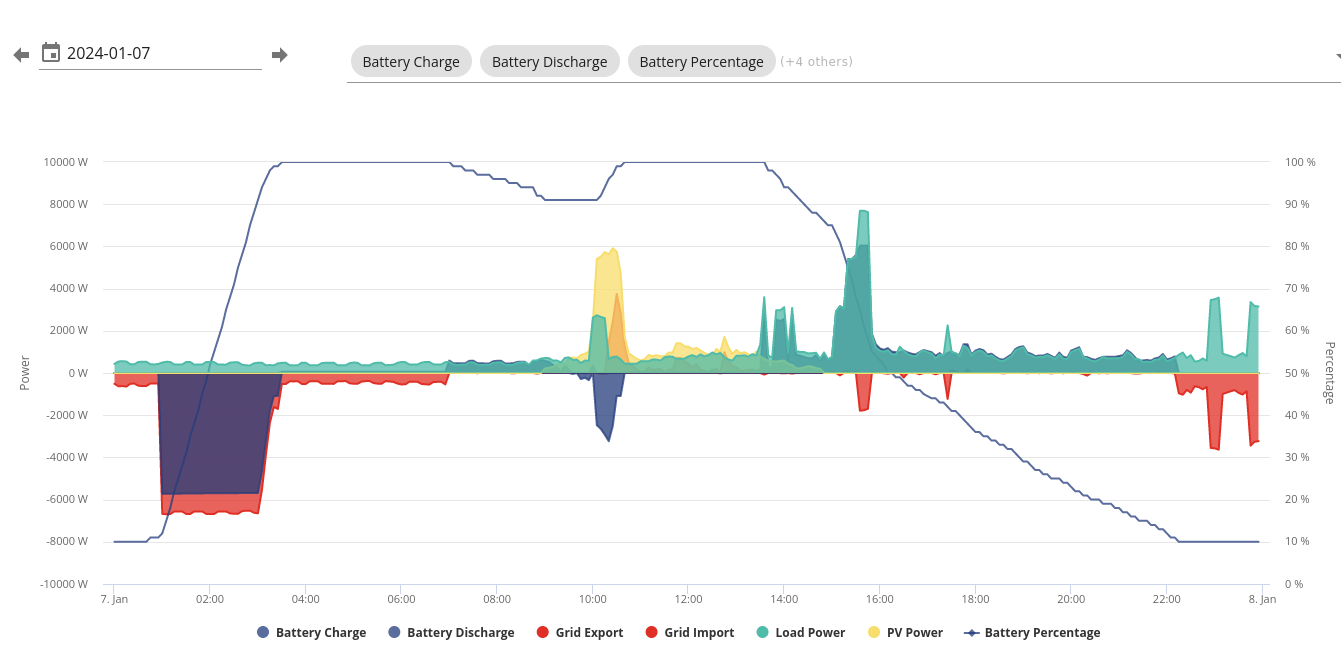
I had my AIO installed at the end of November and had all the low capacity and power drops everyone has been reporting on this forum. That was with Version 7. Since the upgrade to V8 everything is going well, so for me the issue seems to be fixed. This is yesterdays power graph.
Thank you all for the perspective and your experiences. Feel less worried now. I think the other option is just the powerwall and it’s not as integrated with things like home assistant as the AIO so would rather stick to the plan.

BG
I got installed in Sep, and was initially very concerned with the random charge drops I experienced. Since being on the latest firmware (for the last few weeks) my experience has been good.
More generally, I do have some concerns about being wedded to a relatively small manufacturer rather than a behemoth like Tesla. But I take comfort from the very active user dev community, which - as long as the hardware and firmware continue to work - should allow for the system to work over a decade+ horizon.
A positive of dealing with a smaller company - currently, at least, the access to proactive and competent support is excellent.
So, on balance, I'm happy with my decision to go GE rather than Tesla. I hope over time it should prove better value.
Without this forum, I probably would have asked my installer to take it away (mine was an Aug/Sep install):
A/ issues with installation that installer and GE struggled to rectify (how to get LAN working properly, correct order to update firmware at commissioning with gateway and AIO)
B/ SOC drop issues (fingers crossed for BMS v8)
C/ RCD tripping on entering/leaving island mode as the AIO runs split phase (only learnt about this ‘feature’ from this forum - don’t believe it’s mentioned anywhere in the GE documentation)
However after several months of monitoring, learning and fixing things, I am now neutral, waiting to see a full year to see performance and savings. Full house backup was key for me as we have 40 or so power cuts a year, and I didn’t want to buy an automatic diesel generator. Most ROI calculators for solar+battery don’t appear to take into account the savings from winter charging at off peak prices. The capacity of the AIO on most days should cover our daily needs which is a significant factor.
If you’re getting the AIO (and PV at the same time), some things that I would pay attention to (I and people I know have learnt the hard way):
PV related
1/ don’t buy a hybrid inverter with the AIO - it’s redundant - a simple string inverter will do
2/ make sure the PV string setup is appropriate across your arrays (ie take shading / aspects into account)
3/ if any part of your array will be shaded during the year, get optimisers, as otherwise production is limited to the worst performing panel on the string
4/ make sure your panels have bird blockers - it’s an expensive thing to fit later if scaffolding is required
AIO related
5/ installer experience with GE kit - ask them how many AIO installs they’ve done and for some “after’ photos / customer references
6/ make sure the gateway can be isolated with a DP switch from the grid side as even with all the breakers off on the gateway there are still live parts inside. Makes it easier to simulate off-grid / island mode too.
7/ make sure your RCDs are changed to A type if not in place already as per latest guidance and the GE documentation
8/ if you have (or will have) an EV, make sure the charger comes off the gateway and not the house (otherwise one battery will charge the other without advanced controls - especially with vehicle-to-grid future possibilities)
9/ consider AIO location and temperature range to get best performance over lifetime (not too hot in summer, or too cold in winter)
10/ consider LAN over Wi-Fi connection for future-proofing (changing Wi-Fi settings appears painful), and potentially fixed IP addresses on a protected sub-net for security
11/ Make sure the Wi-Fi AP on the GE devices are password protected, names changed and hidden - even if set to LAN mode
I’m sure others will have more to contribute!
PS
YMMV re tariffs, but the logic I’ve landed on for now thanks to this forum is:
Had mine since mid August and apart from an odd Comms glitch it has been fine. Regularly giving the full 13.5kwh + without any issues. I did see one say a brief lapse in power given but like all software, the odd glitch can be expected. Had no problems with GivEnergy support either. So all in, well pleased. It does what it says and full auto switch over when the grid fails works too.
26Left YMMV re tariffs, but the logic I’ve landed on for now thanks to this forum is:
spring thru autumn: Octopus Agile for import and for export (for cheap top ups when needed, good export rates)
autumn thru spring: Octopus Go for import and Outgoing Octopus Fixed Lite for export (for cheap overnight charging, ok export rates)
I find the tariff choice you’ve suggested interesting. Did you type it correctly ?
I’d have said most people are using:
I was Flux last year, now Agile in the winter (no EV and my ASHP uses far more than my battery capacity)
BG had mine since Nov, got BMS 8 early Dec.
While BMS 8 is a LOT better than 7, it's still not perfect. The battery only charged 11.8kWh the other day from 5% to 100% while it charged 14kWh last night from 5% to 100%. It's very inconsistent.
If I had to start over knowing what I know now, I would be swayed more towards the powerwall than the AIO. At least the powerwall can actually do what it claims and run multiple batteries.
The AIO has had at least 8 firmware revisions and there are still fundamental problems with keeping track of the battery SoC, it's such a core feature of a battery system that it baffles me that it still doesn't work properly.
You'll hear people say that "only a few are affected" but what if you're the unlucky few that is having issues? you're at the mercy of GE to fix their firmware and just so you know, the time between BMS 7 and BMS 8 was at least 3 months!
Edit: To clarify - the support has been great and I can't fault them, this is all to do with the firmware.
geoffreycoan I find the tariff choice you’ve suggested interesting. Did you type it correctly ?
Yes. More here on this thread. https://community.givenergy.cloud/d/3765-agile-rates/25
26Left 1/ don’t buy a hybrid inverter with the AIO - it’s redundant - a simple string inverter will do
I'm still a bit new to this so may not understand. We're getting micro-inverters on each panel and an Enphase Gateway then there's the GE Gateway by the battery. I think that takes into account the shading issues etc.
26Left 10/ consider LAN over Wi-Fi connection for future-proofing (changing Wi-Fi settings appears painful), and potentially fixed IP addresses on a protected sub-net for security
I have plenty of Ethernet run, however the installer said it's not actually using Ethernet and they need to run a copper cable as Ethernet might be an issue. I'm not sure I understand this, since Ethernet is Ethernet...

Your installer will be talking about the hardwired cable between the AIO and gateway, which although uses RJ45 is not ethernet, each pair does different things (1 carries EM115 data, another Canbus data...)
An odd quirk is that whoever did the pinout for this connector has wired such as to split up the Canbus across 2 seperate twisted pairs (6 & 7) when wired in the usual T568B way - so it means that if the gateway is more than 10m from the AIO you get some weird glitches stemming from that.
The rest of the system is ethernet though (AIO and Gatrway)