Hi All,
I’m sorry but needs some help from you guys.
What setting I should do on my mobile GivEnergy App which allows me to utilise my battery power to use in home as it’s not correctly offered electricity to home and my home is getting power from grid rather then battery.
I am on octopus flux tariff.
And 9.5k battery.
Please advise
Thank you
Jay
Maximum use of battery
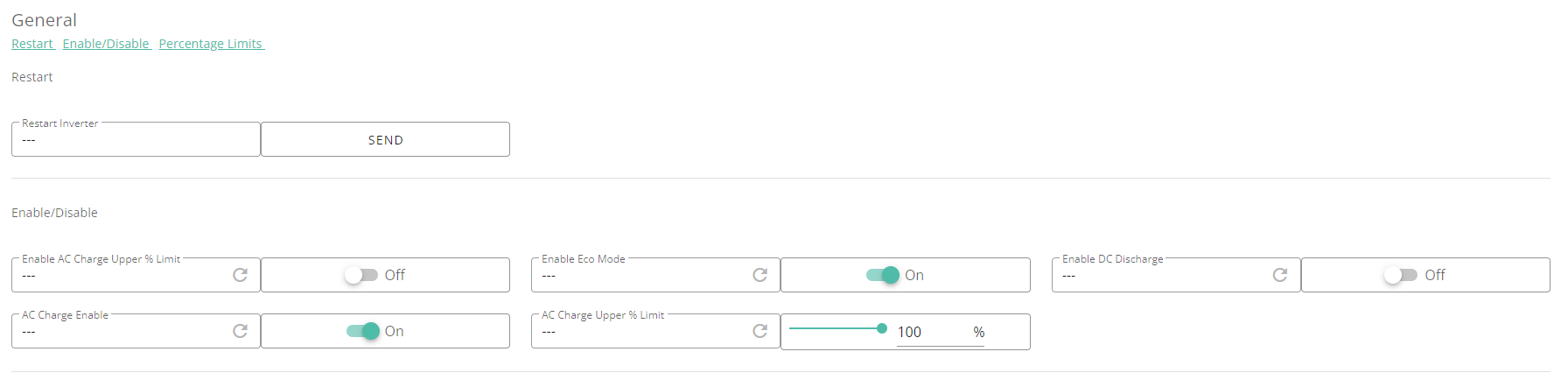
Jayesh There are several settings that could prevent the battery from discharging. Not all are available through the app, I'm afraid. The 'remote control' section on the web portal (gears icon from the inverter page) is probably the most complete view.
Rather than describing the various settings, perhaps simplest if you were to post a screenshot of that page for your system, and someone can take a look to see if anything is obviously amiss.
Or see https://community.givenergy.cloud/d/3650-understanding-the-settings-on-your-app-and-portal which attempts to describe all the settings. Though they are probably slightly different between different variants of the inverter.
Make sure in my inverter setting you have eco enabled
lifco
Thanks buddy but where’s I found it. On my GivEnergy app or portal . Because I don’t know where is my inverted app .
Please advise
Thank you
Jay
Its in the portal, select the My Inverter and in the top right select the cog and in the settings Eco should be set to on see below

Jayesh The eco setting is, unfortunately, somewhat hidden on the app. It combines two internal flags to show as 'dynamic' vs 'scheduled'. The app does not have a way to represent the state where both those internal flags are off.
What you could do, if you want to use the app, is set discharge mode to 'scheduled' and consumption type to be 'full export'. That will definitely turn eco flag off (for my system, at least). As long as start time and end time are before and after now, that should set the battery to discharge, which will allow you test that it is actually working. Then set discharge mode back to dynamic and that should definitely set eco flag on.
It's easier to see on the web portal - in settings, eco mode is shown. It's worth explicitly turning it off then on again, since it is possible that the web portal shows a stale value.
But eco flag being off is just one of the settings that could cause the behaviour you see.