Low charging rate

54 comments started 2024-01-27 last 2024-04-04
GivEnergy ProductsHybrid
J
#1 Josephiah

Hi folks,

First week of using our battery system, and wondering if anyone can shed any light on some slightly odd behaviour.

Setup:
5kW GE hybrid inverter gen 3
6.64kWp PV array
9.5kWh GE battery

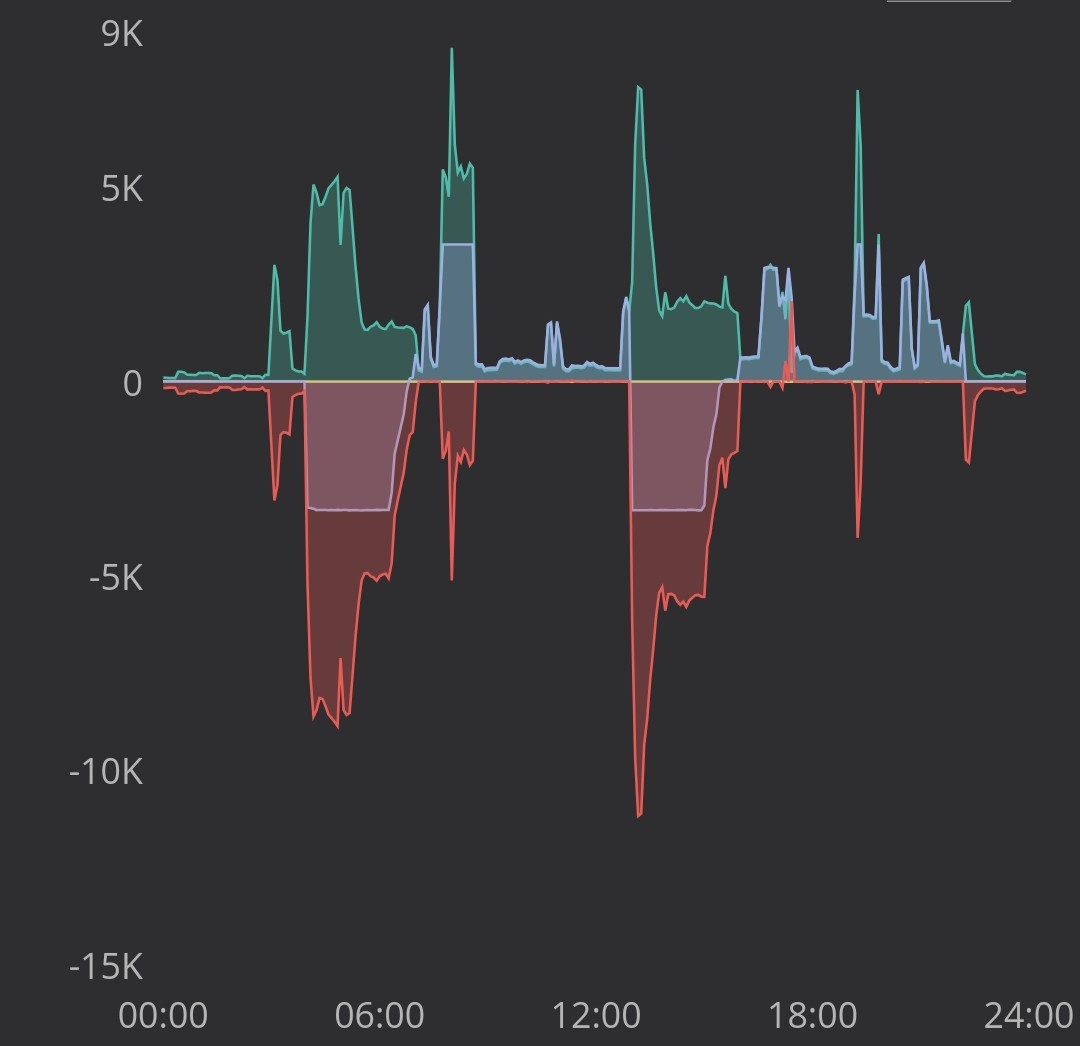
We're on the Cosy Octopus tariff, and have been making good use of load shifting, first just with our heat pump, and now even better with the battery running. We had a few days of battery only before the PV array was commissioned, and you can see the battery behaving as expected, charging nicely at full beans to 100% during the two cheap periods and discharging on demand at other times:
Since then, the solar array has been added, as can be seen here:
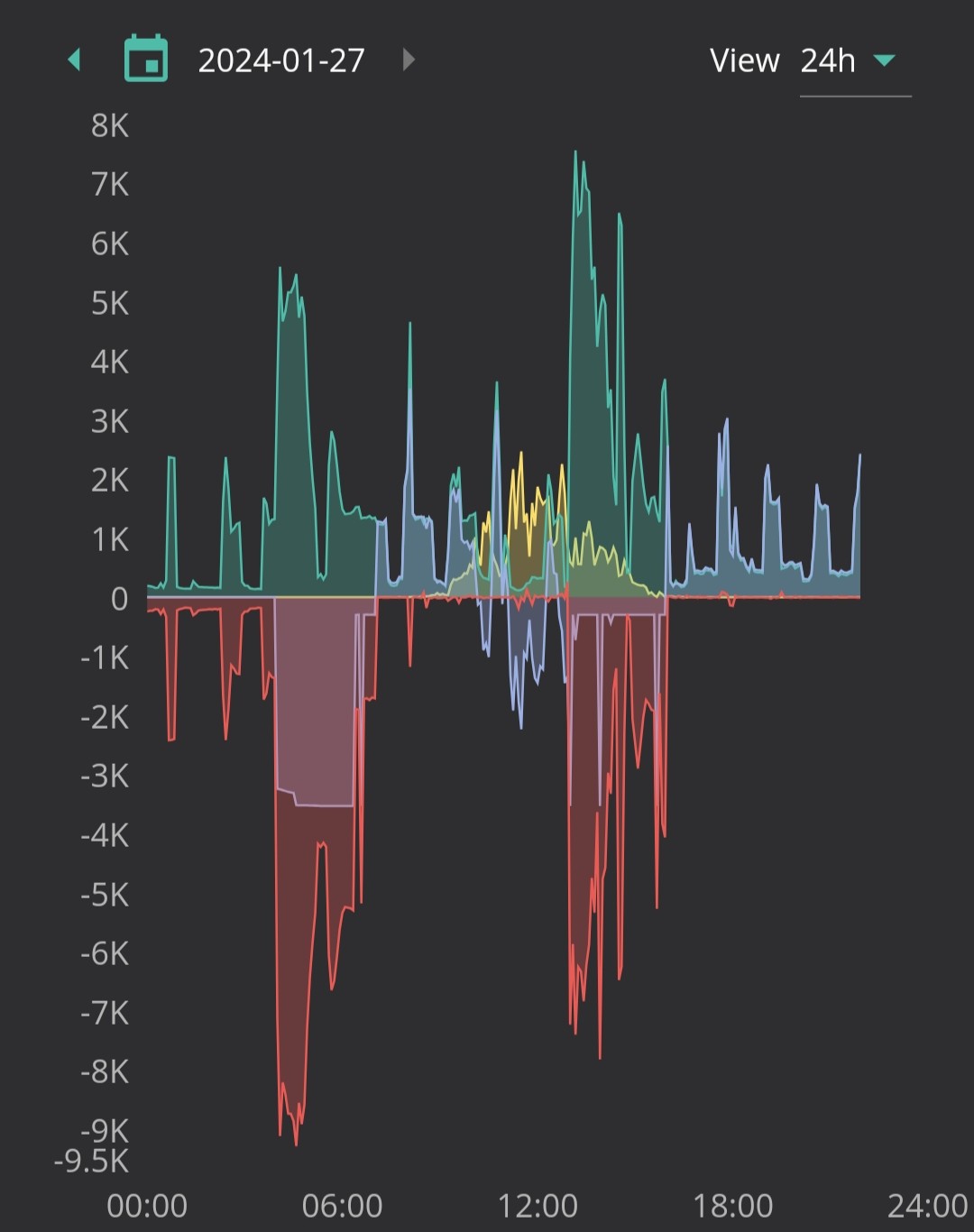
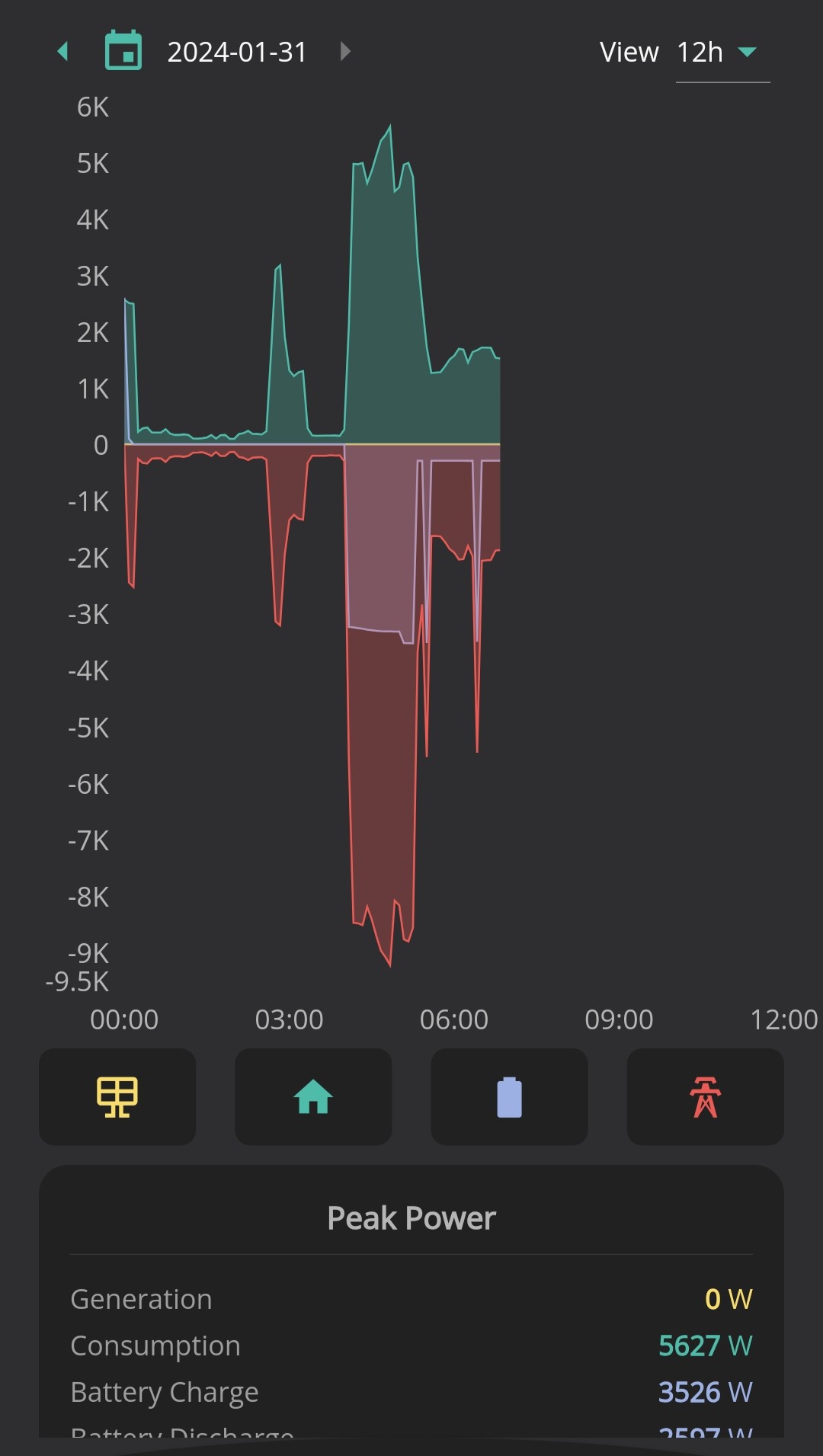
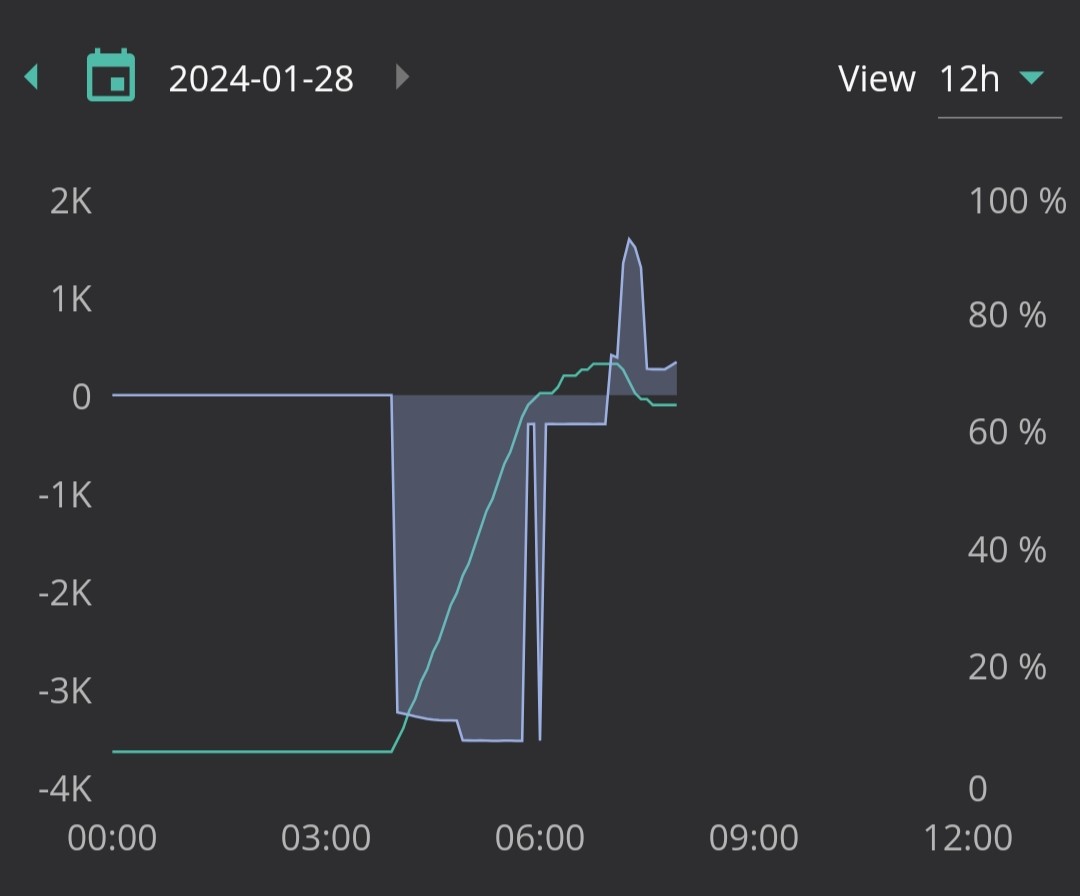
So today the battery charged at full rate to 100% as usual in the first cheap period, but then this afternoon, except when taking in some solar-generated electricity, seemed to get stuck at a low trickle of 300W or so, and only filling to 75% or so instead of the target 100%. Any idea why? Is this the system trying to be clever and reserve space for the solar and just missing the target? Or is there something wrong? (Haven't noticed any error messages or other misbehaviour.)

I'm fairly sure I haven't changed any of the settings. I have turned on the Solcast forecast, but it's unclear to me whether this actually does anything in terms of control, or whether it's just a visual helper for the user.

Look forward to hearing your suggestions.
Cheers,
Jo
J
#2 Josephiah

Similar behaviour this morning:

  • appears to charge fine at full rate from 4am;
  • switches from charging to discharging on demand at 7am, as expected;
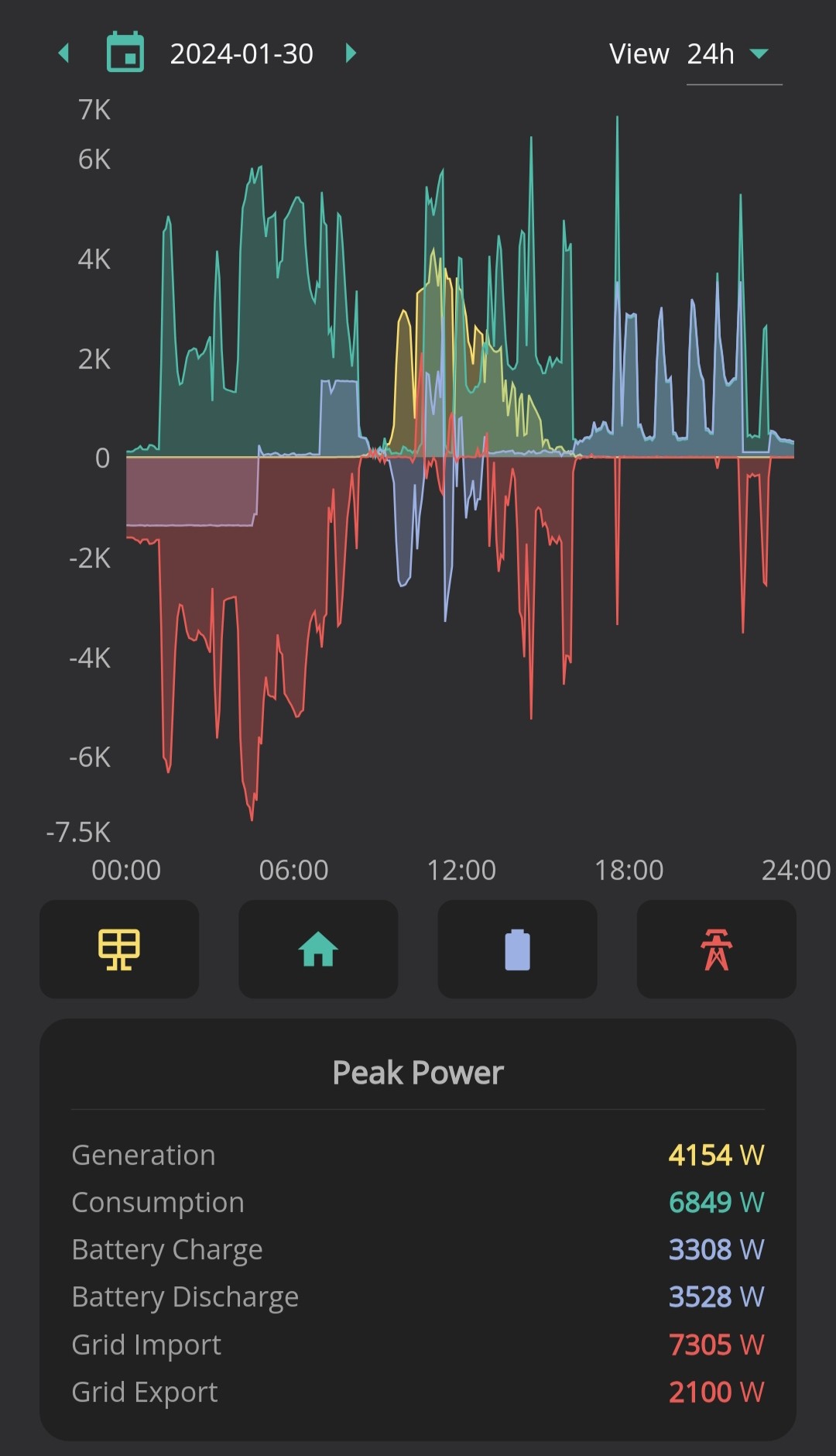
  • however, around 6am the charge rate drops, with the battery at about 65% full, then trickle charges at 300W to about 72% at 7am.

So what's going on here, and how do I stop it?
My immediate thoughts went to:

  • some kind of thermal limit triggering the low charge rate - but battery temp only reached 27°C, which seems pretty comfortable to me;
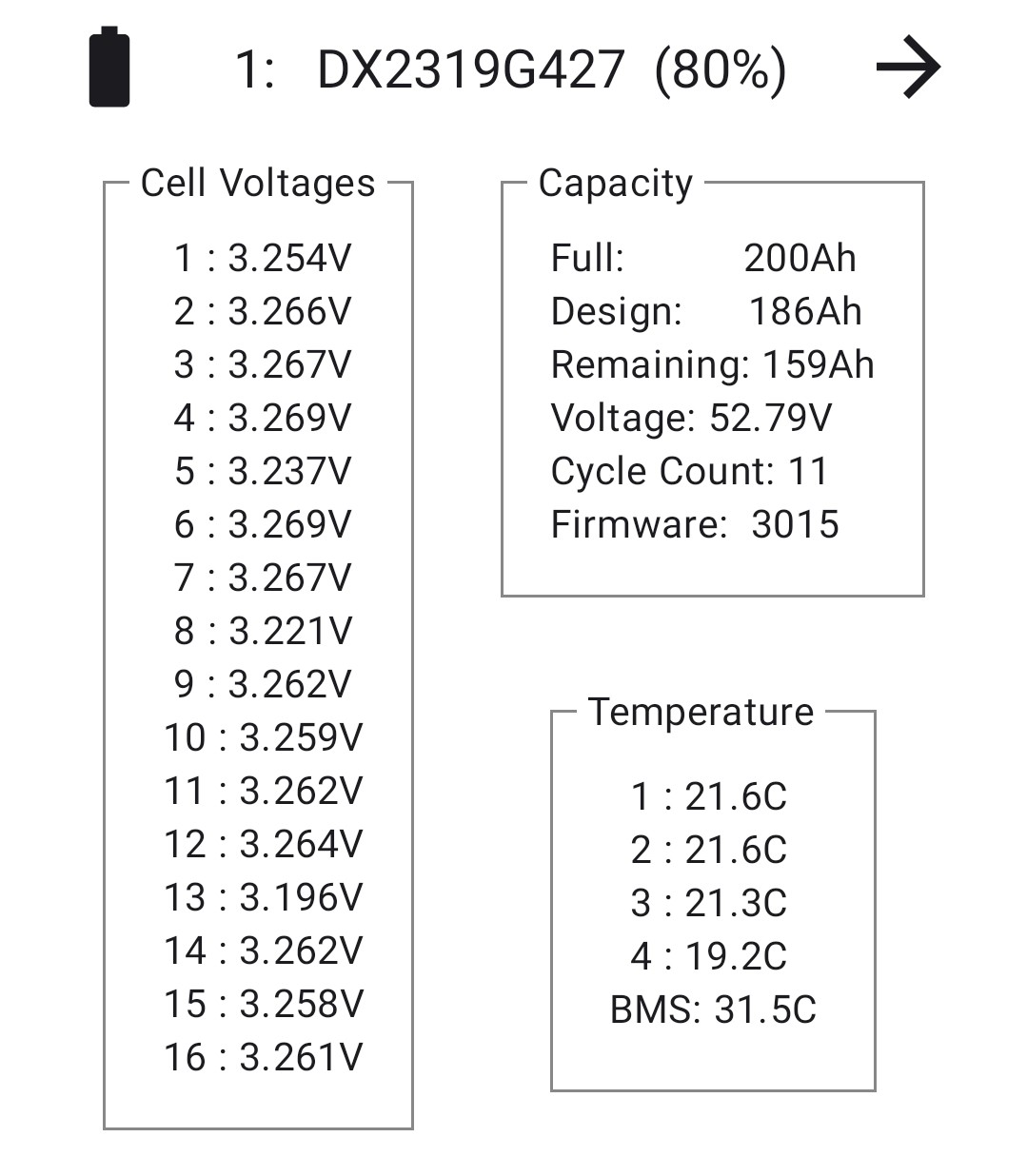
  • calibration process didn't work properly, so it thinks it's already at 100%...?

Also no idea what that off-on-off spike is either...

Any suggestions?

D
#3 DD

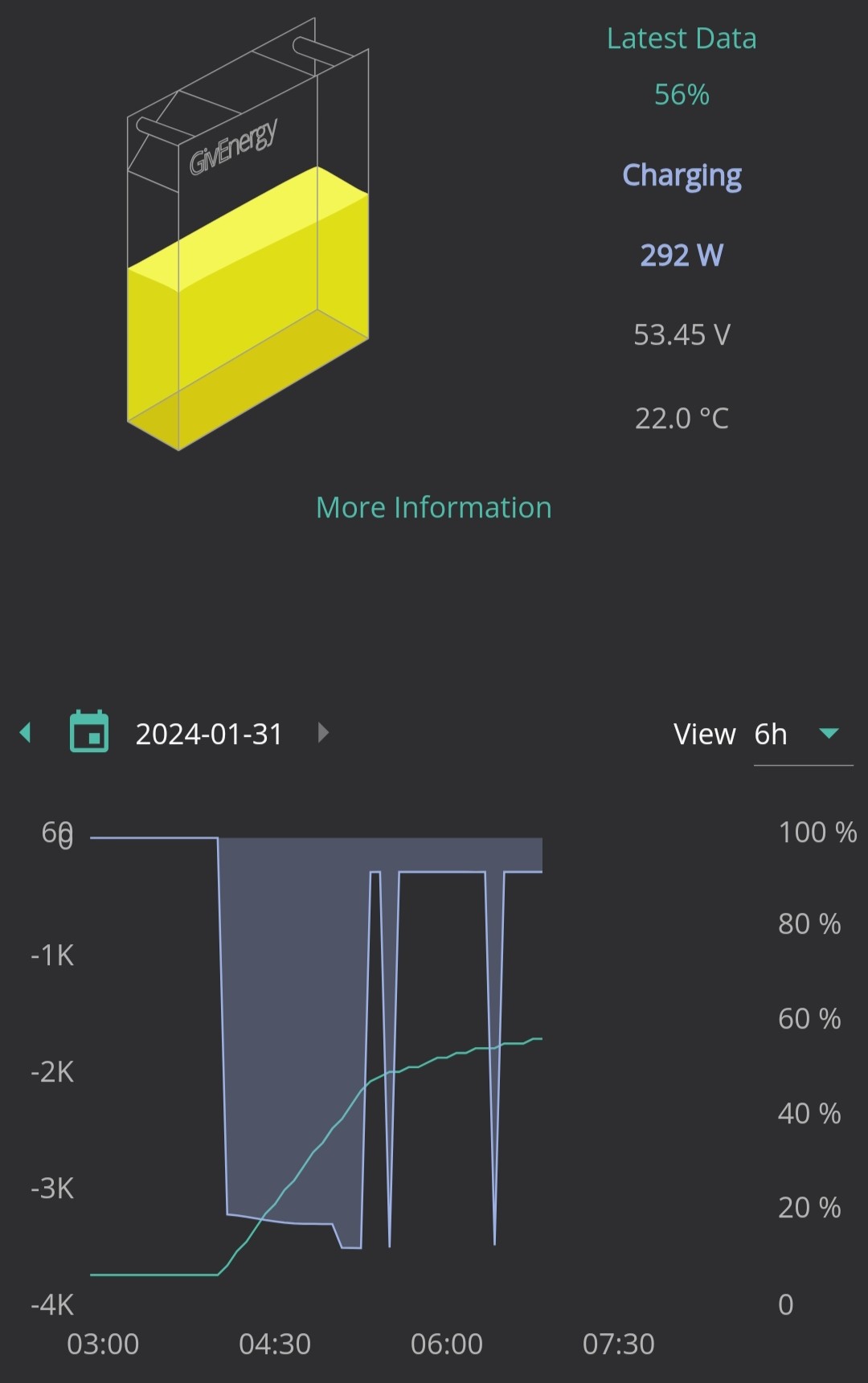
Josephiah might be worth speaking to the installer, since it's a recent install. The slowing of charge rate is something you might see as it approaches full charge, which might suggest a calibration issue. Could also be a bad cell - as soon as one cell gets to max voltage, the whole charge rate has to throttle down. (Not sure why that should suddenly change when solar went in, though. Unless it just developed over time and the solar was just coincidence. I suppose solar does mean battery rapidly shifts between charging and discharging, which expose something.) The free 3rd party android inverter app by @Rubikcube is able to show individual cell voltages - just tap on the battery bar at the bottom. I think you might also be able to get them via the web portal somewhere?

House demand seems quite intermittent - my understanding was that heat pumps are happiest running at constant load, rather than cycling? But perhaps I'm misinterpreting the graph.

J
#4 Josephiah

Thanks DD

Yes, will chase up with installer and see what they say.

As you say, can't think of a reason why adding solar in would cause this. It did do it's calibration thing again after the installer had commissioned the panels, so will check when that seems to be an obvious change point in the behaviour.

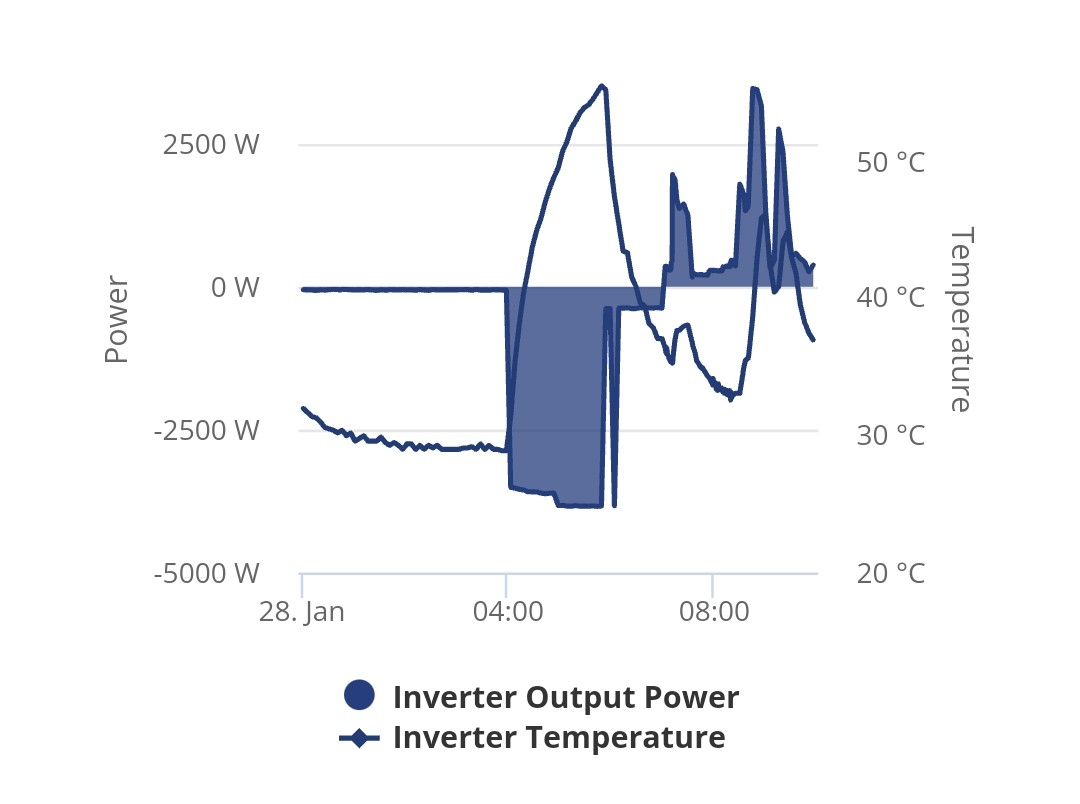
I can't see any obvious cell-level data in the web portal, but I may be missing something. An extra bit of info I did find there was inverter temperature:

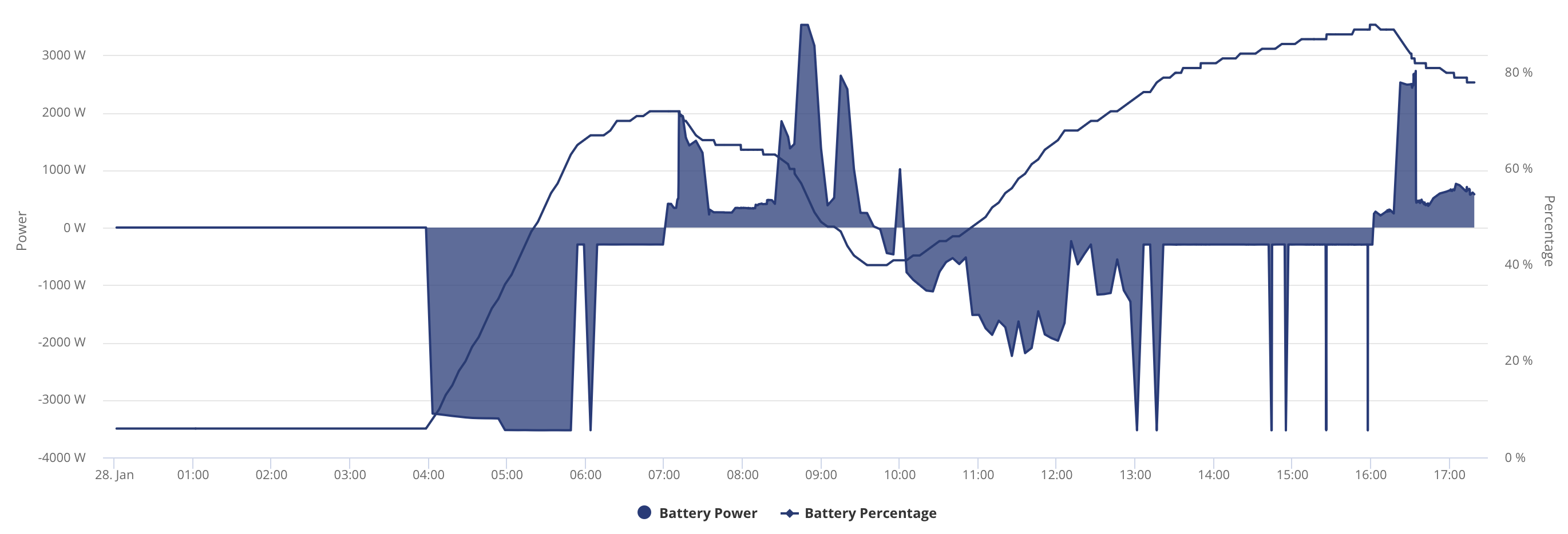
Peaks at about 55°C, then drops, but no idea is this is a cause or effect (i.e "yes of course it cools down once it has stopped working so hard"), or whether this is a normal working temperature. (This doesn't feel particularly wild for a piece of power electronics, and no errors showing up, which is expect if it was a thermal runaway/cutout issue.)

Yes, a lot of stuff going on in the demand: we're thermal load shifting, it's a fairly mild day, so heat pump may well be cycling a bit*, and various other appliances happening over the course of the day.

*Decent performance over our first winter so far, but may well be optimisable in future - an exercise for another time. Cosy definitely incentivises optimizing for cost rather than outright efficiency!

#5 hoggy

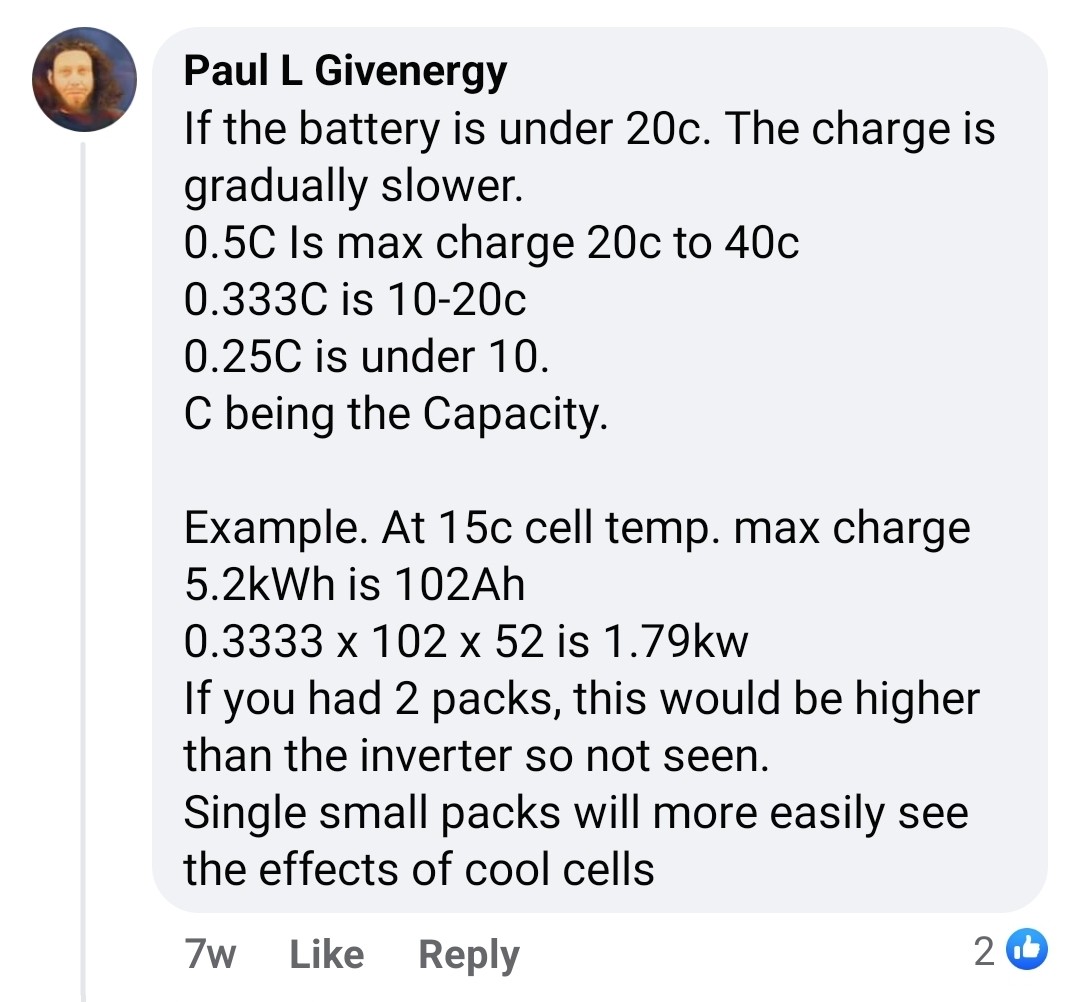
If you've moved to battery firmware 3015 it introduces some undocumented limits on charge rates (including the individual cell voltage limit thing mentioned above). These have quite a severe impact on charge rates if you have smaller packs and it doesn't even need to be that cold!

Personally I feel this is far too conservative, should be front and center on the datasheets and is simply a work around for the BMS's poor history on SOC tracking (see SOC jump threads) ...but that's just me being grumpy.

Edit: this is based on CELL temperatures, not the BMS board temp which is the much hotter one you see in the app/portal.

J
#6 Josephiah

hoggy It is on 3015, but no idea if that's a new thing, or if it's been like that since it was installed earlier this week.

To be honest, I can't make head nor tail of what your screengrabbed Facebook post is saying. Quite apart from using the same symbol for two different things, it's unclear whether he is talking about rates or capacities, and units are all over the place. Or am I missing something obvious...?

D
#7 DD

Josephiah it's unclear whether he is talking about rates or capacities

I believe it's common to talk about charging rate in terms of capacity: 1C means charging at a power such that it fills in one hour. 0.5C means a rate than fills capacity in 2 hours, etc.

D
#8 DD

Josephiah I can't see any obvious cell-level data in the web portal, but I may be missing something

I've seen graphs posted, but might have been from Home Assistant, come to think of it.

J
#9 Josephiah

DD thanks, that's helpful. I don't think that should be causing the issue I'm seeing here then. If I understand correctly, our minimum full charge time would be 9.5kWh / 3.3kW inverter limit = 2.87 hours (which fits what I've seen when it's been working as expected). 1/2.87 gives us a nominal ~ 0.35C max charge rate limit in any case. So nothing that would explain the sudden cutoff to ~ 300W, especially since the battery temps have been in the range 18-35°C over the last few days.

#10 hoggy

Josephiah sorry, probably should have elaborated more on that, I think your specific issue is the single cell voltage rise causing the battery to self limit while the others catch up, I was just trying to point out 3015 introduces all sorts of new "rules" as to charge rates not being what you imagine (you have a single 9.5kWh pack yes)? So it would translate as max Charge Rate of:

0.5 x 9.5 = 4.7kW* if cell temps are 20-40'C
0.333 x 9.5 = 3.16kW if cell temps are 10-20'C
0.25 x 9.5 = 2.375kW if cell temps are 0-10'C
0 x 9.5 = 0kW if cell temps <0'C
*this is above the Gen3 inverter charge limit, so you'll be stuck at 3.3kW.

The temps are not the ones you see I the GE app, that reports the internal circuit board temps (which run hot) your cells will not be sat at 35'C that you've seen.

The app people are talking about that tells you much more about your battery cell voltages and temps is this one:
https://givenergymonitor.wixsite.com/tutorials

V
#11 Vestas

hoggy Section 4.1.2 of the cell datasheet is even more conservative 😉

0 at 0C
0.1 at 0-10C
0.2 at 10-20C
0.5 at 20-25C
1.0 at 25-45C
0.5 at 45-55C
0.2 at 55-60C
0 at 65C

Not quite that straightforward though as charge rate varies according to SoC - which of course GE can't track reliably.

S
#12 SJB

I cannot see that anyone has suggested looking at any of the more obvious causes or whether they have been eliminated. My apologies if you've already checked these.
You do not say how you manage your system, if you exclusively use the GivEnergy App or Web Portal then you might be able to see if what you are experiencing is triggered by actions sent to your inverter by looking at the Remote Control in the Web Portal log (select your inverter and there is a cog like button in the top right hand corner).

It can sometimes happen that charging and discharging rates can get messed up due to problems communicating with the inverter. If you have checked everywhere that the charging settings are what you want (ie the rate of charge and charging target), then sometimes the problem can be resolved by simply by restarting the inverter. This can be done in the Web Portal (select your inverter and there is a power button on the top right hand corner).
There is also the option of resetting the inverter settings back to default and then setting things up again. This should ensure that if your inverter has different settings to the Portal/App that everything is in sync.

Once those possibilities have been checked then less obvious causes could be investigated.
There is a temperature limit on the inverters that can cause throttling and some users have added fans to their inverters to reduce the temperature - search for Inverter Temperature in the threads here. I don't know what the limits are for a Gen 3 but that sudden stop you've seen at 55°C certainly looks suspicious - if that behaviour continues (or is visible on all affected charges) then you might want look into cooling the inverter.

J
#13 Josephiah

Right, a few more puzzle pieces... think I might be homing in on... something.

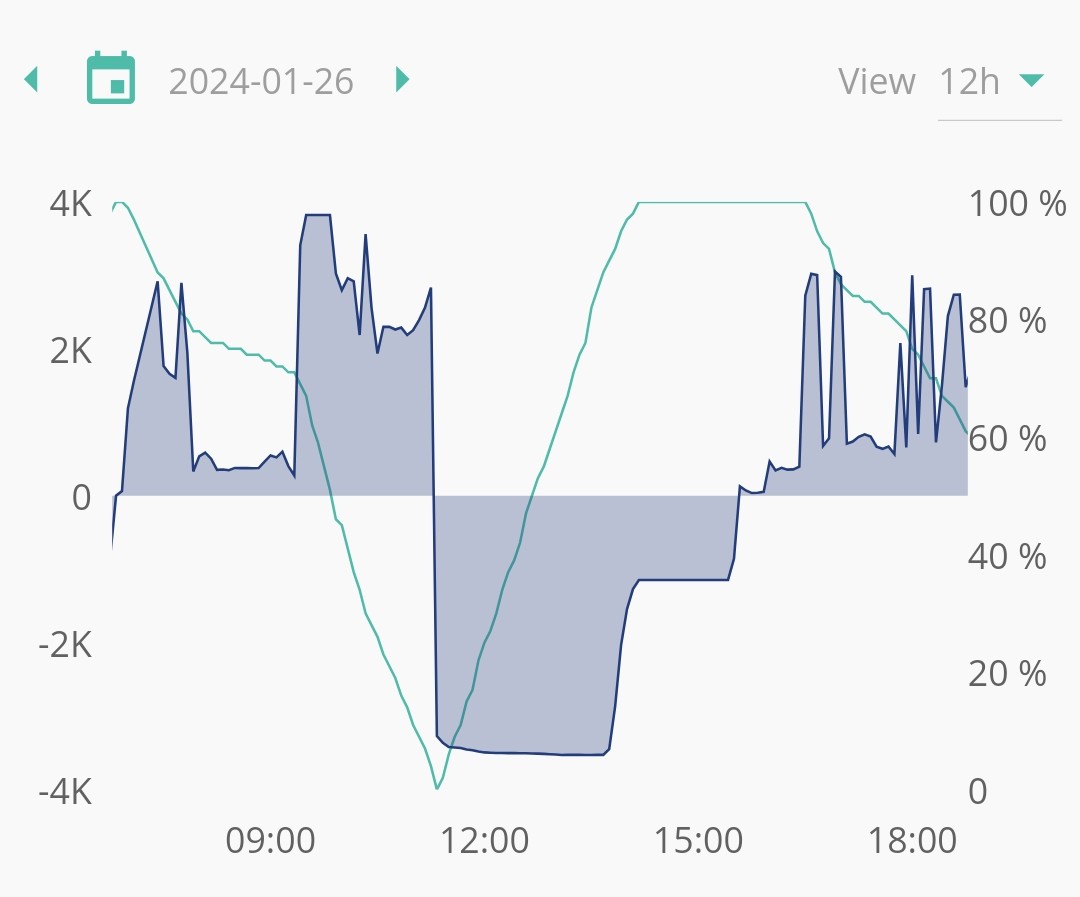
  1. First puzzle piece: this is the battery charging profile on the day that the PV panels were hooked up, and the battery calibration run again:

    Rough timeline:

    • 0925: calibration cycle started; discharging at high rate;
    • 1120: battery SoC 0%, charging starts at full rate (about 3.5kW);
    • 1350: SoC 92%, charging rate starts to drop;
    • 1410: SoC "100%". But we've only been going for 1h50m at 3.5kW, so max 6.4kWh put into nominal 9.5kWh battery, so "real" SoC more like 67%. Keeps charging at 1.15kW until...
    • 1530: Calibration cycle complete. Another ~ 1.4kWh added, for a total of around 7.8kWh. Claimed SoC still 100%.
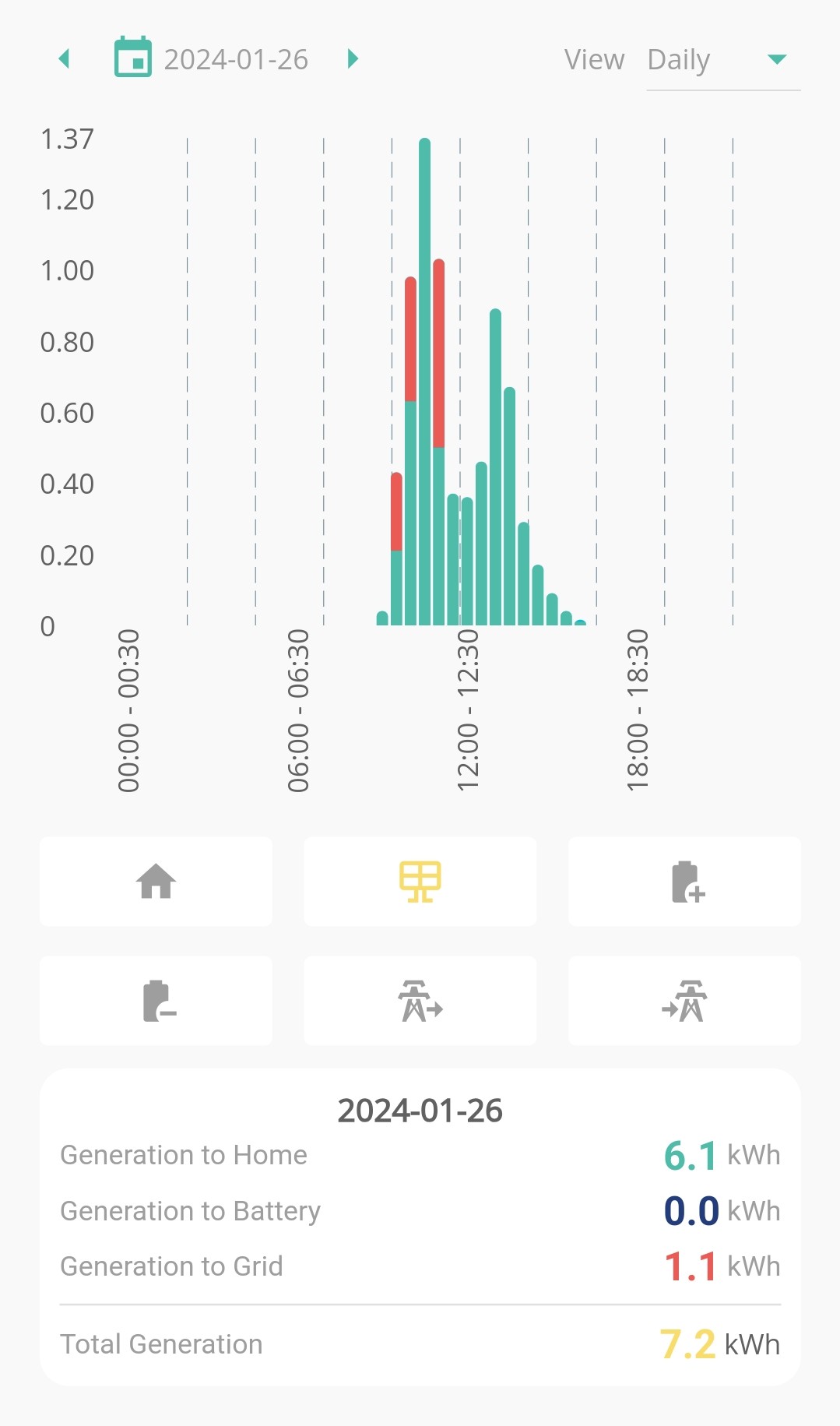
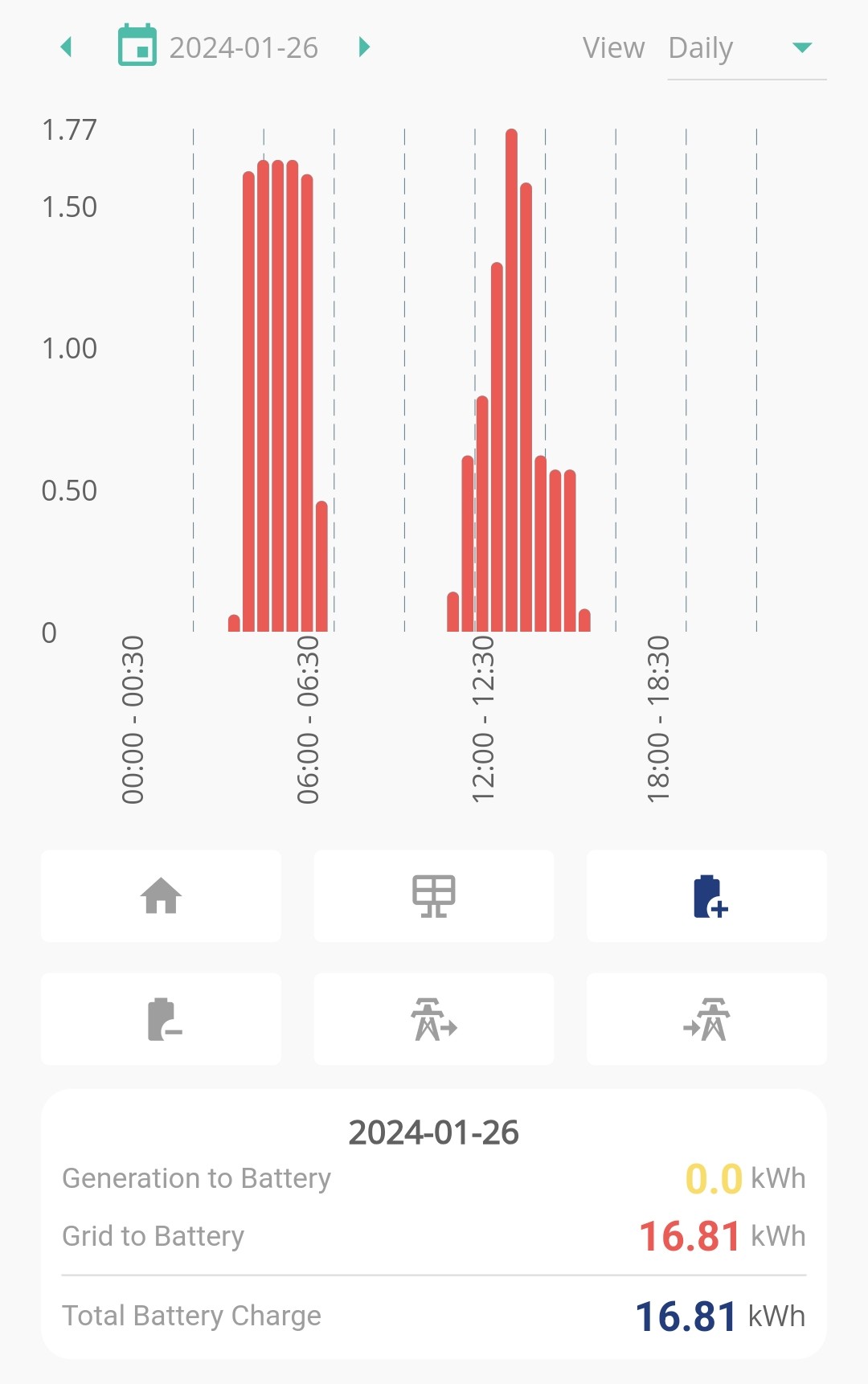
  2. Next puzzle piece: On that first day of solar, I could have sworn we generated just shy of 10kWh, say 9.8kWh. I distinctly noted the figure because I was pretty chuffed with it for a first day, with low winter sun. The history charts all fitted with this. But here are a couple of the energy charts of that day, generated just now:


    Points to note:

    • Generation to Battery is now reading as 0.0kWh;
    • That distinctive lower patch on the generation chart from 1130 - 1300;
    • Total generation figure of 7.2kWh, down from my "I swear I didn't imagine it" 9.8kWh.

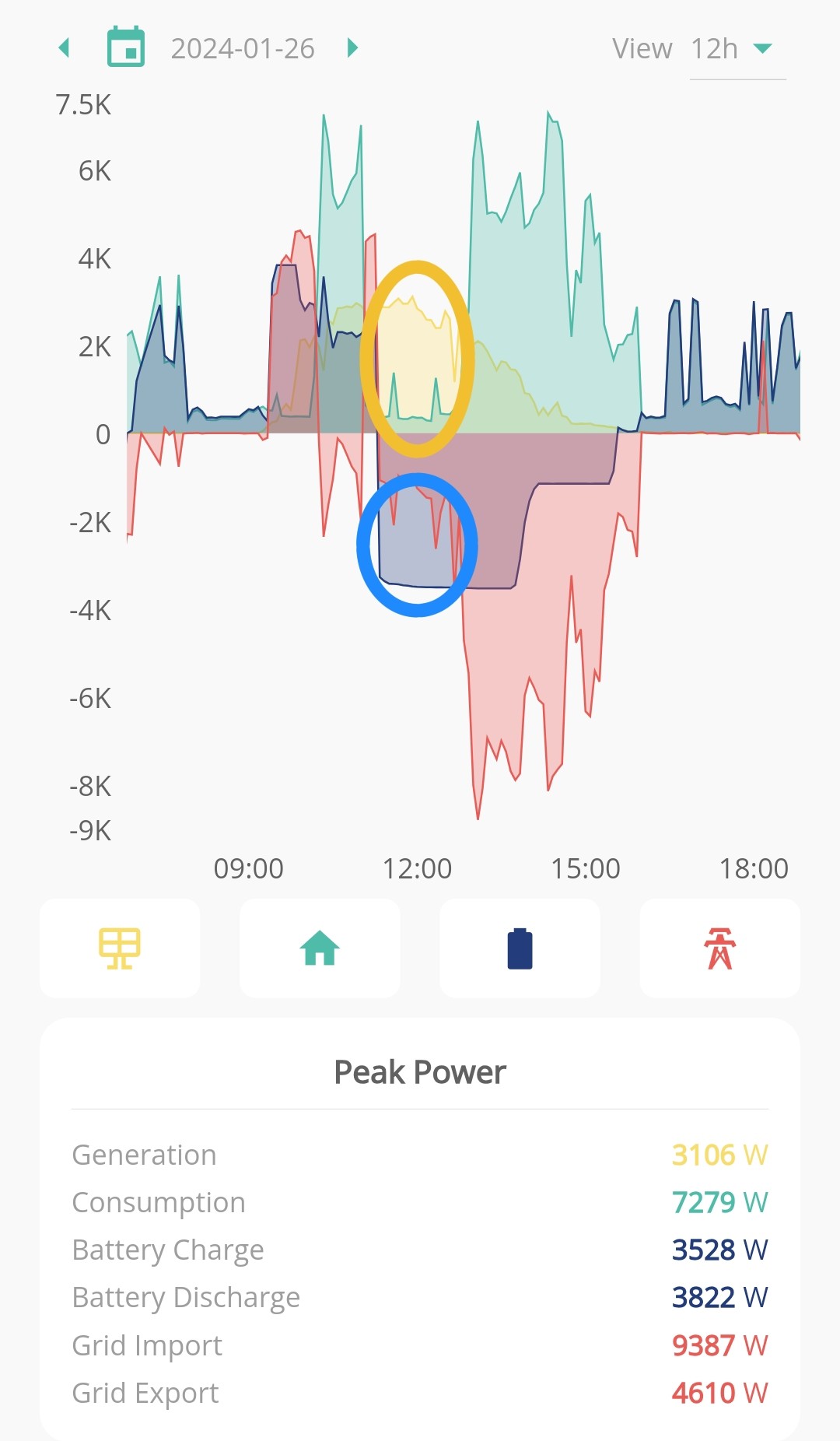
Now, compare that to my power chart from the same period:

  • The solar generation trace does not have that low patch from 1130 - 1300. So that power has gone somewhere;
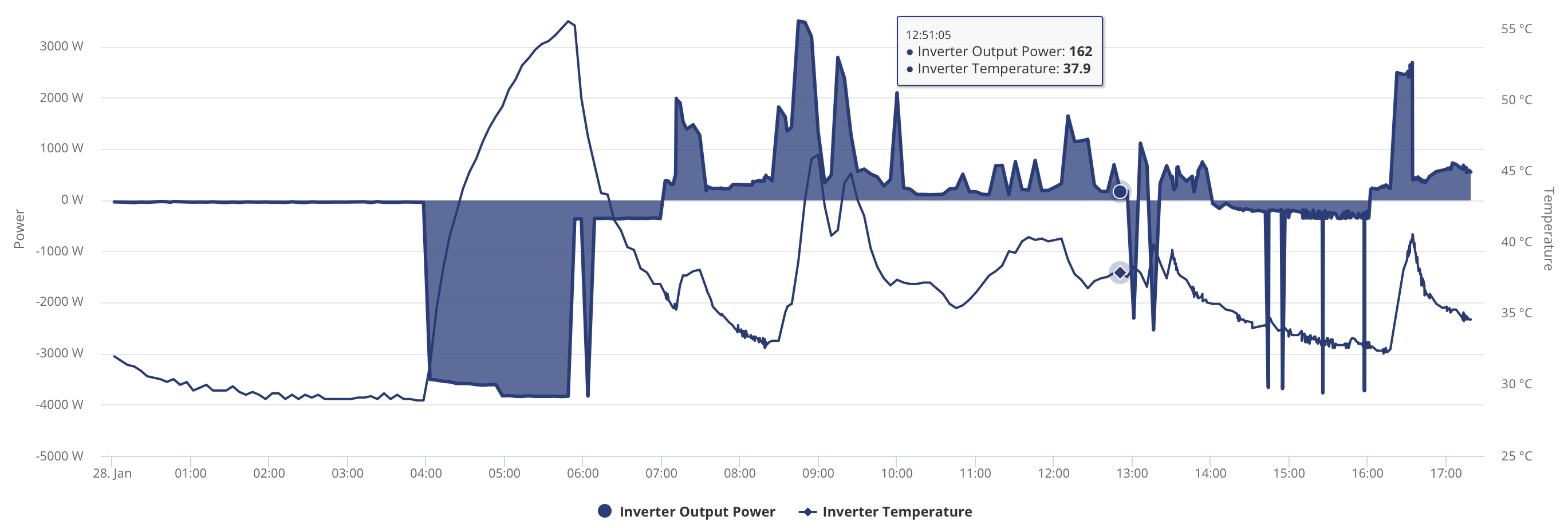
  • In that first chunk of calibration charging, not all of that 3.5kW charge rate is coming from the grid - that chunk of yellow has contributed to the blue. Hard to read the chart with no gridlines, but I could easily believe that chunk is my missing 2.6kWh.
  • At 1300 we hit Cosy cheap period, and the heat pump comes on, possibly washing machine too, hence massive demand spike, and the solar contribution is going towards demand rather than the battery.

So, not really sure what to make of all this. To my untrained eye, it looks like something like the following is happening: the calibration procedure has, for some reason, not included the chunk of solar power being put into the battery in that first portion from 1120 to 1300, leading to the "100%" SoC top marker being set at the wrong place, somewhere around 65% capacity. And now, on the following days, during a charging period, it charges at the full 3.3-3.5kW until it reaches what it thinks is 100% (but is actually more like 65%). It then trickle-charges at 300W until the end of the timed period when it reverts to discharging on demand.

Does any of that make sense? It could of course be a big pile of red herrings, but it makes some kind of sense to me. Has anyone else seen bits of the historical data going AWOL/inconsistent like I've seen here? In any case, what I'd like to try, is to recalibrate the battery with the PV circuits isolated, then reintroduce them. Is it possible to initiate this myself, or is that reserved to the installer?

J
#14 Josephiah

hoggy Thanks, yes, I think that fits with my (new!) understanding. Will check out the app.

J
#15 Josephiah

SJB Thanks, yes, good questions.

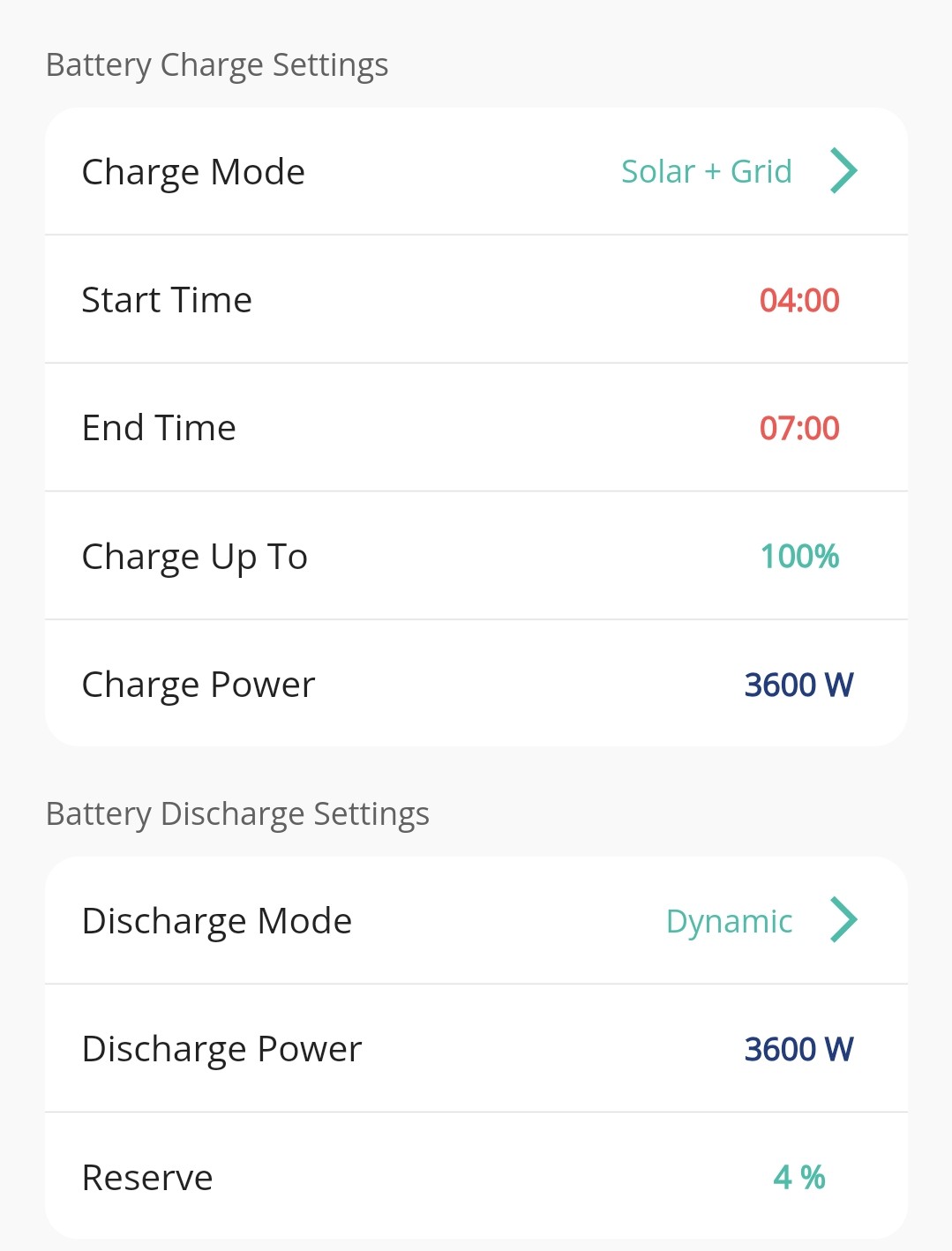
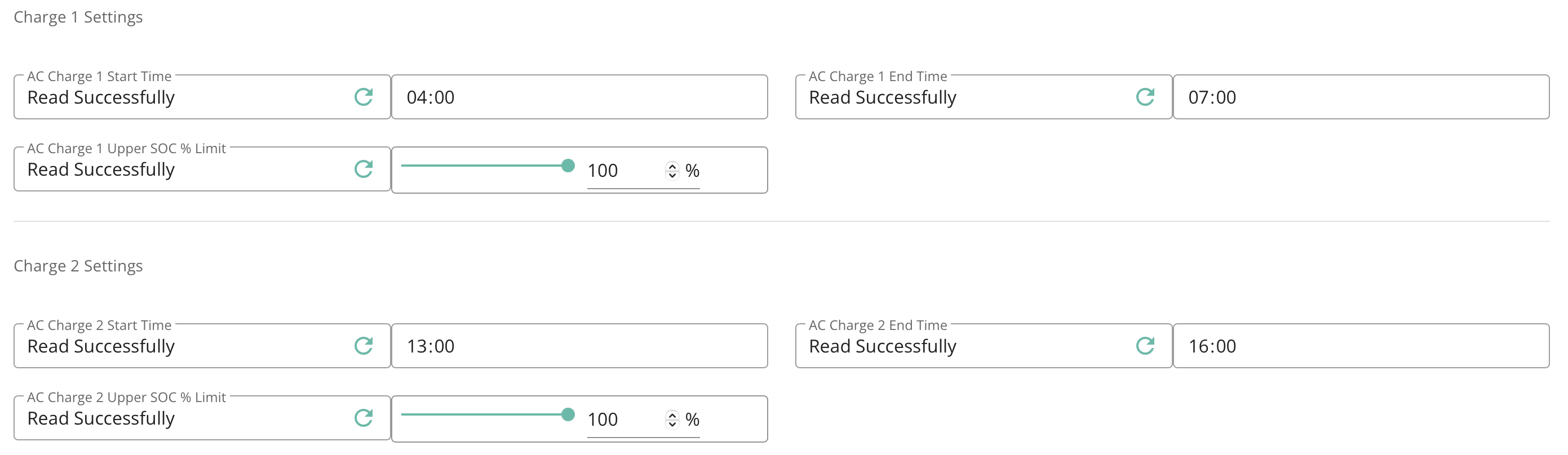
Initially used GE app plus looking around in the web portal settings while trying to figure out how to set 2nd timed charging period. Quickly discovered the weird mismatches between the controls the app gives you vs the behind-the-scenes settings (e.g. a single option in the app changing multiple settings - this feels like awful UI design). Reset everything and set is as follows:

plus the 2nd timed period set as follows:

The charging on/off times all seem to be correct. It just doesn't charge at the full rate for the allotted time.

Yes, not sure about the 55°C thing - hard to tell if that is a) "I've hit 55°C, better throttle" or b) "something else has happened to make the charge rate drop, now I'm working less hard and therefore cooling" - i.e. I'm not sure if it's a cause or effect.

Just charging the battery from empty to full seems like the most fundamental of basic use cases, which shouldn't be requiring users to add their own cooling solutions!

V
#16 Vestas

If you're charging from AC and PV at max rate then the inverter is going to run hotter.

Ours runs about 5-10C hotter than if there's no PV input. Understandable as you're merging two sources (one of which is variable) to produce a constant charge rate.

Re stats - do bear in mind that they're only 5 minute snapshots so aren't particularly accurate.

J
#17 Josephiah

hoggy The temps are not the ones you see I the GE app, that reports the internal circuit board temps (which run hot) your cells will not be sat at 35'C that you've seen.

Not sure about this. The Inverter Monitor app is giving me:

GE app and portal are telling me 21°C also.

J
#18 Josephiah

Vestas Re stats - do bear in mind that they're only 5 minute snapshots so aren't particularly accurate.

Understood, yes. But here I'm talking about 1.5 hours' worth of generation which was reported in both the power and energy charts, and now is missing from the energy chart.

J
#19 Josephiah

Vestas If you're charging from AC and PV at max rate then the inverter is going to run hotter.

Ours runs about 5-10C hotter than if there's no PV input. Understandable as you're merging two sources (one of which is variable) to produce a constant charge rate.

Hmm, not sure.
Here are another couple of data points to ponder (it would be lovely to get both of these sets of data on one chart, but doesn't seem to be possible...), from today's data:


First charging period this morning (04:00 - 07:00), so obviously no solar contribution. Comes on at 3.3-3.5kW. At 05:50 drops to 300W. Could be in response to inverter temp > 55°C, or battery SoC > 66% (my theoretical mis-calibrated "100%"), or something else entirely. Does that characteristic big spike thing shortly after 06:00. Drops to 300W until 07:00. Battery temps range from 17°C at start to 27°C at finish.

Second charging period this afternoon (13:00 - 16:00). Ought to be charging at full tilt. Inverter temp 38°C. SoC already 75% from solar over late morning/lunchtime (again over my theoretical threshold). Does that big spike thing again. Trickle charges at 300W from 13:00 - 16:00, barring a few random spikes to 3.5kW. Battery temps start at 23°C (after warming slightly from solar generation 10:00ish - 13:00), and cool to 21°C by the end.

I also have a couple instances earlier in the week where the inverter seemed to be running happily enough at 57°C and even 60°C.

Thanks all for the suggestions. I think my immediate plan of action is to speak to the installer tomorrow morning, and get them to instigate a re-calibration of the battery with the PV panels switch off, and see what happens - that should rule out my (quite possibly nonsense, but makes increasing (possibly just self-reinforcing!) sense to me) theory. If it was thermal throttling as has been suggested, I'd expect a slightly more gradual ramping down rather than an immediate drop to 300W. And this afternoon's throttling at moderate inverter temps doesn't fit that pattern. Will report back if anything new/interesting/significant/confusing happens...

D
#20 DD

Josephiah Rough timeline:
0925: calibration cycle started; discharging at high rate;
1120: battery SoC 0%, charging starts at full rate (about 3.5kW);
1350: SoC 92%, charging rate starts to drop;
1410: SoC "100%". But we've only been going for 1h50m at 3.5kW, so max 6.4kWh put into nominal 9.5kWh battery, so "real" SoC more like 67%. Keeps charging at 1.15kW until...
1530: Calibration cycle complete. Another ~ 1.4kWh added, for a total of around 7.8kWh. Claimed SoC still 100%.

Surely 11:20 to 13:50 is 2h30m, and at 3.5kW that would give you 8.75kWh. Which is 92% of 9.5kWh

leading to the "100%" SoC top marker being set at the wrong place, somewhere around 65% capacity. And now, on the following days, during a charging period, it charges at the full 3.3-3.5kW until it reaches what it thinks is 100% (but is actually more like 65%). It then trickle-charges at 300W until the end of the timed period when it reverts to discharging on demand.

I think for most people, this sort of thing manifests as jumps in the SoC chart. The firmware knows it's not terribly good at keeping track of the true state of charge (because the voltage curve is so flat). The slowdown in charge is typically feedback from the voltage measurement indicating it's getting full. Then once the voltages indicate that it is full, resets the SoC to be 100%. I have seen jumps from 80% to 100% like this. These jumps are usually rare if you regularly visit high and low states of charge, since the BMS gets to regularly align itself with reality. But my battery tends to just be moving between 40% and 80% at the moment, so I'm prepared to accept jumps from time to time.

J
#21 Josephiah

Josephiah First charging period this morning (04:00 - 07:00), so obviously no solar contribution. Comes on at 3.3-3.5kW. At 05:50 drops to 300W. Could be in response to inverter temp > 55°C, or battery SoC > 66% (my theoretical mis-calibrated "100%"), or something else entirely. Does that characteristic big spike thing shortly after 06:00. Drops to 300W until 07:00. Battery temps range from 17°C at start to 27°C at finish.

Interestingly, the step up from 3.3kW to 3.5kW at 05:00 corresponds with the battery temps crossing the 20°C barrier, which would fit with @hoggy 's notes on charging rate throttling with battery temp.

J
#22 Josephiah

DD Josephiah Rough timeline:
0925: calibration cycle started; discharging at high rate;
1120: battery SoC 0%, charging starts at full rate (about 3.5kW);
1350: SoC 92%, charging rate starts to drop;
1410: SoC "100%". But we've only been going for 1h50m at 3.5kW, so max 6.4kWh put into nominal 9.5kWh battery, so "real" SoC more like 67%. Keeps charging at 1.15kW until...
1530: Calibration cycle complete. Another ~ 1.4kWh added, for a total of around 7.8kWh. Claimed SoC still 100%.

Surely 11:20 to 13:50 is 2h30m, and at 3.5kW that would give you 8.75kWh. Which is 92% of 9.5kWh

A very good point, well made! Misreading my own timeline there. Let me try that again then:
2h30m @ 3.5kW = 8.75kWh; SoC 92%
20m @ average 2.3kW ~= 0.75kWh; total 9.5kWh, SoC 100%
1h20m @ 1.15kW ~= 1.15kWh; total 10.65kWh, SoC 112%...?

Okay, that's making a bit more sense (well, kinda!), and probably knocks out my pet theory, so thank you. Still no closer to discovering the reason for the 3.5kW -> 300W throttling, so will chase that up with installer.

D
#23 DD

Vestas Re stats - do bear in mind that they're only 5 minute snapshots so aren't particularly accurate.

I think that, while the app is running, each time it updates (every 10s), it sends the data to the portal. So if you can find some way to leave the app running for an extended period, that might give you more fine-grained data.

D
#24 DD

Josephiah 2h30m @ 3.5kW = 8.75kWh; SoC 92%
20m @ average 2.3kW ~= 0.75kWh; total 9.5kWh, SoC 100%
1h20m @ 1.15kW ~= 1.15kWh; total 10.65kWh, SoC 112%...?

If you look back at the inverter monitor output, it showed Full capacity as 200Ah, Design as 186Ah. 200Ah at around 51V is 10.2kWh. 186Ah is around 9.5kWh. There's some extra capacity at the top end that you don't normally get to access - while the 9.5kWh battery is sold as 100% DoD, it's actually a, say, 90% DoD battery with capacity of 10.x %. When calibrating, I guess it looks for the true top, rather than the 9.5kW mark.

Worst battery degradation tends to happen at "true" 100% (and 0%), so battery providers tend to not let you use those bits. You get to use the safer middle region.

D
#25 DD

Josephiah I've been pondering the brief spikes in the charging graphs. When the battery is actively charging or discharging, it's almost impossible to infer the state of charge from the voltage. When it's idle, the firmware is able to take slightly better stock. So perhaps after the charging has been paused, it decides there is some room to squeeze a little more charge in, so it takes some more.(Though I am surprised it takes it at quite such a high power level.)

My own battery, when it gets down to 6%, tends to pause the discharge. Then the firmware has a bit of a think, and tends to decide that it's actually more like 12%, so it carries on discharging. But this is usually late evening, so we're not drawing much anyway. Higher the power draw, the lower the voltage, which is what might alarm the firmware a bit.

D
#26 DD

Josephiah It is on 3015, but no idea if that's a new thing, or if it's been like that since it was installed earlier this week.

Oh... 3015 is relatively new. Is it possible your installer took the opportunity to upgrade firmware when doing the solar? (I think the kit tends to get supplied with older firmware.) Any firmware upgrades should be recorded in the notification log.

#27 hoggy

Josephiah RE temps, fair enough, stand corrected but in my pointless defense they are forever changing how this kit/portal works.
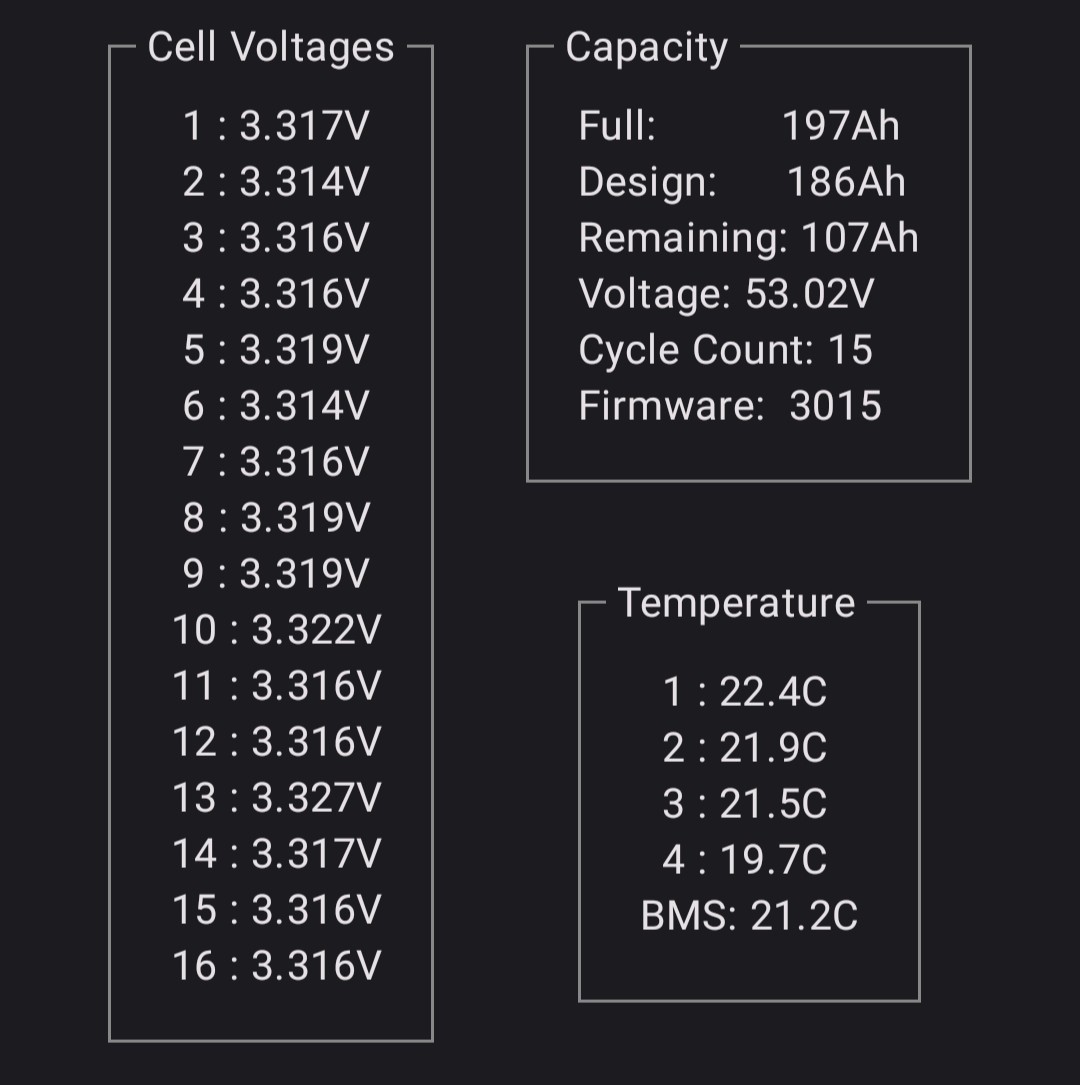
Anyway - your cell 13 is down in voltage compared to the others. I suspect it may be this - if you run a force charge you may see this one lagging behind which is what's dragging your charge rate down - the BMS will be trying to pull that one up by limiting charge current & the cell balancer will be pretty damn slow if its really bad.
You will need to sit and watch the charge though on the this app to see, so maybe one for when you either can't sleep or there's a lot of sun.

Givenergy can see the cell data so they may well suggest a engineer visit if you contact them.

J
#28 Josephiah

DD Looks like it was updated to 3015 at the time of battery install (23rd Jan, panels connected 26th), so we've had both periods of working as expected and periods of... not.

D
#29 DD

hoggy I wonder if it's helpful to look at the cell voltages while it's in the low-power phase of charging (which presuambly has some cells at the high end of the voltage range ?)

J
#30 Josephiah

hoggy no probs, I'm only just learning all this, and have had corrections pointed out of my own... checks notes... basic adding and subtraction!
Yeah, good spot on the lower cell voltage - i did notice it earlier but didn't really think anything of it. Will try installer, and maybe GivEnergy as well.

J
#31 Josephiah

GivEnergy on the case. Now performing another battery calibration. Though so far it looks different to the previous ones, going at a steady 1.53kW. It does have a slight feel of "tick off item 1 from the standard troubleshooting list", but I guess that's not a bad place to start... we'll see what happens...

J
#32 Josephiah

Quick update:
Calibration appeared to go okay, albeit with the inverter throttled to 30%.

Yesterday, started with a full battery from the calibration, so no AC charging. DC charged fine from a good day of solar. AC discharged fine on demand:

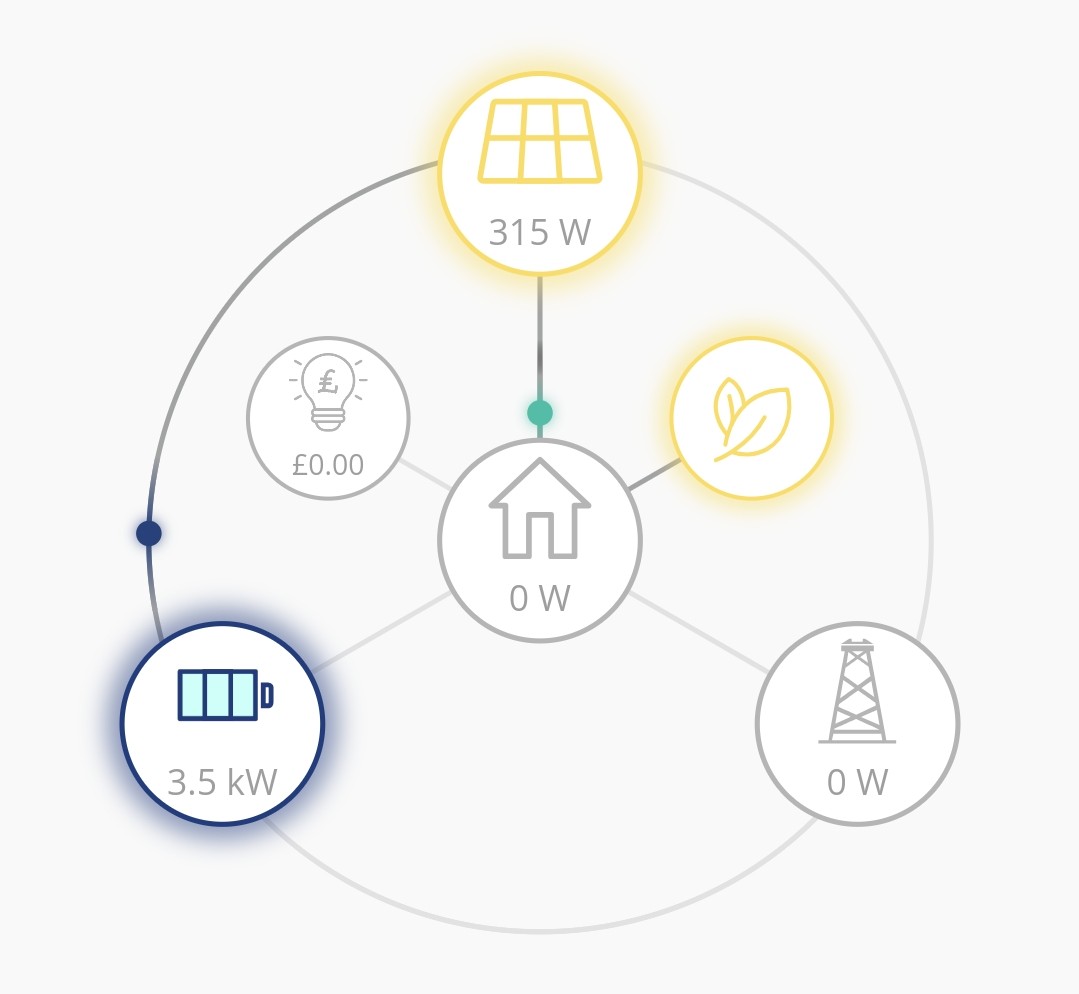
However, back to its old ways this morning. Barely made it to 45% - worse than before - before cutting down to <300W:

Cell voltage towards end of trickle charge (~ 55%):

Awaiting further response from GE.

D
#33 DD

Josephiah I believe (the plugins for) home Assistant can record individual cell voltages over time. But IMHO it's a lot of effort to set up HA for just managing battery in isolation (it's for automating whole house...) You can run a standalone script to do the same, using the bit of python code that accesses the inverter registers, if you are technically inclined.

D
#34 DD

Josephiah in the first chart, there's clearly a pause in the discharge near the end of the day. Mine is similar when it gets down to 6% - it pauses to take stock, then decides there's a bit more available and continues discharging. A snapshot of cell voltages at that point would be interesting.

You said calibration was throttled to 30% - was that from the outset, or after it had reached a certain point ?
While it's actually charging, cell voltages have to be elevated to push energy into them. Pausing the battery before measuring would give a better representation of their state.

I was going to suggest letting it charge for a longer period, to see where it ends up, might be helpful, but may as well just wait for a sunny day.

J
#35 Josephiah

DD ah, sorry, I meant that the calibration instigated by GE ran at 1.5kW charge/discharge throughout instead of the ~ 3.5kW I'd seen on previous calibrations. When I looked at the settings, I saw that they had set the inverter output to 30% for the duration, then set it back to 100% afterwards.

Behaviour on AC charge and DC charge seem to be totally different - haven't seen the <300W charging on DC, but then it's not such a continuous block.

P.s. ever get the feeling GE are doing some tinkering...?

#36 hoggy

Cell 10 & 13 now sitting slightly out from the rest looking at your post. So at least it's progress (albeit in a bad way, now you have two cells going unbalanced!)
Coincidently someone else on the FB group (although it might be you?) has just had a 9.5 swapped out as one cell (cell 13) was doing the same thing.
Only problem being that the replacement battery also has a cell that goes unbalanced and this is his 3rd battery!

D
#37 DD

Josephiah 30% would correspond to 0.3C which, from the table earlier, is appropriate for temperature of 10-20 degrees. Though for a 9.5kWh battery, 1.5kW is only 0.15C, or 15%.

On the AIO BMS8 thread, people are saying it behaves better at 4kW rather than the rated 6kW. And I think generally Li batteries are happier the lower the rate of charge/discharge - especially charging - so I try to avoid charging too quickly. So it's interesting that GE ran this calibration at a lower rate. I wonder if they do that routinely now, or if it was specifically because they suspect your battery needs some TLC.

It's interesting that in an earlier post, cell #13 was the lowest voltage, but in this latest one, during charging, it is the highest.

J
#38 Josephiah

DD yes, cell 13 (and to a lesser extent cell 8 and cell 5) are consistent outliers. It now has the lowest voltage while discharging, so it seems to be consistently leading, in either direction.

J
#39 Josephiah

Well, GE tech support seem to be in agreement that it's a cell or two out of line, but say that a low-rate calibration will bring it back into line. It is now running the calibration again, once again at 30% inverter output. Quite how this is different to the one they performed two days ago is unclear.

Stranger still, I have had, from two different advisors now, the line that "I can see that a calibration has never been carried out". I can see 6 in my notification history, and have the charts showing them happening...

Onwards and upwards...

D
#40 DD

Josephiah Quite how this is different to the one they performed two days ago is unclear.

I guess they're relying on the BMS to do some cell-balancing, which may only happen at either the top or bottom (or both) of SoC range. When they did the calibration, did it continue on 1.5kW all the way up to (close to) 100%, or did it slow down in the same way you see it doing? Maybe a full calibration gets the temperature up a bit, which allows it to charge and discharge faster ?

J
#41 Josephiah

DD An interesting question, without a straightforward answer that I can see:

  • 23/01 Original calibration: 3.3kW throughout;
  • 26/01 After PV connection: 3.5kW for 2.5hrs, followed by 1.1kW for 1.5hrs;
  • 27/01 <300W charge rate problem first appears, repeats on every charge over 27-29/01, sometimes cutting in after a while, other times almost straightaway;
  • 29-30/01 aft/eve/overnight: low rate calibration: full discharge at 1.53kW, full charge at 1.37kW;
  • 31/01 An unclear picture - several GE reps making all sorts of changes to settings during today's calibration(s).

So, in summary, I don't think it's ever dropped to the <300W rate during a calibration exercise. But every other AC charging event since 27/01 has seen it happen sooner or later. (Don't think I've seen a problem with DC charge or AC discharge.)

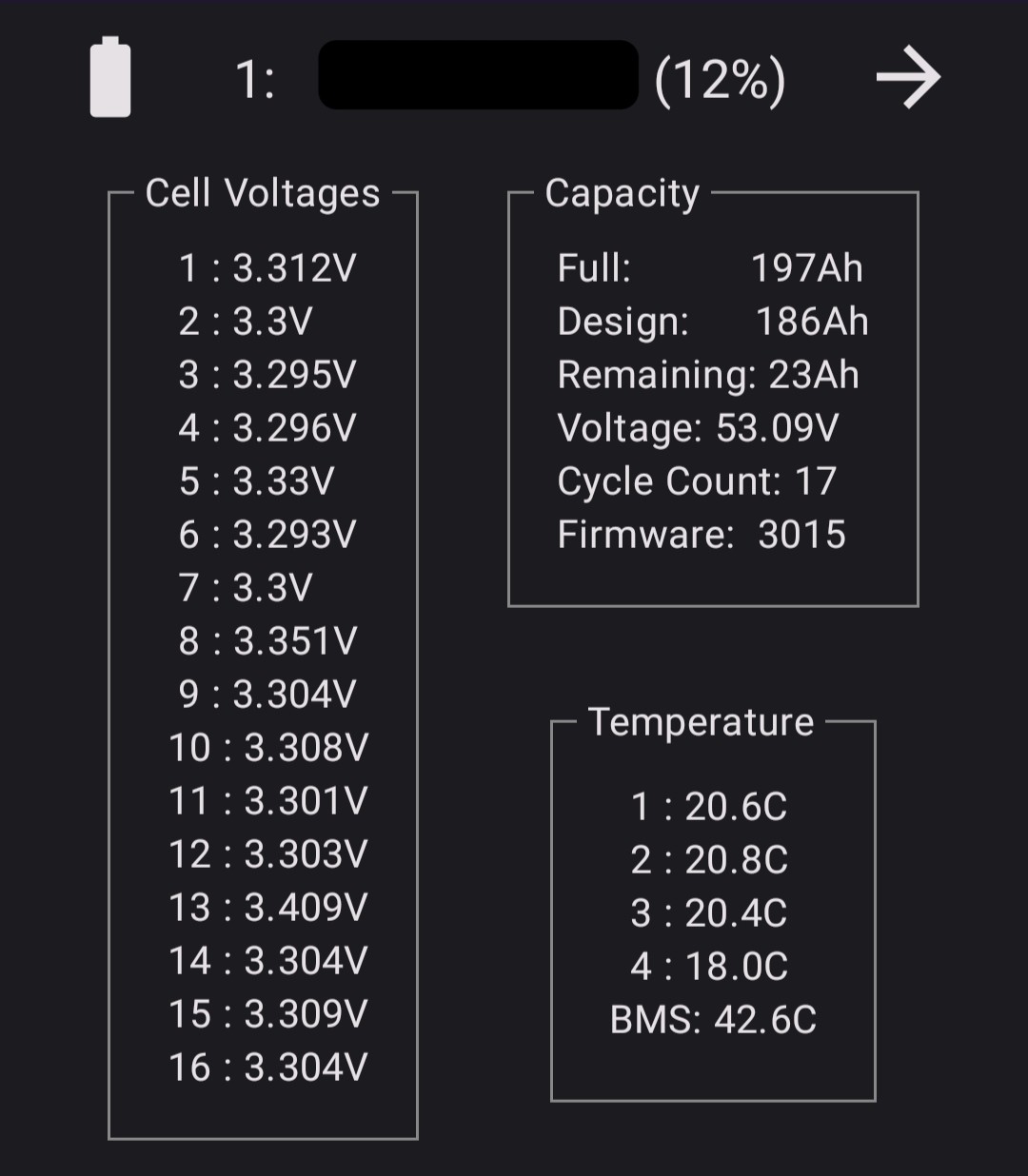
On the cell voltages, at full discharge a little earlier this evening, the cells were all looking pretty even. Now that it's charging again just now, there's a clear spread: Most cells fairly even (3.295 - 3.309V), but cell 8 is ~ 50mV ahead of the pack at 3.351V, and cell 13 is a full 100mV ahead at 3.409V.

J
#42 Josephiah

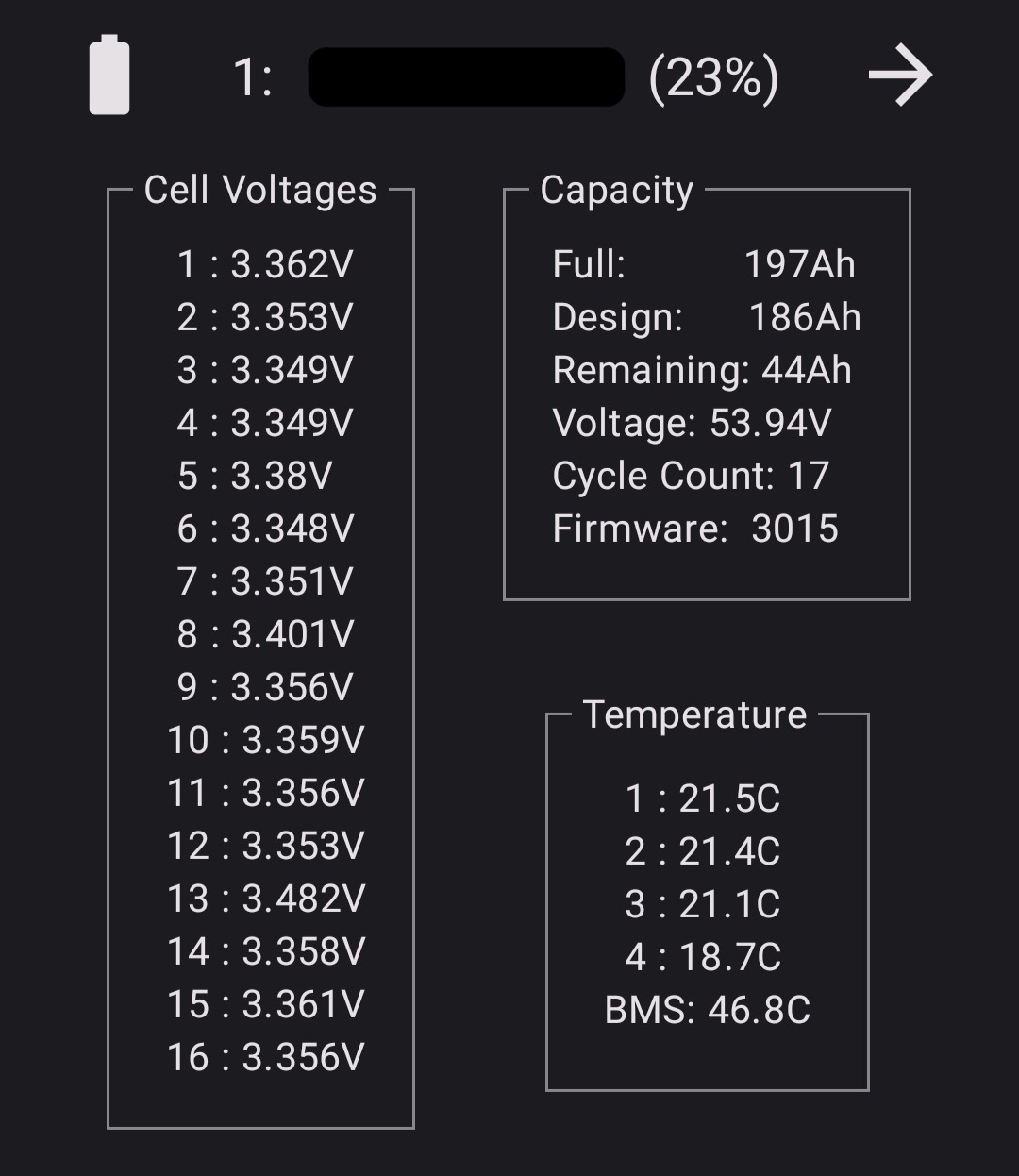
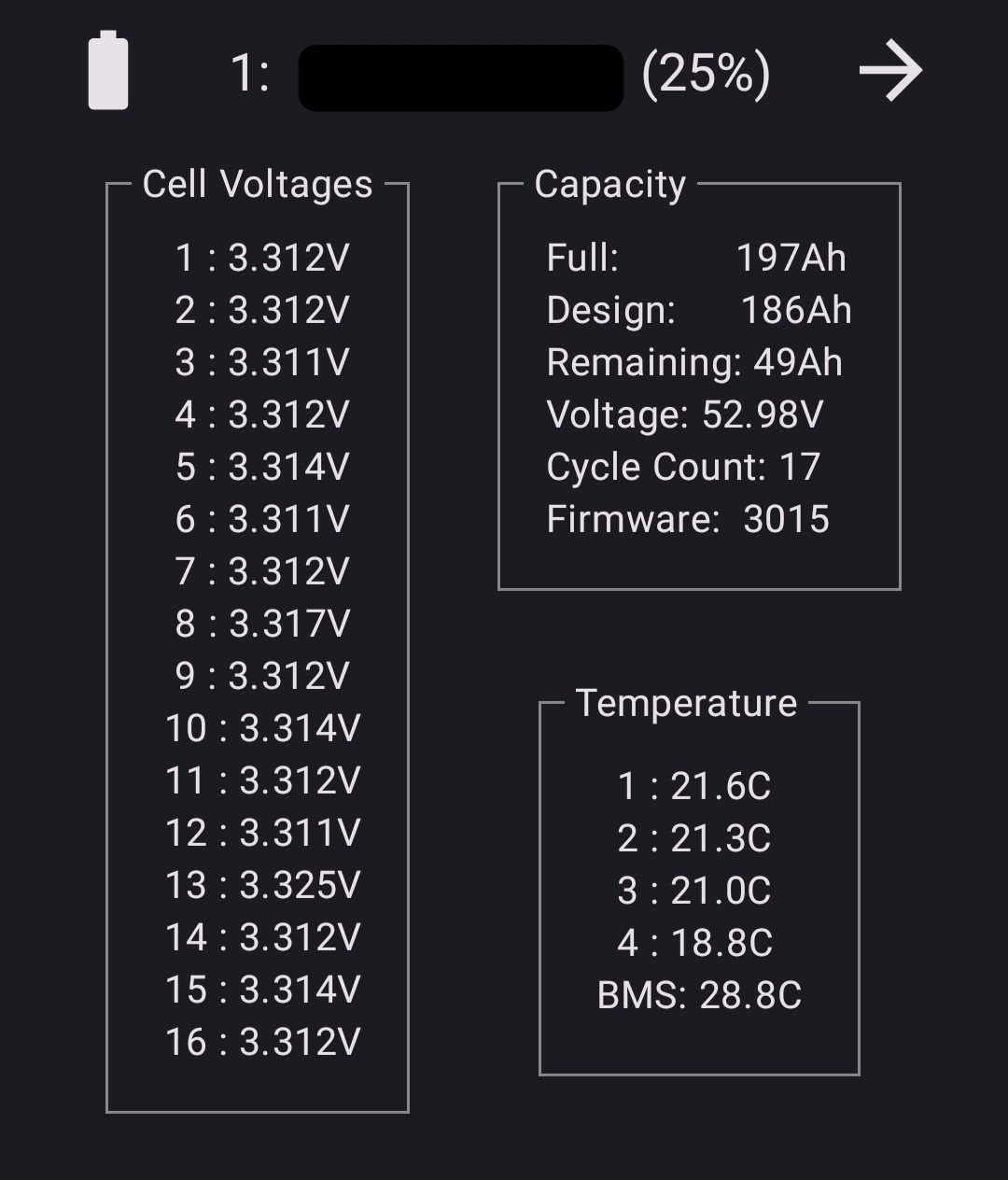
Here's a nice illustration of the progression:
Charging at full rate:

Still charging at full rate:

Bang, <300W:

Cell 13 (and 8 following up) getting way ahead, then the protective charge mode doing its job, I guess...

I'm up to level 2 with GE support...

J
#43 Josephiah

They've come to the conclusion themselves that it requires a physical intervention of some sort. Installer arranging with GE for a replacement to be swapped in, and the original returned as faulty.

Thanks for all the helpful chat and pointers everyone, hopefully we'll have better luck with the next one!

C
#44 Capt_Rich

I was having reduced charging rates of around 2000kw too and just assumed it was temperature related due to the battery being outside. Last week I had a second 8.2kwh battery added to my system. The commissioning required a manual update of the firmware to 3015 on both batteries (the original one was already 3015 but was manually done again). After a calibration my charge rate is back up to the full 3600kw rate despite the battery temps averaging around 12C

D
#45 DD

Capt_Rich After a calibration my charge rate is back up to the full 3600kw rate despite the battery temps averaging around 12C

Presumably the two batteries are charging in parallel, so only 1800W each.

C
#46 Capt_Rich

DD yes, get what you’re saying so maybe there’s not great difference, however the inverter output to the battery is 3600w

D
#47 DD

Capt_Rich My comment was in regard to the temperature only being 12C - each battery is being charged relatively gently.

D
#48 DD

Josephiah They've come to the conclusion themselves that it requires a physical intervention of some sort. Installer arranging with GE for a replacement to be swapped in, and the original returned as faulty.

Any updates ?

J
#49 Josephiah

DD Thanks for asking. After some mild wrangling between the installer, their wholesaler, and GE (nothing contentious I think, just communications slipping through the cracks here and there), the installer is booked to come and do the swap on the 27th.

I've been continuing to use it throttled to about half the charge rate, so it's not been a complete disaster - since we're on Agile now, a long charge overnight isn't so much of a problem compared to trying to cram a full charge into a 3 hour Cosy slot!

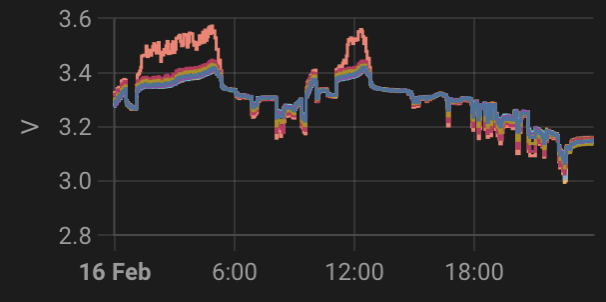
In the meantime I've been getting to grips with Home Assistant, and the misbehaving cell is very obvious in graph form - spot the outlier!

J
#50 Josephiah

Finally got the replacement 9.5kWh battery, and after some "falling through the cracks" wrangling over calibration (the installer wasn't made aware that a full system recommission was necessary with the battery swap...), it is now supposedly calibrated and ready.

Unfortunately, based on one day's use, it appears to be behaving even worse than the last one. Going to gather evidence over the weekend, but so far not amused.

J
#51 Josephiah

After another week working my way patiently past the various lines of GE tech support's defences, they now seem to have decided that my replacement battery needs an intervention, so will be doing a site visit in a few weeks time.

As far as I can tell, looks like exactly the same issue as our first battery - can't charge at full rate for more than 0.5-1 hours without it self-limiting to <300W. Similar cell-out-of-line behaviour as before, but Cell 8 this time. Hobbling along in the meantime by limiting charge rate to 33%.

My suspicions had been alerted right from the off, as the serial number had incremented by exactly 1 from the previous faulty battery!

J
#52 Josephiah

Site visit on Tuesday (short notice, so assume a cancellation). Engineer cleaned up some contacts or something. Did a test run at full charging rate. We looked at the cell voltages on his screen and we agreed it all looked much happier.

But...

First full rate charging block after that worked okay, but certain cell voltages creeping up again.
Second full rate charging block immediately dropped to <300W.

Chasing GE again for whatever's next. In the meantime, seeing what charging rate it'll let me get away with. Survived 33%; trying 50% next.

J
#53 Josephiah

"We have been notified that a revisit is required..."

J
#54 Josephiah

GE engineers showed up yesterday for 2nd site visit. This time they just said "we've brought you a new one!" and swapped it out in half an hour. From the first 36 hours, this one is looking a lot better behaved, so fingers crossed that's us finally sorted. Must have had a bad batch before - batteries 1 and 2 had adjacent serial numbers, battery 3's is completely different.