The Possible Threats by Handing Control to Outside Parties

38 comments started 2024-02-15 last 2024-02-21
Mobile AppCloud PortalGivEnergy ProductsAC CoupledHybridBattery
M
#1 M_J

Morning, So I have been looking at WonderWatt and Axel and Octopus tie ups with the battery and trying to do a bit of a risk analysis to help decide if it is worth doing.

We already have the risk with GivEnergy staff being able to access out kit remotely without our approval or agreement.

So I think it is worth a bit of a deep dive to see what is the worse case...

Off the top of my head in no particular order these are the possible bad things that could be done by a malicious actor.

  • Discharge the Battery / or Charge it at a period of their choosing - Annoying and potentially dangerous if done in concert with many other owners at same time.

  • Open up the Wifi on the inverter (if you have not already secured it) which makes you open to local malicious actors getting access to your network? Not sure if remotely anyone can access your own network via this route?

  • Anything else?

The more we move to a connected world I need to better understand the risks so I am hoping smarter folk will chime in on what you think the risks are and the mitigation?

We have access to the logs so we can see when commands are sent to the Inverter, but do they log all the information?

What is the worst that can happen?

#2 PianSom

M_J
A war with China (likely over Taiwan) is something that people have on their radar as a possibility. Could be a shooting war, or a nasty trade war, or anything. In those circumstance you have to imagine that anything you own where the coding was done in China or Russia could be bricked, or compromised (not just opening your network, but actively acting against you - by searching for your data, or behaving as a bad actor in attacking others).

Here's my take:

  • realise that there may be "suicide" code in my kit which means it will stop working if it doesn't phone home in certain circumstances. There is little/nothing I can do about this - so I don't worry about it.
  • isolate all my potentially non-trustworthy devices (plugs, lights, TVs, printers, kitchen devices, etc) into their own virtual LAN environment, so that they cannot initiate connections to my trusted devices. (Given the importance to me of the energy kit I have, I am actually considering putting them into their own separate virtual LAN. So that they themselves can't be targeted by another piece of non-trustworthy kit.)
  • as far as possible, avoid relying on cloud-based services.
  • make sure I know how to isolate my devices from internet access.

There is a danger here of descending quite quickly into aluminium hat territory, but it does no harm to think "What would I do if ...?". Isolating my inverter + Givenergy kit from the internet and controlling it only with a local Home Assistant may invalidate my warranty, but it may one day be sensible.

That said, this is a lot of faff, and the worst will probably never happen, so just go with WonderWatt!

M
#3 M_J

Thanks - I need to work out how to isolate the inverter from my network - setting up a virtual LAN sounds like a decent thing to do...

I just now need to know how to do it...

๐Ÿ™

At least it seems possible to be able to run the GivEnergy battery via HA and that is a backup if the company goes tits up or they do something dodgy..

#4 Watcher

PianSom

In the words of the unrecognised philosopher Bobby McFerrin, Don't Worry, Be Happy
๐Ÿ˜‰

#5 Wonder Watt

M_J

What would I do if ...?

Mitigation is simple. Revoke your API keys.

All we do is use the public cloud API, as do plenty of other integration partners that integrate with Giv. The relevant permission scopes we need are documented on our forum.

I believe Giv logs each API call via the public API and adds an entry to your Logs on your Remote Control inverter page. In terms of transparency, we also add 'Wonder Watt' to the log message as part of the context, and in some cases add a transaction ID so we can troubleshoot and diagnose issues easier.

Another recommendation that I would suggest is for Giv users to use separate API keys for different integrators/third parties and name them appropriately (so you know what service you created them for).

Just allows you to better isolate and have more granular control.

M
#6 M_J

Wonder Watt Thanks for the response and I will try and see how that is done on the GivEnergy dashboard, not seen it but I guess there must be a way.

But doing that is after the horse has bolted and I am kind of interested in the worse case of what bad stuff folk can do.

Have WonderWatt done any sort of threat assessment / risk register? Obviously there might be stuff you don't want to say but for punters it is always nice to know it has been thought through?

The VLAN is certainly worth doing, just need to work out how...

#7 Wonder Watt

M_J

Have WonderWatt done any sort of threat assessment / risk register? Obviously there might be stuff you don't want to say but for punters it is always nice to know it has been thought through?

We have thought about this yes. And have measures in place. Not going to go into too much detail for obvious reasons, suffice to say I've been developing software for over 25 years, including networking, security etc.

Our attack surface is a lot smaller than say Octopus Energy's or GivEnergy's attack surface. Hope that's some food for thought. ๐Ÿ˜‰

#8 Wonder Watt

The VLAN is certainly worth doing, just need to work out how...

Plenty of network switches and even Wifi access points allow for LAN isolation, where you can easily set up an isolated VLAN with its own SSID.

V
#9 Vestas

VLANs are fine if you know what you're doing but if its the first time you've used them then you're pretty much guaranteed to screw it up ๐Ÿ™‚ I think I'd probably learn with something less "critical" than the inverter.

As a simple example if the inverter is on its own VLAN then you've just lost all local comms with it, everything would have to go via the portal. That's easy enough to sort out if you know what you're doing and have something other than a bog-standard ISP-supplied router. I use Mikrotik but that's probably not something the average user wants to get into ๐Ÿ˜‰

Cheapest reasonable switch for this sort of thing which plays nicely with other kit is probably the TL-SG108E. Costs around ยฃ30 or so.

A
#10 alan_johnston

I have all my IOT devices on their own VLAN where they can access the internet and nothing else.
The downside to doing this (as has been mentioned) is that you then have to access them over the internet unless you have a router that can customise inter-vlan routes allowing you to connect to them but they can't connect to you.

Most of the ISP supplied router/modems (BT, SKY, Plusnet, etc.) might have limited VLAN capability like a guest WIFI access point (although my Plusnet Hub2 doesn't) but won't have any sophisticated routing configuration.

I have a Draytek Vigor which does do all this and it works very well but setting it up isn't for the faint hearted.

#11 Wonder Watt

alan_johnston +1 for Draytek Vigor - got a 2927 here.

A
#12 alan_johnston

One of the big threats is installation teams leaving the WIFI dongle wide open. No password and full public access to internet and home network. ๐Ÿ˜ฎ

V
#13 Vestas

Wonder Watt I'm not a fan of Draytek* but I do still have a Vigor130 which I used as a bridge for Sky VDSL2 connections onto various other routers over the years.

Eventually settled on Mikrotik as it does what it says on the tin and RouterOS7 gets monthly updates. RouterOS is a rather steep learning curve though ๐Ÿ™‚

*probably for historical reasons now, the (sole) UK distributor used to be a right nutter, you couldn't even look at the product manuals without already being a customer and when people complained about features not being implemented he just basically banned them, so they couldn't get new f/w. Barking mad....

K
#14 kram

Vestas

Pretty certain said individual isnโ€™t the sole disty any moreโ€ฆ but I could be wrong.

V
#15 Vestas

kram Oh this was decades ago and you can buy draytek stuff from pretty much anywhere these days.

K
#16 kram

Vestas

If itโ€™s the one I think you mean, who used to have a tech tips pageโ€ฆ I had a similar experience

V
#17 Vestas

kram He didn't like people who had a clue ๐Ÿ™‚

V
#18 Vestas

Also FWIW the Draytek stuff is overpriced, always has been. I've never been entirely clear why it commands such a premium as in most cases its mid-range performance/features.

I have one of these now and they're insanely good ๐Ÿ™‚ Sadly they are rare as hens teeth in the UK post-brexit but what else is new?

https://mikrotik.com/product/rb5009upr_s_in

Better watching the video on this one though as it shows you four of them in a 1U space - https://youtu.be/c5kBvwGqGws

K
#19 kram

Depends on which draytek items and which prices you pay. The HA features are handy, but I do agree theyโ€™re not the cheapest.

Of course you could say the same for ubiquiti and a number of other products.

V
#20 Vestas

kram Don't get me started on Ubiquiti ๐Ÿ™‚

They were superb 15 years ago, pretty good 10 years ago (this is on RF you understand, they've always been crap on switched plant*) but everyone with a clue left there after the boss went AWOL with his basketball team, the phishing scam that cost them $50mill or so etc etc. It's now badly tested, overpriced "prosumer" crap which I suppose is a step up from having kit banned and recalled within ETSI for faking the test figures/not testing at all ๐Ÿ˜‰

Edit - woops we are so far off-topic ๐Ÿ˜ƒ

*I don't mean electrical here, I mean network plant.

T
#21 T-M

alan_johnston I've just had an AIO/Gateway installed and I didn't quite twig what my installer was saying at the time, but on reading this and doing some checking, it appears he has used the same long convoluted password for the dongles as for my 2.4GHz Wifi network. I'm going to be hard wiring the LAN connections in the near future so I'm hoping the dongles can then be disconnected without affecting the functionality of either the AIO or Gateway

A
#22 anglefire

I went the Unifi route (No pun intended!) for my IT kit at home - over kill really for most people, but has lots of control available and can setup mulitple Vlans and SSID's - I've not (yet!) linked the loft switch and lounge switch with fibre, just a copper connection, but do have the option.
Access points are very robust and powerful (One is a higher spec than the other)

M
#23 M_J

Thanks folk for your replies and as no one has added to the main threats I guess those are worse case...

M_J Off the top of my head in no particular order these are the possible bad things that could be done by a malicious actor.

Discharge the Battery / or Charge it at a period of their choosing - Annoying and potentially dangerous if done in concert with many other owners at same time.

Open up the Wifi on the inverter (if you have not already secured it) which makes you open to local malicious actors getting access to your network? Not sure if remotely anyone can access your own network via this route?

Anything else?

G
#24 geoffreycoan

T-M it appears he has used the same long convoluted password for the dongles as for my 2.4GHz Wifi network

There's two different things here I think.
If your inverter is connecting to your Wi-Fi, it'll need your WiFi password. If you subsequently change to using an ethernet cable connection then this does away with using the inverter WiFi dongle.

Separately your inverter WiFi dongle broadcasts it's own WiFi hot-spot (ssid is serial number of the inverter), initially with no password. So if you connect to the inverter WiFi hot-spot you are straight onto your home WiFi with no password!
The installation guide says that the installer should change the WiFi dongle to set a password on it. Sounds like your installer reused your existing password which is fine. At least you know what it is.
My installer didn't do the last step leaving me with an open WiFi for a month or so until I spotted it

T
#25 T-M

geoffreycoan Yes, I understand that the Dongles each have two wireless network interfaces, one that connects the dongle to your router, the other (the Access Point interface) that allows a phone/tablet to connect to a minimal web server running inside the dongle which gives access to the dongle configuration data.
I've asked one of the mods on a FB group I'm a member of to add a dongle security check to his installation day checks. Several people replied that they had checked theirs and like you, found them open to the world!
Knowledge is power!

#26 PianSom

T-M
Mind too was left open to the world.

Shortly after I was installed, I noticed this appeared on the knowledge base

#27 hoggy

Handing over control is basically done via 2 routes:
API keys (such as Octopus R&D, Wonderwatt etc...)
Oauth (Axle, Intelligent Octopus Flux)

I don't believe currently there is any way to set registers that would cause a catastrophic fault / damage via API. So the worst scenario is probably a database breach where thousands of keys are exposed and a bad actor sets up essentially a inverter swarm charging or discharging en masse, destabilising the grid.
I would like to think the API has some sort of "hang on, why is everyone suddenly doing this" function but who knows. It would be hard to differentiate between this and say a saving session.
Ironically, the servers do seem a bit finicky / brittle so a massive flood of requests may just make the server fall over, avoiding the issue!

Both control methods (now) have the option to be revoked from the portal.
The app & portal itself uses a different internal api, and setting registers appears to be unique to each user so a blanket login and do X attack would be pretty complicated. The app is cert pinned & (now) doesn't have some own goals it had before. Doesn't stop the most determined pulling it apart I guess but there are probably far easier brands out there to focus on first.

I believe I've covered hardware before (which seems outside this threads remit) as needs to be done locally but Inverters aren't forgotten by the darker side of the net and things have been poked before. This is a pretty nice investigation: https://www.secura.com/blog/iot-solar-inverters-trickle-down-vulnerabilities
The rougue firmware part is a neat trick.

I do think a hackathon in Givenergy HQ for the community would be pretty interesting for both parties to see how far things can be pushed (on a digital twin of Givs current setup for obvious reasons!)

V
#28 Vestas

hoggy You could essentially do a denial of service by constantly resetting the inverter much like GE did last year when they screwed up a firmware update - for those who missed this wonderful "event", the portal reset all updated inverters every 5 minutes for upwards of 12 HOURS (140+ reboots!). The only way to stop it was to prevent the inverter talking to the portal.

Pretty sure you could break an inverter by rebooting every 2 minutes (720 reboots a day).....

#29 hoggy

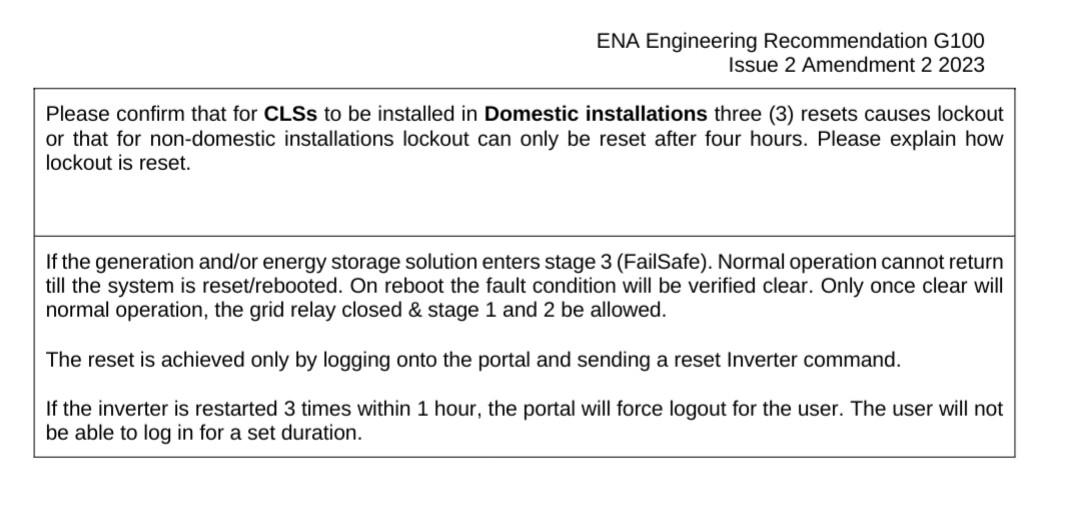
I was under the impression that resets are now under lockout as part of latest ENA compliance. Although this is generally after an over voltage event. I've never tried rebooting 3 times in an hour to see if it boots me out!

Edit: I'd like to hope that GE could restle back control in less than 24hrs though so shouldn't be stuck in a reboot loop until it failed!

V
#30 Vestas

hoggy Well then the G1 doesn't comply (and at the time nor did the G2/G3). If you look back to the tail end of July 2023 (v3012 firmware IIRC) on here you'll find the threads - including the usual denials from GE, eventually followed up by a grudging acknowledgement that it was them.

After about the 9th reboot in an hour I blocked the inverter from talking to the portal for the night. Some people weren't able to do the same and their inverters rebooted every 5 minutes until the following morning when support were available.

Anyway that's just via the portal. You can reboot locally so I have no doubt at all its possible to reboot remotely without using the portal.

#31 hoggy

Vestas I'm assuming / hoping that a server side reboot by the mothership is separated from the user/api side.
When I get back tonight I'll see what it does on my crusty old G1's!
I do remember the saga with that FW reboot loop!

V
#32 Vestas

hoggy After the "budget brand" data screwup I think it'd be naive to assume GE has any competency in terms of data security....

M
#33 M_J

hoggy THANK YOU... was hoping you would notice this and respond...

Some nice insights really useful..

The hackathon is a really good idea for GE to pick up on if they are serious about security and are going to stay the distance as a serious company in this market.. (Of course senior directors can always ยฃuck up good companies, but lets hope they have good ones...)

#34 hoggy

M_J just tag me in if needed, I don't trawl through everything on here anymore as (like all forums you're in for a while) it starts getting a bit like groundhog day.
If they do some sort of hackfest type thing I'll just be sure to check others get invites lest I be tricked and whisked away to Givs Sarlacc pit.

#35 hoggy

Vestas so 5 reboots in a half hour for me on Gen1 and no log out so I guess that would be a potential avenue to exploit (atleast on Gen1)

T
#36 T-M

hoggy Sadly, it looks like the AIO & Gateway both have HF-A21 based dongles, which from the roadmap in the article linked to by @PianSom above, seem to be an evolution of their HF-A11 counterparts and have been around since 2015. Crime was much simpler in the 1970's, you just smashed the back door in ๐Ÿ™‚ (Not me I hasten to add!)

#37 hoggy

Yeah I just used that specific example as it uses "similar" chips. Given the GE inverters have been around since 2017/18 then it would not be unusual to find what now seem like "vintage" chipsets in them - I believe Gen 2-3 / AIO are iterative versions of essentially the same design rather than being completely clean sheet from scratch each Gen but I've never had anything above Gen 1 & the gateway apart in my garage.

Anyway, in the interest of balance, here is another interesting one (not using HF chipsets) involving micro inverters where someone managed to push them into tripping breakers and several other things.
https://media.ccc.de/v/37c3-11810-decentralized_energy_production_green_future_or_cybersecurity_nightmare

V
#38 Vestas

hoggy Same thing was happening to Gen2/3 inverters on that battery f/w update. I'm making the (somewhat generous/naive) assumption that when GE introduced comms "security" for G2/3 that they made the inverters compliant with what they appear to be claiming in your post earlier re ENA.

Perhaps someone with a G2/3 inverter could do the same test you did?