Disabling a timed discharge is causing eco mode to go off

15 comments started 2024-02-19 last 2026-04-14
Cloud Portal
P
#1 Pete Thomas

There is an issue if I start a timed discharge while in eco mode, then disable the timed discharge before it has reached it's end.

If I then check eco mode it is still on (as you would expect)

However if I refresh the page or go out of Inverter Settings and back again, the eco mode is now turned off.

Does anyone know why is this happening ?

D
#2 DD

Pete Thomas Which inverter and firmware. Are you using app, portal settings, or remote-control section? Is it definitely timed discharge, rather than timed export? How, precisely, do you disable the timed discharge?
I can see a sequence where it would behave as you describe, but it depends on some of these details.

P
#3 Pete Thomas

It is a Givenergy 5k Gen 3 inverter. I'm using the portal settings and timed discharged as I said (It's a different thing to timed export which will turn off eco mode immediately and freeze the battery)

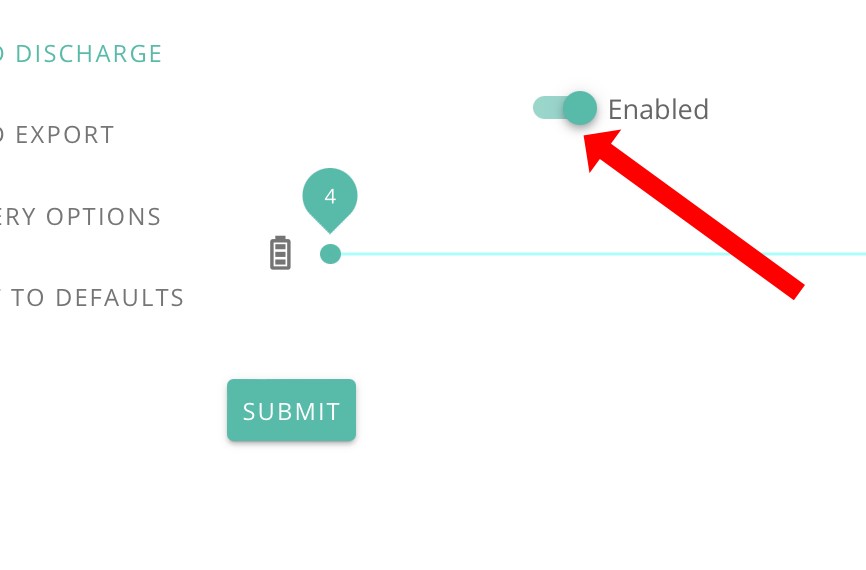
I disable the timed discharge by clicking on Enabled so it becomes disabled and then submit

D
#4 DD

Pete Thomas Oh, one other thing I should have asked... did you check the activity log at the bottom of the remote-control page? That should show eco mode getting turned off, even though the portal UI doesn't get updated to reflect it.

On that page in the portal, only one of the modes is allowed to be enabled: eco mode, timed discharge, and timed export are mutually exclusive. So turning on timed discharge implicitly turns off (that version of) eco mode. But then turning off timed discharge explicitly, all 3 modes are now turned off. Except the page doesn't update the sliders to correctly show this.

The fundamental problem (IMHO) is that they are presenting an abstracted view of the real flags, which are the ones you can see on the remote-control section. These are 'enable eco mode' and 'enable DC discharge'. Timed discharge mode has both these on. Turning off timed discharge mode then turns both these off.

It is much better behaved on the app's user interface, and in the portal remote control. The app presents a different abstraction of the two real flags, such that you can only turn off timed-discharge "mode" by explicitly moving to one of the other two "modes". And the remote-control section doesn't abstract it and lets you see the actual registers.

See also
https://community.givenergy.cloud/d/3654-timed-discharge-behaviour-survey
where I tried to describe it in more detail.

D
#5 DD

Pete Thomas Okay, the shorter version... 'timed discharge' is the combination of two real underlying flags you can see in the remote-control section, 'enable eco mode', and 'enable dc discharge'.

Timed-discharge mode corresponds to both those flags being on. Turning it off then turns both those flags off. It doesn't remember that before you turned on 'timed discharge', the eco flag was on.
Arguably. only turning off 'enable dc discharge' and leaving 'enable eco mode' is probably what most people would actually want, but you can't really say that what it does is definitively wrong.

The app makes it harder to get it "wrong". In fact, I don't think the app offers a way to turn both those internal flags off ? To leave 'timed discharge' mode (which the app calls 'scheduled - home demand'), you have to switch to either 'scheduled - full export' (aka timed export), or 'dynamic' (which is eco mode on, dc discharge off).

Better still to use the remote-control view which gives you direct access to the actual flags that control the inverter. (Though you can then choose to turn both flags off if you want.)

P
#6 Pete Thomas

I think I'm more confused than ever now.

It appears that if I set a timed discharge, then it goes on and off as expected at the start and end times. And eco mode stays on and is still on the next day.

However if I disable the timed discharge it also disables the eco mode. It seems to do this whether it's in the middle of a discharge or after the end time of the discharge.

I suppose now I know this is happening I know to keep checking it but it just seems counter intuitive that it can stay on while the schedule is enabled and discharge starts and stops due to the schedule, but not when discharge stops due to the schedule being disabled.

Or am I being really thick?

D
#7 DD

Pete Thomas Does it help to think of 'timed discharge' mode as being a hybrid of 'eco mode' and 'timed export' mode? The 'eco mode' bit means that the battery covers household consumption, and the 'timed export' bit means that, during the timed window, the battery discharges at a fixed power.

The problem is that turning off 'timed discharge' mode turns off both eco and timed-export bits. There's no particular reason why it should turn off just the 'timed export' behaviour without also turning off the 'eco' bit.

There definitely is a portal bug where it continues to show 'eco mode' as being on, when in fact it's not. You have to reload the page in order to get it to display the correct value. (But if you visit the remote-control section, it does show the correct value. And I think forcing it to reread the value from the inverter may also fix the display bug in the settings.)

#8 nophead

When it discharges to the grid at a fixed power it can't help but cover the household load first. The house and the grid are wired in parallel to the inverter. When it provides power it goes to both and any that the house doesn't use goes to the grid.

C
#9 CoyoteEnergy46

I have come back here and I am confused (again) as well. My requirement is simple I want eco mode and also timed export at the peak rate? Is this possible to configure on the inverter or not?
As soon as I go to put a slot in for timed export on the app or UI it switches off eco mode!! Even when it’s not that time. Surely it should be smart enough to say if a user selects this option leave eco mode on (unless that slot is actually now!!
How can I get what I need please? If it’s do it manually then that’s just daft. It’s just scheduling logic with a hierarchy of options.

D
#10 DD

CoyoteEnergy46 my understanding is that the gen-1 inverter can only export with eco turned off. Newer systems don't need that, and will simply ignore the eco flag for the duration of the timed window.

It’s just scheduling logic with a hierarchy of options.

True. But you also need a system that can do that scheduling. The inverter can't do it itself, and the web portal doesn't currently do that. There are external agents that can do it for you, but most require a subscription.

V
#11 Vestas

DD my understanding is that the gen-1 inverter can only export with eco turned off. Newer systems don't need that, and will simply ignore the eco flag for the duration of the timed window.

Spot on for production firmware (450/451 IIRC).

That's how I got the fast response f/w installed a couple of years ago - I told GE I'd be rejecting the inverter back to the installer as it didn't conform with the marketing/datasheet/etc. Two hours later Paul Landregan was putting the fast response f/w on the inverter....

S
#13 SteveCook

DD
I suffered this problem on my Gen 1
The only way I could get my Gen1 to do what you want consistently was to use HA and create automations for timed charge and timed export, and after each of the sessions, after 5 minutes I had another automation to turn Eco back on to make sure IT WAS ON.
That all worked well for about a year and then I installed Predbat to do it all automatically for me based on predicted solar activity, battery % charge and time of day/tariff etc

V
#14 Vestas

SteveCook That's exactly what I had to do with production firmware on G1.

S
#15 SteveCook

CoyoteEnergy46
I suffered this problem on my Gen 1
The only way I could get my Gen1 to do what you want consistently was to use HA and create automations for timed charge and timed export, and after each of the sessions, after 5 minutes I had another automation to turn Eco back on to make sure IT WAS ON.
That all worked well for about a year and then I installed Predbat to do it all automatically for me based on predicted solar activity, battery % charge and time of day/tariff etc
