
Timed discharge behaviour - survey

20 comments started 2023-12-14 last 2026-04-02
Home AutomationGivEnergy Products
D
#1 DD

I spent some time investigating how my system (Hybrid G3, 305) behaves with the various scheduled discharge behaviours. But today, a post of a message from GE suggests that G3 behaves differently from G1/G2.
https://community.givenergy.cloud/d/3633-octopus-agile-ge-smart-tariff-unscheduled-export/10
I thought it might be useful to collect actual behaviours on different hardware/firmware revisions. This could perhaps get written up on the wiki ?

Looking at the remote control section in the portal (which gives a more low-level view of the configuration), there appear to be two relevant flags: 'enable DC discharge' and 'enable eco mode'. Then the various UI presentations show combinations of those two flags:

  • portal name | app name | eco flag | dc discharge flag
  • eco mode | dynamic | on | off
  • timed discharge | scheduled - home demand | on | on
  • timed export | scheduled - full export | off | on

You can turn both flags off in the remote control part of the flag (app calls this 'dynamic', even though battery is paused). But turning 'eco' off in the friendly part of the portal automatically turns 'dc discharge' to enabled.

On my G3 system, 'timed discharge' leaves eco mode on, so that outside the timed period, it's in dynamic mode, whereas 'timed export' turns eco mode off, so that outside the timed period, the battery is paused. ie the only difference between the two is what it does outside of the timed period. But the descriptions in the portal and app sounds like this may not have been the intended behaviour - perhaps 'timed discharge' was intended to pause the battery outside the window and cover house load during the window ?

(I tagged this as home automation, but really, it's what can be achieved without an external agent that I was interested in.)

For this with android, I can recommend the @Rubikcube monitor app as a useful way to see the flags directly from the inverter, without the app/portal applying an interpretation to them. Though forcing a read of the register from the remote-control section should also work.

P
#2 Pete Thomas

Sorry I didn’t understand most of that. All I meant to ask was why eco mode got turned off without me wanting it turned off now I’m more confused than ever!

D
#3 DD

See https://community.givenergy.cloud/d/4284-confused-about-export/ for lots of discussion.

Turns out that on gen-1, only timed-export will actually export. Timed-discharge will discharge only enough to cover the house load. Which is what eco does anyway. So in fact the (discharge) behaviour is identical inside and outside the time window, just covering house load.

The net effect of using timed-discharge on a gen-1 system is actually to prevent solar charging during the timed discharge period. So it will export excess solar during that period, but won't discharge the battery any more than is required to cover house load.

T
#4 timdownieuk

I’ve just tried a “timed discharge” in the new app, working on the basis that it was the same as the old “home demand” discharge setting which let the battery work in dynamic/eco mode before and after the timed period. Used it many times before to dump spare battery capacity in the evenings with no need for any intervention.

The new timed discharge mode left my battery idling afterwards and I had to manually return it to eco mode which is surely an error in the app. There must be a simple way to schedule a discharge in the evening which doesn’t require the user to take action afterwards to restore “normal” activity.

5kW Gen3 hybrid inverter. Firmware version D0.307-A0.307. Battery 3015

T
#5 TX200

If you have the new firmware, try timed demand.

If not, try timed export - think that goes to eco after. But you may have to adjust the discharge rate if you don't want it exporting at full pelt.

S
#6 SimonClarke

Happy to get mine to do anything….

D
#7 DD

timdownieuk I’ve just tried a “timed discharge” in the new app,

Just to clarify: by new app, do you mean the new interface in the iOS app ?

AFAIK, the iOS app (but not yet the Android app) has been changed to use the same (broken) interface as the portal. On the portal, turning off timed discharge clears both the underlying flags, which turns eco mode off. I can't confirm the iOS behaviour.
See also https://community.givenergy.cloud/d/4140-ge-app-appears-to-be-missing-former-functionality

T
#8 timdownieuk

DD Yes. It’s the updated iOS app that appears to be broken.

P
#10 Pete Thomas

I am continuing to find this very confusing. I ran an experiment today:
Timed change is 23:30 - m5:30 so should not be affecting this
Eco mode is on and battery charged by solar is at 100%, solar is still generating and exporting

16:00 Set timed discharge enabled and discharge from 16:05 - 16:20
16:05 starts to discharge as expected
16:20 stops discharging as expected
16:20 Eco is still showing as enabled
16:36 I disabled timed discharge (which had stopped discharging per schedule at 16:20)
16:36 Eco still shows as enabled BUT refresh screen and shows as disabled
16:36 (20 seconds later) I enable Eco mode and it now shows enabled as expected

Summary:
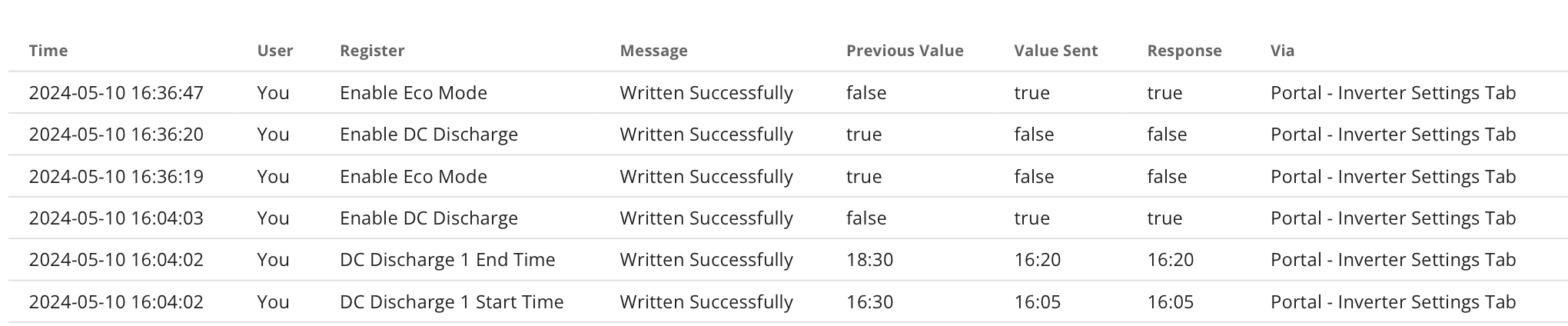
It seems disabling a timed discharge schedule after it has run eco still shows as on but it is actually turned off by the disabling of the timed discharge. Refreshing screen eco now shows it did actually turn off one second before disable the timed discharge

In the screen shot when I turned TD off at 16:36:20 you can see this turning eco off 1 seconds earlier at 16:36:19 !!!

D
#11 DD

Pete Thomas 16:36 I disabled timed discharge (which had stopped discharging per schedule at 16:20)
16:36 Eco still shows as enabled BUT refresh screen and shows as disabled

I believe this to be an interface problem... 'timed discharge' sets a pair of flags 'enable dc discharge' and 'eco mode'. Turning timed discharge off turns off both those flags. Which means you lose eco mode. If you look in the log sectio of the remote-control page, you should see it clearing both flags. But unfortunately, as you have found, the portal display doesn't update correctly, and appears to show eco mode still on.

The (Android) app gets it right, though I believe the iOS app has been changed to copy the flaw from the portal interface.

To turn off just the 'enable dc discharge' flag, you can either use the remote control section, or use a convoluted route of turning on 'timed export' mode and then turning on 'eco' mode. Or maybe turn eco mode off and on again ?

P
#12 Pete Thomas

DD timed discharge' sets a pair of flags 'enable dc discharge' and 'eco mode'.

But no, as you can see at 16:20 all that happened was the discharge schedule to on.

Eco was already on. To test what you say I should turn eco off, then enable timed discharge and see what happens. But I have no reason to do that of course.

The whole thing makes me a bit nervous, like I could break it and lose all my electricity.

D
#13 DD

Pete Thomas But no, as you can see at 16:20 all that happened was the discharge schedule to on.

Eco was already on.

At 16:36, when you turned off 'timed discharge', the log shows that both eco mode and enable dc discharge got turned off.

It didn't record any change to the eco flag at 16:04 because it was already on - the portal only sends (and records) changes to the registers, and since eco flag was remaining on, it didn't log it.

Pete Thomas To test what you say I should turn eco off, then enable timed discharge and see what happens. But I have no reason to do that of course.

Perfectly valid test to perform. That's exactly how I investigated how these flags worked together. The portal log should record the eco flag going off, and then when you enable 'timed discharge', it will record both flags going on.

D
#15 DD

And timed-discharge has been removed from the app for gen-1 systems, since they cannot implement the behaviour as it is now documented. But you should still be able to achieve the old timed-discharge behaviour via the remote-control section, with eco + enable-dc-discharge flags. (I've not had confirmation of that, but that's all the UI was doing when it set timed-discharge, so it ought to be equivalent.)

#16 hoggy

@DD sorry to resurrect this but thought I might as well atleast attempt to get this right.
Does the above logic still stand or has it changed again.
Still trying to re-remember the old logic across Gens and Fast Fw but will be necessary for the attempt at a ESP32 library.

V
#17 Vestas

hoggy Timed mode works on 191/193 fw and doesn't on 450/451 - assuming we're talking about the "Enable Discharge Schedule" control on GivTCP.

D
#18 DD

hoggy My recollection is that the app suppresses the interface for timed-discharge on gen-1 systems, since they didn't originally have timed pause. Fast-response firmware may support timed-pause, but I don't recall if the app was smart enough to distinguish that variant.

I won't experiment now since my control software is having to keep on top of lots-of-solar with almost-full-battery, and it doesn't need any external disturbances added to the mix...

V
#19 Vestas

DD I don't recall if the app was smart enough to distinguish that variant.

It wasn't. They just changed the app so anything with a G1 serial number didn't have the option.

Edit - fast response f/w (191/193) supports all the pause options - charge/discharge/both.

D
#20 DD

hoggy Okay, slightly unwelcome news (gen-3 hybrid) : when I turned on timed-export on the GE app, it both turned on the export flag (register #59) but also set battery_discharge_limit_ac (register #314) to 100% - I generally keep that at 50% because when I want to force export to grid, I want it at 2kW rather than 4kW, just to be a bit kinder to the battery. (Seems to operate independently of discharge power, which I keep at the max so that it can service eco mode at the full 4kW if needed.)

Enabling timed-discharge does affect only the pause-type register #318