givenergy messing with timed pause / timed discharge settings ?

77 comments started 2024-06-05 last 2024-08-21
Cloud Portal
D
#1 DD

Just discovered some new / unwanted behaviour on the portal. See also https://community.givenergy.cloud/d/4549-timed-export-settings/16

Oh... just realised ... looks like they have now actually implemented timed-discharge behaviour to match their documentation! If you set a timed-discharge of 4pm-7pm, say (which is documented to mean that you want to cover the house load between 4pm to 7pm only), what that now does is use the pause timer to pause discharge from 7pm to 4pm.

If you had previously configured timed-discharge, that is now displayed as eco + timed-export (which is quite sensible).

So looks like we're going to have to change our advise yet again - timed-export is now the correct way to to things, and timed-discharge is, ..., well, does what it says on the packet.

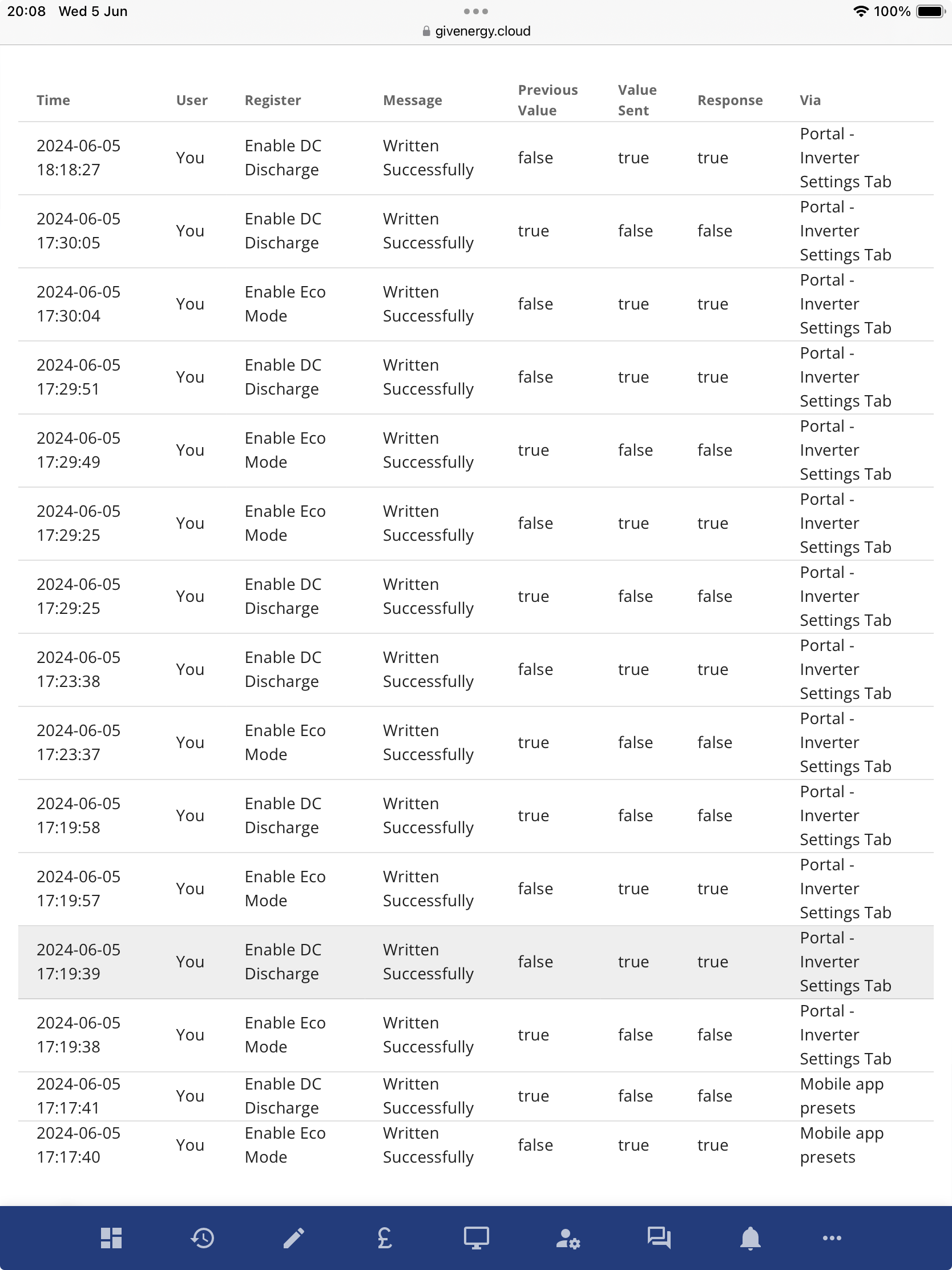
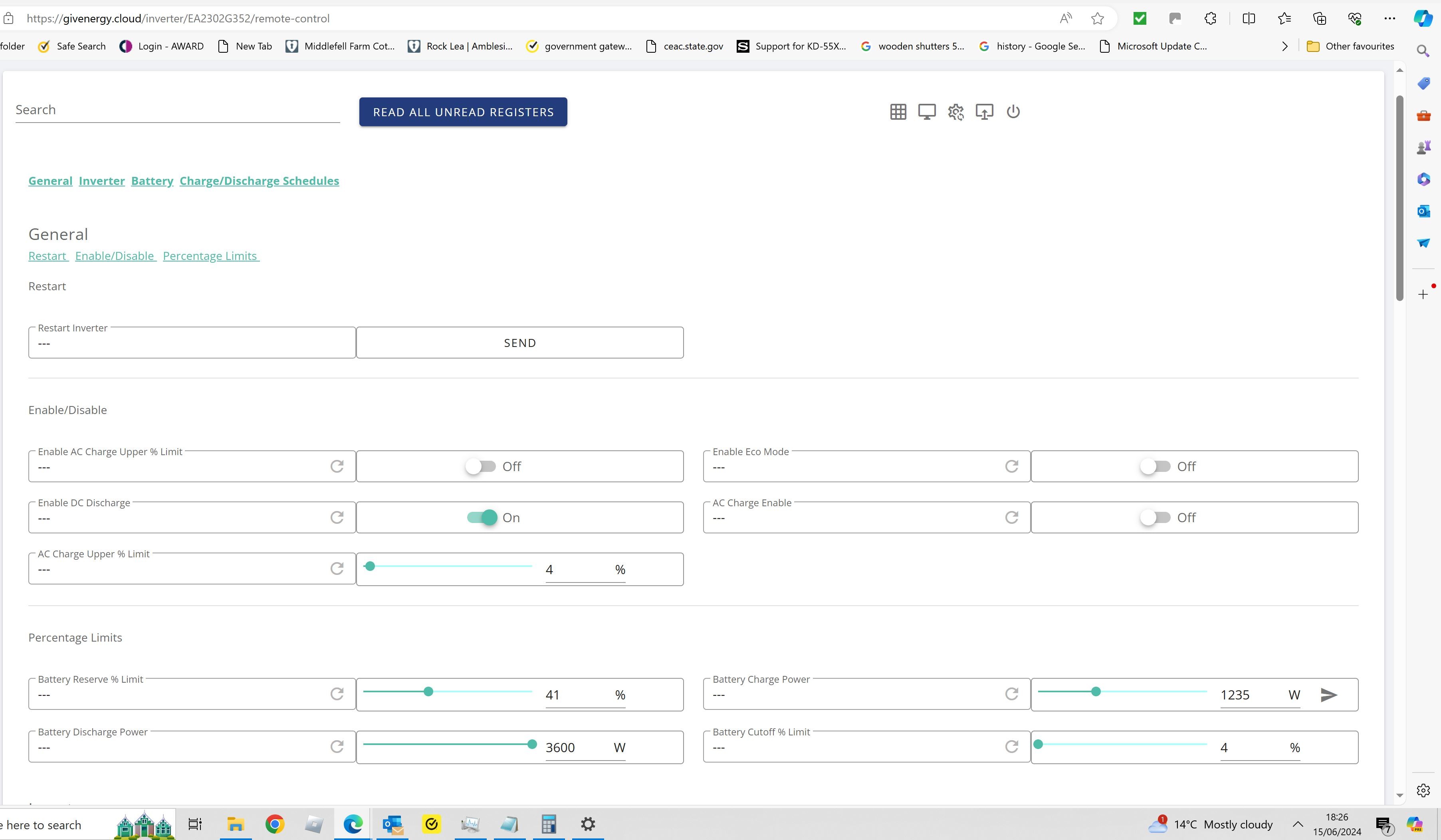
Turning timed-export on/off now just changes the remote-control flag 'enable dc discharge' - doesn't appear to mess with the eco flag.

  • I should mention that I've only explored this on the portal, not the app. My android app is still reporting the mode as "scheduled - home demand", but that's not consistent with the actual underlying settings (which are eco + timed-export). In fact, I guess the android app isn't capable of configuring eco + timed-export ?

S
#2 SimonClarke

Great! I had a perfectly working timed discharge which now appears to be switched off. Timed export hasn’t been switched on so what am I supposed to do? Guess? No email or anything

D
#3 DD

SimonClarke they don't appear to have changed any inverter settings (on my system at least), just changed how they were represented on the portal. The underlying flag is 'enable DC discharge', and both timed-discharge and timed-export turn that on. So the settings configured by timed discharge are now interpreted as toned-export

Any actual changes should probably show up in the activity log.

S
#4 SimonClarke

My timed discharge was switched off and I didn't do it. Not sure what to turn back on....

D
#5 DD

@Wonder Watt Not sure if you'll be affected by this. Possibly if you use the presets api ? (I've not tested that.) But if you use the settings directly, I'm guessing not.

D
#6 DD

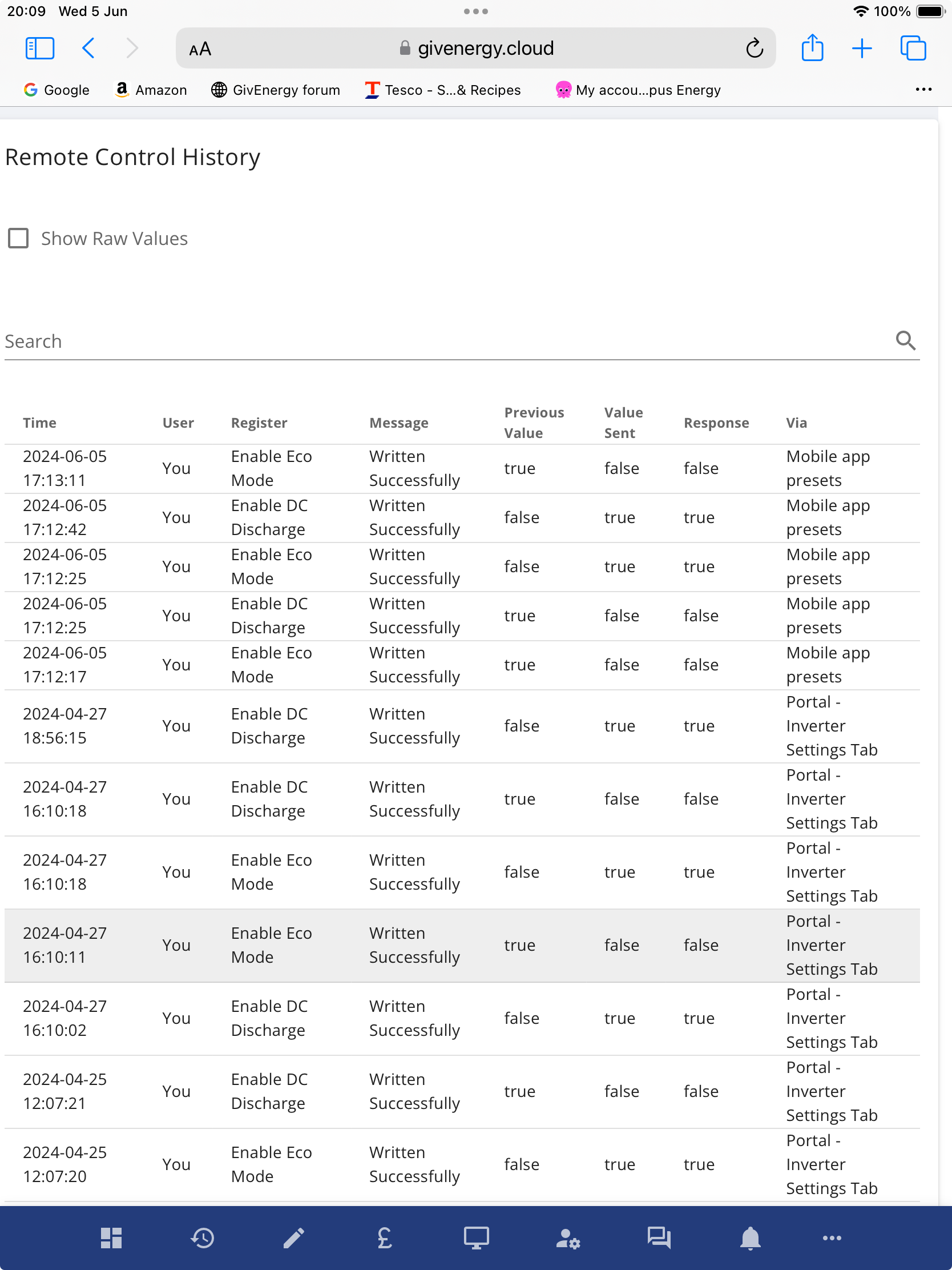
SimonClarke One option is to skip the "friendly" interface and go directly to the remote control section. Then you can turn on 'eco' and 'enable dc discharge' and that should be as it was.

Probably best to experiment a bit - make a change to the (friendly) settings, then look in the activity log to see what it actually sent to the inverter. Not all inverters have the timed pause feature, so it may be doing something different on other systems. And gen-1 inverters (except latest firmware) can only export if eco flag is off.

I'm guessing you want timed-export and eco, if it allows that combination.

S
#7 SimonClarke

DD it is gen 1 and I had a timed discharge with Eco working with the fast software. My point is that it's now switched off and I didn't do it and if they have changed something I don't know what to switch back on. I only normally use the portal but both it and the app show the same thing. If nothing has changed what is the point?.

D
#8 DD

SimonClarke it is gen 1 and I had a timed discharge with Eco working with the fast software. My point is that it's now switched off and I didn't do it and if they have changed something I don't know what to switch back on.

Ah, okay. My understanding was that the gen-1 with the latest ("fast-response" ?) firmware did change the behaviour of timed-discharge to be like that of more modern systems (ie full export during the timed window, eco mode outside it). Not sure if that firmware provides the timed-pause feature, which might complicate things.

Probably would be useful for you to do some experiments and post results - your gen-1 and my gen-3 may well behave differently. Not sure to what extent the portal changes what it presents.

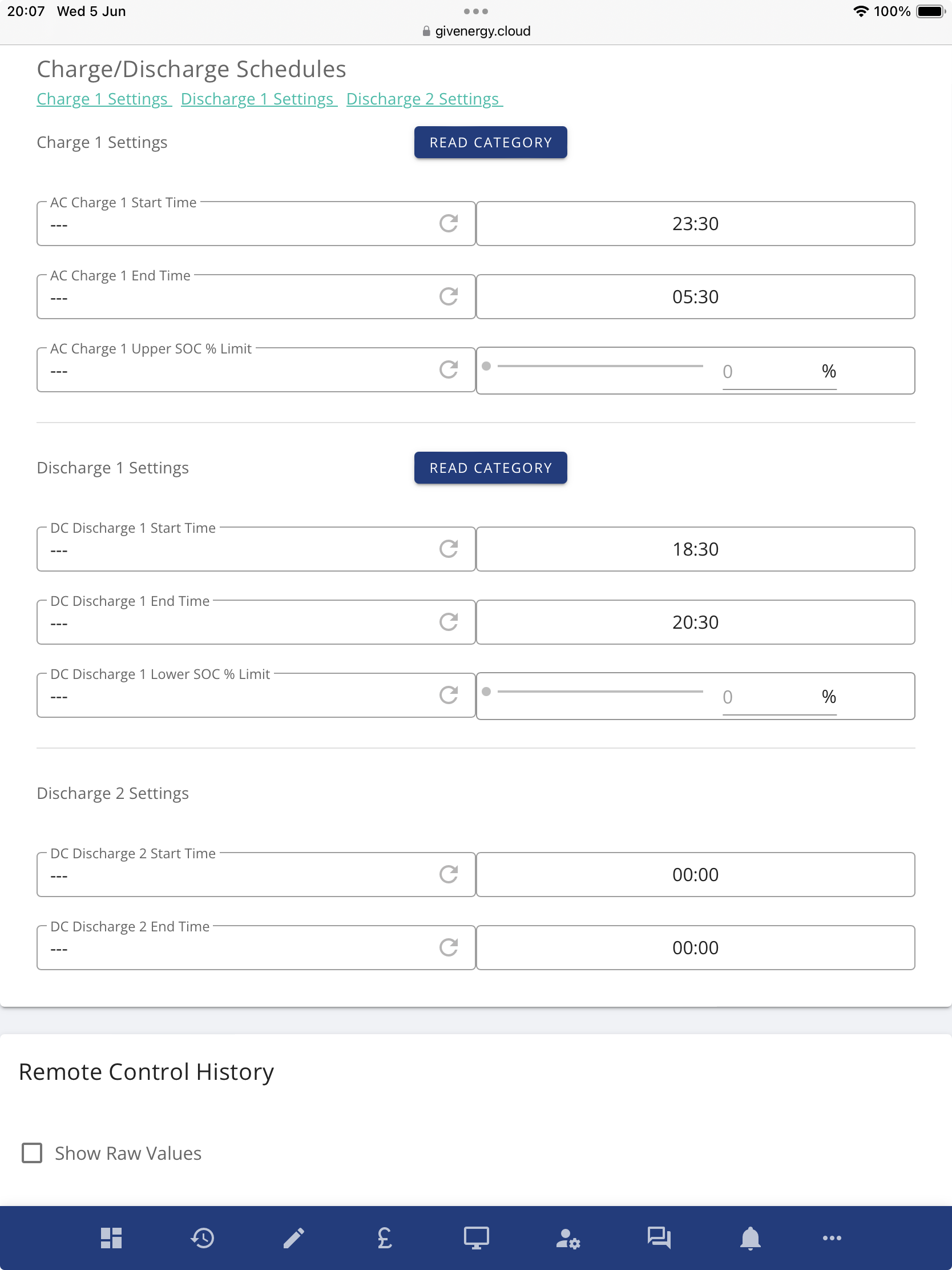
(The thing that had jumped out at me was that timed-discharge was showing a different time period than timed-export, whereas previously both modes were using the same underlying start and end registers.)

S
#9 SimonClarke

My problem is that someone else appears to have turned timed discharge off - just before I go away. Really helpful as it puts extra doubt in my mind. Surely they should at least ask/explain what they are doing to MY system?

D
#10 DD

SimonClarke Yes, I'd be very annoyed if they changed settings on my inverter without telling me and by some means which bypassed the activity log, so that I couldn't even see what they've done.

S
#11 SimonClarke

I asked and they didn't do it...

D
#12 DD

SimonClarke One the remote-control page, what is it showing for 'eco' and 'enable dc discharge'? And does forcing it to refresh the registers change anything ?

S
#13 SimonClarke

Which one is the remote control page? Every time I check either the app or the portal it changes something

V
#14 Vestas

SimonClarke Portal->My Inverter->Remote Control.

Icon is one of the ones at the top right.

Edit - manually refresh (read) each entry as the portal only updates settings if the app or portal set them initially.

S
#16 SimonClarke

Vestas yes that's what I normally do. Not that I've needed to touch it recently as it was fine....

#17 hoggy

I hope they have taken into account old gen 1 otherwise it'll be trying to change a non exist register given they don't have the pause function?

S
#18 SimonClarke

DD ok not looked at the activity log before! Not needed to... I've just told it to do the timed discharge again and I think it says it has accepted it but I don't know now if that should be timed export? Find out in 10 mins

D
#19 DD

SimonClarke I don't know now if that should be timed export?

The changes sent to the inverter should now appear in the activity log. What do those entries say ?

S
#20 SimonClarke

DD it is happily exporting juice. Activity shows I switched discharge on (timed discharge) but not on app or portal

D
#21 DD

SimonClarke I wonder if the problem is that the portal now wants to present timed discharge based on the state of the timed-pause registers, but if your inverter doesn't have those, it just has to display it as 'off'.

Which is a bit disappointing. Does it show timed-export as on or off ?

(I've always been happier looking at the lower-level settings in the remote control page, rather than viewing things through the filter of the higher-level views, which can have a habit of distorting things.)

S
#22 SimonClarke

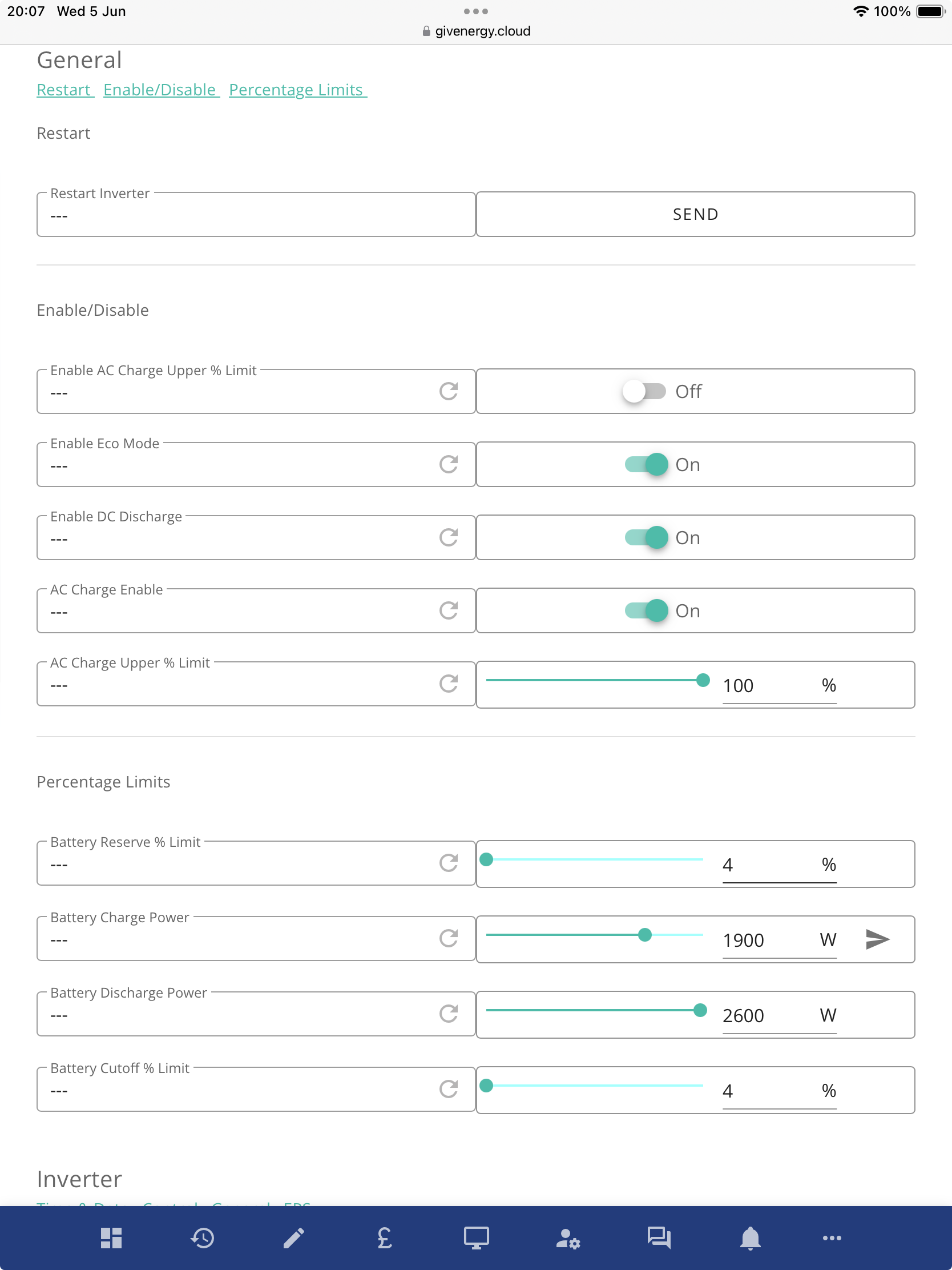
DD ok I’m home now so can look at my iPad. Eco and timed charge show on, timed discharge and timed export both off. This is on the app and portal. It is currently discharging to the grid as it should.


Sorry it didn’t post these in the right order!

S
#23 SimonClarke

Also stopped correctly. Whether Eco or charging works tonight/tomorrow who knows

D
#24 DD

SimonClarke The remote control settings look like everything should be fine. The three flags in the 'enable/disable' section at the top correspond to eco mode, timed charge, and timed export.

S
#25 SimonClarke

The rubikcube app shows timed discharge on!

D
#26 DD

SimonClarke I think it's probably just showing the raw underlying 'enable DC discharge' flag, rather than interpreting a combination of flags as a 'mode'.

G
#27 geoffreycoan

DD My understanding was that the gen-1 with the latest ("fast-response" ?) firmware did change the behaviour of timed-discharge to be like that of more modern systems (ie full export during the timed window, eco mode outside it). Not sure if that firmware provides the timed-pause feature, which might complicate things.

The fast response gen 1 (191/193) firmware has the pause mode: values being disabled/pause charge/pause discharge/pause both
and also the pause slot start and end times

R
#28 Rubikcube

SimonClarke The rubikcube app shows timed discharge on!

Sorry if the terminology is confusing, DD is correct, my app is just showing the status of the flag called "enable DC discharge" on the portal remote control page.

I even consider the name "enable DC discharge" to be misleading. DC is redundant, it could be called "enable battery discharge" or just plain "enable discharge" because the battery is the only thing that can discharge!

But in fact it only causes the battery to discharge (in excess of the home load) during a timed period, so "enable timed discharge" would be a better name.

Unfortunately GE have another section of the portal with confusing use of timed discharge and timed export. The inverter settings page is confusing to me, and it's behaviour is subject to change without notice apparently. Personally I avoid it, and I would recommend everyone to do the same and use the remote control page.

S
#29 SimonClarke

Rubikcube as you say very confusing! It all seems to be working normally despite the settings page saying that timed discharge and export are both off. Normally Eco is on, battery charges to 100% between 23.30 & 5.30, and a timed discharge between 18.30 & 20.30 and that is what happened!

#30 hoggy

I have a feeling that because the portal is now common across Giv, Polar-ESS, some obscure Epever units I can only find in Greece and some long German named one I can't recall off my head - this is some sort of push to get mode/terms commonality across everything.

S
#31 SimonClarke

Be nice if it just worked properly!

D
#32 DD

hoggy this is some sort of push to get mode/terms commonality across everything.

And good that they're at least trying to get behaviour and description of timed-discharge to match each other. I couldn't understand why they weren't fixing the description to match the actual behaviour, and training support staff in what it actually does. I guess they must have been planning this all along.

Just a pity they seem to have a policy of not telling customers about changes, either planned or as they happen.

D
#33 DD

And if they were planning on making this change, they must have been aware that it was wrong - why was it never listed as a "known issue" ?

#34 hoggy

Don't get too comfy though, they've been threatening a new app for 12+ months which may or may not change everything again!

A
#35 Adam-Reynolds

hoggy the logic depends on what FW/HW your setup includes.

It changes from each variation of equipment and the firmware being ran. Typically there was a blanket "use these settings" on the portal to set those values, which concluded with some issues/unexpected outcomes with newer HW and FW in how they use those settings.

But yes, this has been taken into account

S
#36 SimonClarke

Adam-Reynolds might be nice if customers were informed of changes rather than finding out by accident

A
#37 Adam-Reynolds

SimonClarke fully agree - it was a bug for reference.

There's a new "known issues" page in the works which is going to notify/record user issues for this kind of thing.

You'll shortly be able to see a list of known issues and subscribe to them for updates relating too your particular problem. Communications on what we fix/known issues is something we're looking to improve on!

S
#38 SimonClarke

Well my system is working fine. Eco on, timed charge on, timed discharge on. All working as expected. The app and portal both say the timed discharge and timed export are off. Nothing I do changes anything. Givenergy says there is nothing wrong but are monitoring it. I wouldn’t worry much but i’m now going away. Any ideas?

#39 Wonder Watt

DD We used to use the presets, but switched to individual settings. And our Inverter Timeout errors went down by 80%. The presets are unreliable.

S
#40 SimonClarke

Everything still working as intended - eco on, timed charge and timed discharge - but the app and portal still say timed discharge or timed export both off. The remote shows a timed discharge as on - I think as I’ve only just started looking at the remote. Giv are monitoring….

D
#41 DD

SimonClarke I wouldn't worry too much about it - just a bug in the way the high-level UI components are interpreting the low-level individual settings which are actually controlling your inverter.

S
#42 SimonClarke

DD but still worrying for us amateurs who are going on holiday! Timing!

#43 26Left

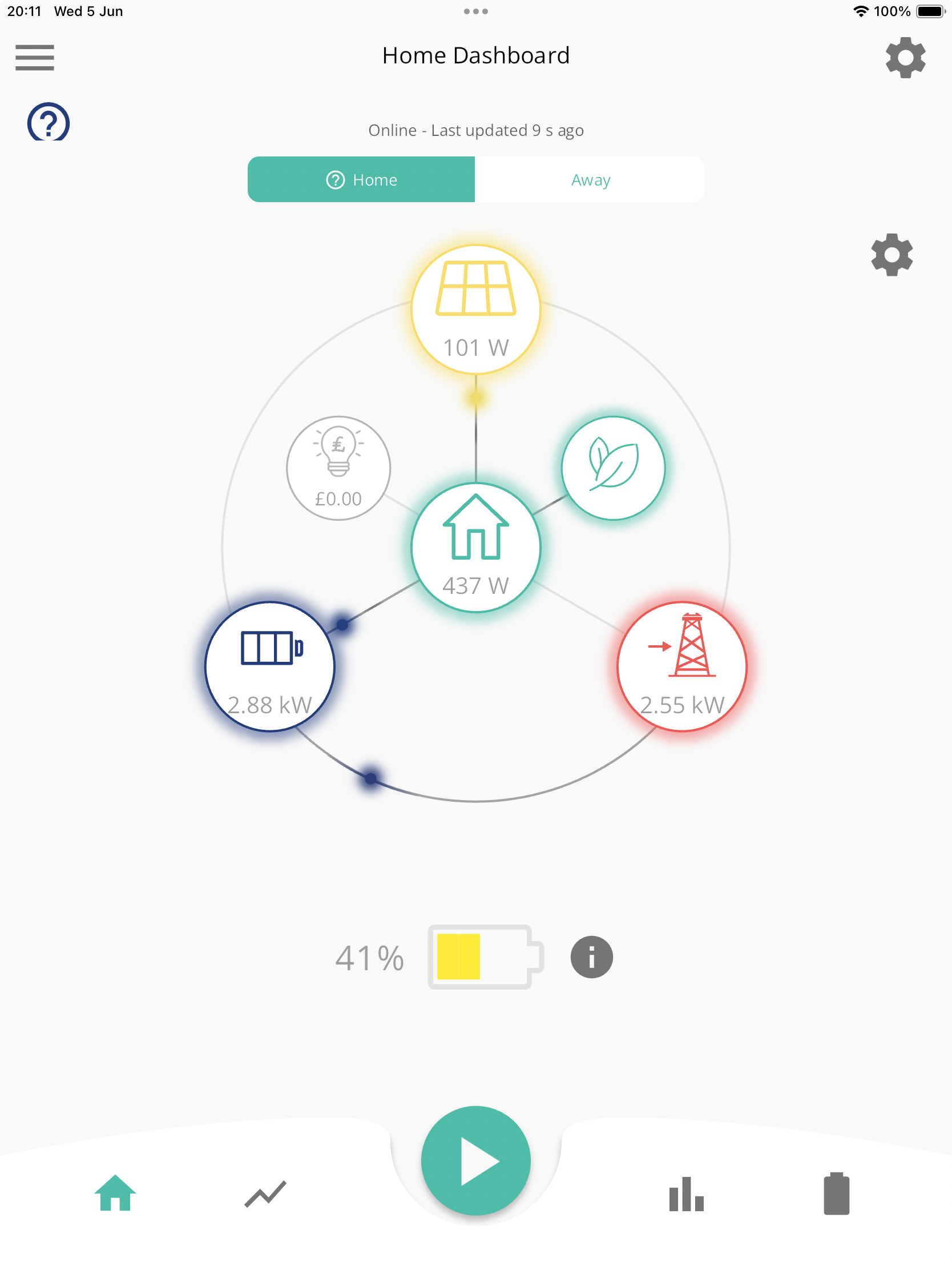
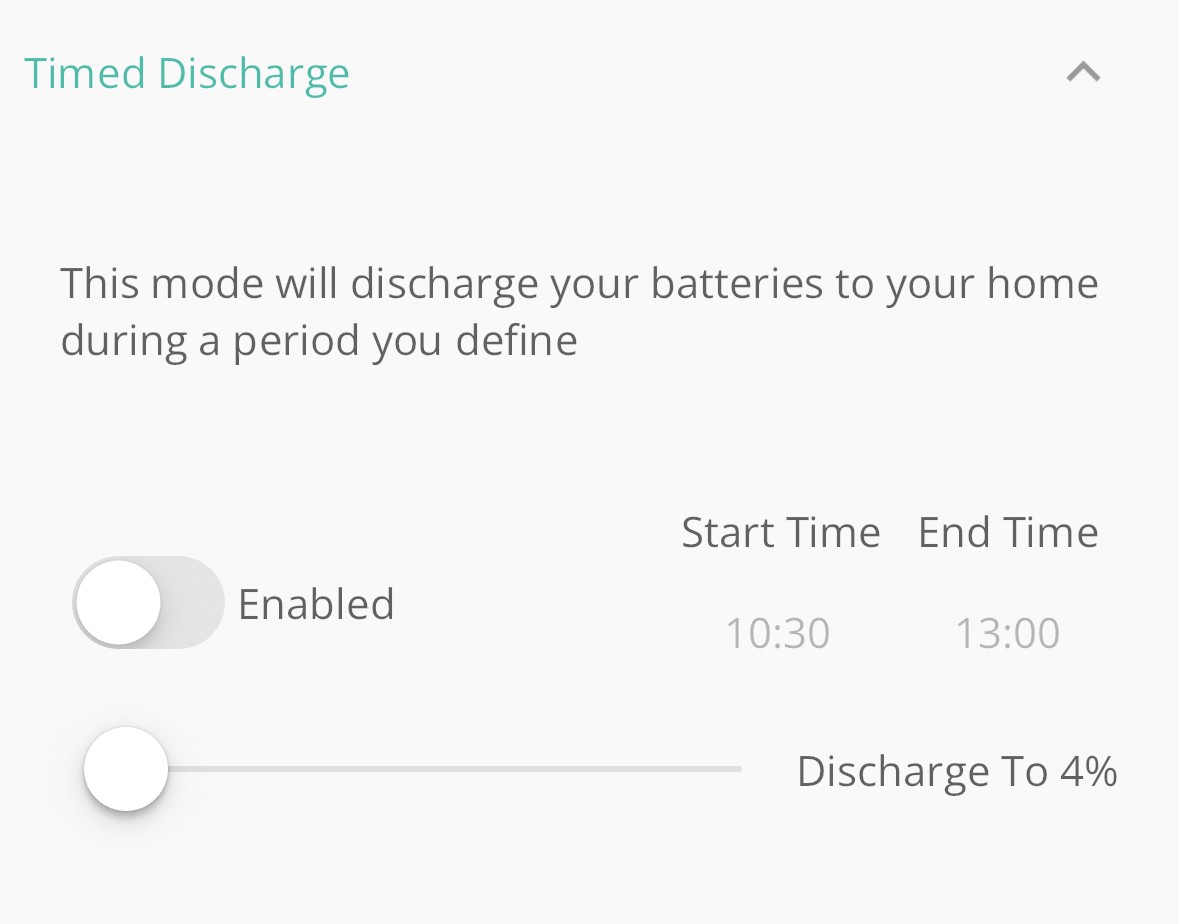
Adam-Reynolds well you’ve created a new bug on the GE app. Now timed discharge doesn’t display as being enabled or not when it is.

My AIO is currently following the settings and discharging during the set period. Despite it showing as not enabled…

Toggling the switch to enabled and saving the settings does nothing - it still shows as not enabled…

S
#44 SimonClarke

26Left yep that’s what I have been saying

#45 Maxwell

Can someone clarify what should happen at the end of a timed discharge period. Specifically whether the system will resort to using the battery normally eg supplying the house etc even if that takes the battery below the discharge threshold set when you define the timed discharge period. Single battery with gen 2 hybrid inverter. All on latest firmware.
The number of different threads on here all relating to this issue makes picking the bones out of this very challenging.
And is this really just an app issue ? The data in the console looks iffy to me as well. See below

#46 hoggy

Maxwell we've tried for ages to get a definitive table together across each FW and Gen but so far I don't believe anyone has nailed anything down 100%? So you may need to elaborate exactly which FW you are on.
As you've found it appears to be determined by inverter type, Gen, FW and/or which moon cycle we are in and what you've had for breakfast....

#47 Maxwell

hoggy
D0.915-A0.915
Well i'm consistant with breakfast. So i can rule out changes there having an impact 😉 Data intergrity in this space is key. And when users can't trust what they are seeing then it is bad news. Oh, it's a meter issue, no it's an app/portal issue or firmware etc And really it should be GE who have the list of what each setup does. They design it.....

A
#48 Adam-Reynolds

26Left I've raised this with the developers and it should be pushed live within a couple of days I've been advised. Thank you for raising it

S
#49 Sadly Broke

26Left Glad it's not just me! I've seen that and also whenever I try and change settings I get either "Inverter offline" or "Inverter timed out". Both notifications happen instantly so can't believe it has a sub 1s timeout. And when I go back to check it appears 9 times out of 10 to have accepted the change. So it just doesn't fill me with confidence.

If the inverter was really offline the system would stop working which it hasn't so I don't believe that either. Also had couple of data loss on the graph. It appears that if its 3 or 4 hours behind at the end of the day and it doesn't update before midnight that data is lost permanently. If it keeps doing that the graphs and reports become a bit meaningless.

V
#50 Vestas

Sadly Broke If the inverter was really offline the system would stop working

It wouldn't stop, it'll simply continue with the settings it has.

D
#51 DD

Sadly Broke I don't know for sure, but I assume "offline" means that the connection from inverter to cloud has broken. The connection has to be initiated by the inverter, since most home broadband connections are set up with a firewall allowing outbound connections only. So the cloud cannot initiate a connection back to the inverter, and has to wait for the inverter to reconnect to it. So that error can be reported instantly. And I'm not sure how the change can be accepted in that case.

The timeout just means that no ack. was received. As you say, the change may still have been accepted.

#52 Maxwell

Adam-Reynolds So, what app versions have the "feature" that needs to be fixed ?

D
#53 DavidVale

Looks like a fix has now been implemented. I am seeing the problem has now been resolved. You do have to question the quality of software testing though for this defect to be released into production and persist for quite a few days.

D
#54 DD

DavidVale You do have to question the quality of software testing though for this defect to be released into production

To be fair, there's a very large number of different firmware revisions out in the wild. It's not so easy to test exhaustively. UI tests in particular are hard to automate.

#55 Maxwell

DavidVale No evidence of a fix on my app. Just enabled discharghe with a 16:00 - 19:00 time. Got an inverter timeout error (app was connected locally to inverter via home wifi). But, then looking at app home dashboard i could see the battery was actively discharging. The app battery discharge setting shows the times i set (previously i had start and sto time set to the same value to stop the rogue discharging). But, as in @26Left image above the app discharge page shows the setting to be disabled (or at least not enabled). IOS app version 3.3.10.5

S
#56 SimonClarke

Mine all seems to be working now. Eco on, timed charge and timed discharge all working and showing correctly in the app etc.

#57 Maxwell

If i disable battery discharge it also disables eco mode is that the expected action ?

D
#58 DD

Maxwell If i disable battery discharge it also disables eco mode is that the expected action ?

Depends which buttons you are pressing to disable battery discharge. Turning off eco mode is one way to disable battery charge, for example.

#59 Maxwell

DD Inverter is running in eco mode. I enable the manual discharge setting sat 16:00-19:00. At some point before the timed discharge period is set to end i disable it by toggeling the timed discharge button on the app. The app reports each change has been successfully written. If yoou then look at the eco setting in the app it shows as disabled even though i haven't manually changed that.

D
#60 DD

Maxwell By "manual discharge" do you mean configuring a timed discharge, or using the quick-settings immediate-discharge button? I assume the former.

Last time I looked at this, it behaved this way. The problem is that 'timed discharge' activates two underlying flags: 'eco mode', and 'enable dc discharge'. Then turning off timed-discharge turns off both flags.

I do use the app to start timed-discharges manually, but I always leave a timed-discharge configured, and only change the start and end times, so I never actually turn it off. (I always do a discharge from 20:00 to 22:30, and if I want to do another one earlier, I just adjust the times. A script sets them back to the evening automatically via the cloud api so I don't need to remember to do it.)

I don't much like (trust) this settings page, and prefer the lower-level remote-control page which gives direc t access to the real flags, or the api.

#61 Maxwell

DD Yep, configuring a timed discharge. And to me the behaviour that the app does when you disable or switch off timed discharge doesn't make sense. Why does it switch of eco mode ? If i have disabled timed discharge i want to revert back to eco mode. As you say the workaround is leaving timed discharge as enabled and tweaking the start and stop times.

D
#62 DD

Maxwell Why does it switch of eco mode ? If i have disabled timed discharge i want to revert back to eco mode.

Remember it's software: it does what you tell it, not what you meant.

Note also the first post in this thread: timed discharge should now do what GE document, not what it has been doing for at least the last 6 months. Are you running the latest version? It may be that you now want timed export, which might not fiddle with the eco flag like it used to.

D
#64 DD

Maxwell that presents them as "modes", whereas you can them concurrently. You can have eco mode set, but still schedule one or more timed exports. Or you can have both timed export and timed discharge.
(But maybe not using the standard UI. Would need to use the remote control page.)

#65 Maxwell

DD Don't take this the wrong way. But, it's a bad day when the vendor is getting told by the users how their equipment works. And i have just tried timed export and again i find that eco mode gets disabled..

D
#66 DD

Maxwell That's interesting... are you definitely running with the latest version of the app? I have Android vsn 3.3.11. (Disappointly, 'what's new' doesn't go beyond 3.3.7, so no help there.)

I think the previous version of the app would have turned off eco mode when selecting timed export. But I've just been testing something myself, and have confirmed that enabling timed export for me does not disable eco mode.

D
#67 DD

More weird behaviour from the app... I have a timed export running (since battery picked up quite a lot of charge today during clipping-avoidance). For other reasons, I reduced the overnight charge target % on the app, and the timed export suddenly stopped.

I repeated several times, and the same result every time: adjusting the overnight charge percentage and submitting resulted in it cancelling the timed export :-(

D
#68 DD

Maxwell And i have just tried timed export and again i find that eco mode gets disabled..

I'm assuming you were doing this on the app.. can you check whether you get the same result if you do it on the web portal ? That should be the same for everyone.

Oh - and what type of inverter do you have? It's possible that the portal turns off eco mode for gen-1 systems (possibly only on older firmware) since export on those does requre that the eco flag s off).

And there does appear to have been a UI bug which means that, for some, it shows eco mode as being off whereas in fact it's actually on. BUt that may have been fixed now ..?

D
#69 DD

Maxwell But, it still lacks the key message about what flags are changed/set when modes like timed discharge vs timed export.

The way I explored it was to look in the activity log on the remote-control page to see what actually got sent to the inverter when various modes were turned on and off. Just lots of experimenting, really...

#70 Maxwell

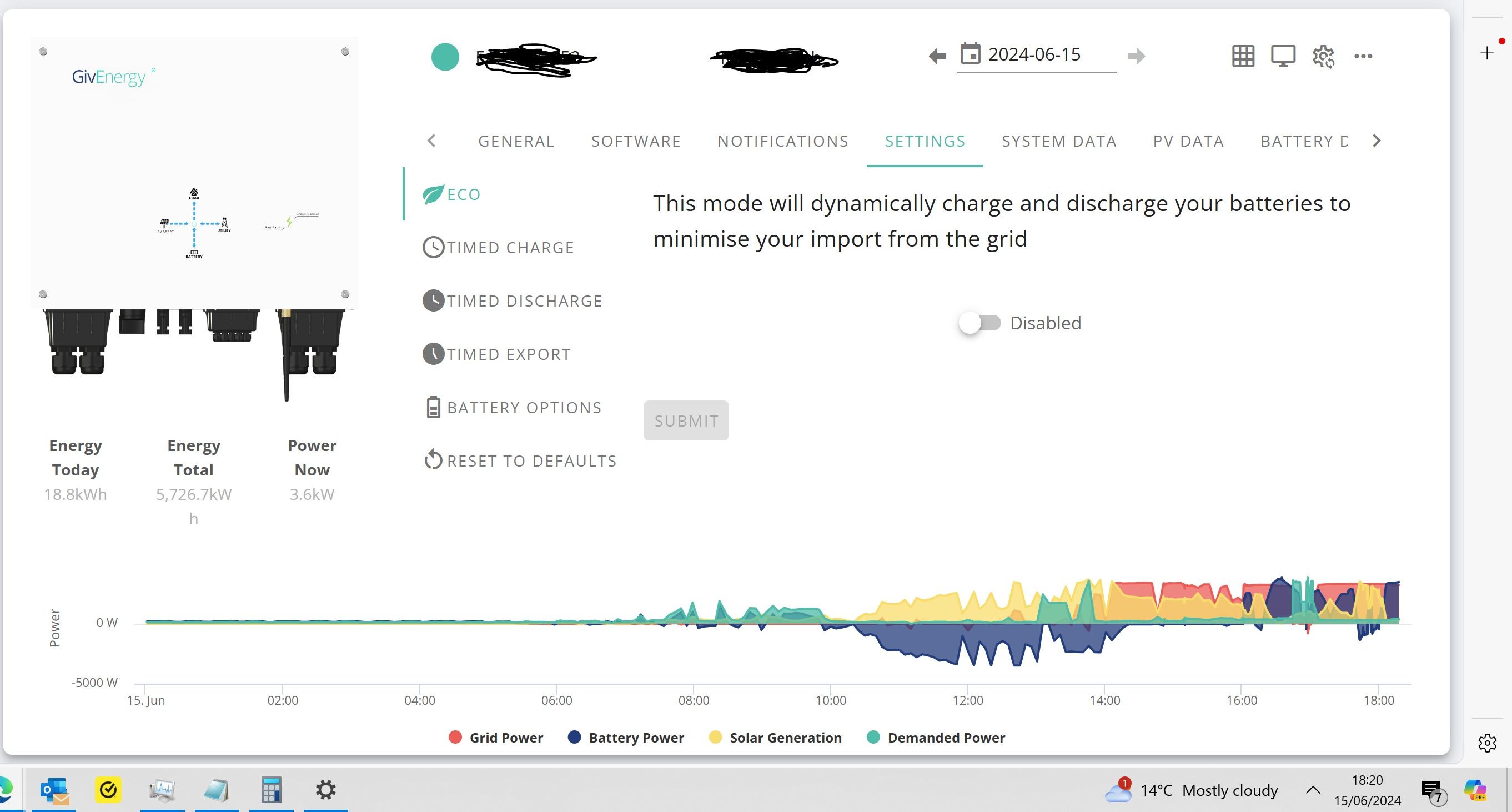
DD Gen 2 hybrid. All firmware up to date (well the portal isn't telling me i need to upgrade anything) and good internet connectivity. Latest ios app v3.3.11.8. And of course the remote control settings don't discriminate between timed discharge and export. Only one setting showing timed discharge is enabled. And agin eco mode disabled.
And here is what the portal shows (i currently have timed export enabled)

#71 Maxwell

And the battery discharge limit i set in timed export has now been reached. And i guess because it has by design cancelled eco mode then my system now imports from the grid to make up the deficit between what my house needs and the low solar output here. It won't let my battery go below the discharge limit set during the timed export. I'm beginning to question my own sanity. Manual intervention to re-enable eco mode again. Right now i can't see any difference in actions between timed discharge vs export in my set up. Both don't work as intuatively as you'd imagine they would and there is no definative table/chart that shows what should or is deigned to happen.

D
#72 DD

Maxwell And the battery discharge limit i set in timed export has now been reached. And i guess because it has by design cancelled eco mode then my system now imports from the grid to make up the deficit between what my house needs and the low solar output here. It won't let my battery go below the discharge limit set during the timed export. I'm beginning to question my own sanity.

For me, it does pause the battery (and so import from the grid) if the timed export reaches the discharge limit. But not because it has turned off eco mode. More that eco mode is suspended during the timed period. As soon as time reaches the end of the timed window, the timed export completes, and it can go back to the default mode, which would be eco mode if that's enabled, or nothing if eco mode is off.

Timed charge is exactly the same: if the battery reaches the charging limit before the end of the charge time period, the battery doesn't go back to eco mode. It pauses until the end of the time window, and only then goes to the default behaviour. Which I think probably is what most people would want.

#73 Maxwell

DD I don't really understand why this is the designed behaviour because in my case it will result in the user importing from the grid at the most expensive time, assuming their is a solar deficit at that time. Must admit i haven't left my system to run to the end of the timed period to see if it automatically switches back to eco as i don't want to be incurring cost and i want to leave enough battery to see me throught the night. Just going to have to suck up the faff of this feature and get manual intervention or get on the automation bandwaggon.

D
#74 DD

Maxwell I don't really understand why this is the designed behaviour because in my case it will result in the user importing from the grid at the most expensive time, assuming their is a solar deficit at that time.

It makes sense from an implementation point of view that there's symmetry with the charging behaviour. And if you've told it not to go below X%, it's hard to know what it ought to do when it does get down to X%. Continuing to discharge the battery seems wrong.

(There's a principle of separating mechanism from policy: they've provided a mechanism which stops the discharge when it reaches X%. Having it switch back to eco mode and continue to discharge would be a policy decision - trying to guess what the user meant, rather than what they said. I find the most useful software to be that which provides a rich set of mechanisms without dictating how they're used - that then allows me to use the provided mechanisms to implement the policies I want.)

J
#75 John_R_H

I haven't read though every post on this thread, so apologies if this duplicates earlier info.
I have an AIO system and for choice use the remote control interface to set charge & discharge schedules.
Tonight I set a discharge period, but it didn't trigger at the set time. I've been caught out before, so I went through re-reading every parameter in remote control. They all all returned the expected values. I had ECO enabled and DC Discharge also showing as enabled. I disabled DC Discharge and re-enabled it and the system leapt to life.
Can anyone reproduce this behaviour?
Another variation of "Don't believe everything you read!"

#76 26Left

John_R_H

Check you're using the right setting - there's now two different modes for getting charge out of the AIO in the app settings (via the cog in the top right hand corner) which I found confusing, as the first one is basically a one way 'Eco mode' that I haven't found a good use for...

  • (1) "Timed Discharge - This mode will trigger your battery to cover your home's electric demand only at times you specify" i.e. Battery to Home at a variable power rate to meet Home demand (nothing to Grid)

vs.

  • (2) "Timed Export - This mode will trigger your battery to discharge at its max power at the times you specify" i.e. Battery to Home and Grid at the max discharge rate - so max rate less Home demand goes to Grid

Note that "max" is as per your settings, under Battery Options, and not the technical max supported by your system.

[Whereas if you use Charge / Discharge Now via the play button / quick settings, that is at the technical maximum rate, and not what you set in the Battery Options...]

I'm guessing that's all clear as mud!

D
#77 DD

26Left basically a one way 'Eco mode' that I haven't found a good use for...

(1) "Timed Discharge - This mode will trigger your battery to cover your home's electric demand only at times you specify" i.e. Battery to Home at a variable power rate to meet Home demand (nothing to Grid)

One use case might be for something like agile, if your battery only has capacity to cover usage during the 4pm-7pm peak rate, so you want to preserve it for that.