I am a little confused by the behaviour of my relatively new inverter. Due to the increasing availability of sunshine, I set a Timed Export yesterday to coincide with the peak period on my Octopus Flux tariff (between 16:00 to 19:00) to try and maximise our export payment. I set the inverter to export the battery with a limit of 25% capacity in the hope that the solar would top up the battery during the following day. However, what I wasn't expecting is that between 04:00 and 05:00 the inverter decided to charge the battery from the grid from 25% to 58%. I am unclear why this happened as I have no other charging or discharging setting in the GE desktop app. Can someone explain please?
Also, I've noticed that the inverter is now exporting the majority of our solar generation with almost nothing going into the battery during the day. This is the first time that I've used the timed export setting, so I am trying to understand more about it. I appreciate that the setting says that "...it will hold the battery's power..." but why does it not allow the battery to be charged during the day and why did it decide to charge the battery in the night?
Chris
Timed Export Settings
chickenlegs unfortunately, timed export is probably not what you want. As a side effect, it turns off the eco flag, and changes a number of things, including prevent solar charging of the battery.
You probably want timed discharge, which is much the same, but leaves eco flag on.
I can't explain the overnight charging, though.
Due to the increasing availability of sunshine, I set a Timed Export yesterday to coincide with the peak period on my Octopus Flux tariff (between 16:00 to 19:00) to try and maximise our export payment.
As mentioned above timed export shouldn't really be used at any time
Time Export = Holds all charge in battery til the time you specify which would disable Eco mode
Timed Discharge = Battery will power home outside of the time you specify and still dump any excess to the grid (discharge limit - home load)
However, what I wasn't expecting is that between 04:00 and 05:00 the inverter decided to charge the battery from the grid from 25% to 58%. I am unclear why this happened as I have no other charging or discharging setting in the GE desktop app
Without knowing your equipment as you didn't state what you are running if you go to the portal via web browser and go to "My Inverter" when it loads at the top right you will see a cogwheel 3 icons past the date selection you can click either "Read all unread registers" or scroll down to the available charge slots and click the button to re-read that time slot, it will look like the reload icon for web browser.
Thank you all for your help.
I have turned on Eco mode and disabled Export and enabled Discharge mode between the peak period.
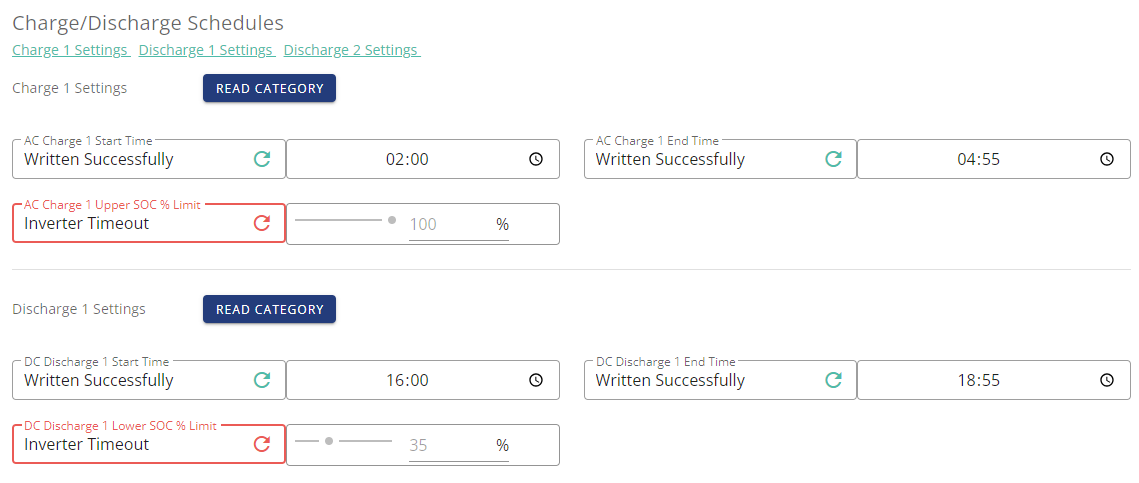
Jellybaby: I have never been brave enough to delve into the "Remote Control" pages. I looked through the entries and there was a Charge/ Discharge schedule set for the 04:00 and 05:00 period. Perhaps it was this that was telling the inverter to charge the battery from the grid? I have removed the start and finish times and set these to 00:00. I hope that's ok. I have checked that my new discharge time period and percentage appears in this schedule - it does. I am very wary of fiddling with this any further! It looks rather scary.
I am running a GE Inverter (GIV-HY3.6) with software version: D0.393-A0.393 with a GE battery (type: 186 Ah | 9.52 kWh | (1 Pack)) and 5.7KWh PV array (type: MEPV 108 HC Icon Black - 410Wp)
chickenlegs I have checked that my new discharge time period and percentage appears in this schedule - it does
A disadvantage of specifying a discharge percentage is that if/when it reaches that, it stops discharging and imports from the grid. During peak rate, that's possibly the last thing you want.
All the settings on the remote control page should be safe to tinker with.
chickenlegs Its not as scary as you looks and as an end user you can't really break anything and there is an option to reset all controls.
That entry for 04-0500 would have been the culprit and it has caught me out before as in the remote control page it said 00:00 and even right at the bottom in the logs it said that it had changed but infact it had not, this was when I was new and one of the chaps that work at GE was able to spot the problem, since then I refresh all the ones I change after reloading the page just for my peace of mind.
It has only happened the once but why wait for it to happen again 🙂
Now you know what to look out for in the future, I am glad I was able to help, let me know if it worked 🙂

@chickenlegs at the risk of confusing you further!
It might be worth you looking at Wonderwatt, which is an online app to manage charge/discharge in an easy user friendly manner.
Feel free to ignore me.😉
Best.
I wonder if I am expecting something that the Inverter software is unable to achieve? I have set the Inverter to Discharge between the Octopus Flux peak period and set the ECO mode to enabled. I was expecting that this would induce an export to the grid during this period, but so far, this has not materialised. Admittedly, I only have one 24 hour period to observe, but the inverter doesn't seem to be exporting to the grid when I have asked it to. The data shows that the battery exported 0.39kWh between 16:00 and 19:00 with a battery percentage being pretty even at approx. 90% during that period. Is this right or should I expect a greater amount of grid export and a lower battery % at the end of the peak period?
I use timed discharge between 1830 and 20.30 to export flat out. Eco on and stays on . 5kw gen 1 running D0.191-A0.193. Been doing it for about a month or so. No issues except it all gets a bit hot.

chickenlegs
Have you got discharge set to 4% (minimum), or whatever your requirement?
chickenlegs I am running a GE Inverter (GIV-HY3.6) with software version: D0.393-A0.393
I think that's a beta software ? (I think inverters might get supplied with that version? I have a vague recollection that mine came with that one ?)
I'm a little surprised you've not been offered an update to the latest. (There's a 309 listed in the firmware list, but my upgrade only a week ago only went to 307.)
chickenlegs I have set the Inverter to Discharge between the Octopus Flux peak period and set the ECO mode to enabled.
Which software do you use to do that ? Android has a different interface from the web portal. I've not seen the iOS one, but it might be similar to the web portal.
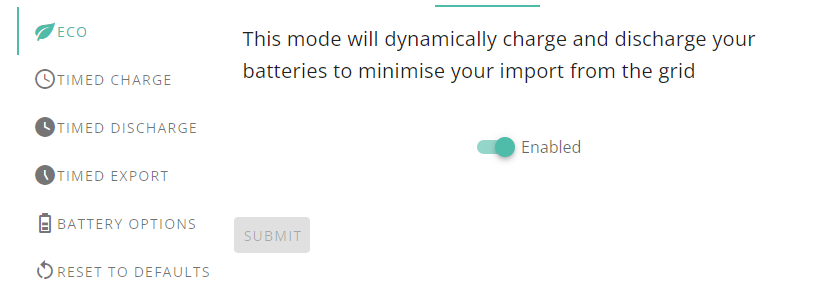
The software presents the behaviour as one of three "modes" - eco, timed-discharge, timed-export. Selecting eco mode could turn timed-discharge mode off again. (But it might not - it's a very weird interface / way of presenting things.)
I've just switched to Flux and I've tried to set my charge and discharge times. I think that the times are correct but the % field is being a bit odd.
L139110 the % field is being a bit odd.
That may not be supported on all model/firmwares. What model of inverter do you have ?
A few answers to your posts:
- I have the discharge set to a min. of 25% (no science associated with this figure, it just sounded sensible to me)
- The inverter software was updated on 2024-05-29 10:41:52 to D0.393-A0.393.
- I am using the interface on givenergy.cloud on a Mac, not on an iOS device. I have set the discharge on the MyInverter pages on that web interface
- The Timed Discharge does not turn off ECO mode in my experience, but as others have identified, it is switched off under Time Export
Chris
Oh... that's a bit odd - just looking at the portal's view of my system, it's currently showing both eco and timed-export on. (Which, historically, has been an invalid combination.)
Timed-discharge is off (with greyed-out times of 2200 to 0700, which aren't times I've ever configured, AFAIK).
I tried turning on timed-discharge, and now it seems to be showing all three enabled. Timed-discharge and timed-export are showing different time windows, but they're both called 'slot 1'.
Argh! They seem to have taken over the paused-time slot for the timed-discharge. What the hell are they playing at ????? The grey-ed out times of 2200-0700 are (the reverse of) what I had configured as the pause time.
- oh, no, what they seem to have done is implemented the documented behaviour of timed-discharge - it is (effectively) eco mode off outside the time window, eco-mode on inside the time window. Implemented as a timed-pause-discharge. See also https://community.givenergy.cloud/d/4569-givenergy-messing-with-timed-pause-timed-discharge-settings
DD GIV-HY3.6
L139110 It did not discharge or charge at the listen times.
L139110 Software version: D0.449-A0.449
L139110 Do I need to have this turned off? 
L139110 No, you want eco on - that's the flag that's in force most of the time (outside any charge/export windows), and controls whether the battery can charge from solar, and discharge to cover any consumption.
In addition, you want timed-charge enabled, to allow the overnight charge slot to take effect, and timed-export set to discharge during the DC Discharge slot you have configured.
The interface is a little weird - after turning on timed export, you might want to go back and check that eco is still on. I think on one of my experiments, turning eco mode off and on again seemed to turn off timed export.
I have sent a question to GivEnergy to ask why I don't see any specific battery discharge during the period that I've set. I will let you know if/ when they respond.
DD I've got these all turned on and I'm getting the same 'inverter timeout' message on the battery % level.

I have had to turn eco off to enable the discharge to the grid between 1600 and 1900. Otherwise the battery wasn't discharging to grid. Not sure what is happening! Is there a YouTube tutorial for newbies using givenergy on what settings to use on Octopus flux?
Lynn what inverter model/firmware do you have ? On the oldest systems, you do need to turn eco off for export to work
We only got the system in April.
2 x 5.2 batteries. Not sure what the inverter is. All givenergy.
It was originally set to eco dynamically and we are with Octopus flux tariff. Saw it wasn't sending to grid between 1600 and 1900 so read community and saw should be discharge not export but it didn't export to grid. Battery stayed charged. Changed it to export and seems to have exported to grid at the set time.
Just totally confused as to the discharge versus export as I seem to have gone against advice in community.
Lynn Is there a YouTube tutorial for newbies using givenergy on what settings to use on Octopus flux?
If there was a YouTube tutorial, it would probably be out of date. It seems that the GE app and portal have changed recently in how they work for some systems.
And with GivEnergy, the same setting can do something different depending on the type and age of your inverter. If you were to figure out how yours works and you make a YouTube video to help others, you would probably get loads of comments from people saying you are wrong because their system works differently.
It used to be that you had to turn eco mode off to export. I have an older system (firmware 450/451) and turn eco off to export. My understanding is that newer systems don't need to do this.
I use an app that I wrote myself to run my system on Octopus Flux. You can read about it and download it here
https://givenergymonitor.wixsite.com/tutorials/about
The site has a bit about how I manage Octopus Flux
https://givenergymonitor.wixsite.com/tutorials/tariffs#flux
Thank you. I will have a look at those tomorrow! Just wish more had been explained when the installer set up the app.
But I will persevere and check your links. Thanks again.
Lynn Not sure what the inverter is.
If you go to the web portal, the inverter section should have a "software" page which includes a firmware version.
Thanks!
Inverter Model
GIV-HY3.6
Software Version
D0.307-A0.307
Battery Type
Lithium-ion
Battery Capacity
204 Ah | 10.44 kWh | (2 Packs)
Lynn firmware 307 suggests gen-3 model - same as mine. It shouldn't be necessary to turn off eco mode to export - that flag allows the battery to charge from solar, and discharge to cover house load. When a timed export is configured, that should discharge the battery at fixed power during that time interval, irrespective of consumption. Excess should then go to the grid.
I think I have set all these options incorrectly as seem to be importing more at a cost. I have set export as on but wonder if that is a mistake so will change back to discharge!
For flux what should I be setting for discharge minimum % and what % to charge to? I make sure eco is on. We are not heavy electricity users.
Thank you for any help!
If I reset to default what does it go to???
Lynn For flux what should I be setting for discharge minimum % and what % to charge to?
To take advantage of the peak flux export rate you ideally want to discharge only enough so you can still run your home off the battery for the remainder of the evening and night until you start generating solar the next day. What that % is will depend on your battery size and your home usage. You could try 70% one night then 60% the next night until you find a level that works for you.
It also used to be that if you set a discharge to level and the battery reached that level before the end of the time period then it would stop at that level and any home demand came from grid import. So you had to be careful to start the discharge sufficiently late that this didn’t happen. I don’t know if with the latest changes this behaviour is now different, but I’d assume that it isn’t.
As regards charging the battery overnight, unless it’s going to be a very dull day the next day it’s not worth charging the battery overnight on Flux as the overnight import rate is the same as the daytime export, and after inverter conversion losses you’ll actually lose out slightly by charging overnight
Thank you. That is really helpful. I will do what you suggest. I think I have imported too much overnight. As we are in the far south of the country we do seem to charge up quite quickly so will stop the import.
Again, thank you!
I have received a reply from a 'Third line service desk engineer!' at GivEnergy. His solution to forcing an export during the peak period of Octopus' Flux tariff when Eco is enabled during the day is to manually switch the Eco setting on and off. This is pretty much what others have identified but doesn't sound like much of a solution to me. I am surprised that GE haven't found a way of automating this process through a schedule.
I have updated the firmware on my inverter to D0.309-A0.309. This doesn't appear to have made any difference to how the inverter exports to the grid.
chickenlegs I have received a reply from a 'Third line service desk engineer!' at GivEnergy. His solution to forcing an export during the peak period of Octopus' Flux tariff when Eco is enabled during the day is to manually switch the Eco setting on and off. This is pretty much what others have identified but doesn't sound like much of a solution to me. I am surprised that GE haven't found a way of automating this process through a schedule.
That sounds like nonsense to me. It may have been necessary on gen-1 systems, but on gen-3 it is fully automatable through a schedule. The thing that's missing is being able to choose either power or length of discharge to have it discharge down to a reserve level. Well... they do, but the result of reaching that reserve is to pause the battery, importing to cover consumption. That's typicaly not what people want.
I think most people would prefer that a timed export meant "start at time X, and run until either time Y, or the battery gets down to level Z. Of course, then you have to address the question of what to do if the sun comes up and charges the battery back up above Z - do you resume the timed discharge? ie was it cancelled, or merely suspended, when the second criterion was met ? You can never choose one design that keeps everyone happy.
The chap from GE indicated that they, or at least their software engineers, are aware that customers would like the export, discharge, Eco scheduling to be better. As a help desk person, he wasn't able to say when that might be.
I posted a reply to a related thread m"100% Battery discharging to grid Why? by GivItToMe: https://community-beta.givenergy.cloud/t/100-battery-discharging-to-grid-why/1642/15?u=clivep
Since then I have been able to achieve my aim of forcing a timed export without disabling Ecomode or Timed Charge. I am still not sure whether Giv Support modified my settings (GivEnergy 6KW AIO plus GivEnergy Hybrid 5kw inverter Gen3 and Gateway installed early May) as they have not replied since. However a Timed Discharge, described as "discharge to your home" in fact discharges to home and also grid if charge is available as surplus and the lower limit has not been reached ie precisely what I thought Timed Export would do! Ecomode is not disabled and therefore I achieve all my needs (I am on Outgoing Octopus) which is to charge the battery overnight, use Ecomode through the day and then discharge the battery to 6% by 11.30 when the cheaper tariff kicks in. Next morning Ecomode automatically takes over.

ClivePorter So, i have a gen 2 inverter and all the firmware is on it's latest (well the portal doesn't show i'm not). But, from my limited experience of timed discharge vs timed export i find the following observations
- i sometimes get an errror message when using the ios app 3.3.11.8 that says inverter timeout when you try to enable enable either of these modes and the switch seting in the app shows disabled. But, when you then look in the app home page you find that the discharge/export operation is in full swing.
- If i set either of these modes (getting the successful confirmation message) and then subsequently disable them, all using the app, eco mode becomes disabled.
And i can't find anything that tells me this is the expected operation. But, it is clear there are many threads on here all having similar issues and no one really has a definative answer to this. Not even the vendor.
https://givenergy.co.uk/givenergy-eco-mode-other-battery-charging-settings-explained/
Since my original post, I seem to have achieved what I set out to do, namely force a battery export during the Octopus Flux peak period and keep Eco mode on at the same time. I have set Eco to 'enabled', Timed Discharge is 'enabled' and scheduled between 16:00 and 19:00, and Timed Export is also set to 'enabled' and scheduled for the same time. With timed discharge enabled, Eco stays on and I get a forced export to the grid when I have requested it.
I am very pleased with the setup and can now benefit from a little bit more money from the peak rate.
chickenlegs And the eco functionality works correctly for the rest of the day ? Because with that configuration, I think battery discharge would be disabled on my inverter outside of 1600 to 1900 (if I understand correctly what those settings map to, but that's still work in progress).
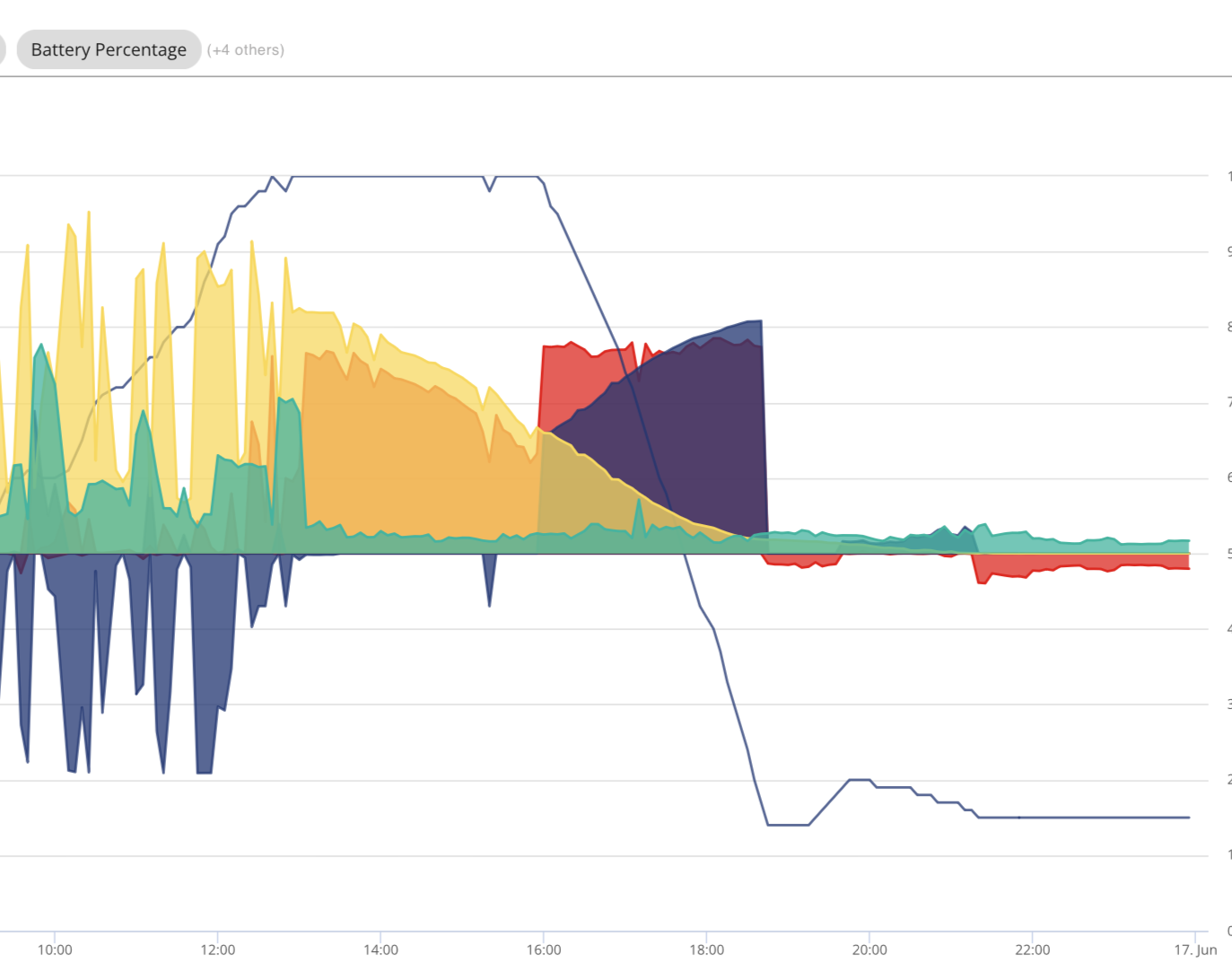
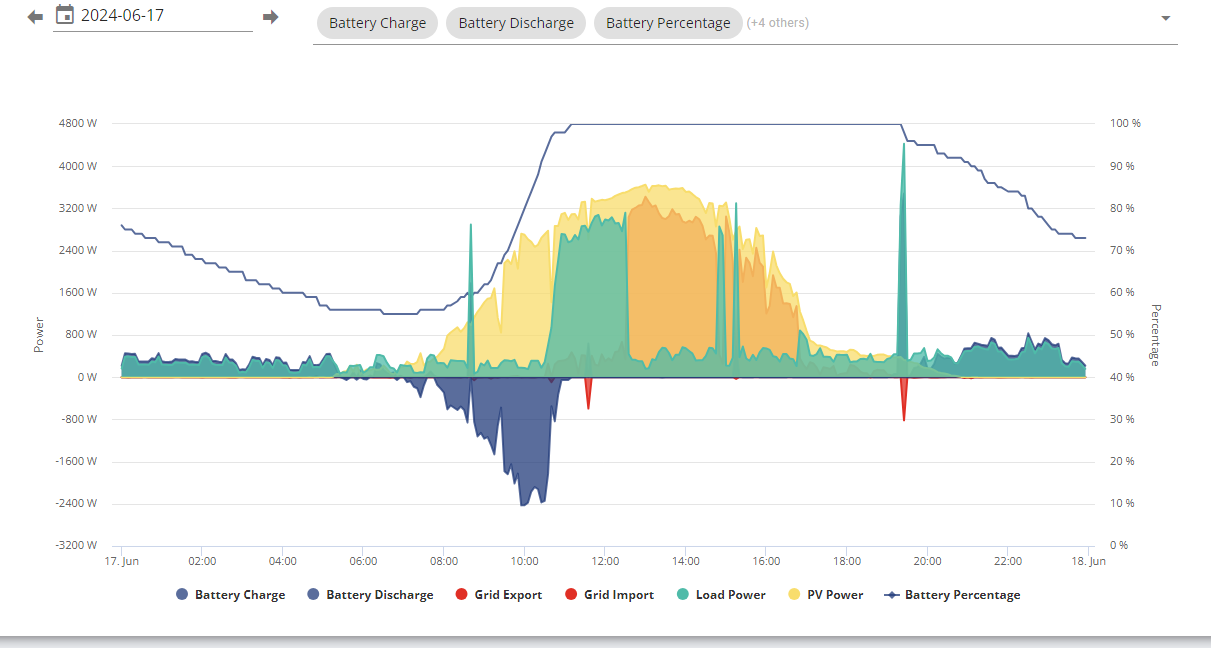
DD - well as far as I can see, yes. The battery fluctuates for the whole day, providing power to our home when needed and is charged during the day via our solar panels. It exports as I was hoping in the evening and sits at c.15% until the sun comes up and charges it back to c.100%. In addition, when we have lots of solar, we export to the grid during the day too which doesn't affect the capacity of the battery. I'm not sure if this is a complete fluke and it will revert to not exporting, or Eco suddenly switches off, but at the moment, it seems to be ok. 
chickenlegs interesting.. the only bit of the chart that actually shows battery discharge to cover demand is around 8pm, when the SoC bounced up a bit after the export. (I assume you have a battery reserve set to 15% ?)
The export during the day was because the battery was full, so it had nowhere else to send the power.
- looks like it hit your 15% discharge limit a little before 7pm, which meant it had to start importing to cover house load ?

chickenlegs Just done some testing here and i find the following (start in eco mode).
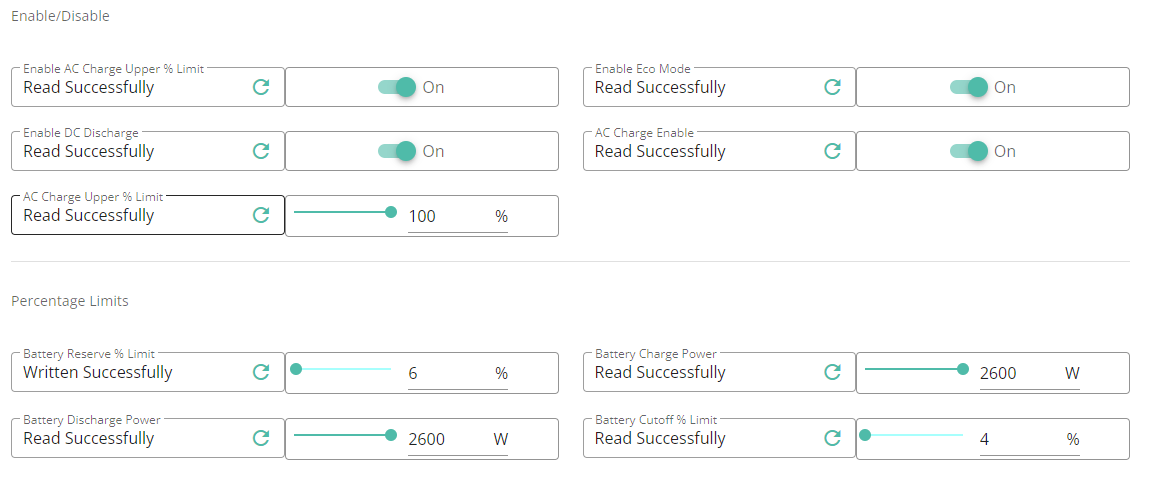
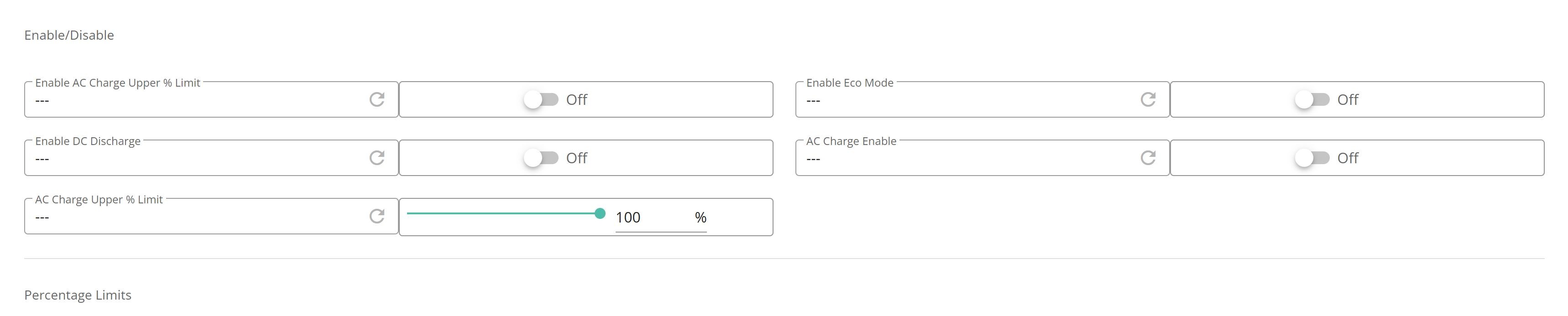
1.Enable timed discharge in the app with whatever start and stop times you want and in the remote control inverter page in the portal you can see both eco mode and enable dc discharge is enabled.
2.Disable timed discharge in the app. And in the inverter remote control page i see both eco mode and dc discharge are disabled.
3.At step 1 instread of enableing timed discharge i enable timed export. I can see in the portal inverter remote control page that enable dc discharge is enabled but eco mode is disabled.
- Both the timed discharge and timed export controls in the app act on the single enable dc discharge control in the inverter remote control page.
5 If i set the enable dc discharge control in the inverter remote control page the timed discharge setting in the app is shown as enabled. But the timed export setting in the app is not enabled. - Setting an unsetting the enable dc discharge control in the inverter remote control page leaves the eco mode enabled. Which is a different result from trying to set them from the app.
I have been trying to follow this thread as I have app and portal page set to discharge between 4pm and 7pm. Instead it discharges some from solar during the day at cheap rate but fails to discharge anything much in the period I have set.
I thought the discharge from the battery meant it did just that but the battery stays at 100% until it goes down to about 80% in the evening after a sunny day.
Should I be setting export in the portal and ignore discharge for that period?
Thought all this was supposed to be straightforward!
How do you copy a screen from the portal to these pages?
Lynn How do you copy a screen from the portal to these pages?
In firefox, you can right-click and then take-screenshot.
Lynn I have been trying to follow this thread as I have app and portal page set to discharge between 4pm and 7pm. Instead it discharges some from solar during the day at cheap rate but fails to discharge anything much in the period I have set.
I thought the discharge from the battery meant it did just that but the battery stays at 100% until it goes down to about 80% in the evening after a sunny day.
Should I be setting export in the portal and ignore discharge for that period?
I think timed-discharge is (now) probably something that people are rarely likely to want. I can't really think of many use-cases. Perhaps if you have a small battery, and you are on a tariff with an expensive peak rate, which means you don't mind using grid most of the day, but really really don't want to use grid at peak rate. In that case, you might use timed-discharge to mean I only want the battery to run the house during those times.
Most of us probably want timed-export, which tells it to discharge the battery at a fixed rate, such that most of it will end up going to the grid.
You will get some export during the day if solar exceeds consumption and the battery is full - there's nowhere else for the power to go.
You also need to maintain a healthy mistrust of the UI - it seems to have a habit of unsetting flags when you don't expect. Eg, I found that simply changing the target % of the overnight charge causes it to spontaneously clear the timed-export flag. i think turning eco mode off and on again may also have cleared timed-export - I can't remember now. I think part of the problem is that GE views these as "modes", and you select one "mode". Whereas in fact they can all quite happily co-exist.
Thank you. That really helps. I do not like the discharge setting at all. We do not use much energy during the day so yes I accept solar exceeds our use so goes to grid but excess hasn't been going to grid in set times for Flux tariff. Just need to juggle with % as we tend to cook after 7pm so don't want to go too low and not have enough until solar takes over in the morning.
So export setting on now not discharge.
Thank you.
DD I did a screenshot a couple of times but it pasted it as a web address. Weird. So gave up. Also tried saving it as an image but would only save as a Web address.
Maxwell 1.Enable timed discharge in the app with whatever start and stop times you want and in the remote control inverter page in the portal you can see both eco mode and enable dc discharge is enabled.
Oh.... That's certainly the old behaviour (before the recent changes), but I don't think that's what I see now... I don't think "timed discharge" enables "enable dc discharge".
Unfortunately, the log on my remote-control page isn't working, making it a little awkward to test.
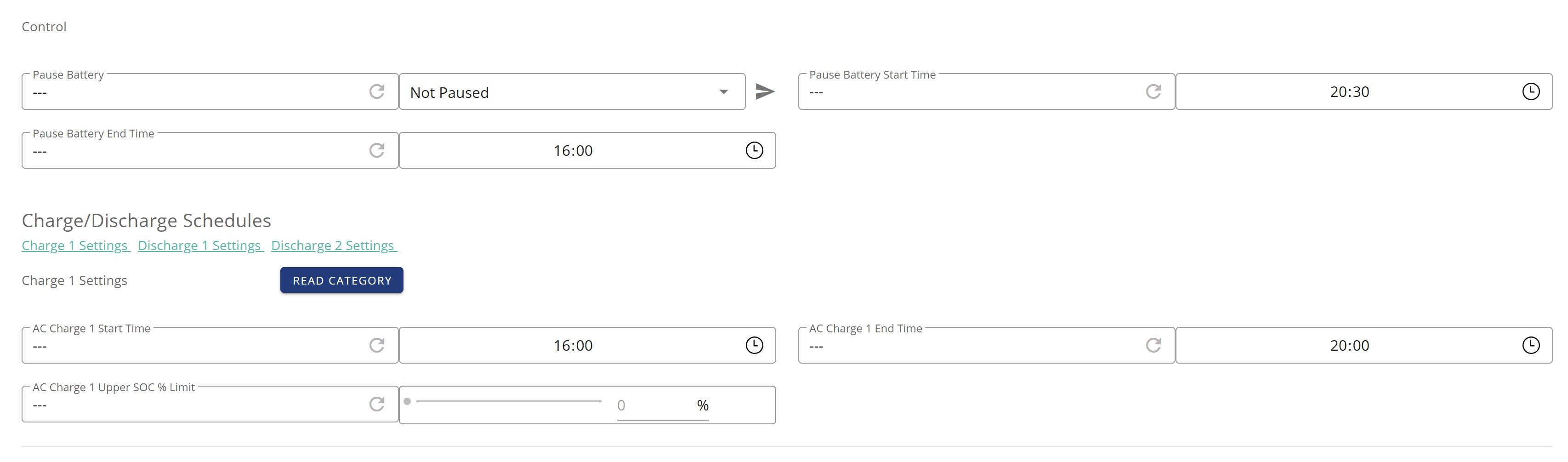
Okay... when I enable timed-discharge, it only modifies pause-start-time, pause-end-time, and pause-mode. It didn't set eco mode (which I had set off first)
I'd expect 'enable-dc-discharge' to be set only for a timed export.
But this is on gen-3 hybrid - it's entirely possible that different inverters do different things. In particular, perhaps systems without the pause timer just implement timed-discharge as dumping to grid.

DD
So, first image shows the view in the portal. This is my default workaround where i keep timed discharge enabled and just change the time period using the app if i am away from the house or the portal if i am at home. 
Second picture shows the time settings i had about 5 mins ago.

Once my timed period ended i then disabled timed discharge in the app. And the last image shows the view in the portal. And you can see that eco mode has been disabled.

Gen 2 hybrid wirh all the firmware up to date and 3.3.11.8 ios app

Lynn Not sure what platform you are using. But if you are using a windows box (i can here the unix fanboys groaning) then you can use the snipping tool to grab an image of part or all of the screen and you can also use that to redact any personal information that is in the shot. You then save that image to disk and then you can use the upload option when you create your post. https://support.microsoft.com/en-gb/windows/use-snipping-tool-to-capture-screenshots-00246869-1843-655f-f220-97299b865f6b
If you are on a mac then there is some instructions linked below to capture images and again save to disk and upload in the post.
https://discussions.apple.com/thread/5908192?sortBy=best
Maxwell And you can see that eco mode has been disabled
I'm not terribly surprised by that bit - the UI has some very odd ideas about how the modes interact with each other. I see it disabling timed-export when I modify the timed-charge config.
The thing I didn't expect was where enabling timed-discharge enabled DC discharge.
Maxwell. Thank you. I'll try that tomorrow. Somehow I still haven't got it right as battery is still discharging down to 14%! Won't make it through the night so will have to charge at cheap rate!

Lynn To get your timed discharge between 16:00-19:00 you could try using the inverter remote control page and making the settings in there. So, as per my first image in my earlier post make sure eco mode and timed dc discharge are enabled. And make sure the battery reserve % limit is set to 4% .upl-image-preview url=https://givenergy-community-forum-uploads.s3.eu-west-2.amazonaws.com/2024-06-19/1718836437-156018-timed-discharge-4jpg.jpg]
But the issue have here is that if your battery reaches the % limit or the end of the discharge time then the system won't use the battery anymore because there is only one register to sore the battery discharge limit. And this limit is used by both eco mode and during timed discharge. I find at this time for year for my nee 40-50% depending on the solar activity as this will be enought to see me through the night withount needing much from the grid. So, with my settings i have to keep a manual eye on the battery discharge limit and when it gets to whatever level i want 40 - 50% i simply set the discharge end time to 16:00 and that stops the timed discharge and eco mode continues. Now today during my timed discharge windoe there was so much excess solar that intially the battery wouldn't discharge as the max available output to the frid was coming from solar. But, when we put some high current devices on eg the oven then the system sorted out the needs and any excess from the battery went to the grid. I also find that you need to refresh the app after you have made any changes in the portal in order to make sure the changes are refelcted in the app. Otherwise the app could show that timed discharge was disabled when in fact it was enabled. But note that if yoy disable timed discharge from the app you should then check the status of eco mode as you may need to re-enable that from the app. That's my experience with my kit. Other kit and experiences may vary..
Maxwell there is only one register to sore the battery discharge limit. And this limit is used by both eco mode and during timed discharge.
May I suggest sticking to the terminology "timed export" since "timed discharge" means something very specific, and different. (I think we're talking export rather than discharge here?) But rather confusingly, the registers are called discharge slots. So "discharge timer" is sufficiently vague - it's just specifically "timed discharge" I'm suggesting we avoid.
There are multiple discharge limits (on some inverters at least). There's one per discharge slot, and there's one overall one that's also used by eco mode. I don't think eco mode should be affected by the per-discharge-slot discharge limit.
I've not experimented much with discharge limits. I'd guess the inverter stops discharging the battery at the higher of the overall limit and the (active) per-slot limit.
Lynn Morning Lynn. I don't know if it might help, but personally I don't bother with percentages limits. I have a 5kw inverter and a 9.5kw battery and am on Flux. I start exporting at 4pm and stop the export at 6.10pm. Depending on how much solar there is at 4pm, I usually find I'm left with around 30% at 6.10pm, which then rises to around 32% if the sun is still shining a bit, before it then starts gently discharging. That's usually enough to see me through the night till solar charging starts in the early morning. You'll need to test out what works for you and your setup. Obviously when the days start shortening, you'll need to adjust the timings a bit, but you can just keep an eye on it.
Thank you to all of you! Unfortunately the % of battery went down to 14% and so had to import at cheap rate. When I put a limit on the export the battery reserve changes as well.
Will read last few posts again and go on portal to see what that's showing.
Thanks again.
Lynn When I put a limit on the export the battery reserve changes as well.
Yes, that's arguably a fault of the UI. The way it's presented, it appears to be offering to set the iimit for just the timed-export, but it's not: it's offering to change the overall battery reserve.
I don't tend to use the limit, but if you want to, have a look in the remote-control section, and there you will find the per-discharge-slot limit. See the very bottom of "part 3" (post #5) of https://community.givenergy.cloud/d/3650-understanding-the-settings-on-your-app-and-portal/5

This was my energy when on Monday we had a sunny day and I had set to discharge between 4pm and 7pm. It didn't do what I expected. Yesterday I set it on export instead but it continued to export down to nearly the reserve battery percentage so imported too much this morning.
I will have to read again the posts and settings.
Maybe I should ignore the app and use the remote control settings.
I appreciate the suggestions from everybody but am becoming dispirited that what was sold as an easy system to navigate is nothing of the sort. Perhaps I should reset to the default mode and just have eco mode but that defeats the object of being on the Flux tariff.
Lynn Yesterday I set it on export instead but it continued to export down to nearly the reserve battery percentage
Did it not stop at the expected time, or did it discharge faster than you intended, or did something else go wrong.
so imported too much this morning.
How much do you typically charge up to from the grid overnight ?
Minor observation: if you're on Flux, you may as well pause battery discharge during the cheap rate, and run the house from the grid rather than the battery.

So, tonight i tried setting timed export and set a battery discharge to % (app terminology) of something that was above where my current battery was at. And was in a time that was inside the set start and stop time. So, immediately the battery stopped exporting to the grid. I didn't need any battery for the house as there was enough solar. I then clicked on some high current appliances and the battery did nothing. The system started bringing in from the grid. But as with my original post on timed discharge that isn't the action i would like when during a timed export it reaches the battery reserve i set for that function. But, when i disabled timed exporft at least eco mode remained on.
Now i then disabled timed export and set timed discharge. And looking in the inverter remote control page i could see (even after refreshing the page) that the enable dc discharge button was disabled. And in the app home screen (again refreshed) there was no evidence of export to the grid eben though there was plenty of capacity. So, clealy some changes have been happening behind the scenes sincei first started using these functions. Also, i notice that in the app in timed discharge there is no longer a battery discharge to % which i thought there was originally (or was that a wrong memory).
So, my conclusion is to meet my need i will now have to use timed export with a 4% battery limit and as i did before when originally using timed discharge just manually change the export times whewn my battery gets to the value i want to see me through the rest of the evening.
Maxwell But as with my original post on timed discharge that isn't the action i would like when during a timed export it reaches the battery reserve i set for that function.
As it happens, I do use exactly that functionality: to pause battery discharge at night, I set one of the discharge slots to run with a limit of 100%. This effectively just pauses battery discharge, exactly as I want.
(I could probably also implement it by asking for a timed charge with target % of 4%)
So, clealy some changes have been happening behind the scenes sincei first started using these functions. Also, i notice that in the app in timed discharge there is no longer a battery discharge to % which i thought there was originally (or was that a wrong memory).
Yes, timed discharge is now implemented completely differently. If you ask for timed discharge between 4pm and 7pm, what it actually implements is to use the pause timer to pause battery discharge from 7pm all the way round to 4pm. The net effect is that eco mode effectively only runs from 4pm to 7pm.
There is no battery % involved because there isn't an active forced discharge.

DD Ah your comments about the new timed discharge hit another point i forgot to mention. That for some reason my AC charge times are now set to the same time as my timed export settings. But i guess that is associated with the new way in which timed discharge works.

But it is frustrating that they are making on the fly changes to a production environment without fitst announcing what is going to change. And the name timed discharge dosen't seem to match your description of how this now works..