Gen 1 hybrid new “fast response” firmware

451 comments started 2024-04-23 last 2026-04-04
GivEnergy ProductsHybrid
G
#1 geoffreycoan

Around 26th March GivEnergy support upgraded the firmware on my two Gen 1 hybrid inverters, its been a few weeks now so here’s a brief update on the firmware.

My gen 1’s are manufactured week 37 2022, so are not the ‘old’ Gen 1’s.

The original issue I was seeing was that I couldn’t get the two inverters to discharge reliably at the same time. This was particularly noticeable during the DFS savings events but happened at other times; both inverters would start discharging at 2.6kW then one would reduce the discharge rate, sometimes to 0, sometimes to 1.5kW. Seemed to be random as to which inverter backed off like this. I have no export limit and on sunny days the two inverters would happily pump out max power to the grid, it was just force discharging the issue occurred.

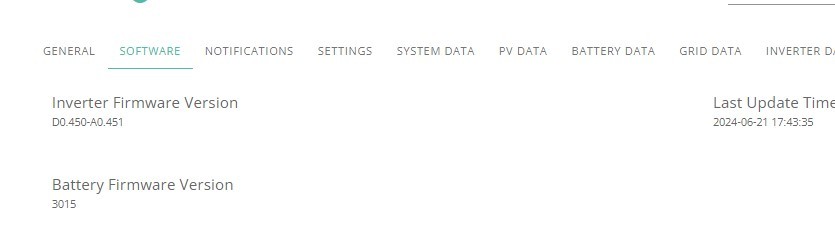
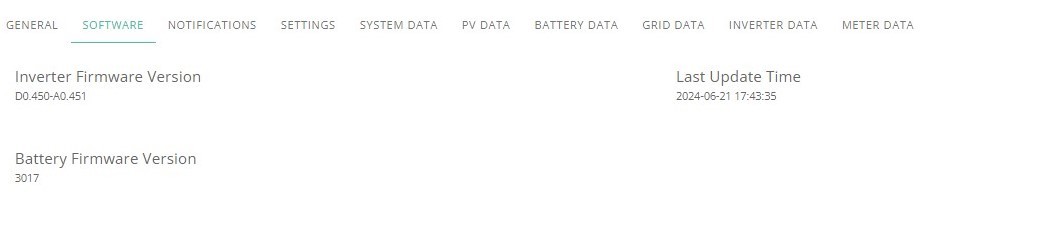
GivEnergy upgraded me to D0.191-A0.193 but this isn’t listed on the Gen 1 firmware list, apparently because its not yet “had a full portal release”.

In terms of fixing the issue In terms of using the firmware it worked great, I was getting consistent discharges from both inverters at full power. In fact it appeared that I was getting slightly higher discharge than the nominal 2.6kW inverter limit, it was discharging at 2.67kW today and I’ve sometimes seen it even higher.

GivEnergy support says that the firmware gives faster reaction speed to grid changes and the ability to output more than the inverter battery demand as it equates for conversion loss before capping the battery.

So all good for a couple of weeks. I then suffered what’s referred to here as the “click of death” https://community.givenergy.cloud/d/2981-battery-failure/10
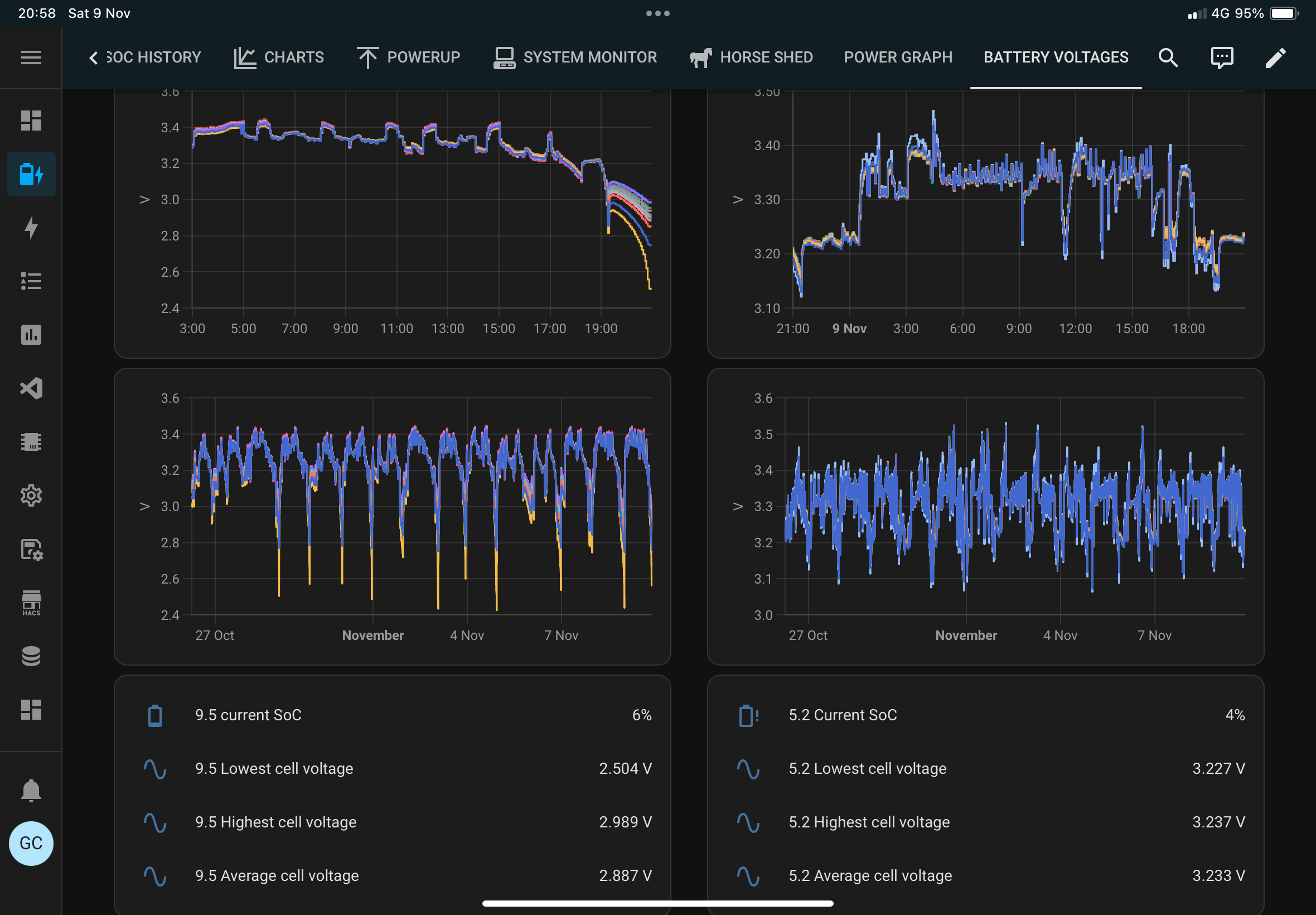
The 9.5 battery that was connected to one of my inverters was turned off. I turned it on again, there was some rapid internal clicking inside the battery, the green status light turns red and the battery turns off again. If I turn the power breaker on the side of the battery off the battery will stay on OK which apparently indicates a problem with the inverter, likely the battery board.
A GivEnergy engineer is due to come later this week to fix the inverter problem. Has been suggested that “it could have been due to the increased reaction speed of the inverter on this firmware. If the battery board wasn't the strongest the extra demand could have made the component fail”.

Or this could just have been a coincidence 🤷‍♂️
S
#2 SimonClarke

geoffreycoan my gen 1 5kw on the same software seems to be behaving at the moment. Same as you I get more out of it (2.88) and it seems a bit quicker to adjust to changes. I’ve noticed it often drops from 100% to 98% when something switches on and then returns to 100% sun allowing. I didn’t notice this happening before. The reason I had this update was to be able to be on Eco and do both a timed charge (no problem before) and do a timed discharge ( previously turned Eco off when it finished). This now seems to behave, leaving Eco on all the time. The only issue is that if you change anything Eco gets turned off so you have to reenable it again. The inverter also gets hot but not to a problem point apparently. Fingers crossed it doesn’t muller my battery!

T
#3 TimHutchings

Thanks both of you, Geoffrey and Simon for your updates. I have the same late Gen1 5kw inverter as you already know. I've been waiting since last summer for the new firmware to be rolled out officially, but it looks like it never will, unless a request to support is made.
Obviously, faster response times by the inverter is likely to improve efficiency and save a bit of money over the long term, and if exports and imports could be increased slightly from the 2600w Gen1 official limits, that too would save money in both directions longer term.
I'm on Flux again now since mid March and don't have any real problems with the inverter, especially now I have an old android phone set up with Rubikscube inverter app which works well for me.
However, if the new firmware works correctly now with eco being switched back on after exporting, then that is something very worthwhile, and I may not need to use the app.
Think I'll hang on just another week or two, just to see if you encounter any other problems, or what the diagnosis is Geoffrey with your battery and inverter.
Many thanks again lads for your input.

S
#4 SimonClarke

TimHutchings definitely hang on!

V
#5 Vestas

SimonClarke If yours has a problem then you're the third person I know who has had the "fast response" f/w loaded by support and whose inverter has developed a fault within a week or so.....

S
#6 SimonClarke

Vestas no fault I’m just not very trusting! If I was in Tims position I’d hang on and see what if anything happens. Couple of weeks won’t hurt. The inverter swap is to do with the EPS issue but I’m still not sure what’s happening.

K
#7 kram

Is now a good time to try a buy one gen3 get a second free to replace the faulted one?

You then end up with 2 x 3.6kW outputs and firmware is I believe more current for the newer products:

#8 Hook

geoffreycoan doesn’t the gen 2 and gen 3 inverters have the same reaction time as what you now have?

Also didn’t predbat balance the inverters for you previously?

I want the firmware, but I’d be very nervous. I do have a newer gen 1 as well.

G
#9 geoffreycoan

Hook I don't know what the specifics of the 'faster response time' is, only that this firmware is supposed to make it faster. To be honest this wasn't the reason I took the firmware, it was to enable both gen 1's to discharge together as I was seeing that they wouldn't consistently both discharge. Both not discharging when maximising export profit wasn't the end of the world but it was very obvious during the DFS saving sessions that I wasn't getting what I ought to be able to.

Yes predbat can balance the inverters but with the Gen 1's they don't clash. I have been very happy with the pair of gen 1's, they share the house load together and they don't cross-charge unlike the gen 2's and 3's. Together I get 5.2kW of charge and discharge capability which is more than enough.
I'm awaiting to see what the GivEnergy engineer actually does with my failed Gen 1 (he's due Thursday morning). The emails I have say "battery board" so maybe they are replacing that board in the inverter, but other people that have had the click of death have had the whole inverter replaced I believe. And if its being replaced then yes I would definitely be keen on getting a gen 2 or 3 if I can do .... but then I suspect I may get much more cross charging issues.

T
#10 TX200

From memory, the faster response time was a happy accident during the firmware development work.

V
#11 Vestas

Hook The G2/G3 are still orders of magnitude faster than G1 even after the "fast response" f/w is applied.

T
#12 TimI

Faster response times is an interesting one.

V
#13 Vestas

Support seem to be claiming that this firmware doesn't exist, which is interesting.

I'm being told that a "business decision" hasn't been reached yet on this firmware, so I'd take Paul Landregan's video with a very big pinch of salt were I you guys.....

Edit - this is basically all getting referred to Paul Landregan on a case by case basis to give the go-ahead/do it himself. The portal (AFAICT) doesn't have the ability to discriminate on the basis of serial numbers for a specific generation of products and I suspect the "business decision" is in terms of developing that ability. Frankly it doesn't make a lot of sense to put that into the portal for a "one-off" set of upgrades - not to me anyway, but given GE licence the portal it might make sense to extend functionality.

I'm going to upgrade for various reasons - one of which is I rather suspect it might help with overvoltage control.

V
#14 Vestas

Got this installed now.

As said in another thread it has "BMS 3015 support" which I'll monitor to see if it affects the overvoltage some people are experiencing.

Other changes are - faster response, adds a couple of registers, timed demand works now, some PV optimisation for Tigo, adds CRC checks on comms.

T
#15 TimHutchings

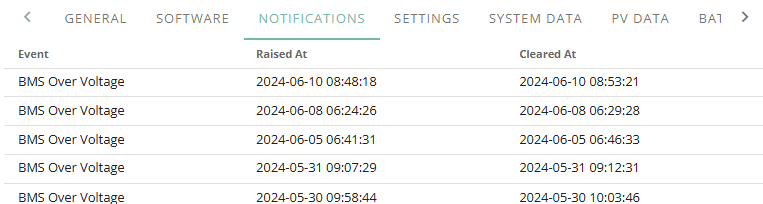
Vestas Keep us up to date with anything you feel gets improved - particularly the faster response and any increase in charge/discharge rate from the 2600w official figures. I also have been getting quite regular BMS overvoltage notifications on 3015, maybe a couple a week. Much appreciated.

V
#16 Vestas

I think I know what's been done to deal with v3015 overvoltage but I'm not 100% yet.

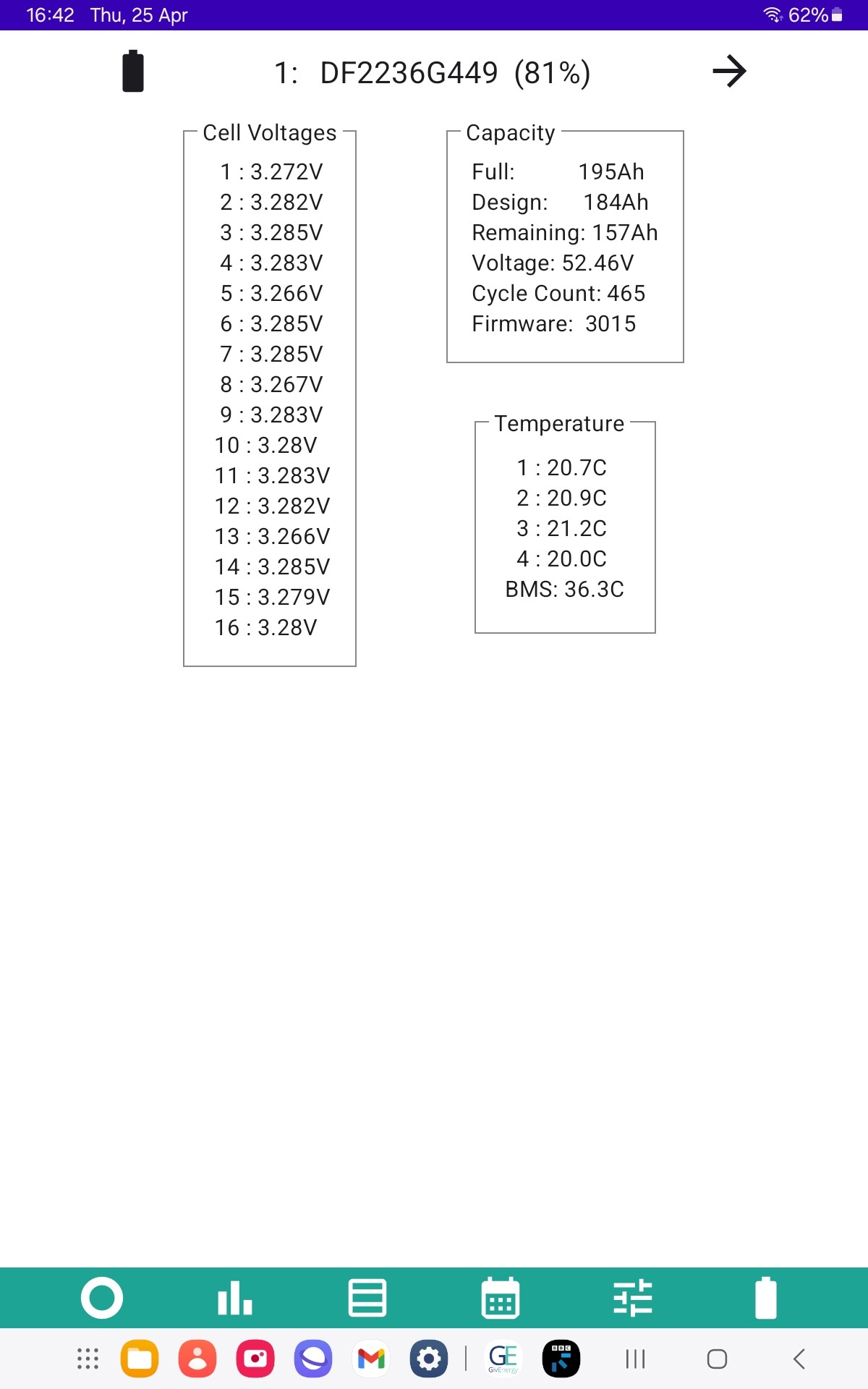
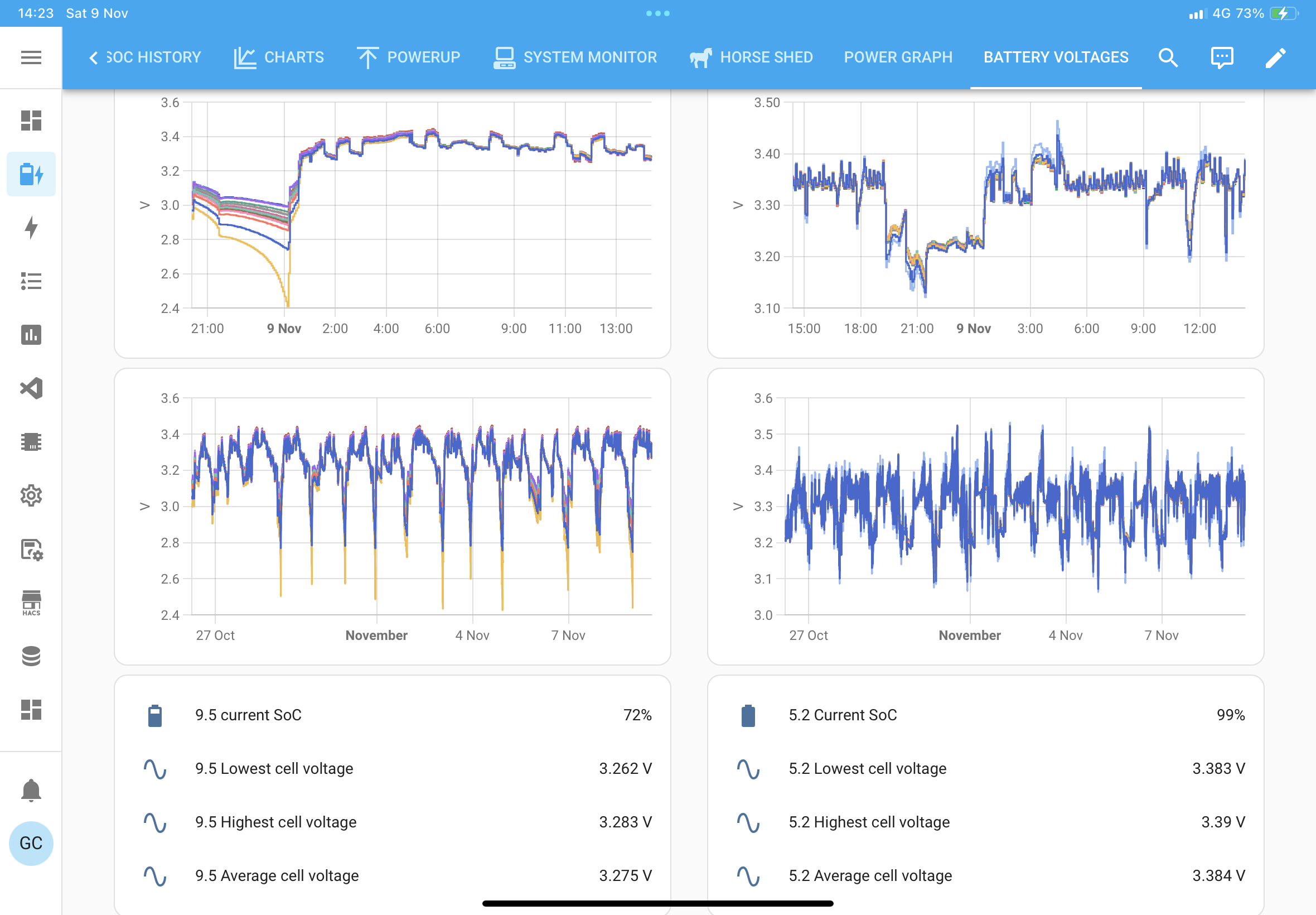
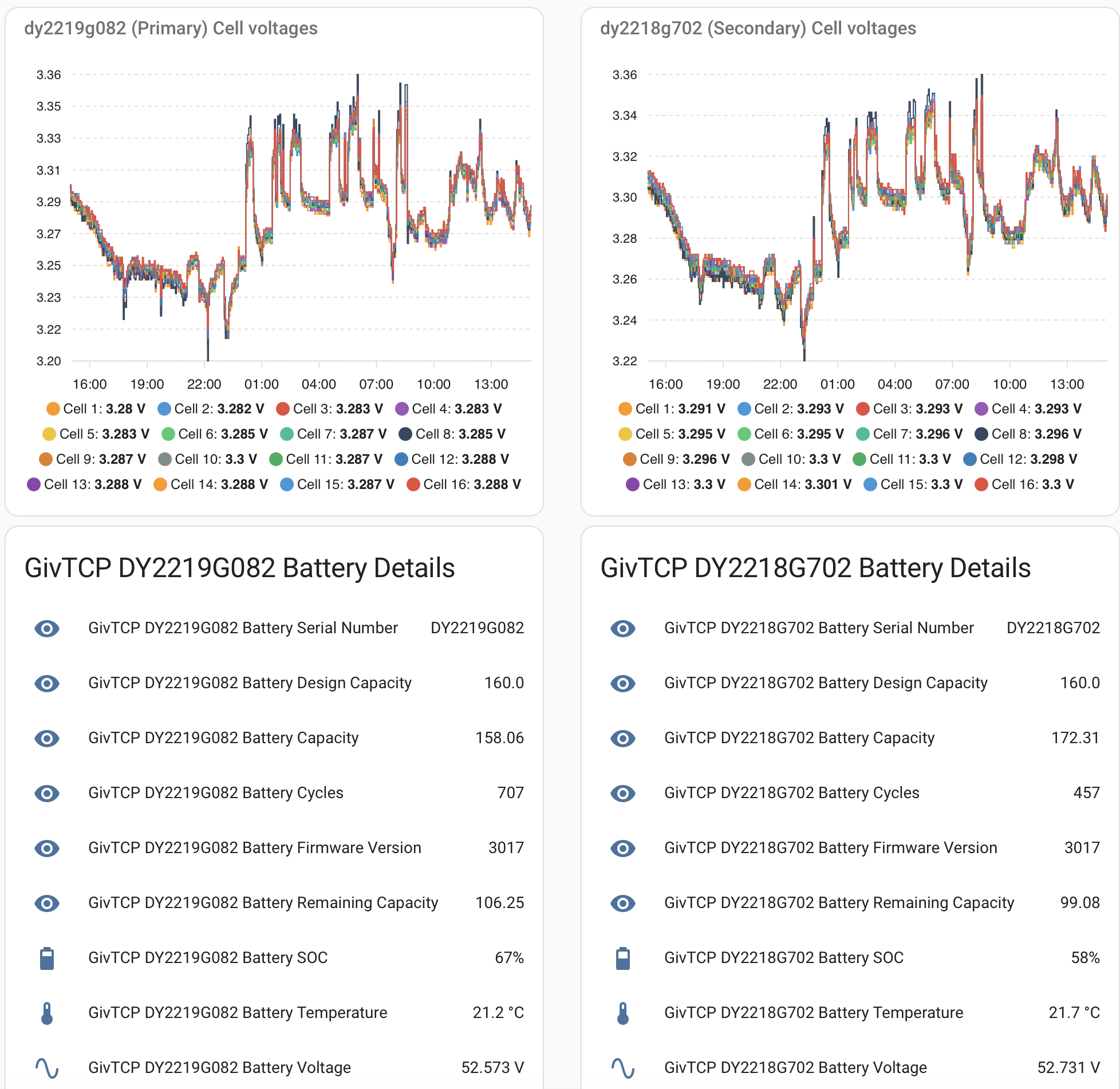
@geoffreycoan What is the "Battery Design Capacity" reporting in GivTCP on your 9.5 battery? Is it by any chance 186Ah? NB not the "Battery Capacity" which should be higher.

T
#17 TimHutchings

Vestas This is my 9.5

G
#18 geoffreycoan

Vestas What is the "Battery Design Capacity" reporting in GivTCP on your 9.5 battery? Is it by any chance 186Ah? NB not the "Battery Capacity" which should be higher.

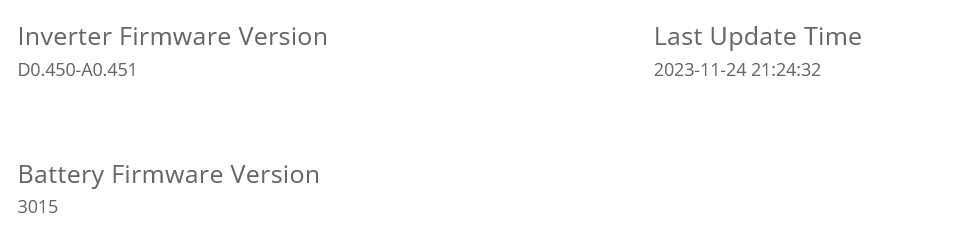
When the inverter first came on on D0450.A451 it was reporting 184.32Ah. It then increased to 186.0Ah, at about a time corresponding to the firmware being updated. Battery capacity is 186.99.

Interestingly on my 5.2kWh battery (80% usable), battery design capacity is 102 and battery capacity 96.85

V
#19 Vestas

geoffreycoan OK that's what I thought they'd done 🙂

On your 5.2 @hoggy noticed that the 80% usable limits seemed to have disappeared, few months back.

Your 9.5 has quite a low capacity given you've only had it a couple of months? I think mine started at 196Ah and is now 189Ah after 6.2MW throughput (on GivTCP) about 10 months after install.

V
#20 Vestas

TimHutchings 2854W discharge to grid according to GivTCP, however I dunno whether that's including losses or what. Need to try it when there's no PV input.

S
#21 SimonClarke

Mine looks like at indicated 97% or 100% according to the app

V
#22 Vestas

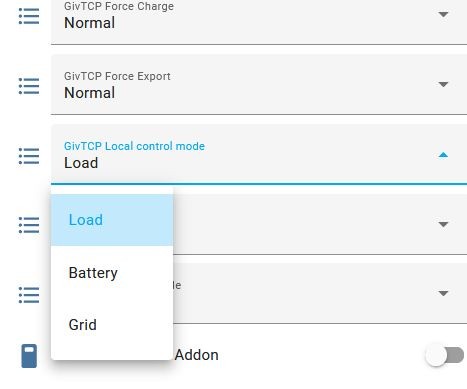
@geoffreycoan Have you played around with these "Local Control Modes" in GivTCP?

Load/Battery/Grid are your choices for anyone wondering.

V
#23 Vestas

Also PV input graph on HA is noticeably smoother/less jaggy when its cloudy etc which is a function of the faster response time. Weather here has been patchy cloud/sun/rain all day and I can clearly see the difference when the inverter was updated. No idea at all what that'll do for PV generation figures but its an improvement for sure.

I think there's going to have to be two f/w versions because while some inverters can't do fast response, they can still have things like Timed Demand fixed which don't depend on specific build dates. Shouldn't be that hard (assuming dongle has space) to download one file which has both versions and then parse the serial number to see if fast response f/w should be installed. Got to be faster than putting that functionality into the portal.

For the first time I'm actually impressed by a GE f/w update - right enough the rest of them were all battery f/w so its not exactly a high bar 😉

Now watch that statement blow up in my face 😃

#24 Hook

Does predbat have extra functionality with gen 1s with this firmware?

T
#25 TimHutchings

Vestas As long as it's not the inverter blowing up!🤣

V
#26 Vestas

Hook I don't see how it would but I don't currently use it. predbat is charge/hold/discharge/export set when needed so nothing changes there.

V
#27 Vestas

TimHutchings Everything is under a year old so if things go pop then best its now 🙂

G
#28 geoffreycoan

Vestas Have you played around with these "Local Control Modes" in GivTCP?

I don’t see these ? Looking in HA all the controls look to be the same as before 🤷‍♂️
T
#29 TimHutchings

Vestas
If you are getting another 200w per hour import and export, over a 3 hour period, that's 600w over 3 hours. That's around 15p extra on Flux export per day (4-7pm) over 5 odd months in the summer. It would also increase the import amount possible on Flux 2-5am, which is never enough time to fill a 9.5kw battery with a Gen1.

G
#30 geoffreycoan

TimHutchings If you are getting another 200w per hour import and export, over a 3 hour period, that's 600w over 3 hours. That's around 15p extra on Flux export per day (4-7pm) over 5 odd months in the summer. It would also increase the import amount possible on Flux 2-5am, which is never enough time to fill a 9.5kw battery with a Gen1.

My observations are that the firmware only gives an improved discharge rate, not an improved charge rate.

During the battery calibration this morning/afternoon, the discharge peaked at 2.88kW for the first 10 minutes, then settled back to a consistent 2.6kW. Strangely after 7 minutes the discharge rate changed to 0 for 20 seconds, then back on at 2.6kW for another 7 minutes, did the same again for a further 3 times, then discharged solidly for nearly an hour before another string of similar drop-off’s. My GivTCP dat polling cycle is every 20 seconds so maybe GivTCP just fails to collect data and thats why it looks like the rate drops off?
On the charging its been consistenty at 2.4kW with no jumps up or down which rather destroys my GivTCP comms theory 🤷‍♂️

A slight increase is useful.

BTW @TimHutchings , unless it’s going to be a poor solar day the next day there’s no (financial) benefit to charging overnight on Flux. In fact you are loosing money slightly as the night-time import rate is so close to the day-time export rate, and when you add conversion losses you’re better off letting the battery fill from solar. Obviously you need to have enough charge in the battery for the morning but I’m finding I’m already generating more than my house load from 6am.

T
#31 TimHutchings

geoffreycoan Thanks for the information Geoffrey. Maybe I was looking at things a little optimistically, hoping any increase would be in both directions . It appears, by your observations, that any increase may only temporary and short term. Oh well, at least if the firmware improves a faster response to load changes, that's got to be an improvement.
I don't usually fill the battery by importing at night apart from in the depths of winter as solar works out cheaper taking losses into account, but the reason I moved to Cosy in winter was basically because I couldn't fill the battery more than around 75% in the 2-5am slot with the gen1 inverter. It also gave me the opportunity to fill up in the afternoon before the peak rate kicked in at 4pm, especially if the weather had been naff through the morning.
Anyhow, I'll continue to watch with interest any observations made by all who have the new firmware.

G
#32 geoffreycoan

Vestas The battery calibration on the 9.5 has just finished (I left the charge rate on zero all night as it was going to be cheaper to solar charge this morning than grid charge last night).

Battery capacity has just dropped from 186.99 to 182.13Ah at the end of calibration
Battery design capacity remains on 186Ah
Battery remaining capacity 182.02Ah

Geoffrey

S
#33 SimonClarke

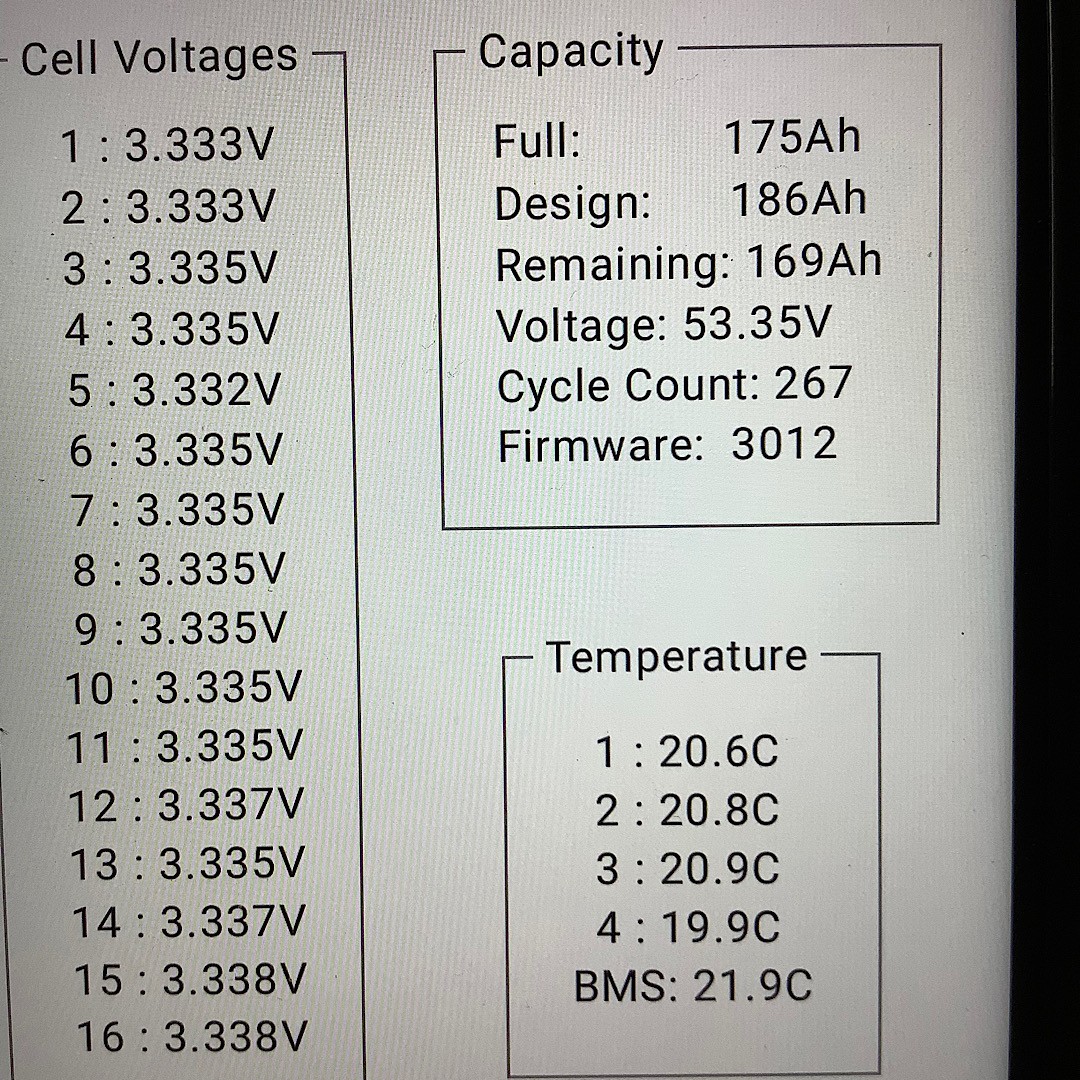
geoffreycoan is this a real amount or just a reading discrepancy? Mine seems even worse Full 175 Design 186 Remaining 169 at 97% again despite the Giv app saying 100%. Is this something I need to look at?

T
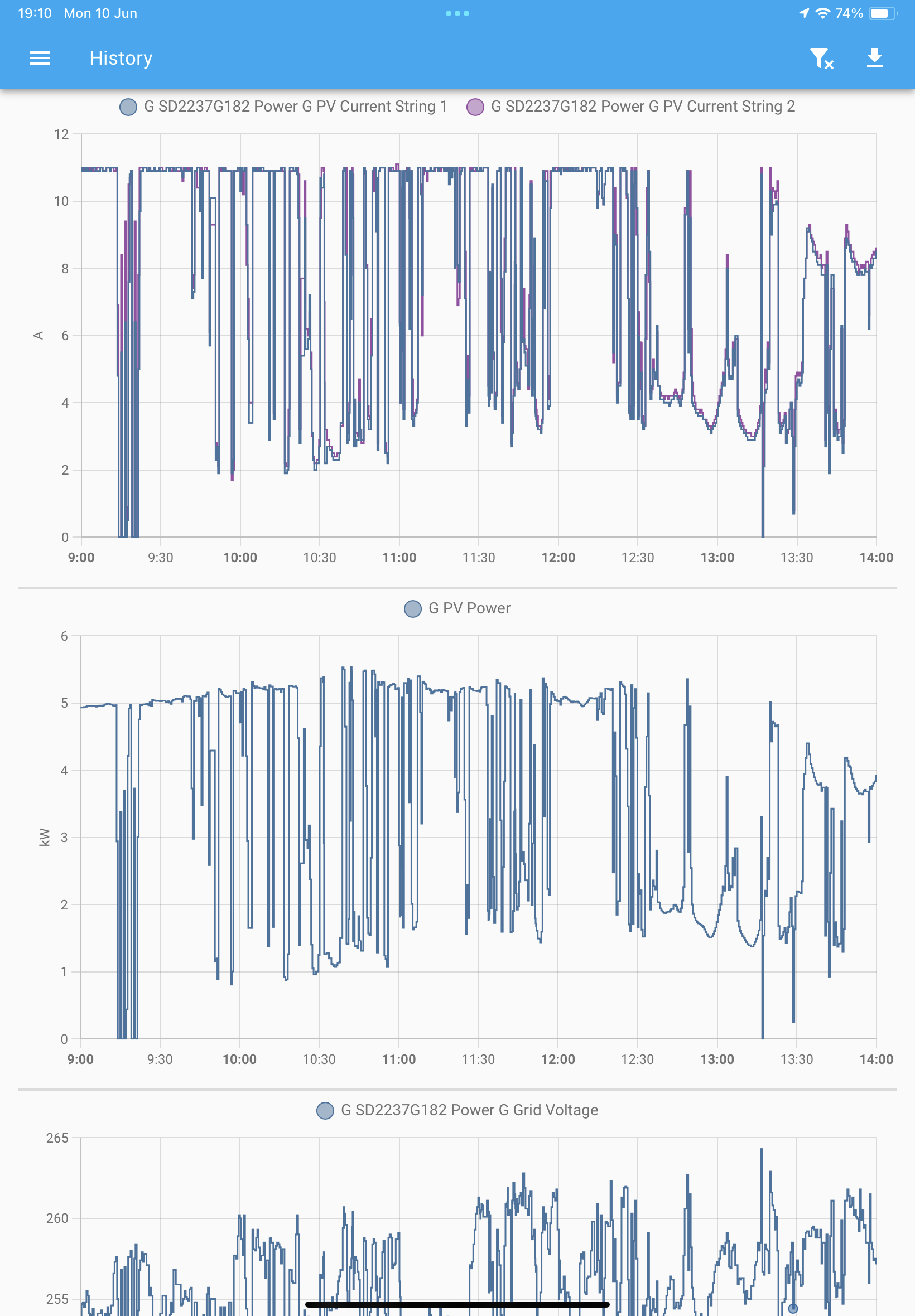
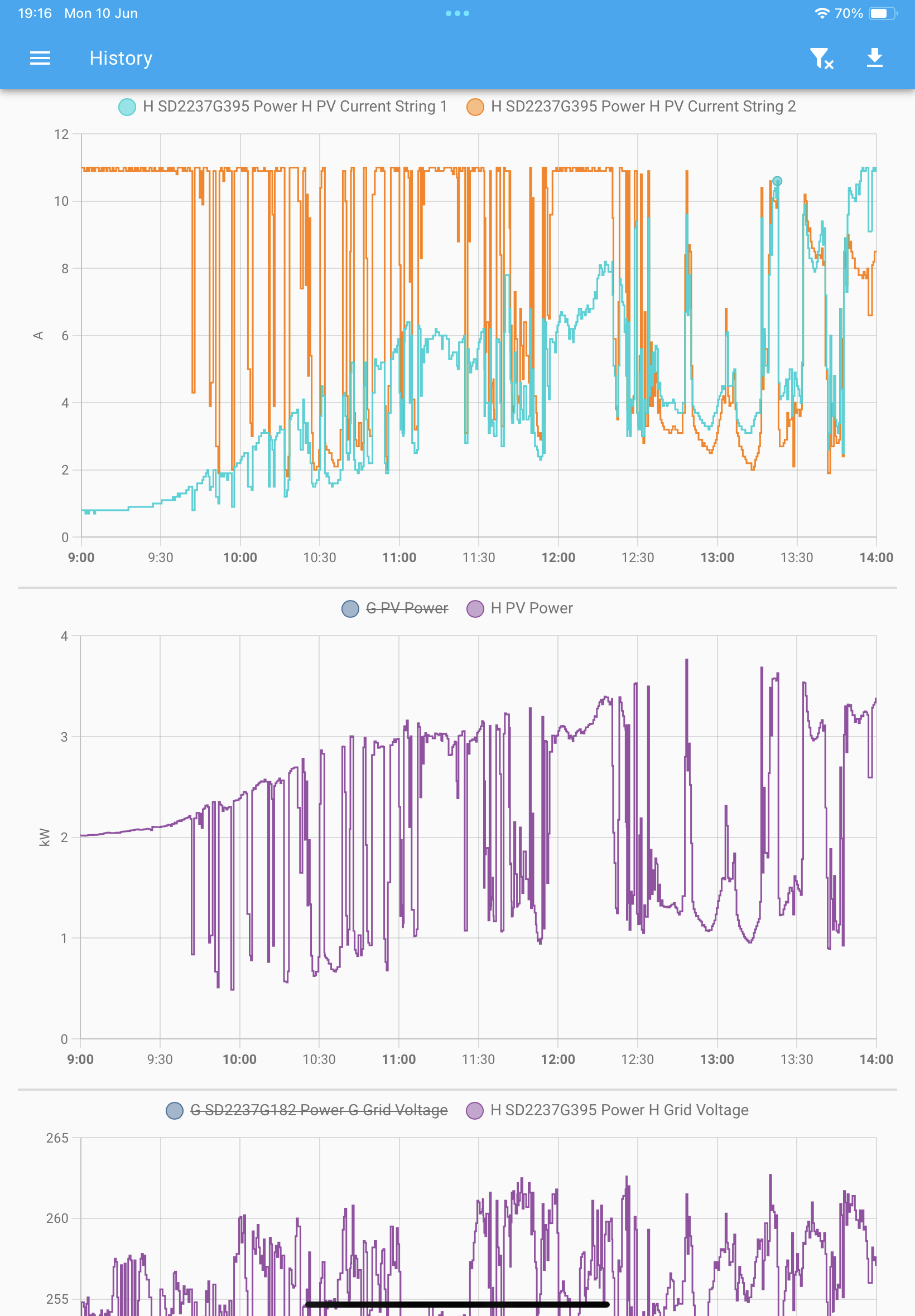
#34 TimHutchings

Interesting how the 9.5 GE battery can differ so much in capacity.
My design capacity is 184Ah, Full capacity is 195Ah, and usually reads 100% SoC on the Giv app at around 187Ah. After fully charging it sometimes stops at 191 or 192Ah, but I've seen it at 195Ah without problems, but occasionally with a BMS overvoltage warning. Only one warning this month filling with solar but 8 in March using Cosy and the grid to top up.

#35 hoggy

Temperature does have a bit of role here. I used to find that in summer a calibration would pull back a little bit lost from any calibrations done in Winter for the "Full Capacity" reading - It's still steadily trending downwards (think I'm at 120AH or something now) - I'm not entirely sure FW 3015 even cares about those anymore though, and simply relies on voltages instead (which is why it kept taking mine down to <15% true SOC instead of stopping after it had chance to settle and do an OCV recalc)

I never did get around to interrogating the BMS directly, can't seem to find any dead ones on eBay to play with but there is a 4 pin JST socket next to the USB which goes back to the BMS so presumably a debug Rs232/485 port. (Didn't fancy trying it on my "Warranty still live" system)

V
#37 Vestas

geoffreycoan During the battery calibration this morning/afternoon, the discharge peaked at 2.88kW for the first 10 minutes, then settled back to a consistent 2.6kW.

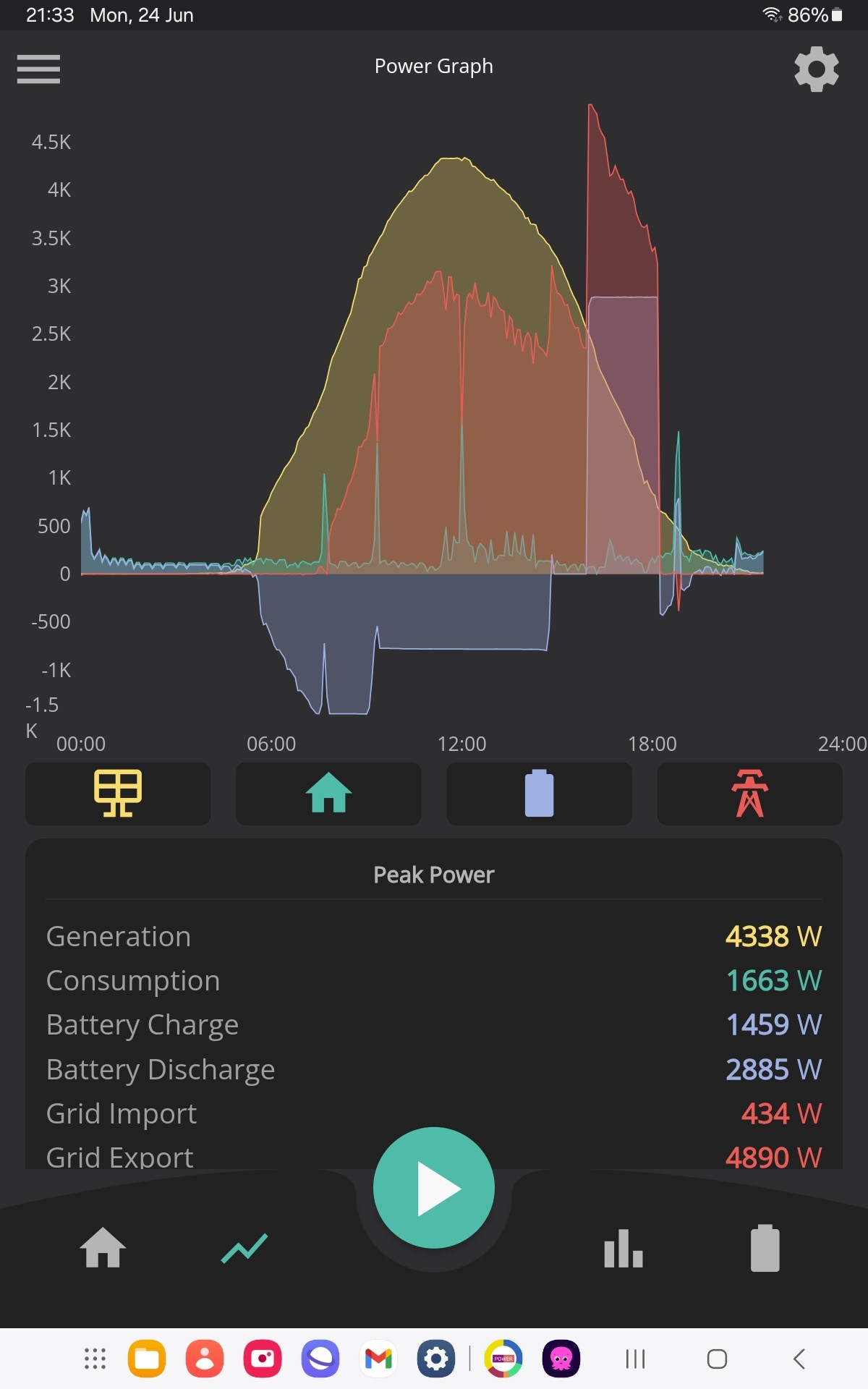
Stayed at 2885W here for the duration of a 30 minute export. However it outputs 2575W to home load, not 2885 so I don't honestly know what to make of that.

Charge is at 2400W or thereabouts, so no change there.

#38 hoggy

Vestas I think they've just moved where they pull the power data from in the firmware that the system returns back to that power register.
Pretty sure it used to be from the CT inside the inverter that resides AFTER the boost converter from 51.2V to ~ 360V DC (so a lower wattage as you've gone through battery conversion losses & then a boost stage.)
Now it kind of sounds like its the raw power from the 51.2V side, possibly directly from the BMS itself (so no losses accounted for but does explain why you see no change in the charge rate which stays at 2400W)
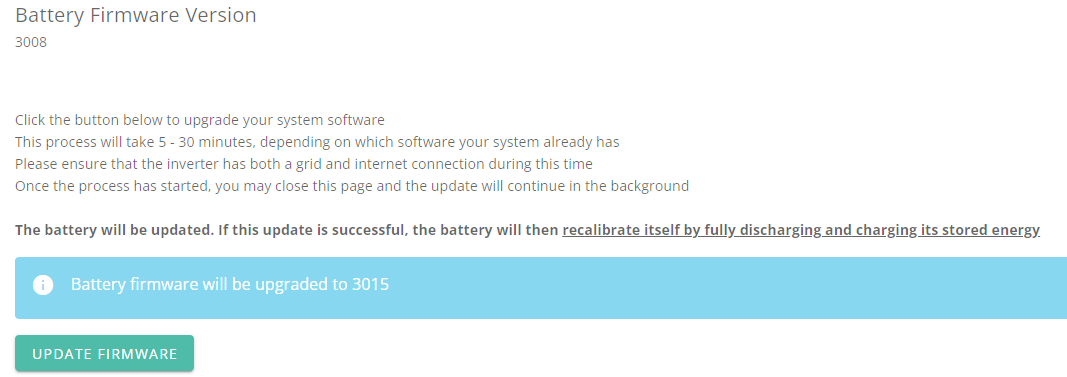
Although not having a system capable of doing so I can't prove one way or another (I think Gen 2 does actually see a slight boost but honestly can't remember.)

V
#39 Vestas

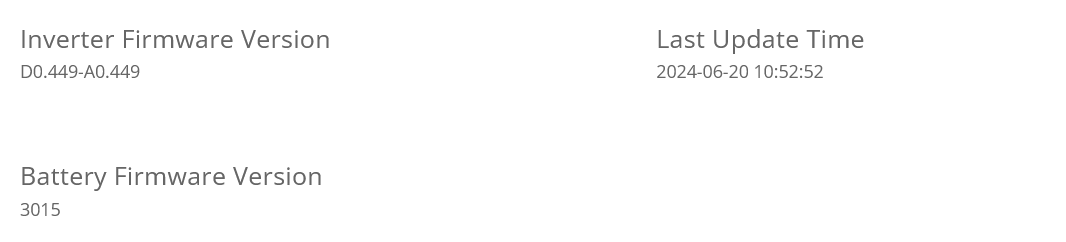
hoggy Paul L changed some settings on CT clamps after upgrading so that makes sense.

Grid Power on an export starts at 2885W then drops linearly to 2400W over the course of half an hour; Battery Power stays at 2885W.

I need to test it when there's no PV input and minimal load as part of that "drop" is probably lower PV/higher load.

V
#40 Vestas

hoggy I'm not entirely sure FW 3015 even cares about those anymore though, and simply relies on voltages instead

Since the f/w update the battery charge rate is stepped down several times (at least 5 steps) once the inverter SoC (not the battery SoC) hits 90%. Its definitely using SoC for these step-downs, not voltage - assuming that's what you meant. I've not seen this many step-downs before, if any at all.

As such the "BMS 3015 support" is still dependent on SoC accuracy - I think changing the "design capacity" to 186Ah just gives them a bit more wiggle room.

The tl;dr of all that was the battery overvolted during a charge this morning. Not by much but there was a 6% battery SoC jump at the end of charge so the starting SoC was obviously wrong. Charge rate was pretty low at the time so it was borderline overvoltage - basically the battery was charged to the calibration value (couple of cells at 3.55V).

#41 TheDragon (GivEnergy)

geoffreycoan

Thanks for mentoning this Geoff.

Battery boards can fail on the old FW, ive seen them fail on old FW. On my beta test "Gang" ive 33 on the FW when it was in test and development. Which have remained on it and still are.
Oldest is a 1949 date, working perfectly hapilly.

The board failing, is under warranty, the fact youve got new FW bears no relation to an engineer coming to replace the board.

G
#42 geoffreycoan

TheDragon (GivEnergy) Thanks Paul for your input r/e no correlation of firmware version to the inverter battery board failing. It was annoying it went but as you say, was replaced under warranty. Some of the others here were concerned there was a potential link.

The firmware is working well for me and now I’ve got both inverters and batteries back, much happier.

hoggy see my next post r/e dead batteries 😉

Vestas I still wasn’t seeing that extra select. As a test I changed the ‘old firmware’ switch to off on GivTCP for one of my inverters, and ooh, yes, a new control.

Also I noticed there’s more new selects for PV input mode (values Independent and ‘1 x2’ 🤷‍♂️), battery_pause_start_time_slot and _end_time_slot, battery_pause_mode (Disabled, PauseCharge, PauseDischarge and PauseBoth). Had always assumed that new firmware was for the Gen 2 and Gen 3 brigade, didn’t know it applied to me as well now which is nice. Chances are I probably won’t be using these new options as Predbat does everything anyway.

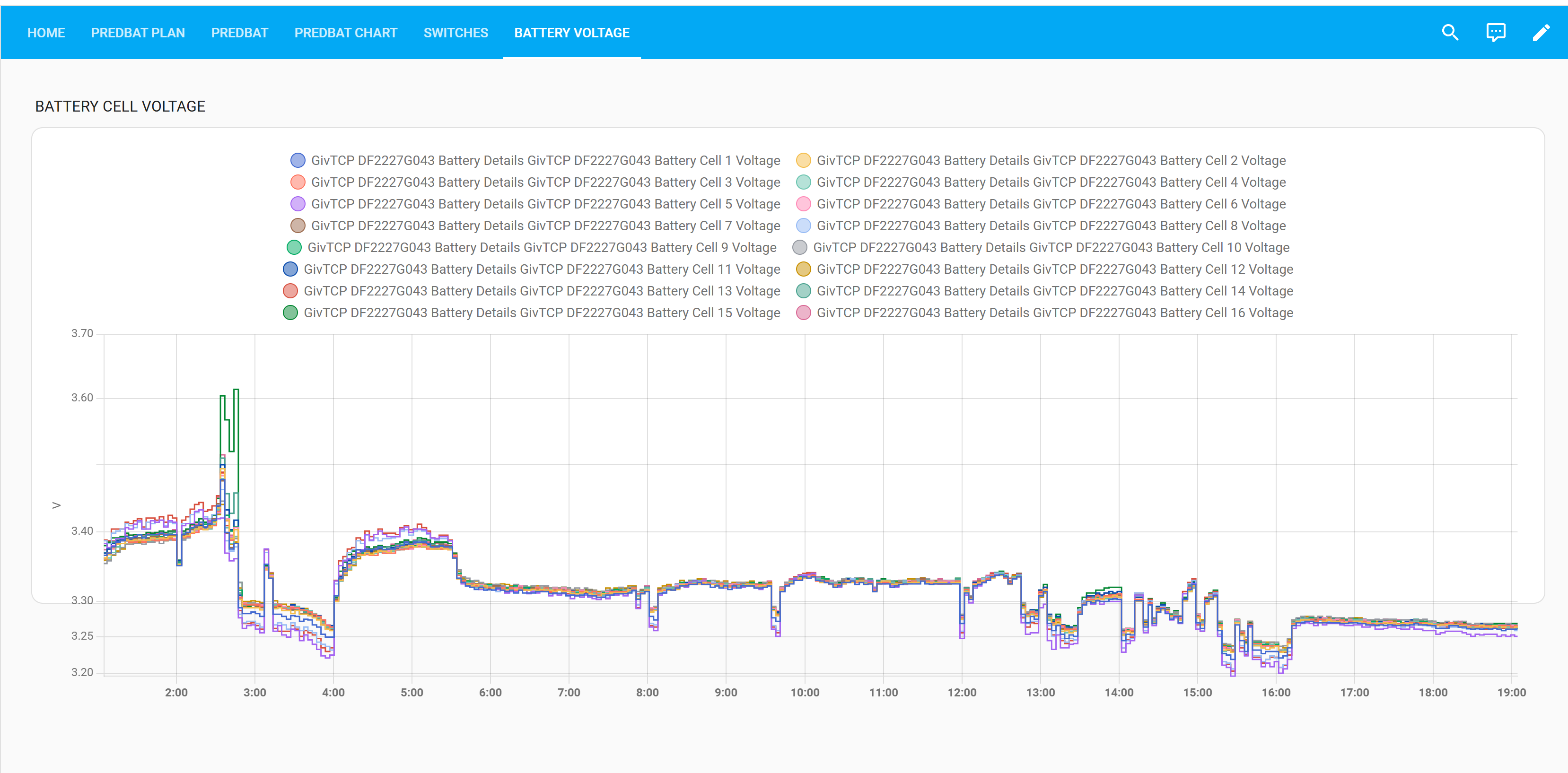
In yesterday/today’s battery calibration there were no BMS errors at all. The fact that 191/193 firmware is “3015 aware” probably explains why I haven’t been seeing any BMS OV errors when others on 3015 BMS see them all the time

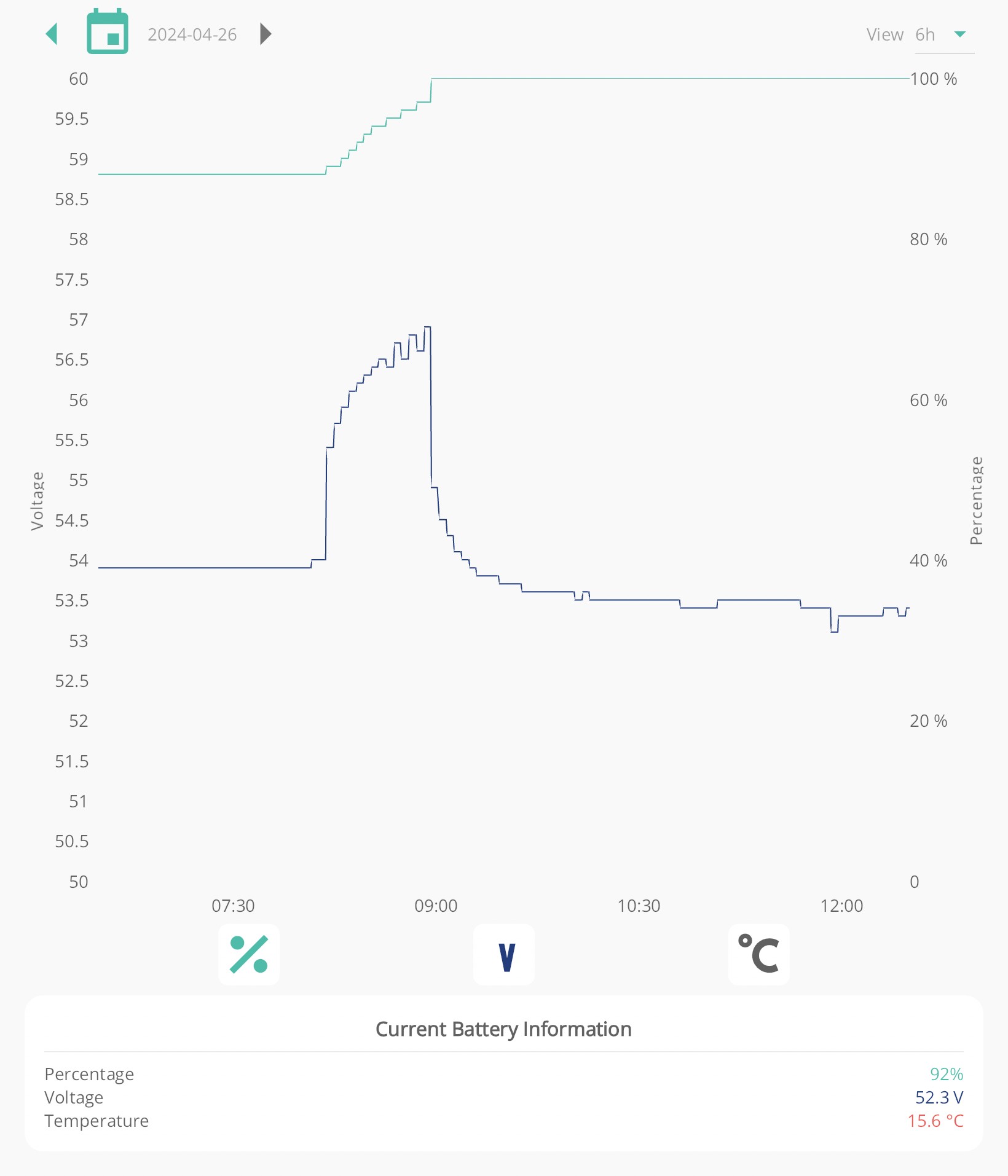
But here’s a weird one, looking at the SoC and voltage graph for today, you can see the SoC rising from 90% or so where I stopped the calibration last night up to 100% at about 8am when I restarted it this morning, and as the SoC rises to 100% the battery voltage shoots up to 57v, and then almost immediately drops back down, but drops below the level it was at when the SoC was being held at overnight. Voltage then bobbles along up and down a bit through the day but SoC stays steady at 100%.

V
#43 Vestas

geoffreycoan As a test I changed the ‘old firmware’ switch to off on GivTCP for one of my inverters

Ummm how did GivTCP work without that on the new f/w? I thought that had to be off if CRC was running on comms....

G
#44 geoffreycoan

Vestas That’s what I thought, it was a binary of the newest firmware only worked with GivTCP when the new firmware switch was on, and the older firmware only worked with the switch off.
Pretty sure there are people on here that have had the switch set wrong and GivTCP hasn’t worked.

But I have two Gen 1 hybrids, both running 191/193, and GivTCP worked fine. At the moment I have only turned the new firmware switch on for one inverter, the second inverter is still switch off. Turning the switch on is how I found the extra controls and right now I have the new controls just for inverter 0, not inverter 1.
GivTCP works flawlessly with the new firmware and switch off.

V
#45 Vestas

In terms of AC charging/overvoltage this f/w seems to work reasonably well.

Charge rate is reduced in several steps (seen 7 on HA) from the point the battery SoC hits 90% so even if the battery does overvolt the inverter isn't trying to push 2400W into the cells at the time.

It does however depend on SoC being fairly accurate which, as always, is the elephant in the room 🙂

Needs a f/w release without the fast response stuff simply for BMS 3015 support and Timed Demand.

Edit - one thing to note is that you can't set battery charge rate to 0W during a timed charge, it still charges at 100W.

V
#46 Vestas

Interestingly the battery voltage and several individual cells went VERY high yesterday (for over 10 minutes) and no overvoltage alarm occurred, which makes me think its being suppressed because there were multiple cells over 3.6V.

Anyway the root cause was (as always) incorrect SoC so later on I discharged to cutoff and left it for several hours. Once the cells rebalanced I got another 1.8kWh out of it before it finally cutoff at about 48.1V. That explains why it was overcharging but that's less than a week after the last discharge to cutoff which is pretty poor SoC tracking (20% out).

Anyway at least Timed Demand works now so I can dump the battery to grid more regularly without automations.

Battery charged perfectly after the "deep" discharge - 10 step-downs on charge rate between 90-100%; within 2Ah of designed capacity (measured) and a maximum voltage of 54.3V. Shows what the battery SHOULD be doing when the SoC is correct.

T
#47 TimHutchings

TheDragon (GivEnergy) Afternoon Paul. I wondered if it was possible to upgrade my late Gen1 inverter with the new firmware D0.191-A0.193. I'm on 450/451 at the moment and have just had a second overvoltage notification in 3 days. I understand from others there is better management of the BMS on 3015, apart from other improvements. My inverter no. Is SD2227G686. If you're not able to do it, perhaps you could point me in the right direction. Many thanks. Tim

V
#48 Vestas

TimHutchings I think you'd be better contacting support (Adam Reynolds) directly and ask him to copy Paul L in.

I got the distinct impression that GE support don't want the forum to become the default for requesting upgrades/etc and especially not on this matter until the company decides what they're going to do.

C
#50 cbowen

Hi, I've tried to request D0.191-A0.193 to my Gen 1 5Kwh inverter via the support email but have been told twice that I'm already on the latest and have closed the ticket. Is there any other way to request it? Thanks.

T
#51 TimHutchings

cbowen It would appear not. I tried support and hit the same wall that you did. It appears from what I was told that it is due for release shortly. They've been saying that since last summer! Guess I'll just have to continue to accept the regular overvoltage warnings I'm getting till the battery gives up and they have to replace it under guarantee.

T
#52 TimHutchings

geoffreycoan Morning Geoffrey. Being lazy, I used your link for support and finished up dealing with Germany. Nice people but not helpful for uk enquires. The email for support in the UK is support@givenergy.co.uk, not dot com.
Just thought I'd point this out to anyone else reading this thread.

V
#53 Vestas

TimHutchings Guess I'll just have to continue to accept the regular overvoltage warnings I'm getting till the battery gives up and they have to replace it under guarantee.

I'd make that very clear to them, also if it fails its on them not your installers.

G
#54 geoffreycoan

TimHutchings Being lazy, I used your link for support and finished up dealing with Germany. Nice people but not helpful for uk enquires. The email for support in the UK is [support@givenergy.co.uk](mailto:support@givenergy.co.uk), not dot com.

OOps, sorry !

For those that are hitting the blank wall of not having the firmware upgraded, maybe raise the ticket that there is an issue with your inverter, e.g. repeated over voltage errors, and that might lead to a firmware upgrade to fix the issue?

My initial submission to givenergy support was the problem I had with the two inverters not discharging consistently which is what led to the firmware upgrade as a solution to this.

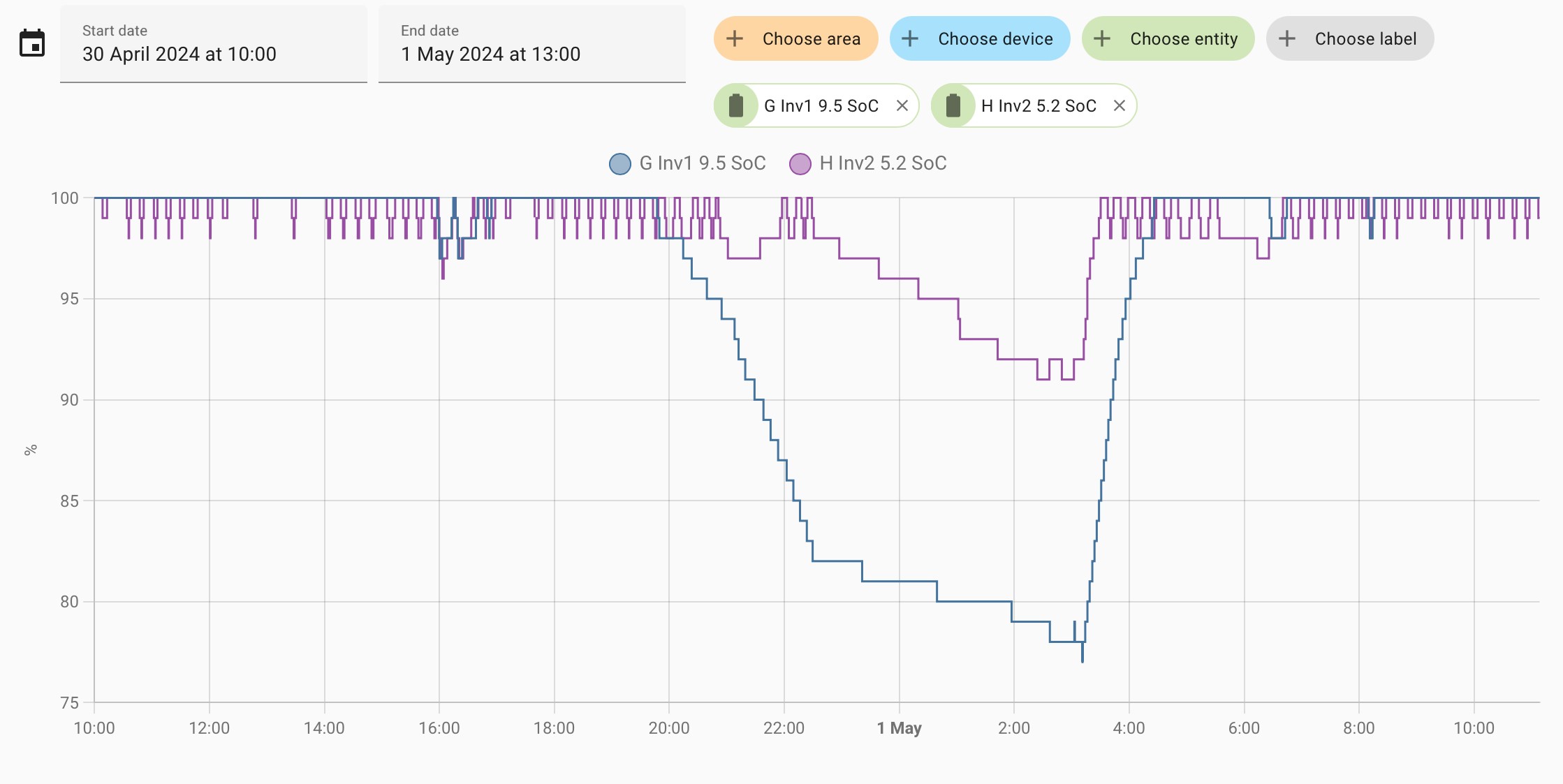
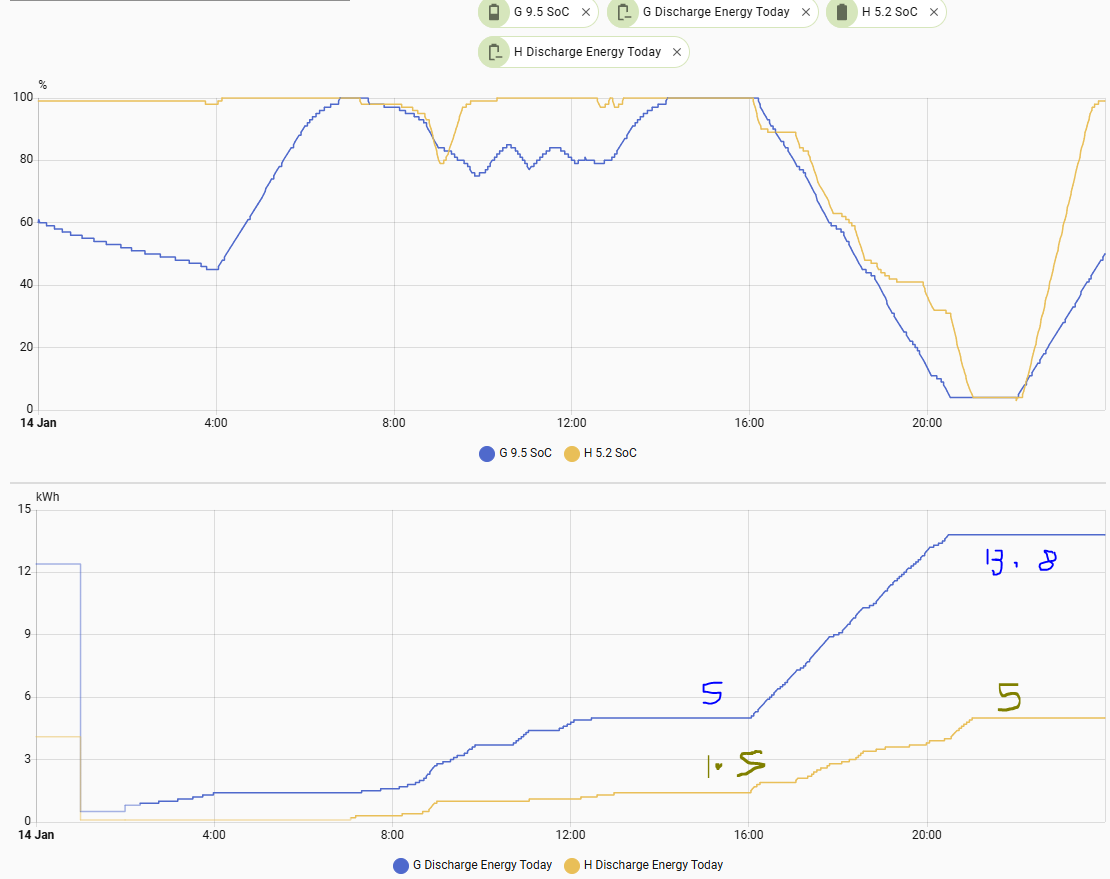
One disadvantage I have seen on 191/193 by the way is that I am seeing a lot more cross charging between my two gen 1 inverters. The 5.2 discharges a bit in response to house load, the inverter with the 9.5 sees the load and discharges in response to meet the load, resulting in the 5.2 then charging up again.
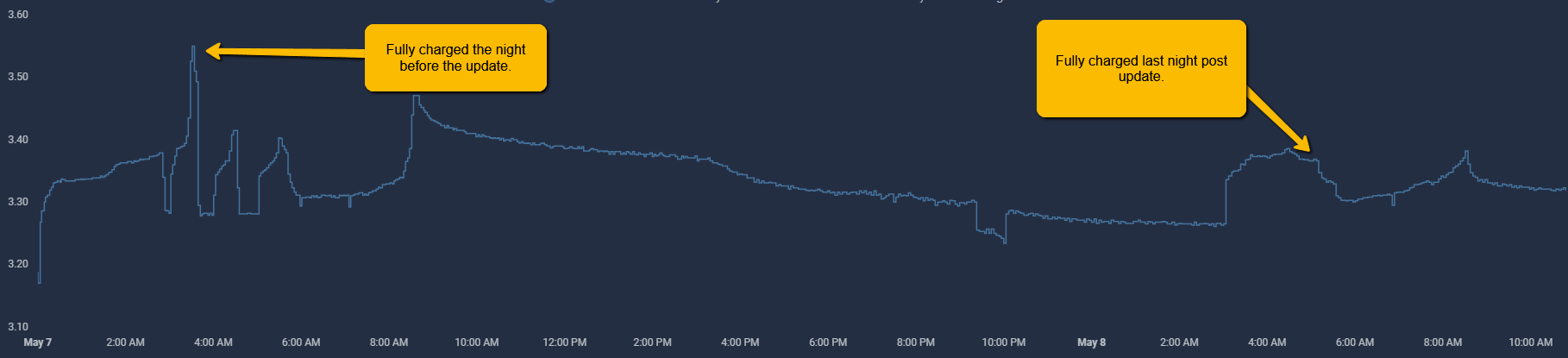
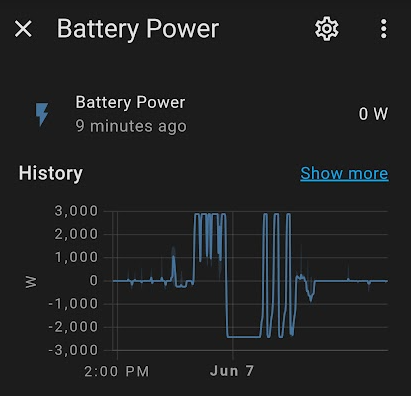
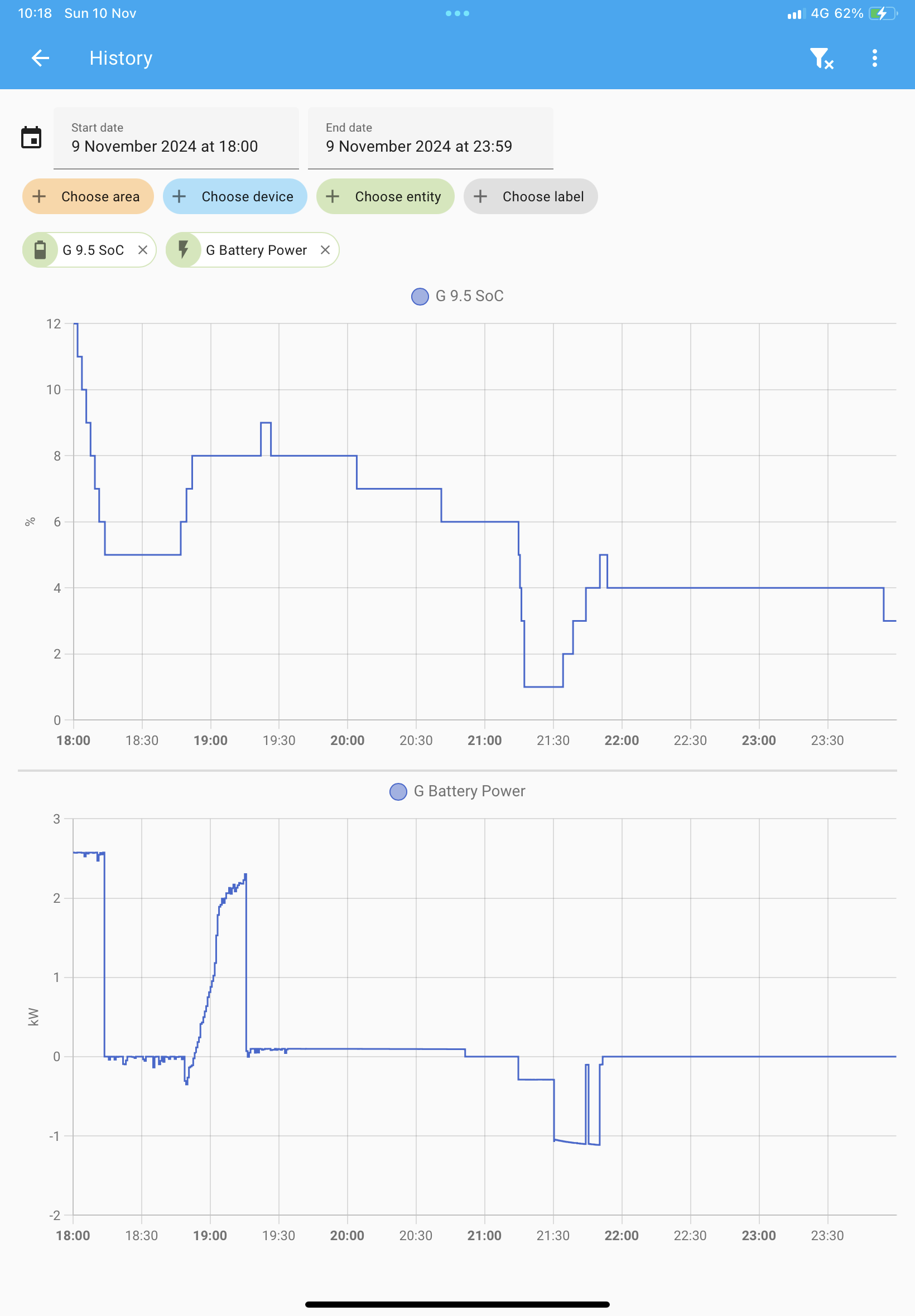
So I get a SoC pattern like this:

Predbat tries to prevent the cross-charging but shutting down the charge and/or discharge rate on inverter 2, but its not working well enough to stop it happening.

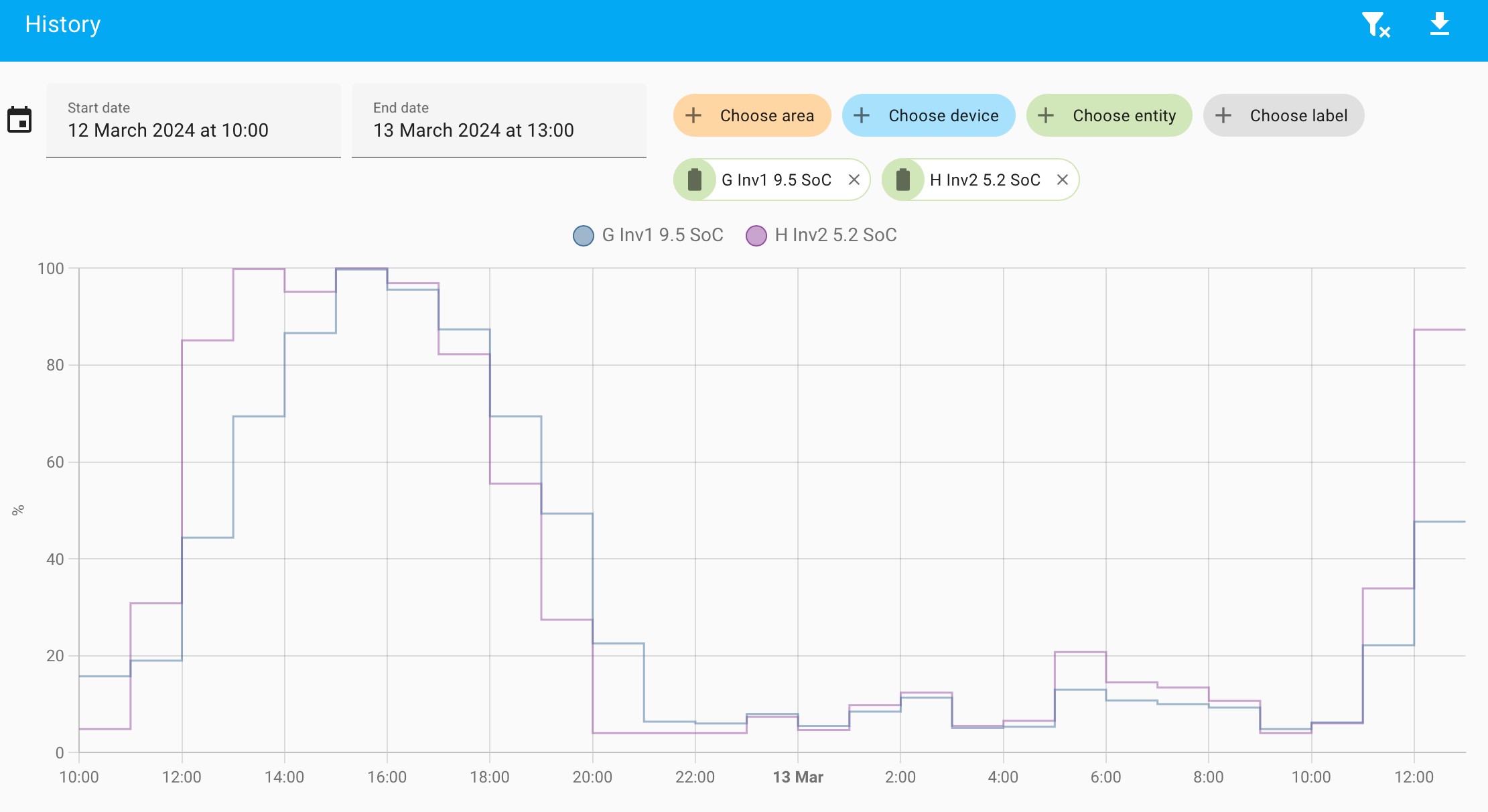
For comparison, here’s a 24 hour SoC trace in March when I was on 450/451. The Home Assistant statistics are summarised to every 10 minutes so its not as granular as the above graph, but it doesn’t show any obvious cross charging.

I guess this is a consequence of the new firmware responding faster

C
#55 cbowen

geoffreycoan

Yeh, I tried that and got didn't get anywhere. I also mentioned the continuous overvoltage issues but they said it's the latest firmware.

The .co.uk support email have told me I've not got a LoRa transmitter which I know as I didn't require it. I wasn't aware it was a prerequisite to the faster firmware.

G
#56 geoffreycoan

cbowen Think the LoRa transmitter is FUD from GivEnergy support.

I have two EM115’s and seems to work fine with the firmware.

Maybe the new firmware is getting close to release and that’s why its not being rolled out in test mode any more?

V
#57 Vestas

cbowen they said it's the latest firmware.

I got the same but escalated to Adam Reynolds.

They still weren't keen until I said I'd have to go back to the installers for a refund/compo as the inverter features weren't as advertised (Timed Demand doesn't work) and I was approaching one year since install, at which point they copied in Paul Landregan.

V
#58 Vestas

geoffreycoan Maybe the new firmware is getting close to release

Not unless a "business decision" has been taken since last Thursday.....

Edit - and if Paul L is doing them all manually I can see why they don't want to upgrade f/w on request as presumably he has better things to be doing.

C
#59 cbowen

Vestas
That's why I didn't message Paul directly. I didn't want to be nagging someone when they have plenty of other things on their plate!

T
#60 TimHutchings

This is the email I got from GE this morning.

Hi Tim,
​I have heard back from Paul regarding the firmware update. Currently we have filled the number of system for the new update. This is limited so we can test the firmware on a smaller number of inverters to ensure quality control. The update will be available to public once this test has been done.
Kind Regards.
James Lewis
1st Line Service Desk Engineer

Maybe the new firmware will come one day, maybe not! In the meantime I'll just have to not bother with the overvoltage messages and let the battery do it's thing, whatever that is. They have been told so it's down to GE and therir guarantee. It'll be their cost!

S
#61 SimonClarke

Got an under voltage notification last night, first one ever. Went from 11% to 1% in twenty minutes at 21.37 then charged slowly at 290w until normal charging kicked off at 23.30 then charged normally to 100%. Sent Giv an email but haven’t heard anything back. As I said before I wouldn’t be in a rush yet to get this.

C
#62 cbowen

SimonClarke
I've now been sent the firmware on email. I'll hold fire for now as I'm busy till the weekend and don't want it to go Pete Tong over the bank holiday!

S
#63 SimonClarke

cbowen don’t blame you! Mine appears to be working ok now but I haven’t heard anything from Giv yet

G
#64 geoffreycoan

Interesting “AC-coupled” like behaviour just now from one of my gen 1 hybrid inverters.

I have two gen 1 hybrids, I call them G and H in Home Assistant, and inconsistently Inv 1 and 2 as well.

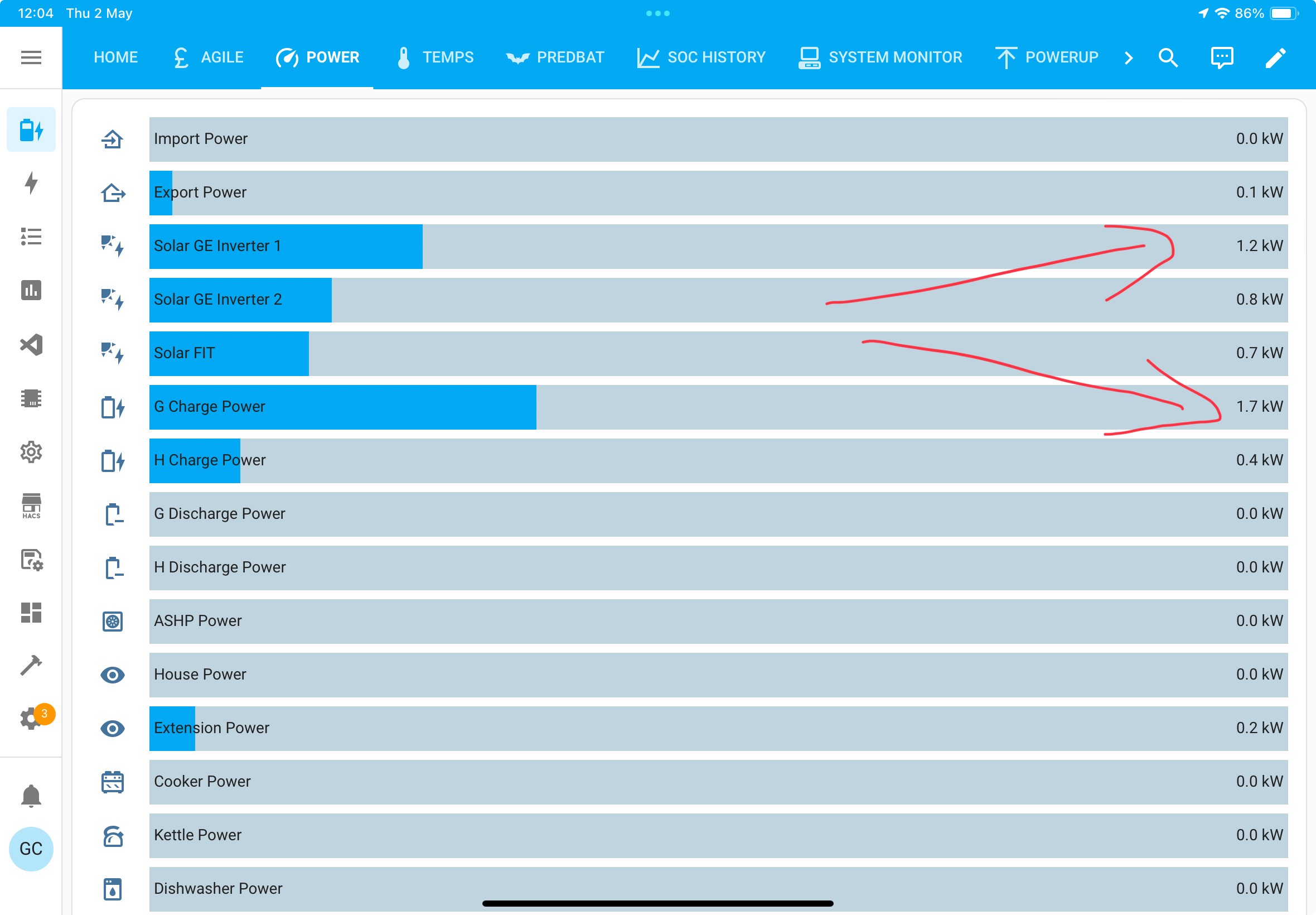
Anyway, inverter 2 (H) the battery is almost full so the charge rate is reducing, but inverter 1 (G) there’s more space in the (larger) battery so its charging at a higher rate.
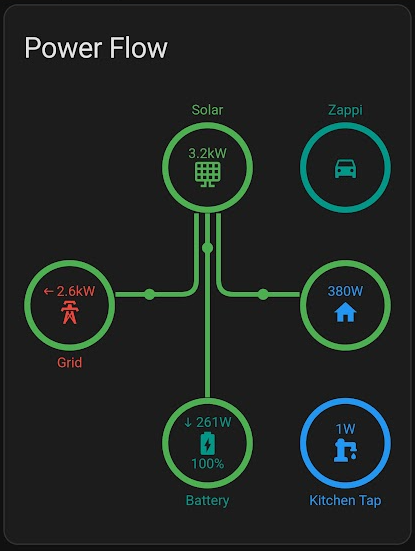
In Eco mode for both inverters, no forced charge going on, and inverter 1 is generating 1.2kW of solar but the battery is charging at 1.7kW; so its soaking up some of the excess AC from inverter 2 and my FIT array and using that to charge the battery rather than let it be exported.

And it wasn’t just a momentary thing that captured this, its still doing it, 10 minutes after I first noticed it.

T
#65 TimI

So does that mean you could (in theory) have a separate power source (not fed into the hybrid string 1 or 2 ) that allows it to charge the battery up ?

G
#66 geoffreycoan

TimI I would assume so, as the power meters above showed there was only 1.2kW coming off the solar panels attached to inverter 1, but yet it was charging 1.7kW into the battery.
That extra power must have come from as AC ouput from Inverter 2 which was generating 0.8kW butthe battery was almost full so was only charging at 0.4kW (and exporting the excess), and my FIT array which was generating 0.7kW and has no attached battery so by default is exporting.

It looks to me that the inverter was choosing to charge the battery with the excess AC rather than let it be exported.

If true, its another great feature in this firmware. Hope it does make it to full public release soon.

S
#68 SimonP

Isn't that expected behaviour? I'm reasoning: You only have one connection to the grid, the current on it can only be going one way, i.e. you can't export and import at the same time. So, any 'surplus' being generated will always go into local loads first if they're 'importing' power. Your Inverter 1 looks just like like any other 'load'. Obviously I don't know the details of your installation though.

#69 hoggy

Yes I believe that the faster firmware also works as if AC coupled, monitoring any other export and capturing if available. Same as Gen2 or 3.

T
#70 TimI

geoffreycoan That would be very useful... for sure.

V
#71 Vestas

f/w is still behaving itself with battery charge/discharge - even when I enable AC charge with decent PV input.

With the previous f/w that situation would always cause an overvoltage as there was never any reduction in charge rate until the battery was full. Think of it as a train running into the buffers at full speed.

With this f/w the charge rate is reduced in ten steps from 90-100% SoC. Train braking gently into the buffers.

There is still the occasional situation where the battery is going to overvolt because the SoC isn't accurate but overall its a massive improvement.

#72 nophead

hoggy Yes I believe that the faster firmware also works as if AC coupled,

If you have two hybrid inverters surely they are AC coupled, or do they have a DC bus connected between them?

#73 hoggy

nophead I meant that they operate the same as an AC coupled inverter would - monitoring via a grid CT for any additional export (ontop of what is already being fed in via the PV strings directly) as opposed to how the Hybrids normally work, which is to ignore any other inverters exporting to the grid.

G
#74 geoffreycoan

hoggy That is how I do see my gen 1 hybrids operating. If there is excess solar that one hybrid can’t use to charge the battery, it converts it to AC for export, then the other hybrid (if it has charging capacity) converts it back to DC for charging its battery.

Its great, I charge both batteries quicker and means that solar from my older FIT array doesn’t get automatically exported if there isn’t enough house load to consume it. I have up to now not included my FIT array in my Solcast forecast as there’s no batteries connected to the inverter so I was just treating it as ‘bunce’ on top of the GivEnergy forecast.

Previously the gen 1 inverters just ignored any export from the other inverter.

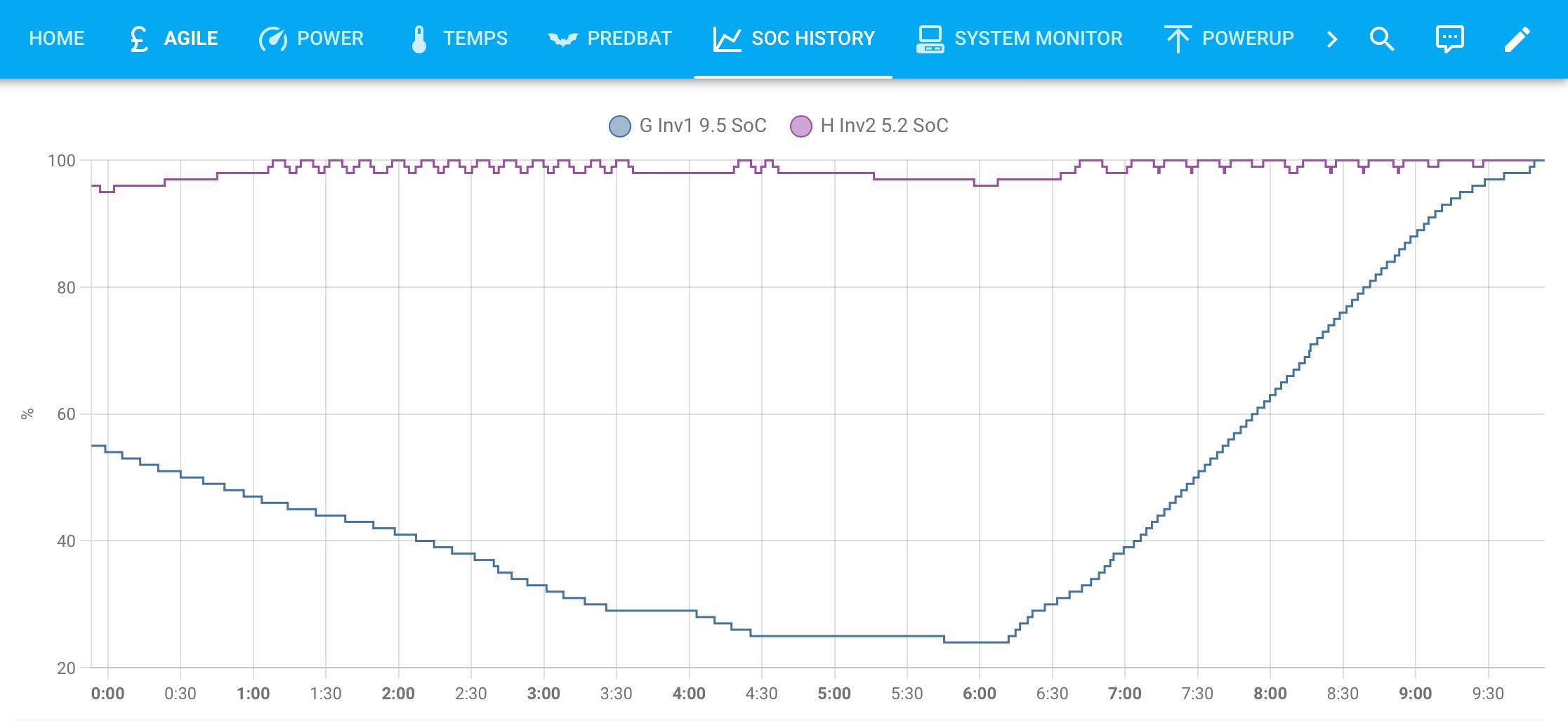
One disadvantage of this is that the inverters are now much more prone to cross charging than they used to be. One inverter sees a bit of excess export and starts charging to consume it so the other inverter keeps on supplying it. This carries on until the first inverter is full. Previously my gen 1 hybrids didn’t cross charge.
Predbat tries to stop it but doesn’t manage to catch it sufficiently.

End up with SoC graphs like this

V
#75 Vestas

Something to bear in mind about this f/w is that the "Reset to defaults" control on the portal does not work. It doesn't seem to know about "Battery Pause Mode" and doesn't seem to reset "Enable Charge Schedule" either.

S
#76 SimonClarke

I’ve not had any issues except getting a low voltage notification that sorted itself, but I have only really tried turning timed discharge off ( when we used all the battery for cooking on a very dull day!) then on again. Just need to make sure eco is working but otherwise no issues. We have been timed discharging every evening.

G
#77 geoffreycoan

One weird thing I have noticed is that the Pause mode can get ‘stuck’ in Home Assistant.

I’ve had it happen twice now, Home Assistant (predbat) is writing to all the inverter controls fine across both inverters but I’ve had the Pause mode on one inverter get stuck in PauseDischarge and you then can’t change it to any other setting. It doesn’t go Unavailable, its just not changeable. I get a warning error in Predbat that it can’t change the mode but it carries on regardless. No error I can see in GivTCP either.
Yesterday I had one inverter stuck in Pause Discharge all day. Fortuately sunny so the other one was carrying the house load, but I need to work out where and why this is happening. I suspect GivTCP but no proof
A restart of GivTCP cures the issue.

Happened twice now

T
#78 TimHutchings

SimonClarke Morning Simon. Thanks for the update. Have you noticed the faster response to load changes?
Glad it all seems to be working ok. I'm still getting these blessed overvoltage warnings when the battery hits 100%. I've tried slow charging it to 100%, and I've also tried stopping it at 98% for 10 minutes then topping it up from there, but I still get the overvoltage warnings. I expect I'll get another today with the strong sun all day, even though I'm only charging at 1500w.
Wish I could switch off these blasted overvoltage warnings if it's not an issue. Roll on the new release if it ever comes.

V
#79 Vestas

geoffreycoan The issue I had this morning was as follows -

1) Pause Charge set to ON;
2) Battery run down to cutoff (6%), then cells rebalance so SoC rises to 11%;
3) Battery run down to cutoff again;
4) Inverter goes idle as battery is idle/no PV to speak of;
5) Inverter/dongle repeatedly drops wifi STA connection - roughly every 30 seconds or so & also doesn't present a host name (HF-21).

Now I've run the battery down to cutoff dozens of times to rebalance cells and never seen this before. AP isn't the issue, its the dongle/inverter disconnecting. The green LED on the front of the inverter was flashing very slowly (every 20-30 secs) when the inverter was idle and subjectively the STA connection was dropping at the same time.

It was a monumental PITA but eventually I managed to start a charge and from that point the wifi reconnects and stays reconnected -

Ping statistics for 192.168.10.16:
Packets: Sent = 4527, Received = 4527, Lost = 0 (0% loss),
Approximate round trip times in milli-seconds:
Minimum = 1ms, Maximum = 410ms, Average = 10ms

Go figure.....

S
#80 SimonClarke

TimHutchings Morning Tim. I am still on 3012 so maybe that is relevant to the over voltage warnings? I am still waiting on Giv for some other changes that I will post when I have something to post! As for faster responses to be honest sometimes it seems quicker and others slower. Maybe just subjective. I am using the iBoost at the moment as I don’t want to order any more oil on the off chance it gets cheaper or I get an ASHP - getting some quotes at the moment. But the iBoost seems to cut in more at inappropriate times such as timed discharge - only briefly but I didn’t notice it before….

G
#81 geoffreycoan

Vestas Definitely PITA. Have to admit I don’t understand the wifi dongles on my inverter. There’s a mesh repeater in the garage just above the inverters so logically that would be the one to connect to. At the moment both inverters are connected to that node but often I see one connected to the living room and sometimes one even connected to the kitchen which through several walls which I’m sure is some of the connectivity issues I get.

At the moment neither inverter is showing with an IP address in the mesh network, but on the broadband router they both appear with IP addresses. Makes no sense to me.

Sometimes I power off the inverter to get it to reconnect to a better mesh node but it seems random

V
#82 Vestas

geoffreycoan If the AP is too close then its likely that clients will find another AP - reason is simple, no spatial diversity as the signal strength is too high/AP is too close. That means the client thinks it can achieve a higher PHY rate by connecting to another AP as it can use more spatial streams.

Edit - NB this is a general rule of thumb for clients with more than one radio chain.

G
#83 geoffreycoan

Vestas Interesting. Would explain why the two inverters are connected to the Garage mesh wifi but the Octopus mini that is sitting right next to the mesh node, one of the Shelly EM1’s and the Shelly 2PM that are all in the garage are connected to the living room, and the second Shelly EM1 also in the garage has decided to connect to the kitchen node.
There doesn’t seem to be a way to turn the signal strength down on some of the nodes and practically I can’t really move them around much to improve things.
Hey ho

V
#84 Vestas

geoffreycoan That's the thing about designing WLANs - you have to accept that the client makes the choices about what to connect to.

You can influence the client by spatial/frequency seperation, power levels, channel selection, 802.11r/v/k and even by the crudest method of all - kicking the client - but ultimately you're at the mercy of whoever designed the client and how (if at all) they decided to deal with roaming. Apple/Samsung/Google all publish their criteria for roaming/AP selection but generic crap from Shenzen? Who knows? Probably not even the manufacturer.

Most people think WLANs are simple. They're actually orders of magnitude more complex than wired plant networks.

That's why most public WLANs (hotels etc) you'll encounter are pretty awful. Few of these owners are willing to pay for a proper site survey, never mind design/install/test/support, hence they end up with cowboys/clueless companies. You get what you pay for 🙂

#85 Hook

Also may be worth using a wifi analyser to check one of your neighbours haven't moved their wireless access point to use the same wireless channels.

S
#86 SJB

Hook All to possible, just had to move channels on mine after having my phone drop wifi connections every 5 minutes. Couldn't understand why the phones' battery was going flat overnight.

V
#87 Vestas

geoffreycoan Other option is that the mesh controller is load balancing because your APs are too close together. I don't know how much is exposed with your mesh s/w but it is possible to force clients onto an AP via load balancing across APs.

This is something (for example) you might do in a large open area like a hotel function room.

Essentially the signal level difference is minimal but there's no way of having a reasonable user experience without multiple APs on different channels (only way to get the bandwidth in use). You don't want all the phones latching onto the first AP in the room so you do a sort of round-robin affair where (new) clients are forced onto a specific AP (only really works at first auth). Provided signal strength doesn't vary too much then they stay "stuck".

Could be that's what your mesh does as a default - especially if its all 2.4GHz devices connecting "randomly".

We digress, again. Apologies peeps.

C
#88 cbowen

Just an update on my system. I received the faster response firmware from the Giv support team last week. With it being bank holiday, I waited till yesterday to install it. Really easy process and took around 5 mins. Since then, I've noticed that the inverter defiantly responds quicker to loads such as the kettle, etc when the battery was either charging or sat at 100% and solar was exporting.

I've also seen the charge curve appear last night and no overvoltage, As a result, the cells which always seemed the highest before when fully charging (sometimes over 3.65v) now are only getting to 3.35v at 100% when charging overnight. Seems like the inverter update is doing what I'd hope for at this point.

T
#89 TimHutchings

cbowen Just being inquisitive, but how did you get the inverter firmware sent to you in the end? I got another overvoltage warning today 😱, the third or 4th this month. I do wonder if it will ever get released to the public.

T
#90 TimI

TimHutchings interesting, my warnings have gone quiet though i've not had the update yet... kinda keen if it helps wiht the responsiveness though.

C
#91 cbowen

TimHutchings I went back to the GivEnergy support UK help desk and sent a screenshot of the overvoltage errors and they sent it to me.

S
#92 SimonClarke

Is the over voltage thing just connected to 3015?

C
#93 cbowen

SimonClarke It was for me. I'd never had it before but upgraded to 3015 about a month ago due to my inverter going into calibrate mode and being stuck. Doing the upgrade fixed that. After 3015, I would get an overvoltage error every 2-3 days.

S
#94 SimonClarke

I’ll stick with 3012 for now then

T
#95 TimI

TimI Spoke too soon - got another one overnight during the nightly charge up. Interestingly, this time was after it had stopped charging - its always towards the end, but from the graph its after it stopped at 4am.

A
#96 alfwro

cbowen Out of interest what happens when you get overvoltage error? Does the system continues to operate or do you have to perform some kind of reset?
Reason for asking is that I have raised a support ticket with GE and they suggested inverter and battery firmware upgrade. But reading all this I think I'm better off staying on the old firmware (3012 battery and D0.450-A0.451 inverter)

G
#97 geoffreycoan

alfwro If you only upgrade the battery firmware from 3012 to 3015 then most people seem to get over-voltage errors. For some reason I never did, but lots of people do get them. AFAIK there’s no impact to the inverter or battery when you get these errors - others will shoot me down if I am wrong on this!

The newer gen 1 firmware D0.191-A0.193 has a number of benefits. It gives faster response times to changing load (solar or house) - so switching the kettle on the inverter should more rapidly pick the load up and discharge the battery rather than letting the grid provide the extra kW. The firmware also ‘deals with’ (suppresses?) the over voltage errors. It also offers battery pause option and fixes the behaviour of timed export (not leaving Eco off at the end).
For me also with two gen 1 inverters there’s an additional advantage that if one inverter battery is full and the other isn’t, then rather than grid export, the second inverter battery will soak up the excess AC and use it to charge the battery. It is a bit more prone to cross charging though - only an issue if you have multiple inverters.

There are several of us here on the forum with the new Gen 1 firmware and I don’t think anyone is having any major problems with it. If support are offering it, then I personally would take it, and take the battery firmware upgrade as well. I wouldn’t take the battery firmware upgrade alone as you’ll probably get OV errors for no noticeable benefit.

C
#98 cbowen

alfwro If you have HA, you can analyse the individual cells in the pack. With 3015, some cells were going above 3.55v. Almost to 3.7v which is far too high and I'm not sure it would do these cells too much good over an extended period of time. With the new inverter firmware, it seems to add a charging curve over 90% which means it's not pulling such high numbers on each cell.

Personally, I wouldn't upgrade the battery to 3015 until the new inverter firmware is publicly released or unless Giv support send you the inverter firmware to install.

A
#99 alfwro

cbowen They offered to upgrade both - inverter and the battery - just waiting for a confirmation what exact version they are offering to install.
Since you have mentioned HA - I assume there are no issues with the new inverter firmware and GivTCP ?

C
#100 cbowen

alfwro Yep, all works fine with GivTCP.

G
#101 geoffreycoan

alfwro I assume there are no issues with the new inverter firmware and GivTCP ?

And if you turn the ‘new firmware switch’ on in the GivTCP config you get access to the new Pause Discharge/Charge control and a couple of other new controls. GivTCP however works fine with Gen 1 inverters with 191/193 firmware regardless of which way you set the configuration

V
#102 Vestas

geoffreycoan I'm not convinced the "local control mode" (load/battery/grid) actually does anything on G1 inverters - anyone else tried it? I'm not that bothered either way, more curious...

T
#103 TimHutchings

Finally ! I've just got the inverter firmware upgrade. Hopefully that will solve the BMS overvoltage issues now. They wanted to do a battery calibration too, but unfortunately I'm not back home till Monday and I didn't want to be charging through peak Flux.

See how we go with it all!

T
#104 TimI

TimHutchings Nice, hopefully it gets a proper release soon. Don't want to be one asking for it 'just cos' 🙂

T
#105 TimHutchings

Just thought I'd give a quick update on the new inverter update 191/193. Firmware was updated last Friday with a battery calibration done on Monday. So I've now had 2 full days to have a closer look at what's happening.
Firstly, the faster response is definitely working well. Most days before the upgrade on days when I wasn't consciously importing any electric, there was always between 150w and 350w showing as import on my in home display at day's end. Tuesday it showed just 12w, and Wednesday just 24w. That's a saving of 200-300w each day.
Secondly, the output now available on discharge on my gen1 is around 3000w, and even after 2 hours of discharging is still at 2970w, so it's a good deal more than the 2600w previously available. Surprisingly, this will also save money longer term as the extra 300-400w now available from the battery means we'll be unlikely to pull excess from the grid when cooking etc.
Thirdly, and the reason for upgrading, the BMS overvoltage warnings have stopped, and aren't likely to come back as the last 10% charging slows right down and keeps the individual cell voltages much more evenly matched. Although the SOC shows 100% the actual internal reading yesterday was only 97%. Still, if it gives more longevity to the battery, then that has to be worthwhile.
That's it so far with the main noticeable improvements, but I'll keep an eye open for other small changes. Certainly it's a good and worthwhile upgrade so far!

T
#106 TimI

That sounds very postive, hopefully they'll get that firmware deployed more generally then. While I know I can go asking support for it, i don't want to add more support pressure for something thats a not critical upgrade for me.

A
#107 Avenir

TimI They wouldn't give it to me, even though I've been getting occasional over voltages since 3015! Hoping for a general release.

B
#108 Ben_Collier

Any more news on this release?

(Don’t want this thread to die)

T
#109 TimHutchings

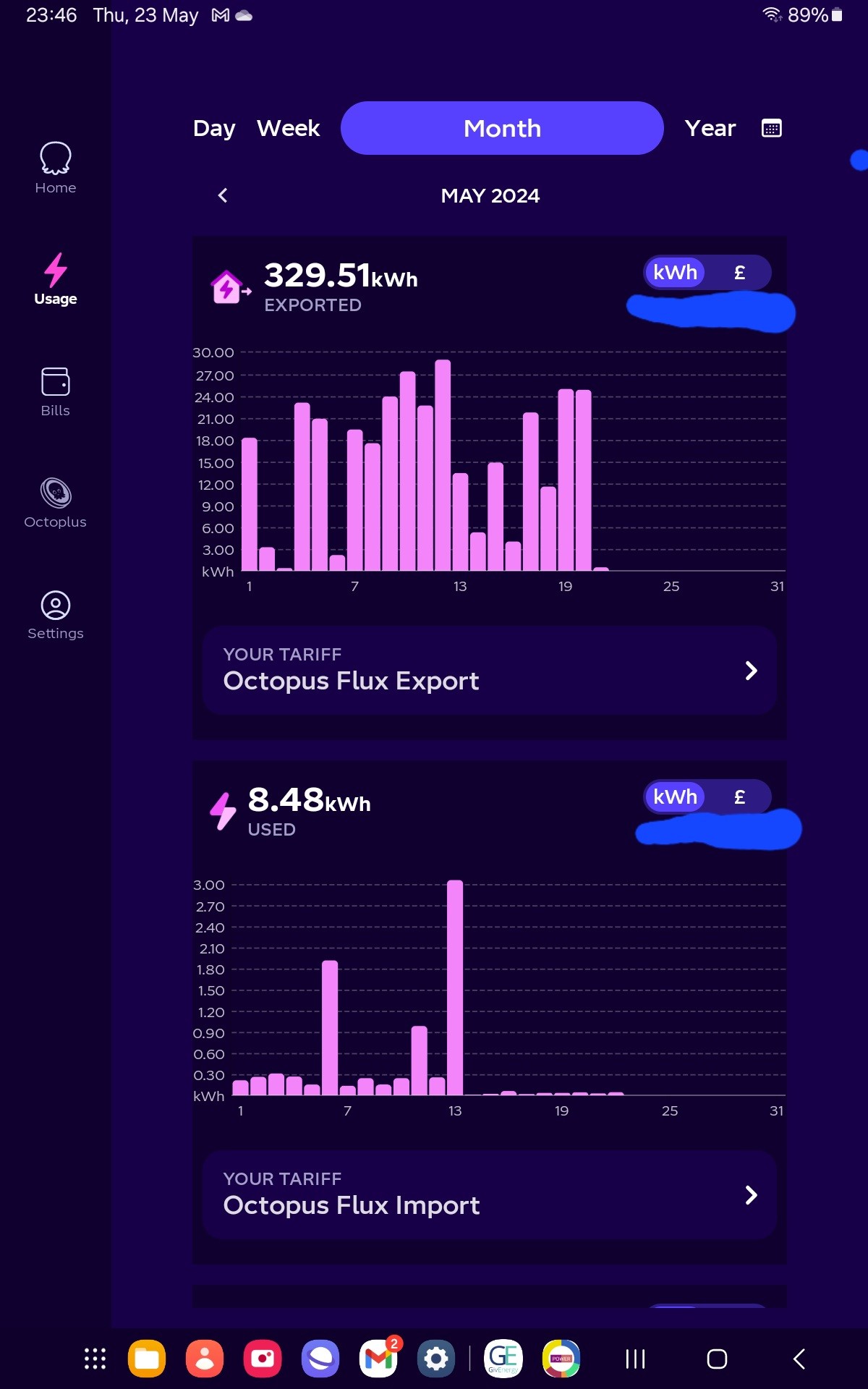
Ben_Collier Since you might be interested, I attach a screenshot of my Octopus account for May so far, showing the difference between the regular daily pull from the grid before and after the firmware update and calibration which happened on Monday 13th.
This illustrates very well that the faster response is savings a few hundred watts daily.

T
#110 TimI

TimHutchings Thats an impressive difference really... let me at it! 🙂 Now for the weather to fill the batteries rather than the overnight cheap tarrif?

#111 Hook

Have there been any down sides to the updated gen 1 firmware?

Any slow starts or throttling of charge towards the top end of charging?

T
#112 TimHutchings

Hook Morning. I don't know if you would call it a downside, but the battery doesn't charge quite to the pre-upgrade limits. My 9.5kw battery, according to the Inverter app by Rubikube, on the battery page, has a design capacity of 186Ah and a full capacity of 195Ah. When I was getting overvoltage warnings every few days, the battery had always hit the 195Ah. When i didn't get them it would reach 191-192Ah. Since the firmware upgrade , I now get 188-189Ah when it stops charging, and in the Inverter app its only showing 97% full, although the SOC is showing as 100%. I'm not unhappy with this as although I'm losing a few Ahs of battery capacity, the annoyance of the BMS overvoltage warnings has gone, and I'm guessing that the battery may last better as a result.
Charging starts slowing up from around 90% SOC, and slows in maybe 15 steps between 90 and 100% keeping the individual cells much more evenly matched.
Other small things I've noticed, is that I now get 1w showing on my string 2 (east facing 6 panels) through the night. I've also noticed that the battery starts charging with solar at around 85w now whereas it used to be between 150-200w. I don't know if either of these things are specific to my inverter or whether it would happen generally, but it appears to be more sensitive.

T
#113 TimI

doesnt really sound like any downsides then.

#114 Hook

@TheDragon (GivEnergy) are there any official plans based on what support are saying on a release window for this?

F
#115 Fridgeman

will this also go on the older Gen 1s? im getting BMS alarms most days

S
#116 SteveCook

I got this reply from GivEnergy support yesterday
"There is a new firmware coming out that will rectify this issue, we have been told its release will be very soon."

T
#117 TimHutchings

Fridgeman The firmware I'm on, 191/193 is only available to be used on gen1 inverters from week 10 in 2022, as apparently they have an extra capacitor or a larger capacitor able to accept and act with the new firmware to make it faster in response times. You can check with your inverter no. Mine starts SD2227xxxx, 22 being the year and 27 the week.

#118 Hook

TimHutchings Yep, mine is yr 22 week 26.

B
#119 Ben_Collier

Year 22 week 21 for me 🥂

#120 Watcher

SA2237👌

S
#121 SteveCook

TimHutchings
SD2227#### for me, so should be good when released

F
#122 Fridgeman

2142 🙁

#123 hoggy

Pfft, amateurs SD2039....

S
#124 SteveCook

SteveCook

WHEN!!>>>>>>>>>>>>>>

B
#125 BobB

Fridgeman Are you on BMS 3015? I've deliberately held off updating to 3015 until the new inverter SW arrives because of the possible overvoltage issues. I've stuck on 3012 and it's actually pretty good. (From the comments in this forum, BMS 3012 is generally accepted to be a "good" version).
If you are on BMS 3015 and you're concerned because it appears you might be unlucky with the inverter firmware update, you might want to consider asking support to move you to 3012 to prevent overvoltage errors.

C
#126 coloneluk

2144

#127 Hook

BobB I’m on 3015.

I’ve had 3 over voltage notifications this month.

M
#128 mrand31

2141 🙁

S
#129 SimonP

My 3012, 9.5kWh loses track of what 100% is when, (as per these days of lots of daylight) it rarely drops anywhere near 50%. The voltage when it says it's at 100% gradually reduces -- I can see it's actually nowhere near 100%. Eventually it goes flat at a high indicated charge level (last time at around 70% and it hit a BMS undervolt), then recovers it's calibration after a recharge to 100%. 2202 inverter so no firmware upgrade there! The cells are well balanced, no issue there. It was well behaved on 3008 until GE forced an upgrade for no good reason!

G
#130 geoffreycoan

SimonP you should be able to get GivEnergy support to downgrade you back to 3008 if you want to

A
#131 alan_johnston

I am SA2224 (3.6 HY) with firmware D0.450-A0.451 and and 8.2 battery with 3012 firmware.
I had a few under voltage notifications and one over voltage but nothing recently. Fingers crossed it remains stable.

T
#132 TimHutchings

alan_johnston Stick with 3012 on your battery until the new Gen1 firmware is on general release, as it takes care of the constant BMS overvoltage issues on 3013 and 3015.

S
#133 SteveCook

When????

T
#134 TimHutchings

SteveCook Soooooooon.....! 😴

S
#135 SteveCook

TimHutchings
Thanks, but not holding my breath.............................

S
#136 scrchngwsl

TimHutchings The firmware I'm on, 191/193 is only available to be used on gen1 inverters from week 10 in 2022, as apparently they have an extra capacitor or a larger capacitor able to accept and act with the new firmware to make it faster in response times.

Anyone know if this is true for the "general release" firmware, or just for this specific firmware 191/193?

I'd be really disappointed if I won't be able to get this even when this does get its mythical general release. It seems like a fantastic update. TBH I'm not sure I'd recommend GivEnergy to people because this slow response is actually very annoying. Maybe it's just weirdos like me who care and most people would just be happy getting to 97% reduction in energy use daily, but that extra 3% is really bugging me! Sucks to be an early adopter I guess...

A
#137 alfwro

Due to some issues I was having with my inverter I was upgraded to the 191/193 version along with the 3015 battery firmware. But now I have noticed that when battery charge is set to 0 this is being ignored and inverter is charging the battery at a rate of around 270W.
I have raised that with GE support but was wondering if anyone here is having the same problem?

#138 hoggy

scrchngwsl unless someone digs up some really old stock from before 2023 then the likelihood of any new install not being able to run fast FW is pretty slim. Yeah sure the heel dragging rollout is a bit annoying but it's no worse than whenever first bought.
I don't find the 'old FW' that slow to respond though? Usually within 1x 10sec refresh its got from level A to B?

C
#139 cbowen

alfwro
I've found that my solar card on HA shows 270w going into the battery when in reality, it's 0w. This is when the battery is at 100% and exporting around a couple of kwh or more to the grid. Not sure if this is the calculated losses?


Not sure if this is the same issue?

G
#140 geoffreycoan

alfwro But now I have noticed that when battery charge is set to 0 this is being ignored and inverter is charging the battery at a rate of around 270W.

This might be a consequence of the new firmware that behaves more like the gen 2 and 3 now. I think if you do a pause charge then it will drop the charge rate back down.

Edit: just saw your update. Yes 270W is not an untypical conversion loss rate, would explain it

S
#141 scrchngwsl

hoggy Yeah that's a fair point. I guess I can't vouch for it with first hand experience, I can only say that the newer kit is probably better.

V
#142 Vestas

hoggy I don't find the 'old FW' that slow to respond though?

Nor did I but the reduction in "unintentional export" to the grid during normal operation is very obvious on Agile billing.

Its about 10% of what it was on D450-A451, possibly less.

In retrospect of course that's about the only way for an end-user to see the difference - can't really poll the inverter fast enough....

#143 hoggy

Vestas on the more recent modbus library I've (well...@DD really...I've done very little) I did manage to get down to 3 sec refreshes. It completely blocks the portal / app doing so though but you can see even the old FW attempt respond quickly, it's just the feedback loop it seems to run is very cautious / smooth so it doesn't ramp immedietly! Presumably to work around whatever hardware deficiency that makes them pop if you run them any faster.

V
#144 Vestas

hoggy Subjectively the inverter seems to be responding better for PV input as well. Hard to prove that though given the polling time and weather variables.

I have noticed that occasionally one string appears to have the inverter load removed for a couple of minutes (ie zero current, open circuit voltages) when the solar input has been consistently high for a period of hours. Its not related to shading or clipping and its not always the same string (they both have same azimuth/angle) so that's one to monitor as I'm not sure if I've seen that on the old f/w. A reboot or switch "PV input mode" from "independent" to "1x2" and back again instantly recovers the string power.

#145 hoggy

Vestas not heard of that before (or seen it) although I think I've only had maybe 2 solidly clear blue sky days though this year for it to show its hand if it does it on 450/451.

Fortunately the Daily Mails "broken clock" promised heatwave forecast suggests summer is saved at the end of June, or maybe July, no definetly August... so you'll potentially get a good test of it (maybe)

V
#146 Vestas

hoggy If it was just one string then I'd suspect wiring (terminations) as one string is just above the other on the roof and hence solar radiation on both is pretty much identical.

Not really the sort of thing people would notice on the app/portal as it'll self-recover within 5 minutes. In fact if I saw it before I probably just assumed cloud, just this time I was doing something with HA and noticed. May well have been present prior to this f/w.

G
#147 geoffreycoan

Vestas I have noticed that occasionally one string appears to have the inverter load removed for a couple of minutes (ie zero current, open circuit voltages)

I’ve just looked at my own data on 191/193 and I do see random drops in the PV string current to zero, but both strings drop to zero at the same time - I’ve not seen any examples of just one string dropping to zero. These zero drops correspond to the overall inverter PV Power dropping to zero.
GivEnergy support have said that this is due to high grid voltage, and I can see it is over limit, but I’ve not seen any grid OV errors in the inverter notifications that I was getting last year - and subsequently got my DNO to turn the supply voltage down a bit. So this is probably self inflicted by my solar panels

And I don’t see a similar pattern zero current/zero PV Power on my other gen 1 inverter despite it seeing the same grid voltage 🤷‍♂️

V
#148 Vestas

geoffreycoan I looked at the grid voltage and its not that triggering anything as the highest its been is 241V.

I guess the next thing to try is pointing a fan at the inverter - although the string power drops don't correlate with high inverter temperatures.

Of course to check any of this I need clear blue skies, which isn't happening this week.....

#149 Tenkaykev

I have an AIO with a 5.3Kw array and a Solis inverter. I have the bbcbasic Inverter app running on an old iPad that sits on the sideboard. Recently I've noticed the Solar output on the display will drop to zero for a short while. Last time it happened I popped into the outhouse where the kit is installed and noticed that the Solis inverted was showing an error message " Alm -001 GRID-INTF " while I was looking at the screen there was a click from the inverter and the generation restarted. I googled the instructions on how to look at the Solis alarm registers and saw several instances of " OV-G-V01 "
Recently I have used the " pause battery " control after charging the battery to 100% , not sure if it's related. Also not sure if it's something that's happening in the Solis inverter itself, or if the Solis is reacting to something in the AIO/ Gateway.
EDIT:
Sorry folks, looks like I am in the wrong thread

M
#150 mrand31

geoffreycoan I’ve just looked at my own data on 191/193 and I do see random drops in the PV string current to zero, but both strings drop to zero at the same time - I’ve not seen any examples of just one string dropping to zero. These zero drops correspond to the overall inverter PV Power dropping to zero.

I get pigeons on the solar panels from time to time. Have you checked to see if there are any local dragons flying about? 😃

#151 Hook

Tenkaykev yep. You are about 3 generations ahead of us old timers.

T
#152 TimHutchings

Interesting observation I've noticed on 191/193. I'm on Flux and discharge the battery between 4-7pm everyday, and the battery discharges at around 2870-2980w throughout the entire time.
Strangely though, when I boil the "summer" kettle (long story - don't ask 😂) at night, which is a 3kw, initially the battery discharges at 2950w or thereabouts for maybe 30 to 45 seconds, then drops back to 2620w ish, and draws the remainder from the grid. Obviously, the old firmware gen1 limit of 2600w is kicking in.
Be interested in anyone's thoughts on this anolomy where house load is different to grid load for discharge.
Still really pleased with the new faster firmware, especially on most days where I usually pull less than 50wh of grid per day compared to the 150 - 350wh before.

G
#153 geoffreycoan

TimHutchings No idea why you can achieve a better discharge rate when exporting to the grid than when discharging to meet house load. I assume that when you have your 3kW summer kettle on and the battery is discharging at 2620W, you are importing 380W to make up the demand?

Maybe it’s down to the way the inverter measures demand, there is rate limiting on one part of the firmware but not the other?

Interestingly I see different discharge behaviours on my two Gen1 hybrid inverters. The one that’s connected to the 9.5 battery discharges at 2.9kW, the one connected to the 5.2 at 2.7/2.6kW

T
#154 TimHutchings

geoffreycoan Morning Geoffrey. Yes, the 380w gets imported from the grid. During the daytime it's not a problem as the solar makes up the difference, but at night I had hoped that the extra discharge available may have saved me importing a bit from the grid. Still when the clocks change, the "Darth Vader" 2.2kw kettle lookalike will come out of the closet, to save us mountains of cash! 🤣🤣
Maybe the reason why our 9.5kw batteries export at 2.9kwh is because they're gen2 batteries capable of discharging at up to 3.5kw withe the right inverter, whereas your smaller one is limited to 2.6kwh whatever inverter is connected?

G
#155 geoffreycoan

TimHutchings Maybe the reason why our 9.5kw batteries export at 2.9kwh is because they're gen2 batteries capable of discharging at up to 3.5kw withe the right inverter, whereas your smaller one is limited to 2.6kwh whatever inverter is connected?

Yeah I have thought this could be the case as well

#156 Hook

Just out of interest what’s the max you can charge the 9.5kwh at?

T
#157 TimHutchings

Hook Afternoon. That hasn't changed unfortunately. Maximum charge rate showing today on my inverter is 2425w, and exporting at the moment at 2907w.
Obviously a faster charge rate would be useful for the 9.5kw battery in the 3 hour charge window on Flux when I start importing again, but for the moment it's not an issue.

D
#158 DD

TimHutchings Be interested in anyone's thoughts on this anolomy where house load is different to grid load for discharge.

Voltage, perhaps? To export to the grid, voltage has to go slightly above grid voltage, whereas to power kettle, it merely has to match grid voltage?

T
#159 TimI

Another week is passing... wonder if this firmware is ever going to get released.

S
#160 SteveCook

Soooooooon! ha ha

T
#161 TimI


looks like its happening then...

T
#162 TimI

updated to

done in 12 minutes

simple. though now i'm confused... isn't that a downgrade (version number)

A
#163 Avenir

TimI Does it force a battery calibration?

T
#164 TimI

Avenir nope

V
#165 Vestas

TimI It is a downgrade.

https://kb.givenergy.cloud/article.php?id=24&oid=23

Edit - also if you note the 450 update on that link then there's an entry for reducing the battery high voltage by 1V. Presumably as you're now on the f/w before that one then that no longer applies to you.

T
#166 TimI

Vestas Yeah, wonder why that one appeared then - would GivEnergy take a firmware away after so long?

S
#167 SteveCook

Do I go for it?

A
#168 Avenir

It would be helpful if they told you what firmware version you were being upgraded/downgraded to before pressing the button, wouldn't it.

P
#169 pwdst

Is the upgrade path to the new fast response firmware from the older firmware perhaps? I have also "upgraded" but I will contact support next week if nothing else has been forthcoming.

T
#170 TimI

I've emailed support already to question it, will update when they come back...

S
#171 SteveCook

Tim has posted elsewhere. Seems this "upgrade" actually downgrades your system

T
#173 TimI

I've had a response telling me the firmwares are the same with minor feature set differences and "the system has decided 499 is better for my system" - i'm not convinced by that answer if i'm honest.

#174 hoggy

They might have meant to set it to D499-A499 not 449 as I think that one is probably the last version for Gen 1 (with no support for fast FW)

P
#175 pwdst

Or it could be an old version of the manifest file/transform was used to build the firmware thus showing an already deprecated version in the portal.

V
#176 Vestas

hoggy Sounds about right. I'd say "you'd think someone would test the portal" but meh what's the point, nobody ever does 🙂

#177 hoggy

just as a bit of info (I never got around to loading it) but 499 is basically 449 with the reserve level bug fixed from what I was told.

V
#178 Vestas

hoggy I'd be surprised if they don't fix the timed discharge behaviour at least so it conforms with their advertising of the product - assuming of course GE intended to "upgrade" and this isn't just some screw-up caused by someone working on live production servers.....

Popcorn time really 🙂

A
#179 Avenir

TimI Is your serial number SD2210… or higher?

T
#180 TimI

Avenir Yes, SA2219...

T
#181 TimI

Vestas it kinda feels like they went to deploy an update and press "go" on an old version to me.

V
#182 Vestas

TimI I guess we'll find out sooner or later....

T
#183 TimHutchings

TimI Looks like that to me too! One hand not knowing what the other is doing. Hope you get it sorted out in the end.

G
#184 geoffreycoan

I’m on D0.191-A0.193, BMS 3015. Just checked the portal and no messages inviting me to upgrade today

B
#185 BenS

I'm on D0.450-A0.451. I am being offered an upgrade. I'm going to wait a little I think.

T
#186 TimI

BenS Thats what I was on before i updated, thinking it was the 'fast response' firmware at last... nope, its been a downgrade.

Support are telling me its "the system deciding i should be on an alternate firmware and its not a problem"... I'll beg to differ.

T
#187 TimI

So, what I didn't notice earlier today... was a new error (I've been seeing the battery over voltage ones and just ignoring them - pending this new firmware) - but today i've got a new error "Check connection on battery" - this has come about since the new-old firmware downgrade. I have 2 batteries, but no clue which one is the one to check.

P
#188 pwdst

@TimI Quite a coincidence for multiple people's inverters (including mine) to suddenly decide on the same day that an older version of the firmware is a better choice.....

This can only have happened if the underlying logic for firmware candidate selection was changed.

T
#189 TimI

pwdst Thats exactly what I said to support...

B
#190 BenS

TimI I'm offered the "upgrade" but it is not being forced on me. Obviously I don't know what it will be until I accept the upgrade. I definitely want the fast response firmware not a downgrade.

A
#191 Avenir

BenS likewise!

M
#192 melodiouscode

Interestingly throughout all this the giv APIs are browning out again. Loads of 404s on settings calls.

S
#193 sammoj

TimI exactly the same here

T
#194 TimI

So, I've got an update button again... do i? 😃

T
#195 TimHutchings

TimI BACK TO THE FUTURE!!

Z
#196 Zaz

Got the inverter showing an update as well. Really want to press the go button but would really like to know what I'm "upgrading" to!

A
#197 Avenir

TimHutchings I was thinking more Dirty Harry, "do I feel lucky"… 🙂

TimI My upgrade button has now disappeared. Yours could be putting you back on 450. If only there was some way to know!

T
#198 TimI

Avenir Lets find out...

Z
#199 Zaz

Couldnt resist..... pressed go! Lets see what happens!!!!!

T
#200 TimI

Zaz Same. lol

Z
#201 Zaz

Upgraded ok and now on D0.450-A0.451 as I was before all this started!

T
#202 TimI

Back on D0.450-D0-451 where I was before this all started.

T
#203 TimI

So i'll take that that someone pushed the button to deploy an old firmware by mistake and now its been reverted back to what it should be 🙂

A
#204 Avenir

Firmware update button could do with a redesign: big, red and labelled 'Do not press this button' 🙂

T
#205 TimHutchings

TimI Shame it's not the new faster firmware. Oh well! It's coming soon......... 🔜🔜😂

#206 Hook

lol. What a farce.

It’s like there are zero change control procedures at Givenergy.

Worse than that there is zero communication to update their customers as to what is going on.

The 2 together aren’t a great mix.

T
#207 TimI

TimHutchings Is this Valve Time "soon" (never?)

Z
#208 Zaz

Hook Totally agree. There isn't even anything in the known issues page on the dashboard to say that there has been an issue and it is ok for people to upgrade back to the original version.
The biggest change needs to be on the upgrade page so that it tells you what it is upgrading to instead of just saying an upgrade is available. If we had all seen that the version was less we might have been more wary of upgrading and people could ask GE about it first. Especially when we have the carrot of a new and improved firmware coming ..... soon....!

B
#209 BenS

TimI
I'm going to take an optimistic view: The fact someone is playing around with the firmware upgrade settings after everything was so quiet on the upgrade front for so long, I take this to be a sign they are getting ready for the big reveal. Kind of a dress rehearsal.
Surely this means ...soon? 😀

T
#210 TimI

BenS maybe... in a dream world right?

#211 hoggy

S
#212 SteveCook

Gen1 Hy5.0 9.5 battery
So I did the "update" yesterday from DO450-AO451 successfully to DO449-AO449 and now it has offered another update.
Is this some sort of Horizon joke !!

S
#213 SteveCook

Seems to be stuck at 88% "writing code registers". Doh!

S
#214 SteveCook

Seems to have finished but now 3015 and DO449-AO449,

So nothing happened other than wasting my time

M
#215 M_J

Hook It’s like there are zero change control procedures at Givenergy

Yep shocking...

Zero trust in the Dev team and management controlling them or not...

As a former IT professional I am aghast at the whole behaviour.

No release notes on the App which has recently been changed.

T
#216 TimHutchings

Back to another anomaly on the faster firmware 191/193. Yesterday and today, I've had BMS overvoltage warnings again on my 9.5Ah battery on 3015. This is the first time since the firmware update in early May. The reason it appears to have happened is because I've reduced the charge rate. I've had clear blue skys yesterday and today, and in order to keep the inverter a bit cooler, I've turned the charge rate right back. Yesterday to around 1350w and today around 750w.
Since the firmware upgrade, I've been charging at full power (around 2625w) and the battery has reached 188Ah and stopped at 97% (SOC shows 100%) design capacity is 186Ah, full capacity 195Ah. Yesterday with the slower charging rate it reached 194Ah which triggered the warning - today unfortunately I was out when it triggered its warning, but I see from the stats battery voltage was 57.22.
I'm not unduly worried at the moment, but thought I'd share my findings.

G
#217 geoffreycoan

TimHutchings Interesting. I'd say I have had the opposite!

Looking at my inverter notifications I can see I have had about 10 BMS overvoltage warnings, all in the morning on my East facing array which is when its getting peak solar.

But for the last week or so when I've been getting inverter clipping and the battery would otherwise be full by 10am, I've been setting a low charge rate, 700-1000W so that the battery trickle charges through the day and I get 5kW of AC generation + 1kW of battery charge.

Have to say I'm loving this inverter firmware, its very reliable and I especially like that the inverter will pickup excess AC from my FIT array or the second inverter and charge the battery if there is space rather than let it go out to export. This gives a lot more flexibility in a multi-inverter setup

T
#218 TimI

geoffreycoan that feature about multi inverter setup sounds really rather interesting. Making the hybrid behave like the ac

S
#219 SteveCook

geoffreycoan
Geoffrey.
What firmware have you got and did it come via the normal upgrade button?

G
#220 geoffreycoan

SteveCook Hi Steve, I’ve got two Gen 1 5kW hybrid inverters. The firmware version is D0.191/A0.193, colloquially called ‘fast response’ because it improves the response time of the Gen 1 inverters when solar or house load changes.

It incorporates many of the features of the Gen 2 and 3 inverters and reduces the BMS 3015 over-voltage errors.

It is not unfortunately yet available as a published upgrade. This was installed by GivEnergy support to fix a specific issue I had with the two inverters not discharging together properly. Since then a number of other people have been able to obtain the upgrade but I think GivEnergy don’t want to have any more ‘beta testers’ which is in effect what we are.
It is due to be released as a formal release at some point, but don’t know when that will be. When testing is finished I guess.

T
#221 TimHutchings

geoffreycoan It is interesting that you've been getting the overvoltage warnings, as that is something the new firmware is supposed to stop or reduce by lowering the charge rate multiple times in the last 10%. Maybe it's got something to do with your twin inverters.
I too like the new firmware as the faster response really is making a daily difference. I've currently only imported 22w today, whereas it was ten times that or more before the update. Probably only 1.5Kw a week, but still a good saving over the long term.
Perfect curve on the generation front today!

S
#222 SteveCook

Geoffrey. Thanks.
I was getting overvoltage errors.
I contacted GivEnergy and they must have taken a remote look at my system (Gen1 Hy5.0 + 9.5 battery ) and emailed me to say "new Firmware coming"
That was about 3 weeks ago
Regards
Steve

M
#223 MrChaz

Well I've got an 'old' gen 1 on D0.449-A0.449 and 3015 on the batteries and there's an upgrade button showing.

Hindsight being 20/20 and all that, I would have steered clear of GE if I'd known what the ongoing support was like

G
#224 geoffreycoan

MrChaz I've got an 'old' gen 1 on D0.449-A0.449

Is yours hybrid or AC coupled. I think that is an older hybrid firmware. D0.450-A0.451 is the ‘general release’ firmware for Gen 1 hybrid. Could be worth upgrading.

I personally have no other similar inverter/battery company to compare the support against. GivEnergy have grown rapidly and last year the support both on the phone/email and site engineers was woefully swamped. Even my installer spent an hour on the phone waiting to get through. The situation has definitely improved, there’s a lot more people on support and they’ve recruited more engineers so field support has improved.
The support they give I find is OK, they are usually able to diagnose issues and resolve them remotely. I had to make a warranty claim that resulted in replacing an inverter, and that went OK with no major issues.

Having said that, the inverter and battery software seems ‘fragile’ and too often in my view needs interventions by the home consumer or givenergy support - they are not ‘install and forget’ boxes like many other domestic appliances. Changes are made to the app and portal with no notification of what’s happening and why, firmware updates are a black hole. If it wasn’t for this consumer forum where a lot of people give their time to help other givenergy customers it would all be much much worse.

S
#225 SteveCook

MrChaz
Gen1 Hy5.0 9.5 battery
On 20th June I was on DO450-A0451
I got the "update" button which I did.
2 updates later I am now on D0450-A0451???

M
#226 MrChaz

Hybrid 3.6 - should have mentioned that

M
#227 mrand31

Mine's a 3.6 G1 hybrid, installed January 2022 with a SA2142G2** serial number, so fairly old stock 🙁 . It's been running D0.450-A0.451 for the inverter and 3015 for the battery for quite a while and seems stable with them.

Petty that it's too old for the 'rapid response' firmware!

A
#228 alfwro

I wonder if anyone has seen this behavior on the new firmware - I am running Gen1 inverter with D0.191-A0.193 firmware and 2015 battery firmware.
Home Assistant (with GivTCP Add-on) initiated battery export as the agile rates are very low in the afternoon. With the new inverter firmware the export rate is now 2884W, that caused HA alert that the battery is running very hot (it reached 60C) - however according to https://www.givenergy.cloud/inverter/SN_here portal and Battery Data tab the temperature was 25/26C. In the past my battery temperature never went above 50C even in the middle of summer.

Furthermore my battery is set with reserve of 6% so I was expecting the export to stop at that value as it did in the past with the 3013 battery firmware and the old inverter firmware. However with the new firmware on both "Timed Export" is still on, battery is at 10% but discharge value dropped to 97W !!!

Is that the new normal with this firmware?

UPDATE: after about 30-40 minutes of 97W export the value dropped to 0W (still in Timed Export) and SoC keeps dropping - currently at 3% - I think I will be talking to GE and reverting my firmware to what it was before - that new firmware is not production ready

M
#229 MrChaz

Did the online dashboard every record a 60c temp? It does lag behind the local figures.

I think I won't press the big button just yet ..

#230 hoggy

All off he top of my head but HA will be reading the BMS board temp if its that high (which does run hot - 70+ is not unusual if its been busy at full load)
There are 4 other sensor in the battery for the cells also.
I think the portal returns an average of the cells, or an average of the cells & BMS (can't remember) but it will likely be different.

A
#231 alfwro

no the online dashboard recorded max temp of 28C with ambient air temperature of 20C and after nearly 2h export at 2884W rate which is not possible

V
#232 Vestas

alfwro I get 53C on the BMS temperature with this f/w when exporting. That was in a garage where ambient wasn't above 23C at the time.

The only way to stop the battery completely (for charge or discharge) is to use the relevant setting under "GivTCP Battery pause mode. That will have an immediate effect, rather than the trickle effect you're seeing. That's similar behaviour to G2/G3 inverters.

Your SoC problems during/after export are likely due to the SoC being wrong in the first place which is a function of the BMS f/w, not the inverter f/w. See many other threads regarding SoC inaccuracies/SoC crash/etc etc 🙂

V
#233 Vestas

alfwro It is possible. This f/w will export from battery at that value, check your IHD to verify that's what the smart meter registers if you don't believe it 🙂

Edit - it'll export about 200-300W more than the older firmware AFAICT. Edit2 - unfortunately this increase only works for export, and possibly home load if the inverter is in island mode (ie there's a power cut). Don't think anyone has tested that yet.

A
#234 alfwro

Vestas I just had my battery calibrated 2 days ago as I was having 50%+ SoC drops in the past few weeks. I think it is time to ask GE to revert back the battery firmware as this clearly shows that 3015 is not production ready.

V
#235 Vestas

alfwro Best of luck with that. I suspect they'll also put 450/451 f/w back on the inverter at the same time as BMS v3012 isn't tested with this f/w.

G
#236 geoffreycoan

alfwro I'm on 191/193 with firmware 3015, all working fine and stable for me for 2 months now.

As @Vestas says you do get a better export rate with 191/193 than the older firmware, its quite normal.

There's also more of a pronounced curve at the top and bottom of the charge and discharge where the battery slows down as it nears the top/bottom limits. This is part of how it prevents the BMS over/under voltages we otherwise get on 3015.

Suggest you stick with it. If the SoC is not stable that points potentially to other issues

V
#237 Vestas

geoffreycoan As an aside, I wonder whether your system works better in terms of SoC consistency because you have, no pun intended, a huge array 😉

ie - when charging from PV its pretty much maxed out constant charge, just like it is from AC charge. Add predbat to the mix and you're cycling the battery daily with max rate charge/discharge.

Will be interesting to see how things go on IOF...

G
#238 geoffreycoan

Vestas As you know I do have a huge array, but effects on the ladies in my life is limited unfortunately. You'd think they'd be interested ...

I actually have to take steps to reduce the impact of the array generation to slow down the battery charging as otherwise I end up with the batteries fully charged by 10am and then anything generated in excess of the inverter limit gets lost.
So my current strategy has to keep Predbat paused, I set the battery charge rate to 1kW on the 5kW inverter connected to the main (6,2kW array) so that it trickle charges through the day and now doesn't get full until about 1pm after the solar peak. The second inverter I set to battery PauseCharge until 1pm when I release it so that trickle charges in the afternoon. I could omit this as the array size is smaller than the inverter limit.

At the moment the batteries are getting full every day but only discharging to about 40% and 80% overnight with house load. With the periods of high agile rates overnight there's been no need to force discharge them either.
So there is more risk of SoC drift although the batteries do get used quite a bit

Z
#239 Zaz

Just looked at the inverter software page on the dashboard and it shows I have a battery update available and it now says what the new version will be! Looks like they took feed back about not knowing what the upgrade was going to be and updated the portal!

G
#240 geoffreycoan

Thought I’d give a quick update on running the fast response firmware (191/193) on my Gen 1 hybrid’s for nearly 3 months.

In summary I’ve been pretty happy with it, as far as I can tell it does what it says it should do:

  • there isn’t a noticeable lag with the inverter(s) picking up house load and my grid import is negligble
  • the ability for the inverter to act as an AC coupled inverter as well as a hybrid is super-useful for me, when one battery is full or the FIT array is generating the other inverter will charge from what would have been exported energy
  • the battery pause is very useful. Setting the charge rate to zero has less effect than on 450/451, setting pause charge reduces the battery rate to just a few W

And the not quite perfect list:

  • I do now get cross charging between my two gen 1 inverters which I didn’t get on 450/451, especially at night when there’s no solar, but unlike the Gen 2’s and 3’s its a quite gentle cross-charge of a few hundred watts and not full rate, and its always from inverter 1 to inverter 2. I can stop this happening by setting pause charge on inverter 2.
  • I’m on BMS 3015 which this firmware was supposed to be more ‘aware of’. Whilst the number of BMS over voltage errors has reduced, over time I have seen that I am still getting OV notifications on both inverters, about 3-4 a month. So nothing like as frequent as others have reported on their firmwares

Overall 👍 from me and I hope GivEnergy get this generally released soon, I don’t see any significant drawbacks (assuming your Gen 1 inverter is new enough to accept the upgrade0

S
#241 SimonClarke

geoffreycoan Mines been ok too. I haven’t posted anything because there hasn’t been any issues to mention and I’m still waiting for GE on a separate issue. I don’t seem to get the SOC problem - still on 3012 - but maybe that’s because it sometimes gets down to empty (which used to be 4% but is now 3-7%) and it charges to 100% every day. It seems to supply abot 2.89kw from the battery. To be honest I haven’t really noticed much change in response times but maybe that’s just me not having anything to complain about!
In general it’s good.

V
#242 Vestas

Battery is on 3015, been running it flat more or less every day due to "summer" (whatever that is) being pretty much 100% cloud every day. Therefore no overvoltages since May as the SoC is always more or less correct when a charge begins.

However, one thing I do see a lot of is the battery not cutting off completely at 4% (or any other cutoff value). There's a residual discharge of around 30W which continues until the battery hits 2% where the inverter initiates a "recovery" charge of around 300W for an hour. This does not result in any notifications/warnings on app or portal.

The same residual discharge is present when in Pause Discharge mode.

tl;dr it works better than the old firmware, battery still has its quirks.

T
#243 TimI

All sounds positive... would just love to know when this "soon" for general release is going to be. its been soon for quite a while now.

#244 hoggy

As a curve ball it's not just faster FW which can pull the AC coupled trick, I've ended up with 499/499 which appears to pull that trick on slow/old inverters.

T
#245 TimHutchings

Agree with all the above. Overall, it does what it supposed to do. I have a gen1 with the faster response firmware, a 9.5kw battery and a 5.46kw solar array (6 x east facing and 7 x south facing).
The big win is that the faster response firmware means I now import between 10-50 watts average, whereas I was importing 150-300 watts per day in normal usage, so although not massive, there is a regular daily saving.
The extra discharge rate of 300-350 watts isn't really that useful for me and doesn't work when there's no solar. When it's dark the battery will only export 2620w to cover a 3kw kettle so seems to revert to its original specification when under load with no solar. I was hoping that during the winter months, I could draw a bit more from the battery to help with cooking etc in the 4-7pm period, but that doesn't look like it will happen.
There is an improvement on the BMS overvoltage warnings although they do still happen on battery firmware 3015. In fact I've had 3 in the last 5 days due, I think, to having lowered the charge rate from solar. I thought it might be beneficial to the battery to charge the battery a little slower. That seems to mess with the new firmware which reduces the charge rate automatically in maybe 15 stages over the last 10%. When I leave it charging at max rate, I finish up with 188ah in the battery out of 195ah and SOC at 100%. On a reduced charge rate, like today at 1235w, I finished up with 194ah in the battery and a BMS overvoltage warning. From what I hear those moved over to the 3017 battery firmware are having no issues with overvoltage warnings, so I expect that will get released generally at some point.
Overall, generally, the faster firmware is working at doing what it is supposed to do. Pleased to have it.

S
#246 SimonClarke

I’ve no idea about the lower background usage as we charge the battery to 100% every day so consumption is always noticeable. But the battery supplies approximately 2.89kw while exporting/discharging between 18.30-20.30 and I’ve noticed that if my wife has used the hot water having a mega bath it supplies the iBoost at the same rate plus any solar available and still exports any left over. If the sun isn’t shining (I know that’s unusual this year….) it still exports 2.89. I haven’t noticed it supplying less at any time but we very rarely use anything above 300/400w in the evening (don’t drink much tea) so maybe we just haven’t noticed.

A
#247 alfwro

Mine behaves similar to what @TimHutchings described. When boiling 3kw kettle inverter discharges from the battery only around 2600W rest is from the grid or solar. However when exporting (timed export) I get 2920W through out the export.
The only annoying thing is (not sure if that is down to battery or inverter firmware) that when battery reaches around 95% it gradually reduces the charging rate and when battery is empty it ignores all settings and charges the battery at around 200W.

S
#248 SimonClarke

I guess I’ll test mine later tonight and see what it gives. I’ve noticed that it slows charging at the top, but we rarely run out so it is usually doing minor (I assume) SOC adjustments. This week it went down to 5% but half an hour later it was back to 8% with no charging

V
#249 Vestas

SimonClarke You'll only get 2.89kW discharge on export, doesn't happen for supplying house load.

S
#250 SimonClarke

Vestas when it’s running the iBoost then does it think its exporting?

V
#251 Vestas

SimonClarke Dunno. Our iBoost only pulls 2.6kW max from the battery, same as all the other house loads.

G
#252 geoffreycoan

I forgot to mention the improved discharge/export rate on my Gen 2 9.5 battery, we too get 2.89kW. The inverter with the 5.2 battery I only get 2.6. Charging is 2.4kW on both.

Another nice benefit of the firmware

S
#253 SimonClarke

Not easy to work out what is going into the iBoost when there is still generation and other things running so I’ll do the kettle thing tonight. So far it’s worked well as we never run out of hot water! Just miss out on a couple of kw export occasionally

S
#254 SimonClarke

Finally remembered to put the kettle on and yes the battery only supplies 2.6kw. Actually 2.58. I wonder why?

D
#255 Dai

SimonClarke I have no idea why either, but we bought a Tescos £7.99 2.2kw kettle to replace the 3kw one, and yes it takes an extra 20 seconds to boil but it’s not pulling anything from the grid to boil, so has already paid for itself 😉

S
#256 SimonClarke

Can’t say I worry about the kettle as it gets used every other day and boils quickly so minimal amounts of juice. I was hoping to get a bit extra for cooking particularly in the winter as although the induction hob is good two rings are about it, air fryer, microwave and main oven all need careful use, and the grill is to be avoided!

#258 Hook

The serial number under battery graph in the app.

First 2 numbers are year, 2nd 2 numbers are week.

So mine is 2022/week 22. The cutoff point is usually inverters made after 2022/week 10.

Some have it, and some us can’t get it despite numerous over voltage errors, but it’s coming soon. 😏

Edit , no idea what just happened thought I was answering the most recent post asking how to check when your inverter was made and now can’t see any sign of it 😅

A
#259 Adrian

Thanks for you reply. I read through the (many) messages in this thread and found a post that mentioned the date is in the serial number so I deleted my question. Thanks anyway!

#260 Hook

Adrian I thought I’d gone nuts 😅. Thanks for letting me know.

Doh and now I also realise mine is actually week 26. Not having a good day.

S
#261 sammoj

Anyone know if ‘soon’ is Greek for August or are we still in the ‘if we ever bother to get round to supporting Gen 1 again’ mode? I have tried with support due to continued issues with inverter not returning to eco mode correctly and constant BMS over voltage but nothing 2 months after asking.

S
#262 SteveCook

I think it means mañana

#263 Hook

Gen 1 isn’t an active product. Probably worth more trouble than it’s worth for them to release it.

They have enough data from the beta testers as it’s been around long enough.

And the awful state of firmwares when they release new products shows they can release fixes if they want to.

I’m resigned to it never showing up.

S
#264 SteveCook

Hook
I am inclined to agree with you even though they told me in an email (from support) that it it is "due soon"

S
#265 SimonClarke

Got a new gen 1 replacement today with the fast firmware. Didn’t cure my eps issue but it’s working fine otherwise.

A
#266 Adrian

Please Givenergy, please release the fast firmware. You have obviously got it and it seems to work. Why can't we all have it?

T
#267 TimI

I was told soon when I emailed support months back after the firmware downgrade mess... so god knows.

S
#268 SJB

In the 18 months since my gen 1 was installed I've learned that GivEnergy soon could be 2+ years or never (I have a 2144 inverter).

#269 Hook

I think the annoying thing was, some of us were forced to get the gen 1 as the gen 2 was sold out everywhere with long lead times.

About 3 months after I had mine fitted the gen 3 came out.

A
#270 alfwro

Hook and GE does not offer any kind of buyback scheme to upgrade to a newer model so the only option you have is buy new kit and bin the old one (or try to sell on ebay)

D
#271 DD

alfwro GE does not offer any kind of buyback scheme to upgrade to a newer model

I had a vague recollection that they did have some sort of scheme, but it's entirely possible I imagined it.

T
#272 TX200

DD something to do with RMA process?

S
#273 SJB

DD I had a vague recollection that they did have some sort of scheme, but it's entirely possible I imagined it.

I read or heard it somewhere. It is another one of those 'coming soon' things.

D
#274 DD

TX200 No, I think that was to do with faulty hardware. Mechanism by which installer could have it returned, or something.

S
#275 sammoj

Hook very similar position, I waited 4 months for the Gen 1 inverter to arrive with 15 panels on my roof doing sod all! Gen 1.5 was shipping just 3-4 weeks later but I was so fed up with all the lost generation and was given a 3-6 month further wait potential from my supplier I gave in and took a Gen 1.

T
#276 TX200

DD I thought they might be buying back to use as second hand spares or refurb for replacements?

D
#277 DD

TX200 Yes, that's what I was thinking.

S
#278 SteveCook

DD
I placed my order early 2022 and installer confirmed in writing it was Gen2. I wanted Gen2 because of higher charge rate and LAN.
When installed late 2022 i discovered it was Gen1 (Installer did not seem to know there was a difference).
I made a fuss, but that was all that was available because of Covid.
It was easier to stay with Gen1 than to wait some unknown time before Gen2s ever arrived. As panels had been sitting on roof for a while and even the Gen1 delivery was a few months late

S
#279 SimonClarke

SteveCook similar minus the covid in April 2023. Thought we were getting a gen2 but got a gen1. Complained but got nowhere really. It’s only really been a minor issue but still annoying. Now on our third one. Still got an EPS issue….Running the fast response stuff and 3012 and apart from the EPS it’s working fine. Touches wood etc….

S
#280 SteveCook

Well I am still getting BMS Over Voltage errors 6 weeks after reporting it to GivEnergy and being told new firmware was "coming shortly".
After another waring today, I contacted GivEnergy and got this reply. I said "provided there are no unintended consequences, please proceed"

S
#281 SteveCook

BMS now gone to 3017. No change to inverter though

T
#282 TX200

SteveCook brave doing that in a Friday. 🤣

Let me know how you get on, I might do mine next week.

S
#283 SteveCook

TX200 All working OK and GivEnergy said "no calibration needed"

T
#284 TimI

SteveCook They've done the battery and not the fast response firmware here haven't they... coming soon... yeah. soon was last year, we're getting into daft levels of the definition of soon.

P
#285 Phil_H

SteveCook Interesting, I have had a discussion with support about BMS over voltage errors as well though with a Gen2 inverter but 3015 BMS and they told me that to get anything past 3015 I had to go into the beta and to email the beta email.

Would be nice if they took a consistent approach to people's issues!

S
#286 sammoj

I tried chasing this again and was told my request was on Paul Lanegan's queue. Poor guy must have a lot of requests with the amount of work he puts in. I am giving up on this now. Have programmed workarounds for Inverter not reverting back to Eco mode properly with some timed inverter reboots to work around it. Never use the stock app now anyway, it's a shame that Gen 1 inverters are being ignored when the work has gone into develop this improvement. Hiding the BMS errors I suspect is their acknowledgement they won't now upgrade the firmware so filtered out the firmware reporting these errors.

#287 Hook

Very annoying when some have it working well with the 3015 BMS stopping the majority of over voltage errors.

A
#288 Adam-Reynolds

Just to keep everybody in the loop and a quick update.

This firmware that was developed and thoroughly tested is not yet ready for live deployment, primarily due to it being restrictive to what Hybrid Gen 1's are compatible.

We don't want to restrict who can have access to these new features wherever possible, and as such the launch has been put on-hold while we're developing another version so there will be two versions with the same intended feature base but for the two different variations due to some changes in the manufacturing of the products through the years that we manufactured Gen 1 hybrids.

Although its not open yet for testing you can contact the beta team, on firmware-beta-trial@givenergy.com to put yourself forward for testing.

Once testing is complete, we hope to launch both of these at the same time, while routing which version is compatible to which inverter.

G
#289 geoffreycoan

Adam-Reynolds Hey Adam, thanks for the update, its great to hear that you’ve not given up on us Gen 1 customers, some of whom only bought our inverters 18 months ago.

Personally I am very happy with this fast response firmware on my gen 1 inverters, there’s lots of benefits over the ‘stock’ 450/451 firmware and really no noticeable downsides that affect me. I’ll certainly drop the beta team an email to register my interest in the next gen 1 version.

Are there any planned functional changes in the forthcoming firmware or is it just a matter of stripping out the ‘fast response’ feature for the older Gen 1 inverters that they’re not compatible with?

One thing I know that a number of people with Octopus Flux or Cosy would like is the ability to set two charge slots. Lack of memory on the older inverters has been explained as a reason why the slots can’t be expanded, but I don’t know of anyone who uses two discharge slots, so if one of those could be removed and repurposed as a charge slot, that would be beneficial.

B
#290 BobB

Adam-Reynolds Attaboy, Adam! Thank you for the update. Everybody bangs on about communication in this forum, and you just gave us some. This thread was just starting to get a trifle punchy, All threads tend to go that way if information is lacking. This sounds like good news for the folk with the older Gen 1s.
Thanks again.

#291 Hook

Thanks for the update!

Most appreciated.

T
#292 TimI

Thanks for the update.

A
#293 Adam-Reynolds

geoffreycoan Multiple charge slots just is not possible sorry to say from a firmware level, there are memory restrictions to the amount of "registers" and we're already at that limit, the additional resource required for additional slots has come with hardware modifications between the newer models.

However, some time back I have put a ticket into the developers, to look to do this "server side" it wouldn't be a perfect solution and more heavily reliant and connection stability and although I obviously cannot commit to anything, it is one work around. But I do want to set expectations that if this does ever go through, it will likely be some time.

I will continue to push this from my end, as its a question we get a lot!

V
#294 Vestas

Adam-Reynolds I'm very glad to hear the engineers won over the beancounters for once 🙂

Assuming it all gets deployed as described then its the right decision to make.

T
#295 The_Engineer

Adam-Reynolds Good to know that development continues and that we will get improvements when they have been fully tested. Commend your communication with your user community. Keep it coming.

#296 hoggy

Adam-Reynolds it would probably save you dev time in the long run bringing G1 upto parity G2/3 logic wise than having to have your app and portal devs endlessly bend it to suit each variations quirks.
(Although you'd then be in the realms of a forced fleet FW upgrade so not sure how people feel about that - I'd rather selfishly need one of mine not part of that for reasons)

#297 Hook

I suggest emailing the beta team if you want to test the beta firmware.

I emailed straight away yesterday and was upgraded to 190/193 this morning. Had an initial voltage issue which was sorted by Paul.

Looking good so far. As mentioned before the battery export has improved. So much so in my case I’ve had to update predbat as it’s exporting faster than expected.

I was only getting about 2.1kwh export before the update and I’m generally above 2.7kwh now.

I also noticed bms 3017 and updated to that too. Will be interesting to see how the charging curve is altered when I change up tonight.

T
#298 TimHutchings

Hook Did your battery recalibrate when you updated to 3017 with 191/193?

B
#299 BobB

Hook Good spot, thank you. I've also got the 3017 update option now.
Gotta say, I'm very reluctant to press the button... I'm currently on BMS 3012 and it's quite predictable. It does suffer "rapid SOC corrections" (as distinct from SOC crashes on 3007), but they are manageable. I'll be really interested in your experience with 3017.
Key now will be the awkward balance of delaying the update long enough to let the early adopters decide if it's good or not and getting the update in while there's sufficient sun to charge the battery using solar!
The rapid response inverter firmware excites me more than the BMS update to be honest...

G
#300 geoffreycoan

I’m on 191/193 the fast response beta firmware and BMS 3015. Together been very happy with them. I see a tiny number of over voltage errors in the portal (and maybe none now after the portal changes), and I don’t see any SoCV corrections at all, but then I do cycle the battery from full to empty and back again pretty much every day

#301 Hook

TimHutchings No it didn’t do a calibration.

As for SOC crashes I tend to cycle my battery every day so wouldn’t really be affected. I’m more interested in stopping over voltage errors even though they’re officially no longer an issue.

As posted the other day Givenergy’s recommendation is to now “exercise your batteries”.

T
#302 TimHutchings

Just tried the 3017 update, and after 40 minutes it's still reading 3015 and everything is running normally as before. Looks like the update has failed, though no confirmation yet!
Update.. The update appears to have updated and shows as software 3017 now. It took an hour.

T
#303 The_Engineer

BobB Went to 3017 six weeks ago with install done by GE and made battery SoC more reliable. No calibration needed and took about 10 minutes to install

S
#304 sammoj

Adam-Reynolds Thank you for the update.

I will email support via the firmware-beta-trial address next week although it is disappointing that this wasn't what I was advised over 2 months ago when I first requested this.

My system is now suggesting 3017 battery firmware which it says is for generation 1 batteries. I have a 5.2 and a 9.5, will this only update the 5.2 and does it require a calibration afterwards? What does 3017 do? I am currently on 3015 for both batteries.

S
#305 SimonP

I'm on 3012 with a 9.5kWh battery and am being offered the update to 3017, which says it will update the Gen 1 battery. So presumably that's also a Gen 1 type. Not that I'm going head with it without more info. or until there's some feedback from some brave 'early adopters'!
3012 gives me some issues with SOC drops, but I'm used to it and can predict them.

#306 Hook

SimonP what charge/discharge rates do you see atm?

S
#307 SimonP

Hook The max. I can set is 2.6kW for both. Earlier Gen 1 Hybrid.

G
#308 geoffreycoan

SimonP I have the same, the max I can set is 2600W for charge and discharge but I tend to get actually achieve about 2400 on charge, and 2700 on discharging my 5.2 battery and 2900 on the 9.5.

#309 Hook

SimonP what do you actually get?

S
#310 SimonP

Hook Not really sure. I've actually got the charge rate set at about 1.8kW at the moment, may change that in the winter with higher usage and less daylight. I've noticed that the higher the discharge rate the higher the losses -- 2.6kW DC results in at least 10% less AC, losses are greater at higher currents. Presumably the same applies to charging but I expect there's actually an optimum rate.
Can't really add much more, obviously I'd like a higher max. discharge rate but in reality it'd make very little difference to what's drawn from the grid on a daily basis.

#311 Hook

SimonP Ok.

We have the same inverter and battery, so you can see the difference in charge/discharge I experienced further up.

I am a predbat user though so my battery is usually emptied and filled daily.

#312 Hook

Is there a battery curve on the 9.5 battery on this firmware?

I presume it slows down as it gets to 100%?

A
#313 Adrian

Hi Folks,
GivEnergy applied the fast firmware to my Gen1 inverter and a 5.2 kWh battery (on f/w 3015)

A couple of things:
Firstly, you are all talking about 191/193 firmware version which I take to mean D0.191-A0.193.
I note my software as upgraded is D0.190-A0.193. Does anyone know anything about this or should I contact GivEnergy?

Secondly I have noticed that at night, If I set the "Battery Discharge Power" setting to 0, the battery still discharges to the house at around 160W. Similarly, if during the day, I set the "Battery Charge Power" setting to 0 the battery still charges at around 160W. Has anyone noticed this?

p.s. I have just spotted that if I set the battery charge power to 0 AND set Enable Eco Mode to OFF then the battery does not charge at all. I don't know if this is the same for discharge since it is sunny now and the battery wouldn't discharge anyway.

P
#314 pwdst

I am also running D0.190-A0.193 after volunteering as a beta tester FWIW.

V
#315 Vestas

D0.191-A0.193 is the "fast response" f/w referred to in this thread.

I suspect that D0.190-A0.193 is probably firmware which has the additional features (such as working timed export, battery pause options etc) but doesn't have the fast response side of things enabled.

Edit - and presumably beta testers could ask @TheDragon (GivEnergy) on the beta forum to confirm/refute that?

#316 Hook

Interesting, I am also on 190.193. Wonder what the difference is.

G
#317 geoffreycoan

Adrian Secondly I have noticed that at night, If I set the "Battery Discharge Power" setting to 0, the battery still discharges to the house at around 160W. Similarly, if during the day, I set the "Battery Charge Power" setting to 0 the battery still charges at around 160W. Has anyone noticed this?

I have D0.191-A0.193. The original 450/451 firmware when you set charge or discharge rate to zero, the battery stopped charging/discharging. With 191/193 I have noticed the same, if you set the rate to zero then there is still a slow trickle charge/discharge. The way I have found to stop it charging/discharging entirely is to set the battery pause mode (to PauseCharging, PauseDischarging or PauseBoth).

This ‘doesn’t stop charging/discharging’ is I believe common to the Gen 2 and Gen 3 inverters and since this firmware introduces Gen 2/3 behaviour such as AC charging, I guess this is a side effect.

BTW, we refer to firmware such as D0.191-A0.193 but one think I learnt when the GivEnergy engineer was here to swap out my failed inverter and he loaded 191/193 as that’s what I had on it beforehand, was that there’s actually two different bits of firmware. Can’t remember what they were called but the A and D did mean something, so D0.190-A0.193 is running the same A firmware and but different D firmware to D0-191-A0.193.

V
#318 Vestas

Hook "D" indicates the digital signal processor (DSP) - which is what is going to be dealing with the grid side of things. ie switching load/matching voltage/frequency between import/battery/PV as necessary.

A is the ARM processor which deals with comms and control.

Logically I have a higher revision of DSP f/w than you and same ARM f/w so that suggests the "fast response" side of things isn't enabled/is different on yours.

P
#319 pwdst

Fast response definitely seems to be working for me. I pressed start on a three kilowatt kettle and two seconds later the app showed that demand being met from the batteries.

#321 Watcher

D0.190-A0.193 & 3017 installed this afternoon, fast response working well. No install issues, no battery dump and reload!🙂

#322 TheDragon (GivEnergy)

D190 is a small tweak on D191.

The slow response version is yet to be issued..

Any requests have been replied to and either loaded with the allowed version, or parked awaiting the slower universal one.

D190 is newer than 191. Small tweak so I can see differences.
Difference is relating to PV logic. No changes to grid response.

V
#323 Vestas

TheDragon (GivEnergy) Wouldn't have anything to do with string 2 (very) occasionally losing power for 3-5 minutes when outputting close to max amps would it?

G
#324 geoffreycoan

TheDragon (GivEnergy) Any requests have been replied to and either loaded with the allowed version, or parked awaiting the slower universal one.

I did register for the beta version and had a couple of emails back, but haven’t been offered an upgrade. I am already running 191/193 on my Gen 1 inverters so maybe that’s why I’ve not been contacted?

T
#325 TimI

geoffreycoan I emailed them and have had no response at all. (7 days ago) - I was guessing they were busy busy?

G
#326 geoffreycoan

TimI I got a response from Paul L quite quickly but it ended up in my spam folder, so check there maybe?

T
#327 TimI

geoffreycoan Got a response having re-sent from my 'account registered email' (the joys of giving every site/system/company a variation of a common email address for spam catching / filtering) means sometimes i have to send from the same asplaces have on account. 😃

K
#328 Kit
T
#329 TimI

Now joined the testing club 🙂 So far, so good.

P
#330 pwdst

I don't know if anyone else on the beta fast response firmware has seen odd generation data for the day of installation/upgrade.
We apparently generated -0.41kWh to house load, 1.29kWh to the battery and 79.63kWh to the grid on that day. I am not sure quite how someone can generate a negative amount and the supposed generation to grid figure is more than 20kWh greater than generating at our theoretical kWp for a full 24 hour period.
Other than that it has behaved entirely as expected and I have been very pleased. The Octopus app shows absolutely tiny load from the grid even on days where we do laundry, cook, run the dishwasher or use the kettle.
The highest half hourly spike in the scerenshot here is 0.01kWh or 10Wh and most of the half hours with bars round to 0.00kWh.

V
#331 Vestas

pwdst The figures will be somewhat skewed.

P
#332 pwdst

I didn't think that I had magically obtained miraculous generation capacity but I thought it might be useful feedback for the developers, especially if others have the same experience. It may be that metering processes can paused for the duration of the upgrade since figures are clearly unreliable.
If it were me I would be looking to script it for consistent reliable execution, but I have never worked on embedded software so completely accept it may not be that straightforward - and that there might not be a register that toggles metering since it is core functionality.
Personally I would rather lose all metering for the day than have averages skewed by such a large outlier. Zeroing data out would be much closer to actual than what is shown at the moment.

V
#333 Vestas

pwdst Personally I would rather lose all metering for the day than have averages skewed by such a large outlier.

That's been said before on many other threads, most of which have nothing to do with firmware 🙂

Nothing can be done about it apparently. Which likely means nobody at GE has any means of manually modifying the portal database for some fields, or if they do then they're too senior to be bothered by such trivia 😉

Frankly in the case of 191/193 its beta software which fixed behaviour which (IMHO) was degrading battery packs on v3015 so I'm not too bothered what it did to the GE stats as I don't use the portal/app for anything other than a quick glance now and then. I'm no doubt in a minority on that.

You should note that inverter firmware changes often include reallocation of registers, so (for example) a register which was dealing with a kWh count may become an additional charging slot. In any case the normal (ie sane) thing is to set them all to default values when updating firmware.

tl;dr is its going to happen in some cases, swings & roundabouts etc 🙂

P
#334 pwdst

It may well be that a register or registers were repurposed without being zeroed out which is why figures appear more normal on days after the upgrade. In which case the upgrade should be capable of resolving this either by migration of values to the new register (harder but probably doable) or at least zeroing them out when reallocated. I will feed back directly to support as that feels like the purpose of beta testing and is absolutely something that feels like it could be fixed before the final release.

R
#335 Roy124

Only just started to exploit this forum. Found the 3017 firmware. Update took about 15 minutes. Now I have to read back up the thread.

Oh, and it is Friday the 13th after 5pm.

M
#336 M_J

Roy124 Brave to do an update on a Friday.

Always better to do it on Tuesday as Monday the tech support team will be dealing with all the issues from the weekend.

When we issued software releases, always on a Thursday or ideally Wednesday but never Friday if at all possible.

Glad it worked for you.

R
#337 Roy124

BTW My inverter firmware shows DO 450 AO451. What does that mean in relation to the 190/191 mentioned above?

G
#338 geoffreycoan

Roy124 450/451 is the standard firmware that’s shipped with Gen 1 hybrid inverters. 191/193 is the beta version of a new Gen 1 firmware that gives a number of benefits (see top of this post).

But to be clear, there are two different things being talked about here. 450/451 or 191/193 is the firmware on the inverter. 3015, 3017, etc is the firmware that runs on the battery - above where you upgraded you upgraded the battery firmware not the inverter firmware.

The inverter firmware isn’t on general release yet, it has to be specially requested from GivEnergy

R
#339 Roy124

geoffreycoan Thank you Geoffrey.

I see from other posts that there are many others discovering that a Solar installation is not a fit and forget option. It took me several weeks to coax a system block schematic from my system provider that was acceptable to my energy provider for SEG. In the end I had to explain the diagram to the SEG people 🙁

Then they went bust.

I hope to learn much from this community.

A
#340 Avenir

Has anyone else had issues with repeated BMS Communication Failure errors when charging from the grid at full rate on the 'Fast Response Firmware' D0.190-A0.193 and battery firmware 3017?

The errors make charing at full rate unusable but seem to be resolved if the rate is reduced.

[Gen 1 Hybrid 3.6 + 9.5 battery]

T
#341 TimHutchings

That's not something I've had a problem with. Mind you, I'm on 191/193 and 3017 for the battery.
What I do find now is that although my battery shows 100% SOC as it’s over 186Ah, it's only 187Ah where my full battery could be 194Ah. So it's actually only 97% full! I also find it takes nearly 3/4 of an hour to charge the last 10%, from 90-100%. Not good if you have a 3 hour limited charging cheap slot like Flux. I'm actually on Cosy now since mid October so it's not really an issue, but it's difficult to know how much time to charge from say 80% to 100%.
At the other end, after only 2 days of of keeping the battery around 40% or above, this morning the SOC dropped back from 30% to 5% in half an hour. So there are obviously still big issues with the SOC drops on 3017.
I'm also getting increasingly annoyed by the fact that from around 15% down to the now 5% (should be 4%) stop discharging point, the scaling back of the discharge rate on a Gen 1, which is pretty poor at 2600w normal, shrinks right back in stages to just a few hundred watts.
This effectively means the bottom end usage is hardly usable and I finish up pulling from the grid. So the assumed 100% claimed depth of discharge at 2600w on a gen 1 for the 9.5kw battery is nowhere near correct now, with battery and inverter upgrades. Usable really only between 15% and 97%. Battery is now deteriorating too as it's 2 years old today with a cycle count of 666! 😱

A
#342 Avenir

Avenir GE support have resolved the issue. They checked the installation photos and noticed the cable between the inverter and battery was not plugged all the way in. I gave it a wiggle and a good push and it moved about 2mm more. This seems to have fixed it. They think the loose connection was generating heat and interfering with the signal on the data cable.

A
#343 Avenir

TimHutchings I haven’t noticed a reduction in discharge rate in the last 15% – by the time I’m down to that level it’s the middle of the night and the house load is about 300w or less. It sounds annoying, but if you’re drawing big loads at 15%, isn’t the battery going to empty pretty soon and leave you drawing from the grid anyway?

V
#344 Vestas

TimHutchings the scaling back of the discharge rate on a Gen 1, which is pretty poor at 2600w normal, shrinks right back in stages to just a few hundred watts.

That's not the inverter firmware, must be v3017 battery firmware, so yet another reason for me not to "upgrade"....

S
#345 SimonClarke

I’m on 191/193 and had some issues of suddenly running out of charge when down to low percentages. Now on 3018 which seems to be an improvement. Not sure when it is generally coming out. Gen 1 5kw and 9.5 battery.

G
#346 geoffreycoan

TimHutchings I’m on 191/193 on my Gen 1 hybrid and 3015 on the battery.

Like Tim I see some issues with not getting the full battery range any more, the battery capacity is reporting itself as 182Ah after 312 cycles which seems quite a degradation from the original 194Ah design capacity.

There’s a noticeable slowdown of charge to 100% but I don’t see any similar drop off at the bottom end when discharging, although the battery almost always stops at 6%. Yesterday after a while it went down to 5% but I haven’t seen 4% for ages. I will report this to GivEnergy support and I suspect they’re going to advise doing another calibration. Want to hold off the BMS upgrade not least of which because I am quite happy with the current BMS not having any reduced charging rates at low temperature.

S
#347 SimonClarke

geoffreycoan they might tell you to try 3018 as they did with me. Seems ok so far….

G
#348 geoffreycoan

SimonClarke No noticeable issues with charge and discharge rate dropping off with 3018?

R
#349 Rbor

geoffreycoan Like Tim I see some issues with not getting the full battery range any more, the battery capacity is reporting itself as 182Ah after 312 cycles which seems quite a degradation from the original 194Ah design capacity.
I have a completely different set up with a Gen 1 AC3.0 and two 8.2 kWh batteries (both 100% DOD), installed at different times.
These are my degradation stats. Both batteries are maintaining capacity better than yours.
Battery 1. Installed August 2022

Battery 1. Installed April 2023

From the battery codes, the 2nd battery was 1 month 'newer' than the 1st battery but has lost significantly more capacity for the number of cycles. Its capacity looks really good.There is a lot of variation here.
My 1st battery arrived from China following close after covid.

Rob

S
#350 SimonClarke

geoffreycoan nothing so far but it’s only been a couple of weeks

G
#351 geoffreycoan

Rbor My 9.5 was replaced in February this year and is a 2327 date code. It’s dropped off quite a lot and I can see on the cell voltages that two cells are lagging the others. I need to talk to GE support when I get back from France.

The 5.2 battery is date 2238 and was installed in Jan 2023. It is showing 96.85Ah current capacity against 102Ah design capacity after 989 cycles so is holding up much better than the newer 9.5. Strange stuff

V
#352 Vestas

geoffreycoan Remember that the ambient temperature when you run a calibration has a significant effect on the "Battery Capacity" figure. Warm batteries hold more charge than cold batteries....

T
#353 TimHutchings

Avenir You're probably right about the battery going to run out, but that's the problem with the state of charge not being accurate. It's not so much of a problem at the high end, but the bottom end. For instance, with Cosy I can use the cheap slot 4-7am or not. Using the Inverter Moniter app, I have it set to tell me how much (what % SOC) will be left in the battery at 7am. If it says 30%, I know there's enough to see me through breaky and fire up the A2A heating with a bit of solar till the cheap slot 1-4pm. If the battery slows the discharge rate at 15% and runs flat by 10am because the SOC is not accurate, I finish up drawing from the grid.
I know I could fill the battery 4-7am but, it's supposed to be good to exercise the battery top to bottom to keep the SOC reasonably accurate. As I said above, after 2 days of keeping it above 40%, I got a 25% drop in half an hour to 5%.
Difficult to know what to do for the best really!
It won't be a problem so much in a few weeks when the Volvo EX 30 arrives, the Zappi is installed and I'm on IOG. Everything will be fully charged between 11.30pm and 5.30am at 7p and the battery will have to last 18 hours with the help of a modicum of sun, 🤣, and there's not much of that at the moment!

W
#354 wrighar

I've been on Cosy for 6 weeks now (was on IOF before which forced a full power charge/discharge daily between 20% and 100% (only 88% efficient...)

Now on Cosy I'm doing 75% rate charges in the low and home 400W ish discharges in the peaks. Battery mostsly cycles 100% - 50% unless we are power hungry when it can drop top 10-20%.

SoC% seems to be working well with tat usage, and efficiency is now above 92.5%

R
#355 Rbor

geoffreycoan The cells in my two 8.2 kWh batteries (daisy chained) show little variation:
Battery 1 3.017 ± 0.003 V
Battery 2 3.019 ± 0.003 V
When running the SOC in Battery 1 (primary) is often ahead of battery 2, sometimes by 10-15%

I am running on AC3.0, so not hybrid but battery info still relevant.
Inverter firmware D0.205-A0.205
Battery firmware 3017

System has run smoothly for some time.
In first year of operation (from Aug 2022), I suffered 4 SOC drops from about 50% to zero.
I have had no sharp SOC drops in last year (🤞).
I have had about 3 firmware upgrades over the last year.

Looking at this thread, my batteries do seem to be working fine.

Rob

V
#356 Vestas

Rbor The cells in my two 8.2 kWh batteries (daisy chained) show little variation:

Is that on full charge/discharge rate or low load/idle because the variance between cells only really shows up under heavy current usage. Faulty batteries will look fine if there's no/little load on them.

R
#357 Rbor

Vestas Cell voltages when idle (this morning).
I will check again when cells are on max charge but at the moment that is in middle of the night!

Rob

G
#358 geoffreycoan

Vestas I don’t think cell 1 (yellow) and cell 2 (dark blue) on my 9.5 are happy.
Top graph is last 18 hours, bottom is last month’s statistics

Batteries fully charged this morning:

Batteries empty tonight:

Nearly 0.4V difference between highest and lowest and 0.35V difference between the lowest and the average.

Definitely need to talk to GivEnergy support about this when I get back home

V
#359 Vestas

geoffreycoan SoC is probably wrong on the 9.5kWh battery for a start. That's not 6% SoC, its more like 2-3%. As its v3015 you could try leaving it idle for 3-4 hours at the low end and see if the balancer can do anything.

If not then you may as well run a calibration on it as that's the first thing GE will do. As you're away then you could probably run it at 900W discharge/charge and see how that goes - again this is something GE are going to do anyway before an engineer visit.

A fault on the battery would explain your rapid drop in "Battery Capacity".

G
#360 geoffreycoan

Vestas Thanks for your suggestions and advice. I did think the battery had lost track of the lower end SoC as it kept stopping at 6% rather than 4%.
Although I’m away the rest of the family is at home and the ASHP is on so the battery is getting a full workout going from full to empty and full again every day.

Last night the 9.5 ran out first and then idled for several hours. Can see the balancer recovering some SoC, then discovering the SoC was lower than it thought (cell 2 was at 2.4V), having to recharge a bit, etc

Partly been holding off a calibration to avoid the usable capacity being declared even lower. Not exactly the warmest conditions for recalibrating the battery ☹️, but as you say, GivEnergy support will want to do that first.
I’ll look for a suitable day with cheaper overnight slots through the night to run a recalibration

V
#361 Vestas

geoffreycoan You could always do a "home-made" calibration. Run it through 2 or 3 full cycles at 900W, leaving it to idle at the cutoff SoC for 2-3 hours in between cycles.

It doesn't look bad on the charge cycle (although the graph scaling makes it hard to be sure) and frankly all the batteries have pretty massive variances across cells when you get down to 2-3% actual charge level. That's normal as you've got close to zero charge in some cells and a few watt-hours left in others.

R
#362 Rbor

I have looked at my cell voltages over last day which has given me also a chance to hone my Apexchart skills. Here's the profile on my two 8.2 kWh batteries. Comparing with charts from @geoffreycoan, there doesn't seem to be any cell issues with my batteries (I hope) ..... unless anyone can spot anything.

Rob

V
#363 Vestas

Rbor Looks OK to me.

Obviously the batteries interact in terms of charge/discharge and assuming the spike at 2230 on the primary was a kettle and the batteries are in mid-range SoC for the whole graph period then it looks normal for the cycles on both batteries.

Edit - that sounds like an arse-covering statement when I read it back 😃

R
#364 Rbor

Vestas
Thanks for the @Vestas seal of approval for the performance of my battery cells!
I won't hold it against you if they start to doing their own thing. 😃

Rob

#365 Hook

geoffreycoan what chart is that please?

G
#366 geoffreycoan

Hook geoffreycoan what chart is that please?

The charts were produced in Home Assistant using data pulled from the inverters with GivTCP.

Topmost chart, history over the last 18 hours:

type: history-graph
entities:
  - sensor.givtcp_BATTERYID_cell_voltage_1
  - sensor.givtcp_BATTERYID_cell_voltage_2
…
  - sensor.givtcp_BATTERYID_cell_voltage_16
hours_to_show: 18

Bottom chart, pulls data from the long term statistics in HA:

chart_type: line
period: 5minute
type: statistics-graph
entities:
  - sensor.givtcp_BATTERYID_cell_voltage_1
…
  - sensor.givtcp_BATTERYID_cell_voltage_16
stat_types:
  max
hide_legend: true

And for completeness, the average, max and min use a template entity row to calculate the average/max/min voltage values direct in the dashboard rather than having to create template sensors to hold these. Of course could do this and retain history of the max/min/average voltages

type: entities
entities:
  - type: custom: template-entity-row
    icon: mdi:sine-wave
    name: Lowest 9.5 cell voltage
    state: |-
      {{ min(states(‘sensor.givtcp_BATTERYID_cell_voltage_1’)|float,
          states(‘sensor.givtcp_BATTERYID_cell_voltage_2’)|float,
           …
          states(‘sensor.givtcp_BATTERYID_cell_voltage_16’)|float
          ) | round(3) }} V
R
#367 Robgy

geoffreycoan hide_legend

I'm still new to HA and didn't realise this sort of code was possible, very handy and I must read up some more about the possibilities to adjust appearance.

R
#368 Robgy

@geoffreycoan
Do you have any HA code to share which can show cells deviation?

G
#369 geoffreycoan

Robgy geoffreycoan
Do you have any HA code to share which can show cells deviation?

Not sure what you are looking for. I used the above code to create a ‘last 18 hours’ and ‘last month’ set of trend graphs. I then added below that the current minimum battery cell voltage, maximum cell voltage and average cell voltage - just copy the above last set of YAML and replace ‘min’ with ‘max’ and ‘average’ for the two other cell voltage calculations.

By default HA won’t let you embed Jinja template code like this into a dashboard so you’ll have to install the ‘template entities row’ component from HACS (search for speak to the geek YT video for how to install HACS).

If you want to see long term trends of cell max, min and average then instead of creating these instantaneous calculations on the dashboard, create a helper sensor in HA of type ‘template’, copy the code below the ‘state’ line from my YAML above and you’ll create your own custom sensor that you can show the history of as you wish.

#370 PianSom

geoffreycoan If you want to see long term trends of cell max, min and average then instead of creating these instantaneous calculations on the dashboard, create a helper sensor in HA of type ‘template’, copy the code below the ‘state’ line from my YAML above and you’ll create your own custom sensor that you can show the history of as you wish.

@Robgy
You may also want to have a look at Apex charts, which has nice functionality

#372 Hook

geoffreycoan

Thanks for this. I spent half an hour messing around, until I blundered into the right config.

I've attached my 'code' if it helps someone else. Batteryid is in lower case.

type: history-graph
entities:

  • entity: sensor.givtcp_batteryid_battery_cell_1_voltage
  • entity: sensor.givtcp_batteryid_battery_cell_2_voltage
  • entity: sensor.givtcp_batteryid_battery_cell_3_voltage
  • entity: sensor.givtcp_batteryid_battery_cell_4_voltage
  • entity: sensor.givtcp_batteryid_battery_cell_5_voltage
  • entity: sensor.givtcp_batteryid_battery_cell_6_voltage
  • entity: sensor.givtcp_batteryid_battery_cell_7_voltage
  • entity: sensor.givtcp_batteryid_battery_cell_8_voltage
  • entity: sensor.givtcp_batteryid_battery_cell_9_voltage
  • entity: sensor.givtcp_batteryid_battery_cell_10_voltage
  • entity: sensor.givtcp_batteryid_battery_cell_11_voltage
  • entity: sensor.givtcp_batteryid_battery_cell_12_voltage
  • entity: sensor.givtcp_batteryid_battery_cell_13_voltage
  • entity: sensor.givtcp_batteryid_battery_cell_14_voltage
  • entity: sensor.givtcp_batteryid_battery_cell_15_voltage
  • entity: sensor.givtcp_batteryid_battery_cell_16_voltage
    hours_to_show: 18
    logarithmic_scale: true
    grid_options:
    columns: full
    rows: 8
G
#373 geoffreycoan

Hook How very curious, I just checked my dashboard again and definitely my history graph works without just a list of entity names, i.e. ‘sensor.givtcp…..’, they definitely don’t have ‘entity:’ before mine.

Otherwise it looks pretty similar to what I had. The correct battery id needs to be inserted into the list of sensor names of course

#374 Hook

geoffreycoan yes. I also had battery before cell.

It was only when I was playing with it, that it pulled the actual entity detail, which I could use to edit the rest.

G
#375 geoffreycoan

Hook Yeah I’ve just realised I typed the sensor names wrong

should be:

sensor.givtcp_BATTERYID_battery_cell_N_voltage

I missed the word ‘battery’ out and added the cell number at the end. No wonder it wouldn’t work

Sorry

#376 Hook

geoffreycoan

No worries,

I wasn't sure if it was me, which is why I posted mine.

B
#377 Ben_Collier

We all given up on this?

G
#379 geoffreycoan

Ben_Collier We all given up on this?

given up on what? I’m still running 191/193 firmware on my inverter, running very well

S
#380 SimonClarke

[unknown] me too. No problems

S
#381 SimonClarke

[unknown] me too. No problems

S
#382 SimonClarke

geoffreycoan me too. No problems

S
#383 SimonClarke

Ah posting madness!

V
#384 Vestas

geoffreycoan given up on what?

Given up on it ever being released to production obviously....

G
#385 geoffreycoan

Vestas Given up on it ever being released to production obviously....

Think we'd need @TheDragon (GivEnergy) to comment, but I believe that a Gen 1 firmware upgrade is still planned for production, just lower down the long list of priorities. ETA?

S
#386 SteveCook

I am on 3017.
Some wag suggested 3019 was the release date

V
#387 Vestas

geoffreycoan Dream on. Its coming up for 2 years since 191/193 went "beta" & if you think they're releasing it now then I have a bridge to sell you 😉

T
#388 TX200

And I've got a lovely monorail for you... 🤣

#389 hoggy

Will be interesting to see where the "Realtime Write" FW leaves things Gen wise...the older G1 "EOL" kit would actually benefit more than newer Gen stuff! (given they could be further into their write cycles already AND require more writes over lifespan to overcome inherent deficiencies from single slots etc...)

S
#390 SteveCook

I guess we will see if/when anyone has a warranty claim because of too many "writes"

V
#391 Vestas

hoggy I noticed the other day that Paul Landregan commented that @geoffreycoan had beta f/w which "needed updating" as he invited what seemed like all the "forum predbat guys" to the beta forum.

However I also noticed that way back when the whole "predbat kills inverters" article was posted he seemed to suggest (on comments there) that the majority of users don't change settings even once a month. If that's the case then there's certainly no business case for rolling out new production f/w to a dead product line, simply put the "heavy users" onto beta f/w to preclude write failures. They have enough data now to identify those users.

We'll see what happens. I'm happy enough with 191/193 and v3015 as I understand its behaviour now.

C
#392 chris_p

Just picking this thread up again, but with my SA2111 am I outside the possibility of this update (should it ever come out)? I remember reading a while back that inverters of a certain age were missing the required hardware?

B
#393 BobB

Thanks for resurrecting this thread, Ben.

I would also like an update on availability of this "fast response" firmware.

There have been a number of updates seemingly stuck in testing/beta: this update for Gen 1 inverters and the 3018/3019 firmware for batteries.

The last we heard about the fast response inverter firmware was from Adam R. in this thread, 13 August. The firmware was nearly ready, but pulled and split into two due to it being restrictive to what Hybrid Gen 1s are compatible.

Apologies, @Adam-Reynolds, @TheDragon (GivEnergy) - I realise you are busy, but you are only folk in GE that have given us any information so far - are you prepared to throw a couple of scraps of more info to your early adopter user-base?

#394 hoggy

chris_p there is a test FW they can load up to see if it can actually handle it before they put the fast FW version on. It is pot luck though if yours is capable or not (& if not, despite being a relatively simple fix it would be warranty voiding...)

G
#395 geoffreycoan

Vestas I noticed the other day that Paul Landregan commented that @geoffreycoan had beta f/w which "needed updating" as he invited what seemed like all the "forum predbat guys" to the beta forum.

I have indeed been invited to the beta forum, and not wishing to be breaking the terms of the NDA we had to agree, as Paul said, there is an updated Gen 1 beta firmware that’s newer than the 191/193 I had installed in late March 2024.

There’s a long thread of other people that have been trying the new firmware, I have yet to read through it all to learn what I am getting into, but I expect I will be asking Paul to upgrade me soon onto this latest beta version.
So I take from its existence that its not dead, it will come, but I don’t know when that will be and its not for me to make comment.

G
#396 G-dog

I believe my younger gen1 hybrid inverter is on the latest firmware. D0.191-A0.193 from later part of 2024. It was definitely has faster response times. Is there a newer version in pipeline?

Only down side was i can no longer stop/pause battery charging completely. it will always discharge at just under 200w when paused until it hits 4%. Does anyone else have this flaw?

G
#398 geoffreycoan

G-dog I believe my younger gen1 hybrid inverter is on the latest firmware. D0.191-A0.193 from later part of 2024. It was definitely has faster response times. Is there a newer version in pipeline?

As above

Only down side was i can no longer stop/pause battery charging completely. it will always discharge at just under 200w when paused until it hits 4%. Does anyone else have this flaw?

I don't have this issue. How are you pausing it, setting the battery charge rate to zero or using the new battery pause mode (introduced in this firmware)? If I set the pause mode to PauseCharging, PauseDischarge or PauseBoth it does what I expect it to do, it pauses the battery pretty completely, maybe a few watts in or out but nothing like 200W

T
#399 TimHutchings

I've found that if you switch off eco instead of pause, it stops it dead! I'm also on 191/193.

G
#401 geoffreycoan

[unknown] And for completeness, I have pause charge set at the moment and the battery says its charging at 29W, which is negligble noise as far as I am concerned.

#402 TheDragon (GivEnergy)

that is correct. Pause will not fully stop. else switch to EPS fast will fail. Battery circuits need to be awake

V
#403 Vestas

geoffreycoan If you set "PauseBoth" then it stops the battery - takes a little time but it stops discharge completely. "PauseDischarge" takes 1% off the SoC every 60-75 minutes and cutoff doesn't stop it at 4% so the 29W figure isn't accurate (more like 75W).

V
#404 Vestas

TheDragon (GivEnergy) So if EPS is disabled on 191/193 then will pause fully stop the battery?

Edit - no it doesn't. Should have tried it first really 😃

G
#405 G-dog

geoffreycoan How are you pausing it

In the app a pause the battery or set the charge rate to 0kW same result. always 100-200w charging. definatly not noise. not really a big issue but a little anoying when trying to manage charge level

G
#406 geoffreycoan

G-dog the pause in the app sets the battery charge level to 0, it doesn’t (currently) set the battery pause mode which is only in the portal (or via Home Assistant)

and as you have observed, setting the charge rate to zero still results in trickle charging

I have seen others reporting the same, and has been requested that the app be upgraded to use the battery pause feature if the firmware supports it. The original Gen 1 450/451 and AC3 firmware don’t support battery pause, its only this newer firmware and newer inverters that do so the app needs to be “smarter” about how it does the pause based on inverter version and firmware

G
#407 G-dog

TimHutchings Thats an idea. Have you got the same issue?

G
#408 G-dog

geoffreycoan Thanks. nice to know im not alone at least. Before inverter firmware update iy would pause just fine.

B
#409 Ben_Collier

I feel like we are getting close to this now with the other updates going out. Anyone heard any rumblings on when we’ll see it?

G
#410 geoffreycoan

Ben_Collier I’ve not heard anything mentioned about release plans, but you’re right, there have been a number of recent firmware versions released including BMS 3020.

I’ve been running a beta firmware newer than D0.191/A0.193 (as mentioned above) for about a month now and haven’t seen any untoward or unexpected behaviour. Have reported my positive results to Paul.
Gen 1 is probably lower down the priority list than the other newer inverters but the fact that there has been further development is good to see. Hopefully soon

B
#411 Ben_Collier

… 🕰️

B
#412 BobB

I hear you, Ben. I suspect it's only you and me that are actively tracking this potential update!

However...

Hoggy has experimented with the Gen 1 fast SW vs current build. For some reason I can't link to the message from here, but it's about message 144 in the "Battery Throughput" thread. Hoggy observed: "As you can see, there's an instant decrease in battery capacity of over 1kWh driven solely from Inverter FW changes only."

This seems to be at odds with Geoffrey's experience above, but it's enough for me to start doubting the update.

M
#413 MikeyHaz

I've been waiting too. I pop back to the forum once a week to look for this thread.

#415 hoggy

[unknown] that is a sample of one (me) as I've not noticed anyone else's doing this. I have a feeling it's more to do with my very old kit & some sort of internal revisions along the way making mine an outlier.

G
#416 geoffreycoan

[unknown] Hoggy has experimented with the Gen 1 fast SW vs current build. For some reason I can't link to the message from here, but it's about message 144 in the "Battery Throughput" thread. Hoggy observed: "As you can see, there's an instant decrease in battery capacity of over 1kWh driven solely from Inverter FW changes only."

I'm still tracking this!

I have not seen any issue with battery throughput, in fact the opposite, I find that charge is a consistent 2.4kWh and discharge is 2.7kWh on my 5.2 battery and 2.9kWh on my 9.5.
One thing I have noticed is that BMS 3020 and 3022 reduce the available capacity of my 5.2 from 4.2 to 4kWh. I may go back to BMS 3015 which didn't seem to have this behaviour

I have been running various versions of the beta firmware for over a year now on my Gen 1 hybrids, to no ill effect. There was a new release earlier this year which introduced real time register support, and maybe that was why the production release got pushed back, but I don't have any updates on its delivery.

@[deleted] do you know where the gen 1 firmware updates are in the pipeline of things? Particularly the fast response and 'flux' firmware features would make a difference to a number of people.

M
#417 MikeyHaz

Just bringing this thread back up to the top so that if anyone from GivEnergy is watching you note we are still interested!

#419 Hook

Interesting. On my gen 1 3.6 I have D0.190-A0.193.

Wonder what the differences are?

S
#420 SimonClarke

Hook same here on gen 1 5kw and 3020 on the battery. No issues - touches wood……

#421 hoggy

400 series firmware is just "slow" Gen 1 FW (so no pause mode or anything - might have RAM registers (you'll see the toggle for that in portal if it has it)
100 series fw is the fast response one (with pause and so on)

P
#422 pwdst

Does the fast response have a version that includes the in memory registers? I am only setting three charge periods a day in theory but with hold charges and other config PredBat is making many more writes than that.

S
#423 SteveCook

This is all above my skill grade, but circa 10days ago I set my battery reserve in Predbat to 40% after the snow/power cut warnings. It sort of worked until about 16:30 every day and then the battery would discharge again down towards 4%. The inverter was showing the 40% was saved in registers. I had (with help of Geoffrey unset and reset everything imaginable, killed any stray APIs etc etc) Still no good. Dragon uploaded a new firmware version yesterday and all fixed.

P
#424 pwdst

SteveCook I don't think that is the fast response firmware though? How quickly do the batteries respond if you boil a kettle for example.

S
#425 SteveCook

pwdst
Sorry give a me couple of days, out at 06:00 tomorrow on grandparent duties

P
#426 pwdst

FWIW I have a pair of batteries each with a dodgy cell and the field engineer who brought the second back to life strongly recommended I use a reserve of 10% to stop the dodgy cell voltages falling out of range.
The battery has reliably stopping at 9% with set_reserve_min: 10 in the config, including the peak afternoon slot.
The batteries are being replaced under warranty on Friday morning but this has been working for a week whilst I wait for the return visit.

G
#427 geoffreycoan

pwdst the fast response firmware does have the in memory registers, but I have never turned it on as I didn't feel it was needed.

Predbat is currently making about 20-30 writes per inverter per day for me, with an average of 49 a day since late 2023 - this includes a lot of time on Agile when it would be much more active.
These are my daily writes for TWO inverters, so half it for a single inverter:

You can see the windy days when Agile was busy, but below 100 is absolutely nothing to worry about.

I was on 191/193 for absolutely ages, perhaps a year or more. I'm currently on 187/187 which I was told is the latest beta version. I can't recall any differences over 191/193, but maybe it was the in memory registers option?

Anyway, both are absolutely stable. Don't know why GivEnergy have not finished off the testing and rolled it out more widely. I could speculate that its not rolled out because any issues will cause a spike of calls on the already overloaded support service, but that is just speculation. The last I heard they were developing a tool to determine if your inverter could accept this fast response firmware, some older Gen 1's couldn't, and without that tool they risked destroying inverters with fast response capabilities they couldn't handle. Maybe this tool is stuck in testing, IDK.

P
#428 pwdst

So we are not on the latest, their versioning scheme is interesting to say the least....
Is there somewhere we can download the latest from or should I be trying to sweet talk the field engineer to update us on Friday? That said this version has been stable for us so there is definitely an argument to stay put.
I imagine the Gen 3 battery they put in will need a firmware update or two anyway.

G
#429 geoffreycoan

pwdst There isn’t anywhere that I am aware of with public copies of the beta firmware. If you are already on a beta firmware then it should be possible to get the givenergy engineer to upgrade you, otherwise it’s a matter of asking Paul. I wasn’t aware that I wasn’t on the latest until Paul told me, and then he upgraded me. As I said, not noticed anything different with this version.

P
#430 pwdst

I can reach out once the battery has been fitted in case this is a previously untested combination (beta firmware, Gen 1 inverter, Gen 3 battery) and see if he wants to update it.
It's certainly not impossible we will be the only customers in the wild with the beta and this specific hardware combination.

T
#431 TimHutchings

geoffreycoan I'm still on 191/193, probably for 20 months or so, and I haven't found any issues really except the battery stops discharging at 5% rather than the 4% set. That however, maybe because the battery has cell no.14 dropping voltage away quickly at the end. That's on 3020 firmware.

S
#432 SimonClarke

TimHutchings on the same but despite being set to 4% it often goes to various different numbers including 3% last night and 1% a few nights ago. Seems like it aims at 4% but can be lower.

G
#433 geoffreycoan

TimHutchings I've found the empty SoC to be a bit random.

My 9.5 is on BMS 3015 and my 5.2 on 3022.

Last night the 9.5 stopped at 4%, 5.2 at 3%
Night before 9.5 stopped at 4 but after half an hour that rose to 5 (not charging), 5.2 stopped at 4%
Two nights before it was 4 and 4 then 4 and 3
4 and 4
4 that rose to 9 before falling to 2, and 4

What I think this shows is self-calibration being done by the inverter. Now that I look I can see that I appear to be getting down to 4% pretty consistently.

geoffreycoan One thing I have noticed is that BMS 3020 and 3022 reduce the available capacity of my 5.2 from 4.2 to 4kWh.

Still getting this though

B
#434 BobB

geoffreycoan One thing I have noticed is that BMS 3020 and 3022 reduce the available capacity of my 5.2 from 4.2 to 4kWh.

Hi Geoffrey/Folks,

I think I've seen this as well with my 8.2kWh battery on BMS 3020. It "feels" to be delivering less. This is as measured by my nervousness at the end of the day. It occurs to me that this isn't the most scientifically sound measurement method.

@Rubikcube's excellent app indicates I've got a capacity of 164Ah which, if right, means I have more capacity than the factory 158Ah. I do not have a deliverable capacity of more than 8.2kWh, but this is at least a repeatable number.

On the crappy winter days when I never generate sufficient solar to charge the battery, I see discharges of approximately 6.8kWh as measured by the legacy Energy Graph card on the Givenergy Web dashboard. I'm not clear how much this should be trusted...

I do have Home Assistant and IOG Smart Meter data that could be used to measure throughput if I was clever enough.

So question: Can we all settle on a standard process to measure delivered capacity so that we are all comparing equateable figures? How?

G
#435 geoffreycoan

BobB I use the battery discharge energy today figures to measure what I actually do get out of the battery into the home; measuring the difference of value from when the reported SoC is 100% and empty.

Here's graphs from yesterday from Home Assistant; you can get the same data from the 'meter data' view in the givenergy portal:

So my 9.5 battery (blue) delivered 13.8-5=8.8kWh and my 5.2 (orange) delivered 5-1.5=3.5kWh. Adding back on 10% conversion losses for the DC to AC conversion gives DC capacity of 9.68kWh and 3.85kWh which feels about right for the 9.5, but definitely low for the 5.2 (which should be 4.2 as its 80% DoD).

Verifying that this wasn't a one-off bad day, figures for the previous days:
13/1: 8.9kWh and 3.5kWh discharged
12/1: 8.9kWh and 3.6kWh

S
#436 SteveCook

pwdst
Hi
I turned on the oven and GivTCP Load Power jumped up from to about 3000w on the count of 15 seconds. GivTCP Battery Power jumped up at exactly the same 15 seconds to about 3500w I am getting about 500w of solar at the moment.13:30 in Yorkshire)

P
#437 pwdst

That sounds like fast response to me, the metering isn't instant so the battery basically responded straight away on noticing the load.

B
#438 BobB

geoffreycoan Thank you. That makes perfect sense. That's exactly what I was after. The GE value of Battery Discharge Today (kWh) is presumably what Home Assistant is measuring. They are the same. I think I'll favour the portal because it's a simple number.

From the portal I see a total of 7.1kWh delivered for the day my battery ran out. If I add back 10% for conversion losses I get 7.81kWh. not quite the 8.2 I was hoping for, but maybe close enough to not make a fuss.

I suppose it might be a little more accurate to reduce the callibration battery capacity (8.2) by 10% rather than adding 10% to the delivered power to take conversion losses into account. But then, 10% is just an estimate, isn't it? So I'll see myself out...

T
#439 The_Engineer

SteveCook I got moved to 499/499 about two years ago and all seems fine.

V
#440 Vestas

pwdst 4xx series f/w (which he has) is NOT fast response. Its normal f/w. Fast response is 1xx series

Also as I predicted back in 2024(?) this will NEVER be rolled out as production f/w. There's simply no business case for it.

@geoffreycoan - I'm still on 3015 BMS and I don't see the reduction in capacity you mention so its (I think) 3018 and on where this happens. @hoggy said something about this on another thread a while back & I think its BMS f/w specific.

G
#441 geoffreycoan

Vestas @geoffreycoan - I'm still on 3015 BMS and I don't see the reduction in capacity you mention so its (I think) 3018 and on where this happens. @hoggy said something about this on another thread a while back & I think its BMS f/w specific.

My 9.5 battery is on BMS 3015, its my 5.2 which was on 3020 and now 3022 where I see the capacity reduction.
I had planned to upgrade both batteries to 3020 and then 3022, so started with the smaller one, saw the capacity reduction, so didn’t proceed with the 9.5.

I have got a copy of 3017 and plan to put that on the 5.2 and see if it rectifies it. Just not got around to it. 3017 because I think that’s the last one that doesn’t have the temperature limiting that was initially broken and then corrected in 3020.

I’m not the only one who has reported capacity reduction issues with 3020/3022 on the 5.2 batteries. Have reported it to Paul but it’s not been taken forward as far as I know. Probably diminishing returns in GivEnergy looking at these issues on older inverters.

S
#442 SimonClarke

My 9.5 is on 3020 and I haven’t noticed any issues

O
#443 Ortwin

I have 2 9.5Kw batteries bought a year apart. Both are on 3022 and the first one has seen a drop in capacity (since a recalibration just after 3022). The second battery has not seen a drop in capacity. I get a close voltage and SOC when Fully charged but wide variation > 12% when discharged to around 15% on the first battery. Not sure if I should do another recalibration or leave as is.

G
#444 geoffreycoan

Ortwin If you have multiple batteries on the same inverter then you're always going to get a SoC difference between them as the first battery in the chain takes more of the load. And when one battery (usually the first) reaches empty then all batteries stop discharging so the bottom end of the second battery isn't accessible.

A number of people have reported this behaviour, and its particularly more noticeable if you have small batteries or dissimilar sized batteries.

I'd suggest you don't do a recalibration, you will loose some SoC range if you recalibrate now in the winter when the battery is colder, and the SoC difference when empty is I'm afraid normal. I would only recalibrate if one of the battery cell voltages was showing a noticeable difference to the others, and I'd wait for warmer weather.

O
#445 Ortwin

Would it help to swap the older primary battery with the secondary

G
#446 geoffreycoan

Ortwin wouldn't do any harm and will spread the charge/discharge cycles. You'll need to change the DIP switches on each battery as well as swapping the cables around so the new primary is first in the chain

P
#447 pwdst

Ortwin Since you seem to have Gen 1 batteries it's worth mentioning that it might be a matter of opening the case and unscrewing cables from terminals inside, not simply unplugging and reconnecting cables. At least that was the case with Gen 1 2.6kWh batteries.

O
#448 Ortwin

Thanks but I thought the 9.5Kw batteries were Gen 2 (BMBW)

P
#449 pwdst

Based on the firmware version and the thread you posted in I thought your batteries were Gen 1 - I have never been that familiar with the larger capacity batteries. I guess the 8.2kWh was the Gen 1 offering and 9.5kWh is Gen 2.
It took a while to find references since the battery is not current but it does seem that the Gen 2 has push fit cable connectors, albeit different to the orange Gen 3 push fit connectors I am familiar with. Whilst GivEnergy probably would be less than thrilled you were messing with the installation, it does look like you wouldn't need to open the case.

B
#450 Ben_Collier

G
#451 Garryc

My GIV-HY3.6 has gone offline. It had the 450/451 inverter software. I have looked for the 190/191 referred to by many of you ... and cannot find that or the original 450/451 software on the givenergy site.

I cannot even see the gen1 mentioned on the inverter software update site :-(

I googled ... latest version for gen 1 inverters and it said .... versions such as D450/A451 and later (e.g., 318/319 series for some models) have been the standard for Gen 1 systems.......
and I can see the 318 software is available under hybrid inverter Gen 3 (low voltage).

so what is the latest version for gen1 inverters please ???

P
#452 pwdst

The fast response firmware was a trial and never publicly available, you had to opt in and it was installed by GivEnergy staff.

G
#453 geoffreycoan

Garryc Unfortunately 450/451 is still the latest available version on public release. The Gen 1 software had completely disappeared off the firmware list for a while, I think it might be back, but that is the latest version.

As said, there are newer versions available but these are only installed to fix a specific issue (if you read the first post in here I describe my issue), or if you are on the beta test programme. For a while they were installing the newer version if you asked, but I think that stopped some time ago.

The newer versions only work on inverters from (I think) 03/22 onwards so the need to have a tool that would determine whether your inverter could support the fast response features was given originally as a reason for it not to be mass rolled out, but now, as others have said in this thread, its likely its just not a priority for givenergy to finish the testing and mass deploy it - which will in turn no doubt generate a volume of support calls for which the helpdesk is already swamped.

Its a pity because the new firmware is faster to respond and adds battery pause capacity so its worth having.

I can only suggest you log a ticket (by email) and see if they will install it for you.

#454 hoggy

There is also a slow FW (400 series) but it has RAM registers added. Not quite sure why that one hasn't been released either given the older inverters need more writes to achieve scheduling than later ones.

G
#455 Garryc

thank you - i will be comfortable doing a manual upgrade - but need the 45/451 files . and not been able to get through to givenergy to find where they are .... as there is nothing about gen 1 hybrid inverters on their site anymore (not that I found)

does anyone have a copy of these 450/451
files