GE App appears to be missing former functionality

59 comments started 2024-03-09 last 2024-04-28
Mobile App
C
#1 comms

Dear All,
The most recent iteration of the GE App appears to be missing former functionality. The previous version included a charging option for either 'solar' or 'solar and grid' BUT these options appear to have been removed.
GE's clunky software is very limited and far from intuitive but here's my understanding of the charging settings:

Solar - Primary solar (summer months) when solar is guaranteed
Solar and Grid - Primary solar, secondary grid charging (winter months) when solar is patchy

Is my understanding correct? If so, then why have the options been removed?
Kind regards Niki

K
#2 killythebid

I am using an Android phone but I still have the options you say are missing and I am on the latest version.

C
#3 comms

Thanks for your timely response, I'm using the latest iOS and and what appears to be an updated version of the GE App.
Where within the App are you seeing the solar or solar grid setting? Could you send the path?
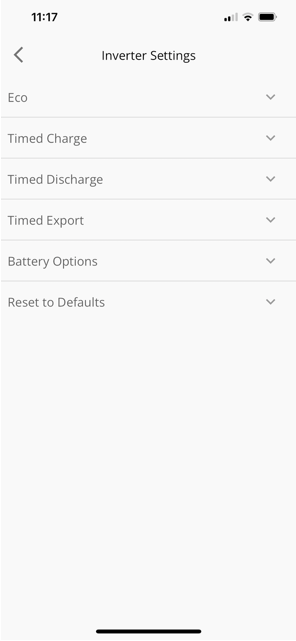
The image below shows my screen on iOS, why has the solar or solar/ grid setting functionality been moved/removed?
Any idea where I can find GE's clunky software update log?

D
#4 DD

comms Looks like they've just renamed it as 'timed charge' ? [Which is all "solar + grid" really is.]

Looks like they're changing the app to look more like the web portal ? (Which is a shame - I prefer the apps way of presenting timed discharge vs timed export.)

C
#5 comms

I concur, all very sub-optimal

C
#6 Claire

I am also struggling with the new inverter settings on the app (iOS). My current settings are as follows:

eco - enabled
timed charged - enabled between 2am and 5am
timed discharge - enabled
timed export - disabled (as I think I need to manually enabled to make the most of higher rate export between 4pm-7pm)

However, it is a sunny day and any excess power generated is going direct to the grid (with my battery at 70%!). Surely with eco enabled it should charge the battery first? I am now lost as to how I get the inverter to do what I wanted ... any ideas?

I had hoped that GivEnergy were working on improving settings so that you can set a timed export down to a battery percentage and then automatically switch back to eco or home consumption, but it seems not!

Also it would have been nice to have a notification and proper explanation of the changes they introduced!!

D
#7 Daveb01

I liked the old version as well.

Note to all, I have turned on each setting and turned it off again. The settings that don’t change the ECO setting sometime now turns it off. I have mine on ECO all the time and now have to check it every time I change a setting, not happy GE.

Plus my AIO went off line at 08:30 this morning and just noticed it at 12 ish. Had to reboot whole house to get it working. Why do we still not get any notification when it goes offline in the Cloud?

S
#8 SimonClarke

I’m on Eco and timed charge and everything else off works fine. Charged currently to 100% so exporting. I could export more but the weather has been very unpredictable here so I won’t bother for a while- if ever!

D
#9 deepanshus

Claire you don't need to enable "timed discharge", thats what is not making your battery charge.

ps: yes the old layout was much better for a phone, these detailed settings we could have done on the web dashboard. its ridiculous to have them in the app

DeepS

#10 hoggy

Wild guess but perhaps Polar ESS systems they are readying is using same app so this is to cover both systems operations modes?

C
#11 comms

On a slightly different note:

I have a brand new GE solar system (battery and solar panels) and I'm just getting to grips with the setup. I invested in solar for personal consumption rather than off peak battery charge followed by export back to the grid to make a few quid. Surely routinely charging (off peak) and rapid discharging to the grid accelerates the need for a new battery right?

During a good solar day, on completion of battery charging, I'd like to export spare solar back to the grid for some return at least. However I find reading around the topic extremely tiresome, my energy provider is Octopus, but the pros and cons of each plan are totally exhausting. Could someone point me in the right direction, I mean where can I receive a little return for the spare solar that I'm pushing back at the grid?

C
#13 comms

Thanks. What I'm really looking for is a cheap off peak rate (for battery top ups in winter) in combination with a simple solar export rate (export solar when I have excess solar during sunny months). Which Octopus Plan accommodates?

V
#14 Vestas

comms There's none which are optimal for both scenarios. You'd have to switch plans every 6 months.

Closest match would be Agile/Tracker for import and Outgoing Fixed for export.

D
#15 deepanshus

Vestas thats what i have now as well and i feel this is quite optimum even in summers. When we export a lot during day, it gets charged at fixed 15p and if the import rates are much less eg 3p or 4p then you can discharge your battery before the charging time slot. if the import is not that low for eg 11p or 13p then just topup from grid overnight.

this i feel is better than the Octopus Flux scenario.

V
#16 Vestas

deepanshus I have the same but our system wasn't designed for export so doesn't matter so much to me.

Edit - well I would have the same if Octopus were capable of switching outgoing agile to outgoing fixed without signing up for export again. Their customer service truly sucks.

P
#17 Pete UK

I’m not enjoying the new app as much either.

With dual inverters and 4x batteries;

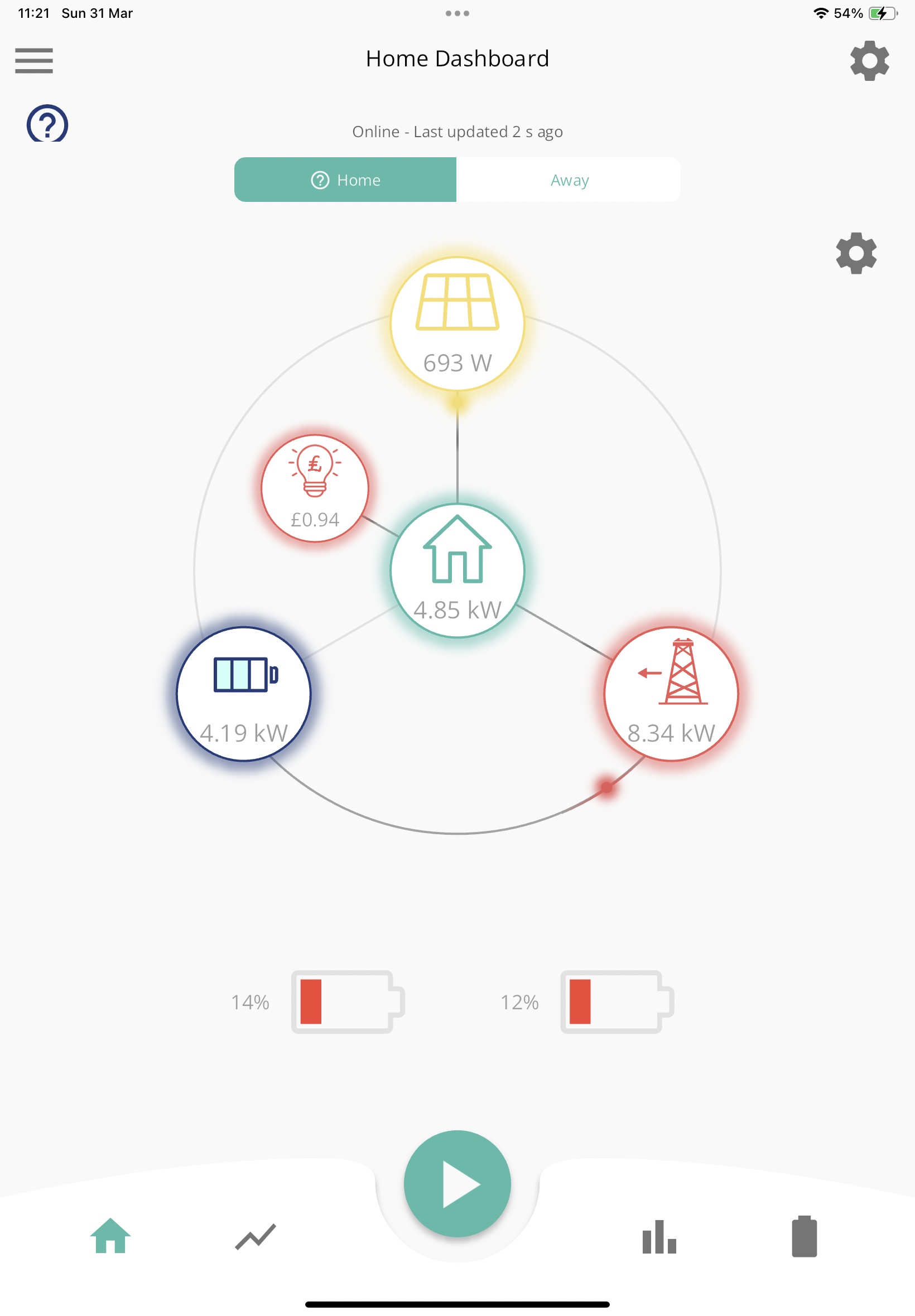
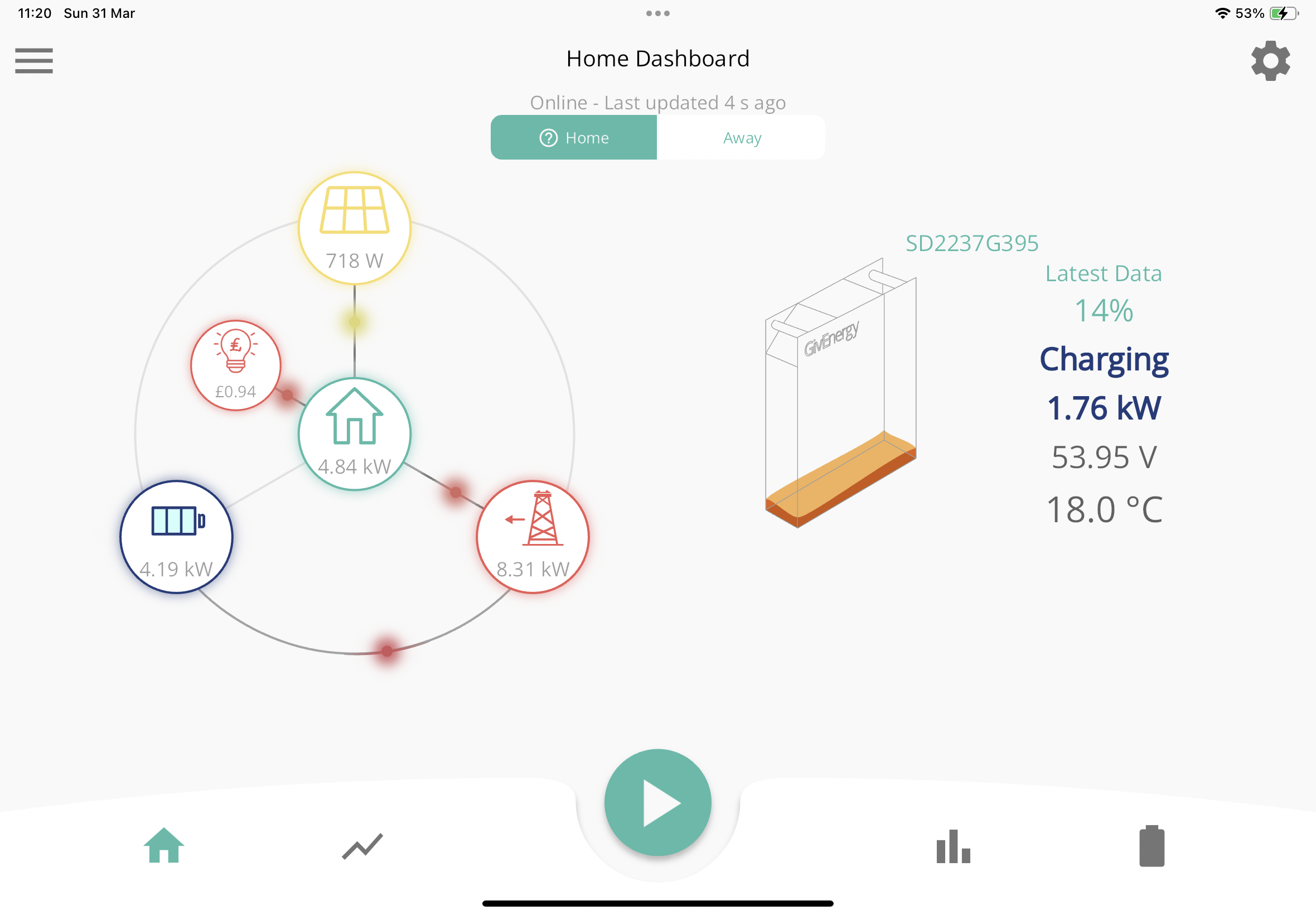
1) Before I could see both batteries together with their individual percentages on the Home Screen. Now I have to click on the “i” (info) button, which then displays them above in a box !
So now every time I have to make an extra click. Why? It was better before !

2) When changing settings, I now have to change each setting separately on each inverter. So twice as much fiddling. Why?

H
#18 halai82

I’ve set max 85% charge when charging from grid. It charges to 100% when Solar is activate.

I would like it to stay 85% and not charge from Solar. Reason: to maintain battery health.

Any idea how I can ask it to never charge above 85%?

D
#19 DD

Claire Surely with eco enabled it should charge the battery first?
Yes. Thing is, with this portal-style interface, it's entirely possible that the eco flag has accidentally become unset. These 3 settings (eco, timed discharge, timed export) are not independent, orthogonal controls: they share (fight over) two underlying parameters. They therefore have odd interactions. Eg turning off timed-discharge can actually turn off eco. (There was a thread about that recently.) I don't have iOS so can't experiment, but I know that in the portal it makes quite a mess of things.

I'd suggest turning eco off then on again - that will force things back into sync, regardless of the starting state.

D
#20 DD

halai82 not sure you can limit the charge from solar? Assuming you have a hybrid inverter, if you want to inhibit solar charging completely, you could look on the portal for a priority setting, and set it to grid-first. If it works, it should send solar to AC preference, and only battery when AC limit is reached. Unfortunately doesn't work for me. Alternatively, you could used the timed-pause feature to pause-charge during the day.

If, however, you want to allow solar charging until battery gets back up to 85% after early morning usage, then stop, I'm not sure that there is a way?

Note that LFP chemistry is a bit less fragile than the NMC used in cars, so an 85% limit may not be necessary. And GE should leave adequate headroom (though with the latest firmware there are doubts ) The BMS has trouble tracking state of charge, so if you never visit 100% or allow it to get low, you may suffer jumps when reality catches up with it.

K
#21 KWcomm

Pete UK
Agree it’s a backward step on both points you raised. I additionally have a bug. If it’s connected on ‘Home’ (as opposed to ‘away’, my battery single battery average is always 0%. Happens on two iOS devices.

J
#22 Jellybaby

That app change is the stupidest thing ive seen, there was nothing wrong with the layouts imo and the charge/discharge screen was absolutely fine.

S
#23 Smk82

Pete UK I agree, for plant users this is definitely a step backwards. Unfortunately I had auto updates on, so it updated before I could stop it🤦‍♂️😳. Now firmly off and I hope Ge take note of how little this new version is liked and revert it to the earlier version (or similar).

D
#24 DavidVale

Agree, the new App design is definitely leading to more confusion and mistakes. I was not even aware of the eco setting until a few days ago, as I only ever used the app. Now I am being told by GivEnergy service desk team that to force an export at a time of my choosing, I will need to use timed export which will turn eco mode off…. But I manually need to turn eco mode back on again after my timed export has finished…. This is not a great design vs how I used to use Discharge Mode = Scheduled and Consumption Type = Home Demand. I did not have to make manual changes once the discharge had completed.

D
#25 DD

DavidVale 'Timed Discharge' is equivalent to 'scheduled; home demand', and leaves eco flag on. (Or at least it does for me.)
'Timed Export' is equivalent to 'scheduled; full export' so you probably don't want to be using that one.

D
#26 DavidVale

Many thanks. This is what I received from GivEnergy Service Desk !

“Eco mode = use power to load

Timed discharge is eco mode on a time = use power to load on a time set

Timed export is eco mode off on a time = use power to export to grid on a time set”

I have suggested the GivEnergy App User Guide is updated to reflect the new App Design, and Features. The most recent version is from 2022.

D
#27 DD

DavidVale That does match the description of 'timed discharge' on the web portal. And I think it might match the behaviour on some systems, but not mine.

(There's a post somewhere where GE seem to acknowledge that gen-3 firmware behaves differently, and they can't currently change it. I hope they don't - it works almost as I'd want it - the only change I'd like would be if the discharge power could be set for each timed period differently from dynamic, or eco mode. When in eco mode, I want the inverter to be free to discharge at up to max rate, but when I'm exporting, I tend to want to do it at a gentler rate. So after a timed discharge, I have to go back to raise the max discharge rate back up again.)

M
#28 MHewett

I agree with comments above. This new app is definitely a step backwards. I am not certain what I am doing with each setting. Can we please have some instructions on its use

D
#29 DD

MHewett I haven't seen this new app, but from the screenshot, it looks like it now duplicates the web portal interface. See
https://kb.givenergy.cloud/article.php?id=7&oid=2

(unfortunately, the image for 'timed export' is just a repeat of the one for 'timed discharge')

J
#30 Jellybaby

They seriously need to roll back the ios app

W
#31 wilfleek

Personally, I don't think there is anything wrong with the app - it does all I need. So the format has changed slightly? So what? Apple/Microsoft et al do that kind of thing all the time.

P
#32 pacemaker

GE should get their mobile app product manager on this thread (or if unavailable, hire one!)

K
#33 KWcomm

wilfleek
It’s not just a format change for those with a Plant set up. It requires multiple clicks on each inverter to the same task as before. In addition, having selected an individual inverter to change a setting, it does not state which inverter you have selected, so it does need an additional check to make sure all the inverter settings are aligned. On the main screen, it takes an additional click to see the individual battery levels.

P
#34 Pete UK

KWcomm

Yes, just realised I’m doing that as well. Keep going back to check each inverter tab is set and it wasn’t the other one I modified. Then another check of both again to make sure !

Suggest we all add these two issues as “feedback” in the app “help” section. As they probably won’t be looking at this thread. The more feedback they get the more likely they may change it back. I’ve just sent my feedback.

K
#35 KWcomm

I’ve raised two app feedbacks - a bug and a feature request, 10 and 3 days ago respectively. No status change with no status change and no update to last action.

Has anyone previously raised any feedback via the app that GivEnergy has responded with an update/resolved/closed any ‘tickets’? Thanks.

G
#36 geoffreycoan

KWcomm I submitted 10 bug reports and feature requests in February and April last year.

Not a single response to any of them.

Doesn’t make me feel at all positive about GivEnergy’s customer service. Seems they just do what they want

S
#37 Smk82

geoffreycoan oh feedback I’m pretty sure they just ignore (unless it’s positive)

G
#38 geoffreycoan

Looks like there’s been some changes to the GE app.

In portrait mode I can now see the battery %’s for my two inverters

And clicking either takes me to the details for that inverter. In the last app update this had disappeared

In landscape I can only see 1 inverter/battery and no way to scroll to the other

Small improvement. No details on the ‘what’s new’ section, so there may be other usability improvements that have been made

J
#39 JK

Claire
It’s completely ridiculous.
I just set to export this evening during peak times, down to 20 percent. Only then, the battery won’t discharge below that rate at all - so I’m then importing from the grid to run the house.
So I turned the timed discharge off, only to find a couple of hours later, eco mode had turned itself off… so I have now imported more power than exported, at my cost.
Honestly, I now feel duped by this installation, I would have never installed giveenergy if I knew how impossible it would be to set basic export rates and percentages so that I can export at peak times, and use my battery to cover me overnight.

Please sort this out!

G
#40 geoffreycoan

JK If I can explain what is happening, hopefully will go some way to reducing your frustration.

Firstly, Timed Discharge. If you look elsewhere in the forum there’s plenty of other discussions of this, but DO NOT USE IT !
Timed Discharge is badly described as to what it does, to all intents and purposes it behaves exactly the same as Timed Export, BUT it has the side effect of turning Eco mode off so once you turn the Timed Discharge off, or the time period expires, the battery (as its not in Eco mode) won’t supply the house.

Use Timed Export instead, it doesn’t have this side effect with Eco.

Secondly, the “down to 20%”, its worth explaining better what is happening. You set a time period (say 4-7pm) and you set a lower level for the discharge say 20%. The inverter switches to discharge mode, the battery starts discharging, and stops discharging when it gets to 20%. The inverter will remain in discharge mode until the end of the time period (7pm).

What you probably wanted was “discharge and export excess power down to 20% and then when it reaches that level, switch the battery to Eco mode to continue supplying the house”. Bluntly, it doesn’t do that.

With the controls in the GivEnergy app/portal you basically have to set the discharge period and % level so that they both correspond at the same point.
e.g. battery is at 50%, you have a 10kW battery and an inverter that can discharge at 2.5kW/hour (keeping the maths simple). You want to end at 25% (i.e. 2.5kW of stored charge) at the end of the discharge period. You would therefore need to set the discharge to start at say 6pm and finish at 7pm. In fact for safety you might want to start the discharge at 6:10pm and finish at 7pm just to be sure the discharge doesn’t run a bit quicker and you get stuck with the battery not supplying the house.

Hope this helps explain things better

D
#41 DD

geoffreycoan Use Timed Export instead, it doesn’t have this side effect with Eco

??? Timed export immediately turns eco flag off. At least timed discharge leaves it on so that it returns to eco after the time period ends. It only goes wrong if you turn it off using the portal interface. The android interface makes it harder to get it wrong. It's just a pity that they seem to updating the app to use the (awful) portal interface instead.

The usual reason for telling people not to use timed discharge is because the poor documentation makes them think they need to use a timer at all, when just leaving it in eco does everything they need.

P
#42 Pete UK

geoffreycoan

I think it’s the other way around isn’t it?

“Timed EXPORT” turns ECO off.

“Timed DISCHARGE” - ECO remains on.

  • So timed discharge is the option most people are wanting; to discharge to the grid for a set time, then use the batteries after that timed period ends and avoid importing from the grid and use the remaining battery power for the house in ECO mode until you hit the off peak period.

I’m using Timed discharge and it does that anyway (Gen3 Hybrid 5.0)

But yes, you are right the plan is: work out the discharge time so that you “get rid of a certain percentage of your battery” to finish with about what you want remaining at the end of the period.

G
#43 geoffreycoan

Pete UK It is possible I got the controls the wrong way round, in my defence the OP said that they had turned on Timed Discharge and found Eco wasn’t on afterwards so I took that at face value.

I personally never use the app to control my inverters (do it all in Home Assistant and then explicitly set it back to Eco afterwards) so am probably not the best person to advise !!

D
#44 DD

geoffreycoan timed export immediately turns eco off. The problem with timed discharge is when turning it off with the portal interface: it clears both the underlying eco-mode and enable-dc-discharge flags. It's entirely a design flaw in the interface.

P
#45 Pete UK

DD

Well that explains what’s going on with the OP then. Personally I am leaving “Timed discharge ON” permanently and just modifying the duration of it (predominantly just altering the start time and leaving the end time at 23:29). So presumably as I’m never disabling it (turning it off and on again in the app), ECO is remaining ON all the time. I will check ECO is enabled again In future though if I ever switch timed discharge off.

As I’ve got this balancer beta going on, I’ve got hundreds of API commands being sent and aren’t 100% certain of what the “normal” behaviour is.

You’re right though this does seem like a major design flaw. I think 99.9% of people would want the system to return to ECO (normal operating mode) after a timed discharge. It should operate like the quick play buttons in the app only automated.
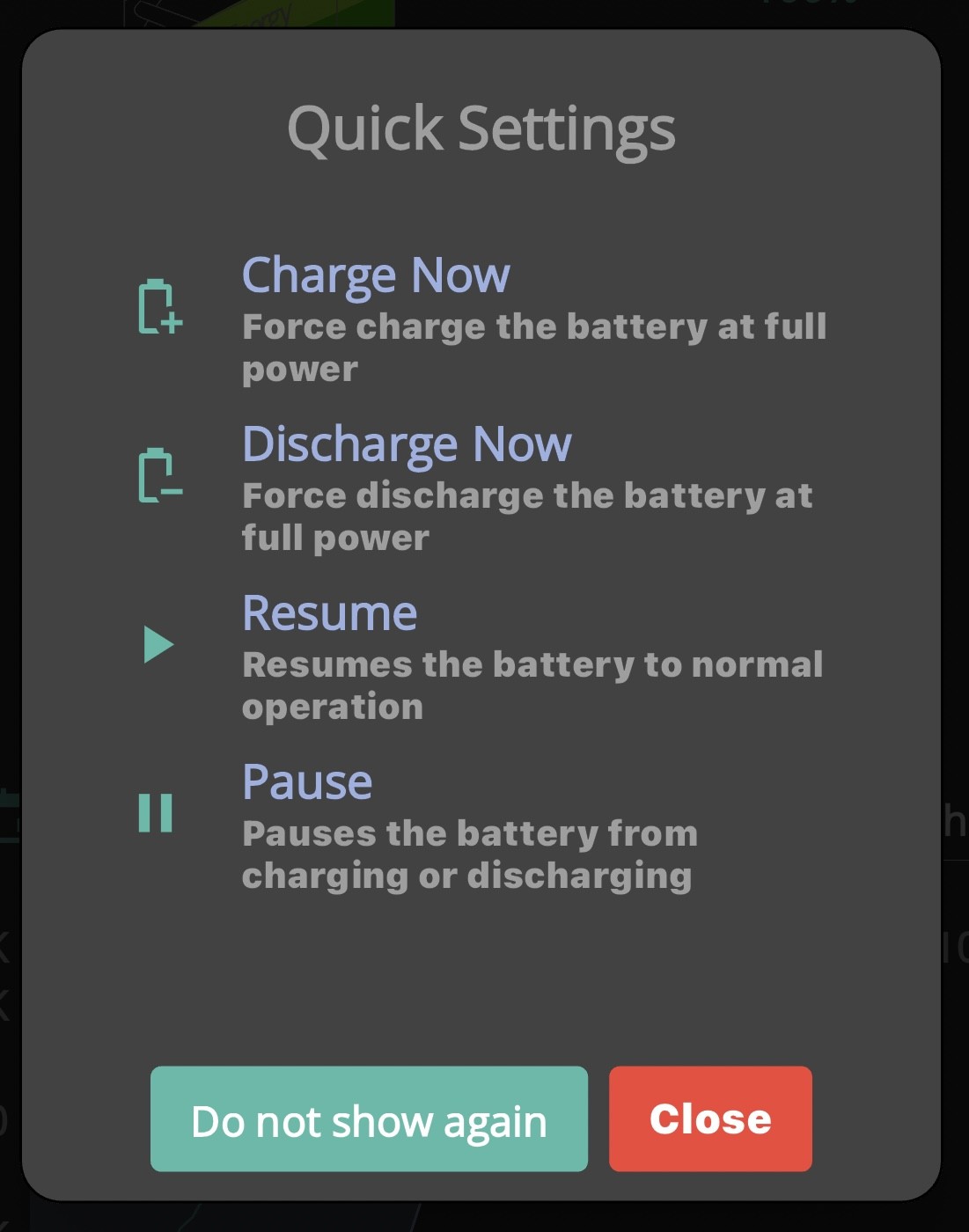
Quick play buttons; you hit battery discharge and it discharges at max to the grid and covers house load and then when you hit “play” it returns to ECO. This should be what “Timed discharge” does. Why there is even a “Timed export” function I’m perplexed. All that does is guarantee you’ll end up in the wrong mode (not in ECO).

@geoffreycoan

Back to the original topic:

Yes, it’s good to see both batteries back on the main screen. Not sure if that was coincidence or as a result of me providing app feedback or not because I got no reply.

M
#46 MayaW

I’m on economy 7 so the timed discharge worked well stopping the battery discharging after midnight meant that the hot water cylinder took power from the grid at cheap rate. Now it takes it from the battery and is costing me over £5 a week extra as the hot water cylinder discharges the battery then takes power from the grid as the battery charges. Also concerned that due to the large power draw form the battery will cause damage. Need to return to the old app and it functionality. Not impressed.

D
#47 DD

MayaW as far as I know, all the functionality (in this area) is still there. They've just changed the interface to match the portal. You can still configure exactly the same behaviour on the inverter, just need to change how you do it.

To leave timed discharge, you could try first switching to timed export, then switch to eco. (Because the interface is trying to pretend the system is in one of 3 modes, you ideally want to switch to another, rather than switching them all off )

S
#48 Smk82

The most annoying thing with the new app is having ti program both inverters individually!

D
#49 downfield

comms comms Hello Pete - I'm late responding because only just seen your post asking about tariffs.
I have been on Agile since 23 December and since then have cut my power costs by 50% compared to Octo Flexible. I have 19kWh of batteries and 24 panels = 9kW on the roof. The savings have mostly been possible because I am using MyEO to manage the batteries efficiently. It's completely hands-off but keeps you informed about what its doing, so its no good if you like constantly fiddling with Home Assistant or similar. I have a 14kW ASHP which has a fairly constant demand over the cold months and with Agile I have been averaging 13p/kWh for 21 hours/day and not needing to pay during the expensive peak. I also have Fixed export at 15p/kWh but only really starting to need that now solar is getting going. Hope this helps.
Also recommend the Octo Compare app if you haven't got it.

P
#50 Pete UK

Why are there even 2 options for discharging/exporting to the grid?

It’s confusing the heck out of people.

There should be just one timed discharging/exporting option called “timed export” that discharges to the grid and home load and then returns to ECO - with multiple slots.

Similar to the single “timed charge” which currently charges and then returns to ECO ! - also add multiple time slots to that as some people need that.

I mean there aren’t “timed charge” and “timed import” settings, so why have two for export?

It seems the quick play buttons do exactly what we want (except setting the rate) but we have to press the buttons manually to do it, which isn’t convenient to say the least.

Aren’t these quick play buttons all the functionality everyone would ever need (excluding setting the rate) just at different times of the day? ie these should be intuitively time programmable? The quick play buttons do all the modes we need.
It seems whoever designed the quick play buttons got it right. They are intuitive. They do what the user wants. Now they need to implement an intuitive way for users to set the timing for when we want each “quick play” mode operating.

What is required is an app/ and portal interface that automates the quick play buttons; ie you can set the times when you want to perform these actions (change mode). Also at a deeper level in these settings the ability to adjust the rates at which charge/discharge is performed.

P
#51 Pete UK

For different inverters that may operate slightly differently, there should be an “auto detect inverter type” integrated into the app or at minimum a “select inverter type” during the app set up which would mean the app could send the required commands to the specific inverter type.

D
#52 DD

Pete UK Why are there even 2 options for discharging/exporting to the grid?

It’s confusing the heck out of people.

There should be just one timed discharging/exporting option called “timed export” that discharges to the grid and home load and then returns to ECO - with multiple slots.

Similar to the single “timed charge” which currently charges and then returns to ECO !

What's crazy is that, behind the scenes, that's exactly how it does work (on gen-3 at least). One variable says whether the inverter does eco mode, and another register says whether that can be temporarlly overriden with a forced discharge during a time window. The fabrication of the modes is entirely within the user interface.

I think however that the older models behave quite differently. They do seem to take these two registers together and concoct different operation modes depending on the combination.

Oh, I guess one simple interpration of the behaviour is that on older models, the eco flag takes priority over the timed discharge behaviour, whereas on newer models, the timed discharge takes priority over the eco flag.

P
#53 Pete UK

DD

Yep agree. Hence my second post. Once the inverter type is known to the app/ portal (which it should be already). The commands required for that type of inverter should be sent to achieve the desired mode. Not have two different options with no proper explanation and a vague “one fits all” description that doesn’t work as expected for all.

Thinking about it a bit more, likely that’s why there are two different user modes for “exporting”? One that works for older and one for newer inverter types? 🤷🏼‍♂️
In which case that should be made much clearer to the end user! ie use “timed export” for older models and “timed discharge” for newer models.
Or preferably (rather obviously) the wrong option should not be available (or even visible) to be selected by the end user.

Also the detail of these flags should be invisible to the end app user to avoid the constant confusion. Just have one and label it “timed export”, get the app to send the correct commands for the inverter model it’s connected to. Seems to be what the quick play buttons do.

The quick play buttons seem to work for all inverter types don’t they? If so, obviously they have got that working correctly. (Sending different commands to different inverter types).

Shame there is no explanation of how to set things up correctly for your particular inverter type. Add to that conflicting information when users contact GE support for advice and conflicting posts here.

Hope they can sort it soon. Also… when CEMS…?

#54 nophead

I don't think pause works on my Gen3 inverter after the firmware was updated to 307. I think the app still sets the power to zero but that no longer works, it discharges at 300W. I have to pause it in the portal settings.

D
#55 DD

Pete UK The quick play buttons seem to work for all inverter types don’t they? If so, obviously they have got that working correctly. (Sending different commands to different inverter types).

Not necessarily... AFAIK setting eco off and timed-dc-discharge on will do a forced export on all inverters. Because the quick-play buttons don't set a time limit on the export, you have to manually turn it off, which can set eco back on. (I've not checked that's what it actually does, though.)

Shame there is no explanation of how to set things up correctly for your particular inverter type

"Correctly" is perhaps the wrong word - they provide control mechanisms, and it's up to you to decide how to use those mechanisms to control your inverter. But yes, some how-to guides for different firmwares would be most welcome.

M
#56 MayaW

DD Thanks for you reply. all worked fine until the app update. Now I have no control on how the battery discharges. I work on the principle keep it simple which it was. Previously timed discharge was simple, it worked and saved money. Now it’s not simple and costing me money. The reason I had solar and battery fitted was to save money. I’m concerned that the hot water cylinder is draining the battery so quick it’s will cause damage. All I need is a simple and easy to use app and not having to go deeper into the more complicated parts of the system is not what I want to do. Unfortunately I have no patient's with poorly thought out ever changing app designed by developers who don’t actually use the products they produce. Sorry for the rant. Also because of this change I’m no longer recommending Givenergy as my first choice manufacturer to my clients although I still have them on the list of recommended manufacturers I don’t plug as I once did.

MayaW

M
#57 MayaW

Well the bills in and I’m now using more electricity than I did in January with the heating on. No heat on for over a month. So thanks Givenergy for the app update. Great one. Loss of ability to control battery discharge hours was a great idea. Not everyone can use cheap tariffs I’m stuck with economy 7. Get your act together and give the ability to control our equipment the best way to suit our use and tariff.

B
#58 Beebod

We also have Economy 7 along with fixed export of 15p / kWh which seems to work well. If you are heating hot water at night with E7 which we also do, just set your Timed Charge for E7 hours and set the battery percentage you want to achieve and that charge % value will be maintained regardless of your immersion heater going on and off. However, I wouldn't worry about your battery rapidly discharging, that's what they are designed to do. Over-discharge is the main enemy but the GE batteries have built in reserve which prevents that from happening. You could also consider fitting a Solar i-boost which will automatically divert any surplus solar energy you have during the day to your immersion heater, only exporting once your water is hot.

G
#59 geoffreycoan

Beebod with export rates at 15p, significantly higher than gas prices, the economies case for an iboost or similar isn't there as it used to be.

Heat the hot water overnight on cheap electric or gas and export the surplus solar power