Charge schedule ignored

25 comments started 2024-02-25 last 2024-04-20
GivEnergy ProductsBattery
J
#1 John_R_H

For the last few days, my AIO system has not been following the timed charge schedule I set.
As soon as "AC Charge Enable" is set to on, the battery starts to charge from the grid.
I currently have the charge period set as 01:30 to 08:30, but charging started at 22:30 when I set "AC Charge Enable" on.
Similarly, at the end of the charge period, the battery does not start to discharge to support the house load until I force the "AC Charge Enable" to off.
This is not the behaviour I had been seeing in previous weeks, then the schedules had been working as expected.
Any advice will be much appreciated.
D
#2 DD

John_R_H the inverter has multiple charging slots, but only one is shown in the app/settings. Have a look in the the remote control section on the portal to see if one of other slots has become configured.

J
#3 John_R_H

Thanks for replying. I used remote control to check that very carefully as a known "gotcha".
Only the "AC Charge 1 Start Time" and "AC Charge 1 Start Time" have values other than 00:00.

J
#4 John_R_H

Last night after the original post, I used Settings in the portal to "Reset all charge modes, timers and limits to their factory defaults".
I then used the app on phone to change Charge Mode to solar + Grid and to set start and end times for the overnight charge slot.
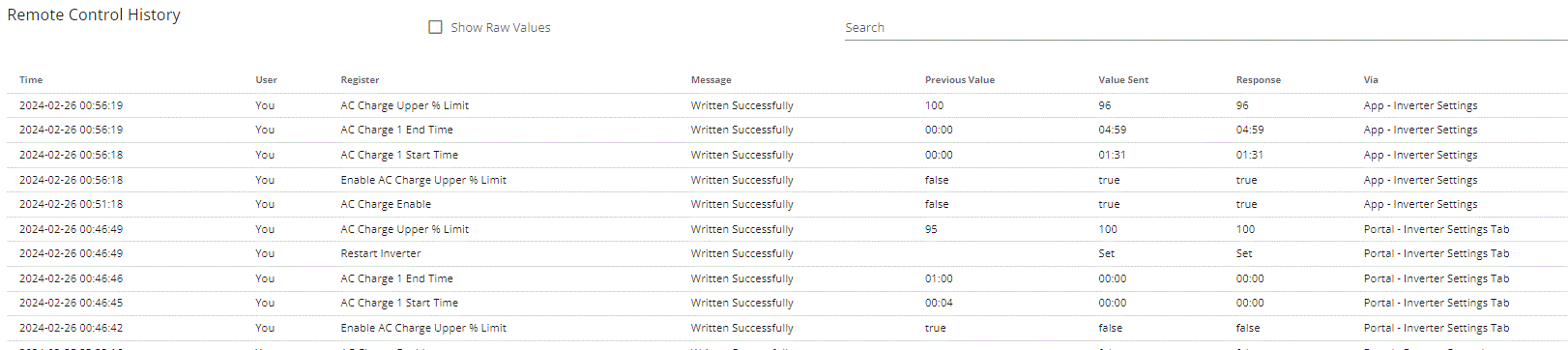
Here is the extract from the Remote Control log:
![
](https://)
This succeeded in delaying the charge start but discharge didn't start and the end of the time slot.

J
#5 John_R_H

Curiouser and curiouser...
The battery did start to discharge at 07:55 (instead of the set 04:59) without me changing anything.
Coincidentally (?) this was 30 minutes after a substantial drop in load when the new heat pump switched off.

Could this odd behaviour be a quirk of ECO mode?

D
#6 DD

John_R_H Could it be that the inverter clock has drifted? Not sure how to check it with the official tools, but the free 3rd-party app can show inverter time compared to android time (on the 'home' line). [I see mine's about 15 seconds slow.] I don't know if the time stamps in the various logs record the time the inverter sent it, or when the portal received it.

You could do a binary chop using the AC charging time field to figure out what time the inverter thinks it is.

The remote-control section has a field to set time/date, but not obviously to read it.

J
#7 John_R_H

DD Thanks for the suggestion. I used the suggested app to confirm that the inverter time & my phone time are within 2 seconds of each other. I had used remote control to reset the inverter time a couple of days ago...

R
#8 Rubikcube

One possible explanation might be because the grid voltage was too high. The voltage tends to drop when your neighbours get up and start turning appliances on.

G
#9 geoffreycoan

Rubikcube In general, worth checking if there are any errors in the inverter log on the portal.

Looking back at your original message

John_R_H I currently have the charge period set as 01:30 to 08:30, but charging started at 22:30 when I set "AC Charge Enable" on.
Similarly, at the end of the charge period, the battery does not start to discharge to support the house load until I force the "AC Charge Enable" to off.

All the symptoms do point to a clock mis-alignment, maybe the inverter is set to the wrong time zone? You can ask GivEnergy support to check this.

If there is a charge slot setup then the inverter will not swap to Eco mode and start discharging to meet house load until the charge period is over or you turn AC Charge Enable off. So this bit is normal

D
#10 DD

John_R_H The log is truncated... can I assume that the lines underneath (earlier) are a sequence of the portal setting default parameters (one at a time), and then the restart-inverter signals the end of the reset-parameters sequence ?

Something that's troubling me is whether, when doing a reset-to-defaults, the portal unconditionally sets all parameters, or only sends changes for parameters which it thinks are different from default.

In another thread, misbehaviour was consistent with eco flag being off, though portal said it was on. User had done a reset-to-defaults. Yet setting eco flag off then on again fixed the problem. So it was as if the portal doesn't unconditionally set all flags to their default values, only those it thinks need it. Just wondering whether you could confirm this.

With the 3rd-party app, you can see many settings directly from the inverter, but it doesn't show everything. The portal does allow you to forcibly read registers from the inverter, though it would be a bit tedious to do them all...

Another way, if you're up for it, is to use a python script to retrieve registers from the inverter. It's distributed with GivTCP, but you don't need to install home assistant to use it.

J
#11 John_R_H

DD
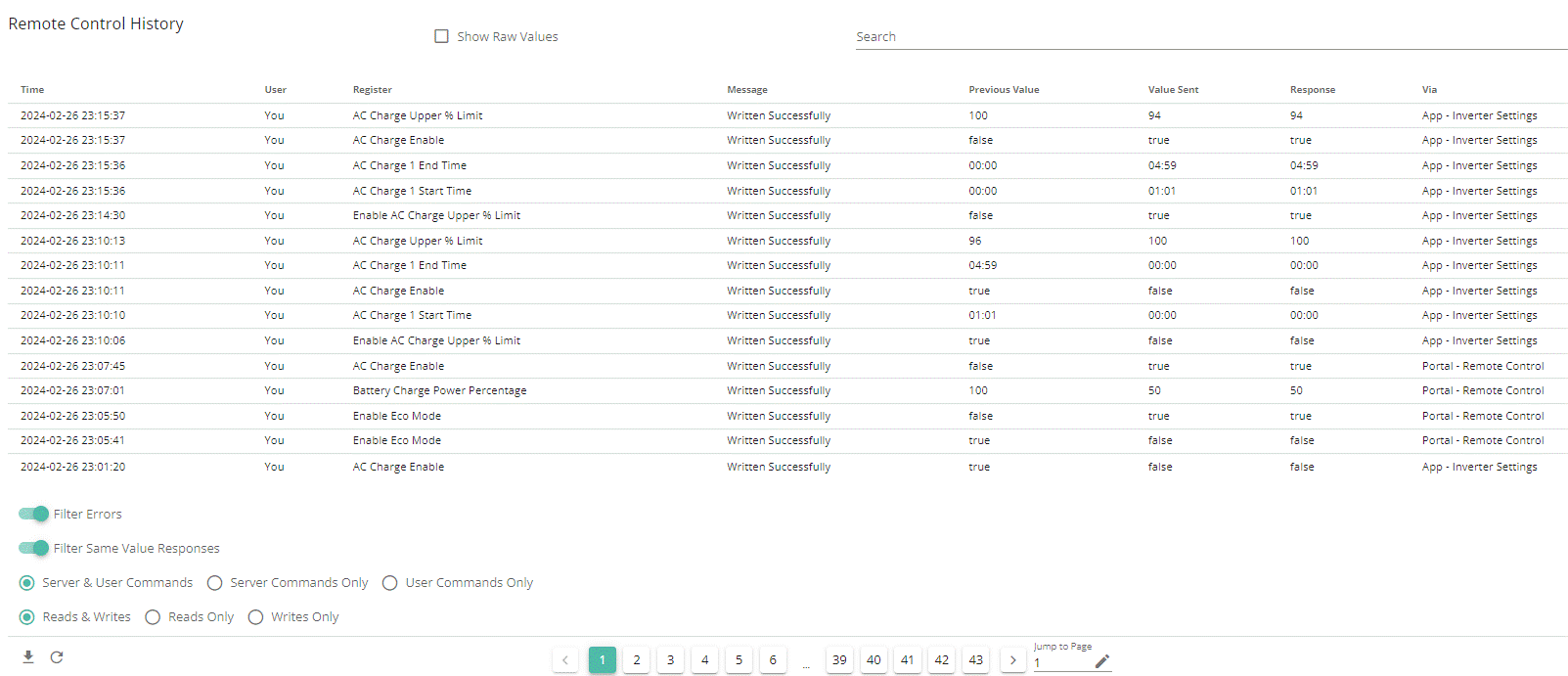
Screen capture of log from tonight is attached to this post.
I had left the charge mode set to solar only from approximately 9am. By 6pm the battery was still at close to 100% as solar had kept it topped up through the day. I had to go out then. When i got home just before 11pm, battery was down to 70% so I was able to try turning AC Charge Enable on. The battery immediately began charging from the grid despite the charge period being set as 01:01 to 04:59.
At 23:01 I disabled AC Charge Enable using the App; then (using Portal remote control) tried turning Eco Mode off and on before setting Battery Charge Percentage and re-enabling AC Charge Enable. Battery again when straight into charging.
At 23:10, I invoked Restore to Default in the app.
At 23:14, I issued a command to set the charge mode to solar+grid, set the charge period & the Charge Up To value. This initially failed with Inverter Timeout. I resubmitted it at 23:15. This is the latest set of commands in the screen capture.
Battery again began charging immediately. I've left it running.

I'll try to have a look at the python script but will also take this up with installer and Giv.

J
#12 John_R_H

Rubikcube No Errors in the log.

J
#13 John_R_H

geoffreycoan If there is a charge slot setup then the inverter will not swap to Eco mode and start discharging to meet house load until the charge period is over or you turn AC Charge Enable off. So this bit is normal

I agree, this is the behavior that I used to see and want to get back to.

geoffreycoan All the symptoms do point to a clock mis-alignment, maybe the inverter is set to the wrong time zone? You can ask GivEnergy support to check this.

If the inverter clock is wrong, would the timestamps in the remote control log reflect its time?
I also did a test previously where I set the charge period to be very short so there was a very small chance of accidentally being within it.

J
#14 John_R_H

midnight miracles?
At just after midnight, the battery spontaneously began to discharge (as it should.)
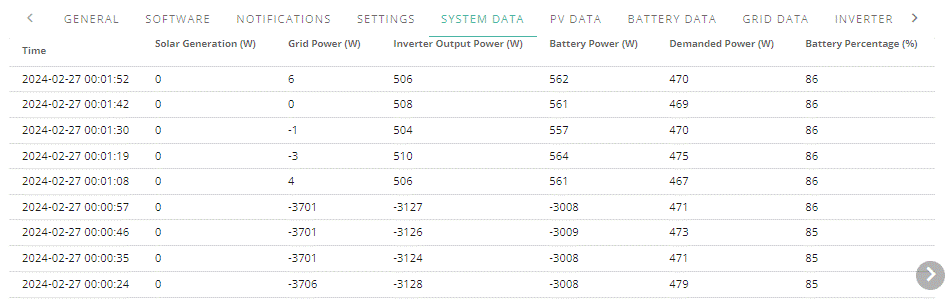
Here is an extract from the system data:

There are no log entries after 23:15 as seen in my earlier post.

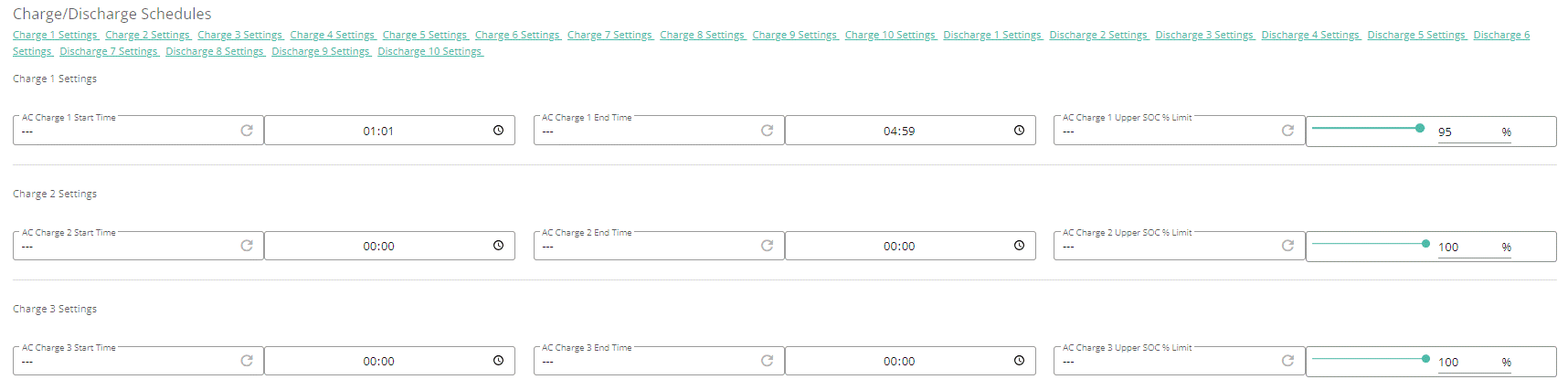
and here are the charge slots according to remote control:

I hope that I've captured enough evidence for Giv.

G
#15 geoffreycoan

On the screenshot of the charge slots, did you click the wheel icon in each of the boxes? This forces the portal to retrieve the register value actually on the inverter - otherwise the portal just displays what it thinks the inverter is set to. Weird design but itโ€™s the way it works, and can result in the portal not having correct values.
Worth eliminating this potential point

Otherwise as you say, talk to support tomorrow

J
#16 John_R_H

geoffreycoan
Genius!
I followed your suggestion and slot 2 popped up with a start time of 02:00 and end time 00:00.
That would explain the behaviour. It also backs up the idea that Reset to Defaults also misses these hidden values.
How naive of me to trust what is displayed.

Many thanks all.

D
#17 DD

I think there's a button at the top of the remote-control page that says something like "read all unread registers"? (Can't check right now.) If it does as it suggests, probably worth suggesting people do that before resetting defaults, so the portal knows what needs changing.
Perhaps someone who uses HA (and therefore registers don't match portal) could test?

J
#18 John_R_H

DD
Button is READ ALL UNREAD REGISTERS. But for me, it is grayed out so does nothing.

G
#19 geoffreycoan

John_R_H Genius!
I followed your suggestion and slot 2 popped up with a start time of 02:00 and end time 00:00

Yay, result. So pleased we found the issue

D
#20 DocD

DD
how do we find out the ip address of the inverter to use in the 3rd party app?

R
#21 Rubikcube

DocD how do we find out the ip address of the inverter to use in the 3rd party app?

If you press the help, there is a facility to scan your network. That is the trail and error method and may not always work.

Better method is to access your router, and see what ip address has been assigned.
https://givenergymonitor.wixsite.com/tutorials/connecting

Q
#22 qwertz

geoffreycoan

Sorry to hijack the thread.
I seem to have the same (or at least a very similar) problem as OP.
Can I just double check which "wheels" you meant?

Those ones?

#23 Simon_C

qwertz, no these. One per setting, to force a read from the inverter in case the comms was down to the cloud when a value was changed.

Q
#24 qwertz

Simon_C

Ah amazing, thanks. Yes, that seemed to have been the same problem in my case. What a rubbish system ๐Ÿ˜ƒ

Thank you!

D
#25 DD

Simon_C to force a read from the inverter in case the comms was down to the cloud when a value was changed.

My understanding is that the portal makes the assumption that only the API can make changes, so it just records the value it last sent. The inverter doesn't upload any changes made locally, such as through modbus or because of corruption.
(They could probably also get out of sync if the API sent an update which the inverter did accept, but the confirmation reply didn't make it back correctly, so the portal assumes the old value is still in force.)