Givenergy DC 9.5 kwh Battery discharge (DC to AC conversion)

21 comments started 2024-03-25 last 2024-03-27
GivEnergy ProductsHybridBattery
V
#1 Vikas

Hi,

Inverter Model - GIV-HY5.0
Inverter Firmware Version - D0.307-A0.307
Battery Firmware Version - 3015


I suspect there could be something wrong with the battery, but not sure whether my calculations are correct.

I've been comparing some usage data and estimates. Considering I've 9.5kWh and set to be discharged depth at 8% when using 350Wh (variable/approx), it should last for at least 20 hours even after factoring efficiency for DC to AC inverter conversion. But I see it lasting only 6-7 hours when fully charged to 100%.

The battery is set to charge 60% during the night at 2000W.

So is this the right behaviour here when DC to AC is converted? Or is there any firmware issue with the battery or inverter?

Any thoughts would be appreciated. Thanks.


Thanks,
Vikas
S
#2 SteveCook

what is your background base consumption.
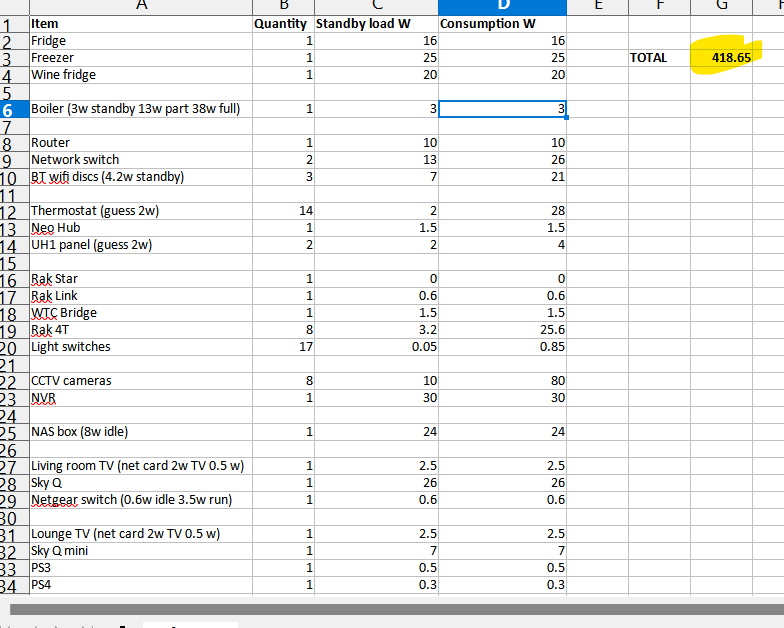
I went around the house and counted every device including those on standby and could not belive it when i get to 400w which matches my portal number (allowing for conversion loss).
Extract of my spreadsheet below

S
#3 SteveCook

What does the portal energy graph show as base overnight load show in W

V
#4 Vestas

Take a look at the portal -> My Inverter then click on Inverter Data (the rubiks cube icon) then click on Meter Data.

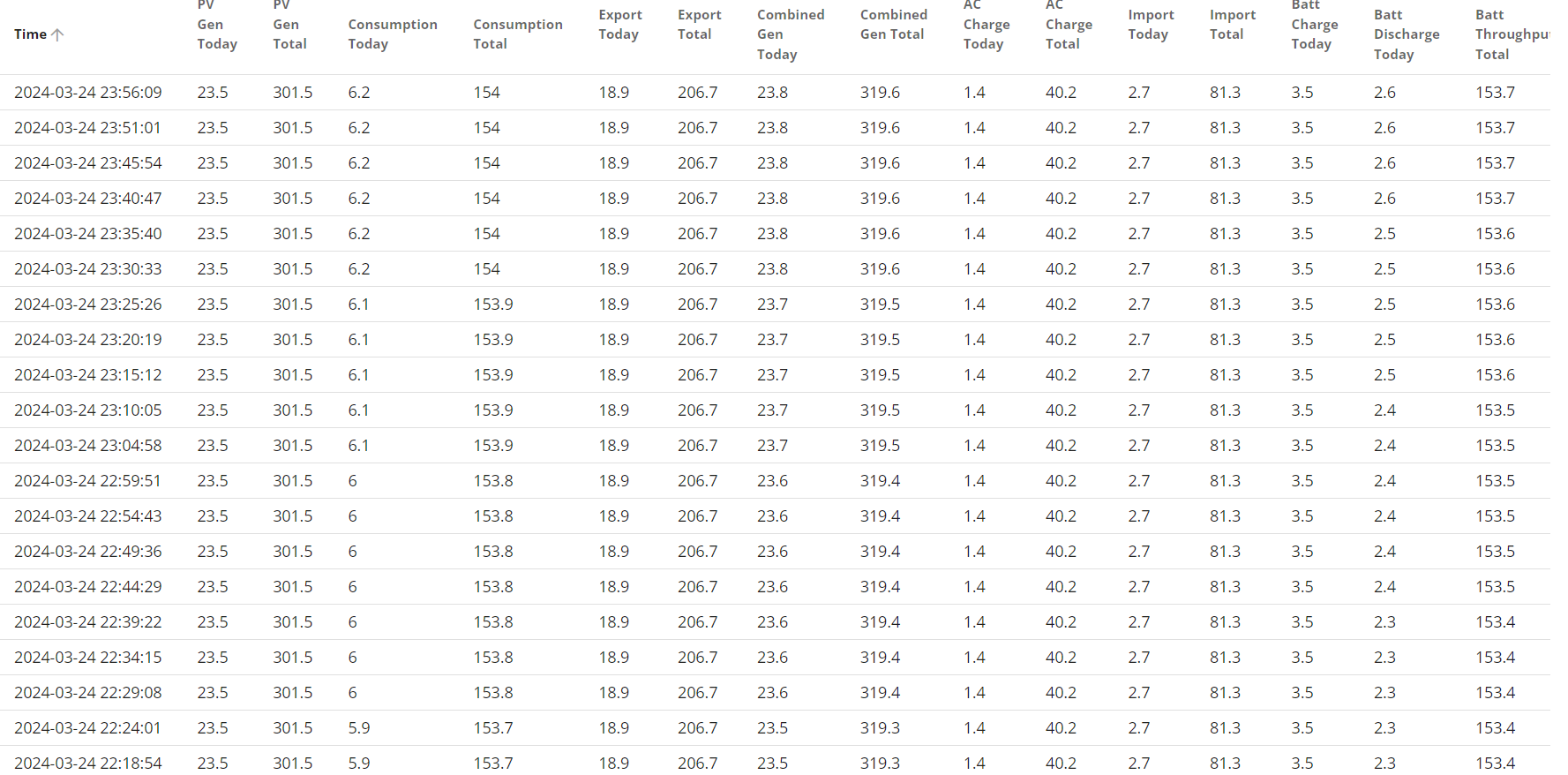
Do the "battery charge" and "battery discharge" readings seem correct? Bear in mind they're per day so ideally you want a day where your battery went to minimum charge after midnight so all the charge/discharge is in one 24 hour period - ie you're not carrying charge over from the previous day.

I took at look at my own HA graphs for a suitable day and I went from 8.5kWh to 500Wh over the course of 10 hours, rough average of battery discharge is about 800W so seems about right.

I suspect that your SoC is just completely wrong - see multiple threads/thousands of posts on this forum.

D
#5 DD

Vikas Not sure why you're only charging to 60% if it only lasts 6-7 hours from 100%. Do you only have 3 hours cheap-rate ? (2kW * 3 hours = approx 60%). Or I guess you also expect to get some solar during the day.

If the battery is runnng out, it presumably goes idle - do you see the SoC drifting back up slowly? From what I've been reading, it's when it's idle at low SoC that it does balancing / recalculating estimates of SoC. So it ought to have a relatively good picture.

If the battery is a problem, it might show up as a weak cell or two. You can use the app at https://givenergymonitor.wixsite.com/tutorials to see individual cell voltages. Differences only tends to show up under load (charging or discharging). Do you ever get over- or under-voltage notifications? (Some people report that as an issue with the 3015 firmware.)

V
#6 Vikas

Thanks for the reply:

Not sure why you're only charging to 60% if it only lasts 6-7 hours from 100%. Do you only have 3 hours cheap-rate ? (2kW * 3 hours = approx 60%). Or I guess you also expect to get some solar during the day.

Charging only 60% at night and during the day it will be charged to 100% for evening use, which later lasts for 6-7 hours
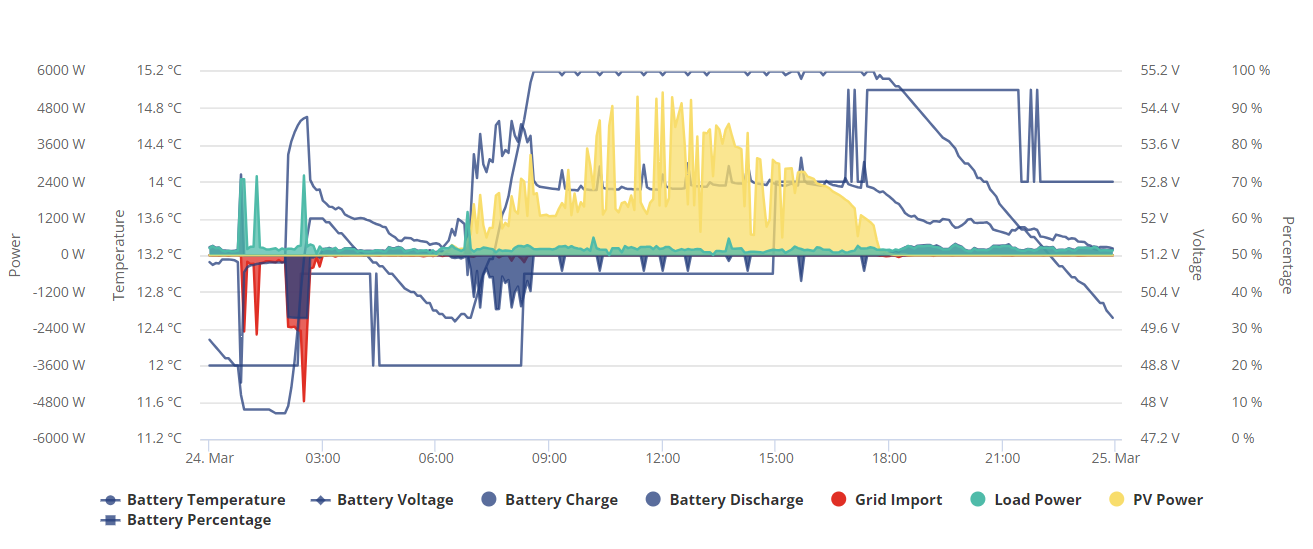
But the odd thing is it only takes 30 minutes to charge that amount which is strange - Ideally, I thought it should take at least 2 hours (2 * 2kWh AC to DC)

Please check the screenshot attached.

If the battery is runnng out, it presumably goes idle - do you see the SoC drifting back up slowly

How do I check this, don't understand SoC here.

Is there a way to download the data which is shown in the graph above?

Thanks

V
#7 Vikas

@SteveCook

what is your background base consumption.

It should be around 120W - 200W, but shouldn't that be accounted for in the load consumption?

V
#8 Vestas

Vikas That battery looks knackered. Best to get support to look at it.

D
#9 DD

Vikas But the odd thing is it only takes 30 minutes to charge that amount which is strange - Ideally, I thought it should take at least 2 hours (2 * 2kWh AC to DC)

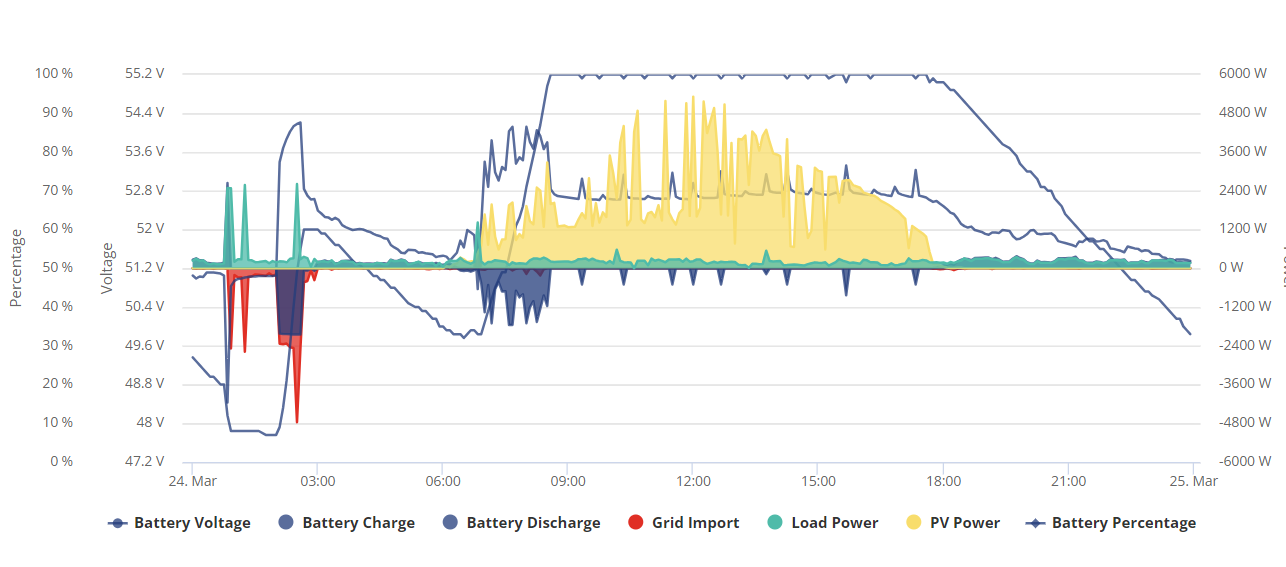
Yes, that'll be the problem, as Vestas mentioned. The GE firmware seems pretty hopeless at tracking SoC (state of charge) correctly. If it rises 40% in 30 minutes at 2kW, it has completely lost track of the SoC.

The graph's a bit busy - could you repost without the temperature.

Looks like it only gets down as low as 20% or so, then starts charging. Allowing it to actually run out and then idle might be beneficial - perhaps a timed discharge starting at around midnight, which will empty the battery and give it a little time to idle before charging starts at 2am. Or maybe start at 11pm with a reduced discharge power.

Or you could ask support to run a formal recalibration.

(I have 6 cheap hours overnight, so I now run a regime of allowing battery to idle for the first hour. Some nights SoC remains flat, sometimes it drifts upwards during that hour. Haven't spotted a pattern yet. I rarely charge up as high as 100%, but I probably ought to from time to time.)

V
#10 Vestas

DD Calibration is probably the first thing support will try but that battery looks very very unwell to me....

D
#11 DD

Vikas Is there a way to download the data which is shown in the graph above?

Yes, on the inverter page on the portal, the 'inverter data' icon (grid icon) gives you the data in a table, and there's a download icon in the top right. (There are two different pages giving tables of data, but only one has a download option. Very strange.)

V
#12 Vikas

@DD

It is set to discharge until 8% around 01:00, and it stays idle for an hour before it starts charging from the grid at around 02:00

The charging from the grid is been timed at 0200 -03:00 (I changed that assuming it charges to quickly)

@Vestas
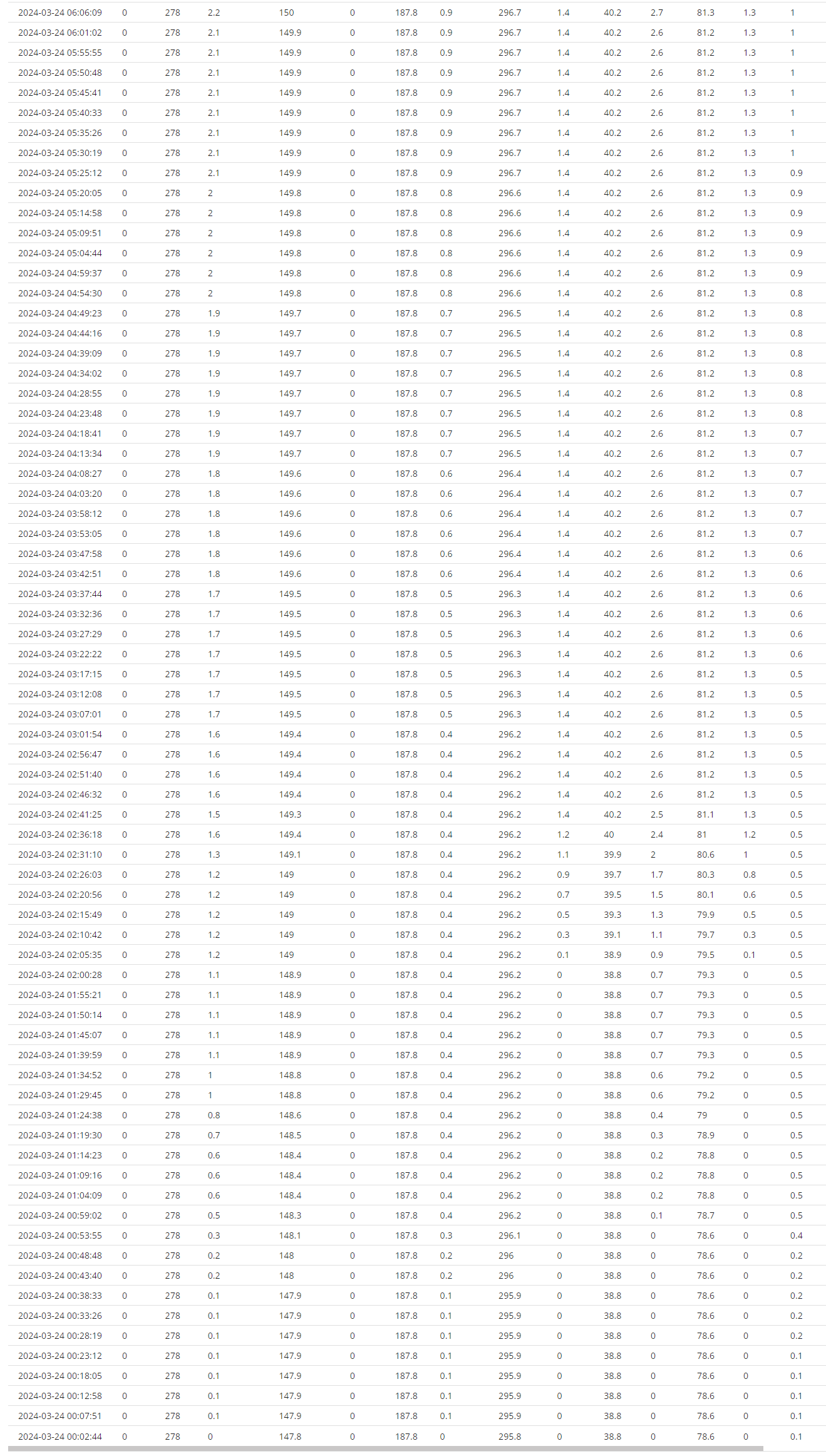
I'm seeing the meter data, but can't make sense of it (can't upload the excel)
- in the evening
- 00:00 - 04:00

fd2314g053-data-download-2024-03-24.txt
77kB

- complete data

V
#13 Vestas

Battery is only taking 3.5kWh of charge so that's the problem.

Email support and ask them to take a look. They're normally pretty fast to respond - well @Adam-Reynolds is anyway.

V
#14 Vikas

@Vestas That makes so much sense now.

D
#15 DD

Vikas 'm seeing the meter data, but can't make sense of it

I think in another thread someone says that the column headers are in the wrong order ?

V
#16 Vestas

DD No, that's a different section of the portal. The meter download is correct but you can only download daily data.

A
#17 Adam-Reynolds

For accurate conversion loss I'd suggest doing a full charge from flat, then full export. back to flat then check the meter data for the battery in energy from the time you started, then battery out energy after. The average losses are around 7.5% per conversion but can be more or less depending on power rating and temperature.

You also have to factor in that the inverter + bms draw power directly from the battery not shown on the graphs which is around 30w hybrids and the AC coupled.

V
#18 Vestas

Adam-Reynolds Did you notice he can only get 3.5kWh of charge into the battery?

V
#19 Vikas

@Vestas @SteveCook @DD Thanks for the help
I contacted support and asked to refer 24th Mar 2024 data and they are currently performing battery calibration and confirmed it is only charging to 3.5 kWh

V
#20 Vestas

Vikas Let us know how it goes...

V
#21 Vikas

Thanks, guys... after performing a slow calibration lasting for almost 18 hours the issue is sorted.

I almost went out to buy 2nd battery, but my installer never suspected this could also be a problem! (they just quoted me for another battery)