P
Woke up today to my battery in calibration. It hit 0% at 4am and has been charging since. I've never had this before, I certainly didn't trigger it, and I am on old firmware as far as I can tell... why would this happen?
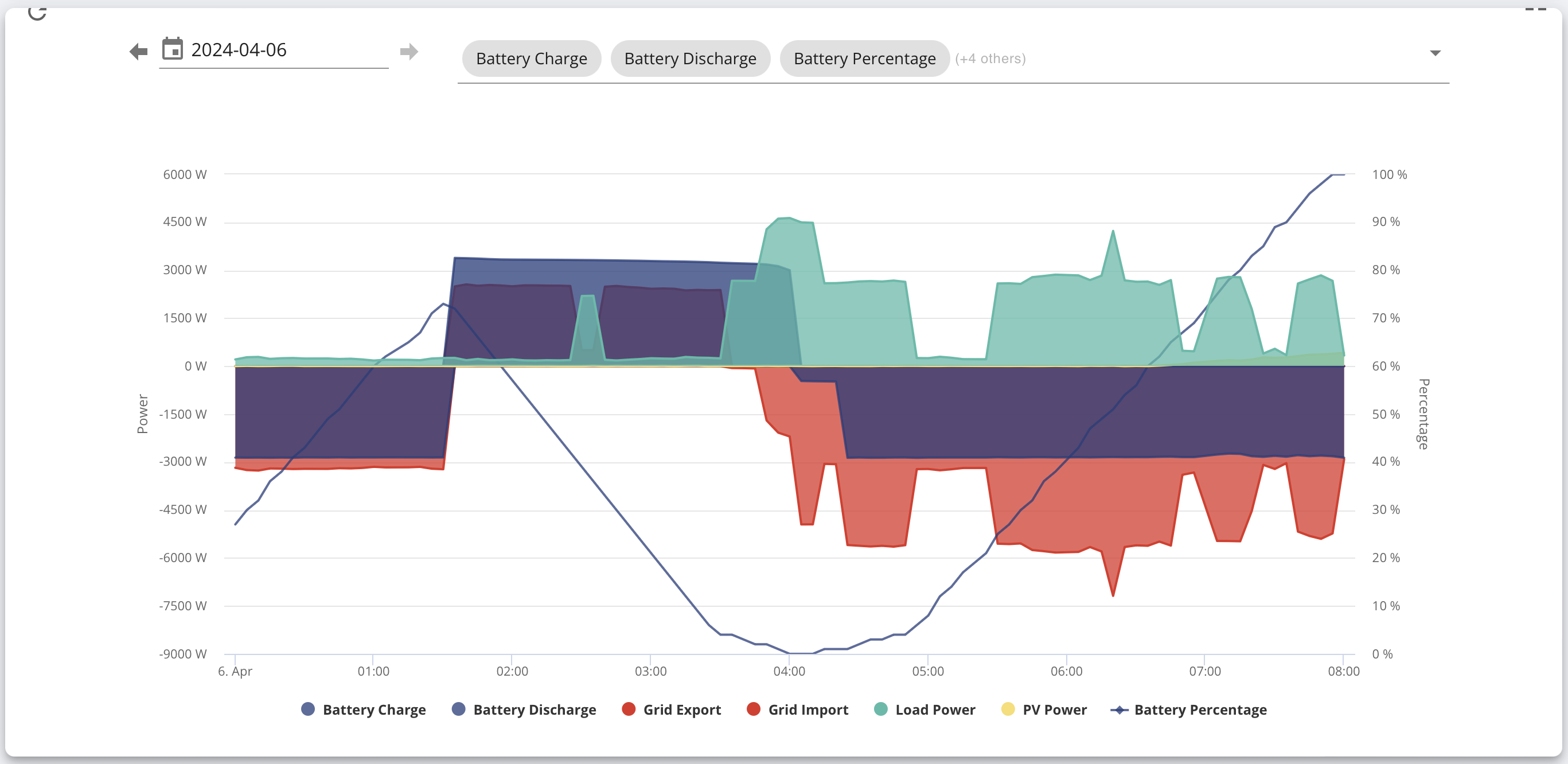

Woke up today to my battery in calibration. It hit 0% at 4am and has been charging since. I've never had this before, I certainly didn't trigger it, and I am on old firmware as far as I can tell... why would this happen?
pacemaker Do you use any kind of external agent to control your inverter? One theory I've seen is that random corruption of data in requests sent to the inverter can trigger this. Newer firmwares have enabled checksums on the data packets to reduce the risk of this. (But I may be misremembering.)
DD Yes, I am using Predbat to control my charge/discharge schedule. Maybe it is the culprit? Any way to confirm this "random corruption" ?
cc-ing @geoffreycoan in case he's seen this come up, otherwise I will ping Trefor
pacemaker
See some recent stuff here:
https://community.givenergy.cloud/d/4218-idiot-guide-battery-idle-stuck-at-x/5
(I wish this forum had a way to bookmark interesting posts,)

pacemaker Did you also get BMS under voltage? If so then I wonder if I had the same yesterday about 7pm. Went to 0% then the notification then full charge to 100%. I wasn't using any external agent but was using the portal remote control. This is a GIV-AC3.0 with D0.535-A0.535 software with 3012 Firmware.
Windy Miller no I haven't had one of those, I had an over voltage but that was in January
pacemaker There have been a few reported incidents of random calibrations seen with predbat recently, and as @DD says one suggestion is that its corrupt communications from GivTCP to the inverter that cause a register to be overwritten and causes the corruption.
Another suggestion is that its the battery loosing track of SoC and starting a recalibration itself.
So might be a clue in the inverter notifications or the SoC history (big jumps), or may never know.
Predbat/givtcp have no ‘programmatic’ way of initiating a battery calibration, its not an API that is exposed for customers to use so whatever caused it is not directly driven by home assistant code.
The other thing worth noting is that predbat has fairly recently added code to detect that a calibration is running on the battery and to stop operations until the calibration is finished. Before this was added predbat would just keep trying to control the inverter normally and any battery calibration might not have been seen. Its now recorded in the predbat status so is much more visible
pacemaker Windy Miller Do you know what command(s) were sent to the inverter at the time the calibration started?
Hi,
This reply is an attempt to link to the same issues drawn from different places. There are already some links in the previous 6 posts in this thread. If you are not running predbat, some of my reply may not be relevant.
I had the same issue of an initiated and random calibration on March 14th and posted on 'First night live on predbat #656'.
There are several replies that followed.
See my power curve below.
I posted the details on GitHub as a potential Predbat issue (#856). Since then another issue has been posted on Github raised for the same (#869).
I have had my GE coupled system for 18 months and before predbat had never seen this (although I have suffered from the 'SOC drop' syndrome). My power curve also show the battery voltage.
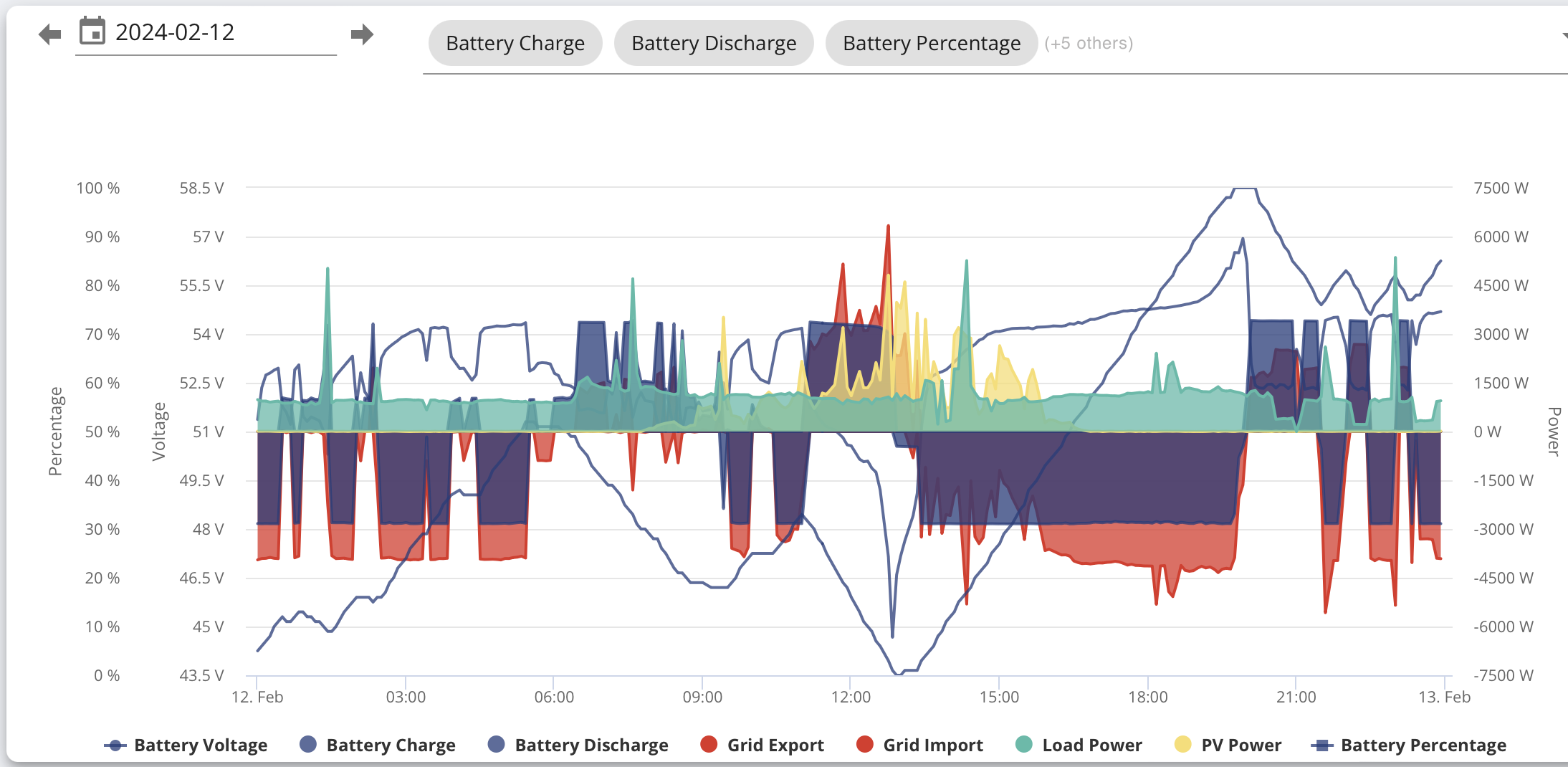
Since running predbat (from 30th Jan, I have experienced 11 BMS over voltage warnings coinciding with reaching 100% SOC. But these are all cleared quickly. I have values for battery charge and discharge in my apps.yaml file, generated in predbat.log. When I got the unexpected calibration, there was no BMS voltage error.
System details
AC coupled 3.0 inverter from 2022 (Week 18)
Inverter firmware: D0.535-A0.535
Battery firmware: 3015 (for both batteries)
Two 8.2 kWh batteries daisy chained to inverter.
Following my random calibration, I contacted GE and they were happy with all my inverter and battery voltages.
I did also about a firmware update as several seem to be available:
https://kb.givenergy.cloud/article.php?id=23&oid=24
GE were reluctant to upgrade me, hinting that my current Inverter Firmware was stable and upgrading may make introduce issues. But D0.535-A0.535 is almost ancient.
Clues
My batteries do not run in sync SOC all of the time. Typically, they are different by 8 kWh at the extremes.
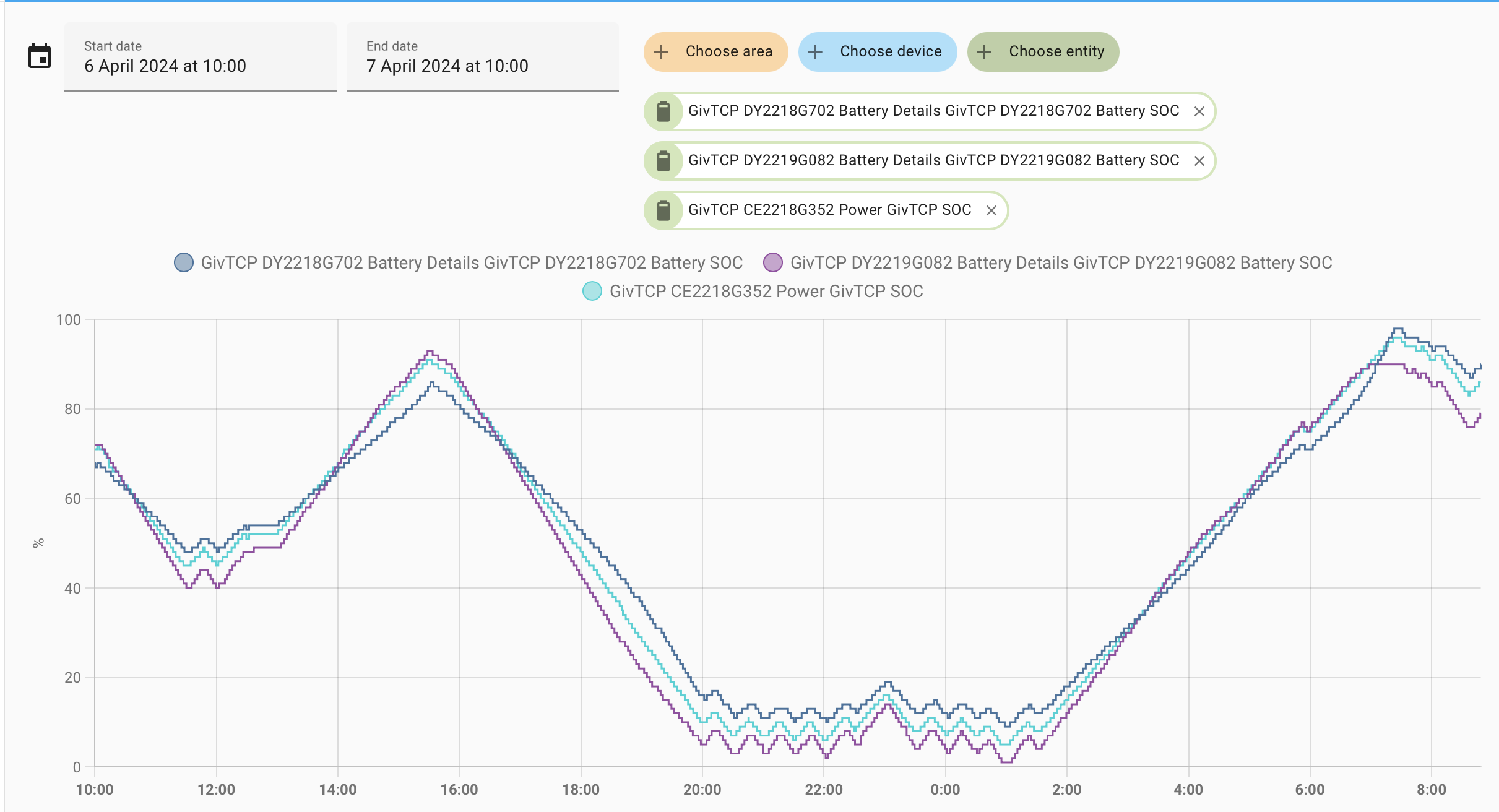
The purple trace is the 'primary' battery, 1st in the chain.
The dark blue trace is the secondary battery with the cyan trace between the 2.
At the lowest point last night, Primary was on 1% SOC, Secondary 9% SOC and inverter 5% SOC.
Reserve is set at 4%
Questions
There are also and also high/low rate thresholds which are referred to in the documentation.
I don't really know how what values I should use for any of these?
Conclusions (if any)
Sorry for the long reply but hope that it helps to discover what is causing random calibrations.
Rob
geoffreycoan I see that you have found this thread, as I have done.
See my reply (#10) below for details.
Rob
Rbor responding to your questions:
Geoffrey
Rubikcube With the low Agile prices yesterday I was setting up a schedule at 7pm through the Portal Remote Control to discharge 11pm-2am, charge 2-5am, discharge 5-8am. The battery was discharging at around 4% so I was expecting it to stop exporting before I used the quick settings button to charge before 11pm. I may have touched the ECO setting but can't be sure. I was alarmed to see the battery rate dropping under 4% and the system still exporting. It did so for a further 20-30 mins with the SOC dropping to 0% after the first 10 minutes. I couldn't stop it even by restarting the inverter (through the Portal). I watched the cell voltages drop (through your Inverter app) with one reaching about 2.7v before the BMS under voltage notification occurred and the battery started to charge (much to my relief). I didn't touch it again until around 10.30pm after it had reached 100% when I used the quick settings to return it to play. It then followed the settings I had made earlier throughout the night without problem. So I think that the setting up of the charge and discharge registers prompted what looked like calibration cycle. Note that I was often getting inverter timeouts so hit send again so it seems there is quite a high probability that registers are indeed getting corrupted. I can't see the Calibration bit so can't be sure that's what it was doing but it wouldn't follow any of the commands I was sending through the quick settings buttons. I have 2x 5.2KWHr batteries which seem to keep in step fairly well.

geoffreycoan the register is not flagged as writeable in "vanilla GivTCP" so no it can't.
source: https://github.com/britkat1980/giv_tcp/blob/main/givenergy_modbus/model/register.py#L201
(Note the lack of: 'write_safe': True)
Variations of the underlaying library, such as the one Givenergy_local now uses (and the one I'm playing with), theoretically have the ability to - but choose not to expose it to the user despite being it being a writable & valid register as far as I can tell.
https://github.com/cdpuk/givenergy-local/blob/master/custom_components/givenergy_local/givenergy_modbus/pdu/write_registers.py#L23
Windy Miller I may have touched the ECO setting but can't be sure.
I think I have seen before turning eco on can trigger a calibration.
Turn eco on is equivalent to set register 27 to 1, whereas start a calibration is set register 29 to 1.
So far this seems random, and my best guess is that it happens about once in every 10,000 commands. So if you send (on average) 10 commands a day to your inverter, you can expect this to occur about every 3 years.
Using my app, if you tap the battery line on the main screen, you can see the calibration stage. Non zero means that a calibration is in progress.
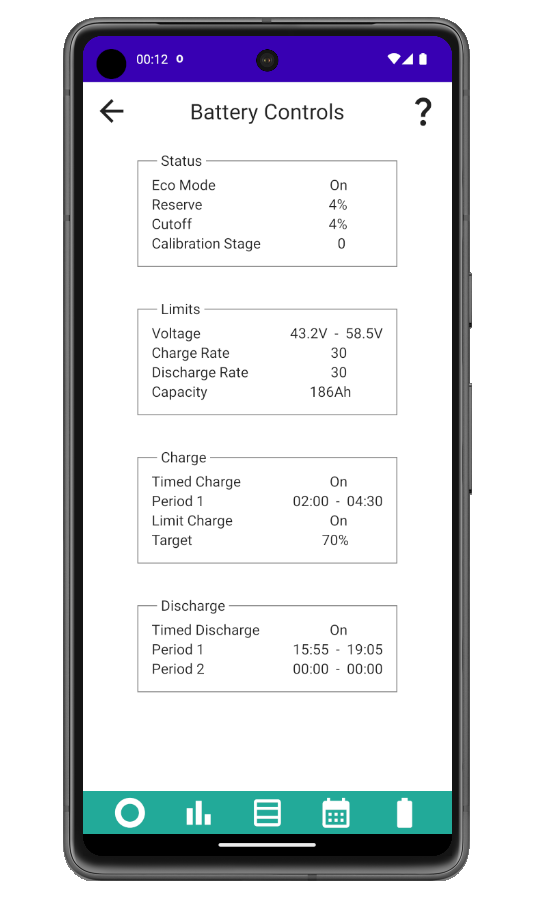
I have just noticed that my secondary battery is showing the SOC 0% problem when it reaches 100%. I didn't notice this before as I think it is now worse since yesterdays re-calibration (it is currently stuck at 0% but I'm just about to start a discharge in the quick settings). Looking right back to my install date (30/5/23) and the initial calibration reached 100% then blipped to 0% for 10 minutes before returning to 100%. It looks like every time I charge to 100% it steps over the mark and shows 0%. The primary battery also occasionally shows this but much less often. Is this a re-calibrate issue or a firmware (3012) issue?
Edit - just as I thought, within 5 minutes of starting the discharge the SOC returned to 99%.
- Of the available (8.2 in your case) battery space, the 4% is the lower limit that the battery can discharge down to. So its 4% of 8.2.
For my 2 8.2 kWh batteries, I have tried 0.66 kWh and 0.86 kWh for Best SOC keep.
In my predbat plan,
With 0.66 (4% of 16.4) the plan goes down to 4%
With 0.86, the plan goes down to 5%
I have been running with 0.86 and predbat has run smoothly and I will stick with this value for the moment.
For info, since upgrading to HA 3.3, I have had no strange warning status messages.
I hope I am not speaking too soon .......
..... and I hope that I won't see another spontaneous calibration.
At least 3 of us have experienced the unplanned calibration, all with AC coupled inverter running D0.535-A0.535.
I won't raise another issue and will see how things settle down.
Rob
Windy Miller Looking right back to my install date (30/5/23) and the initial calibration reached 100% then blipped to 0% for 10 minutes before returning to 100%. It looks like every time I charge to 100% it steps over the mark and shows 0%. The primary battery also occasionally shows this but much less often. Is this a re-calibrate issue or a firmware (3012) issue?
It almost sounds like a bug in the software that’s displaying the SoC value that it can’t display 3 digits properly. Where are you seeing this 100 going to 0% - in the GE app, Home Assistant, ?
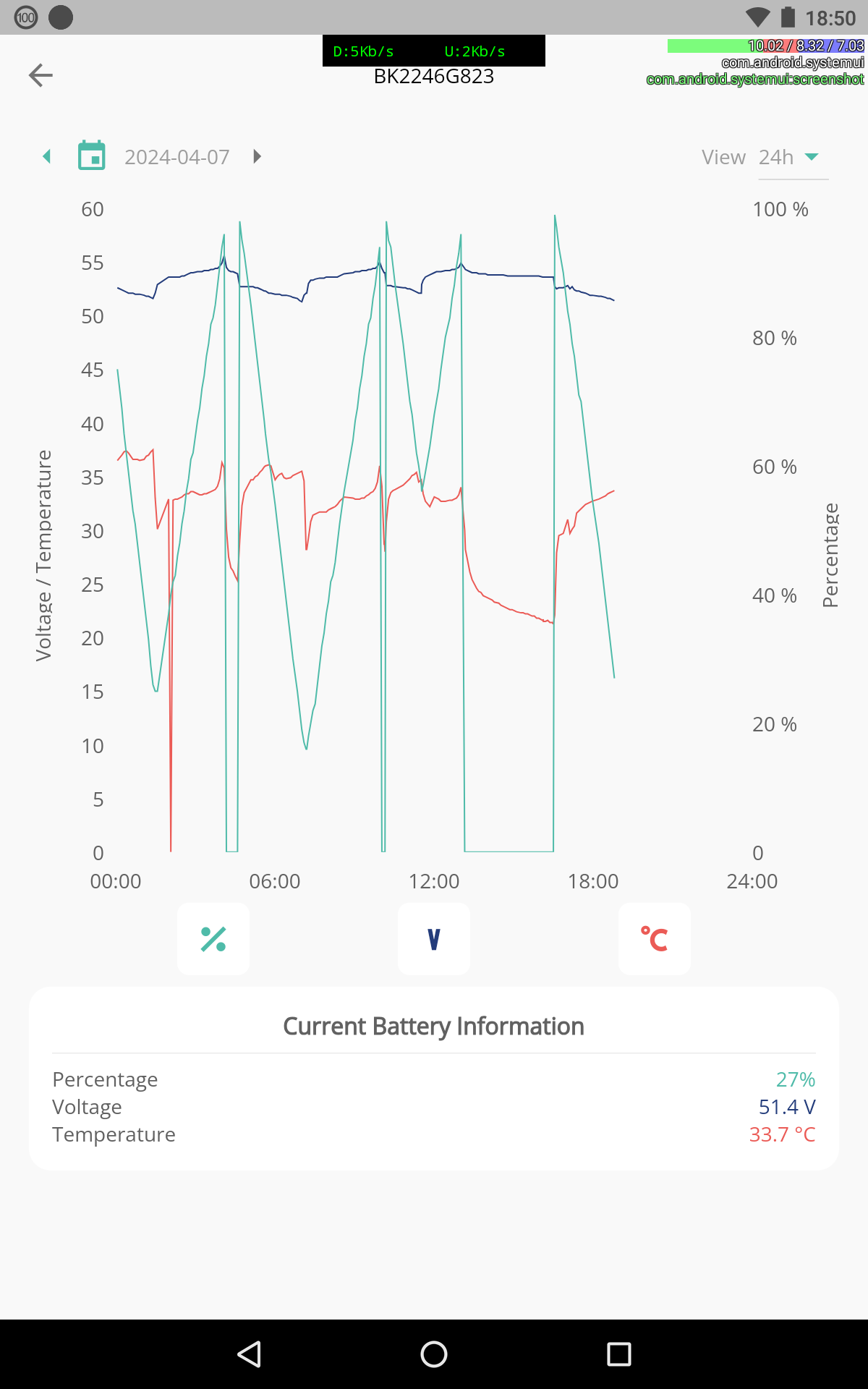
geoffreycoan This is in the GE App (see screenshot below) but it's more than just a display bug as whilst one of the batteries was showing 0% the maximum charge and discharge current reduced from 3000 to 2500 to match the remaining single battery (that's how I noticed something was wrong). I also went to the physical battery and the red status light was on. It looks like the SOC was above its calibrated 100% so it marked it as 0% and unavailable. But even a very slight discharge brought it back into operation.
Windy Miller thanks for the extra clarification, yes does sound like another new GE “feature”
Interesting you are getting it on 3012 as well.
Others here on the forum have reported that 3015 can tend to over charge the battery, but isn’t something I have personally seen.
Probably need to raise it with GivEnergy support
Here is my log leading up to the calibration:
https://github.com/springfall2008/batpred/discussions/920#discussioncomment-9028095
geoffreycoan I'm now in a dialog with GE as I think I may have a problem with reduced capacity on one of my batteries. First they have upgraded me to
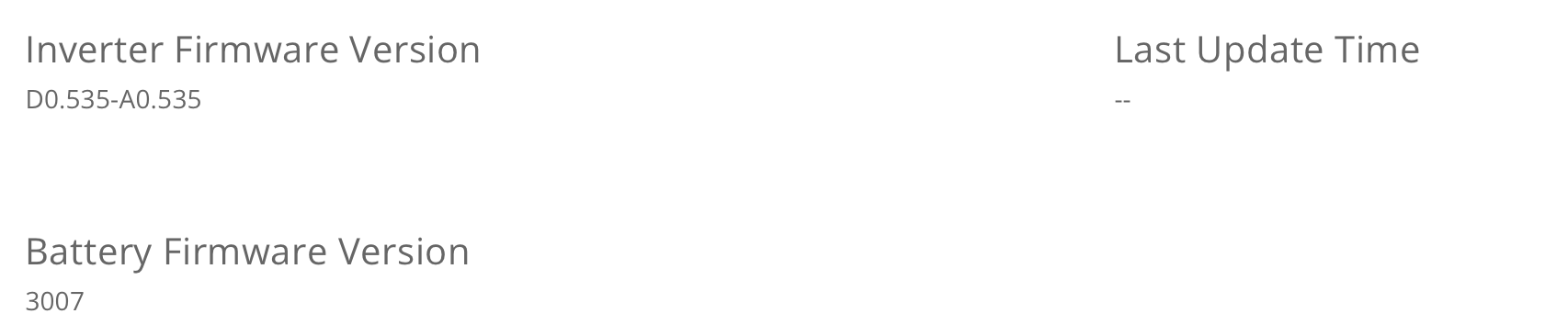
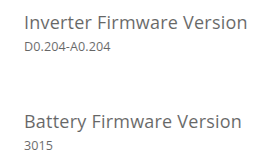
Inverter Firmware Version
D0.204-A0.204
Last Update Time
2023-05-30 14:27:26
Battery Firmware Version
3015
It is currently doing the mandatory calibration so I'll update the forum again later...
I'm not sure now if my two (yes I had another one a day later) random calibrations were register access corruptions or because I may have a battery problem.
Windy Miller I will be interested to see the outcome.
You seem to have been updated to the latest version of the inverter firmware.
See https://kb.givenergy.cloud/article.php?id=23&oid=24
I am still on D0.535-A0.535 and battery firmware 3015.
I haven't experienced an unplanned calibration since 14th March but I am experiencing BMS over voltage notifications every 2 or 3 days coinciding with my batteries reaching 100%. I get a rapid rise in battery voltage within a comparatively small difference of SOC values.
See what happened between 4:30 am and 5:00 am today.
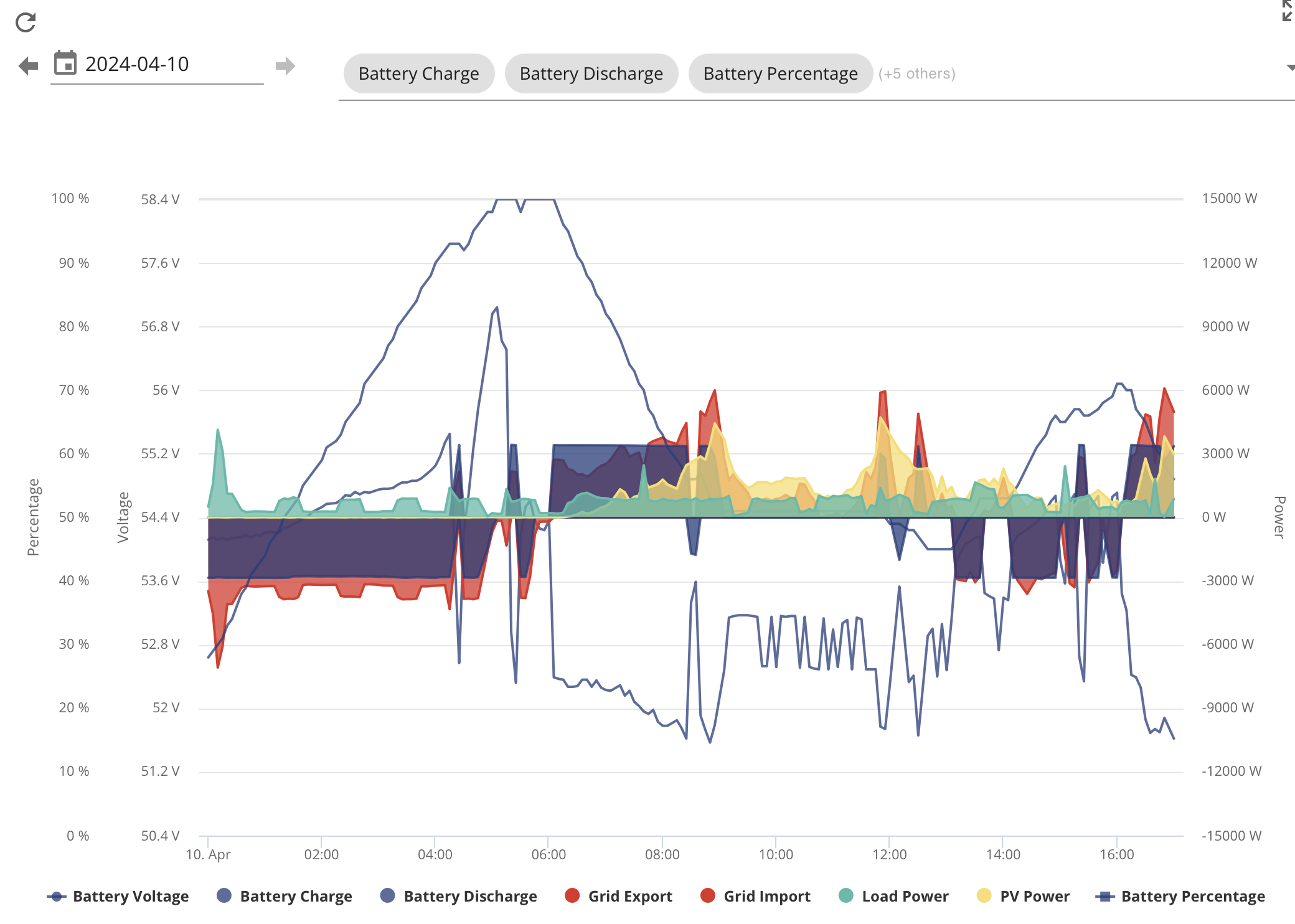
The common thread with these issues seems to be the GE AC coupled 3.0 inverter.
I will see what you report back but am tempted to ask GE about my BMS over voltages.
Rob
Rbor Yes - it looks like your batteries were fully charged at 4.30am but it didn't stop charging.
My overnight calibration completed. Primary battery went from 93Ah to 99Ah. The secondary battery from 84Ah to 89Ah. So an improvement all round but still an issue with my secondary battery being 90% of the primary battery capacity. Both are 5.2KWHr batteries. Still have one cell in the secondary battery underperforming (dropped to 2.4v during the calibration, others at 3.1v).
One BMS under volt and two BMS over volt notifications during the calibration - this is to be expected.
Did a discharge/charge test. Only the primary battery complied. The secondary battery stayed at 99% charge.
So I'm back to GE who have suggested a slow calibration which it is now doing. The discharge rate is just over 1000W rather than the previous 3100W.
Windy Miller Thanks for your update. Keep me informed.
Any calibrations I have carried out have gone smoothly. It sounds like your secondary battery isn't responding. Mine always lags behind the primary battery but usually manages to catch up.
The cell voltages in both my batteries are all just over 3.36 V which looks healthy.
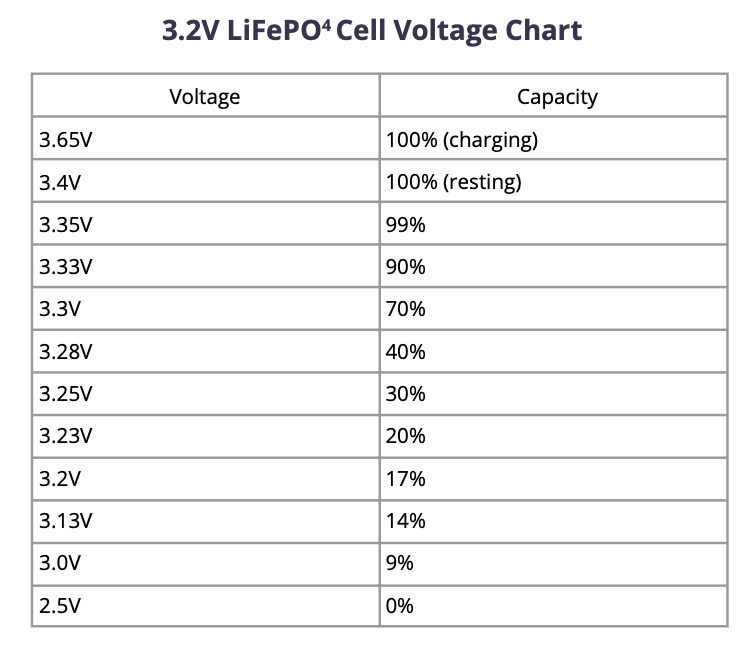
This table shows expected cell voltages. It looks like you do have a problem with one of your battery cells.
Rob
Rbor The slow calibration limited to 1000W took 10 hours to do the discharge and 10 hours to do the charge. Unfortunately it found no more capacity with the 2 batteries still returning 99Ah and 89Ah respectively. At least when I did my own discharge/charge test both batteries now responded. I captured the cell voltages at their minimums during the discharge calibration. You can see the Primary battery cell voltages all fairly similar corresponding to somewhere below 9% from your table. But in the secondary battery, one cell dropped below 0% whilst the others still had around 14% of charge. I think this is the root of my problems. GE support will pick this up again on Monday.
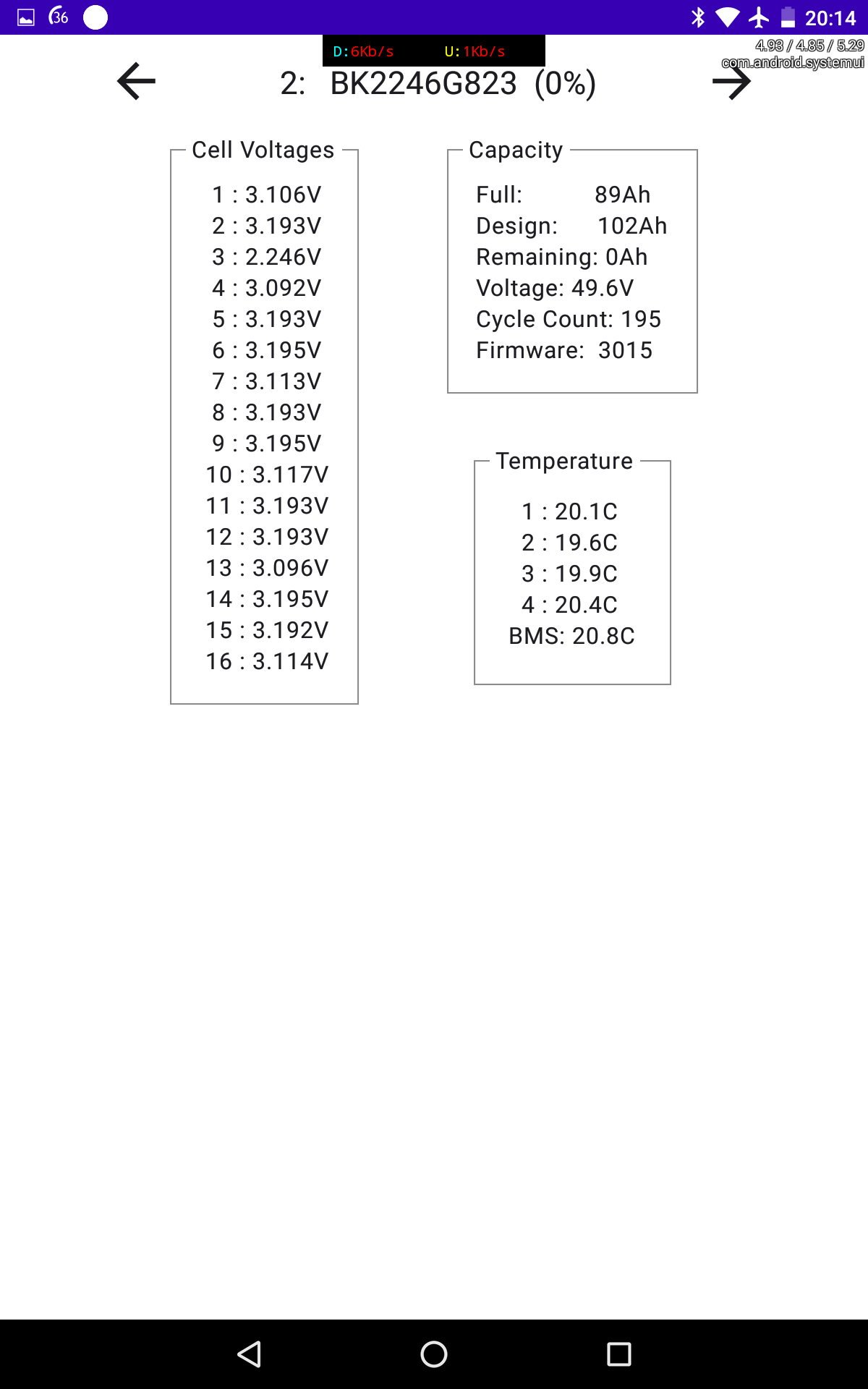
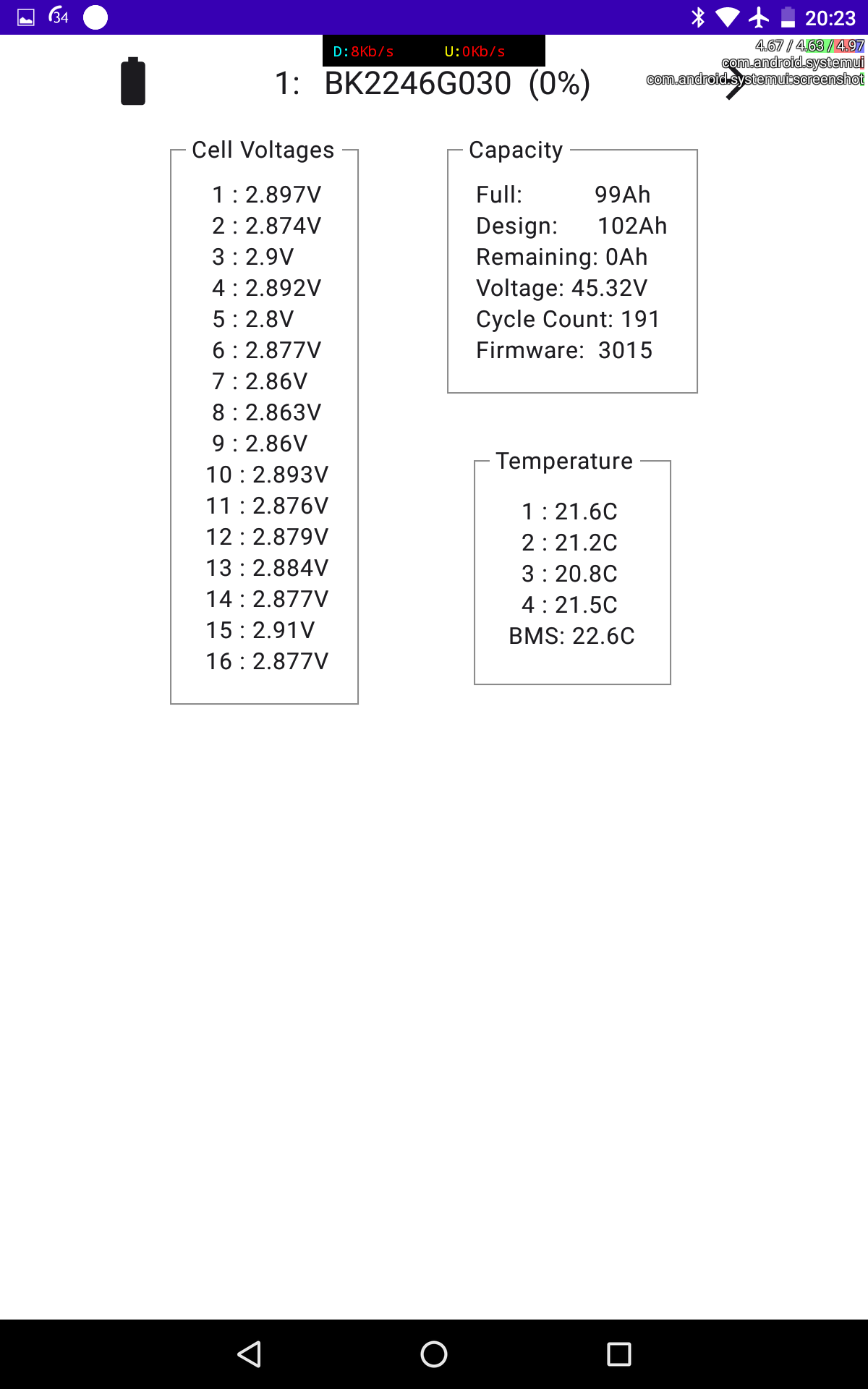
I had the DC isolator drop out a couple of times during the discharge test which is a bit worrying as these are not really supposed to trip. That's another problem and probably one for my installer rather than GE as it may be faulty. I have dropped the max discharge current to 2700W for the time being.
For reference, I have attached 3 statement that we were sent in late 2022, after a big fuss about large drops in SOC.
Significantly, I have never received updated firmware from D0.535-A0.535 for my AC coupled 3.0 inverter, despite the statements. I know that there are updates available but I am actually wary about asking for any to be made available to me in case something gets broken.
Rob
Windy Miller had the DC isolator drop out a couple of times during the discharge test which is a bit worrying as these are not really supposed to trip. That's another problem and probably one for my installer rather than GE as it may be faulty. I have dropped the max discharge current to 2700W for the time being.
I thought you said the slow calibration was done at 1000W? If it tripped on that then there's something very very wrong.
Rbor Thanks for posting these. I think their upgraded firmware may well be better now but any system is only ever as good as its components and I'm pretty convinced one of my batteries has a weak cell which is affecting the overall charge I can store. But I'm also letting GE do their work as they may be able to perform some "magic" that brings this cell up (rather than degrade all the other cells to match :-).
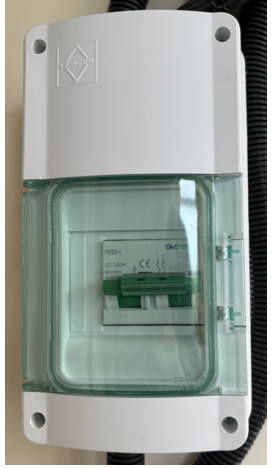
Windy Miller Is this the switch that is tripping?
 .
.
Last December, I had a similar problem. I contacted GE and they suggested that this switch may be faulty.
I found a youtube video that highlighted the same thing:
https://www.youtube.com/watch?v=XsIi3aZ7cJw
I found that the breaker switched off when using 3000W (or even 2000W), with a smell of burning.
GE suggested contacting my installer, which I did. Unfortunately, they couldn't replace the switch for 10 days.
I found that I could reduce power to 1500W, allowing me to hobble through until the installers arrived to replace the switch (a 10 minute job). But at least I could still use for the batteries in that time.
It does look as if you have a battery cell issue though.
Rob
Rbor Yes it is that switch. It has been OK for 10 months and only since the upgraded firmware has it tripped out twice (no smell noticed but it's in the garage and I didn't see on the app, where it showed a battery voltage of 7v, that it had tripped 30 minutes or so before). I can believe the new firmware is allowing a slightly higher discharge current but I agree the switch must be faulty. But it's one problem at a time at the moment and I would like the battery issue sorted first (unless the switch gets progressively worse of course).
Rbor Fixed the DC breaker problem by tightening up the bottom 2 cable screws. They were tight but I could tighten them a bit more. Hasn't tripped again for 3 weeks even though I've upped the current back to maximum. I guess the warmth from the cables/connections helps the breaker to trip out below its rating.
Just had another random calibration. Firmware wasn't being updated. No commands were being sent to the inverter from WW or GE. Only status reads were happening according to the GE log.
Started at 100% SOC and I controlled the current down to the minimum as it approached 0%. Lowest cell got down to 2.25v before the battery current dropped to 0 then the cell recovered to 2.45v. Calibration finished at this point (0%) and in time for the plunge sessions last night.
No idea what triggered the calibration this time. I had been thrashing the battery yesterday as Agile slots were cheap but the calibration started when it was at 100% this time. It's been 8 months since this happened before. Must be a feature of the firmware?
Another one this morning. Coincided with the reads WonderWatt do before sending a sequence of commands but definitely started the Calibration before WW sent the first register write. Seems like register reads can cause a random calibration.
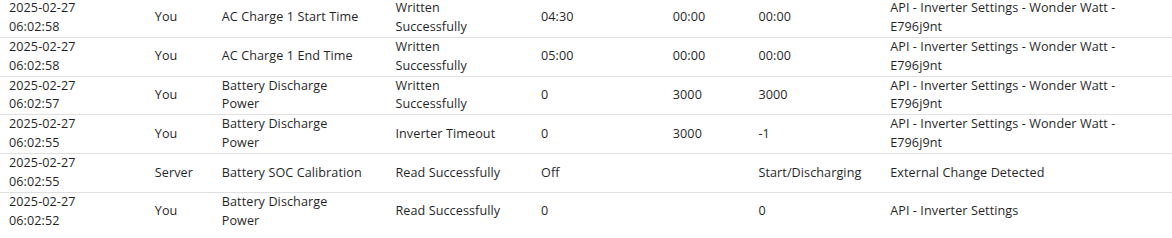

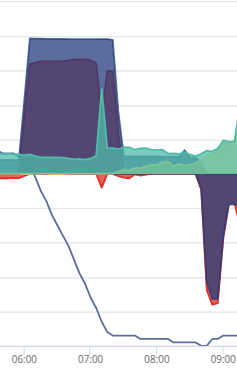
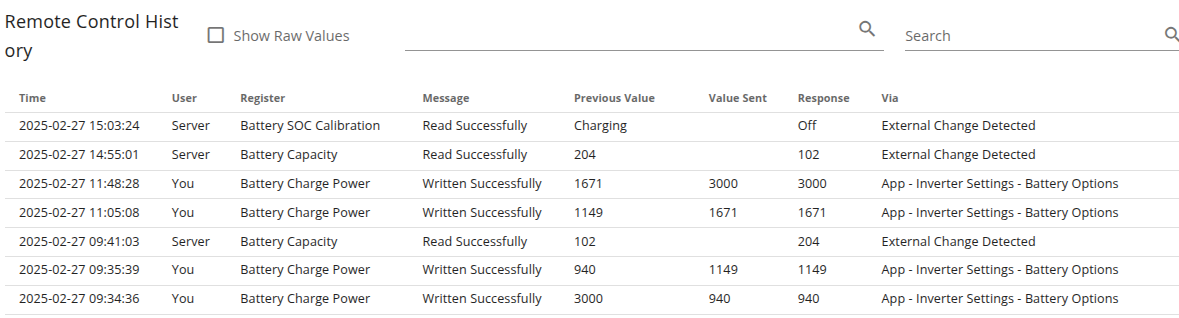
At 02:06:55 WW sent the command "Please set the battery discharge power to 3000W" and expected the inverter to reply "Yes I have set the power to 3000W". However the inverter misinterpreted the request, started a calibration, and sent the reply "Yes, calibration started". WW didn't receive the expected reply and so recorded Inverter Timeout. 2 seconds later WW sent the request again.
It was the command to set the battery power that triggered the calibration.
Rubikcube I see what you're saying. They have the same timestamp but are in the wrong order in the log which is probably because a timeout takes a little while to occur.
So I think we now have proof here that the inverter can misinterpret commands and start a random calibration. I've now seen three instances of this in the last year on 2 different versions of inverter firmware.
Windy Miller that is interesting. Wonderwatt of course is reading and writing the inverter data via the published Givenergy API’s, not directly on modbus as GivTCP does
@TheDragon (GivEnergy) any thoughts?
What to do? Going to GE will simply get a firmware update and a really slow calibration which completely misses the point!
Battery calibration just finished. Lost 1Ah in the Primary and 6Ah in the secondary. I need to do a slower re-calibration but on a warmer day when the import is cheap and no solar.
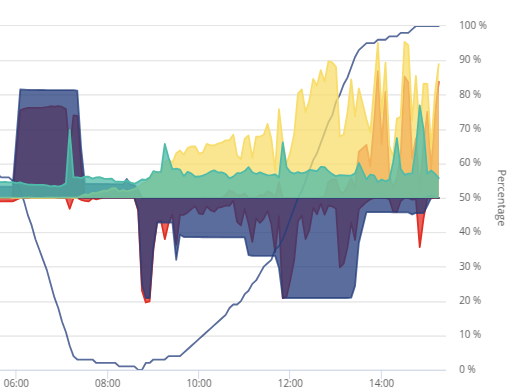
Windy Miller I need to do a slower re-calibration but on a warmer day when the import is cheap and no solar.
why do you say that? I’m planning on recalibrating my 9.5 battery soon and was probably going to do it in the next few days off solar. I’ll just turn the charge rate down and should be able to slow-charge fill the battery on a decent sunny day
geoffreycoan My batteries are in the garage which is currently around 12oC so they may naturally return a bit lower capacity as they're cold. With a slow calibration they do not self-heat so much so I will wait for an ambient of 20oC.
Last year I found that a long slow calibration found a little more capacity. Doing it over a windy weekend in April would be my preferred choice when the grid prices are low (on Agile).
Putting solar into the battery then exporting it wastes 10-20% so I will probably start the discharge part of the calibration in the late evening when the batteries are almost flat anyway. Then it will move to the charge part of the calibration overnight and through the next day (it will take 30 hours). I'll set the charge and discharge currents to 10% (300W). I suppose it doesn't matter if the day part of the charge is sunny as it will just get exported.
Windy Miller Good point about the coldness, mine are in a garage as well, I hadn't thought of that and the impact on battery capacity. Maybe I should hold off.
Quite agree with you that if its Agile rates like we had last summer at average <10p then it makes sense to import overnight at that rate rather than charge off solar. I am on Cosy at the moment (13.2p cheap rate) as the Agile prices were so high, and since I was thinking of charging imminently it made sense to do it off solar as the 15p export is much the same as the Cosy rate when losses are included.
But if holding off until Agile rates are lower and its warmer then yes, follow your logic