Which Device belongs to which Mac Address

16 comments started 2024-04-26 last 2024-04-30
GivEnergy Products
C
#1 CW

Hi All

I have recently installed an AIO with gateway and hybrid inverter. All 3 of these devices are connected to the network via wifi and I can see all three on the network. They all have a device name of HF-A21, but with 3 seperate MAC and IP addresses.

Does anyone know how to determine which device belongs to which address?

T
#2 TX200

Turn each one off in turn and see if the router says one of them is now not connected.

Should only need to do that for two of them.

#3 PianSom

On my system the AIO has dramatically less traffic (actually zero!) than the Gateway. So if you can see that stat on your router then that should help distinguish between those two.

I have a third party inverter on my PVs, and it turns itself off at night. If yours does that then you should see it disappear from the network (or at least stop responding to pings) when the sun goes down.

C
#4 CW

TX200
I hadn't thought about that. I'll give that a try (once I've worked out how to safely turn of one device without breaking anything). I did try blocking the wifi for a device then seeing if I could connect locally via the app to each of them in turn, expecting one to be unavailable, but could connect to all of them!

C
#5 CW

PianSom

Unfortunately I don't get that information - all my devices are connected to a mesh network and the app doesn't provide any stats for that. Are you aware of any wifi scanners that might provide this?

C
#6 CW

Update - Thanks to the above suggestions, I thought I would re-try the wifi blocking. I noticed that the "away" setting, i.e. reading from the cloud was affected for a specific device when one was blocked from the wifi. Before I was looking at the local setting and expecting that to not be available when it appears that it was. So disabling one item then checking each device to see if the "away" option is "waiting" seems to highlight the relevent piece of equipment.

#7 PianSom

CW
'Fraid not.

The other way of distinguishing is using the Givenergy app. Go Hamburger/Settings/Local Monitoring. Add the addresses in turn. The one that connects (gives a tick mark when you hit Enter) is the AIO.

T
#8 TX200

PianSom if it's a GivEnergy hybrid inverter, that'll also appear as a tick?

Would it look different to the AIO in the app?

I suppose the battery screen would show the hybrid's serial at the top of the screen.

What does the AIO show on that screen, presume the AIO serial?

Any other telltale differences in the app for AIO Vs Hybrid? Battery size I guess?

C
#9 CW

PianSom

Aha - that also works - I connected to the AIO account (I have three for some reason, one for each device) and the AIO inverter appears in the list and agrees with one of my AF devices :-)

This also worked for the Gateway and the Hybrid.

#10 PianSom

TX200 if it's a GivEnergy hybrid inverter, that'll also appear as a tick?

Will it respond after dark?

T
#11 TX200

PianSom probably, unlike normal string inverters.

#12 26Left

CW

I had this to start with as well. My solution - you can login to the dongle on each device via the router assigned IP address, and on the dongle webpage you can see the MAC address assigned. The dongle / AP name can then be matched to the device on the GE portal…

PS the MAC address of the dongle LAN is the same as WiFi, but the last digit is 3 higher.

#13 26Left

CW

Yeah it’s kind of bizarre that you have to split the devices across the accounts. My AIO and gateway are on one account, my inverter on another. That said the only account that matters most of the time is the AIO for the app, dashboard, graphs, controls etc. The inverter is just an input to the AIO, and there’s very little to do on the Gateway.

C
#14 CW

26Left
Yep - that's my take as well. My installation is Hybrid Inverter Gen 3 5KW and AIO plus Gateway. The inverter currently only shows PV production and by string. After that it just "sees" house load. The AIO has the best handle on what is going on in the house. as it shows the various loads/exports.
Interestingly if you look at the AIO inverter PV, it only has the one string (which I think is the combined output from both strings) and this is different to what the inverter shows - so you can kind of guess what the loss is from PV to AC

J
#15 Jellybaby

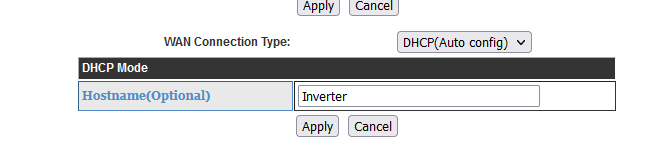
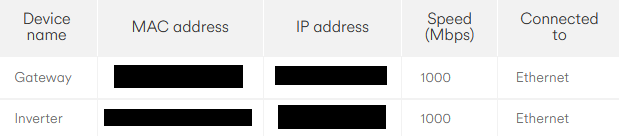
CW May I suggest when you narrow it down (harder to do when using wifi) go to their ip address on the network and on their config page you can change the names of the equipment like so.

I put Gateway for one and Inverter for the other, I am on LAN so I could just pull the gateway to narrow it down here.

Another way of pinpointing the AIO is to connect to access point, its the only thing that allows you to browse the internet afaik and then you can enter the config page and change the name from AF blah blah blah to "All-In-One" (it doesn't like spaces for names) or just AIO

C
#16 CW

Jellybaby

Thanks - I found this set of settings after reading another post about the wifi dongles and passwords being left to default! All makes much more sense now.

Urgent Security Issues