Urgent Security Issues

181 comments started 2022-11-17 last 2026-01-19
GivEnergy ProductsHybrid
P
#1 Patappleby

1
I recently discovered my inverter (HY5.0 Gen2) has an open Wi-Fi access point which in turn is connected to my house internet giving free internet to anybody in within range of my house.
It is important that a password is put on the inverter Wi-Fi. It should at least ship with the default password enabled and inform the customer that it is something that needs to be addressed.

2

Passwords/Pass Phrases are visible on the inverter portal. They should only be visible as asterisks.
This is a basic security requirement on any system and should be addressed as a matter of urgency.

#2 Cdent

Patappleby you might be best raising this as an issue in your portal rather than on the forum, the GE folk don't spend a lot of time on here, and when they do it's usually aimed at the firmware/SOC issue

#3 hoggy

It's been noted to them numerous times. They don't seem too bothered about it - the installer is supposed to secure it on commissioning but they often don't.
Personally I think it's a poor get out relying on the installer, who will already be rushing (especially in winter with early sunset) to get it online and out the door to save a return visit.

T
#5 TX200

Rubikcube except if a neighbour wants to use it to download something illegal! Little bit risky!

S
#6 SimonP

Patappleby Thanks hugely for pointing this out!
I went looking and found the wide open wifi into my inverter and domestic wifi, it not having been secured as per step 7 in the installation guide -- thanks to Rubikcube for that!
Thankfully, I've managed to login myself to the dongle and set up a password so that the door is now closed and locked. Quite shocked that this was left open by my installer.

T
#7 TX200

SimonP was the web admin portal also still set to admin admin?

If so, I guess there's a small chance someone might have discovered the WiFi AP, guessed admin as being an obvious username and logged in... If they did that they'd find out the password for your router.

Edit - I guess they'd also need to find out the internal IP address of the AP in order to find the web admin portal. Not sure how easy that is.

S
#8 SimonP

TX200 Yes, left as admin admin. The wifi SSID was visible with no security, I just switched to it and was able to carry on browsing the web with no request for a password as it was not secured -- so there is a route through the dongle into the router and onto the web, and presumably onto my main wifi network (I didn't check for that). I used the IP address given in the installation guide to get into the dongle settings and yes, once there you can see the main router wifi password.
Still shocked when I realise that entry route has been there since last April when the system was installed.

#9 positor1

is there an easy way for non techies to check theirs?

K
#10 kram

There are official reporting structures for these things when they can cause a weakness in core infrastructure.

The more I see, the more I think it’s not up to snuff.

S
#11 SteveCook

Login to your router
Get the IP address of the wifi dongle. The device name will be something like HF-100 (that was mine)
Open a web browser page and type in the IP address, it will be 192.168.1.XX. The XX will be the numbers assigned by your router.
A dialogue box will pop up and the user name and password willbe admin and admin.
The settings page will pop up. Mine was in Chinese, but right click and hit translate to Engilsh
The 3rd tab down is where it shows you network name and password

The bottom (5th tab) is the dongle login/password page), you will see admin and admin.
Change them to what you want and don't forget and hit save (or it may say are you sure)
Close the browser and go back to same IP and use your new settings and you should be into the dongle network settings page

Regards
Steve

S
#12 SimonP

positor1 Look for available wifi networks in the usual way, if you find something starting WO with further numbers/letters and it's not locked, check if that's the serial 'number' for your dongle via the web portal, inverter / general page. If it is and you can connect to it then it's a problem! Follow the step 7 instructions referenced above in the installation guide and you can password protect it.

Edit: Just seen the message from SteveCook, we sent at the same time! Logging in his way also works, you will need the inverter's ip address, most easily obtained by looking for online devices in your router's status pages. Another example, mine is HF-A21. However, I changed the wifi security as described above, rather than the dongle access password -- but I'll now go and do that as well!

#13 positor1

thank you both very much.

#14 positor1

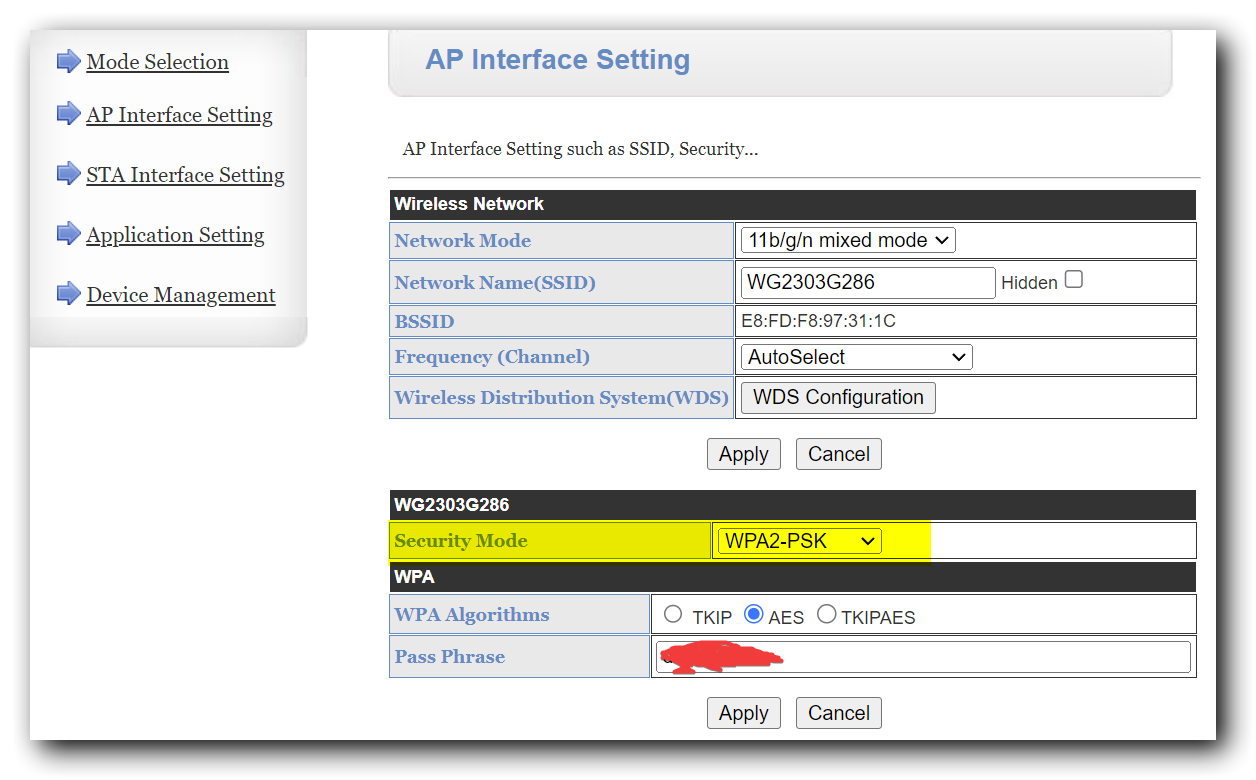
I have changed the log in password, do i need to change the security from "disable" to WPA2-PSK?

#16 positor1

THALL
thank you

#17 positor1

that guide does not mention which WPA algorithm to use.
TKIP AES TKIPAES
tkip is pre selected?

#18 THALL

positor1 For the encryption type? Just leave it on tkip.

J
#19 JMalcolm

I note that step 7 of the installation guide recommends to the installer that the password should be the same as the dongle serial number which is also set as the SSID. First thing I'd guess if I was trying to access someone elses wifi...

Though there is a check button to make it a hidden network

T
#20 TimI

I noticed the exact same - again, the installer wanted my wifi login, I'd kinda assumed that once it was on my network it wouldn't be broadcasting its own too - i disabled that promptly after they left.

In the modern world, security on stuff is critical...

T
#21 TX200

JMalcolm it's recommended to be set to the inverter serial number, that's different to the dongle serial number.

But you can of course set it to whatever you want and reset it if need be when you forget what it was. 🤣

K
#22 Karen

OK - Technical numpty is getting confused! I've looked at the guide, but when I try to select the WPA2-PSK and click "apply"I get a box come up with the dongle IP address asking me to" input 8-63 characters of key" What is this? It won't let me proceed without putting something in.

M
#23 MattWhitfield

Karen You need to set the password for the wifi. When you select a WPA2 then some boxes appear. Just put in the password you want.

P
#24 pelowj

Why can't you turn off the Wifi Access Point entirely once it has a connection? It's a huge attack surface and one of the reasons I wanted a totally wired solution.

J
#25 Jumbo99

Interestingly just checked mine. The WO SSID does have a lock symbol and I cannot connect to it. In fact I have no idea what the password is. Tried “admin” but it’s not enough digits. Would I ever need this password? I suppose I might if I move to a new router.

#26 positor1

If you were asked by GE to perform a manual upgrade you would but i suspect they would know how to bypass or recover the set password. have you tried the inverter serial number?

S
#27 SteveCook

pelowj
Or GivEnergy issue a dongle with a LAN port in the bottom

J
#28 Jumbo99

SteveCook great set of instructions. I have noticed that you can hide the WO SSID on the 2nd link down, a small check box.

J
#29 Jumbo99

positor1 the pass phrase can actually be found too by logging into the GUI, on the 2nd link (AP Interface Setting), again it’s all there for anyone logging in to see. It’s a really long set of characters, which I will leave as is now that I have changed the admin password.

K
#30 Karen

Nice chat guys - but I'm afraid none of this helps me. When I go to application settings I see the following
Network mode: 11b/g mixed mode
Network name: Nothing - this is blank
BSSID: blocks of letters and numbers NN.NL.NL.NN.NL.AC
Frequency: Autoselect
Wireless distribution system: WDS config

Security mode: Now set as WPAK-PKS (but will not apply when button is pushed)

IP address - nothing - this is blank
Subnet mask - nothing - this is blank
DHCP type : Disabled.

I seem to be missing lots of information compared to the screen shot on the dongle installation guide. Can any one help me fill in the blanks or suggest what I should do next

#31 positor1

that is odd.
I have: in the ap interface setting -perhaps you are on a different screen?
network mode 11b/g/n mixed mode
network name (starting with WO and is the network name i logged into from the mobile of wifi networks available) so i dont understand how you logged into the network without seeing that but hey ho.
bssid looks like the MAC address of the dongle.
frequency - mine is set to 7 , perhaps the installer did that?
Wireless distribution system: WDS config
Security mode: set as WPAK-PSK
below that you should have
wpa algorithm select TKIP
pass phrase - enter what you want as the password to log in with

T
#32 Tim

Karen Karen, in AP Interface Setting

  • Network Name (SSID) is usually the serial number of your dongle but can be anything you want.

  • BSSID is the hardware MAC address of the dongle and can't be changed

  • the other settings are OK

In the LAN Setup

  • IP Address(Default DHCP Gateway) 10.10.100.254 (default setting)

  • Subnet Mask 255.255.255.0

  • DHCP Type Server

T
#33 Tim

Karen The blank LAN settings you have mean that the dongle wouldn't be able to operate as an Access Point, which would prevent anyone from connecting to it and getting out to the internet. However, it also means that if you needed to log into it to change your wifi SSID or password for any reason, you wouldn't be able to. Better to lock it down with a better admin password and a better WPA-PSK passcode.

T
#34 tk2

Oh god, just found the same - open wifi network and default settings. THANKS for flagging this and instructions on how to secure it.

K
#35 Karen

Tim Thanks Tim. All changed now. Have changed WPA passcode and a new admin password. It now showing as secured, although there is a comment saying that it uses an older security standard that may not protect me. Is this what everyone sees? Is there anything else I should do?

#36 TheDragon (GivEnergy)

Karen

No. Unless you see some shady bloke outside your house all day long, relax

M
#37 MrWobling

SteveCook many thanks Steve. Mine was wide open too, but I've fixed it with your steps. What an absolute shocker!

E
#38 Ewahwoo

I too have managed to lock mine down, thanks for the info all. I have discovered, with my mesh network at least, that there is a problem with the Giv unit connect to WPA2 devices... I've had to downgrade my router to WPA. Anyone else also find this? It seems odd considering that WPA2 is clearly supported via the interface.

E
#39 Ewahwoo

Yeah I can't seem to switch the Giv unit into WPA2 mode, under STA interface mode it remains in WPA.

T
#40 Tim

Ewahwoo Mine's OK on WPA2PSK with a BT Homehub. There are a couple of other threads on here about the same thing.

E
#41 Ewahwoo

Tim Interesting, thanks for that. It's pretty annoying!!

#42 Riscy

WPA2-CCMP/AES works fine.

#43 TheDragon (GivEnergy)

One thing that is going to get Enphasised to installers, is they set the Dongle up properly, Factory defaults are just that. They need setting up, as a min, set the local SSID passphrase. Change the GUI admin password.

If they use the app to set the dongle, it does all this for them. But they dont, its darn annoying to see security comments day in day out

A
#44 aniseedvan

Hadn’t seen this until now but just went onto mine and set up as above. Not impressed it wasn’t set up as per the guide, I’m waiting until I get my handover paperwork to send some feedback…
The portal is still a bit poor, generated random garbage in my password manager for the admin password and had to reduce it to a length of 12 rather than about 20…

P
#45 pacemaker

aniseedvan

yep same, installed a month+ ago and it was just left open. Terrible.

#46 Maxwell

Some observations i can see are.

  1. Can we get security issues as a pinned thread please ?
  2. What is the reason for the in built access point and why is it not disabled by default ? Yes i understand that to exploit an open access point you have to be within range (all depends on how close you are to your neighbours, or the delivery person in their van outside your house).
  3. There is no log out option that i can see.
  4. The admin password is limited to 12 characters max.
  5. The password fields don't provide the ability to verify the password you enter.
T
#47 TX200

Pinned threads don't really work properly on here. They appear at the top of the threads until you've read them, rather than all the time.

The access point is so you can tell the inverter what WiFi network to join.

The installer is supposed to configure it securely. See the GivEnergy kB site for the article on that.

Can't comment on the other three points.

#48 TheDragon (GivEnergy)

Unforunatly the Installer is supposed to configure it, using the App, which sets encrypted random passwords. These are then, as back up stored in your account (Back end) should they be forgotton and be needed. Never really, as you can just reset the dongle and set it again.

The AP initially is needed to 1st configure the STA settings to connect it to your own WiFi.

It is noted and the right pople will get to know, Additonal training, additional empasis on the installer training and yearly refresher.

New dongles are coming, with wifi6, WPA3, 5Ghz SSL connections to inverter.

#50 TheDragon (GivEnergy)

Maxwell TKIP may well be depreciated, but on a local network, the risk is tiny.

The overheads of AES, make it a bit slower to connect. The dongle is at its limit. Hence new ones

K
#51 kram

THALL
Tkip can be broken in almost zero time with any modern computer and a few sniffed packets.

Will the WPA3 dongle be available to purchase as an upgrade for older inverters? Ideally by end users to keep things secure.

#52 TheDragon (GivEnergy)

kram Yes it will

It will be a purchasable item from GivEnergy, once tested, i use that word tested. I will let nothing out the door without it

B
#53 Baychattan

What would be really nice, and a lot more secure, would be an ethernet 'dongle' - ie a USB to ethernet adaptor with all the other stuff the present dongles contain - for those of us with 'old' inverters that don't have inbuilt ethernet.

More secure both from external intrusion, and reliability of connection.

#54 Maxwell

TheDragon (GivEnergy) Making customers pay for security updates isn't a good look. It's a bit like the car industry charging customers for safety recall work. Be an innovative company and lead the way in keeping customers secure.

C
#55 cluelesscris

Baychattan Another vote for this option.

#56 TheDragon (GivEnergy)

Baychattan Funny you say this. I had eyes on a few weeks ago an old prototype, modified Gen1 dongle. With an ethernet socket. Was made for one customer who could not have anything wireless.

I casually mentioned if there were any more, as these would be good for some installs.
So they can and do exist, just not pretty like a factory one, these were lab made. But proved the concept

T
#57 ToothyChris

Being able to turn off the APs (Access Points) would also be a great option. Based on another thread, it seems that even if you use the built in LAN socket on the new new Gen2 inverters, the APs are still active, clogging up the WiFi band....

Yes you can remove the areal, and fit a dummy load if you really want to, but that feels very much like a bodge rather than a solution.

I have read that on some competitor equipment, the APs are only active for X minutes, after it is powered up, which seems like a much more elegant solution.

#58 TheDragon (GivEnergy)

ToothyChris Interesting.

When we get the prototypes of the new dongle, I will look at this. You might have to remind me though

#59 THALL

kram Yep, but it is better than the open network most of us had it left to. Just seeing encryption will deter a few wanna be hackers too :-)

T
#60 ToothyChris

TheDragon (GivEnergy) I suspect your 'To Do' list will get quite quite long, quite quickly.....

#61 TheDragon (GivEnergy)

ToothyChris Its growing for sure

#62 positor1

TheDragon (GivEnergy)
would be imperative to be able to keep generation history from previous dongle or a way to re import?

B
#63 Baychattan

TheDragon (GivEnergy) Another thought I had - Would it be possible to use a standard USB-ethernet adaptor? I have one for my notebook computer which plugs into a USB (type B) socket on the computer, has a short lead then a 'block' with one gigabit ethernet socket and three USB (type B) sockets - so effectively turns one USB socket (ie like the inverter has) into three USB sockets and one ethernet socket. Eg https://www.amazon.co.uk/AmazonBasics-3-Port-Adapter-Gigabit-Ethernet/dp/B07V5K6LSF.
Unplug dongle from inverter, plug adaptor into inverter, plug dongle into adaptor, plug ethernet cable into adaptor.

There would then be no need to change the GivEnergy dongle hardware, it would 'only' need a new dongle firmware version that could sense/recognise and use the ethernet connection. Presumably a menu option to select either ethernet or wi-fi, defaulting to wi-fi, so the wi-fi could be disabled if ethernet was available.

Possibly a list of readily-available adaptors known to work, but left to the customer/ installer to buy/supply.

This 'software' approach would presumably be rather easier for GivEnergy than 'new' hardware.

M
#64 michaelhoskins

Thanks to this thread, I've had the same issue and resolved.

Found the transmitting SSID, added a password and then hid the SSID by logging into the "dongle" (though it's a Gen2 hybrid so I didn't see an actual dongle).

Thanks!

#65 TheDragon (GivEnergy)

Baychattan Would it be possible to use a standard USB-ethernet adaptor?

No. The dongle is not just a USB wifi widgit

It has storage for upgrades, MODBus UART, WifI, AP, WIfi Client, its a few things rolled into one.
In there the chip does have ethernet capability, so if your nifty with a soldering iron, im sure its possible to do at home.

T
#66 Tim

TheDragon (GivEnergy) if your nifty with a soldering iron, im sure its possible to do at home.

Now that could be a business opportunity for someone with the skills.

S
#67 Smk82

TheDragon (GivEnergy) are these new dongles for retrofitting to everything or just new installations going forward?

T
#68 Tim

Smk82 I don't think @TheDragon (GivEnergy) is referring to new dongles, just explaining that the existing dongles are far more than a USB wifi adapter.

S
#69 Smk82

Tim he does in a post of 2 days ago where he refers to prototypes?

T
#70 ToothyChris

TheDragon (GivEnergy) "New dongles are coming, with wifi6, WPA3, 5Ghz SSL connections to inverter."

I think this is what Smk82 was referring to.....

T
#71 Tim

ToothyChris He did! I though the inference related to:

TheDragon (GivEnergy) I had eyes on a few weeks ago an old prototype, modified Gen1 dongle. With an ethernet socket.

It would be a boon if the new dongles also had an ethernet interface (IMO), or an ethernet version. There's something reassuring about being able to put a cable tester on a cable and follow it from one end to the other; rules out lots of wifi hassle.

M
#72 M_J

Just found this and my installer left it open and Admin Admin... Now changed!!!! FFS.... Thanks for posting and it needs to be a sticky...

#73 TheDragon (GivEnergy)
#74 TheDragon (GivEnergy)

M_J OK. Sticky

K
#75 kram

Maxwell

WPA3 and WiFi 6 is a completely different hardware,

You might be able to upgrade some WiFi 5 devices but not all to WPA3, but not the higher speeds.

I do agree if the old dongles can’t do AES it’s an issue.

I would imagine a price of say £20 wouldn’t be unfair for what is essentially an speed and enhanced security (over what we all assumed was there)

Question would have is can the gen2 inverters be upgraded to WPA3 in software?

#76 TheDragon (GivEnergy)

kram Good question. Next hardware meeting I'll mention this

#77 Hook

My installer had changed the password, but wasn’t aware that he’d setup an open AP until I told him. He was horrified.

Not sure if it’s part of the training, but he was clearly unaware. I showed him where it was and he’s going to contact his previous customers.

P
#78 paultottie

Hook
Same for us, I asked the installer why he was leaving it open and he said that's how they were told to do it.
Unfortunately though this installer doesn't seem to have changed their practice. A neighbour a few houses down from us also had a GivEnergy system installed a couple of months after ours with the AP left unsecured.

T
#79 ToothyChris

Given that GE has e-mail addresses for all of its users, I have always found it odd that they do not communicate directly with things like: company news, regular newsletters, customer/installer stories, best practice/operating strategies and indeed reminders about security issues.

Given the vey obvious communications issues which GE suffers from, this would seem to be an easy 'quick win'.

Yes this might result in an increase in calls to customer services, to start with, but surely the longer-term goal should be to increase the number of happy customers? How many times have we seen new customers saying "Hey, my installer left an unprotected Access Point on my household WiFi network" ?

#80 TheDragon (GivEnergy)

ToothyChris I like this idea.

Once a month news letter, quick wins, best practice.
@Danlambert (GivEnergy) One for Support. Or at a push Marketing, with tech input

Common faults explained, a way we can get news out to everyone Once a month.

R
#81 Russ

Thanks for this.

I just logged in and changed the username and password to enter the web portal and now I can't login to the dongle with the old or new password. Anyone had this issue?

I haven't secured the open access portal yet so need to get back in.

T
#82 Tim

TheDragon (GivEnergy) I like the idea, but wonder if the issues/hints/tips were entered onto separate blogs on a part of the Givenergy website, then the "newsletter" could be like a contents page to blogs that had been created, or updated recently. That way, it wouldn't matter when customers started receiving the emails, all the content of previous ones would already be available as a single resource.

T
#83 Tim

Russ changed the username and password to enter the web portal and now I can't login to the dongle

Web portal? Do you mean the Givenergy cloud or do you mean the dongle? If the dongle, do you mean the Access Point (AP) username and password or do you mean the STA mode (ie your home wifi SSID and password)?

If it is the AP Username and Password, you can reset the dongle by pressing the small button under the cover on the bottom of the dongle and set it up again either in situ or plugged into a laptop.

A
#84 alan_johnston

My system was installed wide open too but I did spot this at the time and locked it down after the installer had left. They said it wasn't their job to do WIFI security, just get the thing working. 🙁

Feedback about the current WIFI diongle:-
If doesn't recognise channel 12 and 13 on the 2.4GHz band and doesn't know what the 5GHz band is at all.
Doesn't seem to like MESH WIFI networks either.
Would be nice if there was a wired ethernet solution so WIFI could be avoided if needed.

A
#85 athresuk

alan_johnston It is their job as it is specifically detailed on page 47 of the installation guide !!!!.

"Important note on WiFi dongles
• Note that the WiFi dongle network must be password protected to ensure the security of the clients WiFi network."

A
#86 alan_johnston

athresuk Mabye he thought that meant enter the local WIFI network password?
When I told him that the WOxxxxx access point was an unsecured WIFI access point to the internet via my router he wasn't interested or bothered or had any idea how to secure it.

#87 TheDragon (GivEnergy)

alan_johnston

This is the issue with Installers, they are elctricicians, not network or security engineers.

Ideal, is an install, as 3 key components.
PV, Inverter and IT/network.

Modern day PV kit is so tech savy now, it needs an additional skillset. not yet present.

Training is being developed to improve the non sparky stuff.

A
#88 aniseedvan

TheDragon (GivEnergy) agreed, and tbh I’d far rather the sparky got the wiring right and I’ll sort the IT but appreciate not everyone has the understanding or nosiness to poke about and check these things.

Z
#89 Zakalwe

TheDragon (GivEnergy)

TheDragon (GivEnergy) Modern day PV kit is so tech savy now, it needs an additional skillset. not yet present.

Ah, again, it's someone's else's fault.....

The actual problem is poor implementation, training and documentation at GivEnergy's end. There are a billion products on sale to the general public that require Internet access to work. The good ones are both secure and easy to set up. Try setting up an Amazon Fire TV cube to see just how easy it can be made to allow a new device to connect to a customer's network. I recently bought some Tasmoto smart plugs and they were a doddle to connect to my WiFi. There's absolutely no reason why your kit makes this so complicated. It's not like security of the customer networks is the primary concern at GE is it? Not when your kit and procedures have been leaving active APs wide open in people's homes.

I appreciate that you are an expert in security and IT infrastructure. But you shouldn't be "victim blaming" here and should instead be looking at GE's inability to design a system that is easy to connect and is secure. So far GE have failed on both sides of the scorecard- they've managed to implement a system that is a PITA to connect to the home-owner's WiFi AND is totally insecure. That's 100% on GE.

B
#90 Ben_Collier

Zakalwe The actual problem is poor implementation, training and documentation at GivEnergy's end.

TheDragon (GivEnergy) Training is being developed to improve the non sparky stuff.

A
#91 alfwro

my inverter's AP was left open for anyone to access - working in IT this was the first thing to check when my sparky finished his bits.
I have also ran security audit on my inverter's IP and the results are far from good, I found major DoS vulnerability and a couple of stack overflow issues. Not to mention that the inverter's AP is running on port 80 (as opposed to the industry standard encrypted 443) oh and yes there is telnet running on it with no way of disabling it !!!
I ended up putting the inverter on a guest wifi that has no access to the rest of my home network. Preferably I would like to restrict it from accessing internet all together but that would invalidate the warranty (I think).

#92 Cdent

alfwro it would

B
#93 BrianHere

alfwro

What port did you find your Telnet on? As per this screen cap mine are closed.

A
#94 alfwro

standard 23 - there are 4 commands available: get, set, del and prof and it seems to be in some kind of debug mode where it is spitting text:

in m2m_uart_thread, while(1)
after mutex
sock 14: Network link ended prematurely
Del a client_sock 14, sock_num=0
Add a client_sock 14, sock_num=1
in m2m_uart_thread, while(1)
after mutex
in m2m_uart_thread, while(1)
after mutex
in m2m_uart_thread, while(1)
after mutex
sock 14: Network link ended prematurely
Del a client_sock 14, sock_num=0

etc...

#95 hoggy

Suspect it’s a dongle version thing. Mines open (older WF…. Serial dongle)
Atleast for me anyway the password has changed from default Hi Flying one although I suspect the known route to finding it through unpacking the firmware is still probably possible.

V
#96 Vanasol

Thank you for this thread! Just secured, hid the SSID and customized the lot!

K
#97 kram

TheDragon (GivEnergy)

So put a random password on the AP network and a sticker on the inverter with it on.

That way the installer knows where to find it and you don’t end up with a gaping security hole.

Also how about a simple press and hold button in whilst powering on to enable AP that boot only?

There are many valid options and the random string generator is a well used one.

Using http, telnet being open and hardcoded passwords is ringing major alarm bells with me.

I would definitely have to fully isolate it from my network and even then it might be a problem.

N
#98 NotoriousPyro

You can set the password yourself on the AP.

I changed mine to be the same as the WiFi so I wouldn't forget it.

Just go to AP interface setting, choose AES and set a password below it. If you ever forget it you can just reset the dongle.

K
#99 kram

NotoriousPyro

Yes and I could do that and have it on a fully isolated network with rules so it can only talk to GE.

I imagine however most people trust the installer/product and don’t fiddle. In these cases if the installer leaves it open it’s game over.

Broadband routers used to ship open and with a default password on them. This was a security problem as many people didn’t update them. Now they have a random SSID key and password on a sticker on the device.

This makes the default pretty secure rather than insecure, which should be how everything ships.

I would dread to think what would happen if this got put through its paces by some of the network security teams I had to deal with.

H
#100 Heald642

Hey all, @Patappleby thank you for creating this thread. Out of curiosity I checked my WiFi and found the single completly wide open. I have now gone ahead and password protected and hidden the WiFi. Also let my installer know that this was wide open.
@TheDragon (GivEnergy) Congrats on the appointment, definitely well deserved as you've put a load of work into this forum (and I've only been apart of it since October)!

#101 TheDragon (GivEnergy)

Heald642 it's a community.

If active conversation are struck, we get a good cumulative result.
Of which you we, me, us, are all part of

#102 Maxwell

Another option that folks could consider to protect their home network is to put their GE kit onto a seperate subnet/vlan on their home network, if their router supports that. Appreciate that not all customers may have the skill set to do that. And there are limitations on the typical router supplied by internet providers. Although more 3rd party routers do provide that capability. But, could be another reccomendation in the installer guide. And as has been stated before this requires additional skill sets for the installers.

K
#103 kram

Maxwell

Valid, and I know you say this, but rather than not all it’s most. I certainly wouldn’t give an installer access to my routers admin pages though.

Open AP can still be used to browse the internet or download things even on an isolated connection, so then you need firewall rules and more.

99% of home users plug in the details from the ISP router they got to one network and don’t know how to do more.

This can be simply addressed by GE, with some process changes and you shouldn’t rely on third parties to be the remedy.

Z
#104 Zakalwe

kram
Exactly. There's no way I'd let a spark into my router. And let's face it, a majority of users have no idea of what the admin page is, much less basic security.
This is 100% a GE issue. There are many simple ways to connect a device to an existing WiFi LAN without leaving the LAN wide open and vulnerable.
Unfortunately we have ample evidence of GE's disregard for their customer base and their willingness to point the finger of blame at everyone except themselves.

#105 hoggy

NotoriousPyro not sure if that was replying to me. It was the Telnet port being open & password I was on about.

A
#106 alfwro

I agree, I had a lot of dealings with electricians both when renovating my house and at work them doing stuff around our data centre and very rarely they have any IT security awareness. GE expecting them to properly secure their kit but it should be GE's responsibility (i.e. it should be secure out of the box). I wonder how old is the firmware on their AP's - telnet/http was ditched years!

R
#107 Russ

Tim
Thanks managed to reset it and close the open WiFi access. When I change the login to the dongle I again get locked out and can't access it. I'm not too fused now I've closed the WiFi access and know nobody can get into the dongle with the default login.

I'd suggest a physical switch to turn the WiFi access on and off for future versions. It would be much easier for the installers or users.

Will you be providing a lan port dongle because I'd like to move to a hard wired access at some point which is more secure and will remain online when I turn the WiFi off?

R
#108 Russ

Maxwell
I agree. A VLAN or wifi guest network would provide some decent security to your personal devices. I currently have mine on a guest WiFi. Looking to get some managed switches soon to create some VLANS.

K
#109 kram

Russ

But zero protection against someone downloading illegal images/software hacking from a customer’s broadband.

The average customer won’t have logging set up to prove that a certain device connected to the home connection via an open AP and downloaded said illegal content.

I’m genuinely considering asking work’s security professionals to look into it as it poses a risk if staff have this.

@TheDragon (GivEnergy)

Bearing in mind who you used to work for, ask yourself what the opsec team there would have made of the situation? I’m pretty certain it wouldn’t be positive.

Home working means every home network is now a corporate security risk.

#110 Hook

kram he’s the new Head of Security and System Testing. I’m sure he’s all over it.

B
#111 BrianHere

Hook Totally agree...

#112 Maxwell

kram Exploiting this vulnerability is dependent on a number of factors, the device's proximity to neighbours, public highway etc as you have to be close to use the open access point. Although there are ways to increase that range for an attacker https://www.techregister.co.uk/how-to-pick-an-antenna-for-wi-fi-hacking-null-byte-wonderhowto/
So, not a simultaneous attack against lots of customers but could have a big impact on those targeted in cases as you say where some one using it for illegal purposes brings the boys in blue to your door step.
These devices fall under the banner of internet of things (IOT) and IOT security is a big challenge. If you are going to get your company to provide user awareness of the risks there are plenty of security resources out there they can call on. And you might want to think about expanding it to encompas more than just GE kit. There are internetprotocol (IP) security cameras, smart sensors/switches/lights and that is befre tou consider domestic applicnaces such as fridges/washing macines/kettles/central heating controls etc Of course companies face a similar challenge as the addition of IOT to company networks extends their attack exposure.

Z
#113 Zakalwe

Maxwell These devices fall under the banner of internet of things (IOT)

As the old saying goes, the "S" in IOT stands for security.....

#114 hoggy

For the bits the UK arm actually make (like the portal) they have been responsive in fixing all of my security findings I had with it within hours of submitting them.
Like the firmware, the dongle is likely under the China umbrella so internal code of the dongle is going to be another slog. They likely can however force some of the easy stuff like auto PW config and switching off the AP from their commissioning part of the app.

A
#115 anglefire

One of the biggest risks are security cameras - I've upgraded my router and it now supports threat monitoring at my broadband speeds - I turned it on and my camera was getting hit almost continuously - so I've disallowed internet access to the camera and the attacks have stopped - I've also setup honeypots on all my networks.

#116 Maxwell

anglefire If your router has an in built inbound VPN feature then configure that and put your ip camera behind that. You will still be able to access it through the VPN but it won't be visible on the interweb.

A
#117 anglefire

Maxwell I use a tunnel to get into what I need when remote. The camera is only there to record what goes on. I don’t look at it as a rule unless something happens. Other year it was for the police to try and see who broke into the neighbours house.

J
#118 James L

I've just checked the settings on my inverter and yes, the dongle was set with username and password of 'admin' and 'admin'. Not great. I've emailed the installer to let them know that this is an extra step they should add to commissioning. Actually then while out for a walk met the company owner, who I know, and tactfully told him too!

The Access Point settings were with a passphrase of 12345678 - which I've obviously changed.

Initially I thougth that because the dongle was set to STA (station) mode and not AP mode, I wouldn't be able to see or connect to its WiFi. However, I could in fact see and connect to the dongle WiFi - giving me internet access piggy-backed off my home WiFi presumably. So I've also ticked the box to hide the SSID.

J
#119 James L

Maxwell I've informed our installer and and suggested they update their commissioning process.

For me personally, the risk is low - as an attack depends on several things. But if an installer fits a system in a high-profile or otherwise 'likely target' customer, I wouldn't like to be in their shoes if the customer's system is compromised and it turns out the compromise was due to this security hole.

It's all about reducing the 'attack surface'.

K
#120 kram

Whilst all valid, nearly all users are not tech savvy and most wouldn’t have a scooby doo how to do any of the above.

#121 Maxwell

James L Whilst security through obscurity (hiding your ssid) may prevent an oportunistic person from exploiting an open or weakly secured wifi it will have little effect for high profile targets where the attacker can easily determine the hidden ssid.

#122 Maxwell

kram I don't disagree and there lies the elephant in the room of IOT, easy for the non tech savy user to use but challenging for them to use safely...

J
#123 jmccar23

Thanks for the heads up. My WiFi dongle hadn't been secured. All done now as per instruction guide 👍

J
#124 James L

Maxwell Absolutely - so hiding and changing the passphrase is essential.

And referring to your comment about the non tech savvy user. I agree! The installer/manufacturer needs to secure the system, not the user.

#125 TheDragon (GivEnergy)

James L which will begin with better training for the installers.
Who are sparkies not network engineers, or network security engineers.

Baby steps guys and gals.

#126 Hook

I think the ‘leccys’ that install our systems who all have the same training are obviously not IT experts.

Mine did change the admin password, but was unaware of the AP password and security. He was savvy enough to understand the ramifications once I pointed out the issue and was going to contact previous customers.

T
#127 ToothyChris

TheDragon (GivEnergy) Better training yes. But it should really be belt and braces. New customers also need, and deserve, a proper welcome pack. To include a checklist of things to check, and to understand. So many GE terms and settings need proper definitions, as well as 'Alt Text'.

G
#128 geoffreycoan

Same issue for me, the WIFI dongles on both of my AC5 inverters that were installed in January were left open unsecured and with the default admin/admin password. I’ve now set WiFi passwords on them, set the SSID’s to hidden as nobody really needs to know they are there, and changed the admin password.

Annoying that the engineers couldn’t finish the last steps of the install process. Laziness.

#129 TheDragon (GivEnergy)

ToothyChris
Welcome pack is a good idea to improve.

I have suggested a good tech author who could do this for them.

#130 rn41

Hi, first post from a new forum member with a freshly installed Gen2 Inverter (flat) connected via wired LAN cable.

I had the exact same issue with an unsecured wifi connection allowing direct access onto my network. And as my inverter is outside, it posed even more of a risk as the open wifi would be accessible quite a long way.

Worth noting that you don't actually need to connect to the open wifi to access the settings and set a password. You can do this within your network by just pointing your browser at the local IP of the inverter, which you can find from your router's devices list, and then login as others point out, with admin/admin.

I've fixed the issue myself and let my installer know so that they can emphasise the issue to their engineers. But I do think GivEnergy need to make this safer. Trawling through the available documentation, I can see why an installer might miss this. In the latest installer training manual (v12), there's a paragraph that says...

LAN
Our Gen 2 Inverters include a LAN port to allow hard-wired data
connections. No additional set up is required.

Installers could take that to mean they don't need to do anything with the wifi on the Gen2s.

#131 Maxwell


I don't remember deleteing my post. So, what has happened here ?

#132 Simon_C

Looks ok from here.

#133 Maxwell

Simon_C Thanks, just went back and had another look and it was ok for me.

T
#134 TimI

Surely it just needs to be a step in training, and then a step that all installers have to go through - setting a password. It doesn't need that much extra, yes, everyone can go the extra mile to be better with it - but basically removing the open AP should be simple to implement across the board. Why does it exist in the first place really? why not have a 'default' password printed on the device that starts that ball securely from the get go.

K
#135 kram

It really should be the manufacture who removes any gaping holes, not a third party that should plug it. I’ve said this a few times however so I get the impression it’s not the preferred route.

#136 TheDragon (GivEnergy)

kram New dongles are secure from the outset. These are still in development
Existing ones will get a firmware update securing them by defult.
Not aware of timeframe yes on this

K
#137 kram

TheDragon (GivEnergy)

Thanks for stating this, it’s a positive move for certain and the fact that new ones come out secure is a bonus.

I’m hoping not just a default installer password but a once per device passkey, but I’ll certainly wait to hear the news.

#138 TheDragon (GivEnergy)
R
#139 rjp

TheDragon (GivEnergy)

Just been round the loop on this issue. We have a Gen 2 with LAN connection, so AIUI the 'dongle' still exists but is internal?

I was surprised that I could connect to the inverter's open Wifi Network and directly access any device on my home network. I've since set up WPA security on the internal AP, but really I'd like to disable it permanently, I have enough Wifi channel clashes to contend with already!

Maybe installers need to be reminded to configure the "dongle" even when they don't provide a dongle...?

K
#140 killythebid

rjp
It does have built-in wifi attached through your router. You need to change the password as noted somewhere above to something that will be private to you and the security hole will be plugged.

R
#141 rjp

To be absolutely clear, you need to enable WPA2-PSK security and enter a passphrase here.

Changing the 'admin' password without doing this would be like changing the lock on a desk drawer while leaving the front door to your house wide open.

I'd still like a way to disable the wifi entirely, as it's wholly unnecessary if you're using the LAN.

P
#142 PhilS

I contacted Giv and my installer about this a while back. I run a security company from home and the issues came out during a routine network screening. There are several and I'm glad to hear that Giv are redesigning the dongle. The installers are definitely not helping matters but I will not excuse them because they're not network techs. The instructions are step by step and part of the basic competencies needed to install the system. You don't need to understand the security stuff, just follow the steps.

For me, I'd prefer to be off wifi and on LAN but that's not to be. I would strongly recommend that, if you have the capability, you place the Giv inverter on its own wireless network that uses a different passkey to your main wireless network. This is in addition to hiding the access point and putting a decently long passkey on it. A lot of home routers have guest network capability that you can use for this.

K
#143 kram

PhilS

I’d also look to isolate that WiFi network either via clan or other method so it can not see the LAN devices and only the internet.

I am curious about how GE are logging onto inverters with users unaware. I plan to drop all incoming connections as I would expect the inverter to push out and pull in.
If needed and I give permission then it can always open a port out temporarily.

#144 TheDragon (GivEnergy)

kram the inverter has no open ports inbound. Hence no Upnp or port forwarding needed.
The dongle initiates the session and only then can the reverse be used.
So no unsolicited connections are possible

K
#145 kram

TheDragon (GivEnergy)

Whilst I am not saying it’s wrong, how do you do a firmware update for the beta customers or kick off a calibration with no open ports and no user pressing a “give Paul access” button first.

If the answer is a reverse tunnel, then yes it’s less bad than open to the internet, but if GE gets successfully targeted, everything with an open tunnel is at risk.

I will still be keeping everything on the dedicated external only vlan.

R
#146 rjp

kram "Whilst I am not saying it’s wrong, how do you do a firmware update for the beta customers or kick off a calibration with no open ports and no user pressing a “give Paul access” button first."

Once a TCP connection is established, data can be sent in either direction, regardless of who initiated it. So after inverter (client) initiates connection to GE (AWS server), GE can easily send commands/data to the inverter. It's currently all unencrypted, and so open to MITM attacks.

Like you, I'd feel a lot happier if the cloud portal was only used for data capture from the inverter, and any control and updates could only be performed locally - or with owners authorization. Would be useful to know if GE have had an external security audit on the system.

#147 Maxwell

kram I'm with you here a dedicated vlan which just gives internet access for the inverter is the way to go here. When you consider the potential for poor cyber hygene on home networks, folks clicking links, opening docs etc the scope for malware on networks is scary. And when you consider that details of how to receive data from the inverter and send data to it come with nice friendly warnings https://github.com/dewet22/givenergy-modbus (i know this isn't the repository favoured within this community) But the friendly warning here serves to remind you that those of nefarious intent could cause you grief. Not to forget the potential for IOT ransomware (other opinions are available) https://iotsecurityfoundation.org/the-iot-ransomware-threat-is-more-serious-than-you-think/

K
#148 kram

rjp

I understand that a connection can be kept alive, but that means that technically if you open a connection to GE, they can come in via that open door. That also means that data can be taken out of the inverter or in fact the connected network..

At no point is the user being asked to allow inbound connections, which frankly is not OK if that is what is being done.

If someone can remotely ask the inverter to download new firmware, there is nothing to stop new image being sent down which allows a shell or even just a routing configuration which allows direct access to a home network, which this device is already inside. At the very least I would expect a "GE have asked to initiate activity X APPROVE/DENY" type prompt in the app.

If it is as you say, then it's a pretty easy way to connect to the router, upload firmware or just connect to an unprotected NAS and then suck the data off to whoever is waiting.

I keep any products that have IoT/Cloudy interfaces very much separate, but this would be sitting in absolute isolation.

And this is before we even touch on the unencrypted piece. At least my reverse VPN tunnel would have used encryption and isolation of sessions, albeit only if the cloudy side of things also keeps data isolated.


R
#149 rjp

kram "they can come in via that open door"

Really, there's no 'open door' : Attackers cannot directly 'connect' to your inverter without you specifically setting up port forwarding on your router to enable this. Nothing can establish an 'inbound connection' to the inverter.

For an attacker to deliver malware to your inverter they would need to have already compromised something upstream of it - GE's AWS server, your router, or something in-between. TLS encryption between GE and the inverter closes most of those loopholes, but the weak link would then be GE's portal itself - or their software development process.

It's good to be aware of this, but I'm not unduly worried by it. Things like the open Wifi exposing access to your entire internal LAN are a huge concern, by comparison.

K
#150 kram

rjp

The point I was making is that it is an open door from the GE cloud service, not from the internet.
However the point I was trying to make was that it is an open door, because if GE were to be compromised, then it's easy.

  • You are correct the open wi-fi would worry me a lot, but is only exploitable locally.
  • Unencrypted messages are open to a MITM attack
  • Allowing GE (or any other vendors product who does this) to carry out actions an already open connection, or regular connection, on the router such as the firmware is a big problem.

The reason the last is an issue for me, is I have no hashes of the firmware to prove it is what is says it is, I have no ability that I'm aware of to block it. Notifying for confirmation in the app at least means nothing unexpected.

Essentially it's not unheard of for bad actors to pay an insider to upload a modified firmware to the servers when you have a global workforce with widely differing pay regimes. Quietly leave it to do what is expected and then use some software on the GE cloud to command the inverts to carry out DDOS or just connect to the network it is already inside the "secure-ish" perimeter of.

I don't think we're actually disagreeing, as I see it any internet service which controls many devices is a target for attack. Once that or the software process is compromised, then surely it's game over.

R
#151 rjp

I'd agree with all that. 🙂
One thing to note is that the actual GE firmware doesn't have any kind of networking capability. It uses a variant of modbus over RS485 to communicate with one of these modules, which converts that serial data to a TCP stream to the AWS server: http://www.hi-flying.com/hf-a21

The AWS server and TCP port used are configured in the HF-A21 Web UI.

So, bad GE firmware could brick the inverter, but it can't access anything else on your network.
The firmware in the HF-A21 can be updated from it's web UI, but that's not exposed externally (no port forwarding, as mentioned). I don't see any mechanism for firmware to be pushed to the HF-A21.

P
#152 PhilS

rjp There are absolutely ways of accessing your network using the HF-A21. It's typical IoT nonsense. I'm not mentioning further on the forums but absolutely do treat this as a security risk and place it on a separate network. Myself, I have all similar stuff on one network and then have trusted networks for secure machines. I have an information security company I run from home and I absolutely can't allow the Giv system on the main network. It's a shame as it means we can't see live inverter data though the Giv app.

I'd much prefer a hard wired version as I expect that would mitigate a lot of the problems.

I reported my findings to Giv. Part of my initial concerns was due to the installer but the system is still vulnerable (unless it was updated since I last looked, but I doubt it).

D
#154 Daveb01

I am still annoyed they have not updated the security on credit cards e.g PIN from 4 digits to 6 😀

V
#155 Vestas

Ben_Collier Another meaningless law because it won't be enforced.

G
#156 geoffreycoan

Ben_Collier sounds like a good idea but it won’t be retrospective, there’ll be a grace period for manufacturers to comply within, and even when it does come in and a device is non-compliant, what’ll happen? Consumers won’t get a free replacement device if their tech allows easy to guess passwords.

Z
#157 Zakalwe

I'm sure that the myriad Chinese manufacturers are all quaking in their boots and are jumping to comply with the mighty UK ruling....

V
#158 Vestas

geoffreycoan Enforcement simply won't be funded so nobody will do anything.

Same reason most of the rivers in England are now pretty much dead - laws are in place but funding to enforce those laws hasn't been there for a decade now. Farms get inspected once every 30 years on average....

The idea that these regs are going to be enforced in the UK is just risible. No other word for it really.

J
#159 Jellybaby

Ben_Collier lol good luck with that UK, I don't have a passcode on my phone, they going to ban me using that. muppets.

Default passwords are needed and its up to teh end user to change, another case of "I dont know how to do it so it shouldn't be like it"

It is hoped the new measures will help give customers confidence in buying and using products at a time when consumers and businesses have come under attack from hackers at a soaring rate.

How about customers read the manual, either hard copy or online.

T
#160 TimI

Zakalwe and therein lies the biggest problem... the firmwares created by those in the east don't really care for security, updates, blah blah. Done some work recently on an embedded system, the "sdk" i was given was based on Linux Kernel 2.6 😐 Yes nice and up to date, I didn't even dig into the rest of it.

K
#161 kram

Old kernel isn’t a problem as long as they backport / create patches for any security issues that come out….

… oh wait, sorry 😂

T
#162 TimI

kram Yeah... I don't expect miracles... This is why when building embedded systems I'd rather start with a clean / updated / managable base than something someone else has provided with whatever legacy/crap decisions that have been made.

C
#163 CW

Thanks for posting this - just had an install completed and yep, all open.

AP and default passphrase plus default admin details!

All changed now, but ouch

S
#164 sparky77

Hard wire LAN is the best solition for security

B
#166 bRhFDKtjRMK9

I just discovered open WiFi network being broadcasted by Gateway (AIO companion). I've enabled encryption so no one can enter. But why it's even there? Gateway and AIO are both hardwired by Ethernet cable since day 1!

I think this network wasn't there when installer finished, maybe update have restored factory settings to it?

Anyway, the best solution would to physically remove it, any info on this appreciated.

T
#167 T-M

bRhFDKtjRMK9 I have an AIO & Gateway which have hard wired LAN connections, and had the same thought in mind back last February when they were installed. Sadly, it is not possible to "disable" the WiFi APs of these dongles as they are still used to perform ethernet <=> modbus protocol conversion.

I also discovered at the time that changing the DIP switches from WiFi to LAN reset the dongles to their insecure defaults. My solution to detect this ever happening again was to create a bespoke web scraper in Home Assistant to periodically retrieve and check the dongle security settings, and alert me if they ever change from the expected values (WPA2PSK/AES). I posted how to do this back in December in the Facebook GivEnergy Battery & EVC Owners group, link here: https://www.facebook.com/groups/489882062425810/

L
#168 Leeshore

T-M I’ve never used Facebook. Could you possibly paste the details here as well? I would be most grateful.

K
#169 kram

I assume this thing uses the standard connectors to the WiFi aerials. If so could you unplug them and pop a couple of terminators on the board?

B
#170 bRhFDKtjRMK9

T-M Thanks for your reply. Sadly, I don't use Facebook, I can't access it, can you post it here or somewhere else? Thank you.

B
#171 bRhFDKtjRMK9

kram For now, I just unscrewed the antenna on that WiFi module. Forgive me ignorance, couple of terminators on the board, can you explain what you mean by that? I am not sure I want to mess with the PCB inside the gateway.

V
#172 Vestas

bRhFDKtjRMK9 You can buy a 50 ohm terminator which you put in place of the antennae/antennae cables.

It means little to no RF will be emitted/received and the output amplifier in the radio has a proper load.

T
#173 T-M

Leeshore Here you go. You will have to tweak the URL in the AIO Dongle Security Check automation to provide your own dongle hostname/IP address. Have fun.

wifi-dongle-security-checks-v20.pdf
250kB
#174 PianSom

T-M
Very nice write-up!

Have you written up any other utilities that you would be willing to share?

T
#175 T-M

PianSom I have an IT background, but sadly not as a Python programmer! I kind of stumbled my way to a solution that worked for me (thanks StackOverflow et al). I tried using the HA Scrape integration, but I simply couldn't get it to work, hence the use of PyScript (and Beautiful Soup), which I figured might also be a richer framework that might be useful in the future. Predbat uses the AppDaemon framework, which I understand is a similar, but alternative, framework to PyScript, but I didn't make a concious choice between the two.
The only other GE related "utilities" I have is a simple automation that charges the AIO battery when my Octopus Energy integration calculates the 6 cheapest 30 minute slots each day, and another automation that sends me GRID DOWN/UP email notifications depending on whether the AIO inverter grid frequency is below/above 49 Hz.
In the future, I might look at writing my own Battery Manager as a simpler alternative to Predbat (I don't have Solar PV yet) because it might be a fun thing to do, and I could then take into account historic and predicted house consumption, but that's way out there at the moment.

G
#176 geoffreycoan

T-M I thought it was an excellent writeup, thanks for sharing.

T-M I might look at writing my own Battery Manager as a simpler alternative to Predbat

Predbat started off as a simple GivEnergy battery manager and as you’ve probably seen has grown a lot over the last 18 months. It actually starts getting quite complicated quite quickly, deciding when and whether to charge, to hold the battery level or discharge it, what the predicted load should be, battery and inverter losses, etc

And that’s before you even start with solar predictions, export rates, car charging, DFS sessions, carbon optimisation, and different inverter types.

All depends how far you want to go down the road of getting the most optimal plan, and then even agreeing what is the optimal plan!

T
#177 T-M

geoffreycoan

geoffreycoan All depends how far you want to go down the road of getting the most optimal plan, and then even agreeing what is the optimal plan!

I've been a member of the Predbat Facebook group for a while, so I'm aware of the tremendous effort you and Trevor have put into it, so thank you both for that and keep up the good work👏.

Optimal plans are slippery beggars, aren't they. If I do have a go at it, just for fun and as an excuse to properly learn Python, I'll at least have the luxury of just one particular set of hardware & losses etc to worry about, along with all those other things you have listed.

A
#178 AlanW

New install here, through E.ON Next of a GIV-HY5.0 inverter. I'm a retired Senior Cyber Security and Network Engineer. After the installer asked me for my WiFi password I was concerned about how I could change it in the future. A quick web search led me to this PDF on GivEnergy's web site:

https://givenergy.co.uk/wp-content/uploads/WiFi-Dongle-Guide-2024.pdf

which gives the admin/admin username/password.

I was appalled to find that this had not been changed by the installer, and worse that my WiFi password was visible in plain text.
I quickly changed it.
It seems that installers are still, years later, failing to do their duty.

I was also given a gridX box, which needed to be plugged into an Ethernet cable. What does this communicate with and how? The smart meter over Zigbee? I hope it's not the inverter over WiFi, otherwise I will have just stopped it working.

S
#179 SteveCook

What is the gridX box. I have a Gen1 Hy5.0. I quickly logged into my Dongle. I found the IP address by logging into my router admin page. It is called HF-21 or something like that.

Suggest you allocate it with a fixed IP address, it helps reconnection after a power cut etc.

Login to the dongle and change pword etc.

I dont have and was never given a gridX box?!
I have Octo home mini and IHD from Octo with my smart meter

G
#180 geoffreycoan

AlanW was also given a gridX box, which needed to be plugged into an Ethernet cable.

I’m guessing it’s one of these:

https://www.gridx.ai/gridbox

Never heard of it. The website is full of buzzwords, not really sure what it does. Suggest you ask your installer what the purpose is. Maybe it’s something to do with Eon Next’s PV smart tariffs?

A
#181 AlanW

geoffreycoan

Yes - one of those. As you say, lots of buzzwords.

I'd provided a surge protected extension lead, the same as the computer that acts as my "router" has, but was strongly pressured into plugging it directly into a wall socket so that the installer could take a photo.

I set up a separate firewalled DMZ for it on its own network interface.

It's busy chattering away on port 443 to the Amazon cloud
$ tshark -N nN -t a -i enp5s6f1
Capturing on 'enp5s6f1'
1 20:30:13.360218620 192.168.179.2 → ec2-35-157-225-135.eu-central-1.compute.amazonaws.com TLSv1.2 108 Application Data
2 20:30:13.360414064 192.168.179.2 → ec2-35-157-225-135.eu-central-1.compute.amazonaws.com TLSv1.2 1107 Application Data
3 20:30:13.386163446 ec2-35-157-225-135.eu-central-1.compute.amazonaws.com → 192.168.179.2 TCP 66 443 → 50342 [ACK] Seq=1 Ack=1084 Win=443 Len=0 TSval=1642054646 TSecr=306569073
4 20:30:13.396052071 ec2-35-157-225-135.eu-central-1.compute.amazonaws.com → 192.168.179.2 TLSv1.2 124 Application Data
5 20:30:13.396075458 ec2-35-157-225-135.eu-central-1.compute.amazonaws.com → 192.168.179.2 TLSv1.2 100 Application Data
6 20:30:13.396358038 192.168.179.2 → ec2-35-157-225-135.eu-central-1.compute.amazonaws.com TCP 66 50342 → 443 [ACK] Seq=1084 Ack=59 Win=501 Len=0 TSval=306569109 TSecr=1642054656
7 20:30:13.396600559 192.168.179.2 → ec2-35-157-225-135.eu-central-1.compute.amazonaws.com TCP 66 50342 → 443 [ACK] Seq=1084 Ack=93 Win=501 Len=0 TSval=306569110 TSecr=1642054656
8 20:30:13.683186747 192.168.179.2 → ec2-3-127-126-163.eu-central-1.compute.amazonaws.com TLSv1.2 104 Application Data
9 20:30:13.708643459 ec2-3-127-126-163.eu-central-1.compute.amazonaws.com → 192.168.179.2 TLSv1.2 225 Application Data
10 20:30:13.708839264 192.168.179.2 → ec2-3-127-126-163.eu-central-1.compute.amazonaws.com TCP 66 39038 → 443 [ACK] Seq=39 Ack=160 Win=501 Len=0 TSval=3353488900 TSecr=1406513004

A
#182 AlanW

The website https://www.gridx.ai/gridbox says:
Reduce latency, limit bandwidth usage and enable dynamic control for advanced use cases, while also enhancing security with TLS 1.3 encryption
But in my previous post tshark (a network protocol analyzer) is saying TLSv1.2. I've checked with a packet capture of another TCP connection and it does distinguish between 1.2 and 1.3.