
Electricity Meter Com Fail

9 comments started 2024-05-03 last 2024-05-05
Commisioning
M
#1 Mikeymike

Just had a new system commissioned by Octopus. I'm not seeing any energy flow to or from the grid, and in the notification tab there is an unresolved event "Electricity Meter Com Fail" which would probably account for it. The electrician said it would resolve itself once the battery calibration had finished, but that finished a couple of hours ago and the issue is still there.

Is there anything I can do to fix this, or do I need to call someone?
D
#2 DD

As part of the install, there will have been a small monitor in the mini consumer unit. Maybe an EM115 ? That connects to the CT clamp around the meter tails, to measure grid activity, and plugs into the inverter. It sounds like that connection has failed.

I think loose connection is relatively common. But maybe that's hidden behind a panel on the latest inverters, so not something you can check yourself. You could have a look in the installation guide in the knowledge base:
https://kb.givenergy.cloud/category.php?id=1

M
#3 Mikeymike

DD Thanks.

It's a GIVenergy GEM120 meter, and it seems to be displaying sensible numbers.. I think that there may have been a loose connection on the meter module, but I've now fixed that. Should the inverter recognise the meter automatically and clear the notification, or do I need to do something radical like shutting down and restarting the system? A simple restart from the portal doesn't fix it. Perhaps the fault is at the inverter end of the CAT5 cable. I guess it would be wise to shut the system down before looking for those connections.

G
#4 geoffreycoan

You shouldnt need to restart the inverter for it to start working if you have resolved the connection issue - although your installer should have done. Saying it’d be cleared by the calibration is BS

Notifications don’t clear, they stay there forever. Check the meter tab on your portal inverter data and as long as you can see import and export data (and voltage), its all working correctly

M
#5 Mikeymike

geoffreycoan Thanks - that confirms what I thought (including the BS bit). I'm going to look at the inverter end of the CAT5 this morning and see if I can clear the fault. Otherwise I'll be on the phone without delay to get them to come out and sort it.

By the way (for the benefit of anyone else reading this), I am a qualified electronics engineer and I'm familiar with working on domestic mains installations, so I do know how to do this safely.

M
#6 Mikeymike

All sorted now - one of the wires from the meter unit wasn't properly inserted into the push-fit connector at the inverter end. IMO, not a good choice to use CAT5 for this type of connector as once the end is stripped it's so thin it easily kinks and fails to make a reliable contact. But it is what it is, and it's now working. Now just need my export MPAN so I can start getting paid for my exports (I have requested it).

S
#8 SteveCook

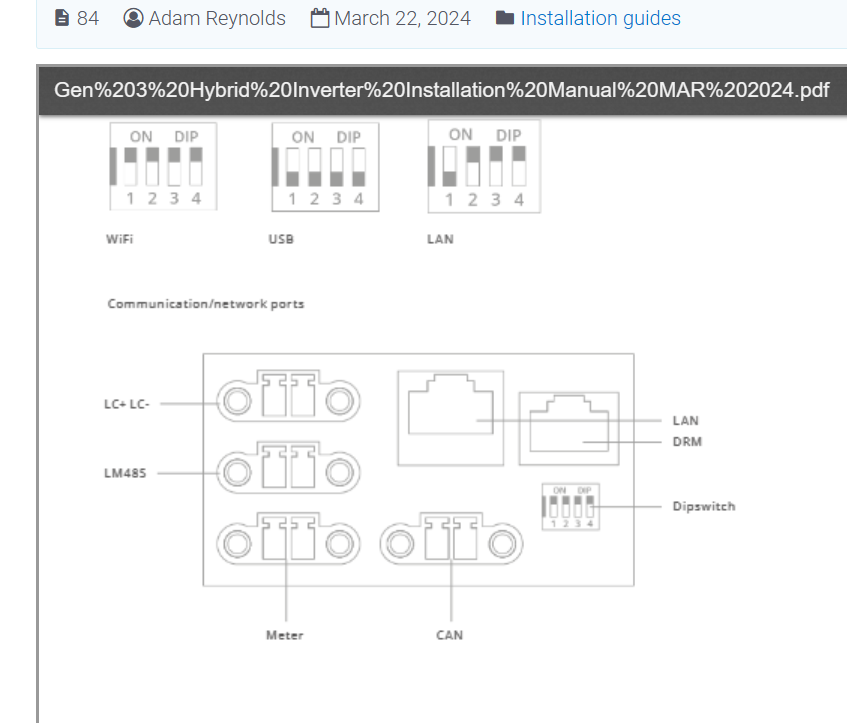
On my Gen1 all the data connections to the inverter are on the bottom, so you are looking up when trying to figure them out. I thinks some of mine got plugged into the wrong places and I got lots of errors. In the end slow looking/thinking and plugging in got is all sorted. This snip is example from GE KB

G
#9 geoffreycoan

I got my meter plugged in the wrong port on the bottom of my gen 1 hybrid as well when I was trying to diagnose a battery failure and continued inverter notifications as a result

Pictures of the inverter ports are in the installation guides on the givenergy kb website.

If you have an EM115 which in turn is connected to CT clamps, the connection goes into the ‘meter’ socket not the ‘CT’ socket on the inverter.