F
Hi Guys,
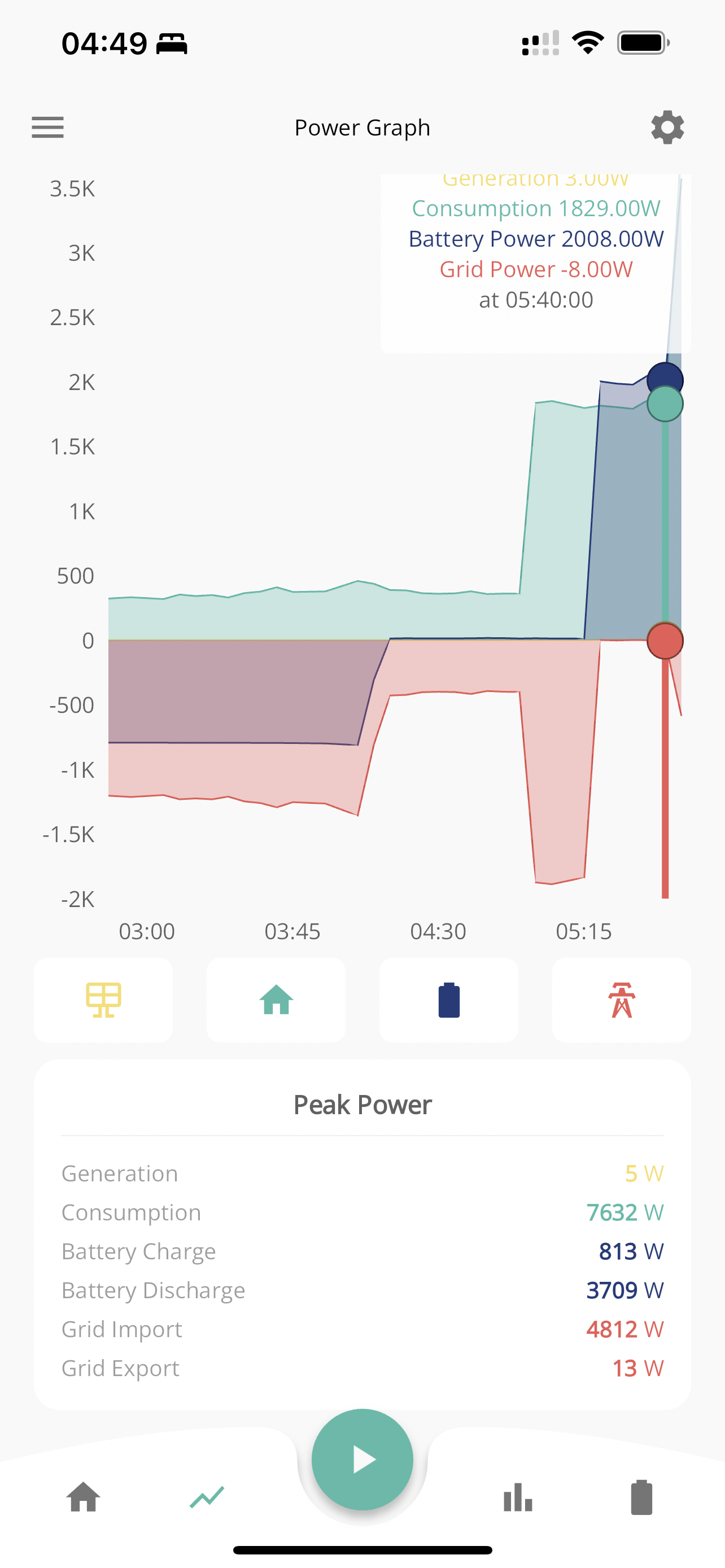
Is there somewhere on the GE system to set the system time or configuration as it appears that my time graphs are +1hr.
I took this photo at 4:40am but the graph shows 5:50 …

Hi Guys,
Is there somewhere on the GE system to set the system time or configuration as it appears that my time graphs are +1hr.
I took this photo at 4:40am but the graph shows 5:50 …
Try ‘Account Settings’ ‘Sync Inverter Time’?

My setup is in an outbuilding. I have the AIO + Gateway and a Solis PV Inverter. A couple of days ago I noticed that the Solis Inverter time was an hour adrift, probably been like that since BST. It was simple to adjust with a few button presses on the Solis. I can't see that it would have affected anything but thought I'd mention it as an observation just in case it does have any effect.
( My Solis Inverter doesn't seem to have any wireless network natively so I assume it is wired in to the Gateway which does all the necessary monitoring. Just a shame that I can't access it from the desktop )
The time in the inverter should always be set to GMT not GMT +1. GE automatically make the summertime adjustment.
TimHutchings
Thank you, that's someting that I wasn't aware of. I will switch the Solis back to GMT 👍
TimHutchings Are you sure ? GE send updates to the time on inverters when the clocks change, which rather implies the inverter runs on local time. Looking in notifications section, I see a message from a month ago saying 'Inverter Time Sync Succeeded'.
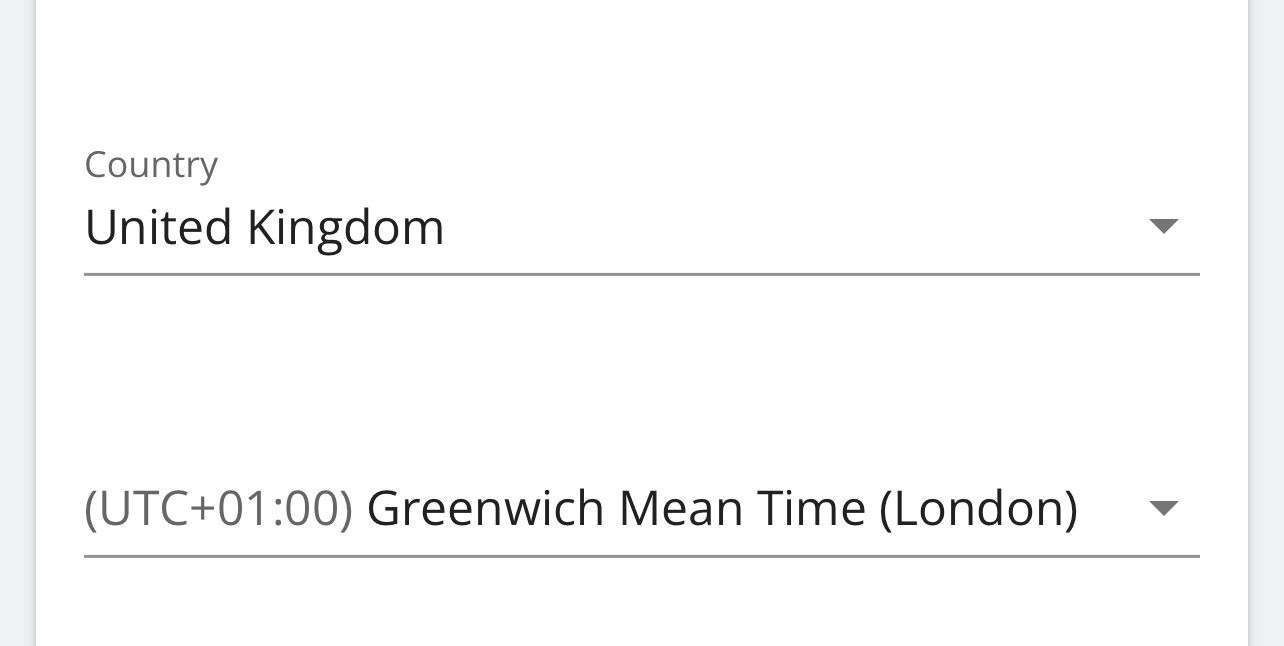
I agree that it is usual for embedded systems to run on UTC, and for UI to convert to local time. BTW I'm always wary of using "GMT" since there seems to be some confusion about what that actually means. Microsoft, and the the image above, seem to consider "GMT" to mean whatever is local uk time (ie UTC+1 during the summer), whereas AFAIK, GMT is always close to UTC, and BST is GMT+1.
https://www.timeanddate.com/time/united-kingdom-bst.html
https://www.timeanddate.com/time/gmt-utc-time.html
DD It's only what I've read on posts from other people where they have a one hour time difference. From memory, it's also happened on some new installs for some when the installer has set it up wrongly to GMT +1.
You may be right DD, as it's something I've never personally had an issue with. In any event, the poster appears to be out of sync in some way with the correct time, so I would have thought adjusting the timings by an hour may have helped, and wouldn't have caused a major issue.
TimHutchings wouldn't have caused a major issue.
Well, getting out of sync with cheap-rate tariffs might be considered a bit of an issue. I don't know about all vendors, but Octopus tariffs tend to move with BST, ie they are always in local time. So if you have a timed charge configured for 2am, it matters whether the inverter is set to the correct version of 2am. (Inverter doesn't have a timezone register, which is why changing to local time requires invervention.)
FunkMaster That's in account settings on the portal ? Not sure what that does, but pretty sure it doesn't do anything to the inverter itself - just tried changing the setting, and nothing wasn't sent to the inverter. (I have logging via modbus which notes all changes made.) And nothing appeared to change on the graphs. [I have it set to (what they call) GMT (London), ie UTC+1]
To change the time on the inverter, I'd use the remote-control page. About a screenful down (depending on the size of your screen...) there's an Inverter section, and the first box is 'Set Time and Date'.
The portal should be set to GMT/UTC as that's the correct time for that zone regardless of time of year.
Same as pretty much every other bit of kit people have - phones, PCs etc etc...
DD It has concerned me for some time about the time differences. I have just had Octopus confirm they use UTC summer and winter for clocks and tariffs. Therefore the low cost period on OF of 0200-0500 BST is actually 0100-0400 on the smart meter and at Octopus. Similarly the high tariff is 1500-1800. When the clocks change then the tariff times should coincide with the UTC time.
It made my head hurt.
Roy124 I have just had Octopus confirm they use UTC summer and winter for clocks and tariffs. Therefore the low cost period on OF of 0200-0500 BST is actually 0100-0400 on the smart meter and at Octopus. S
Might want to ask them again... I'm pretty sure the cheap periods follow local time, so eg on IOG when the clocks go forward you only get 5 cheap hours, and when they go back you get 7 cheap hours. (The smart meter will probably record and report everything in UTC, but the billing happens at a higher level.)
Unless you're on economy-7 - I think that might be fixed at UTC hours ? (Because old-fashioned E7 meters were mechanical things which didn't understand BST. Though were they switched using radio signals ? Not sure...)
https://octopus.energy/help-and-faqs/articles/what-is-an-economy-7-meter-and-tariff/
@dd, as I said, my head hurts.
Hi Roy,
All tariffs and smart meter use gmt. Not bst or utc.
Kind Regards,
Greg.
On Wed, 09 Oct 2024 at 13:36, roybrocklebank@talktalk.net wrote:
Greg, thinking on, that didn't answer my question. What time does the higher 1600-1900 tariff use, is it BST or UTC?
Roy
I can't think of a different way to ask the same question a third time in the hope og getting a different answer.
My solution is simply to charge at 0200 and stop by 0400 (0100-0300 UTC)and for the afternoon start at 1400 and stop by 1600 1300-1500 UTC). Then minimise usage between 1600-1900 BST. Next month it all goes away.
Roy124 Roy. My GE portal is set at UTC+1 (GMT +1 London) under account settings, and I always set my import and export times as per what the clock times are currently showing. I've never had a problem with GE or Octopus being out of sync. Give your brain a rest and have a glass of wine or a G&T!
Roy124 All tariffs and smart meter use gmt.
So they didn't confirm that they used UTC, they confirmed that they use GMT. Unfortunately, 'GMT' appears itself to be ambiguous. My understanding used to be that GMT was fixed at (close to) UTC. However, common usage now appears to be "the local time in London", so it's UTC during the winter, BST during the summer. So I now try very hard to avoid using that term, and stick to UTC.
As I write, https://greenwichmeantime.com/ reports local time as 18:41 and GMT is 17:41
https://en.wikipedia.org/wiki/Greenwich_Mean_Time says it is UTC+00:00
But I know that Microsoft, for example, seems to treat GMT as "the time in London", which moves with DST.
By specifically saying "gmt not bst or utc", I can only interpret that to mean local time. (Assuming BST is fixed at UTC+01:00). ie they consider that GMT is UTC+00:00 in winter, and UTC+01:00 in summer.
I think the only way to frame the question unambigiously is something like "at which time in UTC does the cheap period begin".
Roy124 My solution is simply to charge at 0200 and stop by 0400 (0100-0300 UTC)and for the afternoon start at 1400 and stop by 1600 1300-1500 UTC). Then minimise usage between 1600-1900 BST.
Strictly, the clock changes between 1am and 2am. In spring, it jumps from 1am to 2am directly, but in autumn 1am to 2am happens twice. So in principle, flux from 2am to 5am should be fine - maybe start at 2:05 rather than 2 precisely. HOWEVER, the other variable is exactly when GivEnergy actually adjusts your inverter's time to UTC - if doesn't happen until later in the morning, then your system was running on BST overnight.
The afternoon session should be absolutely safe, if you can check the time on your inverter. You should see a message in the remote control log reporting when GE actually changed your inverter. (That said, I can't see the entry in my log for end of March when BST started.)
If you were to set the time to UTC yourself on the evening before the clock change, you'd probably be okay. I think I might do that, actually...
TimHutchings I have been working with time zone changes all my life, GMT+7.30 was the best 🙂
Just annoying when it is clearly set up to confuse.
The data from the smartmeter/DCC is always in UTC. Its the energy supplier's responsibility to adjust to BST on any tariff it affects.
Haven't had a problem with the GE portal changing time. Probably regret saying that soon.
Vestas That is not the issue. You set the time in GE; it charges at the time you set.
Has anyone actually proved what the billed tariff is at a particular time? For instance what is the tariff billed at 0101 which is the time O says they have the low tariff at 0200 which they say is also UTC.
As I say, I am away from now so will wait for someone to confirm or deny.
Roy124 Has anyone actually proved what the billed tariff is at a particular time?
I dug out my bill for last October. I was on Go at the time, so cheap rate was 00:30 to 04:30
I have no idea why I imported nothing at all that day - away, perhaps? But it clearly shows that 1am to 2am happened twice. Start/end/price/kWh/cost
00:00 - 00:30 29.14 0.00 0.000
00:30 - 01:00 8.57 0.00 0.000
01:00 - 01:30 8.57 0.00 0.000
01:30 - 01:00 8.57 0.00 0.000
01:00 - 01:30 8.57 0.00 0.000
01:30 - 02:00 8.57 0.00 0.009
02:00 - 02:30 8.57 0.00 0.000
02:30 - 03:00 8.57 0.00 0.000
03:00 - 03:30 8.57 0.00 0.009
03:30 - 04:00 8.57 0.00 0.000
04:00 - 04:30 8.57 0.00 0.000
04:30 - 05:00 29.14 0.00 0.000
05:00 - 05:30 29.14 0.00 0.000
05:30 - 06:00 29.14 0.00 0.000
As was mentioned, the smartmeter will be using UTC exclusively, but billing performs DST adjustments.
Similarly in march - now on IOG. There was no 1am to 2am
Period Rate p / kWh Consumption kWh Cost p
00:00 - 00:30 7.14 0.19 1.364
00:30 - 02:00 7.14 0.74 5.314
02:00 - 02:30 7.14 0.37 2.607
02:30 - 03:00 7.14 0.38 2.714