
Poor data reporting of battery percentage on the app and dashboard

11 comments started 2024-05-25 last 2024-06-01
Cloud PortalGivEnergy Products
K
#1 KevinB

I have an AIO, and just this week had some solar added via a Gen3 hybrid inverter. I realised this morning that the installer hadn't enabled wifi properly on the Gen3, so I fixed it at around 10:30am. That's when the battery percentage display chaos started...
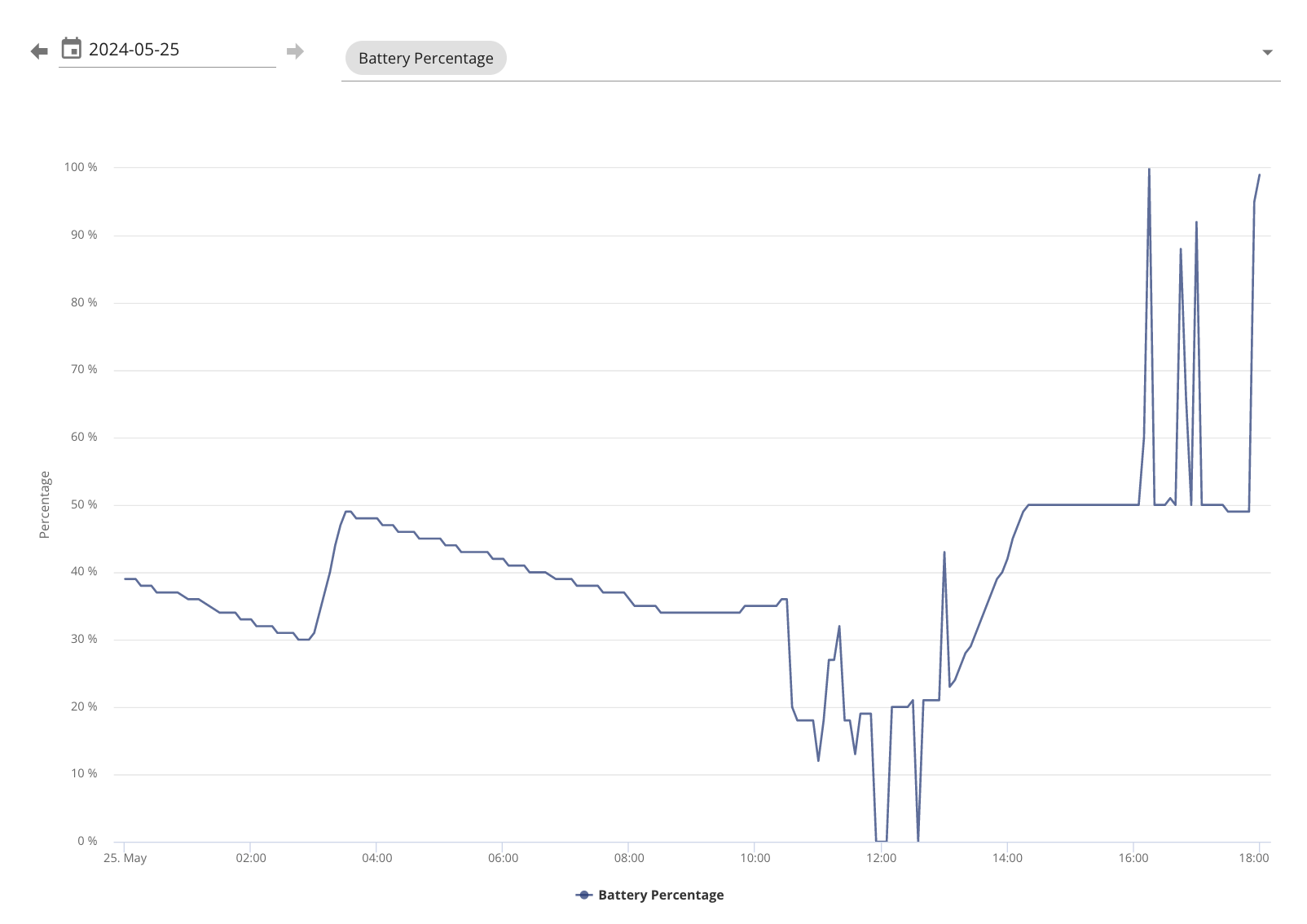
Note that I charged the AIO a bit at 3am, and a bit more at 1:30pm-3pm (cheap Agile slots). I think it hit 100% charge at around 2:30pm.

I think what's happening is this:

  • Before 10:30am, it was showing the AIO battery properly
  • At 10:30am, the Gen3 started reporting data as well. However, for some reason GivEnergy thinks that the Gen3 has a battery attached which is permanently at 0% charge
  • Most of the time, the portal and app are showing the average of the two batteries (the AIO and the none-existent 0% charged Gen3 battery)
  • Sometimes, either the AIO or the Gen3 briefly drops off the internet. At those times, the portal and app are only showing whichever one is still connected

That's the only thing I can think of to explain these weird data. Surely, though, GivEnergy knows the setup, and can display the data better than this? Surely?

#2 hoggy

Erm... no it actually can't in what is essentially plant setup.
See also: https://community.givenergy.cloud/d/4476-incorrect-total-soc-percentage-in-portal

With no battery on the Gen 3 the portal will simple scale between 0-50% for your AIO.
Best option is to split the Gen3 off your portal and into a new account so it doesn't screw your readings up.

Givenergy and multiple inverters in plant mode has been quite cursed for years with things like this pretty much standard.

K
#3 KevinB

hoggy but... but... but... the Gen3 surely knows that it doesn't have a battery attached, and surely it can report that up to the mothership... surely...

Even if I did have 2 batteries, the whole thing about averaging them is a bit weird - I'd much prefer 2 different lines on the graph. Fair enough if they were both attached to the same inverter, but in this setup they'd be on different inverters.

But... but... but... I don't even have 2 batteries...

#4 hoggy

KevinB welcome to Givenergy multi-inverter / plant setups.... surely you don't consume several MWh per day either but that and a few other hilarious values are fairly par for the course if you rummage around on here.
The portal (& presumably the back end) is not the most flexible of things it appears when you have more than 1 of a thing.

If you were lucky enough to have an AIO and gateway put in on the first batch run, then the gateway too reports that it has a battery at 0% (because...well its a gateway...) which meant that even those with a single AIO and nothing else was scaled 0-50% as it was averaging the gateway values too.
Again I believe that was resolved by moving it to a different account (although I think that has since been fixed)

You might get lucky and someone from GE here might be able to do the same but equally it might not be possible (and if Speak to the Geek is struggling, who no doubt has considerably more friends on the inside then perhaps not...)

K
#5 KevinB

hoggy For what must be a reasonably common use-case, I'm amazed that it's such a bad experience. When I hit the info icon next to the battery charge number in the mobile app, it shows the individual battery levels (even though I only have 1 battery, but it shows a second one at 0%), so something at least knows the individual battery levels. Even showing me 2 numbers, and 2 lines on the graph, would be a much better experience than showing me a number which is definitely incorrect.

I'll see what the support email address says, this can't be the intended behaviour...

K
#6 KevinB

I've been staring at the PV "generation" number for a bit, and I think that's getting doubled? Presumably the solar inverter is reporting the figure locally to the AIO, and both of those are sending it up to the Givenergy cloud which is duly adding them together... that's my guess anyway.

Battery is halved, solar is doubled. I thought having the various bits from the same ecosystem would add value, not detract from it.

The data from the API is correct on both counts, though, so clearly the raw data is being tracked correctly inside Givenergy's systems - it's just not displaying it usefully on the dashboard or mobile app.

K
#7 KevinB

... and to add another anomaly, the way that the "two" batteries (1 real and 1 ghost) are being combined is different on the web dashboard vs the mobile app. My AIO is currently at 100% charge; the web dashboard is saying that I have 50%, and the mobile app says 67% (I think because the Gen3 fake ghost battery is a lower capacity than the AIO, and that's being taken into account in the mobile app but not the web dashboard).

Two individual numbers would be far more useful than one combination-of-two-others-so-definitely-wrong-on-its-own number, then I can just ignore the number which is always 0.

M
#8 MrChaz

Heck, I have two batteries attached to a gen1 inverter and it's really common for the app to show something like 100% battery and then in the details show 96 and 96 or some other non-matching combination

T
#9 TX200

MrChaz isn't that because the app shows the user percentage and the more detail shows the true percentage?

E.g. the protection bit top and bottom.

100% user percentage isn't really 100% full.

M
#10 MrChaz

Dunno,

It's currently showing 93 or 89 and 92 which still doesn't add up (based on some quick mental maths)

#11 Watcher

Gen 1, 2 batteries = 100%
Primary 93%
Secondary 98%