
App 3.3.15.7, new ‘what’s new’ & withdraws Timed Discharge

20 comments started 2024-07-02 last 2024-07-14
Mobile App
G
#1 geoffreycoan

I know others have commented about changing behaviour in the app recently. I saw just now that the GivEnergy app on my ipad was upgrading itself so I went to see if there was any updates to the ‘what’s new’ to describe the changes.

And to my surprise there was:
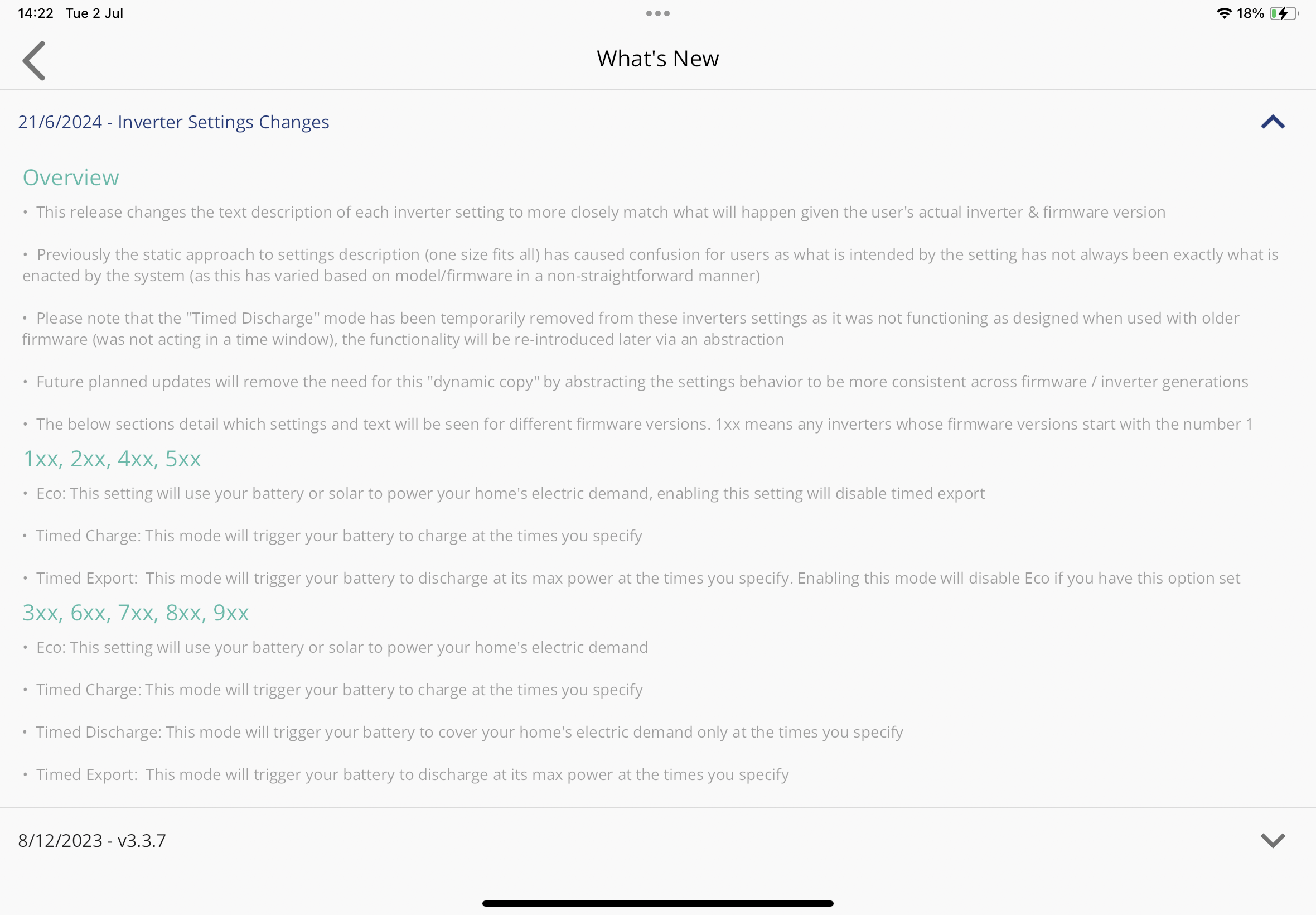
Good to see that GivEnergy have actually updated the What’s New, it seems prior releases have been very short on details of what’s changing, and good that they acknowledge different behaviours on different firmware versions.

Highlights that Timed Discharge has been removed for some firmwares which is something others have spotted, and there’s a ‘sort of’ explanation of how the different modes work but with still lots of questions.

e.g. What happens outside of the timed periods, is the inverter in Eco mode or what?
Outside of timed discharge hours, appears the house demand is met by solar or grid import?
The explanation of timed export at max battery power is not strictly correct, its limited by inverter power and whatever solar is being generated

Appreciate that there is limited space to write an essay on the way the different modes operate, but explaining what happens outside a timed charge or timed export is I think key, and a link to a fuller description of the modes on the GivEnergy website would also be beneficial

D
#2 DD

And they rarely seem to mention that eco mode also enables solar charging of the battery. Or rather, priorities battery charging over grid export, whereas turning it off seems to prioritise grid export over battery charging.
(But I don't know to what extent that varies across firmwares.)

V
#3 Vestas

geoffreycoan Those notes are now visible on the Android app - they weren't when it was actually updated a couple of months ago, last notes then were dated 2023.

Of course the notes aren't accurate are they? Not if you're on 191/193 like us 😉

G
#4 geoffreycoan

Vestas Yeah I thought this was a retrospective update of the app What’s new.

And of course 191/193 behaves differently from the other 1xx firmwares. I just looked and Timed Discharge has been removed as an option in the app for me, so looks like the app isn’t aware of that subtlety

B
#5 Ben Taylor-Wright

This is the functionality I was looking for. I.e. I don’t want to charge my battery from my solar, I want to export it at 15p and then recharge the battery at night at 7p.

I won’t fully discharge my battery unless the heating is on, so for the next few months I want to maximise my solar revenue.

G
#6 geoffreycoan

Ben Taylor-Wright If you set it to Eco mode, then a force charge overnight, and a timed pause of battery charging during the daylight hours, it should give you what you want

You can only do this through the portal though, battery pause mode isn’t in the app (or at least isn’t in the app for me)

D
#7 DD

geoffreycoan And you can still have a timed-export configured.

S
#8 SteveDooley

geoffreycoan I am trying to do the same thing as Ben. The problem with pausing the battery is that it pauses both charging and discharging, so if the sun goes in you end up importing at full price. What is needed is a timed "charge from grid only" mode. This needs to be something that you can programme and forget, no use if it needs daily intervention.

I think GivEnergy hasn't caught up with the new tariffs which allow you to charge cheaply overnight and export profitably during the day.

D
#9 DD

SteveDooley the pause from the app may do both, but if you go to the remote control page, you can choose to pause either charging or discharging (or both).

G
#10 geoffreycoan

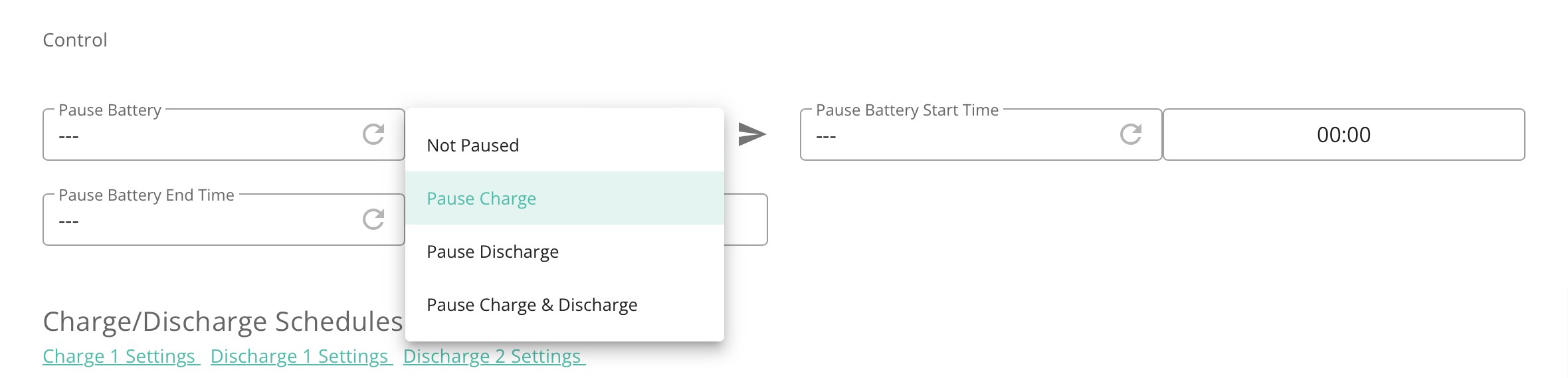
SteveDooley As DD says, set the battery pause mode to just Pause Charge which will stop all battery charging and allow discharging:

And use the portal for this, not the app (as I said before)

S
#11 SteveDooley

geoffreycoan Thanks. But I don't see these options in the inverter settings in the web portal. I am on firmware D0.450-A0.451 which was installed last year. I suppose I need to upgrade?

G
#12 geoffreycoan

SteveDooley If you are on D450/A451 then I’m pretty sure this implies it’s a Gen 1 hybrid inverter.
My own inverters are Gen 1 hybrids, installed January 2023 as Gen 2’s were in short supply from China at the time.

Unfortunately the 450/451 firmware doesn’t support battery pause. GivEnergy have in test firmware 191/193 which is what I have which does have the pause capability so when this finishes testing and you upgrade, you should be able to pause the battery from solar charging during the day.

In the meantime the only option is to set the battery charge rate to zero, either in the app or in the portal. This does much the same except there is no start and stop times so you’ll have to change it in the morning to stop solar charging and change it back overnight before you want to start grid charging at the cheap rate

#13 hoggy

This does seem to have caused some fracturing across the fleet.
I'm still unsure why there can't just be a "Fast Response" firmware with the fast part removed so it doesn't blow up the early ones.
Atleast you have some sort of parity then and the app Devs wouldn't have to extrapolate functions / switch them off!

D
#14 DD

SteveDooley Ah, sorry, that's a gen-1 system ? The timed-pause was introduced in a beta "fast response" firmware, but that seems to be a 1xx rather than a 4xx firmware.

It seems that the previous behaviour of timed-discharge may actually have been what you wanted?
See https://community.givenergy.cloud/d/4284-confused-about-export/52 and https://community.givenergy.cloud/d/4284-confused-about-export/65

Which I attempted to summarise in https://community.givenergy.cloud/d/3654-timed-discharge-behaviour-survey/3 but might have got it wrong.

So it's possible that the old gen-1 behaviour of timed-discharge was what you wanted. No longer available via the app, but on the remote-control page I think it just corresponds to eco + enable-dc-discharge (with the discharge timer set accordingly). But you may have to experiment a bit.

Or if you happen to have an always-on computer, such as a raspberry pi, you can use the api to automate switching charging power at different times of day. (0 during the day, max for overnight charge.) I have python scripts you can copy for that.

S
#15 SteveDooley

Thanks DD and geoffreycoan. I think it is a Gen 1, installed November 2022. So I'll have to wait for the new firmware. I may experiment with using HA to change the battery charge limit to 10% outside the timed charge period. Then it will charge to 100% overnight, and not charge during the day. Not used HA yet so hope this is possible.

V
#16 Vestas

hoggy I suggested exactly that to GE a while back now.

Frankly I think the way to approach this is that the G1 inverter (in 2022/23 anyway) was sold with timed export/demand as a feature. On 450/451 f/w it simply doesn't work and never has. That's grounds for rejecting/claiming a full refund on the inverter as its not as described in advertising etc.

That's basically what I said to them and they installed 191/193 for me after that.

Having said that I was still (at the time) inside the first year from install so the installers wouldn't have any choice other than to replace/refund. I also know our installers (not a small company) aren't happy bunnies with GE - AIO N-E fiasco amongst other things, so perhaps that was a factor.

I doubt anyone on G1 will see any new f/w unless the alternative will cost GE more money. Fair enough up to a point but given they were still being installed less than 12 months ago due to the last Chinese Covid-19 lockdown I don't think its a sustainable position legally.

S
#17 SteveDooley

OK. Now successfully set up the inverter with Home Assistant, following the incredible "Speak to the Geek" Youtube videos. Having done this made two simple automations, the first to set "GivTCP SD******** Control GivTCP Battery Charge Rate" to 100% at 23:30, then another to set "GivTCP SD******** Control GivTCP Battery Charge Rate" to 0% at 05:30. So now the system automatically charges the battery in the (as of July 24) 7p rate period, and during the rest of the day will export everything net of house load to the grid, at 15p. I have similarly programmed my EDDI, thus converting it to a very expensive time switch. This is using the Octopus Intelligent Go for import, and Outgoing Octopus for export.

S
#18 SteveDooley

If anyone else is using Home Assistant with GivTCP to control the inverter, can you point to any documentation on the individual parameters which can be changed. Most of them are obvious, but there are some which are not. GitHub has some but not all. In particular, anyone know what "GivTCP S******** Control GivTCP Active Power Rate" does?

G
#19 geoffreycoan

SteveDooley anyone know what "GivTCP S******** Control GivTCP Active Power Rate" does

no idea, mine is set to 100 all the time and hasn’t changed in the last week. I reverse engineered what the app did to work out what controls I needed to manipulate to manage the battery myself. This wasn’t one of them

Unfortunately there’s no documentation that I am aware of as to what the individual controls do in GivTCP. You could look at the GivEnergy API documentation on the knowledge base as a starting point?

S
#20 SJB

SteveDooley Don't know about documentation.
The Active Power Rate is effectively what it says. If you lower it to say 50% then the inverter will work at 50% of its normal rate, ie charging/discharging/pv will be reduced by 50%. Best left well alone @100% and don't put it on any dashboards as it's really annoying to find it's been accidentally set to a lower value whilst using the HA mobile app.

I've seen recommendations that if you are shutting down your system that it's more gentle to lower the Active Power Rate before using any manual switches.