
Settings to direct solar into AIO instead of export

8 comments started 2024-07-11 last 2024-07-12
Cards - Energy FlowCloud PortalGivEnergy ProductsAC Coupled
H
#1 Hightower

Hello everyone. Brand new Giv Energy user as of yesterday. Solar/AIO install is now online after a month of commissioning problems and now I have some settings issues. Here is the setup:

6.1kw Solar Array
Solis 6kw Solar Inverter
Giv Gateway - Firmware Version: A0.008
Giv Energy AIO - Inverter Firmware Version: D0.611-A0.611 // BMS: 9
Electricity Tarif: Intelligent Octopus Go (No export configured yet)

I've already made a few classic mistakes like not reading current settings before adjusting, not submitting changes to the system before changing pages and setting an export schedule when it should have been a discharge schedule. (Honestly I'm not sure how an average user could figure half of this stuff out.)

Now I'm attempting to utilise my solar generation to keep the battery topped up instead of exporting to the grid while I don't have an export Tariff in place. Here are my questions:

1 - In the Cloud Portal you can change settings on the AIO AND the Gateway. As the Gateway controls the flow of electricity I assumed the settings would be on this device. Except it is listed as an inverter in the portal which obviously isn't correct and there's a load of settings for battery levels and such. Should I use these settings or leave them alone?

2 - If the answer to above is leave them alone. What settings on the AIO will allow me to direct the majority of the solar to the battery? I've tried various combinations of ECO on and off, timed charge/discharge on and off and General Export priority set to be Battery within the AIO and the gateway settings. The majority of my solar generation is still heading out to the grid. Any tips?

Thank you for any help provided.
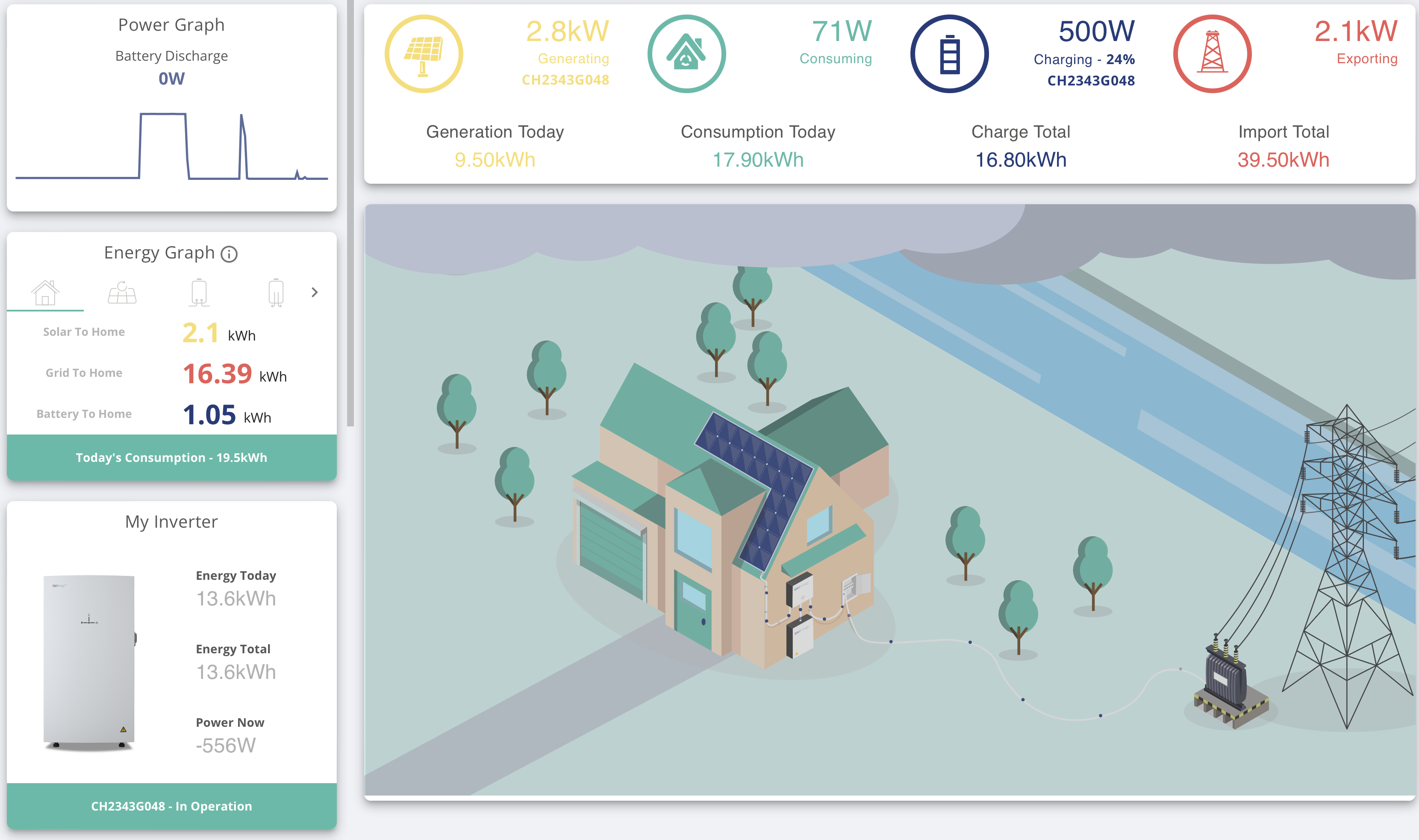
D
#2 DD

Hightower welcome to the forum

what's your typical daily consumption, and do you have a solar-aware car chargepoint?

There are various parameters that might limit battery charging power. If you've been fiddling with things, perhaps a reset-to-defaults might be a good place to start?

H
#3 Hightower

Typical daily consumption is normally around 7kwh in the summer.

I don’t have a solar aware car charger or other solar aware load in the property. I’m currently running an Ohme Home Pro that is controlled by Intelligent Octopus.

I’ve combed through the settings several times and not seen anything out of place. What is the main setting that instructs the AIO to take the bulk of the solar export? If I can verify that I have this setup already and it’s not working then I can go the reset route.

D
#4 DD

(I have a hybrid inverter rather than AIO, but I think a lot of the settings are common.)

500W is a bit of an odd value - it's high for charging being disabled, but obviously much lower than is possible (except perhaps when the battery is approaching full, in which case the system does tend to slow charging down, but that's not the case here. Or when the battery is very cold.)

One relevant setting is the max charging power. Even setting the charging power to 0, it still charges at a few hundred watts. 500W is perhaps on the high side for that, though.

Perhaps see also https://community.givenergy.cloud/d/3650-understanding-the-settings-on-your-app-and-portal

#5 hoggy

The gateway is essentially the brain / cpu part out of all the other inverters, put in a box, so they have much the same internals - so show up as if they are inverters on the portal.
Unless you have multiple AIO the gateway won't coordinate with singular AiO so any settings like charge rates or times you change on it won't really do anything.
(Multiple AIO is different, as the Gateway does actually start doing things like dishing out commands to inverters and so on)

H
#6 Hightower

DD

I may have solved my issue. I began playing with the system using the IOS app and discovered it was missing a lot of controls. I then transitioned to using the cloud portal. The thread you directed me to talked about the some settings not passing through from app to portal. I discovered the battery was “paused” in the app. The confusing thing is it was still functioning, just at a reduced percentage. Thank you for the assistance.

H
#7 Hightower

hoggy

This is super interesting and makes sense for multiple AIO’s linked through one gateway. Thank you for the insight and helping me understand the system better.

D
#8 DreadorUK

Just a quick one to say you might want to hide your serial number in the image...
