Residual Battery discharge when paused

10 comments started 2024-10-01 last 2024-10-01
GivEnergy ProductsBattery
M
#1 Mondriver

Hello all,

First post to the forum and struggling to find an answer in the search as there are so many combinations of equipment/variables to all the systems.

I have a AOI system which was installed yesterday.
I’ve ‘paused’ the battery discharge from the quick action button in the app, yet the battery is still discharging 150-180w per hour.

Is this normal please? Have I set up something wrong?

Many thanks for the help.

Nick

D
#2 DD

Mondriver yes, does seem to be normal, unfortunately. There's another couple of ways of doing it, depending on what you're trying to achieve. Turning off eco mode should fully idle the battery, or configuring a timed-discharge will set the time window during which discharge is allowed.
There's also tricks like setting up a timed charge window with a low target SoC.

M
#3 Mondriver

Thanks for the reply DD.

I have ECO mode enabled (tried what you suggested, and it indeed turned off the battery completely).
I also seem to have a residual 'phantom' load' in the house of approx 450-500w. I've gone round and turned everything off (incl. stby's, fridges, freezers, etc). I had a phantom load of less than 100w before installation.
Surely the 'system' doesn't consume 300-400w constantly just to run does it? Seems incredibly inefficient if that's the case...?!!

Many thanks

Nick

M
#4 Mondriver

...oh...1 more thing to mention...

I had also set up a timed discharge window of 0900-0000, but it seems to be ignoring that and discharging anyway. Am I correct in assuming then that the timed discharge only works if ECO mode is turned off?

D
#5 DD

Mondriver had also set up a timed discharge window of 0900-0000, but it seems to be ignoring that and discharging anyway. Am I correct in assuming then that the timed discharge only works if ECO mode is turned off?

Don't think so... timed-discharge is implemented using pause timer, with pause-mode=pause-discharge from (for you) 0000-0900. It's only useful if eco is turned on, since that's what allows it to discharge during the hours you allow.

(I don't use timed-discharge, but do use the pause timer for other stuff.)

M
#6 Mondriver

Thank you so much...that's really helpful

D
#7 DD

Mondriver I also seem to have a residual 'phantom' load' in the house of approx 450-500w. I've gone round and turned everything off (incl. stby's, fridges, freezers, etc). I had a phantom load of less than 100w before installation.
Surely the 'system' doesn't consume 300-400w constantly just to run does it? Seems incredibly inefficient if that's the case...?!!

Is that as reported by your smartmeter, or by the givenergy app ?
The app has a feature to bodge the numbers to make them add up - if you press the lower gears icon you get config for that page, and the first one is 'show calculated load' - I think the default is on, but I turn it off. I think all it does is add any missing numbers to the load.

If you have solar, presumably that's a separate inverter - I can only assume it has to take its power from AC when the sun is down. The AIO itself may be able to power itself from the battery. (My hybrid must do since there's zero grid import most of the time.)

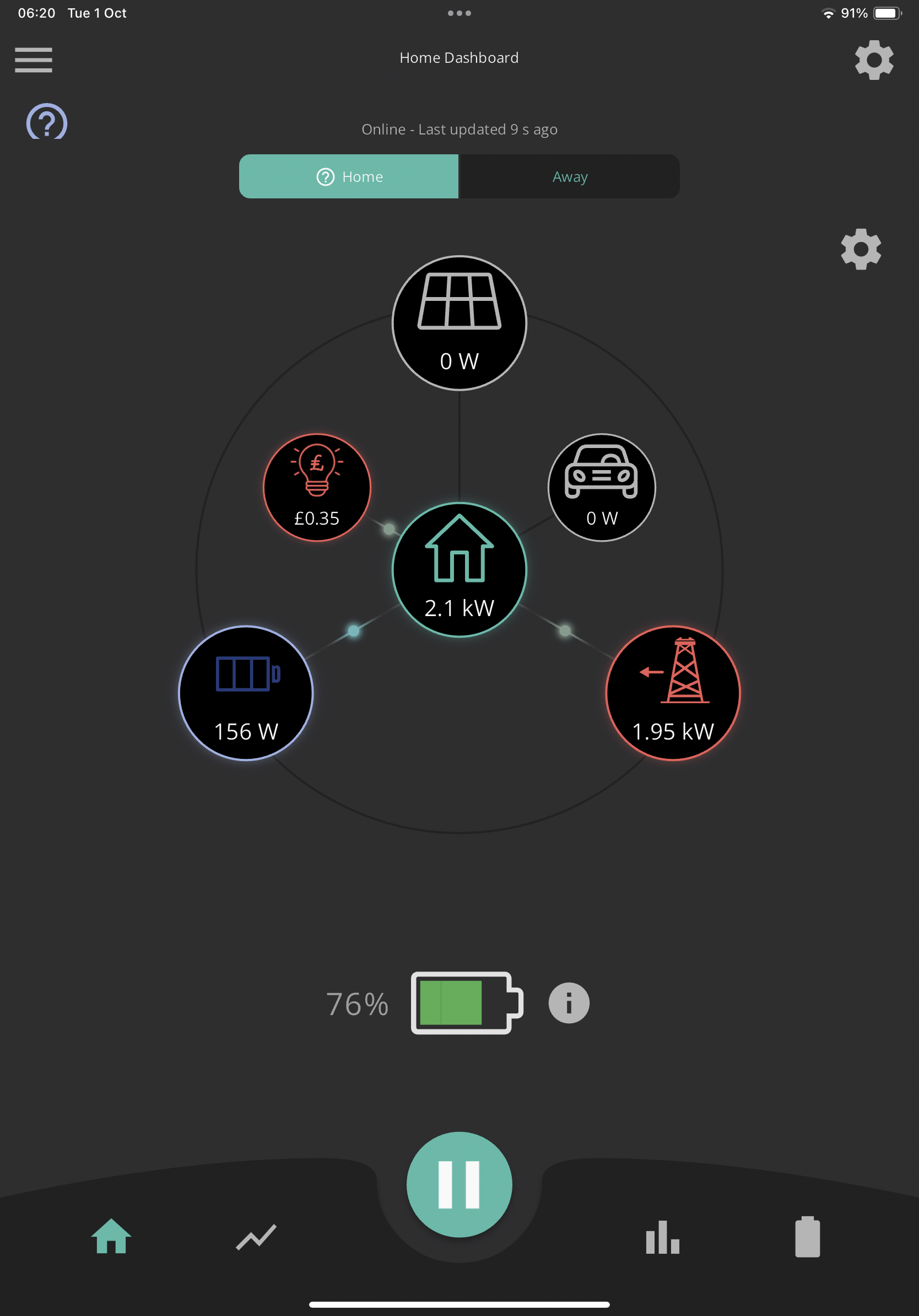
M
#9 Mondriver

DD thank you - that does indeed affect the 'phantom' amount!

Makes you wonder why the numbers don't add up though...!

D
#10 DD

Mondriver Makes you wonder why the numbers don't add up though...!

I assume it's the power consumed by the inverter itself.
There's a third-party app https://givenergymonitor.wixsite.com/tutorials which shows a separate category 'inverter' which I guess is this extra power. (Currently about 150W for my hybrid - grows as the inverter does more work.)
