Just went to the portal and got this popup


Just went to the portal and got this popup
It still appears to be down, I am getting a HTTP 500 in the browser and the app won't load. I am sure I was able to see load and app data after the maintenance window though.
Seems the maintenance fix has caused an issue. Wonder if there's anyone at the support desk to see the fault and fix it.
15 minutes eh, I hope givtcp does its job with new times I set at midnight.
Edit
Yup, it worked 🙂
This is why I hate this cloud crap, its on the network the app should connect through that and not 100% rely on their servers.
Edit 2
Well it worked for 1 minute, damnit, I had it set from 00:00 to 00:01 by mistake and not 01:00.
When it stopped charging I set it to 01:00 end time and now its not charging, stupid servers.
Edit 3
Finally got it charging again but missed out on nearly 10 minutes of the cheapest slot for the entire day
Since it came back online I've lost connection to solcast. Anyone having same problem ?
I just hard reset everything as mine is was not connecting to the cloud this morning and as far as I can tell even after the reboot still isn't working.
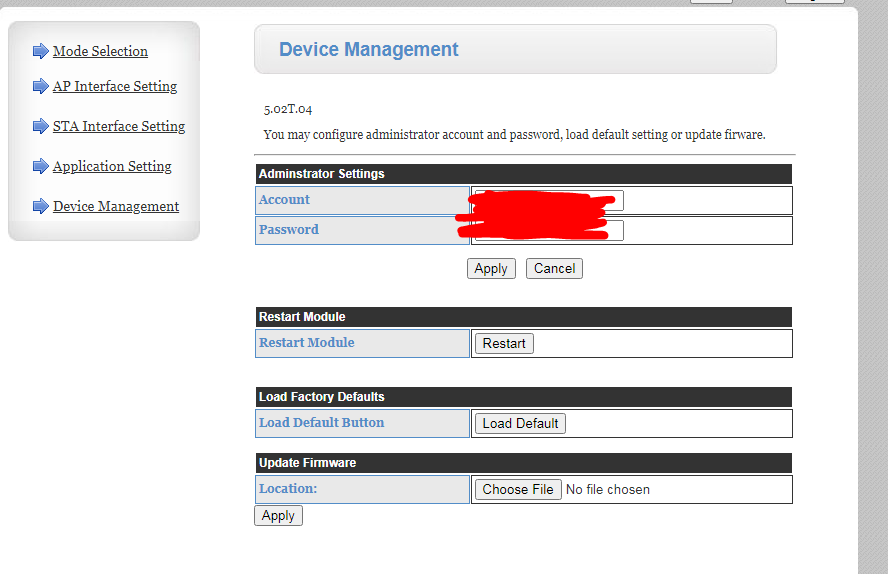
RobN for anyone experiencing the same I had to go into the inverters web admin page and reconnect the wifi http://10.10.100.254/home.html
I tried the WiFi dongle password I had previously set and that works. It is just the same dongle admin page though. I didn't know you could access it without disconnecting and reconnecting to the dongle's built in network.
I had hoped that there might be a local admin page which would allow me to set the charge slots when the cloud portal and app were down. Looks like I will need to set up Home Assistant.
pwdst I think that's its address on its own APN it creates.
While it is connected to your wifi, you can connect on its (probably) 192.168 address, then login as (probably) admin/admin. Once in, you can set/change the security on its APN, so that you'll be able to connect to that in the future.
It might have been set to your battery serial number by your installer, or something like 12345678 (as it was for me).

A good number of users were reporting issues with us due to this maintenance window too.
My app is connecting locally but portal is saying its offline at 12:15 which is now and these were the last updates.
11:30:37
11:31:00
11:32:00
11:32:59
11:40:50
Again, my app is fine and is connected to home but portal isn't updating.
EDIT
Leaving app on whilst typing this it seems to be back online................. for now.
Edit 2
and its stopped at 12:26, jesus christ.

Jellybaby Yeah, my web portal is up and down like a yo yo.
The readings are missing from the web portal, and it's saying the inverter is offline.
Duh.. no it isn't!
I have Richard Russell's Inverter app running. It's talking to the inverter just fine. On local wifi network.
I have the ios app running. It's talking to the inverter just fine. On local wifi network.
I have Home Assistant running. It's talking to the inverter just fine. On local wifi network.
I have WonderWatt running. It can control the inverter over the internet just fine. Over the INTERNET!
Conclusion: GivEnergy have f-d up something.
Now I cant stop the charge that is in progress because despite being online its saying inverter is offline, jesus christ what the hell have they done for god sake.
Jellybaby I'm shit at Home Assistant - I can display facts about the inverter and set up various dashboards, but I can't get my head around how to control the inverter with it. I want to write rules to charge, discharge, etc, based on various factors, but HA makes no sense whatsoever; when I look at online guides they don't match up with what I see, and they assume too much.
miffy I have in the past shared my scripts for controlling the inverter manually, and happy to do so again if it helps. The inverter controls are quite low level so you do have to often set several to get what you want to happen.
But TBH you might be better off in leveraging the work of others with something like Predbat.
Or use the @Rubikcube Android app to control your inverter locally with simple schedules
geoffreycoan I'd really appreciate some help in creating an automation. I go Settings/Automation/Create New Automation.
Let's say I want to tell HA to force charge the batteries between 2am and 5am.
I go:
When the time is equal to 2:00
Then do:
And this is as far as I go, because although I can select Device: 'GivTCP MyInverterRefHere Control' which seems to have a ton of sub-options, only some of them are mentioned in the GivEnergy web portal, Remote Control page. Therefore I'm uncertain of all the switches and options I need to set.
If you were to send me the YAML, presumably I can enter Edit in YAML mode and paste it in?
And that should be a simple rule, charging 2-5am. What about a conditional rule, like Export to the grid between 4-7pm but only if the battery SOC at 4pm is more than 75%? And Export down to 40% then stop?
And.. I need more rules during the summer to avoid capping because my solar array is 9kW while my Inverter is 5kW.
HA automation has me pulling my hair out in confusion and frustration!
oh for the love of god I still can't send any commands through via portal

Been out all day just got back to find app offline from 12.00.... being a bear of very little brain I'll leave it & see if it comes back on its own.
This has happened so many times... wish they'd sort it first instead of getting us to be the guinea pigs!
I’m not sure this is impacting everyone, my app has shown as online all day, and everything shows online in the portal.
I've been using app and api all day with no obvious problems. (Did fail last night, which was a little annoying since battery didn't charge as much as intended. Fortunately it's been a very sunny day...)
JasonF yeah app and portal seem fine but have not been able to use portal to send any settings to it, I ended up giving up.
App earlier was connected to home and refreshing every 10s but still no luck even reading a register, got 3 different errors.
Edit
Just checked right now again and its still updating every minute and green light as it should but.......
Portal is completely useless atm.
miffy I'd really appreciate some help in creating an automation. I go Settings/Automation/Create New Automation.
Since we are getting off topic here I have created a new discussion item on the forum and shared my scripts. https://community.givenergy.cloud/d/5062-beginners-guide-automating-inverter-actions-with-givtcp-in-home-assistant/
Have a look at that and reply back with questions you have. One thing though, DON'T use device id in your automations, it makes them unreadable and ties the automation to your specific HA install. Use entity_id's instead.
I’ve got the same problem. My evening discharge didn’t start, I’m pretty sure the overnight charge won’t happen as well.
Does the app work wrt the quick play buttons?
I’m a bit reluctant to start a max rate discharge or charge, if I can’t stop either !
System is operating effectively in eco mode right now (and each inverter is cross charging 😖).
Car charging will flatten the battery overnight if I don’t kick off an ‘manual’ charge. But I’d rather not if it can’t be recovered.
Pete UK If you install the BBC basic app (available for IOS, android, etc) you can manually control your inverter locally. Equivalent of the quick play buttons in the app.
If the portal isn't working then I suspect the Givenergy app won't either as the app commands go via the portal
I think I have the same problem. The inverter is online and reporting data to the portal, but trying to change any settings or restart the inverter via the portal or app results in a timeout error. I've reset the module via that device management page, no improvement. I really want to turn off the timed-charge which was in place for an Octopus "power up" today but will be useless tomorrow!
davebiff If you are up for it I supposed you could power cycle the whole lot, see if that gets things fired up.
There are supposed to be some apps that do local control but at this point I think best bet is to power cycle the equipment which was my next step, whatever they did messed something up and its going to take that to see if it sorts it.
Ok. I have that but I’m 3,000 miles away and at 30,000 feet right now !
Maybe - where is that page/ how do I get that? do I need to be on my own WiFi network? I’m miles away from home for the next 3 weeks.
Anyhow… the batteries seem to be charging (well one pair is, the other pair stayed on 100% as it’s being cross charged (I guess the inverter balancer software isn’t working either!) At least they won’t be drained by the car !
Thanks for the tip. Helpful as always 👌🏻
I’m back again as well. Support fixed it.