Have changed from Nowtv to Sky with a Max box router. Cannot now connect to Generation 3 inverter.
Have tried various suggestions and videos.
Changed name and password back from Sky to Nowtv using MySky app.
Tried from Givenergy app to connect 'dongle'. No joy. Husband stood by inverter in garage but wouldn't connect. Tried the 6 possible attempts twice.
Tried to 'discover' the inverter through wifi . Not there. Added it as a new network with the WH...... and password as FA...... but didn't connect so when I typed in 10.10........etc it didn't connect. So stuck.
The video suggests splitting the 5 from the 2.4 gHz but Max hub appears to be fixed at 5.
Thank you.
Read post so not looking good. . Have posted in Sky forum but if this is an ongoing problem with fibre broadband then surely Givenergy, and others, will need to help us connect inverter to our network.
G
#5geoffreycoan
Lynn Sky will say that they adopt modern security standards and its up to other equipment to comply, GivEnergy will say that supporting more modern standards is on the roadmap but no dates yet, and whether that will require a hardware upgrade or even be possible for older equipment ….
The “fix” is to buy your own internet router or mesh network that you can control yourself. Even get an older one from ebay and connect it up to your sky box just for the givenergy inverter
S
#6SteveCook
If I have BT disks connected to my router and the discs are WPA2, will that allow my GivEnergy donlge to connect to the discs with 2.4Ghz (as present) and then allow the inverter to connect with GivEnergy eevn If I get a new WPA3 router.
Currently my discs and router all work fine, but I am still on copper and sense fibre is coming
R
#7Rbor
SteveCook Have a look at this: https://www.youtube.com/watch?v=6HMe2lAjsOI
Good video by EVM for Givenergy.
It is very informative. Round about 6:00 min, he gives a rundown of WPA2 /WPA3.
He is really saying, drop down to WPA2 for compatibility.
Rob
G
#8geoffreycoan
SteveCook If I have BT disks connected to my router and the discs are WPA2, will that allow my GivEnergy donlge to connect to the discs with 2.4Ghz (as present) and then allow the inverter to connect with GivEnergy eevn If I get a new WPA3 router.
Yes
Only thing to watch is to set the channel numbers being used by your new Wifi router and your WPA2 router so they don't clash or are too close to each other
N
#9NormC
Lynn In the MySky app, select Broadband, then WiFi settings tab, Advanced settings, Disable Wifi tab, Press continue to go through the warnings. Select down arrow to the right of GATEWAY. You can turn off 5Ghz to see if that helps to connect the Inverter.
Hope this works for you. I have a Sky Max hub and everything is fine. I did change the security to WPA2 as I have old equipment connected.
#10Windy Miller
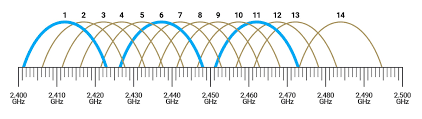
geoffreycoan In the 2.4G band channels are allowed to overlap but do suffer from reduced bandwidth when they do. Bands 1, 6 and 11 do not overlap so using one of these is preferred as long as not being used by too many close neighbours (they can share bands but will also reduce your bandwidth). If these 3 already have lots of devices try channel 3/4 or 8/9 if they are free even though they will overlap slightly with one of the adjacent bands.
Best not to use channels 12, 13 or 14 as not all equipment can use these bands (some are restricted in UK airspace).
V
#11Vestas
Windy Miller You can actually use 1,5,9,13 as a frequency plan provided you're not using 802.11g anywhere on the WLAN. Its common practice in Germany but not so much here & hence isn't as useful in urban areas where the majority of ISP routers are set to C1, C6 or C11 and hence will overlap anything on 1,5,9,13.
Reason is that the sidebands aren't as wide because of the modulation used.
V
#12Vestas
Oh and since the topic is Sky Max routers, its probably worth mentioning that there's currently an unfixed bug affecting the phone service on the Sky Max router if you're a new customer/getting the Sky Max for the first time.
Basically Sky are at this time unable to provision the VoIP service which provides Sky Talk. They claim its "only a few customers affected" but that's PR bullshit.
If you don't care about that then no problem but if you do then you will get a dial tone but you won't be able to make or receive calls. Been ongoing a LONG time so don't hold your breath for a fix.
N
#13NormC
Vestas I moved from TalkTalk to Sky in June. I have Sky Ultrafast+ with Sky Talk. When the Openreach engineer had finished setting up the Sky Max Hub he just plugged our BT big button phone into the router. It works fine for both incoming and outgoing calls.
V
#14Vestas
NormC This is after June. They broke something in August and still don't know what it is.
Apparently if you're in the "wrong" IP block when the VoIP is initially provisioned then it'll fail and regardless what subsequent IP addresses you may be allocated will continue to fail. If your VoIP was previously provisioned correctly then it doesn't affect you.
Smart money is on something to do with their (broken in many ways) MAP-T system which was rolled out this year.
N
#15NormC
Vestas Thanks for letting me know about that. We’ve only got the landline because our parents always phone us on it. We’ve tried to get them to phone our mobiles but they’re in their 90’s and set in their ways.
L
#16Lynn
It's now 3 weeks since our inverter has been offline due to changing wifi to Sky. Givenergy and installers have tried to fix it with us on the phone. We are talking hours here. But to no avail.
A helpful Sky engineer came yesterday as weak and no signal in main parts of house. His suggestion was to turn iff the safeguard option in the Sky app. Hasn't worked so far but have contacted supplier again to check the password.
NormC Thanks for your sugfestion. l will try your suggestions later today. This has all kicked off at the same time asI have had shoulder replacement. Added pain with internet problems was something I could have done without.