Has anyone got the Dongle firmware update using the GivInstaller app to work?
I have Gen1 Hy5.0.
I put app on the phone. I took the little plastic cover off the bottom of the external dongle and followed app instructions and pressed the reset button for 15 secs.
I scanned the inverter barcode and the app read it in.
The "next" button just sat doing nothing .
All that happened was this all appeared to have factory reset my dongle and I had to follow the whole setup procedure from scratch to get the dongle to reconnect.
Pretty poor if you ask me. There is no way to tell what firmware version the dongle is on, so how do you know if you need an update!
I then logged into the dongle with my laptop. There is nothing that tells me what firmware version the dongle is on.
I went and found various dongle firmware downloads on the GivEnergy website. I downloaded them.
I tried to install a firmware file but that failed eveytime.
I think the dongle is looking for an image file, but none of the GivEnergy stuff is an image file.
Do they "test" any of this stuff before pushing it out?

B
#2Ben_Collier
I’ve been meaning to try this. But the lack of anyone mentioning it here put me off!
Watching 👀
B
#3Ben_Collier
OK I took a gamble and tried it - and surprisingly, it worked!
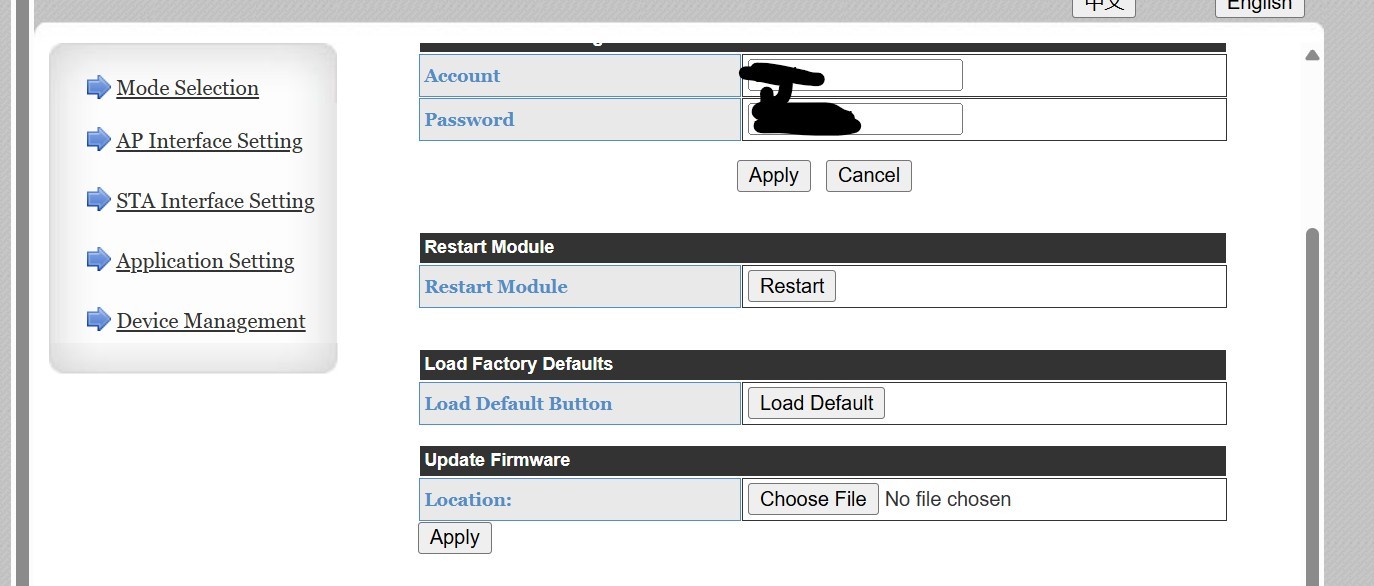
You can see the version number in the Device Management section, mine went from 5.02T.04 to 5.05T.19(Boot:V1.1.3)
S
#4SteveCook
Thankyou for that. I just installed that ecos.img file and the inverter says it is rebooting now. Fingers crossed!
Wonder why the image file is not better "signposted" better on the KB pages
Seems to have worked OK
It now says I am 5.05T.19(Boot:V1.1.3)
S
#5SteveCook
SteveCook
whether that is the right image file for the dongle, who knows?? No readme files anywhere
T
#6T-M
SteveCook GE told me the eCos.img file is a network stability upgrade for the Dongle. The way I understand it is that this is a HF-A21 chipset/microcode update, which is not the same as the Dongle firmware (WireLessModule.bin) which runs on the Dongle ARM chip and presumably handles the Ethernet-Modbus comms and setup/config page.
Be aware that installing the eCos.img update will change the MAC Address of the Dongle, so if you have IP Address reservation set up on your router, you may need to revisit your router setup. Also, it seems to give each Dongle a unique Hostname of GivEnergy_MAC (where MAC is the BSSID), so be aware that the last digit may differ from what you see in your router client/reservation list.
In the case of an AIO having two Dongles (AIO and Gateway), giving each of them a unique hostname looks to be a good idea, as without the eCos.img update, having two devices with HF-A21 as hostname is obviously suspected to be causing some people network connectivity issues.
A
#7alan_johnston
As well as the eCos.img file, there is another file in the Dongle FW ZIP.
Complete lack of any release notes 🙁
Looking for my old gen1 3.6 inverter and wifi dongle.
S
#8SteveCook
i wish GivEnergy would post some readme notes
S
#9SteveCook
alan_johnston Well if that works on a Gen1 inverter dongle please shout
J
#10Josephiah
I've just had a notification in the app suggesting I should do this, but I'm unclear why... Anyone aware of what the benefits might be, and whether they are real, or worth the hassle?
S
#11SJB
Josephiah I couldn't find any information on why either. If you don't have any WiFi connectivity issues then I wouldn't bother (if it ain't broke don't fix it). Mine's been been fine for 2 years and unless there's some really great new functionality I don't see the point of potentially breaking it.
A
#12alan_johnston
My gen1 wifi dongle can't see wifi channels 12 and 13 which would be a nice fix. and it does seem to reset itself every now and then, but it works mostly and in the absence of any release notes and support if the update goes wrong, I am not keen to try the upgrade out.
I also receiving the notification that I should download GivInstaller now and update in just 5 minutes!. This update will enhances WiFi connectivity and ensures a more stable connection.
But in the absence of any release notes and support if the update goes wrong, I am not keen to try the upgrade out.
There is information on the Hi-Flying website - www.hi-flying.com/hf-a21 - that includes the 'HF-A21 High Performance Series Wi-Fi User Manual', that might help?? but you might want to get in touch with GivEnergy to see if they can help first.
D
#17danielnepomuceno
Like someone else said above, my dongle has been working fine for the last nearly 2 years, providing sub-10 seconds updates to my Home Assistant instance. I've even faffed around with changing my home router a few months ago and it handled that without any issues.
Definitely not interested at all in touching this, specially when it lacks any kind of detail other than "enhances wifi connectivity".
#18ProximusAl
Ryggwelter Just done my Gen2 Hybrid too based on your post.
No dramas, successful upgrade, and no MAC changes (I use DHCP reservation)
Happy days....
T
#19TX200
It's times like this I'd like a test inverter 😄
Defo not touching it whilst I need predbat (agile prices!).
I could run an ethernet cable across the lounge if I got desperate I guess. Or buy some decent powerline adaptors.
TBH, I think the smart thing to do is leave well alone - as someone mentioned, 'If it ain't broke..'
Lack of documentation, unclear which target systems it runs on, risk of bricking your dongle. Not worth it, but sometimes I just can't resist playing.
J
#21Josephiah
#p70506 well I think this answers this one!
L
#22Leeshore
🤦♂️
R
#23Roy124
Josephiah Thank you, I reported elsewhere that I could not sign on to Givenergy Installer - solved that one - the £ is not a valid Symbol whereas $ is. (I had the same problem with Toyota).
My next problem was scanning the bar code. With some contortions, a mirror, and interpreting the mirror image I got the Dongle serial number. At this point I am stuck.
My connection issue is only connecting AWAY and not HOME. Other than that, do I need to install the Update?
If I do, can I unplug the Dongle to scan the bar code, and the plug it back in without messing anything up?
G
#24GribinIsaf
Notification just arrived:
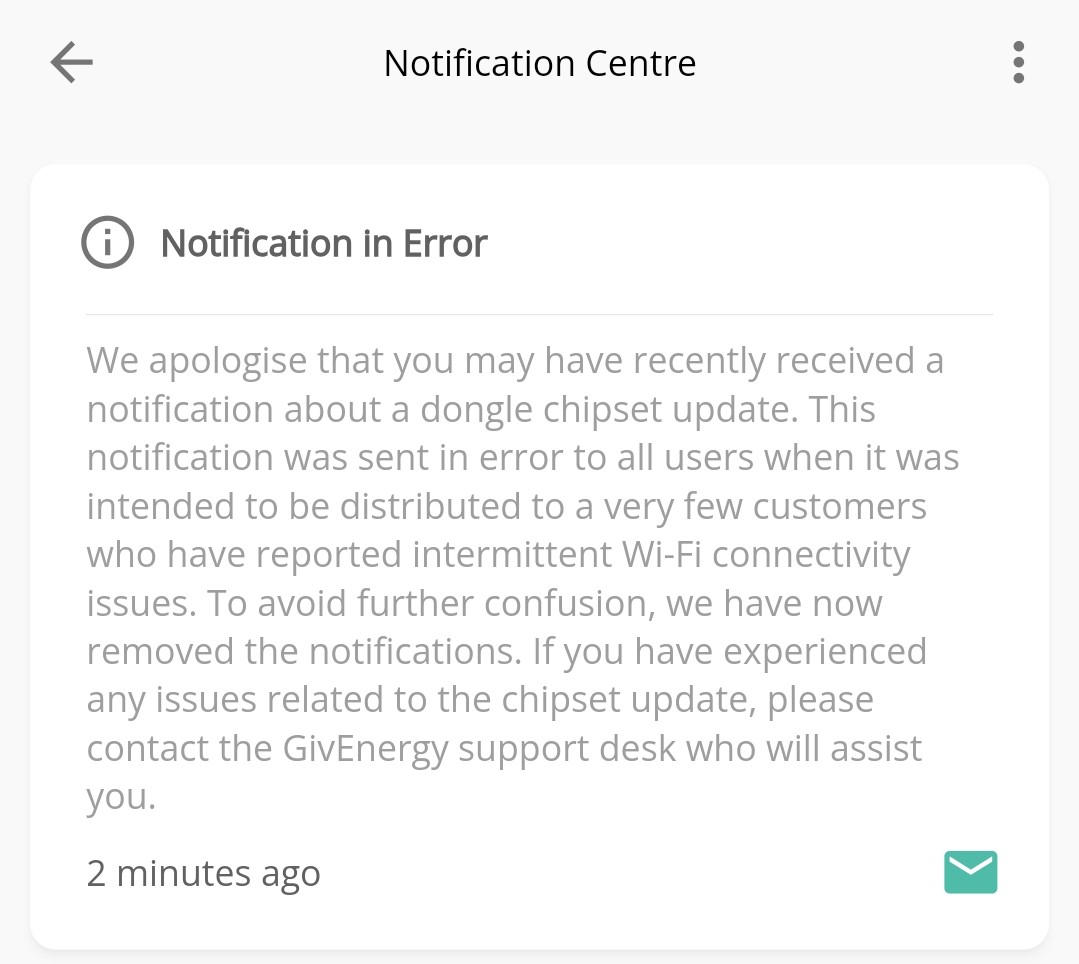
"We apologise that you may have recently received a notification about a dongle chipset update. This notification was sent in error to all users when it was intended to be distributed to a very few customers who have reported intermittent Wi-Fi connectivity issues. To avoid further confusion, we have now removed the notifications. If you have experienced any issues related to the chipset update, please contact the GivEnergy support desk who will assist you."
I have exactly the same questions/issues as Roy124 above, although the App will connect to 'Home' but no longer automatically, only if I select it. Any insights out there?
I did not get anywhere using the GivInstaller app but in the process of following the instructions I had reset the dongle (though I found out that it had kept the password I had put in ??)
Anyway when I made sure my house 5gHz was turned off
Used my phone browser to login to 10.10.100.254 and entered my house wifi details etc and restarted the dongle.
I then used my laptop and logged into my router to see that it connected to my wifi and had a name something like AF-21 (sorry cant remember). I then used my laptop browser to access that IP address 192.168.1.35 in my case.
I downloaded the ecos.img file from GivEnergy to my laptop
On the Device Management tab I browsed to the cos.img file on the laptop and it all went OK.
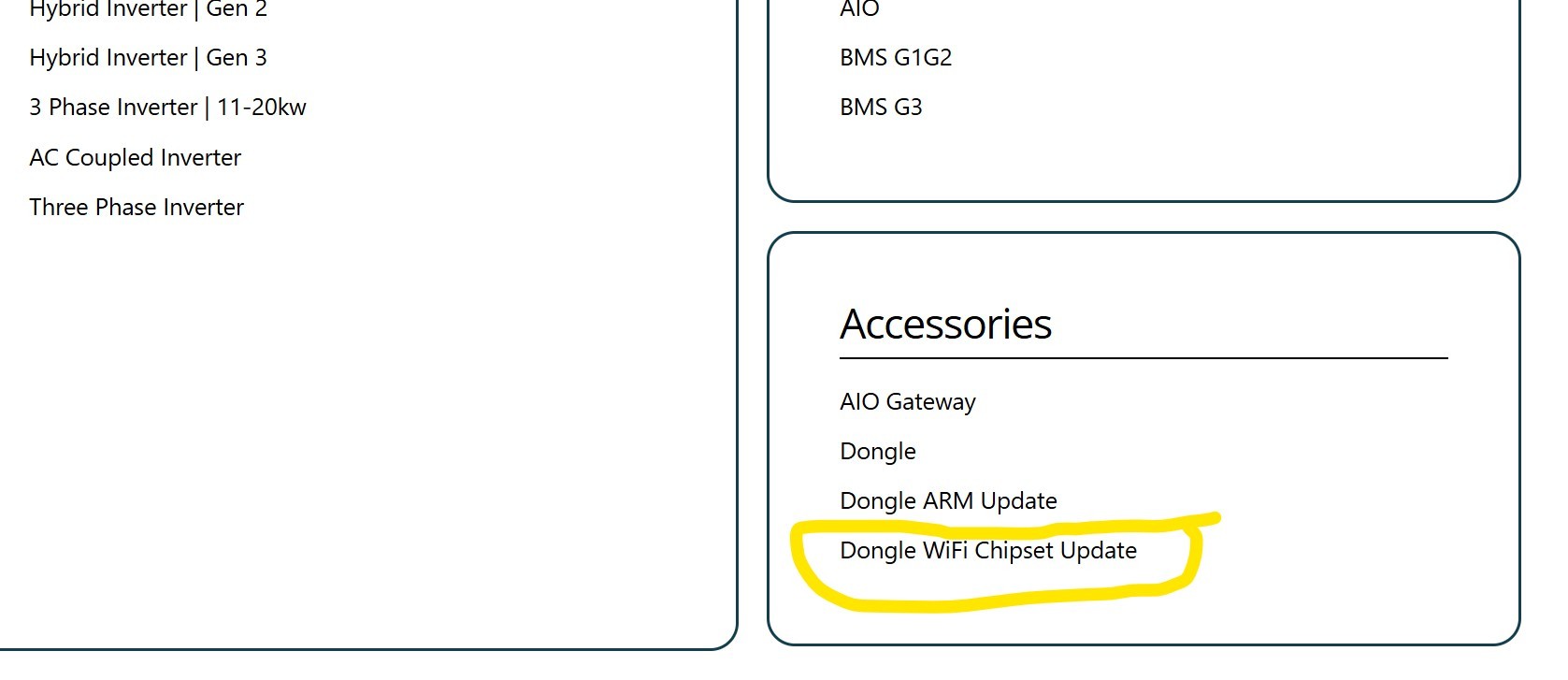
The image file is here https://givenergy.co.uk/installer-resources/ in the Accessories - Dongle wifi chipset update
Note I have a Gen1 Hy5.0 with dongle and i could not find any notes on what this cos.img file does, but it all worked OK.
I had no response from GivEnergy, so as the dongle WiFi is not coming up, I bought a new one. I put the new dongle in my PC USB and updated the MSN.txt file with my old dongle serial number (this seems to be locked into my inverter config). I put the new dongle back on the inverter, configured my network and changed the SSID to my old dongle S/N. After rebooting the dongle, my inverter came back on line.
It cost me £46.13 but it seemed the quickest route to getting back online. If GivEnergy ever contact me, I'll ask for a refund on the new dongle.
Next time I'll check this forum BEFORE updating any firmware! :-P
Dave
R
#32Roy124
Ben_Collier any suggestions then to get the Home option to work, not that it is vital as Away works.
With the latest dongle firmware I didn’t have to do anything special to get it to connect to my WiFi.
Mesh Eeros, previously it wouldn’t connect at all, now it connects without any special changes.
S
#40SteveCook
Ben_Collier
Ben
Thanks. That sheds some light on what the updates (might) fix
S
#41sponev
We run a Fritzbox router in mesh mode and no connection issues, this is on the original firmware. No plans to try to update it.
G
#42geoffreycoan
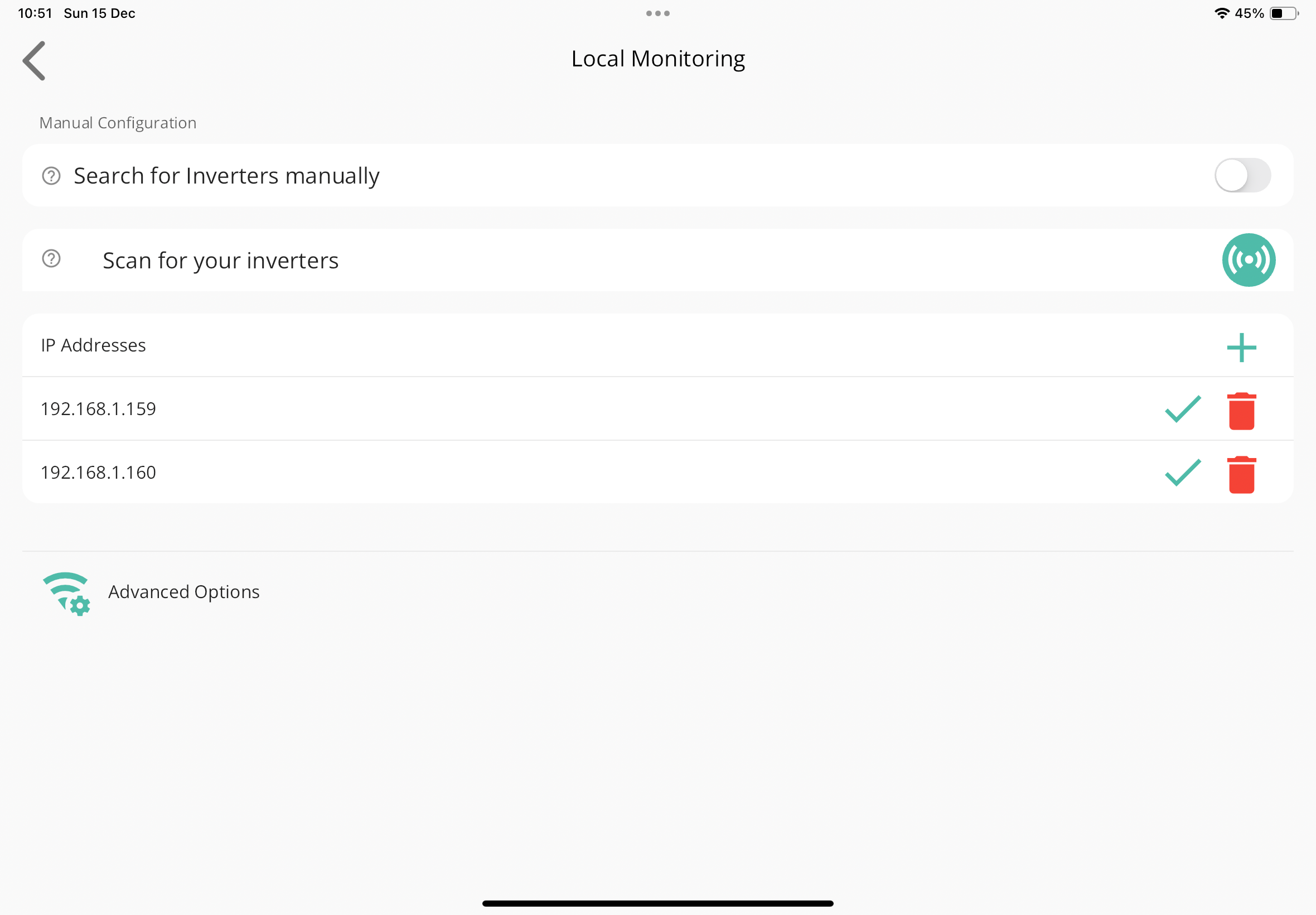
Roy124 Hamburger option, Settings, Local Monitoring, Scan for your inverters
I just get Scan complete
or just add them manually - I selected manually and Scan and just get complete. exactly what am I to?
I assume your inverter is connected to your wifi OK and you can do ‘remote’ mode in the app and see data in the portal OK.
To get the inverter manually added to local monitoring, hit the plus button and manually add the IP address of your inverter:
If you don’t know the IP address, look at the configuration on your wifi router, it should be called ‘HF-21’ or something similar.
#43Tenkaykev
sponev
When we switched to FTTH I connected our original Fritzbox via Ethernet and reconfigured it as a wireless extension. Always a rock solid piece of kit it has worked perfectly 🤞
S
#44sponev
Tenkaykev yes, impressed with Fritzbox and far more capable than the cr@p TalkTalk provided. We're now with Zen FTTP, decent so far. We also run a Fritzbox repeater with all of it set up in mesh mode. Been solid and very good signal strength. You can also access the router remotely without having to set up an independent VPN. Handy if stuff ever needs re-booting while you're away.
Great advice, I also changed my dongle as it bricked after the update, bought a new one online - trade sparky ?, mine connects to the home network, BUT only when my device is on the same, also needs a fairly strong signal from the router & noticed at night the signal strength drops right down - to much interference
All givenergy keeps saying is reboot the system, split the wi-fi , I informed them I had changed the dongle also..
Will give it a try "when" I can get use of my daughters PC...
I put a wifi extender near the inverter. This is the type that you plug into the socket and the network tavels through the mains network. You plug in the transmitter near the Wifi router connected via an ethernet cable and put the extender near the inverter. This worked OK but was quite slow. I have since added a network of Unify access points around my home, with one in the garage that serves the inverter and EV (amongst other things) - this works well.
It took givEnergy 6 weeks to contact me - if I hadn't fixed it myself, my battery would have been flat for over 6 weeks. Very poor support indeed.
The Gen 1 hybrid inverter with the wifi dongle is not a good stable solution - there is a single point of failure: the dongle - and without a back-up ethernet option. I wish I had the Gen 3 model instead.
This is exactly what I did to get mine working. You need to do it on all devices (e.g. my wife's phone) too.
G
#49geoffreycoan
[unknown] I put a wifi extender near the inverter. This is the type that you plug into the socket and the network tavels through the mains network. You plug in the transmitter near the Wifi router connected via an ethernet cable and put the extender near the inverter. This worked OK but was quite slow. I have since added a network of Unify access points around my home, with one in the garage that serves the inverter
These are called powerline networks. I had one as well.
They can be quite fast but they can also be slow, I had the same experience. The slowness is caused by electrical noise on the ring mains, caused in my case by some cheap plug-in pest eradicators and mains sockets with in built USB sockets. Took a bit of trial and error to identify these, but basically it was cheap electronics, and once I removed them the powerline networks was very fast.
I too swapped to a mesh network (TPlink mercusys) and have no regrets with it
Thanks for the advice & pointers Dave, I was checking online & as you mentioned the dongle serial number is allocated upon the commisioning to the system.
I mentioned this to givenergy support via email correspondence, all they come back with is reboot the system, or reboot the dongle !.
I asked them IF I replace the dongle with another one, would that cause problems - as its serial number is allocated to the system when commisioning !, I can't get a straight answer off them !.
I had a play around with the network,now get 65-70+ % signal strength at the dongle and can currently view the system on "home", BUT not away, i.e. cloud.
I Will have to access & change the serial number, its my last option, if that doesn't,t work, will have to get thr installers out again - suspect they will have to commission the system again.. 😏
D
#52Dave Hostick
[unknown]
If you take the new dongle and put it in a USB socket on your PC, you should be able to edit the MSN.txt file and update it with the old dongle serial number - being the number allocated when the system was commisioned. This is because the cloud system needs to find the dongle with this number - as it shows in the Wi-Fi Serial field in the My Inverter page on the GivEnergy cloud portal.
If you don't want to update the MSN.txt file, your installer will be able to update Wi-Fi Serial field in the cloud to the new dongle serial number - this actually happened when my inverter was installed, as the original dongle was faulty.
Regards,
Dave
J
#53Jaybee62
[unknown]
Update ( finally ) as of June 2025, I changed the serial number of the dongle to the original one allocated to the system as per your advice... And it works !.
THough my WiFi booster has given up , as the dongle needs a strong signal to work on local network.
But at least I can now view & alter the controls on the battery etc via the cloud ( just need another WiFi booster for local ).
Regards
John
J
#55Jaybee62
[unknown]
Update, I changed the dongle serial number on my daughter's windows pc to the one allocated originally to the system... AND I can now access the dongle & battery settings etc !.
Though as of 21St of Oct 2025 the issues with aws are still it seems causing problems with givenergy access,so no access.
This seems to be a issue with a lot of people..🤞 they get it sorted.. soon 😏
J
#56Jaybee62
Jaybee62
Update, I changed the dongle serial number on my daughter's windows pc to the one allocated originally to the system... AND I can now access the dongle & battery settings etc !.
Though as of 21St of Oct 2025 the issues with aws are still it seems causing problems with givenergy access,so no access.
This seems to be a issue with a lot of people..🤞 they get it sorted.. soon 😏
Finally got round to doing this yesterday. With all the givtcp issues I was experiencing I was spending extended periods of time waiting for my inverter to rejoin the network.
I’d forgotten my admin password, so factory reset the dongle, setup the WiFi and disabled the AP option.
A lot more stable now and stays connected. Furthermore now a lot more secure now that it’s not a backdoor into my network.