Batteries: Pause Discharge, DON'T Pause Charge?

28 comments started 2024-12-09 last 2024-12-10
Cloud Portal
G
#1 GribinIsaf

I am quite familiar with the "remote control" settings via the web portal, and the app control options, but...

Is there any way (without third party control applications), on a day like this, to pause the battery discharge to the house to reserve it for expensive tea-time use but at the same time, in the rare event of generation exceeding load, for the excess to go into the battery and not be exported?!

The "Pause Battery" section in remote control offers "Pause Charge", "Pause Discharge" and "Pause Charge and Discharge" but the first two appear to do the same as the last one.

Inverter Model GIV-AC3.0
Software Version D0.205-A0.205
Battery Firmware Version 4007 | 3017

D
#2 DD

GribinIsaf The "Pause Battery" section in remote control offers "Pause Charge", "Pause Discharge" and "Pause Charge and Discharge" but the first two appear to do the same as the last one.

On my hybrid system, "Pause Charge" allows discharge, and "Pause Discharge" allows solar charging.

G
#3 GribinIsaf

DD On my hybrid system, "Pause Charge" allows discharge, and "Pause Discharge" allows solar charging.

Um... here "Pause Discharge" results in excess generation being directed to grid and not used to charge battery.
Can't see a conflicting setting..... Eco on or off?

D
#4 DD

GribinIsaf On my system, turning eco off almost stops battery use: it does still charge the battery when solar exceeds the AC generation capacity, though I guess that only applies to a hybrid system, rather than AC-coupled.

There is one other setting that appears to do nothing for me - "export power priority" has options battery first, load first, grid first. But I can't think why that should be related to pause-discharge.

D
#5 DD

GribinIsaf I guess another way to do it would be to reduce the discharge power. But you'd have to do that manually, since I don't think there's any (built-in) way to automate that.

G
#6 GribinIsaf

DD Ah, that makes sense as an idea. Thank you

G
#7 GribinIsaf

DD I guess another way to do it would be to reduce the discharge power.

That made me think of another possibility - now trying: temporarily up the battery reserve limit to just under existing %age...

D
#8 DD

GribinIsaf yes, that should also work. On my system, setting a discharge limit on a discharge slot seems to act as a timed reserve, so I'm using that to hold 25% of battery until 4pm. But that seems to be very specific to firmware revision (and might even be a bug).

G
#9 GribinIsaf

GribinIsaf now trying: temporarily up the battery reserve limit to just under existing %age...

Well, it is working in that it has frozen battery when dropped to set %age (obviously). Don't think any chance left today of excess generation to see where it goes but I can't think of any reason it wouldn't go to the battery. Just need to remember to drop reserve before 4pm!

#10 miffy

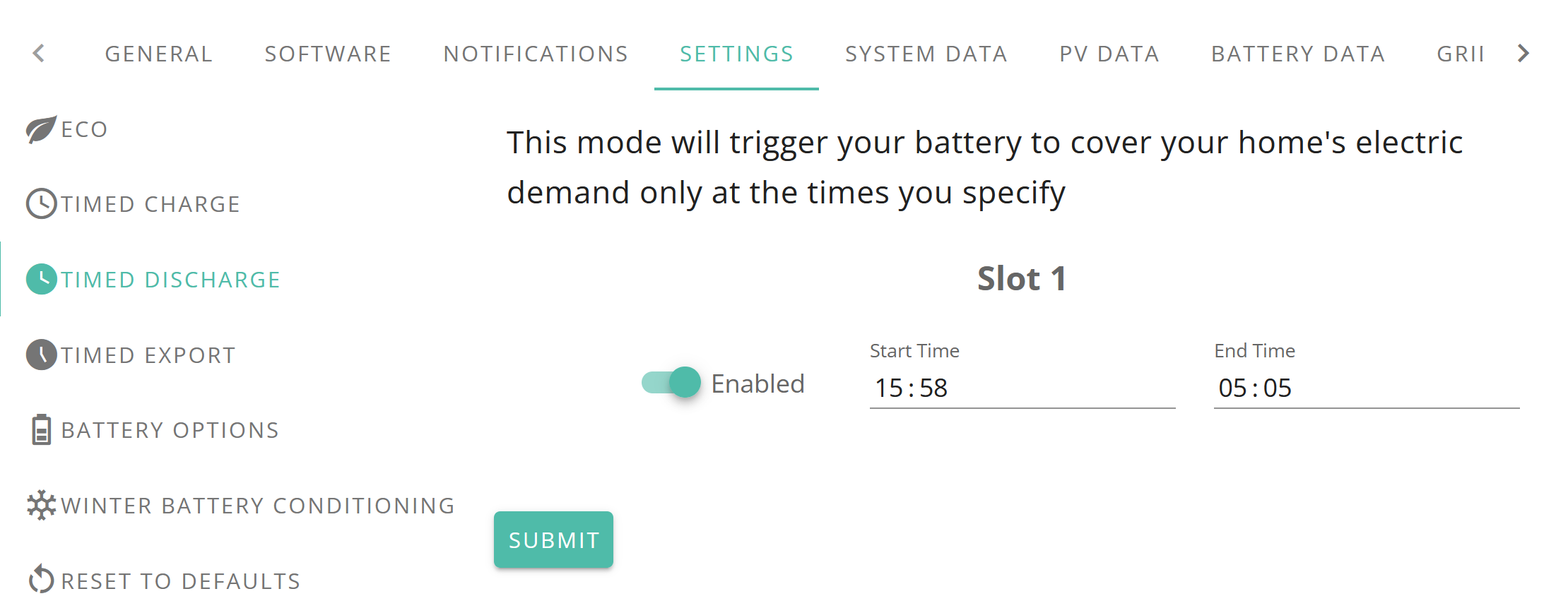
We are on Octopus Flux, and so I need to preserve the battery during the day to get us through the peak Flux time of 4-7pm. These are my battery settings (Eco is on):

During the day time we run off the grid at normal day rate, and any solar if we have it, and any excess solar goes into the battery. Come 4pm, we switch to using the battery to power the house to avoid peak grid rate, and run off the battery for the rest of the day, when it goes flat around midnight. The timings are offset by a few mins to avoid any possible clashes with any other settings I might be using, such as export times. HTH.

G
#11 GribinIsaf

miffy We are on Octopus Flux, and so I need to preserve the battery during the day to get us through the peak Flux time of 4-7pm. These are my battery settings (Eco is on):

Thanks for that. We are on Flux too. I like your settings in as much as they don't need changing every day. Not sure if they would fix my point which is sometimes I am generating more than I am using, even on days like today. I would like that energy to go into my battery rather than be exported at the low Flux daytime rate!

G
#12 geoffreycoan

GribinIsaf I would like that energy to go into my battery rather than be exported at the low Flux daytime rate!

As long as you have Eco set on on the inverter, then this is what will happen. Just make sure you do a PauseDischarge not a PauseBoth which will pause both Charging and Discharging.

PauseDischarge still allows the battery to solar charge

G
#13 GribinIsaf

geoffreycoan As long as you have Eco set on on the inverter, then this is what will happen. Just make sure you do a PauseDischarge

Nope. That is exactly the settings I have been using (Pause Discharge/Eco) and when generation exceeds house load the inverter is choosing to export the surplus.

G
#14 GribinIsaf

miffy These are my battery settings

Also, I don't seem to have the Pause Battery Start and End options. That section of my settings looks like this:

G
#15 geoffreycoan

GribinIsaf what inverter type and firmware are you on? It's supported on most newer firmware versions

G
#16 GribinIsaf

geoffreycoan what inverter type and firmware are you on?

Inverter Model GIV-AC3.0
Software Version D0.205-A0.205
Battery Firmware Version 4007 | 3017

#17 miffy

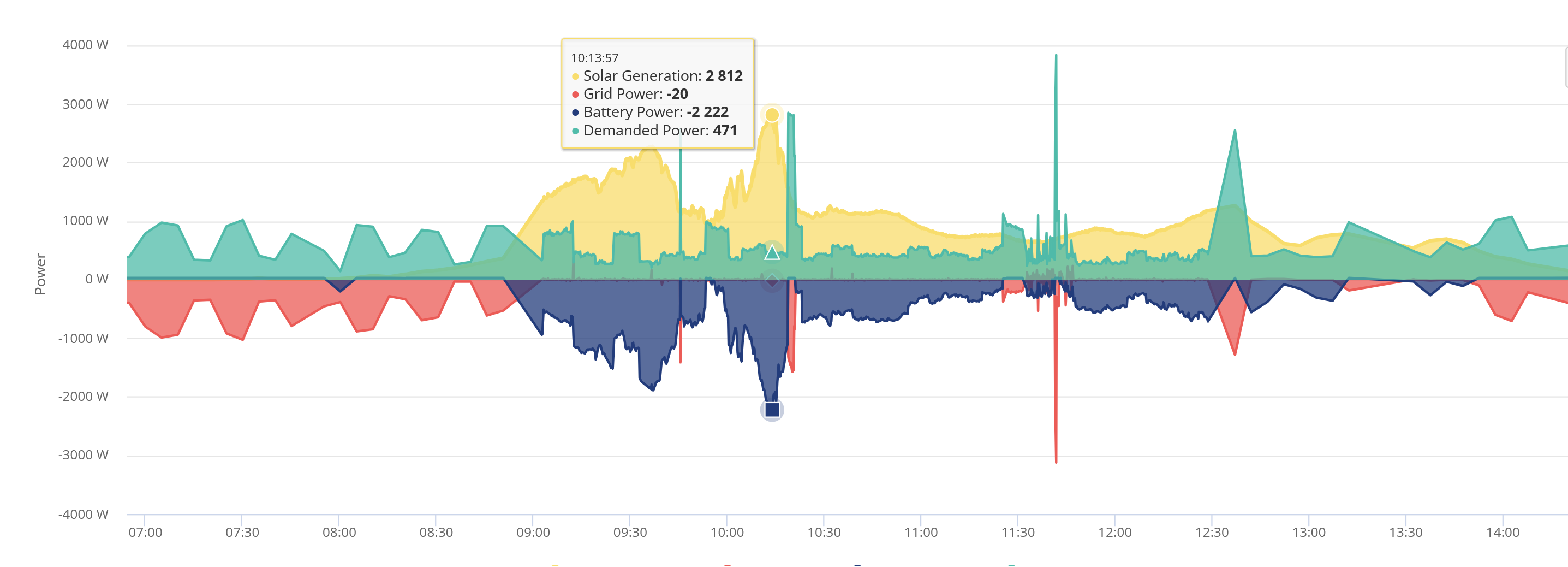
This chart is from 6 Dec when we had some sun:

As can be seen, when we had more sun than needed to power the house, the excess sun went into the battery. (Blue area below the line.)

We have a Hybrid 5kW Gen 2 inverter.
Inverter firmware: D0.915-A0.915
Battery firmware: 3017

#18 miffy

miffy
Following up to my earlier post that showed the settings on my Remote Control page, those particular settings are also seen in reverse here:

Do you have this setting available to you?

G
#19 geoffreycoan

GribinIsaf Inverter Model GIV-AC3.0
Software Version D0.205-A0.205
Battery Firmware Version 4007 | 3017

I think that’s the original firmware for the AC3 which didn’t have the battery pause option. Have you got the option to upgrade to a newer inverter firmware version?

G
#20 GribinIsaf

geoffreycoan Have you got the option to upgrade to a newer inverter firmware version?

The inverter is not saying that one is available.
I have emailed support to find out.

G
#21 GribinIsaf

miffy Following up to my earlier post that showed the settings on my Remote Control page, those particular settings are also seen in reverse here:

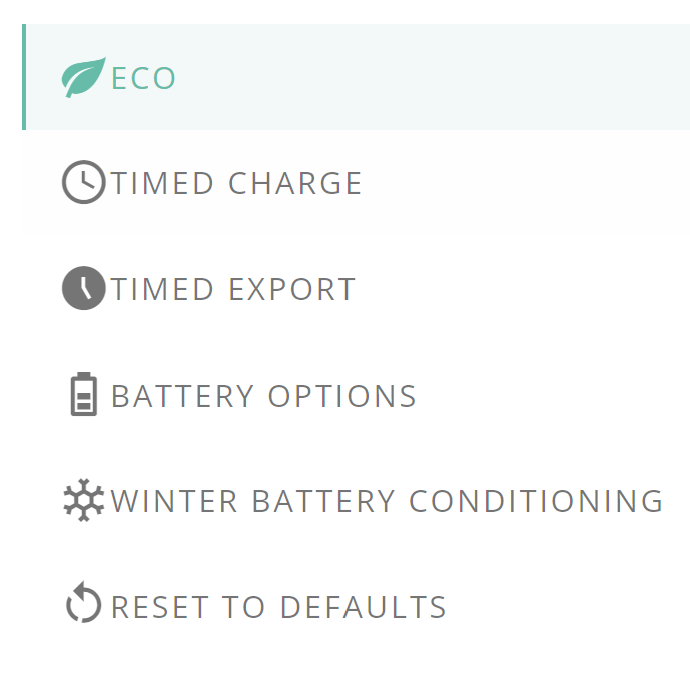
Again, I am lacking! My version of that settings list only shows this:

D
#22 DD

GribinIsaf My version of that settings list only shows this

That's consistent with not having timed pause available - the app used to show all possible options, but that was confusing to those for whom they weren't availble. So now the options offered are tailored to the features on the inverter.

From the KB, that firmware is May 2024, so relatively recent.

S
#23 SteveCook

Time to go to HA and setup the options you need if your inverter does not have them.
That's what I had to do with my Gen1 Hy 5.0

G
#24 GribinIsaf

SteveCook Time to go to HA and setup the options you need

Yep, that's what I was thinking. Did tinker a while ago, time to relearn

G
#26 GribinIsaf

DD There are several other options

Thanks

S
#27 SteveCook

GribinIsaf
There sure are other options. I just found HA something relatively easy and it was interesting (got free Pi from son who had moved out) and could also hook up with other things in the house such as heating controls . Trying to keep retired mind active!!

G
#28 GribinIsaf

SteveCook Trying to keep retired mind active!!

That's one of my aims too!