Swapping primary and Secondary Batteries

27 comments started 2024-12-18 last 2025-01-10
GivEnergy ProductsHybridBattery
P
#1 Pete UK

Hi,

I have 4x 9.5kW batteries, two on each of my 5.0 hybrid inverters. On one inverter pair the Secondary battery is newer than my primary battery. This primary battery is (and always was) getting 10c hotter than the secondary under load according to the BMS temperature (during max charge and discharge). Whereas on the other inverter pair they are within about 4c of each other. The primary battery on this pair has always been a bit suspect since install; it seems to offer less capacity (and it is the only ‘originally’ installed battery left after several other replacements).

I’d like to swap the primary and the secondary of this pair over to see if this makes any difference to the temp or available capacity/ SOC split (16%) as the primaries always seem to get a bit more of a bashing than the secondaries (well on my system anyway). ie the newer of the two batteries would become the primary battery. I’ve read that the newer one should be the first one in the set up for other systems. Is that correct as well?

What is the correct way to do this?

I’ve been given this by GE engineers when they attended last time;
1) Turn off the DCMB’s on the side of the batteries
2) Turn off the PV isolator on the bottom of the inverter
3) Turn off the AC isolator to the inverter (Red)
4) Turn off the batteries with the push button on the side.
Then I assume I do this;
5) Unplug the cables to the batteries
6) Change the dip switches
7) re-connect the cables to the new primary and secondary.

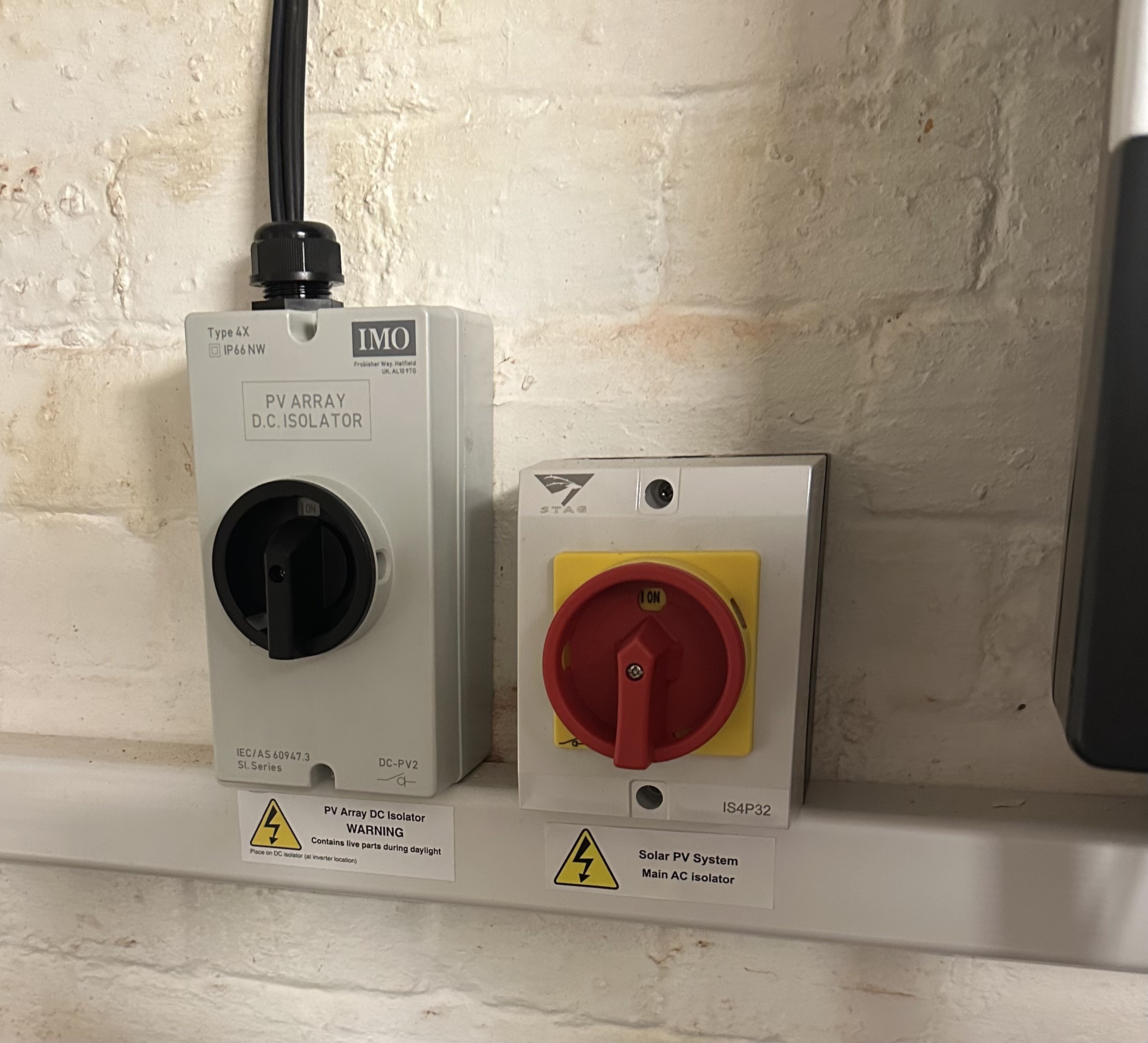
It doesn’t mention turning off the PV array DC isolator (the black one in the picture) Should this be turned off as well? And if so when in the sequence?
Also what about the MCB in the mini consumer unit for the Solar system (labelled PV2)? Do I need to turn that off as well or not?

Never turned any of my system off or on before !

Also, powering back on I’ve got;
1) Turn on the batteries with the push button on the side
2) Turn on the DCMB’s on side of battery
3) Turn on PV isolator on the bottom of the inverter
4) Turn on AC isolator for the inverter.

Thanks for any advice.
G
#2 geoffreycoan

You should turn off the PV isolator (or do it at night-time) as the first step before you start shutting down the inverter as this stops the inverter being under load. There is a shutdown and startup sequence in the inverter installation manual (on the knowledge base), but what you’ve written looks sensible to me, but do double check the manual.

I believe that you may need to have the system recommissioned after swapping the batteries around. I had some problems in the app because the GivEnergy data was wrong when a battery was swapped from one inverter to another without recommissioning, but the system did work fine until I got it recommissioned.

P
#3 Pete UK

geoffreycoan

Ah right, thanks for that. Makes sense. Maybe it was dark when they gave my wife the instructions 😂
Think I’ll hold off for a while longer then. I thought I read on this forum somewhere that someone was swapping their primary and secondary over regularly (like every 6 months or so to try and keep things even) but I couldn’t find it with a search.

Anyone else have any experience of swapping a primary and secondary?

V
#4 Vestas

geoffreycoan I think your issue would have been because the battery was "registered" to one inverter and you moved it to the other.

I wouldn't have thought swapping primary and secondary over on the same inverter would cause any problem if they're the same type but like you I don't know for sure 🙂

R
#5 Rogerbu

I have switched two 9.5s on a single AC30 inverter some time ago. It worked without recommissioning.
The result was the the SOCs became closer for a while, but eventually the 10-20% SOC difference has returned.

M
#6 mrand31

I wonder if it would help to connect multiple batteries via matched length cables all from the same Henley block, rather than by daisy chaining them. The RS485 connections could stay as they are.

P
#7 Pete UK

Rogerbu

Interesting. Thanks for that. At some point in the near future I’ll probably swap them over so the newer one is in the primary position just to see what happens.

Did the split in SOC re-occur in the same way? What I mean is, was it the same physical battery that was “leading” whatever position it was in? Or was it the battery position (primary?) that then once again became the leader? (Decreased from 100% faster/ increased from “empty” faster, with the secondary lagging behind in terms of the SOC).

Thanks.

R
#8 Rogerbu

Pete UK
Before switching, the Oldest Battery on Primary had the lower SOC & higher Voltage.
After switching it is the same (both on 3017)
Newer battery now on Primary - lower SOC and higher Voltage

At this moment (09:00 after IOG charge to 100% at 05:30)
Newer Battery, Primary, SOC 90%, Voltage 52.87V
Older Battery, Secondary, SOC 93%, Voltage 52.69V
By this evening when the batteries are well used, the SOC% will probaly be something like Primary 30% Secondary 50%

GE Customer Services said that the secondary should always be the lower voltage if everything is working correctly.
So it seems to me that the SOC difference is deliberately driven by the Inverter firmware

G
#9 geoffreycoan

Rogerbu MIght be a completely wrong thought, but if you swap the batteries around on the inverter do you need to recalibrate them?

The “system” sets the high and low voltage positions corresponding to 100% and 4% SoC when the batteries are calibrated. I understood that this information is held in the inverter not the battery (if you replace the inverter you have to do a recalibration), so am wondering if you swap the batteries around whether the inverter is now confused as to what voltages correspond to what SoC’s.

Remember nothing in the inverter/battery setup measures SoC, all that is ever measured is voltage and the SoC is derived from that based on the prior calibration.

#10 hoggy

Because they are daisy chained not ring/star you will always get some voltage drop each hop from one pack to the next. They are simply further away from the inverter.
Equally this is probably why the primary gets more stick than the proceeding ones.

G
#11 gregstewart

mrand31 this has been done, hooked up via a busbar with cables same length. Keeps multiples together as they are actually in parallel

P
#12 Pete UK

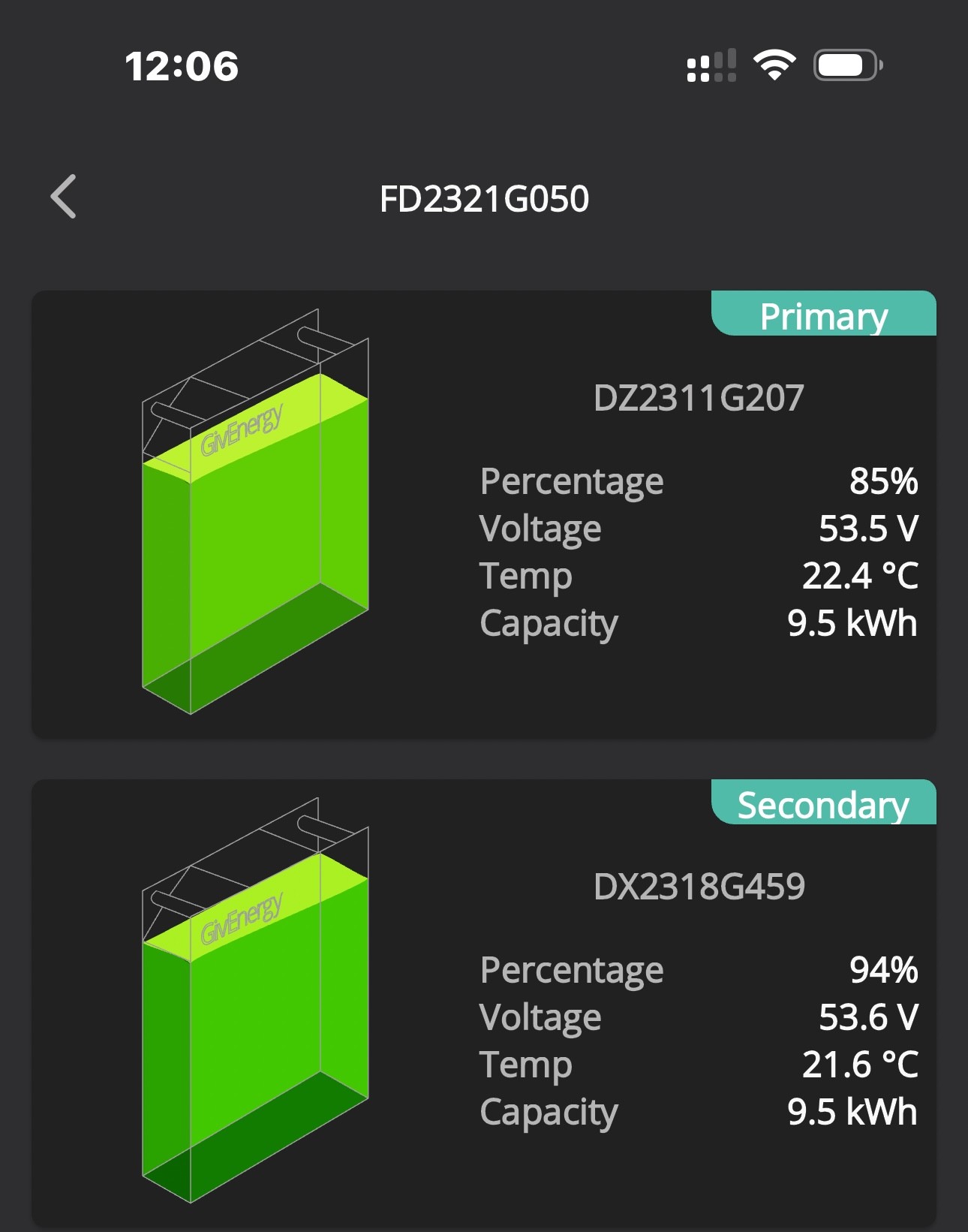
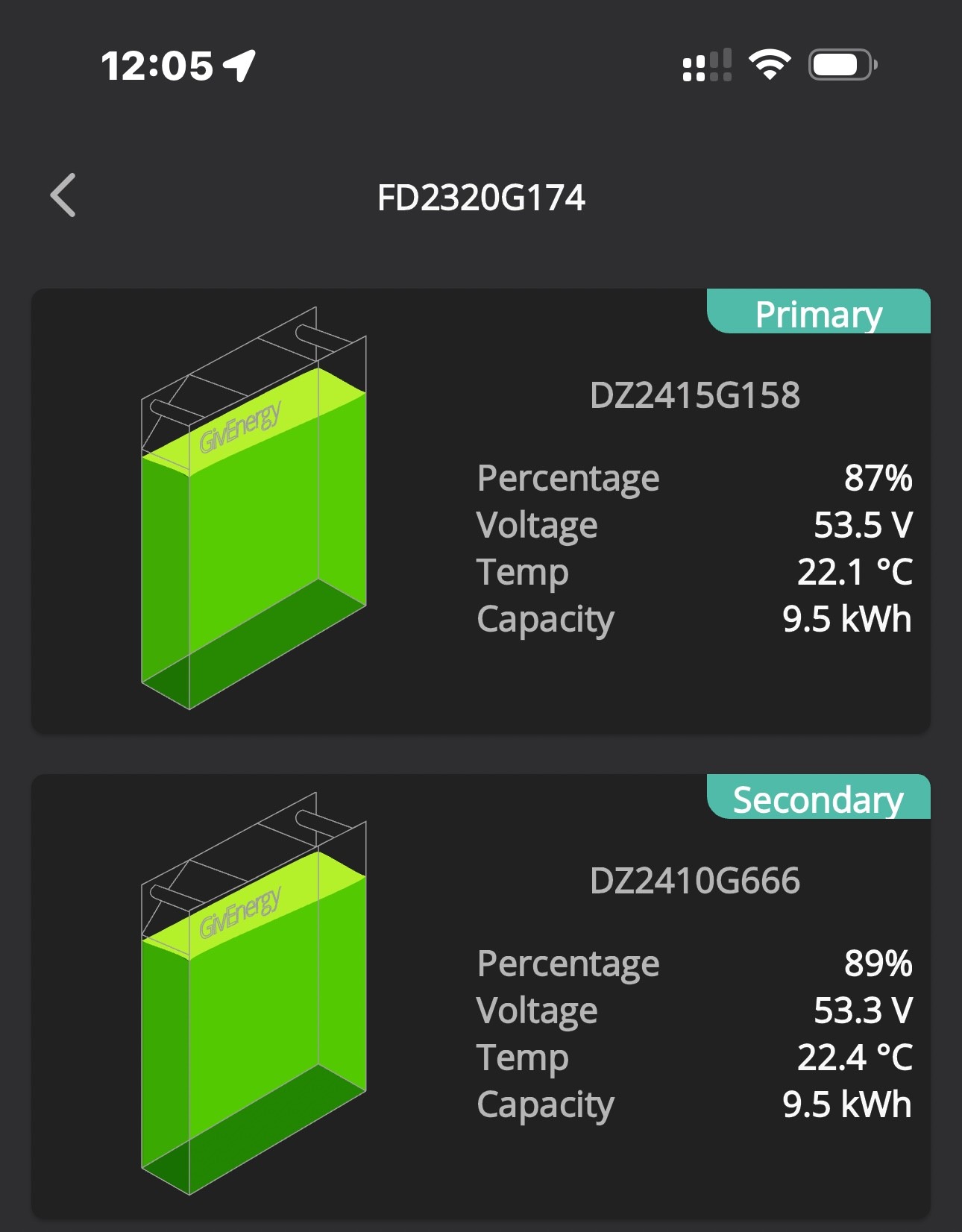
Well this is what I’ve got…. About midday.
G207 is the one that hasn’t really worked properly since install and is the oldest one.

Is it worth swapping the newer secondary to the primary position. Or not really?


V
#13 Vestas

Pete UK The primary appears to get hit worst so swapping batteries over once a year ought to help level wear across the batteries at least.

P
#14 Pete UK

Ok, so just to update on this…

I’ve swapped the primary and secondary batteries over about two hours ago (following the correct sequence/procedures, changed dip switches/ cables etc).

After powering up again, everything looks normal. Except the following;

1) The battery serial numbers still show in their ‘old’ positions instead of the new positions. (I kind of expected this and that they may take a while to show up in the correct position or require a call/ email to support).

2) With the battery positions now swapped I tried a manual (quick play button) discharge to grid and nothing happened on that pair. Just 10-20w or so. The other inverter pair discharged as normal at 4.0kW. I set a timed export and this didn’t do anything either - just got ignored.

3) This inverter pair now doesn’t seem to be discharging to the house or grid. The solar is getting used, just not the batteries.

4) EPS toggle is “ON” and won’t turn off. (I don’t have EPS). I send the “OFF” signal, but when I re-read the register it comes back as “ON”. (Not sure if this is relevant or not or even if it was “ON” before swapping them over. (Battery reserve is still at 4%)

I’ve subsequently restarted that inverter, turned the batteries off and on again with the button and the breakers on the side; no change. I’ve looked at all the settings in the remote control page, re-read them, all look good: no change. ECO is on. Reset inverter to defaults.

From previous experience of battery serial numbers being shown incorrectly after replacement, I suspect a calibration won’t change the serial numbers over or change anything. But that’s a possible non-optimal next option to try.

Before contacting support anyone got any other ideas or info? eg Do I just have to wait for some time?

edit I suspect it may be a comms problem. Just this minute noticed that the inverter seems to be intermittently off-line. if that’s potentially the case how do you fix that on a Gen3 inverter? Never had any problems with comms before !

P
#15 Pete UK

Meh,

Didn’t hear anything back from support, so I swapped the primary and secondary back to their original positions, as it was beginning to import from the grid all the time.
First inverter pair was showing the average SOC percentage as “55%” (53% and 54%) and second inverter pair was showing “90%” average. (83% and 92% - the ones I swapped primary and secondary around).

All seems back to ‘normal’ again. Just in time for a rapid discharge to the grid for the savings session !

So there must be some calibration required for the Gen 3 5.0 hybrid inverters after swapping positions(?). Either that or it’s something to do with the balancer beta trial I’m on. No idea which TBH.

I guess I’ll have to be in contact with support next time I want to try and swap them over again !

  • comms seem to be normal again now as well. All very confusing. Hate making changes, it’s always a bit nerve wracking that you’re going to hobble your system indefinitely!
O
#16 Ortwin

I find my two 9.5's (bought a year apart) fluctuate sometimes but since going to 3017 are more together. This morning they are 89 & 77 % (P & S) which is the widest for several weeks. I do chare overnight on the cheap slot and discharge most days for some or all the peak time. Hopefully by tonight they will be closer together.

#17 Windy Miller

I have 2x 5.2KWh batteries and I've stopped worrying about the difference in SOC when they are in the middle of the range. I think this is just the difficulty of accurately measuring the SOC. Currently they are showing 71% and 76% having both been at 100% 4 hours ago. I check that the pair are still delivering the total expected when going from 100% to 4%. In my case this is at least 8KWh (80% depth of charge), sometimes as much as 8.2KWh. Generally both batteries arrive at 100% together and at 4% together. My BMS software is 3015 which isn't the latest but seems to be OK in my case. I don't want to upgrade to find that the temperature limits the charge current. My batteries are currently sitting at 11oC.

P
#18 Pete UK

Pete UK So there must be some calibration required for the Gen 3 5.0 hybrid inverters after swapping positions(?). Either that or it’s something to do with the balancer beta trial I’m on. No idea which TBH.

Edit:
I meant to say “some commissioning/ support intervention” above and not “calibration”

P
#19 Pete UK

Ortwin

Yep, I’d say my ‘good pair’ do something like that. Maybe 10%ish difference when reaching the lower end. Usually much better. I’m happy with them. One usually catches the other one up.

The other pair doesn’t.

Have you tried swapping them around? (seeing as you’ve got the same batteries as me)

#20 Windy Miller

Windy Miller Just to clarify, 100% at the BMS is 92% at the Primary and 98% at the Secondary, 4% at the BMS is 10% at the Primary and 17% at the Secondary but they reach these limits together. Each drop by 81/82% but have different start and end points. They both get a full charge/discharge cycle every day.

P
#21 Pete UK

Windy Miller

Yep, I’d say yours are working very well. And I’d definitely stay on 3015 if I were you, especially if the batteries are somewhere cold.

I’m on 3017 and my batteries are in the cellar. BMS temp is never reported at less than 20c (usually 22c) even now in winter. So luckily I’m unaffected by the reduced charge rate at lower temperatures restriction. The 10 step reduction in charging above 90% does slightly affect me but not too much. (Not sure what firmware version that was introduced in). If it improves battery longevity then that’s a trade off that’s worth it to me.

The replacement pair I’ve got work similar to yours and @Ortwin ‘s, which I’m happy with. My main concern was the primary battery ending in G207 (see pic above from previous post), which (in my eyes anyway) has never really been ‘right’ since installation. The BMS indicates 10c hotter than the secondary under load (whereas the primary on the other (good pair) only gets about 3c hotter, and the SOC always increases/ decreases much faster than the secondary it’s paired with. When the indicated SOC drops below 20%, the primary temp drops off and the secondary battery’s temp then increases (on both pairs) and gets hotter than the primary. But in the case of the pair where G207 is the primary it never really catches up when discharging to 4%, so that the lower SOC primary cuts both off from discharging a bit too early. Hence the reason for the post of trying them in a different position. The good pair I get the combined 19kWh in and out. The not so good pair I don’t quite get that; maybe 18 or 18.5kWh. GE say all is fine with the batteries. (Which individually they may be). Just doesn’t look like all is right to me when they are operating paired up. And I suspect it’s the primary G207 because of the increased temp it’s showing compared to the other pair I’ve got.

My swapping the positions over induced a problem where they wouldn’t discharge at all, so I’ve swapped them back for now.
Support did get back to me but didn’t really address the failure of the discharging issue when primary and secondary were swapped that I reported.

I’ve emailed them again highlighting that what I want to do is try the primary and secondary in new positions (ie the newer one of the pair in the primary position). I’ll update if I get a response. Otherwise I think I’ll just leave it as is. Pretty frustrating that they wouldn’t work just by swapping them over.

#22 Windy Miller

Pete UK You might not want to touch the good pair but swapping them as a pair between the inverters might also give some clues. You could see if the behaviour was the same on the other inverter.

What you describe with the temperature seems like an imbalance in the discharging current between the two batteries. As they are daisy chained, maybe one of them has a higher impedance causing it to heat up more or maybe the other one has a higher impedance causing it to supply less discharge current even though they are connected together? I've not opened up my batteries but on the one that gets hotter first, would it be worth seeing if you can tighten up any of the internal battery connections?

P
#23 Pete UK

Windy Miller

Thanks for the suggestion. It certainly sounds like that could be it. Last time the engineers attended they said they tightened things up (just the front bus bars, as the rear ones are apparently quite tricky to get to and require some disassembly, so they didn’t tighten those). I Don’t really fancy doing that either. They also checked the BMS temperature sensor in that primary battery and said it was connected correctly and in the right position. They said they didn’t know why it was getting 10c hotter than the secondary but they’d monitor it. I had new leads installed when they replaced the other pair of batteries. So what you suggest makes sense.

I could but I don’t think I’m going to swap that pair from one inverter the other either after they didn’t discharge just swapping the primary and secondary on the same inverter!
That suspect primary battery was on the other inverter before IIRC and it’s also been in the secondary spot before (matched with a different battery that was faulty and got replaced as it was faulty. So my preliminary idea was to just swap their primary and secondary positions to see if it made a difference. But that induced the ‘no discharging’ issue.

It does sound like the rear bus bar connections need tightening. Unless it’s something else. I’m reluctant to try that myself though.

If only they worked normally after swapping them from primary to secondary I’d be all over trying all the batteries in different positions.

Thanks for your input.

#24 Windy Miller

Pete UK If you can see the bus bars with the lid off, try a thermal camera to see if any of it is hot whilst discharging. At least then you'll know why the 2 batteries are different.

We nearly had a fire at work once because the bus bar on the main distribution board needed tightening - something that would have been obvious if we'd had looked with a thermal camera.

O
#25 Ortwin

I was told by GE and my installer that swapping the batteries would not change the variance in SOC so left it as is. I find it better to discharge the batteries to less than 50% and then charge overnight to get the SOC level close.

P
#26 Pete UK

Windy Miller

Good idea. I’ve been wanting one of those for ages 🤓
I’ll see if I can pick one up on eBay or something.

Not sure the rear bus bars are are visible though.

P
#27 Pete UK

Ortwin

I’m fully charging and discharging mine on IOG every day to keep my costs to a minimum.

As a side note;
When it’s suitable and convenient to me, instead of an overnight smart charge (23:30-05:30) I’m topping up the car (and batteries) for an hour or so in the morning to end just before 11am with the IOG smart charge. (Something like start the house batteries charging at 10am then plug the car in at 10:25 to get two slots and stop the house batteries charging at 11am. (Sneaky). It does involve going out in the cold though and is only suitable really in the winter when there isn’t much solar.
Best return on this is to aim to get the house batteries up to 90% by 11am. After 90% it’s diminishing returns, because of the slower charge rate. But it’s also nice seeing them close to 100% still at 11am 😛