Connecting car charger with Home Assistant and GivTCP

12 comments started 2024-12-23 last 2024-12-27
Home AutomationHome Assistant
T
#1 timdudgeon

I have GivTCP working in Home assistant, connecting to the AllInOne and gateway, but can't get the GivEnergy car charger to work. I have identified the correct IP address for the charger and set that in the config:
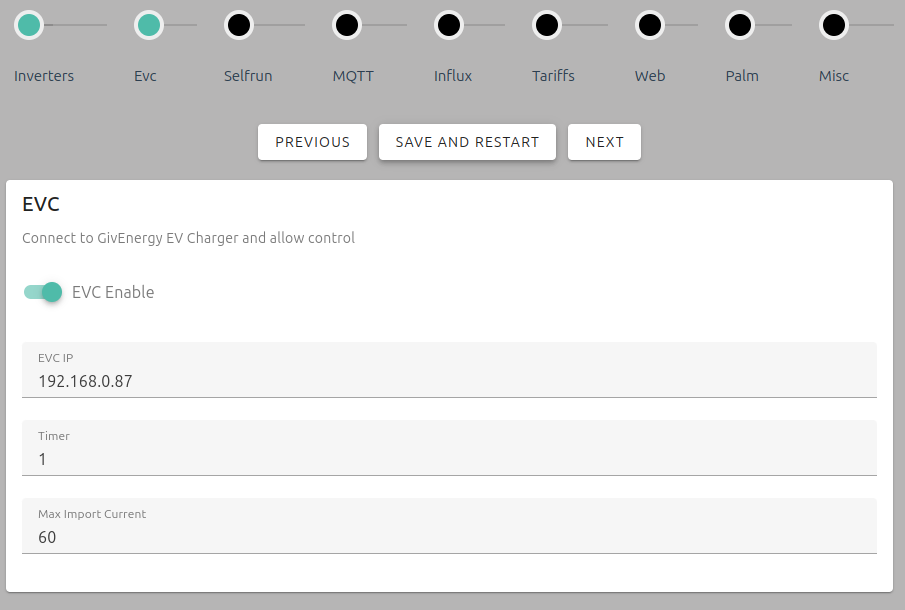
The charger can be pinged from HA.

The logs show this error:
2024-12-23 12:12:16,379 - EVC - evc - [ERROR ] - 10 consecutive errors, pausing and waiting 5 mins for EVC modbus port to come back

Any suggestions for how to get this connected?

#3 hoggy

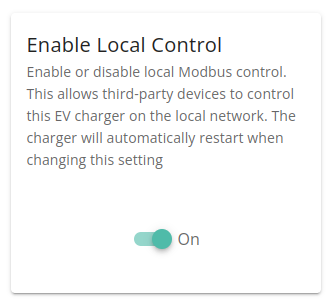
Isn't there a toggle in the Givenergy portal somewhere to enable Local Control?
This was back in Feb but there was an announcement that suggested so (I don't own an EVC)

Heads up for GivTCP users, using Local ModBus Control of the EVC.
The new security patch is going out today, to fix the lack of auto reconnect.
It will also disable local TCP by default. Dont panic, we have provided an end point to turn it on, for the small numbers using it.

The API notes a similar function under "Enable-Local-Control" configuration: https://beta.givenergy.cloud/docs/api/v1#ev-charger-GETev-charger--charger_uuid--commands

T
#4 timdudgeon

Yes, that's what I eventually found. You need to enable "local control" on the charger.
Would be good to mention this in the docs.

S
#5 SteveClubley

hoggy

Thanks Hoggy. Hadn't seen this toggle. Turning it on made all of the difference. GivTCP is now finding the EVC device.

S
#6 SteveClubley

timdudgeon

Have you been able to find any historical charging info that you can download and manipulate? Both the portal and the app show total and previous charges but there doesn't seem to be a way to download the info.

T
#7 timdudgeon

Haven't looked for that, but I suspect historical data is stored on the GivEnergy portal, and not accessible directly from the devices which would only show real time info.

M
#9 Monstercrew

timdudgeon I'd like to enable local control, but am unable to find it in the app or on the cloud UI, any chance you could let me know where it is? Cheers.

G
#10 geoffreycoan

Monstercrew I think it was said above that the switch for this is in the portal. I don’t have a GivEVC so can’t confirm myself

S
#11 SteveClubley

The local control toggle is not in the mobile app. It’s in the cloud portal on the EV card under Settings then Other. On my iPhone the Other options fail to load and they just ‘spin’. I needed to access the portal with a laptop browser instead of the Safari browser in my phone.

M
#12 Monstercrew

SteveClubley Thanks, found it on the "My EV charger" card on the web portal, didn't realise that there are more options on the cards once you click on the expand in the top right.