Dead system? Help much appreciated.

19 comments started 2025-03-23 last 2025-04-07
GivEnergy ProductsBattery
C
#1 CK18

I have a GivEnergy 3.0 inverter and 10.8kWh of storage in total, across 2 battery packs. This afternoon my system went from a SoC of 76% to zero within 1 reporting cycle of 5 mins. My system now appears totally dead. Inverter is idle, SoC is zero (when it shouldn't drop below 4%) and there are no lights on the battery packs. I've tried a "Reset to defaults" on the portal and I've tried to start an import from the grid to see if that will kick it back into life. but my system is useless.

I've emailed the installers, but it may take a while before they get back to me. In the meantime, can anyone suggest anything that may help please?

I can post screen shots if required.

#2 Windy Miller

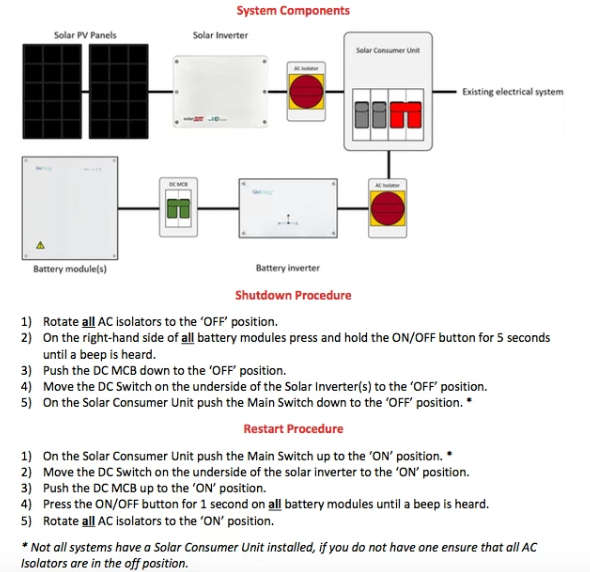
First check all the breakers are OK. In particular the one between the batteries and the inverter.

PS you have the same system as me.

C
#3 CK18

Thanks for replying. Not something I've done before, so not sure what on looks like. If they should be up, they are.

#4 Windy Miller

OK The batteries are wired to each other with thick red and black wires (they may be inside conduit/pipe) and then onto the inverter. The battery wired nearest to the inverter is the primary battery and the other one is the secondary battery. There is a large white switch in the wires between the batteries and the inverter. This one should be up.

#5 Windy Miller

It looks like the one in this post

Rbor

R
#6 Rbor

Windy Miller I have had two of these switches replaced by my installer over the last 2 years.

Rob

#7 Windy Miller

You want to shut everything down - this is my system but you should have something similar. Then start everything back up and tell us what happened.

C
#8 CK18

Thanks so much, that's really helpful. Time has run away with me this afternoon and I'm now out for the evening. I'll look at it again in the morning.

For info my PV system inverter and switches are separate and in the loft, with only the battery system near the consumption unit. Perhaps more to come tomorrow.

Thanks again and have a good evening.

C
#9 CK18

Morning folks. I've followed the shutdown and startup procedure illustrated above, with the exception of the DC switch on the solar inverter - I couldn't be bothered to go into the loft. I did turn the solar AC isolater off though.

I now have green lights on the secondary battery pack. For the primary however, all lights came on initially, but the status light turned red then all lights went out again. I'm guessing this is not good! For info, the primary 8.2k battery is the newer of the two, installed in 2022.

My PV system is generating and supplying to the home and export, but nothing going to the batteries. SoC is still 0% on the portal.

I don't know if it's significant but the MCB switch made an odd noise, a sort of vibration noise is the only way I can describe it. It happened in both procedures, but only lasted a second or two then stopped.

I'll ring the installer shortly, but thanks again for any help.

#10 Windy Miller

CK18 One thing you can try is to start the batteries with the DC isolator off. This decouples the batteries from the inverter and might tell you if the fault is with the primary battery or with the inverter input. Don't switch the DC isolator on though with the batteries powered up in case you do have an inverter fault as you don't want to damage a battery as well. That means switching off the batteries before you follow the startup procedure again.

Switching off the DC on your solar inverter would make no difference to your testing if you switched off the AC isolator as you have indicated.

I don't know about the MCB noise except mine are usually silent but won't stay up if there is an over-current fault. Did you mean the big DC isolator switch or the small MCBs in the electrical distribution panel?

Contacting your installer is the best approach as it does seem like something has failed.

Z
#11 Zakalwe

CK18
If the batteries has discharged below a certain level then they will need "jump-starting" to get them to start to charge again. This is not something that the end-user can do. It involves opening the batteries and charging the cells with an external power supply to get some voltage into them

https://kb.givenergy.cloud/article.php?id=77

C
#12 CK18

Thanks all for your contributions. I've been in touch with GivEnergy support and run through a few tests with them. With the MCB off, both battery packs start up okay and lights remain on. A few seconds after the MCB is switched up, it makes the aforementioned noise and the primary battery goes offline.

A ticket has been raised with the Field Service Team for an engineer visit, although they say there is currently a 2 week minimum wait. I'm not sure what to think about the wait. It seems excessive to me!

#13 Windy Miller

They seem to be very busy with a lot of customers needing some level of support. For a few weeks after Christmas they seemed to be bouncing all requests to the installer network and only taking calls from them which added even further delay. At least you have got some response from them.

Well done too for isolating the fault down to what appears to be the inverter. They should have suggested you leave the batteries off so that they do not discharge too low to avoid the problem Zakalwe has highlighted above as restarting a completely flat battery requires intervention. In 2 weeks they shouldn't go flat from 76% though.

G
#14 geoffreycoan

CK18 you’ve got the click of death, the inverter will need to be replaced

Basically its the battery system motherboard in the inverter, when the battery is turned on it try’s to communicate to the inverter, what you hear is the relays clicking over when it does this. If it doesn’t get a response then the battery powers off. If you turn the battery breaker off and the battery powers up OK then this is a sure sign of this issue.

It happened to me. Took a couple of weeks for a field engineer to come, they schedule them to try to cover the same part of the country on the same day, but the engineer did a good job, swapped the inverter over and changed the serial number of the new one to match my old one so there was no impact to the portal data

C
#15 CK18

Thanks guys, you're guidance was invaluable. Now if only I could get a response from the installer (iVoltz). So much for their 10 year warranty, they won't even speak to me, apart from the receptionist!

C
#16 CK18

Spoke to the installer this morning. I was told that it's up to Givenergy to resolve such issues, not them. They used to get involved previously, but no longer.

D
#17 DD

CK18 you bought the system from the installer, so they are responsible for some period of time. Just as if you buy something from a shop, any faults within the first N months are their responsibility.
But there's probably some period N after which it does move to the manufacturer.
The 10 year warranty probably is from GE, though. But contingent on correct installation and their periodic remote checkups.

V
#18 Vestas

DD I wouldn't expect any installer to support GE's products for longer than 2 years from install (MCS/HIES requirement) without being paid for it. After that its GE who have to rectify problems.

C
#19 CK18

Well, I'm still waiting for a date on which a GE engineer will visit to resolve my issue. I contacted them last week to see if they had a date yet. I was provisionally given week commencing 21st April (that would be a 4 week wait). A little while after that I was given an actual date of 23rd April requesting further details (address, site of system etc.) Less than an hour after my response I was told that "our precious email" (presumably previous, but that's what it said!) was sent in error. So I am now back in the dark as to when GE will come and fix this useless inverter :o(