BMS 3020 Self Load instead of waiting for Portal to offer it

55 comments started 2025-04-05 last 2025-04-21
GivEnergy ProductsBattery
#1 TheDragon (GivEnergy)

BMS 3020 - G1 & G2 batteries (2.6, 5.2, 8.2, 9.5)
https://givenergy.co.uk/wp-content/uploads/BMS-G1G2-3020.zip

BMS 4009 - G3 batteries (Polar 5.2, Giv 5.12 & 9.5G3)
https://givenergy.co.uk/wp-content/uploads/BMS-G3-4009.zip

Instructions for various Inverter types

AC3
Remove the Dongle from inverter
Unzip the required file and inside will be BMS_ARM.bin
Rename this as ARMStore.bin
Place the Dongle in a laptop and a USB drive will appear
There should only be MSN.txt files on here. If anything else eg ARMStoreT.bin - Get rid if it
Copy the battery file now named ARMStore.bin onto the Dongle.
Eject and remove from laptop
Place it back in the inverter
Inverter will see the update file and process it to itself initially, then onto each of the batteries in turn
Each battery will show red/greed LED flashing and then reboot with a beep


Gen2/3
USB Stick of 8GB or less formatted as FAT required
Locate the DIP switches on the inverter and note their current position for Wifi/LAN
Set DIPs to all OFF (USB loading mode)
Unzip the required file and inside will be BMS_ARM.bin
Rename this as ARMStore.bin
Place the USB in a laptop and a drive will appear
Copy the battery file now named ARMStore.bin onto the USB.
Eject and remove from laptop
Place it in the inverter. As the inverter is in USB mode, it will read it
Battery will update via the inverter
Once done, remove the USB stick and return the DIP setting back to how it was, either 1111 or 0111

**The portal might not initially recognise the update, but provided each battery has flashed red/green and beeped its done.

If not updated on the portal after an hour. Reboot the inverter, to trigger a read of FW version**


Direct to battery - If via inverter fails - Seek GivEnergy advice before doing this way as not all batteries have an external USB Slot
Unzip the file and place BMS_ARM.bin on a 8GB or less USB stick
Place the battery DIP into External update mode

The battery will read the file, red/green flash and reboot

S
#2 SteveCook

What if I have Gen1 Hy5.0 inverter and 9.5 battery?

#3 TheDragon (GivEnergy)

SteveCook you can load it if you so wish.

But no one on Gen1 has asked nor needs it

M
#4 MikeM

Hi,

Does the inverter firmware need to be updated first? In my case to 315 or can it be done in any order?

Thanks Mike

S
#5 SteveCook

TheDragon (GivEnergy) But no one on Gen1 has asked nor needs it

Thanks. Then I need not worry or bother. That clarifies things

#6 TheDragon (GivEnergy)

MikeM in any order

G
#7 geoffreycoan

TheDragon (GivEnergy) But no one on Gen1 has asked nor needs it

You say no-one on Gen 1 (hybrid) needs this BMS upgrade. I understood that BMS 3020 changes the battery charge curve that was introduced in BMS 3017, charge is less restricted for temperatures from 10-20 degrees C.

I have held off upgrading from BMS 3015 because of the BMS 3017 change but was planning on going to BMS 3020.

But I thought BMS 3018+ is dependent upon being on a newer inverter firmware for Gen1?

Thanks

W
#9 wilfleek

Hi Paul- as I have described on the other thread, trying to update to 3020 seems to have crashed my system............ never have been able to update battery firmware OTA, might need the files to drop onto each battery memory stick individually.
Tried a system reboot - no luck.

Edit - system has now come back online and "ECO" working, though it still seems to think only one battery exists and the SOC shown is way out.

#10 TheDragon (GivEnergy)

wilfleek the file linked can be loaded direct to battery. As described.

But if it involves opening a battery cover seed advice from GivEnergy and your installer.

Not all batteries have external acceptable USB.

W
#11 wilfleek

Thanks Paul - have done it before, I'll give it a go.

W
#12 wilfleek

OK - so 3020 put onto both batteries, slave first. Expected light flashing and beeping from both as I have seen before.

System back up and running, have tried a couple of battery modes, seems OK, although the SOC reading for the master is still way out (low). I'll see if tomorrow's solar charge sorts that, it did earlier today. Hopefully no calibration needed, but we'll see.
Thanks for being responsive at this time of a Saturday evening Paul! Service above and beyond.............

W
#13 wrighar

I'm on 3019 and happy, so unless I can find a small USB and fight my way into the garage, I'll have to wait a bit.

#14 TheDragon (GivEnergy)

wrighar 3019 and 3020 are so similar it's not worth the change.

W
#15 wrighar

TheDragon (GivEnergy) That was my understanding too andwhy I'm not rushing out just yet :-)

#16 Woodstock

Already had 3020 installed from beta testing but wanted to try updating the battery via the inverter dongle (AC3). Worked like a dream and much easier than taking the battery (single 8.2kWh) apart to access the internal USB slot!

#17 hoggy

It updated the one strewn across my desk no bother 🤣

#18 TheDragon (GivEnergy)

hoggy Hoggy, you bad lad.

D
#21 Dpe

[unknown]
Can I confirm, should the AC3 inverter be shutdown prior to the removal of the dongle, or can it be removed/ replaced with the inverter online?

P
#22 PaDav6

TheDragon (GivEnergy) If not updated on the portal after an hour. Reboot the inverter, to trigger a read of FW version**

I have rebooted the invertor 3 times and the battery still shows 3017 on the portal. Shows as 3020 on RubikCube's app. Any clue?
Invertor FD2327G037

L
#23 locked

GE instigated a push of the 3020 firmware to my batteries late one morning via the online chat. They said the load failed and it looked as though it had as the portal showed the old firmware but the following day as if by magic the portal showed the batteries being on 3020.

W
#24 wilfleek

PaDav6 Mine sorted itself overnight

W
#25 wilfleek

Dpe As I understand it, no need to shut down the AC3 before removing the dongle. I didn't.

S
#26 Simon-D

Hi I have a dual AC3 do I need to unzip BMS 3020 firmware to each dongle or can I use the same dongle in the other inverter

Thanks

A
#27 arczi19

I have asked on the live chat to update me to 3020 and they said they have done so, but on the GivEnergy portal it’s still showing 3017 firmware - they say it’s fine and it can take some time to update there. It’s been 2 days now with no change. Anyone had something similar? They did restart my inverter and I have tried doing it myself too, but there hasn’t been any change.

D
#28 Dpe

arczi19
I updated yesterday morning, Home assistant showed the change in BMS software straight away. By last evening the portal had not changed, so I restarted the inverter - no update in the portal at midnight, but I checked this morning and the portal has changed to 3020.

A
#30 arczi19

Dpe There was no change in home assistant either, so this morning I ended up just doing the update manually myself, using the file from this thread and its all good now it seems.

S
#31 SteveCook

Gen1 Hy5.0 + 9.5 battery. Portal just offered update. I bit the bullet and successfully updated to 2020 "over the air".
Got notification text that it started on phone and then text when completed

A
#33 ADO

Gen 3 5kw hybrid inverter 9.5 battery
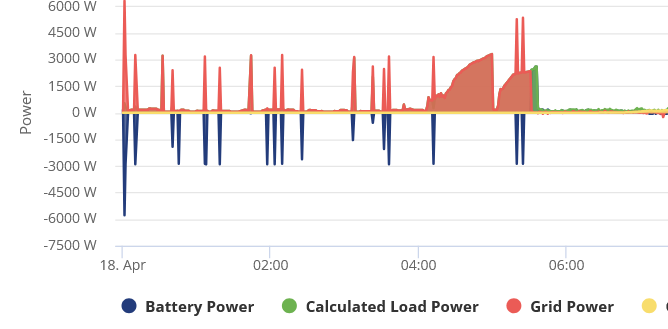
Just had the update appear for 3020 to install. Updated from 3019 and now the battery starts discharging small amount 20-30w when the battery reaches 100%. Anyone had any similar issues or do I need to contact support
Cheers

A
#34 ADO

Gen 3 5kw hybrid inverter 9.5 battery
Just had the update appear for 3020 to install. Updated from 3019 and now the battery starts discharging small amount 20-30w when the battery reaches 100%. Anyone had any similar issues or do I need to contact support
Cheers

#35 TheDragon (GivEnergy)

ADO normal. Its balancing itself

A
#36 ADO

TheDragon (GivEnergy)
Thanks for the quick reply. When its balanced will it be back to normal (idle at 100%)

#37 nophead

I find it never does because the sun goes down first and it starts discharging to the load.

J
#38 Jon-boy

Gen2 5kw Inv and 9.5kwh battery. With some nervousness I stopped Givtcp and hit the GE FW update button this morning. It took 21 mins to update Inv and battery to latest FW. Started Givtcp and all looks good. Portal reports DO.920-AO.920 and 3020 versions installed. So far so good.

A
#39 Andrewz61

I did the update a few days ago via the portal and now the system is ignoring the SOC % set remotely by OVO and charges to 100%, it does appear to be using the times set.
It's done it 2 nights on the trot now, i’ve just manually charged the SOC figure as OVO have been cutting it off at 45% for a while now, looking at the history, the SOC hasn’t actually needed to be overwritten I'm hoping it’s just a glitch and me forcing it to overwrite will cure the problem.

T
#41 ThePalfs

Gen2 5kW 9.5kWh and 6.5kW panels. I updated this morning and all ok so far, fingers crossed. It took about 30 minutes and now showing D0.920-A0.920 and 3020.

O
#42 Ortwin

Well as usual my two 9.5Kw batteries have failed to update via the portal as they did with 3015 (as does my inverter). So back to GE support to get them to sort it out again.

B
#44 BobB

I took a brave pill this morning and updated, from the portal, my Gen 1 8.2kWh BMS from 3012 to 3020.

Gotta say - the process was seamless. Rapid progress to the verifying update stage (I'd say 1-2 minutes tops) followed by a prolonged pause at 90%. I'd expected this from the documented experience of others in this forum (thanks guys). The update completed 20 minutes after I first pressed the button.

It's too early to tell if the SW behaves differently for me, but it appears to be charging/discharging normally to meet house load and solar generation today.

No re-calibration was forced on me. I'm going to run the new BMS without a calibration for a few days to see if I get any unexpected movements. I might schedule a re-calibration in a few days to coincide with Octopus cheap rate. Does anyone vehemently disagree with this approach?

I'm going to mark the update process down as a resounding success. It felt more reliable, robust - good words to use.

Thanks GE team.

W
#45 wrighar

I updated my Gen 2 9.5 to BMS3020 4 days ago when it came onto the portal (from BMS3019)

It took 11 minutes and everything has been fine. Very happy.

W
#46 wrighar

I updated my Gen 2 9.5 to BMS3020 4 days ago when it came onto the portal (from BMS3019, so very little different)

It took 11 minutes and everything has been fine. Very happy.

T
#47 The_Engineer

Update a Gen 1 5.2k 5 days ago. Took 9 minutes with the pause at 90% as above. So far the cells seem to diverge less from their average voltage when charging, and the battery squeezes in a little more charge to reach towards 100%. Seems good - thank you GivEnergy.

T
#48 The_Engineer

Update a Gen 1 5.2k 5 days ago. Took 9 minutes with the pause at 90% as above. So far the cells seem to diverge less from their average voltage when charging, and the battery squeezes in a little more charge to reach towards 100%. Seems good - thank you GivEnergy.

O
#49 Ortwin

Well I had to talk to GE technical as my two 9.5Kw batteries would not upgrade to 3020 from 3015. They managed to get the software loaded and instigated a battery calibration. According to the portal my batteries are now on 3017 not 3020. So either the portal is wrong and my system is doing a discharge and calibration for nothing. So once again I will have to contact GE technical to get the update to 3020 and hopefully not another battery calibration.

S
#51 Simon-D

In the end I just updated via the portal for my 4 9.5Kw batteries, with no problems.

Do I need to carry out a battery calibration as my last one was over two years ago when the system was installed?

Thanks

S
#52 Slartibartfast

Updated Gen1 9.5 and 5.2 a few days ago from the portal. 9.5 Gen3 - had to update via USB. The correct way to upgrade a Gen3 is:
Gen 3 batteries

_1. Plug the USB into a laptop and drag the relevant file onto the USB drive

  1. Set the 2 dip switches to the down position. These are located under the USB slot next to the DCMCB isolator on the battery
  2. Plug the USB into the USB slot whilst the battery is powered on. The battery will then take the update
  3. After completing the update, make sure you change the 2 dip switches back to the up position

The problem is 'trickle charge' during the remainder of the charge period - not seen on 4007 and 3017 -

S
#53 Slartibartfast

Updated Gen1 9.5 and 5.2 a few days ago from the portal. 9.5 Gen3 - had to update via USB. The correct way to upgrade a Gen3 is:
Gen 3 batteries

_1. Plug the USB into a laptop and drag the relevant file onto the USB drive

  1. Set the 2 dip switches to the down position. These are located under the USB slot next to the DCMCB isolator on the battery
  2. Plug the USB into the USB slot whilst the battery is powered on. The battery will then take the update
  3. After completing the update, make sure you change the 2 dip switches back to the up position

The problem is 'trickle charge' during the remainder of the charge period - not seen on 4007 and 3017 -

O
#54 Ortwin

After contacting GE technical and them failing to update my batteries, I now have to wait for someone to come round and look at and or upgrade my system.

O
#55 Ortwin

After contacting GE technical and them failing to update my batteries, I now have to wait for someone to come round and look at and or upgrade my system.

A
#56 alan_johnston

Gen1 HY3.6 + 8.2kWh

A notification has just appeared on the web portal saying
The generation 1 battery will be updated
Battery firmware will be upgraded to 3020

Does this mean it will be automatically done by a GE push or can I hold off and do it later when I want to?

Currently on
Inverter Firmware Version
D0.450-A0.451
Battery Firmware Version
3012

And prefer the if it aint broke dont fix it approach.

B
#57 BobB

Hi Alan,
GE are unlikely to push it unless they spot a particular issue with your kit that could be resolved by the update.
You can hold off updating for as long as you like.

I updated from 3012 to 3020 four days ago. My personal experience was a smooth update. Others have had more ordeals.

My experience of 3012 was it was okay, but still suffered a few SOC drops and spikes. I managed these through Home Assistant. I've not yet seen any misbehavior yet on 3020, but it's too early to be definitive.

S
#58 SimonClarke

alan_johnston did mine yesterday with no problems

W
#59 Wavy Davy

I noticed a update available on my dashboard for my 2 x gen 1's.
Update done no issues.
Invertor still on D0.450-A0.451.

G
#61 geoffreycoan

Wavy Davy Invertor still on D0.450-A0.451.

The Gen 1 hybrid firmware upgrades that have been in beta test for quite a while haven’t been released yet (still).

I’d hope that now that BMS 3020 is out there across the inverter range and Gen 2 firmware upgrades have come out, the Gen 1 won’t be too far away. But I have no personal insight as to when its planned to happen