1
Tried twice on different days and both times got the 'firmware update failed' message. Anyone else having issues with this update?
Inverter would also be updated from D0.205-A0.205 to D0.210-A0.210
Thanks in advance

Tried twice on different days and both times got the 'firmware update failed' message. Anyone else having issues with this update?
Inverter would also be updated from D0.205-A0.205 to D0.210-A0.210
Thanks in advance
Have a read through this thread:
In my experience, I have never managed to get an OTA to work on my system, but the "manual load" procedure works fine, both for the AC3 and my batteries.
I experienced real problems trying an OTA upgrade of D0.205-A0.205 to D0.210-A0.210.
The upgrade froze at 88%, disconnecting the dreaded dongle in the process.
After many hours of failed attempts trying to re-establish connectivity with the dongle with a solid blue light rather than flashing blue, I decided to try the manual process.
This worked and the upgrade to D0.210-A0.210 completed. I was surprised that I also had upgraded to BMS 3020 from 3017.
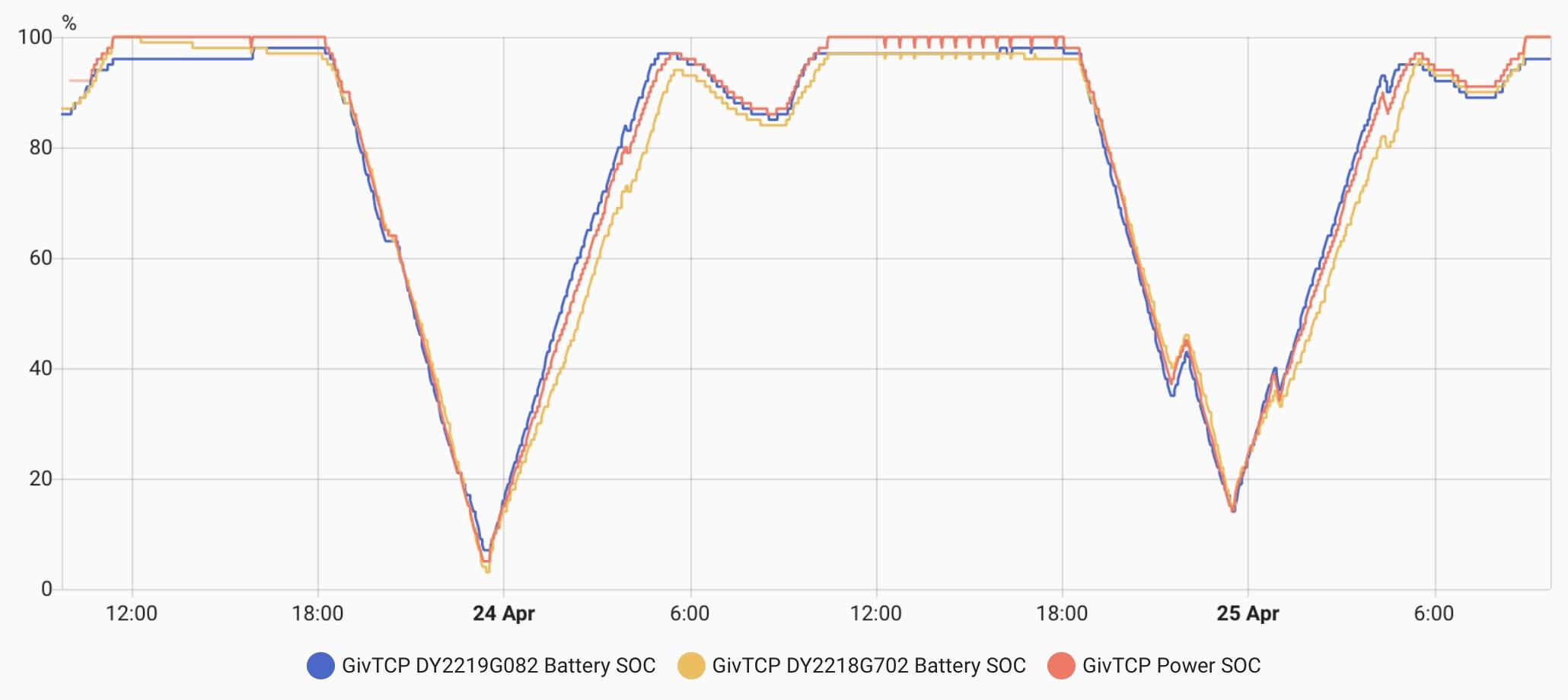
I have two 8.2 kWh batteries daisy chained to my single AC3 inverter. After a few weeks of running the new firmware and BMS 320, I have noticed that the SOCs of my two batteries are much better synchronised. Before they would drift apart, especially in 'mid charge' states.
I run Predbat and the batteries are often cycled across their full SOC range. This should have helped them to train themselves to synchronise.
So a good upgrade for me but not one that I would have carried out had I predicted the pain of getting there.
Rob

Wonder how the update experience varies based on network connectivity of the inverter ? So, do those on wired lan always do the ota update first time, every time ? Or is the ota success more about the GE servers and the load they are under when the updates are happening ?

The updates are chunked - the entire file doesn't get sent to the inverter/battery in one lump. So it fetches a bit, checks it, fetches another bit, checks it... and so on.
This is why if you use GivTCP or the app in local that's polling a lot during an update it can fail - as the polling can clash with the fetching side of things.
Last time I updated OTA to 3015 (Gen1 5.2kW Batteries and Gen3 inverter) it said it failed but in actual fact it was successful!
I’m in a dilemma. I don’t know whether to risk updating from 3017 or not.
I’ve got one pair of 9.5’s on one inverter (both replacements) pretty well synced; operating “normally” with up to a 10% split in SOC at times but mostly In sync. Which is “normal”.
On the other inverter they can get way out; like daily it’s a 15% split between them at certain times (I suspect one particular battery (the primary) is not quite right. It has been like this since initial install nearly 2 years ago. It’s almost like it’s got a totally different make of BMS and software in it to all the others ! I just don’t get what’s going on with it.
The other 3 batteries can be at 53.5v and say 95% and this other one battery is at 53.5v and it says it’s at 85% or something. It doesn’t make any sense. I’ve complained to customer support since day one but they say there is nothing wrong with it.
I’m loathed to risk upgrading, as my system has been working “ok” for a good while now and I’m just about able to get the full 38kWh from all of them.
The risk is the ridiculously long wait times to get hold of support to fix things or for support to visit and replace necessary items if required. I’ve had OTA updates work fine before in the past (apart from one; apparently one OTA failed to update one battery to a different BMS version - this wasn’t visible to me though).
Are there any significant advantages to 3020 and 210? Or should I just not bother with the update?
Oh and does it force a calibration?
Pete UK there is another thread with details of what's actually in 3020, but the biggest thing you might notice is the temperature related charging curve has been adjusted so it doesn't derate until (I think) 10 degrees C, was 20 with 3017.
210 depends what you are on at the moment. If you are on the original firmware then the new firmware is much faster to respond to load changes, and adds battery pause capability, but if you have upgraded already since then then not so significant a change.
New firmware introduces in-memory registers you can turn on if you want, so if you are balancing your two inverters through home assistant or similar then this could be useful to reduce the register writes
Thanks for the summary. Saves me reading all those posts. 👍🏻😂
I am on the previous latest update (309 and 3017). (Not this last one; 310 and 3020).
Edit: Actually I’m seeing an update suggestion on the portal to D315 and 3020 ….. !
I guess the first number of the update is the inverter version?
Pete UK yes the D and A numbers are the inverter firmware, there's two parts that can be updated separately, so sometimes the D and A numbers increment/decrement independently (e.g. I was on D.0191/A0.193) and the 30xx is the battery firmware version.
So you've got both inverter and battery firmware upgrades being offered.
FWIW I'm on a beta inverter firmware on my Gen 1 hybrids and BMS 3015, I never went to 3017, in part because of the temperature charging limitations.
If an inverter firmware upgrade came out I'd take that as soon as it was out. I do plan to go to 3020 but will wait maybe a month more until the weather gets warmer as the battery recalibration will give me more back in the battery than if the battery were cold.
From 3017 to 3020 I don't believe there will be any calibration required, the newer firmwares do some sort of continual calibration now
geoffreycoan Going back to my earlier post #4, I did upgrade to the latest AC3.0 inverter firmware (from D0.205-A0.205 to D0.210-A0.210) and to BMS 3020.
The upgrade was a terrible experience but I am glad that it I have made it.
The biggest difference is that the SOC on each of my 8.2 kWh batteries keep in sync.
Previously the SOCs could drift apart by 10–15%.
I do run IOG and the batteries get a lot of exercise, which GE claims to help with aligning the claimed SOC % with the actual charge stored.
I would never have achieved the chart below using D0.205-A0.205 and BMS 3017.
In my experience, a GE upgrade always carries with it a risk that the upgrade may not go smoothly.
I usually wait until there is some feedback from folk who have carried out the upgrade before taking the plunge. But the upgrade should lead to an improvement.
Rob
geoffreycoan My Gen 1 update from 3017 to 3020 did not initiate a re-calibration; others have reported same. Seems to charge slightly better and cell voltages are more closely aligned.
Went from 3018 to 3020 on Gen 1 5kw in about 20 minutes. Nothing happened and I haven’t noticed any change good or bad
hoggy Ah GiveTCP, a self denial of service feature 😉 I don’t use it. Sounds like it could do with an option to say dial back the polling period if you specify that the system is under calibration. And my usage of the app isn’t continuous, even in local, so that wouldn’t affect me. Again, is there scope in the app to dial back the probe time during calibration.

In what way is it charging better? I have a gen 1 and mulling over if it’s worth doing.
Hook Appears to me to reach 100% more often with a slightly slower charge rate. Previously often stopped around 96%. All with the proviso that these are the system reported figures. Previously cell voltages had a variance of 44mV during charge but now more than 7 mV is rarely seen. The OTA update from 2017 took 9 minutes with a long pause at I think 70%. No calibration required, though when its warmer I shall do one.
Ok, I bit the bullet and updated both my gen3 hybrid 5.0 inverters and 4x 9.5 batteries OTA (wifi) to D315 and 3020.
I did one inverter at a time about 6pm last night. Each inverter update took about 25 mins and there were two very long nervous pauses; one at 69% (updating ‘something’) and one at 90% (verifying update). And as previously reported there was no calibration.
Update worked fine. Haven’t noticed any new behaviour yet (I wasn’t affected by the reduced charging as by batteries are in the cellar where ambient temp is a pretty constant 21c).
One difference I've noticed with 3020 is that I now never get more than 181 amp hours into the battery.
I had my 9.5 battery installed in Nov 2022 and have a Gen 1 inverter. I use the -'Inverter ' app which shows the max full capacity as 188ah, design at 186ah, and max remaining at 181ah. Before the upgrade I was getting variable amounts on 3017 up to 185ah, so I seem to have lost up to 4ah on each charge and I now never exceed 97% (was getting 98% or 99% sometimes). App always shows 100% on main page but only 97% under the battery section.
I had noticed a similar occurrence over the previous few days. Today was totally different. I have a timed export set for the morning to empty the battery to enable it to charge from solar and reduce clipping. The export ends at 09.45.
By 08.00 the battery was at 3%. It stayed at 3% until 09.30 when it started charging at 60w to raise the SOC to 4% by 09.38.
It then started charging at 900w at 09.45.
At 15.00 the Android Inverter app and the battery data under the More Information section were showing it being at 100% SOC.
The Home Dashboard showed the battery at 99% SOC.
It continued to charge the battery at over 800w for 15 minutes.
This is the first time I have seen the Home Dashboard showing a lower % SOC than the More Information section. It seems to have done its own calibration.
It will be interesting to see if this happens again in the future.
I wonder if this is by design or just an undocumented feature.
TimHutchings One difference I've noticed with 3020 is that I now never get more than 181 amp hours into the battery.
might be worth doing a recalibration to force the upper and lower soc limits on the battery
geoffreycoan I was thinking of doing a calibration, but I moved from 3017 and it wasn't deemed necessary. I did a couple in November last year using a slow 700w recharge, and each time I did it I lost a couple more amp hours. I'm on 188ah full now, but it will only put in 181amp hours. Last summer I was getting a full showing as 195ah and getting 191-195 ahs. Rather loathed to do it again!
I also get a cut off now at 5% instead of 4% at the other end, and that started happening with 3017 and has continued with 3020. I know the battery is 2.5 years old and I guess degradation is beginning to take its toll. Done 880 cycles now!
Since the update to 3020, I’ve noticed a constant battery discharge of 100w during the day over the last 2 days. This wasn’t there with 3017. Maybe some kind of re-balancing has been going on…?
I wouldn’t have expected it to last 2 days though.
🤷🏼♂️
geoffreycoan is there a note anywhere of what the new temp/charge rate curve is, to update my predbat apps.yaml...?
Late to the party. The new GE App offers me a chance to upgrade to 3020. Not seen anything here from last year that seems significant for a Gen 1 5.25kW battery.
It's working, leave well alone?
Ive been on 3020 for over a year- likely a month or so after release. Best FW so far. It attempts to balance my 2 off 9.5s as best it can. I dont see any downsides to 3020.
What he^ said. 3020 seems to work well.