
My battery just had dcmcb replaced last week this week not taking full charge and working as 2/4 kwh battery 2nd time I have calibrated it works for a bit then seems to resets 100% value.

My battery just had dcmcb replaced last week this week not taking full charge and working as 2/4 kwh battery 2nd time I have calibrated it works for a bit then seems to resets 100% value.
Alan, what are you asking? The title and the message don't seem related.
giving all the infomation I have
Alan. This forum is not a GivEnergy helpline, it is a collection of system owners trying to help each other with problems. The thread title is about a battery charging from 50% to 100% in 20 minutes (sure that cant happen), but the 1st post you made talks about a replacement DC breaker and then a 2/4 battery (what is that) not taking full charge.
What kit do you have? Inverter and battery
What tariff are you on? Is it smart?
Can you login to your GivEnergy portal and check your battery settings. Maybe change them, save them and then change back to what you want and save again.
Maybe restart the inverter
I wanted to know if anyone is having same issue the live chat at givenergy said it was a issue but just said to keep an eye on it. On my Givenergy app the battery graph % goes vertical should be steady climb and battery stops giving power very early that night.
[unknown] try answering the question
alanhowgate. Try answering the question. I gave you a hint, SteveCook asked explicitly about your setup and gave advice.
Who is your energy supplier? What tariff are you on?
[unknown] Who is your energy supplier? What tariff are you on?
Why are those relevant ?
Sorry to say I completely control my battery installed last August and spend to much time on it.
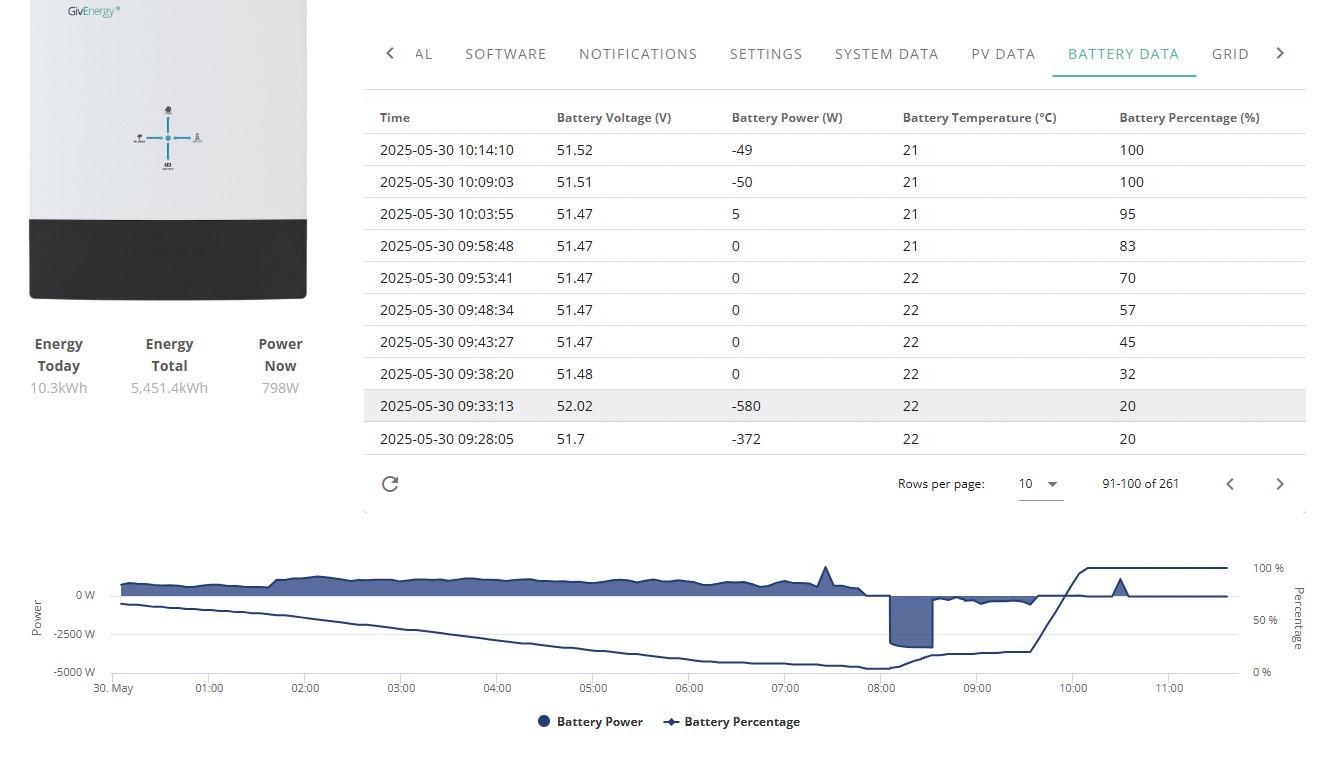
I am trying to find out if anyone else having this issue this is todays event and voltage drops. The help line does very little.
alanhowgate GE systems aren't very good at tracking the true SoC - the voltage curve for LFP chemistry is very flat, so cannot infer SoC from voltage except near the ends. So the BMS has to try to estimate SoC by tracking power and out from last time it visited the extremes.
Advice is to regularly allow the battery to fully charge and fully discharge, which allows the BMS to get its bearings. A full calibration probably isn't necessary, but does achieve the same thing. Perhaps also allow the battery to idle for a while when empty or full or empty. (Not sure how important this is.)
https://www.youtube.com/watch?v=s7lAUEvJpwU (does rather play down the importance of doing this...)
But if this has only just started happening, after months of reliable service, it might indicate a weak battery cell ? It is possible to access individual cell voltages, though not on the standard GE software.
Over the winter, did you typically fill the battery from grid during cheap rate, or did it spend most of its time empty ?
alanhowgate while it's reporting close to 0% at 8am, it's possible it's actually still half-full, but BMS has just lost track. Could try doing a forced export (perhaps at reduced power) to see if it rallies a bit - sometimes my system will sit at 4% for an hour, then drift back up to 8% (with no input power) and then start discharging again. This is the BMS re-evaluating the SoC - it has to do this while the battery is idle since charging or discharging distorts the voltage too much.
Are you on the latest firmware - they've been trying to improve this behaviour over time.
The voltage is expected to drop as the battery approaches full (max voltage) - the BMS has to treat the battery rather more gently as it becomes full.
DD I am on agile and I set charging every day since I got it even putting small heater near it to maintain 22 c for max charging in the winter. The battery would last with all the sun we have just had till 5 or 6am in the morning now only 2 or 3 if lucky. When it reaches 100% will trickle in today 850watts for 2 hours and still filling set to 3600 watts on charge.
CHEERS for interest.
alanhowgate Run a calibration on the battery. You can do this from the portal (My Inverter->Remote Control).
Sounds like the SoC is wildly out so the simplest thing to do is run a calibration on the battery. Don't do this more than a couple of times a year as it ages your battery.
FWIW my battery (v3015) can show a SoC value that's 8% out from the actual charge level just from a single day of PV input/battery discharge. AC charge/discharge not so much...
I tend to dump the battery (fully discharge it) every couple of days and even then its going to be out by a few percent.
alanhowgate 52V seems low? My battery is 52.53 V right now, and that's on 67% and discharging (which would pull it down). Looking at the logs, it reached nearly 55V when it was trickle-charging this morning.
How do your voltage look between 07:30 and 08:30, say ?
There's a table of cell voltages linked from https://community.givenergy.cloud/d/1931-sudden-battery-discharge/13
If you use Android, there's a third-party app which can show individual cell voltages - https://givenergymonitor.wixsite.com/tutorials
click on the % bar at the bottom of the screen
Vestas Sounds like the SoC is wildly out so the simplest thing to do is run a calibration on the battery. Don't do this more than a couple of times a year as it ages your battery.
(From first post, calibrating fixes it for a short time only.)
Vestas I have Calibrated twice now hopefully next GV help will move past the newbies onto next level engineers I only noticed this as hoping to use no grid electric and battery ran out at about 2 am. Hoped someone else had had similar issue up to date all software but the DC MCB had just been replaced 2 weeks ago will try DD s tomorrow.
alanhowgate SoC tracking is not a fixable problem as the BMS on the G1/2 batteries is hopelessly inadequate in terms of tracking SoC. It cannot be "fixed" with software - they've tried 6 or 7 times and failed every time.
Its absolutely fine for tracking CONSTANT charge rates or CONSTANT discharge rates, anything else and its not. With PV input then it'll end up 10% out within 36 hours. Unless you fully discharge the battery every day then the SoC will be wrong, sometimes radically wrong (30-40% out).
Why was the DC MCB replaced?
one side of switch went faulty engineer said he has changed a few of them. Now today we are getting paid to use electric and my battery is full in 60 mins with about 600 watt hours of power so annoying.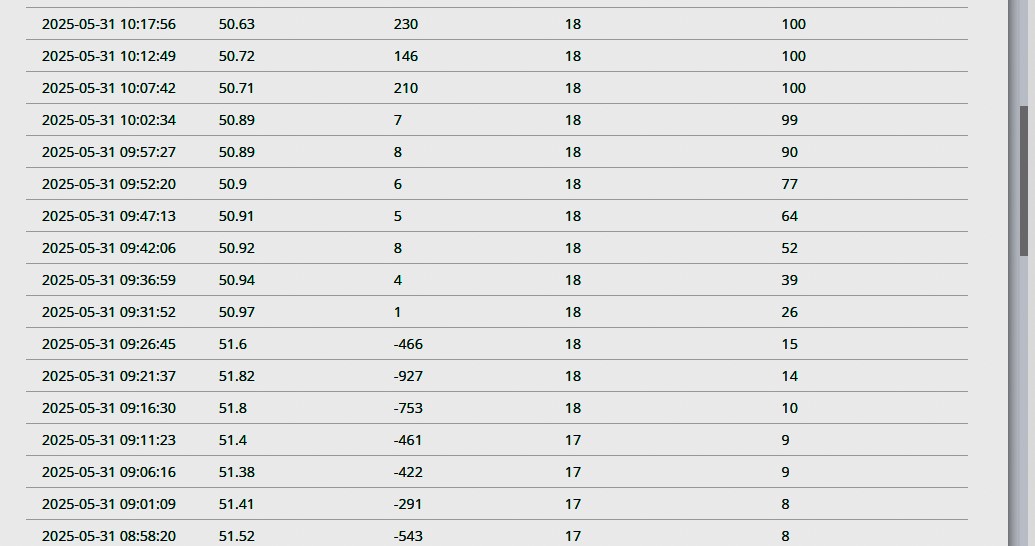
alanhowgate You need to get the app mentioned and post your cell voltages when the battery is idle and also when the battery is on full load - eg export to grid from the battery.
Ideally do this when the battery is showing around 70% SoC.
If the breaker failed its entirely possible the battery cells are damaged.
Edit - there's no way the battery is full with the battery voltage in your post. It'd be above 54V as a minimum. Something looks dead, might be a cell pack or might be the "engineer" didn't fit the MCB properly.
Vestas Got the App to monitor individual cells all okay so did recalibration again then checked cells with no load at 60% voltage on cells 3.28 and all close to that reading 0.002 difference so not cells as system less than year old and this second fault I have emailed support.
Just hope they will escalate to next level CHEERS ALAN
alanhowgate 3.28 seems about right for 60% according to that chart I referenced earlier. I guess you need to record it at various other states.
How does it look under load - that's when weak cells tend to show up. Mine are matched at idle, but about 25mV apart under load.
What was the lowest and highest (total) voltage recorded during the calibration?
alanhowgate You need to check the cell voltages under maximum load. Easiest way to do this is to put an oven on at 200C after dark.
Cell voltages when idle are only useful for determining charge level/cell balancing or identifying gross failures (like a dead cell).
I've noticed similar behaviour on my Gen 2 9.5kWh over the last few weeks. Initially shrugged it off as the usual poor SoC tracking, exacerbated by the long period of sunshine in April/May. Was down to an effective capacity of 2-3kWh between "0%" and "100%", with those characteristic leaps in SoC.
I ran a calibration on it yesterday, shown on the left hand side of these charts, and that all looked pretty sensible, pushing in a solid 9-10kWh. But then in less than 24 hours it's back to it's bad habits - note the big jump from 50->100% at the right hand end. It looks to me like that Cell 8 is leading the pack too much and triggering an early "full" reading.
Customer support here we come... 😬
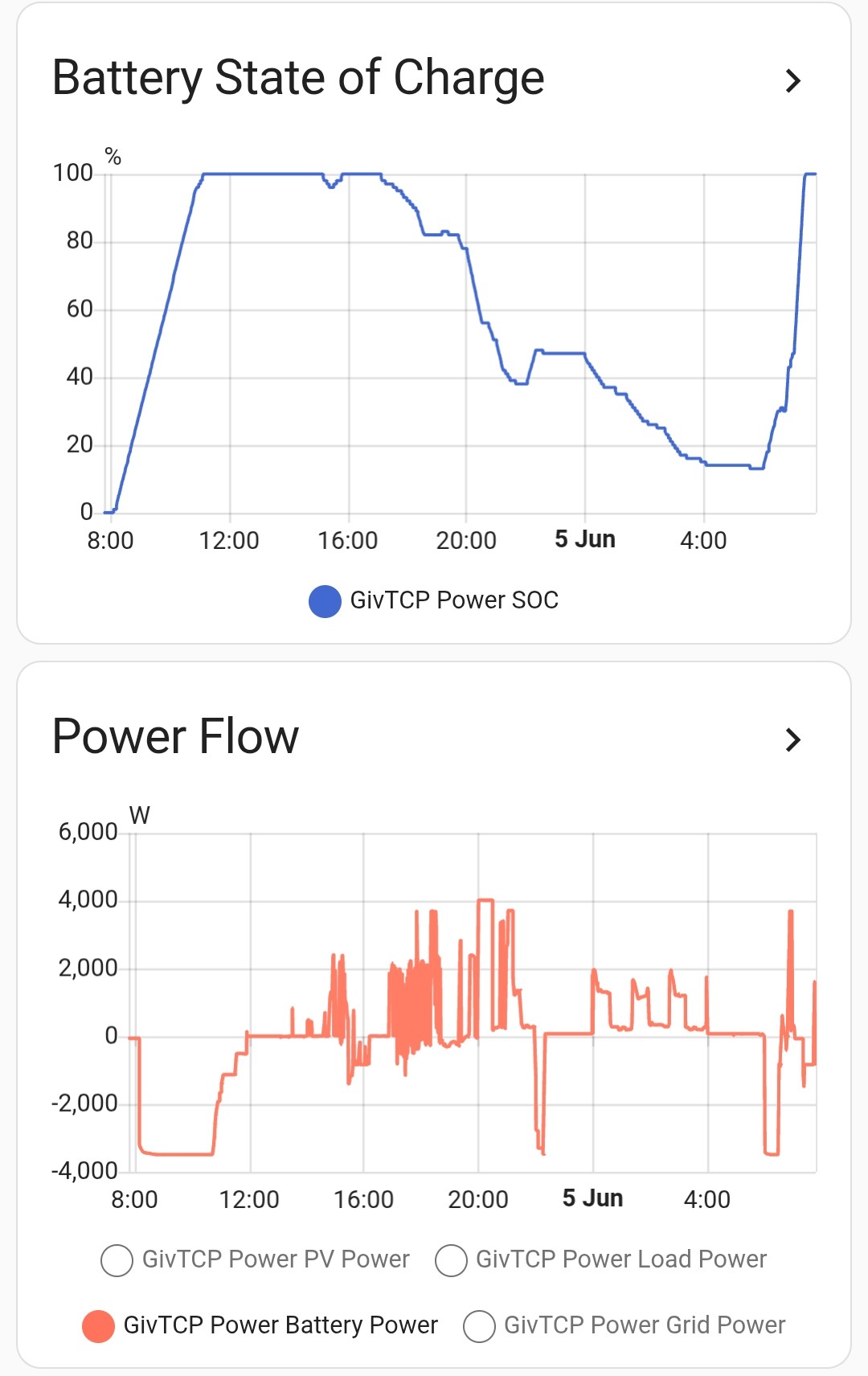
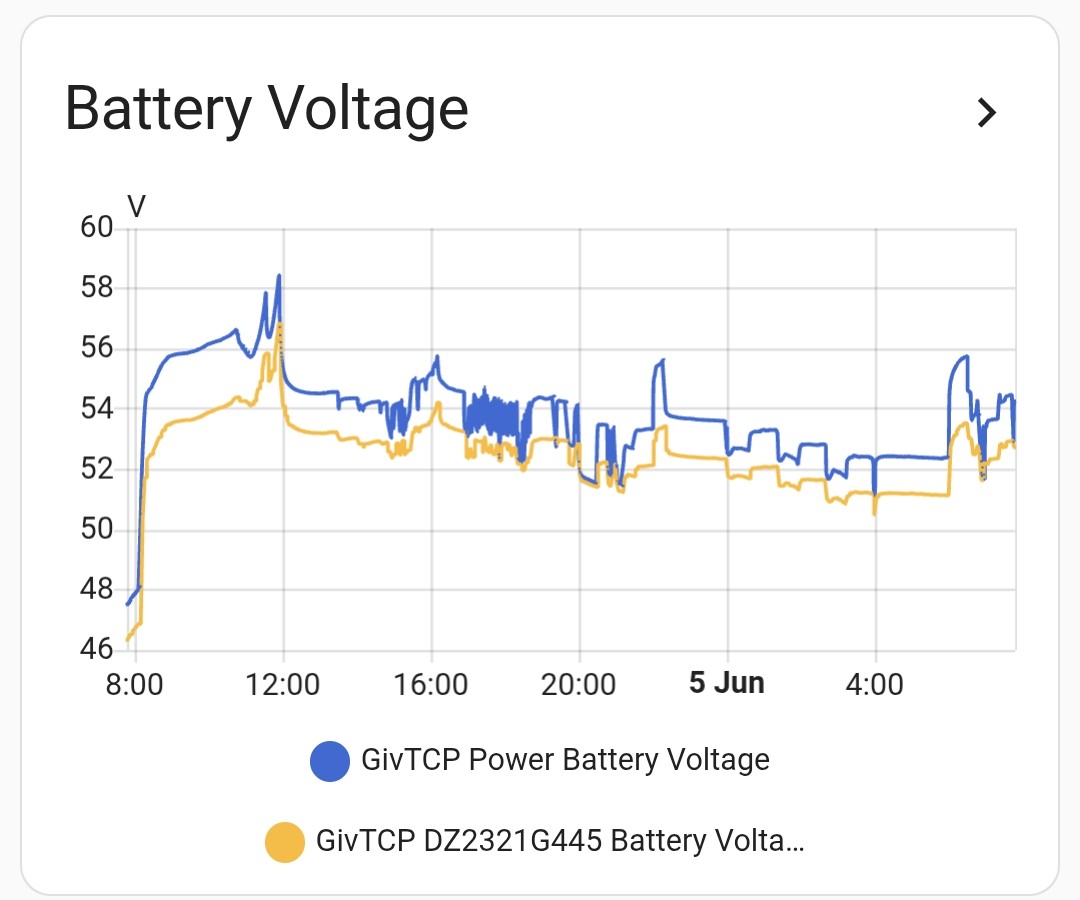
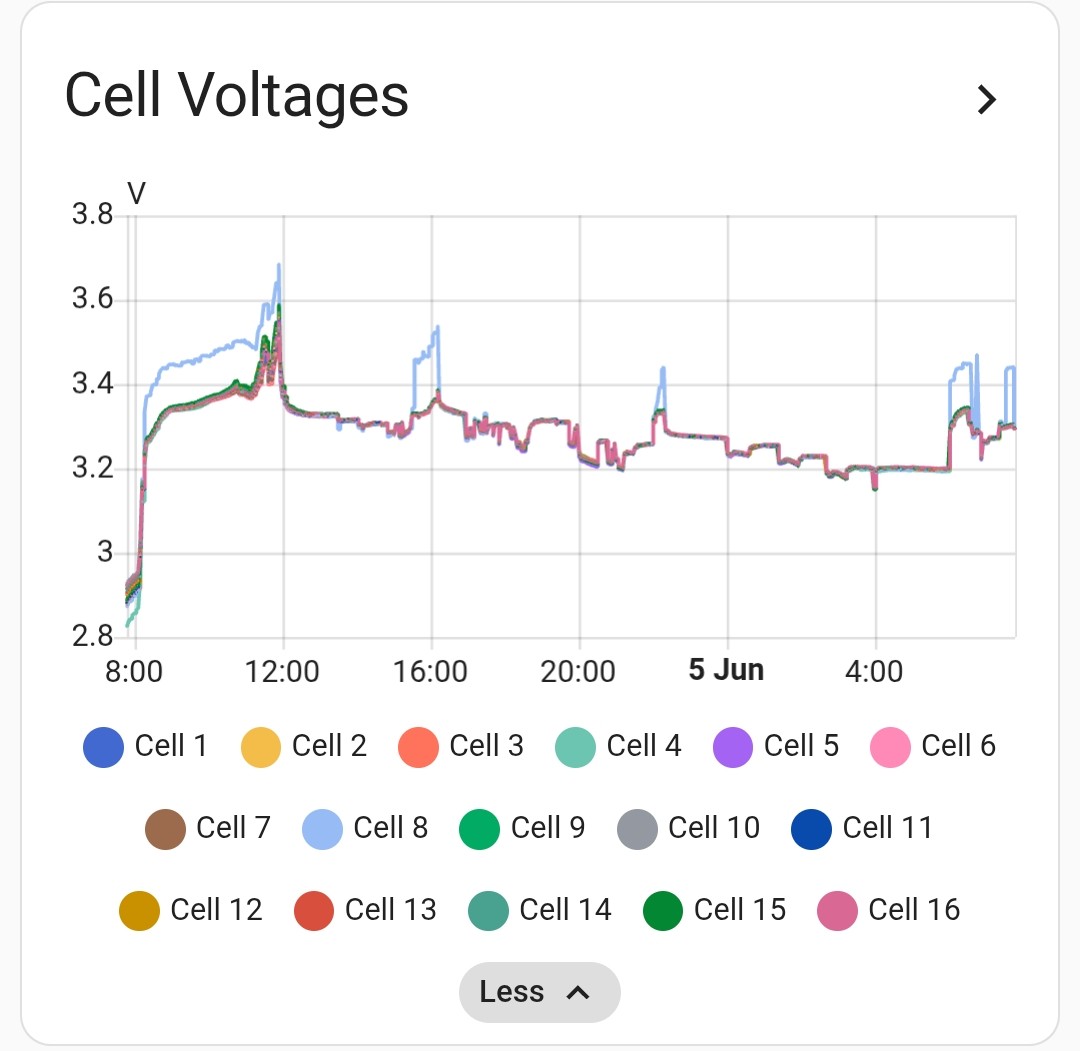
[unknown] thanks - full calibrations down to 0%? Or just manually export and import? (The annoyance with the calibration method is that you never know how long each phase will take - I always seem to end up charging in an expensive period on the tariff!)
Josephiah Just run it from empty to full as normal with timed cycles but at 900-1000W fixed charge/discharge. No need to calibrate, you're just looking at whether the cell comes back into line a bit next time you use full rate charge. I did this last year and took a few cycles to pull a cell back in.
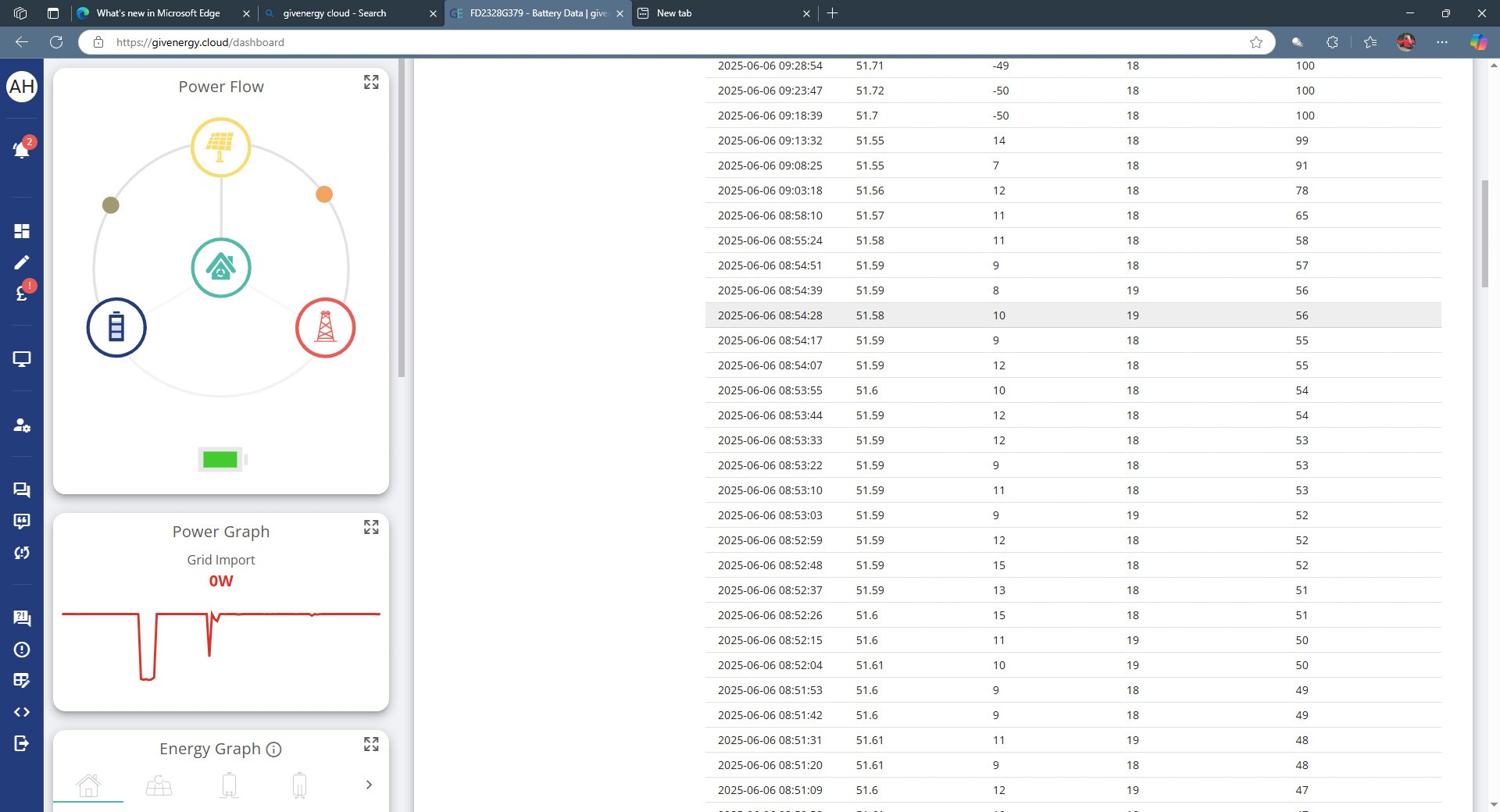
Had not noticed before but the battery is Discharging while % going up. This is after Givenergy recalibrated the battery.
Phoned up giverergy tried to get it moved up the ladder as fault came off the phone then they started another recalibration this the 5th one and bet you again will go back to issue after 24 hrs later. Costs me in electricity and battery life.
Nothing to see yet, Cell 8 leaping ahead even at the low charge rate. Will give it another cycle or two. Looking back through my sensor history, Cell 8 has always tended to be the leader, but only got far enough out of whack to be problematic a few weeks ago.
It's interesting that I get such a linear SoC increase on charging (right half of chart) but decidedly non-linear with the 1kW discharge (left half).
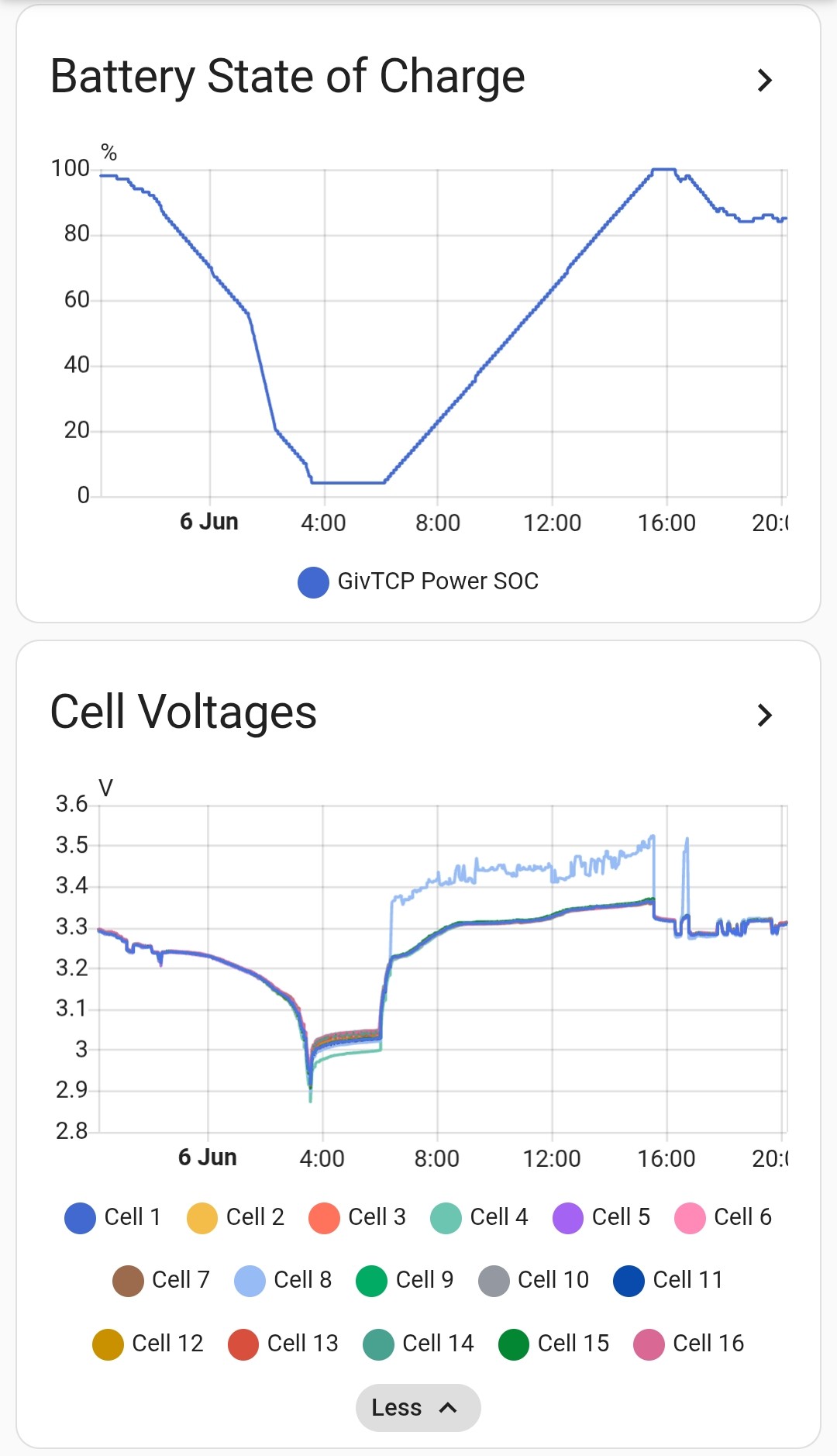
Presumably charging stops when cell 8 gets to around 3.5V - I wonder what happens if you use an even lower power as you approach the top - I guess you're trying to find some way to get the other cells up to a higher voltage before 8 reaches 3.5
I have no idea how the balancing works, but I guess it has to happen before charging stops and cell 8 falls back to the same as the other cells. Maybe charging really slowly can hold it in that state long enough for something interesting to happen?

I believe you'll need to get all the cells over 3.4V for the balancer to kick in. Which might be a struggle on this one.
You could try the "Charge only" calibration, that just charges to full rather than doing a full discharge and recharge.
DD I don't know what the trigger is, but it has put in a full 9-9.5 hours at the 1kW rate here, which is obviously about right. This is quite different to yesterday's full rate charge which blipped from 50% to 100%. (Though interestingly, later on in the day it did some blocks of ~ 800W charging despite it being at "100%", adding another few kWh...)
hoggy can you explain what the aim is here? Are we trying trigger a particular mode which will do something to rebalance the cells?
Charge only does sound preferable to the full empty-and-refill, but I'm not seeing an obvious option for that in the portal...?
Josephiah . (Though interestingly, later on in the day it did some blocks of ~ 800W charging despite it being at "100%", adding another few kWh...)
that may be what you're aiming for - having done a little rebalancing, it's able to raise the other cells up just a little, then it does some more magic to reduce 8, and can squeeze a little more in, and so on. I'd probably try and keep that going as long as possible.
Did you look at the cell voltages while that was going on?
DD I'd probably try and keep that going as long as possible.
Did you look at the cell voltages while that was going on?
It's not something I had control over - it was just on Eco mode (with fluctuating demand and solar) for a stretch, so I think when the demand caused the SoC to drop fractionally below 100% it then tried to charge at it's usual 99->100% slow rate, and just kept going for an hour or two.
Violates looked similar every other time it was charging, with cell 8 around 120-150mV higher than all the others.
DD Perhaps calibration is allowed to go to a higher cell voltage than normal charging, and so will allow the other cells to get above 3.4
That certainly seemed to be the case - it kept on charging long after it would normally have given up. So perhaps there is value in doing a slower rate calibration rather than @Vestas suggestion...?
I emailed Givenergy and new engineer TJ got back to say they are dealing with my battery and will contact be on Monday with results. The recalibration they started only went down to 77% then recharged for over 5 hours and about 6 kwh went back in. Will report back on Monday hopefully with good news cheers.
Josephiah the bms has something called active balancing, where it tries to shunt excess energy from cell to cell.
The idea is that it levels out the individual charge in each cell, which then should translate to a levelling of voltages in each cell.
If the cell is defective (or the connection to it is loose, like I suspect this may be) then there is little it can do, but you'll be waiting a while for warranty anyway. If your cell runs both as the lowest voltage when flat & the highest when charging, that point to a faulty cell.
From my digging into the BMS's brain, the balancer is set to work at over 3.4V per cell, so unless you keep everything above that it won't be running. It's also very low power and slow.
The charge only calibration aims the bms for 3.65V per cell so has the best chance of getting the pack upto the balancing threshold. Although I think only GivTCP or Richard Russell's app offer that Charge only calibration (it's not available from the portal it seems)
Vestas 150mV variance is into warranty claim territory IMHO.
Sadly I'm inclined to agree - I'm just procrastinating ahead of the joys of dealing with GE support...
hoggy The charge only calibration aims the bms for 3.65V per cell so has the best chance of getting the pack upto the balancing threshold. Although I think only GivTCP or Richard Russell's app offer that Charge only calibration (it's not available from the portal it seems)
Thanks for the pointers - I see it in GivTCP, so may have a play with that.
Out of curiosity, I tried charging at different slow rates this morning:
DD so perhaps charge to 100, run it down just enough to persuade it to charge some more, then charge at 190W ?
Yeah, something like that crossed my mind too. hoggy I ran a half-rate charge-only calibration this afternoon which got all the cells above 3.4V - looked reasonably sensible, but too early to tell the effect yet, if any.
Vestas If its a loose connection then the resistance between cells is higher than it should be. The more current you put through the connection then the higher the voltage discrepancy will be.
I've not spotted anything like a linear relationship there - seems more like nothing until you get over some threshold, then jumps up.
Josephiah Heat will play a part if its a loose connection, however....
Remember that the charge/discharge rates can only be adjusted in increments from 0-50 and that relationship doesn't appear to be entirely linear in practice/as displayed in GivTCP. Therefore you may think you're setting a certain power level when setting rates in watts but in fact that power level can't be set and the inverter defaults to the nearest "integer" value in the 0-50 range. On a G1 inverter you can end up a couple of hundred watts off your intended limit when setting rate limits in watts via GivTCP.
Hmm, in writing up my findings for tech support, I looked back through our battery history: we had two duff batteries from the same batch at the very start, which were swapped without too much fuss. This is our third one, which has performed well up until the last few weeks.
However, the interesting thing is that, looking back, no.2 (and possibly no.1 too - I was less au fait with the technicalities back then) suffered from exactly the same issue - Cell 8 refusing to stay in line with the others. Pretty convinced now we're looking at another warranty swap - I wonder how long it'll take this time...? And I wonder if the Gen 3 has any improvements in this area...?
Turning down the charge rate to 50% seems to work fine (cell 8 voltage still jumps up to 100-150mV above the others, but it doesn't seem to trigger the "I'm full" condition in the same way), so that's my workaround for now - okay for the summer, but will still be pursuing a fix/replacement.
Josephiah I've often wondered if I'd got the G2 inverter I was supposed to get then would I be having more problems with the battery - pretty sure some of the BMS f/w revisions would have caused more issues due to increased charge/discharge rates. Also pretty sure if you put this battery on a G3 hybrid then the divergence on cells 5, 8 & 13 would become an issue. They're not an issue, most of the time anyway on a G1.
TJ from support did get back in touch but wanted to close the case as no further issues even though 6th ,7th and the 12th same super fast charge to 100% on very little power. Last night we got less than 3 KWH out of the battery before it switched over to mains. The system not even 1 year old and having issues wish I had gone with another system now.
[unknown] Were you able to install the inverter app and look at the individual cell voltages ?

[unknown] Can you advise me a bit more on the Inverter App. I have that app and believe that knowing the individual cell voltages and their reported total that I can calculate the current capacity. Is it my school days physics that Watts = volts x amps ? I see three values for capacity as Ah: Full, Design and Remaining (133, 160, 126) and voltage 53.59v. So when full does this mean 7.12747 kWh?
GrahamShaul The voltage isn't something you can derive much info from with a LFP battery as the voltage is pretty much the same on a given load unless the capacity is above 80% or below 20%.
The Ah figure is more useful as the Design value of 160Ah equates to 8.2kWh, the Full value is the capacity detected by the last calibration and Remaining is the current SoC.
So your battery's maximum capacity is now 133/160 = 0.83125 (83.1%) of the designed capacity, which was 8.2kWh.
Full = 8.2 x 083125 = 6.18kWh
The current charge level of the battery would be 126/133 = 0.947 (94.7% full). Edit - this would show as 99/100% on the GE app & would equate to (126/133) x 6.18 = 5.85kWh.
GrahamShaul I have that app and believe that knowing the individual cell voltages and their reported total that I can calculate the current capacity. Is it my school days physics that Watts = volts x amps ? I see three values for capacity as Ah: Full, Design and Remaining (133, 160, 126) and voltage 53.59v. So when full does this mean 7.12747 kWh?
W=VA gives power, but unfortunately not capacity - as you draw power, the voltage will drop, and it's a parameter of the cell how much energy it stores, ie how quickly the voltage will drop.
As a ballpark figure, 133Ah at around 52V is 6919Wh. My 9.5kWh battery is described as 186Ah, which would put the correct average voltage at 51V, making 133Ah = 6893Wh. Or 133/160 * 8.2kWh = 6.82kWh.
DD Whoops I got the 1 and the 8 the wrong way round.
So the Full capacity for the battery is 6.81kWh and the current charge level would be 6.45kWh.
I can't remember whether the 8.2kWh battery was "100% DoD" or 80% DoD but assuming its "100%" then there's 4% to be taken off that figure due to the discharge lower limit so useable capacity would be about 6.3kWh.
Josephiah Turning down the charge rate to 50% seems to work fine (cell 8 voltage still jumps up to 100-150mV above the others, but it doesn't seem to trigger the "I'm full" condition in the same way), so that's my workaround for now - okay for the summer, but will still be pursuing a fix/replacement.
Spoke too soon. Sometimes charges up okay when limited to 50% charge rate. But only sometimes. They've had a week to respond to my email, so gritting my teeth for a long succession of phone tree music...
Just to round out my part of this discussion: I laid out the history of our three batteries, and GE agreed to an engineer visit with no fuss. Engineer came last week, tinkered for a bit, then just swapped battery no.3 out for battery no.4. It's another gen 2 9.5kWh, but appears to be a refurb rather than new - BMS showing 500 or so cycles (fewer than no.3, so no particular cause for complaint there).
Now trying to figure out the behaviour of the new one. The cells do look to stay in line much better during normal charging and discharging, but it looks to me like Cell 1 leads the others quite significantly at low voltage. Trying to understand how much impact this is having on capacity, but I'm not convinced I'm getting the full 9.5kWh. Calibration under way...
This is the thing I find most frustrating about the whole thing: the glacial slowness of any troubleshooting process. It's inherent to a system that takes hours to do its thing, but it inevitably means that the engineer is back at the other end of the country by the time you discover any issues 😬