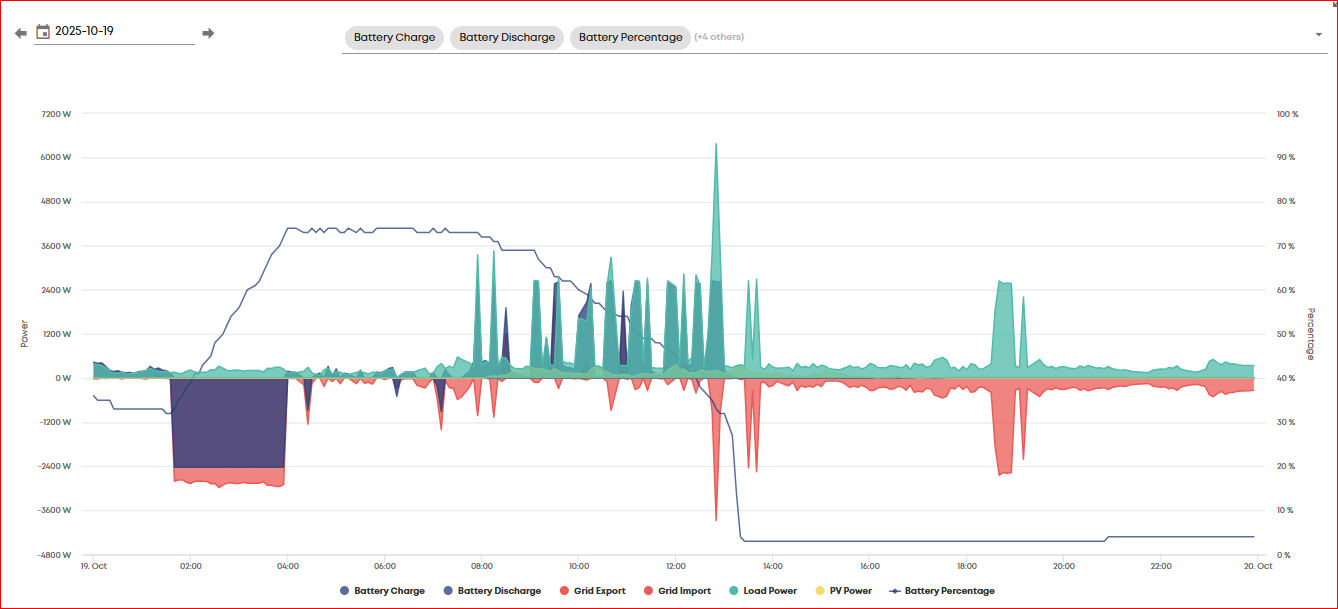
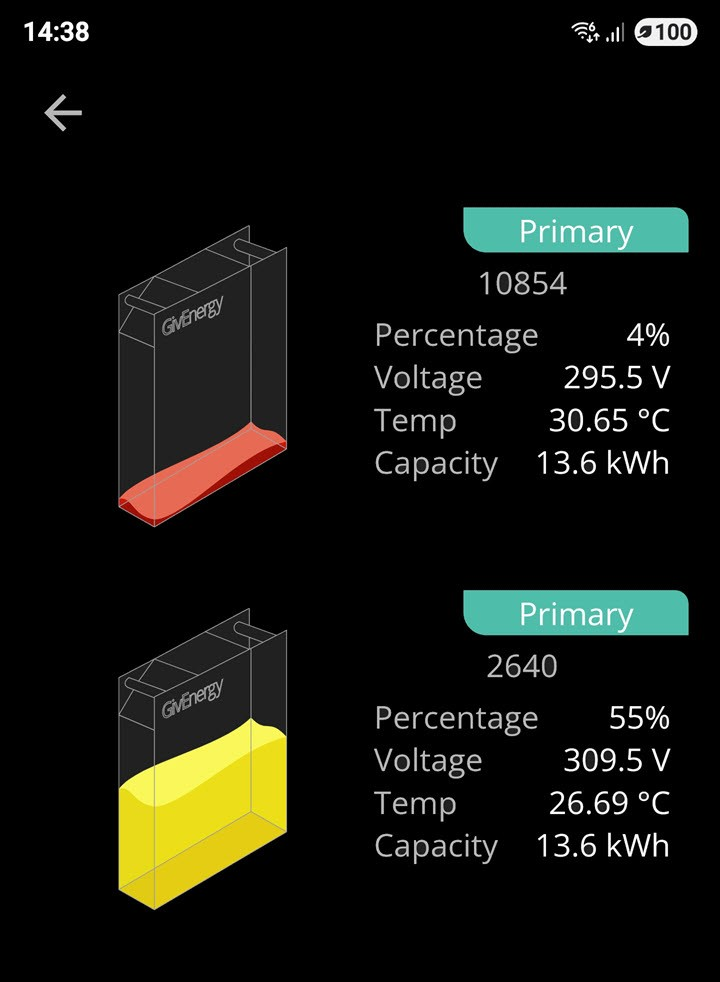
Anybody else noticed that their battery capacity seems to collapse as the capacity drops below 30 - 40%.
Its happened 3 times now, the battery seems to supply the house and the capacity drops as expected until about 40% then it just rapidly collapses to 4%. I’ve checked the total battery to house measurement for the day and it was 7.4 kW, so I don’t think it’s a SoC issue.
I’ve raised a ticket with GE on the 3rd October and followed up every week since, but nobody has got back to me.
D
#2duplada
Richard_D I have 2 AIO's and had terrible SOC issues as soon as the SOC got below 50% it would just collapse. Had GE look it and they had me testing it from 100% to 4% should be near to 26kWh exported but the results were near 19kWH. They suggested I use the full range of the batteries at least once a week. I now empty the batteries down to 10% or so and fully charge up to 100% on a daily basis my SOC issues have gone away and I get about 26.4kWh from a 100 to 4% discharge.
P
#3pwdst
This sounds like a calibration issue where the batteries have lost track of their State of Charge - either regularly discharge completely as suggested, schedule a calibration through the portal or ideally do both.
Completely emptying the batteries on a regular basis will help the BMS (Battery Management System) keep calibrated and maintain an accurate SOC (State Of Charge).
Think of it like filling up a water tank, if it has been months since it was last filled from empty you probably don't have a completely accurate idea how much is in there. If it was filled from empty last week and you have topped it up a few times since it is much easier to know how much water is in there.
C
#4CW
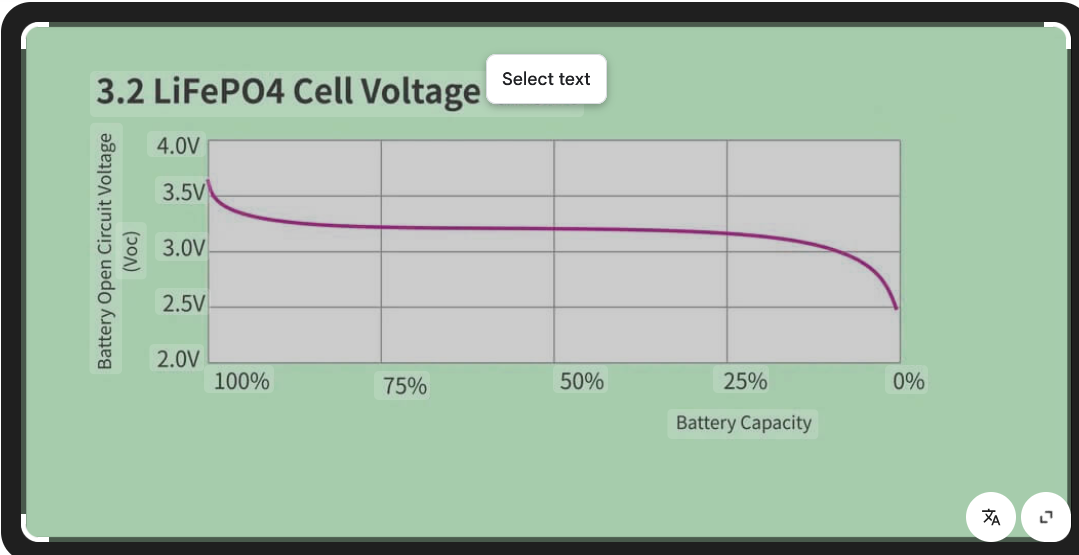
My understanding is, it is to do with the voltage curve of a LiFePo4 battery. Because the curve is fairly flat for the majority of the SOC then it is difficult for the BMS to accurately work out the charge level. I guess it probably has to work out charge in/out to guess at the level. By fully emptying it, and then fully charging the BMS has a more accurate picture to work on when it starts measuring current in and out.
D
#5DD
CW and the sudden drop in reported soc is presumably because the voltage starts falling when the BMS thought it was still in the middle of the plateau.
T
#6treborUK
My system suffers from these occasionally during summer months where mostly the system sits above 60-70% as solar is easily topping it up daily. If after a few weeks like this I do drain it down further then once below 40% I do sometime see a sizeable (20-40%) SOC drop. Once it has subsequently been charged though the system is fine again for a good few weeks. If I exercise the full range once every couple of weeks or so it seems to keep a better handle on the SOC.
In winter months it gets down to my 10% reserve several days a week and is charged fully overnight and I don’t experience any of these larger SOC drops.
I’ve just got used to how it works, understand with the battery chemistry involved why it happens, and just let it run. I don’t force export (only if excess solar) as on deemed export FIT and get no benefit from actual export.
The SOC drop issue is a minor niggle for me in what is a brilliant bit of kit generally. Started on BMS 4 or 5 and it was a much bigger problem back then but has got steadily better as the firmware has developed.
I've had the same problem, when my battery % gets to 30% it just drops off to 4% in 7 minutes! So doing the maths, my batteries are total 16.2kWh x 26% = 4.2kWh lost in 7 minutes! Considering that my system has a max input/output of 2.6kW per hour this is impossible! I'd love to know what is going wrong. To avoid the problem I almost fully charge my batteries every night.
The app 'Monitor for GivEnergy Inverter' by Andrew Miller is great for keeping an eye on your system, particularly battery data, you see the cell data for each battery.
P
#9pwdst
CurlyDownes Check that your firmware is up to date and then schedule a calibration on the portal.
M
#10mole
Its a pity Andrew Millers' app does not cover AIO batteries performance as it might help in predicting when the dreaded cut off might occur. It has already caught us out twice. Going to resort to doing a calibration on the first of the month whether it needs it or not! For those not exporting it can be a bit tricky trying to run down to <10% before setting off a calibration and potentially "losing" energy back into the grid, only to buy back later. Andrew has said that he is not familiar with AIO higher battery voltage and layout, so it's not likely to happen soon. We can only hope.
Do you need to do that (I understand a recalibration can be hard on the batteries) - could you just not empty it out to the reserve instead and then fully charge it?
G
#12geoffreycoan
CurlyDownes I've had the same problem, when my battery % gets to 30% it just drops off to 4% in 7 minutes! So doing the maths, my batteries are total 16.2kWh x 26% = 4.2kWh lost in 7 minutes! Considering that my system has a max input/output of 2.6kW per hour this is impossible! I'd love to know what is going wrong. To avoid the problem I fully charge my batteries every night.
As explained above by treborUK, it is not impossible to lose that much charge, it was never there in the first place, your AIO has lost track of the SoC level. By fully charging it every night you’re not enabling the inverter to regain knowledge of what the upper and lower battery limits are.
Let the battery drain to empty periodically, e.g. once a week before recharging and your inverter will have a much better grip on what the SoC value is with less unexpected drops.
If you don’t want to force discharge, just set the battery charge rate to 0 so solar generation is exported and let the battery run down overnight on house load.
R
#13Richard_D
IThanks for all of the comments, I have scheduled an overnight calibration as it’s almost 21 months since the last one. It will be interesting to see how much power is drawn/input in the process.
I have been running the battery with a 95% overnight top up charge since some time in September because the sun wasn’t out enough to keep the battery charged enough for the evening load, so I would have thought that this would have helped the BMS keep track.
M
#14mole
It looks like the Android Inverter monitor is being updated to include AIO. Rubikcube has posted that 3.8 should be out this week. I greatly look forward to seing it. Hopefully it may help me judge when to do a calibration going forward. On the question of calibration, what is the difference between running a battery down under gridpay/ Octopus/etc and running it down by using the portal, I don't see as it stresses the battery anymore, or am I missing something? And on a final note, why are people not seeing battery drop offs more, are they daily or weekly running the batteries right down?. I believe I am on the latest bms 616/12 version according to the portal.
Thanks.
D
#15duplada
mole The latest BMS is 13 and the AIO Firmware is AO620 but you would need to ask to get it.
D
#16duplada
mole Rubikcube has posted that 3.8 should be out this week
Yes V3.8 is out, my phone updated today. I can confirm I can see each of the 4 battery packs of my AIO's, Voltages and temperatures.
C
#17CW
mole I have it and I can see the battery details which is interesting. It download for me automatically, so I guess it is there on the App store now
D
#18duplada
mole On the question of calibration, what is the difference between running a battery down under gridpay/ Octopus/etc and running it down by using the portal
I asked Paul.L about this and there is no difference taking the batteries down (at your leisure) to 4% and then recharging them back up to 100% as doing a calibration. He also said expect when you do a recharge to 100% for the percentage to go to 100% for a period and then drop back to 99%, all of which is normal.
D
#19duplada
mole And on a final note, why are people not seeing battery drop offs more, are they daily or weekly running the batteries right down
I run my batteries down to 4% and back to 100% once a week and down to 10% and back to 100% the rest of the time. I had horrendous SOC sync issues beforehand. Nowadays my SOC sync is within 2% all the time with no big drop offs below 50% which is what I had previously.
M
#20mole
@duplada
Thank you for the info on latest firmware.
Is 620 / 13 in beta? and do you know if it is stable and helps with tracking SOC better.
I have just downloaded v3.8. I will have to get my head around what the battery numbers mean going forward.
Thank you all for your responses.
C
#21CW
mole And on a final note, why are people not seeing battery drop offs more, are they daily or weekly running the batteries right down?.
I have an AIO - I very rarely run it down to the 4% - it usually sits around 65% before charging. having said that, because I do not have it fully emptying I have never seen the SoC drop happen. I do howver, very occasionally, force discharge to empty, but rarely ever.
D
#22duplada
mrand31 On the Installer site the latest All In One completed download contains the AO.619 firmware but there is no documentation with it. I have AO.620 for about three weeks or so. The latest Gateway firmware is V13. AO.618 and Gateway V13 Firmware offer a few features such as BMS optimisations and dynamic load adjustments. V13 allows a Gateway max load limit to be set (by support) the Gateway is limited to 85amps Max, they set mine to 80amps and it now tracks well adjusting battery charge rates if there is a lot going on.
I don't think they are any rush to push latest versions out to customers as it just compounds their support issues when things don't go to plan.
D
#23duplada
CW it usually sits around 65% before charging. having said that, because I do not have it fully emptying I have never seen the SoC drop happen
Well that's what I thought then one day this happened.
C
#24CW
duplada Do you have two AIO's? Apart from the above, how is that working? I was considering an extra AIO but not sure at the moment
D
#25duplada
Yes I have two AIO's but I wasn't prepared for trouble I was in for when I first got them, One delivered faulty, 6 week wait for GE to come and fix, Endless SOC issues, etc.
Nowadays, I am IOG and use Wonder Watt for scheduling, I run completely hands off and Octopus are paying me money rather than the other way around. Though it has taken 6 months to get this far, and at one point I thought I had wasted a great deal of money and it was very stressful.
Just to say on the AIO there are 4 battery packs. Each pack has a controller that has a serial number and manages the battery voltages, but that's about all. There is an overall controller which keeps track of the calibration and cycle count, which seems odd because if a battery pack is replaced the cycle count will be wrong. The AIO has no factory capacity, it is always 52Ah, because there is no choice of batteries.
When you empty and refill the AIO the calibration figure (which is used to estimate the %) remains the same. When you run a calibration, the figure stored in the controller is updated with a new measured value.
G
#27Guybrush-Threepwood
Rubikcube are you saying using from full to empty won’t update the calibration (and therefore fix any percentage problems) and you must use the run calibration option?
D
#28duplada
Guybrush-Threepwood Well I have never run a calibration after Paul L said I didn't need too. Using the full range did sort out out my SOC issues.
C
#29CW
duplada Same here - I have done one calibration early on, and now if I do anything it is a force discharge to empty (and even then I've only done that a couple of times over the past 18 months) and I am not experiancing SoC issues - although as it rarely goes below 60% I maybe not going low enough!
D
#30duplada
CW Mine used to drop like a stone from 50% or below
#31PianSom
Rubikcube When you empty and refill the AIO the calibration figure (which is used to estimate the %) remains the same. When you run a calibration, the figure stored in the controller is updated with a new measured value.
Are you sure about this? My recollection is that Paul L mentioned that on recent firmware recalibration on the top occurs when charge moves between 99% and 100%
G
#32Guybrush-Threepwood
duplada my extreme drops occur when it’s below 40%
D
#33duplada
Guybrush-Threepwood Yes, I would just use the the full range of your batteries and the problems will go away.
Never certain about anything regarding the AIO; I don't have one. I think you might be confusing balancing with calibration.
Balancing happens automatically every time the battery reaches near full. Think of the cells as buckets left out in the rain. One will always reach the full mark first, and the buckets each have a special little tap to let a tiny bit of water out. Using the taps you can make sure all the buckets get filled properly without any overflowing. Balancing can only be done at the "top", because when the buckets are partly filled they look the same, and when they are empty, you can't let water out!
Calibration is deliberately emptying all the buckets, and then filling them all to see how much they hold. The measurement is recorded and used to estimate the % full. The estimate will be more accurate if the system is filled and emptied frequently.
You can use my app to check the capacity recorded at the last calibration, and to see the cell balancing when the battery is full.

M
#35mole
Well 2 weeks after doing a calibration the battery fell off the cliff from 42% to 16% in an hour with only 400w load. Ran dishwasher and set calibration to run at midnight. Better half checked at 4 am and battery was not supplying house and seemed paused. She pressed a few buttons on the app and it came back to life. Looking at log and several things appeared to have occured. I had set what I thought was a safe backstop in Andrew Miller's app to charge battery to 50% if less than 20% at 00:30. Well this had kicked in during the calibration. Not sure if this had any impact but my wifes button pressing started and stopped pause operation. Although there is a pause time set it is supposedly not active, but there may have been a glitch.
We are on 616/12 software. I know there is a later version available. Not sure why GE is not making it available via the portal, only for manual download.
Question. Am I likely to run into trouble doing it myself, and how likely am I to get GE support if things go wrong.
Thank you.
V
#36Vestas
mole how likely am I to get GE support if things go wrong.
GE support is pretty much non-existant these days (and has been for a very long time) so in answer to your question - not very likely. You may get lucky 🙂
S
#37Slartibartfast
Rubikcube What do I do if there is a hole in my bucket dear ...