A
Just had the message pop up I can upgrade my inverter and battery to the following versions:
Inverter firmware will be upgraded to D0.318-A0.318
Battery firmware will be upgraded to 3022
Has anyone done so already? Any known issues?

Just had the message pop up I can upgrade my inverter and battery to the following versions:
Inverter firmware will be upgraded to D0.318-A0.318
Battery firmware will be upgraded to 3022
Has anyone done so already? Any known issues?
AIO also has updates
Inverter firmware will be upgraded to D0.620-A0.620
Battery firmware will be upgraded to 13
Notes link doesn't work, Ive been burned a few times now so will wait this out with support so bad.

Found the bug with the link, its browser related
As it works here, but managed to replicate
https://givenergy2025.zohodesk.eu/portal/en/kb/documentation/firmware-logs
Here is the link anyway
Just done mine. 15 mins. all done
Oddly I have a second option
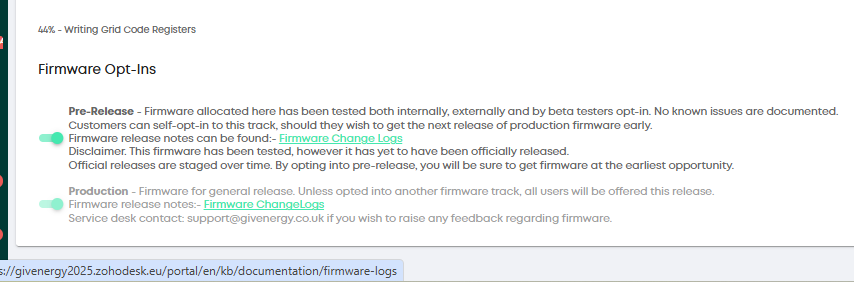
For some Pre-Release too.
So maybe there is more updates coming later
The url link works too

My Gen2 updated fine as well as 2 x 8.2 batteries.
Inverter Firmware Version
D0.922-A0.922
Last Update Time
2026-02-12 10:19:24
Battery Firmware Version
3022
Will monitor for a few days before deciding if I want to calibrate.
EDIT: Noticed that before the upgrade my batteries were at 81%, after the update 73%...weird..
EDIT2: After about 10 minutes, the SoC went back to where it was.
I've updated as well. No obvious issues and Givtcp working fine 🙂
AIO updated - took 30 mins. Seemed to hang at 59% and 90% for long time.
TheDragon (GivEnergy)
I already have 4010 firmware for my Gen 3 Battery (and 3022 for my Gen 1) - so how do I just update for my Gen3 HY inverter alone?
AndyZ900rs The standard auto update will install production versions
Do you have a Pre-Release option, this will offer 4011 G3 BMS
The your latest available should read 318-318 for inverter, BMS G1 is already at latest, and 4011 will be offered for the G3 battery
TheDragon (GivEnergy)
Thanks Dragon - will do...I do have a pre-release option
TheDragon (GivEnergy)
I got the 318 but the Gen 3 battery remained on 4010 - thanks
its still loading. wait please
The Battery is now stuck on 90% and doing nothing
AndyZ900rs
OK - thanks
I'm not doing my gen 2 HY-5 and 2 9.5Kw batteries before Monday as the last 3 times it has needed intervention by GE, either remotely or onsite. I will probably leave it till the engineer comes to sort out my BMS module.
Remember folks you don't need to update unless you want support from GE.
If your happy with the system without the update and you don't need GE support I would leave it alone for at least a month... to bed in
Updated from 316 and 3020 took 26 mins and did hold at 59 an 90% for a while. Grid import of 150Wh ! All seems to be working fine.
Well I've just updated mine to 318 and 3022, both worked perfectly, even though the battery DCMCB is thrown and the inverter (probably about to be exchanged) is broken.
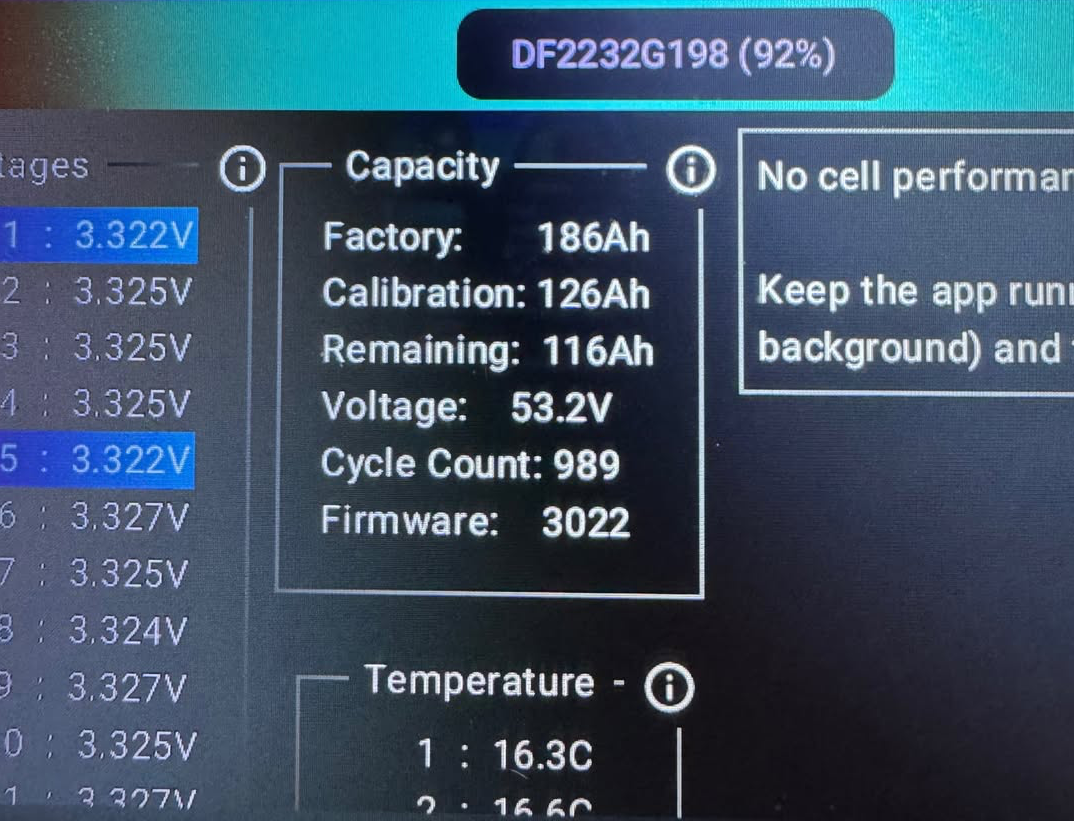
Just updated (Gen3 Hybrid 3.6, 2x Gen2 9.5 batteries), and one of my batteries is now showing a much lower ‘calibrated Ah’ value…
Any ideas why? Do I now need to schedule a full calibration?
Are there any advantages to moving from 3020 from 3022? If so, what's are they please. Thanks.
TimHutchings Taken from the change log
Optimise issue where SOC does not drop from 100% after a minor overvoltage alarm.
Optimise balance activation conditions: passive balancing is disabled when a battery cell detection fault is present.
ectoplasmosis the Ah value should not change, it does over time gradually fall i guess.
Schedule a calibration overnight, i always find turning teh power down, doing the charge slower gets more power in
TheDragon (GivEnergy)
Inverter updated to 318 but battery failed to update from 4010 to 4011 two/three times...Should I do nothing?
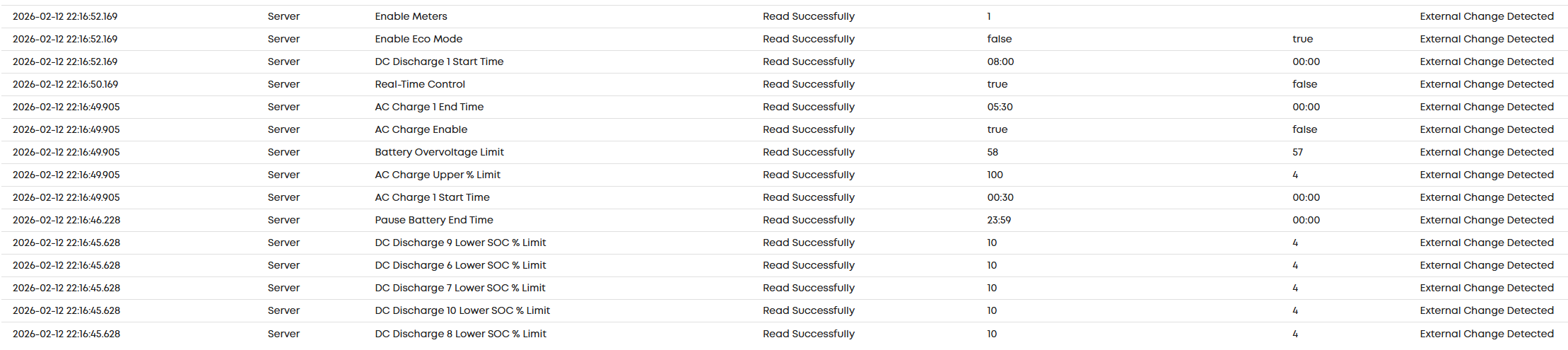
After updating yesterday (318 and 3022) and thinking everything OK. Battery failed to charge overnight as charge slots had been blanked. Did check after update, but must of been showing cached charge slots.
Hopefully now reset.
yes - when inverter updates the slots have to be reset
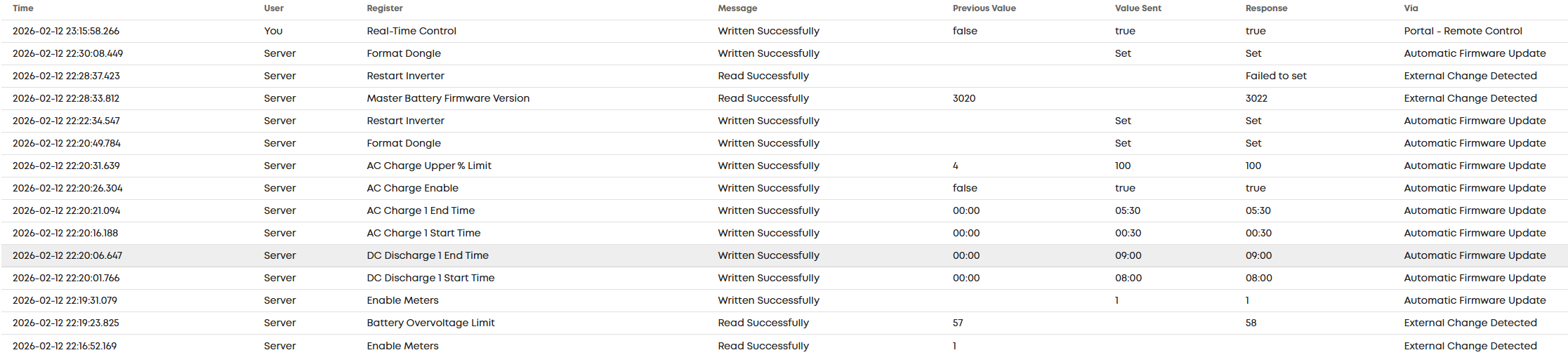
All my charge and discharge slots got put back as they were, only thing I had to reset was RTC (Real Time Control) which got turned off:
As other have said, 26m end to end.

TheGuru Thanks, I'll try a calibration.
The 'calibration capacity' fell from 180Ah to just 126Ah after the firmware update... meaning the capacity has reduced by 30%!
Nothing else has changed, everything was working fine previously on version 3020, I was able to use the full capacity of both batteries every day.
AIO overnight scheduled update failed, althought version 620 shown for software. BMS still at 12.
Redoing a live update brought up the disclaimer tick box, which when actioned started update. Timed pause at 29% and 90% before completion. Seems that the disclaimer held back the first attempt.
AIO updated successfully.
Overnight only charged to 75%. Will monitor tonight as normally the battery is at 100% in the morning
Charging schedule transferred over without problem.
.
Back at 100 percent overnight so all running as before.
AIO upgraded ok.
Only thing I notice with upgrades is sometimes things like battery reserve, charge limit can end different from what I had set.

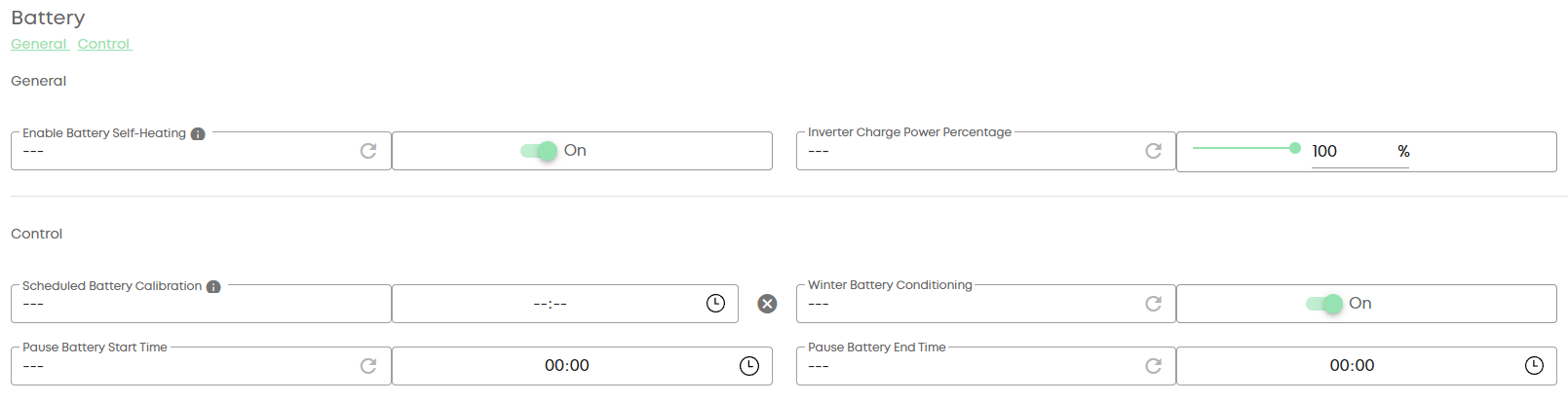
I'm lead to beleive that some inverters *Gen3? Now have an option for Winter Battery conditioning locally (so done via the inverter not the portal)
This should be a new toggle in the portal remote control page.
@Rubikcube I don't know what register this is (it's not even in GivTCP ) but something to be aware of maybe?
Gateway up to A0.014, without issue. I just put bypass on for the duration of the upgrade to prevent the house load from dropping.
hoggy I am sure someone will discover it and let us know.
Sneeking out a new feature and not in GivTCP 1st. Probabaly a Battery register, if the changelogs are to be read properly.
it mentioned 1 version back in 3021 which looks to have been skipped
Add AI Heating processes
Perhaps BritKak has gone to ground, not see anything from him in weeks
Changelog: "Add AI Heating processes"
Artificial Intelligence for this??
So is this update worthwhile or still in the if it isn't broken don't fix it camp? I'm running AIO and gateway, 13.5kwh version 1
Ultima357 So is this update worthwhile
Depends what version you are coming from.. Gateway LED changes, no. Grid import limit (if you get them or installer to config the numbers too) yes. Better handling of several power cuts in a row, yes. Improvement of some aspects of battery management, maybe. (AIO1 13.5 and GW1 here too).
YMMV
https://givenergy2025.zohodesk.eu/portal/en/kb/documentation/firmware-logs
geoffreycoan Great thing is it doesn't even need to mean 'artificial Intelligence' its just 'an inverter' Heating processes
Mouton BMS V12. The gateway is a couple of updates adrift now as I've not bothered mainly due to power loss and the faf of resetting clocks. Not sure what the import limit is about, presumably to limit it to 18kw? I've wired my house so my garage and car charger are supplied separately from the gateway to limit the throughput and stop any issues with car charging draining the AIO as Octopus Intelligent Go means I have no control over when it charges.
Ultima357 Not sure what the import limit is about
The grid import limit allows for the AIO charger to ramp down in periods of excess load to either protect the DNO cut out (ours was getting to 60C until it was upgraded) (much like eg Zappi etc do). Also useful tactic to help stay under the 18KW limit in the GW1 and avoid shutdown.
Did the AIO software update tonight. First two tries failed, the third worked though took 43 minutes to complete. Maybe I'll do the gateway tomorrow.