Best way for stats collection and reporting post cloud

26 comments started 2026-03-17 last 2026-03-19
Cloud PortalGivEnergy ProductsHybridBattery
S
#1 sponev

Should the worst happen and we end up with no cloud service, what's the best way to collect and report stats please? I have RubikCube running together with remote WAN access for control but I'd also like to collect and report basic stats - so solar generated etc etc.

What's the best way to go about this please? I know Rubik can record stats on a local android device but how do you easily report on that? Maybe @Rubikcube could consider a paid add-on?

Or am I looking at a local Home Assistant set-up please? Does that provide capability for basic stats reporting and if so, how good do your HA skills need to be please? Where is the data recorded and what back-up options exist? Thanks
G
#2 geoffreycoan

sponev Your inverter records daily and all-time solar, battery, import/export figures so you can view these with either the BBC basic or Rubikcube or Home Assistant integration. There is no other storage on the inverter.

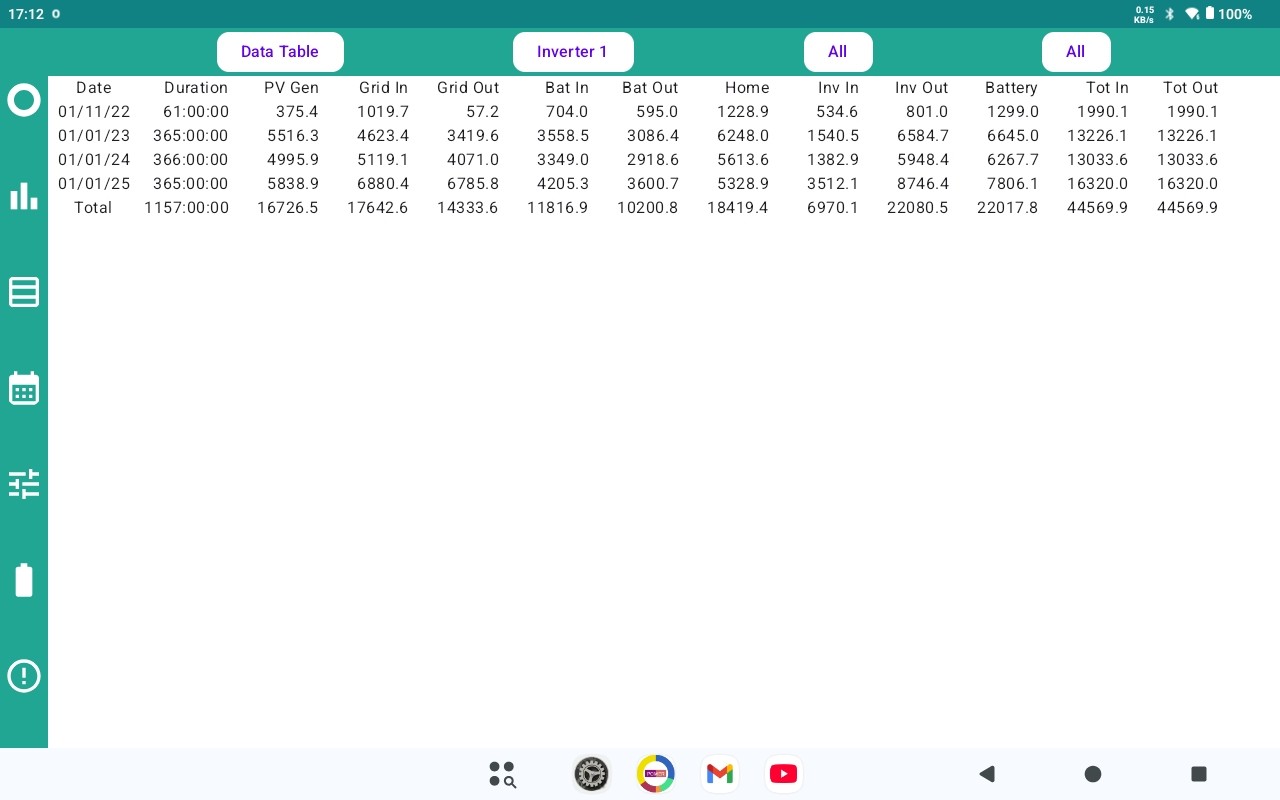
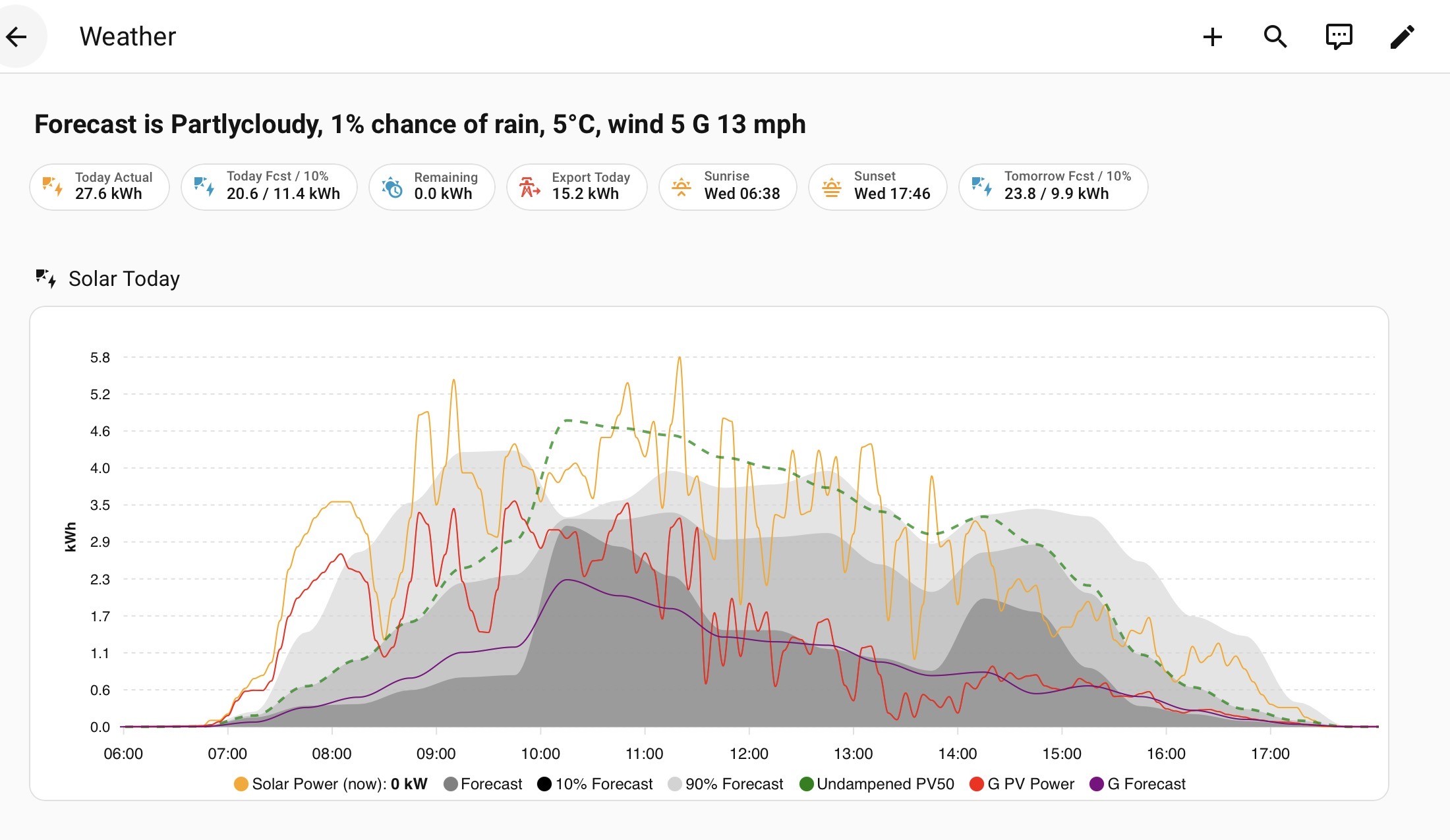
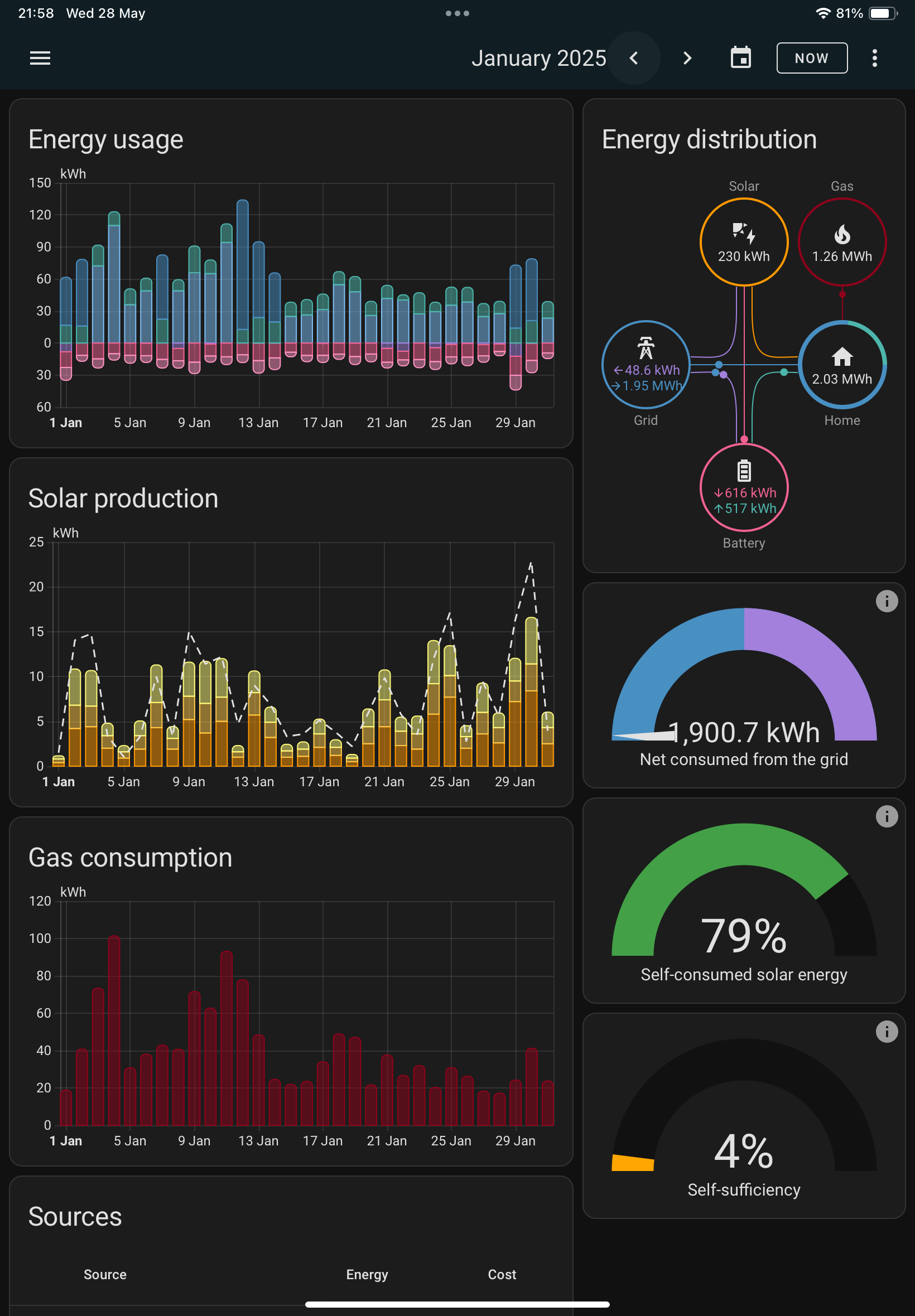
Rubikcube Android app will accumulate data for you so you can locally see the daily figures over time, Home Assistant will do the same and feed it into the Energy dashboard or you can create your own reports of any data.

e.g. today’s solar generation vs forecast

monthly energy stats:

If all you want is to collect the data each month then you can just look at the total at the start and end of the month. If you want a bit more drill down then Home Assistant will give you the most flexibility, Android app a bit less but still very usable.
Home Assistant runs on a PC or a Raspberry Pi or a Home Assistant device, its fairly easy to setup but does require a bit of technical nowse

S
#3 sponev

geoffreycoan excellent thanks. Is that HA code available anywhere or is it locally spun please? With the RubikCube app, we have the paid version but haven't collected stats yet - is there any graphical stuff in there already please or just tabular data? Is there export functionality e.g. to CSV. Sorry for all the questions. I'm determining whether the time investment needed to make my current Giv kit is worth it, or switch. Ideally the former although time is precious just now.

G
#4 geoffreycoan

sponev HA is open source so you can just install it yourself (or buy a ready-made box with it pre-installed). The first is a custom chart written in Apex, the code for that I can share, but once you get the hang of it, its pretty straight forward. The second is the in-build HA energy dashboard, you just configure it with your inverter battery and solar details and it does it all for you.

Configuring Home Assistant to talk to your inverter is pretty straight forward, there are videos and guides to help you, and plenty of people here with experience. Likewise we can help you with creating dashboards etc and there are other threads where this has been done before (you know who you are @Daveb01)

You can export the data from HA in CSV if you want. You asked about backups, lots of options, either backup to a NAS drive or similar, or I created a google account which gives 15Gb of free storage and my HA backs itself up to Google drive every night.

The Android app I'm sorry I have no experience of it but there is a documentation at https://givenergymonitor.wixsite.com/tutorials

S
#5 sponev

geoffreycoan this is excellent and thanks for your time. We have some experience with web programming and server management so I guess we can handle HA with a bit of practice. Thanks again, appreciated!

R
#6 Rubikcube

sponev is there any graphical stuff in there already please or just tabular data? Is there export functionality e.g. to CSV

There are basic graphs, but mainly tables. I'm more of a numbers person.

You can export to CSV (and import too) to do your own analysis.

https://givenergymonitor.wixsite.com/tutorials/portal-transfer

S
#7 sponev

Rubikcube excellent, thank you. Any intention to add some graphical functionality please, maybe as a paid option? I use the Giv app quite a lot to pre-empt things like clipping and tweaking settings - the graphs are pretty handy for that. I'll also be looking at Home Assistant but it's nice to have most of it on your phone. No worries if not of course and thanks very much for what you've done already!

S
#8 SteveClubley

sponev
About a year ago I bought a Home Assistant Green device which came with HA installed. It auto updates a few times a month. I back it up to Google cloud. It’s only using about a third of its storage and processing power. You can also access it remotely. Reporting and graphs are easy to generate just from menu options.
There are what HA calls ‘integrations’ to 100s of smart home devices or services so you can bring everything together in one ‘app’ on a smartphone, tablet or PC.

S
#9 sponev

SteveClubley thanks for that and it's sounds very interesting. Perhaps a bit more accessible than I'd imagined. I'll take a look for that, thanks again.

S
#10 sponev

SteveClubley I can pick one of those up for just over £110 so not too expensive, particularly through my business. Then it looks like "simply" following one of the SpeakToTheGeek tutorials to install GivTCP and then on to an energy dashboard configuration etc? On face value it looks relatively straightforward? I don't want to do anything fancy (yet) simply be able to access the kit locally. You mentioned remote access, is this simply a VPN and then navigate to the local IP address please? Does it display the dashboards etc reasonably well on mobile by default please? Sorry for all the questions but this does look like a good way forward. Thanks again.

S
#11 SteveClubley

sponev

I use Home Assistant Cloud which has a remote access feature along with other features. It costs about £6 per month depending on whether you subscribe monthly or annually. There is a free trial for a month. It enables the standard HA app (I use an iPhone) to access HA as if you were at home.
The dashboards are absolutely fine on an iPhone. Dashboards are easy to create from menu options. You have the option to use YAML but I haven’t done so.
I also use an Amazon Fire tablet to display dashboards for GivEnergy (GivTCP) info and other smart home stuff like lighting, Hive heating, and EV status. Speak to the Geek has a great video on how to do this.
With HA automations you can do endless stuff eg I can turn the heating on in my EV from my Apple Watch. Your problem will be when to stop messing and tweaking 😁

S
#12 sponev

SteveClubley Excellent thanks, I feel a purchase coming on!

R
#13 Robgy

SteveClubley Your problem will be when to stop messing and tweaking

That is exactly the main problem with home assistant, it's addictive and the possibilities are endless 😉

G
#14 geoffreycoan

SteveClubley you’re the first person I’ve heard mention that has HA cloud.

How does it work, is all your HA running in the cloud (including givtcp), or do you have a local device still and the cloud is just for remote access?

@sponev you can easily setup remote access to HA running locally. You ideally need a fixed IP address from your internet provider (mine charges £2 a month) although there are workarounds with DDNS. Then VPN app is pretty easy to setup for remote connection into your local HA.
The graphs and dashboards are all responsive design, there’s been a lot of improvement to the HA UI in the last year, it’s now a lot easier to create custom dashboards showing what you want to.

HA has the cloud offering and the HA devices (green, yellow, etc) and through that the software is open sourced. There’s a huge amount of community development with integrations for everything you can reasonably think of. New HA releases come out every month which add or improve functionality each time. Its very impressive and can be addictive as said !

A
#15 alan_johnston

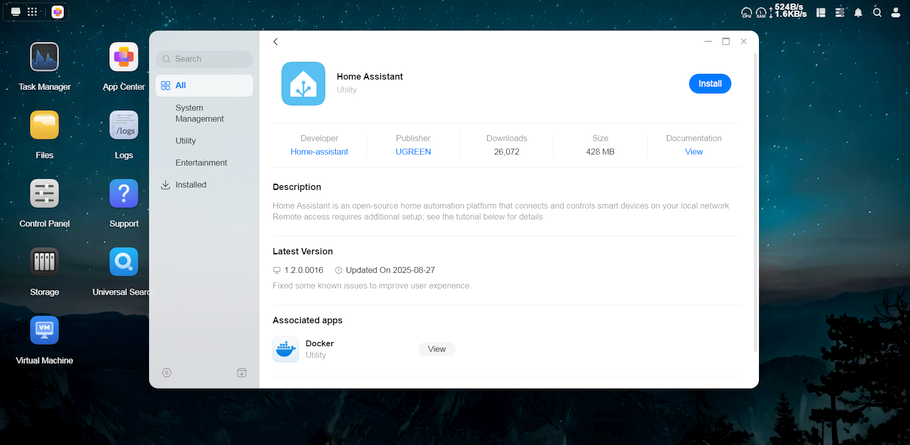
I have just got a UGREEN NAS which has a Home Assistant module. When I have finished setting up the NAS and migrating the data across from the old one, I might give it a go. I tried HA on a Pi but gave up after a couple of days. It was too slow and wasn't going well so I gave up.
UGREEN also has a docker app so might be able to do things with that.

S
#16 SteveClubley

geoffreycoan

Hi. The HA still runs locally. In my case on a HA Green device. HAs/Nabu Casa’s cloud service provides the remote access to your local HA. Their cloud service also lets you use cloud based voice assistants like Alexa to control HA. That said if you want everything to run locally then they also have a dedicated voice device that you can have in your home.
As you say there’s so many additional ‘integrations’ that can be added, all seem to have good support and can work with each other eg Hue motion sensors to operate Tapo bulbs, Time & Date to operate Aqara roller blind drivers. So HA should be seen as much more than a GivEnergy admin alternative.

V
#18 Vestas

geoffreycoan As an aside I get this error occasionally on GivTCP v3 and I see you raised an issue which was apparently fixed in a dev build last year? Has that been pushed to any of the other builds?

2026-03-18 09:18:32,013 - GivTCP - register - [ERROR ] - Error processing datetime. Sending Zero Date

The thing is that it actually DOES set the date to a string of zeros*, so it doesn't sound like some sort of error handler like the issue response suggested.

*verified using Rubikcubes app and the BBC basic one.

Apologies to others for off-topic question, just thought geoffreycoan might have a quick answer.

S
#19 sponev

Vestas Thanks and I'll take a look. But first priority is a simple and fast workaround in case Giv pull the plug. £110 isn't too much of a hit to get some peace of mind.

S
#20 sponev

geoffreycoan Thanks and it does seem reasonably straightforward. I've already connected to the RubikCube app remotely via VPN into a Fritzbox router, so shouldn't be too bad. It also seems like there's a HA Green cloud option although I'll try to avoid the £6 per month if I can.

S
#21 SteveClubley

sponev

The HA cloud services like remote access should work irrespectively of what device you are actually hosting HA on locally eg on a Green device, Raspberry Pi etc.
If you can get a VPN to work then you could avoid paying for the HA cloud services.

G
#22 geoffreycoan

Vestas As an aside I get this error occasionally on GivTCP v3 and I see you raised an issue which was apparently fixed in a dev build last year? Has that been pushed to any of the other builds?

2026-03-18 09:18:32,013 - GivTCP - register - [ERROR ] - Error processing datetime. Sending Zero Date

I just checked my givtcp logs and I am not seeing that error any more. I was running a dev release for ages as that had more bug fixes, but I’ve been running 3.5 since it came out and that version has been very stable for me.
I do get occasional bits where givtcp won’t talk to the inverter, most times givtcp sorts itself out, but occasionally (I had one this morning) where my error automation had to give it a helping hand and restart givtcp to get everything working again. But this is infrequent.

You could try givtcp dev which on version 3.5.7, but there hasn’t been any new releases from Mark for quite some time. GivTCP beta is still on v3.3 so don’t use that.

V
#23 Vestas

geoffreycoan Thanks. I think I'll have to live with it.

Can't help wondering if BritKat is (was) actually a GE employee. It would explain the lack of updates...

S
#24 sponev

Vestas I was wondering that too. I'm about to delve into HA and GivTCP for the first time and now wondering about the sustainability of that.

W
#25 wrighar

Vestas Wasn't there talk last year of him visiting GE under P.L. help to check/test out the new version of code?

#26 hoggy

No he's not a GE employee - he was from the old Developer volunteer group I ended up in years ago when Givenergy first wanted to build an API.
Local control (GivTCP) spawned from that group. The group is long gone (hence why i don't have access to anything modbus register wise since it went away) but he still seems to be able to get the right people attention for new kit as it comes out.

He is just busy with his real job at the moment.