
First steps with Home Assistant

20 comments started 2026-03-19 last 2026-03-20
Cloud PortalHome AutomationGivEnergy ProductsHybridHome Assistant
S
#1 sponev

So, with the possible demise of GE, at least quite a lot of speculation, I'm about to embark on setting up local control with Home Assistant. This will run alongside the excellent RubikCube app which I've already configured for local and remote access.

Tomorrow I have Home Assistant Green arriving with HA already installed. My objective and I suspect similar for lots of others soon too, will be to set up inverter access, the ability to configure everything locally and stats reporting including some form of dashboard. Then when that's done, enable remote access too.

It looks relatively straightforward to get GivTCP installed but what are the next steps after that please? I see SpeakToTheGeek has a short tutorial about setting up but is there anything a bit more comprehensive with step by step instructions please? As I mentioned earlier, my guess is that a lot of folk will be ploughing this same furrow soon, so any guidance really appreciated please.

S
#2 SteveCook

Have you got a battery?
What tariff are you on?
If you have a battery I world suggest predbat. It works brilliantly for me. https://www.youtube.com/watch?v=PvGyENVJup8
You might need to add Solcast
Watch some of the youtube videos on how to build dashboards. I found the easiest way once HA was up and running was to use a laptop with another display plugged in. One screen youtube a tutorial that i could follow/pause whilst the other screen was HA that I could work on.
I got a PI and added an SSD as there have been reports of SD cards failing over time.

A
#3 AndyZ900rs

sponev
How to: excellent RubikCube app which I've already configured for remote access?

S
#4 SteveCook

Other HA apps I use are NGINX and DUCKDNS so I can use HA on my mobile when I am away from the house.
Google Drive Backup is also good and easy
It is difficult to guide you how to do this stuff. I found following youtube tutorials the easiest and TBH, I still look at them for anything I want/need to do ( Or hope Geoffrey sees my cries for help)

A
#5 AndyZ900rs

How can you set up the RubikCube app for remote access? It only works when connected directly to the inverter when at home...doesn't it?

S
#7 SteveCook

AndyZ900rs How can you set up the RubikCube app for remote access? It only works when connected directly to the inverter when at home...doesn't it?

Yes I think that is the case, though I suspect there is a way to use a DNS/VPN?? to connect into your home network so that your phone can then "see" your inverter even though you are not there. Sorry I am not an IT expert and am just guessing. That is how HA works when I am away using DuckDNS and NGINX

P
#8 pwdst

I can confirm that the RubikCube app works perfectly if you VPN in to your own home router.

A
#9 AndyZ900rs

pwdst
Cheers - excellent!

S
#10 sponev

pwdst it does indeed.

A
#11 AndyZ900rs

pwdst
I might try TailScale

S
#12 sponev

SteveCook we have a 5kw inverter and two 9.5kwh batteries. Also a seldom used Eddi for hot water. We also have a lot of solar, two EV chargers and two EVs. We are currently on IOG. Oh and a couple of heat pumps.

To be honest my first priority is to get as close to the standard Giv app as possible, so facility to control the usual inverter functions, plus scheduling etc. Then data capture and graphical display. Once that's done, I'll want to VPN in for remote access but that bit should be straightforward. So it's really how best to go from the stuff GivTCP appears to provide and then make that more user friendly via a dashboard or similar. But just the Givenergy stuff to start.

I'm new to HA but reasonably IT literate, so if there's no step by step instructions, I'll dive in and have a play.

S
#13 SteveCook

sponev
I am not an IT person, though I can follow others - if not too fast.
Best thing is to watch the numerous youtube videos aof how to:-
Get started
Build dashboards
Install predbat
Install VPN
etc
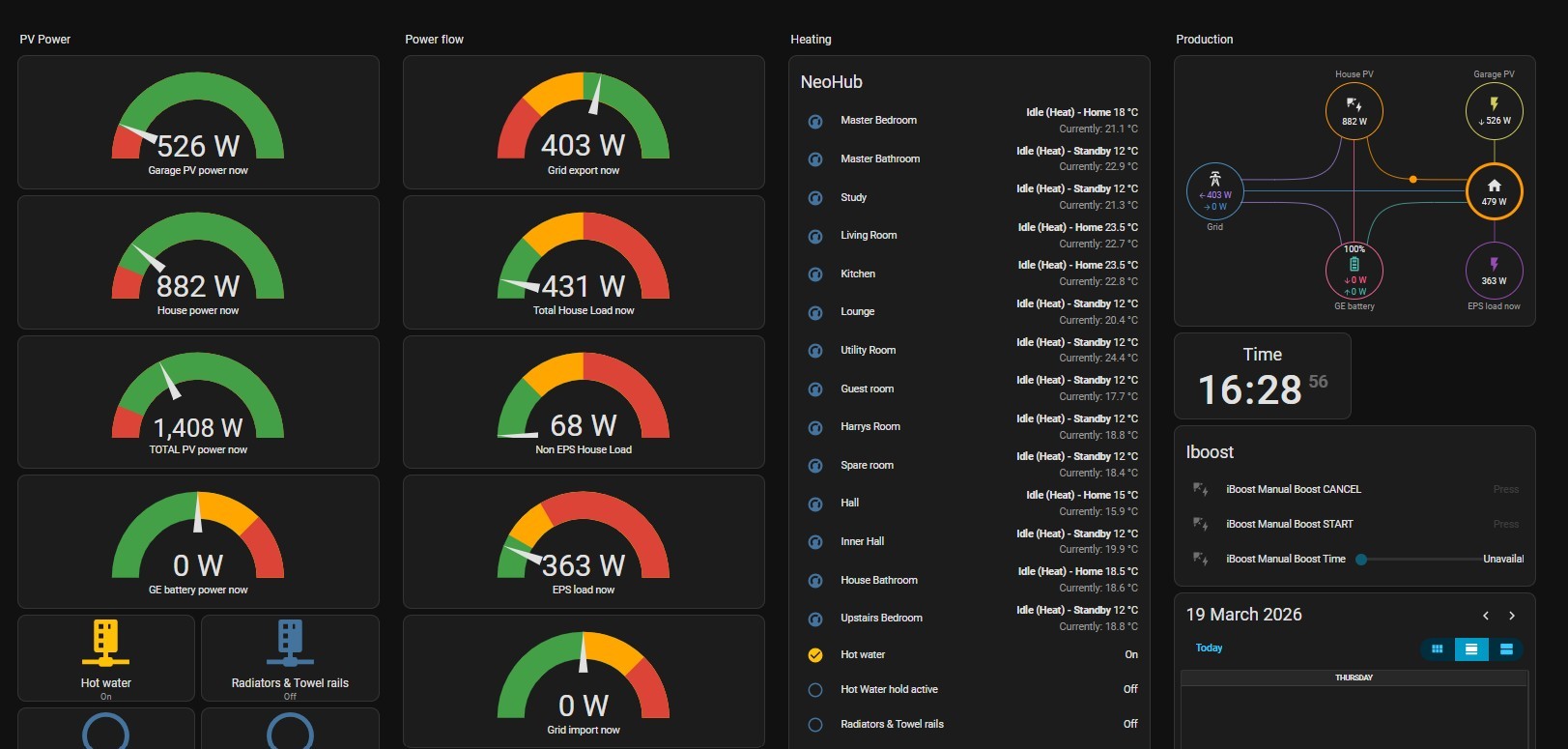
This is one of my dashboards. Took a morning from scratch. The power flow diagram top right is animated.

S
#14 sponev

SteveCook nice, thank you. I suspect it might be a bit easier than I'd anticipated but let's see. I'll leave Predbat for now, just keen to get as much functionality back, independent of Giv should the worst happen.

M
#15 MikeyHaz

sponev It's a great first step and good fallback for local control.

Predbat is where the fun kicks in - so don't write it off for too long. It claims it made me an extra £1.36 a couple of days ago - I'm always slightly sceptical of it's savings figures - but I know it's doing a much better job of managing my system than I would.

S
#16 SteveClubley

sponev

Hi. You’ll need to install a HA Integration called MQTT which GivTCP uses. Also install HACS which gives you access to a kind of App Store for Add Ons. In there you’ll find an Octopus add on which you’ll find useful if you’re with them.
Most things are accessed via the Settings menu. Get the Home Assistant Companion App for your mobile/tablet or you can use a browser from a PC to access HA.

W
#17 wrighar

sponev

Predbat is worth installing , even set to 'Monitor' mode so you can see what it would do.

S
#18 sponev

SteveClubley many thanks. Currently watching HA YouTube videos much to the displeasure of the wife!

M
#19 M_J

I am in the process of getting PredBat set up. Not that I currently have any batteries as Inverter broken on Wednesday.

Need to get a Solcast account as next step.

#20 Maxwell

sponev I don’t have HA Green. But a quick google suggest that only supports Ethernet no WiFi. Is your inverter hard wired to your router or have you got your Ethernet port on your router on the same subnet as your WiFi (if your inverter connects via WiFi) ? Although in the event GE disappears then you could then connect your HA directly to the inverter via Ethernet. Although I could have mis read the HA green specs. I do have form there eg the Beeb iOS app.

S
#21 sponev

Maxwell Same subnet and the new HA Green is connected to the Fritz repeater via ethernet - it was a seamless set-up in just a few minutes. The Green auto detected lots of kit in the house e.g. Sonos, AC units, CCTV etc but I've yet to configure all of that.

I've managed to get GivTCP running and already configured basic energy monitoring, display, control and stats collection in just a couple of hours. I'm also able to access HA on mobile via the app and a secure connection into the Fritzbox. So all good so far. Thanks for the encouragement and pointers folks, appreciated.