New Givenergy email

72 comments started 2026-04-13 last 2026-04-26
Cloud PortalGivEnergy Products
W
#1 wrighar

Just into my mailbox:

Keynote: Octopus tariffs are the most popular third-party integration. This remains available for free on the Standard Tier, since Octopus are billed for access directly. Second is HomeAssistant/GivTCP. This also remains available for free on the Standard Tier, because they access your inverter locally

GivEnergy Premium

Two weeks ago, we sent out notice that we’re introducing a Premium Tier for some features of GivEnergy software. We asked for feedback to help shape our plans, and received over 16,000 responses to our survey – and couldn’t be more grateful.

Since then, GivEnergy Software’s parent company, GivEnergy Ltd, has been placed under administration. This has made funding software from hardware sales impossible, so GivEnergy Software must implement a funding model that keeps our software available to all customers who rely upon it – with core functionality always available for free.

As promised, we want to take the time to be transparent about the survey results, answer the many questions raised, and bring some clarity to what the plans mean for you.


Results of the survey

93% of respondents use the app at least sometimes, and 58% use it at least once a day.

Your chosen three most popular features remain available for free on the Standard Tier while you’re at home.:

    visualising the current power flow

    battery state of charge

    manually setting charge/discharge schedules. 

The next three top features are available on the Premium Tier:

    historic energy graphs

    power graphs

    smart tariff automation

Octopus tariffs are the most popular third-party integration. This remains available for free on the Standard Tier, since Octopus are billed for access directly. Second is HomeAssistant/GivTCP. This also remains available for free on the Standard Tier, because they access your inverter locally. Other third-party integrations rely on our cloud API – which costs us to run, while they earn a subscription from the customer. Such services will become Premium tier options.

53% of you felt that paying something – at least £2 per month – felt reasonable. However, only 20% felt that our final price point is reasonable – this means we have some work to do to earn it.

59% of you felt “disappointed but understanding”, or better, that we need to introduce a premium tier – although at the same time, we recognise that the rest of you feel deeply let down by it, and we hope that this email will answer your concerns.

Only 15% believe that our tariff automation will save you £5 per month off your energy bill. This represents a huge opportunity, because our data shows that it’s true for more than half our customers. We need to overcome this trust hurdle to empower energy freedom for all.

We also received over 9000 questions and comments, which we have put together into the following FAQ.

We hope that this will bring clarity and comfort, and that you will support us with patience, understanding and hopefully subscription as we make this transition.


What does the software actually do?

This question really stood out because it means that too many of our customers are not getting the most out of their battery investment!

In short: GivEnergy saves you money by storing energy when it is cheap, then releasing it when it is less cheap.

You can save money by adding a schedule to charge your battery at the same time every night on an electricity cheap rate (a feature that remains available on the free Standard Tier). But, for optimal savings, you need to consider expected usage, solar generation, tariffs, and many other factors. A basic version of this has previously been available as “Smart Tariff” – GivEnergy Premium will extend this feature, to automate savings to the next level.

Previously, GivEnergy Software existed primarily to support hardware sales. This resulted in a neglected software experience. Now, it exists solely to support existing customers with top-quality software. This is an opportunity for us to bring software to you that makes managing your GivEnergy equipment easier and more lucrative than ever before.


Will GivEnergy Premium really save me money?

That’s the goal. Simulations show that our new optimisation software can much more than offset the cost of the subscription for the majority of customers.

This is evidenced by the similar services on the market which make use of the GivEnergy Cloud API. These use our platform’s resources to save you money – and earn their subscription from you. They will still be able to do this, but the costs must be borne fairly to ensure this will be possible for all into the future.


Can you charge for software? It was advertised as free, and it feels unfair.

Yes. As set out in our EULA, access to software “is provided at the sole discretion of GivEnergy. The purchase of GivEnergy hardware does not entitle you to use GivEnergy software.”

Some have noted that we have old brochures advertising software that is “free forever”, and others located an old pricing document which indicated free software for customers within warranties. Neither of these representations are contradicted by our plans: we undertake that for at least as long as GivEnergy Software exists, there will be a free Standard Tier.

Also in our EULA, we explicitly reserved the right to offer a “Premium Tier” at a paid monthly subscription. This is what we are rolling out in May. Our EULA mentioned a 90-day notice period for changing the price of the Standard Tier - but this was and remains free. No notice is required for changing or introducing a Premium Tier. We allowed a month’s notice at our discretion to prepare customers for this change.


Do you have to do this?

Yes. With GivEnergy Ltd going into administration, there is no access to funds from hardware sales, which was the previous funding model. Until now, the software used by existing customers has been paid for by new customers buying hardware. The ongoing cost of cloud services must be covered by the users who rely on them, or the platform will be lost entirely.


What about warranties, and customer support?

GivEnergy Software Ltd is not responsible for either warranties or hardware support.

We understand that the inner workings of the GivEnergy group companies is not clear – nor interesting – to customers, and ideally customers needn’t know the difference between the entities. But, the reality is that GivEnergy Software has neither the ability, legal responsibility, nor indeed authority to assist in these matters. Questions regarding these topics must be directed towards GivEnergy Ltd and/or its administrators.


What happens if the administrators liquidate and shut down GivEnergy Ltd?

Your hardware will continue to operate as usual. The software will continue to operate as usual.

GivEnergy Software is a separate entity and will continue for as long as we are able to fund our costs.

Plan A is that our GivEnergy Premium subscription will be attractive and valuable enough to you, that you will choose to support us and ensure that the GivEnergy software - both free and Premium tiers - remains available to all.


What happens if GivEnergy Software Ltd also enters administration?

This is something we are explicitly looking at, as a Plan B.

Unlike many manufacturers of smart devices, we believe that when you purchase a product, it’s yours and should be usable forever, regardless of what happens to the company. That’s why we have always supported open source, direct control of your equipment.

Today, you can view telemetry in the official app completely offline, and you can control your hardware directly over your home network - but you need some technical know-how to do this.

With GivEnergy Premium, we’ll be investing part of your subscription fee in developing simple, user-friendly, local control within the official app, prior to cloud login. We have already started – if you log out, you’ll see a new way to connect to your inverter marked “offline mode”. We’re working on adding control to this very soon.

If we can fund ourselves long enough to complete this project, “offline mode” will continue to operate no matter what happens to GivEnergy Software in the future.


Can’t you fund the software in another way, like…

  1. Advertising?

The economics don’t add up. Ad revenue is paid per-impression. This works well in an attention economy, like social media – where you have many hundreds of thousands of views per day. GivEnergy customers are an exclusive bunch, who use the app only occasionally – in fact, if the Premium automation is working well, you should almost never need it except out of curiosity!

  1. Using part of what I paid for the hardware to run the software?

With hindsight, we would have structured things differently. We didn’t ringfence the cost of multiple years of software operation into the hardware cost, and this was not transferred from GivEnergy Ltd to GivEnergy Software Ltd.

  1. Could you charge only new customers, and ‘grandfather’ old customers to retain access to the platform?

With our parent company in administration, we have to plan for the scenario that there may be no more new customers.


What does “local” and “remote” mean in software?

“Local” means that the software is communicating with your hardware, directly from your device (such as your phone) to your inverter, over your home WiFi or network. “Remote” means that you are communicating with your hardware via “the cloud”, which really just means our computer servers in a data centre. We have to pay thousands of pounds each month for the use of these servers – which is why we need to charge our customers for their use. But, if you have the technical know-how and are willing to pay for it yourself, you can run your own server at home!


What will be in the Standard Tier (free) vs the Premium Tier (paid)?

Standard Tier:

Free forever.

Monitoring of your system’s current power, with the official app, while at home.

Monitoring of your system’s battery state of charge, with the official app, while at home (pre-login already available).

Controlling your inverter’s settings, like charge slots, with the official app, while at home (pre-login coming soon).

Free remote access supporting at least the above functionality, for specific hardware configurations which do not support local control (like those with 4G dongles or unsupported hardware).

Firmware updates, if made available from other Group companies.

Third party software integration over your home network (like GivTCP).

Premium Tier:

Monthly subscription.

Monitoring your system while at home and while away.

Viewing historical data, graphs, and reports.

Automation tools that save you money, like Smart Tariff.

API access (including third-party integrations via cloud).

What about the EV charger (EVC)? And Smart Plugs?

Complete, remote EV charger functionality will be included in the free tier from the outset, because local control is not fully supported.

We’re looking at ways to improve local EVC control, which will benefit tinkerers as well as app users. We reserve the right to move more of the EVC control over to direct local mode, avoiding the cloud costs, in the future.

GivEnergy’s Smart Plugs have been discontinued and will no longer be able to be set up within the app after next month. They were produced in partnership with Tuya, and can be set up controlled with the Tuya app available for free on the App Store.


I have heard that the GivEnergy EV Charger (EVC) won't function if it can't connect to the GivEnergy servers. How can I ensure it continues to work?

There is currently no expectation of the EVC servers going offline. However, if you want to ensure that your GivEnergy EVC will still work even if it's disconnected you can do either of the following:

  1. Register your id tag(s) to your EVC using the GivEnergy App or Portal and tap it on the EVC to start or stop a charge. This will continue to work even if the EVC is offline because the EVC itself keeps track of registered tags.
  1. Create and enable a schedule on the EVC using the GivEnergy app or Portal that charges the car at the times you require. This will cause the EVC to start a charge at the scheduled time as long as a car is plugged in, regardless of whether the EVC is online, because schedules are stored on and executed by the EVC itself. If your vehicle supports setting a schedule, it is recommended to set a 24-hour schedule on the EVC and a more specific schedule on the vehicle.

Please note, Plug and Go (also known as Plug and Charge) will not function if the EVC is not online as this functionality is provided by the GivEnergy servers. You don't need to turn it off, but please be aware that plug and go will not activate if the EVC is offline. If you would like a charge to start as soon as your EV is plugged in, you can create a 24-hour schedule as described above.


I don’t live in the UK. How does this affect me?

The Premium tier applies globally, and our secure payment provider will accept payments from all countries where GivEnergy hardware is active. We will cover local sales tax, Forex and bank fees – so the price you pay will be exactly equivalent to the price in British Pounds. If for any reason payment is not available in your country, we’ll provide free Premium access until we can make it available for you, too.


I am a commercial or large project partner. How does this affect me?

Commercial systems vary between sites. You may or may not have good local control, and the per-user price model may not be appropriate for you. For the time being, such systems are excluded from these plans and will continue to operate exactly as before. If you would like to discuss a special business arrangement, please contact us at premium@givenergy.co.uk with “Commercial Premium” in the subject line and we will get back to you in the coming weeks.


I only use basic features. Will I still be able to use my hardware if I don’t pay?

Yes. If you only need monitoring and manual control while you’re at home, you’ll be able to continue using your system without a subscription.For users who want remote access, data analysis, automation, and optimisation, the paid tier is designed to deliver value beyond its cost.


Do I need GivEnergy Premium to use the Octopus tariff controlling my battery?

No. Energy providers are charged separately for access to the API, so they will continue to have access to your inverter. However, we hope you may choose to subscribe to GivEnergy Premium for some of the other features it offers.


How much will it cost, and how did you decide on that?

We are launching in May for a price of £4.99 per month. This includes VAT and payment processing fees. This price reflects an honest assessment of the platform costs, divided by our expected userbase of GivEnergy Premium, given the survey feedback.

All revenue will go to supporting the software and building new features that will save you more money. We don’t intend to make a profit from this, and we will review pricing in the future if this happens.


Why should I pay when support has been poor?

This feedback has come through very clearly, and is a fair challenge, though difficult to hear. GivEnergy Ltd’s level of support was not where it should have been, and we recognise that this contributed to the difficulties the company finds itself in.

On the software team, our ability to impact customer support is both legally and practically very limited. We’ve aimed to improve it through creating the new Health Check feature, and we’ll look at more improvements in future. With GivEnergy Ltd in administration, GivEnergy Software can only directly support with software issues – we’re not authorised to help with hardware and firmware.


Will firmware updates still be free?

Firmware is generally not maintained by GivEnergy Software, and it’s unclear at this time what the future of firmware will be. However, GivEnergy Software will undertake to provide any firmware updates we are given, for free and at the customer’s discretion. There is no plan to force any payment changes through firmware updates, as some have questioned.


Will my installer still be able to support my system, for free?

Yes. All installer accounts will be provided with a free Premium subscription, and they will be able to view and debug your system as before.


Can I subscribe later if I don’t sign up immediately? And can I unsubscribe?

You may subscribe – and unsubscribe – at any time. A payment qualifies you for access to GivEnergy premium from the day of month the subscription began, to that day the following month (e.g. from the 7th of July to the 7th of August), regardless of the number of days in any one month.


Are you offering any discounts?

We’re offering an early bird discount – anyone starting a subscription during the month of May will get their first month completely free.

Registered charities may email supporting documentation to premium@givenergy.co.uk to receive permanent free access to GivEnergy Premium - please use “Charity Premium” in the subject line.

We reserve the right to offer further discounts in the future.


I don’t want to pay. How can I use the free Standard Tier app?

That’s OK! Log out of the app and you’ll see a new option to use the local features on the sign in page.


I’m in! How do I sign up for the Premium Tier app?

Thanks for your support! We’ll follow up with a link to our payment page and new Ts and Cs when it is ready in May. Note that we can’t link to payments from the app due to app store restrictions, so after login, if you see a paywall you’ll need to follow the link to the payment portal in our next email.


I have another question not answered here!

Please direct any questions to premium@givenergy.co.uk with “Question About Premium” in the subject line, and provided the question is about Premium we aim to get back to you within 2 weeks.

View email in browser
update your preferences or unsubscribe

T
#2 TimI

What a mammoth email to read through. I get it, sure, don't like it mind. Multiple smart things at home have come in wiht the promise of having control free forever, and added premium levels to control it etc.

N
#3 Neal720

I get it don’t want to pay but if it’s only £2 for now, standard would still be fine, though do use the cloud function also.
Makes me wonder whether I should upgrade my firmware and software, if I read correctly do you think it could get pulled? If it crashes unsure there’ll be support to bail me out!!

G
#4 Goshiki2

Neal720 It’s £4.99

J
#5 jonhd

Am on Octopus IOF tariff, so only need Premium for view / downloading server logs - which I will do.

#6 GrahamShaul

Only because I am cynical! But I wish these companies would give up with the £x.99 nonsense. Just say that it is £5, the penny less doesn't fool anyone these days. Just poking the hornets nest in my case.
Not decided if I want it or not. I don't need it as it only is going to show if my system is alive or dead. If its dead then there is no one to fix it so finding out when I get home doesn't affect me either way. Can I live without remote viewing? Probably. I am still not convinced that there is the suggested £5 a month to be earned by entrusting my charging and discharging to their software, if I had all the details in front of me then I could make an informed decision. Currently I feel that I am being asked to trust them to deliver on their promise in time. Not ready to trust seems to be where I am at the moment!

D
#7 deepanshus

GrahamShaul whats more funny is that they acknowledge "Only 15% believe that our tariff automation will save you £5 per month off your energy bill"

and yet, they set the price to be as £5 per month, just to piss off the rest 85% ... have they not learned anything from their hardware business shutting down about not pissing people !

D
#8 duplada

Well do I like it ? NO am I going to subscribe YES.

My dual AIO doesn't run locally and I use the services of Wonder Watt for hands off 24/7 scheduling. I paid over £15k for my system which runs well and saves me a significant amount of money per annum, adding another £60 per annum is hardly going to break the bank. I also think that this time around the software is going to be better than it was in the past. Therefore I am "IN" and prepared to give this new scenario a chance.

A
#9 alan_johnston

The GE mail says

"I don’t want to pay. How can I use the free Standard Tier app?
That’s OK! Log out of the app and you’ll see a new option to use the local features on the sign in page."

This is not true.
GE have tweaked the app requirements so it is no longer compatible with my phone and I can't update to the version that has the new local features sign in.
There is not a version for Windows or Linux users either.

4
#10 4tea2

wrighar There is currently no expectation of the EVC servers going offline. However, if you want to ensure that your GivEnergy EVC will still work even if it's disconnected you can do either of the following:

Register your id tag(s) to your EVC using the GivEnergy App or Portal and tap it on the EVC to start or stop a charge. This will continue to work even if the EVC is offline because the EVC itself keeps track of registered tags.

Create and enable a schedule on the EVC using the GivEnergy app or Portal that charges the car at the times you require. This will cause the EVC to start a charge at the scheduled time as long as a car is plugged in, regardless of whether the EVC is online, because schedules are stored on and executed by the EVC itself. If your vehicle supports setting a schedule, it is recommended to set a 24-hour schedule on the EVC and a more specific schedule on the vehicle.

Please note, Plug and Go (also known as Plug and Charge) will not function if the EVC is not online as this functionality is provided by the GivEnergy servers. You don't need to turn it off, but please be aware that plug and go will not activate if the EVC is offline. If you would like a charge to start as soon as your EV is plugged in, you can create a 24-hour schedule as described above.

Can anyone shed any light on this part of the email?
OK, I confess I've watched a video on the "Speak to the Geek" channel. My understanding was that he was suggesting setting the EVC to "Activate Plus and Charge". I think that the email suggests the opposite.

Any thoughts?

Cheers
John

D
#11 DD

4tea2 The previous section said

Complete, remote EV charger functionality will be included in the free tier from the outset, because local control is not fully supported.

SttG made his recommendation before this clarification. (As a defensive move, presuambly.)

4
#12 4tea2

DD, yes I read that, but I find that part unclear. Is it saying that it will only work when an app update is released that reflects the free tier?

If it is, then that would imply that a schedule will stop working until the app update is released.

Seems clear as mud.

G
#13 geoffreycoan

4tea2 If it is, then that would imply that a schedule will stop working until the app update is released.

Schedules are programmed into your inverter. Currently that programming goes from the app via the portal to your inverter.

GivEnergy are introducing a new ‘direct local’ option which sounds like it is what you will use in future if you don’t pay the subscription (and presumably won’t be able to login to the app or portal any more).

Any schedules that are programmed into your inverter will continue to run regardless of the app version. If you upgrade the inverter firmware then this will wipe any schedules and you will need to set them up, but otherwise you just set the schedules up and it will execute them forever

M
#14 mrand31

Upgrades aren't going to happen for us Gen1 folks 😃

R
#15 Rubikcube

alan_johnston There is not a version for Windows or Linux users either.

There is an android version, and since you can run Android on a Windows, Mac, or Linux computer your statement is not really correct.

R
#16 Rubikcube

alan_johnston the app requirements so it is no longer compatible with my phone

Yes, the latest version of the Givenergy app requires Android 10 or later. An lot of phones were sold with Android 8 and 9.

My app requires Android 5 and up, and I hope to keep it that way for some time yet. Google puts pressure on developers to use only the latest versions.

A
#17 alan_johnston

Rubikcube since you can run Android on a Windows, Mac, or Linux computer your statement is not really correct.

But you have to be able to install and configure an Android emulator on your PC.
GE don't have a version of the app for the major desktop operating systems. 🙁

A
#18 alan_johnston

Rubikcube Google puts pressure on developers to use only the latest versions.

And the hardware companies (like Samsung) only update the Android OS for a couple of years then you have to buy new hardware when the old hardware works just fine. 🙁

G
#19 Giveme

Still a lot of confusion (at least for me) around how the schedule run by energy providers will work in practice. For obvious reasons there is a focus on Octopus tariffs as the market leader, but we are with OVO and use their app for charging the EV at off-peak times. Can anyone throw any light on how this fits in - my reading of the FAQ and the way the free tier and app will function in future suggests we may not need to pay for the premium tier unless we want to take greater control of things. Any thoughts?

D
#20 DD

Giveme we are with OVO and use their app for charging the EV at off-peak times.

Is that with the GE EV charger? If so, you get the premium tier for free, initially at least; if not, you'll need to clarify how GE is involved in car charging.

#21 GrahamShaul

Giveme My charging of the car uses Octopus Intelligent and ohme charger, I can't see how the GE ecosystem is involved in that. My battery is set to charge during the time period of OI to prevent the car from draining the home battery. I am also one of the 85% who couldn't see that there was a £5 income benefit from using the proposed functionality of future GE software, based on a lack of detail. So I am not intending to sign up. Had the monthly fee been a couple of quid then I would have opted in but the £5 was too high as no case was made to induce me.

R
#22 riversdale

With the help of AI, I have developed a Raspbrerry Pi based system that interacts locally (home wifi) with my battery/inverter system. I used Claude, but other AI apps are available. It does more than GivEnergy propose and it is a one-off hardware cost (<£100) and about 3W running costs. If anyone wants to do the same, post the notes below into a new Claude AI chat thread and be amazed. It will take you step by step, fault find, it can view screen shots that you post with alarming speed and accuracy.

GIVENERGY HOME ENERGY MANAGEMENT — BRIEF
For new users starting a Home Assistant implementation

INTRODUCTION
This brief is designed to be pasted into a new Claude chat thread to provide context and structured guidance for implementing a Raspberry Pi based Home Assistant energy management system for a GivEnergy battery inverter. Claude will guide you through options, decisions and implementation step by step, asking for confirmation at each stage before proceeding.

BACKGROUND
GivEnergy battery inverters can be monitored and controlled locally over your home network using an open source software stack running on a Raspberry Pi. This approach is explicitly supported by GivEnergy and remains free of charge under their Standard Tier, as it accesses the inverter directly over your home WiFi rather than through GivEnergy's cloud servers.

The result is a system that provides real time monitoring, intelligent automated charge and discharge management, and daily tariff notifications — at no ongoing cost beyond the one-off hardware purchase.

CORE SOFTWARE COMPONENTS
The following components work together and are all free of charge:

Home Assistant OS — open source home automation platform, runs on the Raspberry Pi. Provides the dashboard, automations, integrations and user interface.

GivTCP — Home Assistant integration that communicates with the GivEnergy inverter over the local network via Modbus. Provides all inverter sensors and controls.

Octopus Energy integration — connects to your Octopus account to provide real time tariff data, current and forecast rates, and next day Agile price schedules.

Solcast PV Forecast — provides solar generation forecasts for your specific panel arrays, updated throughout the day.

Predbat — intelligent charge and discharge planning add-on for Home Assistant. Integrates GivTCP, Octopus and Solcast to calculate the optimal battery charge and discharge schedule across a 48-hour horizon, automatically exploiting cheap and negative rate slots, avoiding peak rate import, and maximising export revenue.

HARDWARE REQUIRED
Raspberry Pi 4 (2GB RAM minimum, 4GB recommended) — approximately £50-60.
MicroSD card 32GB minimum — approximately £8-10.
Case and power supply for the Pi — approximately £10-15.
Total one-off cost: approximately £80-100.
Running cost: approximately 3-5W continuous power draw.

PREREQUISITES — INFORMATION TO GATHER BEFORE STARTING
Before beginning the implementation, gather the following:

Your GivEnergy inverter serial number — visible on the inverter label or in the GivEnergy app under device settings.

Your inverter's local IP address — available from your router's device list or the GivEnergy app.

Your Octopus Energy account number — visible in your Octopus online account. Format is typically A-XXXXXXXX.

Your Octopus electricity meter MPAN and serial number — visible in your Octopus account under meter details.

Your Octopus tariff product code — for Agile this is typically AGILE-24-10-01 or similar, visible in your account. Also note your DNO region letter (A through P, visible in your account).

Your Solcast API key — register for a free hobbyist account at toolkit.solcast.com.au. You are allowed up to 2 rooftop arrays on the free tier.

Your solar panel array details:
Number of panels and total kW capacity.
Azimuth (compass bearing) of each array face — note Solcast uses its own convention: 0=North, +90=West, -90=East, +/-180=South.
Tilt angle from horizontal in degrees.
If you have panels on more than one roof face, treat each as a separate array.

Your home network details:
Router make and model.
IP address of your Raspberry Pi (set a static DHCP reservation in your router for the Pi's MAC address).

IMPLEMENTATION STAGES
The implementation proceeds through the following stages. Claude will guide you through each one, asking for your specific details and confirming decisions before proceeding.

Stage 1 — Raspberry Pi setup
Install Home Assistant OS on the Raspberry Pi. Connect to your network. Access the HA web interface at homeassistant.local:8123. Complete initial setup.

Stage 2 — GivTCP installation
Install GivTCP via HACS (Home Assistant Community Store). Configure with your inverter IP address and serial number. Confirm inverter sensors are appearing in HA.

Stage 3 — Octopus Energy integration
Install the Octopus Energy custom integration via HACS. Configure with your account number, MPAN, serial number, tariff code and DNO region. Confirm import and export rate sensors are appearing.

Stage 4 — Solcast integration
Register at toolkit.solcast.com.au and configure your panel arrays. Install the Solcast PV Forecast integration via HACS. Configure with your API key and resource IDs. Confirm forecast sensors are appearing.

Stage 5 — Predbat installation
Install Predbat as a standalone Home Assistant add-on. Configure apps.yaml with your inverter, battery, tariff and solar details. Confirm Predbat is generating a valid plan. Switch from Monitor mode to Control charge and discharge mode once you are satisfied with the plan output.

Stage 6 — Automations
Set up the Octopus Agile next day rate alert automation — sends a daily push notification and email when tomorrow's Agile rates are published, highlighting any negative or sub-export-rate slots.

Set up the negative rate force charge automation — automatically overrides Predbat's charge target to 100% when the current import rate drops to zero or below, and restores normal Predbat control when the rate returns positive.

Stage 7 — Optional enhancements
Remote access via WireGuard VPN.
Additional IoT device integrations.
User guide for household members.
Local Flask server for dashboard access without cloud dependency.

WHAT TO TELL CLAUDE AT THE START OF YOUR THREAD
Paste this entire brief into your first message, then add the following information:

My inverter model is: [e.g. GIV-HY5.0]
My inverter serial number is: [e.g. FD2322F228]
My inverter local IP address is: [e.g. 192.168.0.51]
My Octopus account number is: [e.g. A-XXXXXXXX]
My Octopus tariff is: [e.g. Agile]
My DNO region is: [e.g. H — Southern England]
My battery capacity is: [e.g. 9.5 kWh / 19.2 kWh etc]
My number of battery modules is: [e.g. 2 / 4]
My solar array details are: [number of panels, kW capacity, azimuth, tilt — one line per array face]
My router make and model is: [e.g. TP-Link Archer AX55 Pro]
My Raspberry Pi model is: [e.g. Pi 4 4GB] and its IP address is: [e.g. 192.168.0.252]
I am at stage: [1-7 or "not yet started"]
Current issue or question: [describe where you are and what you need help with]

NOTES FOR CLAUDE
This is a technical implementation project. The user may have varying levels of technical experience. Please ask for confirmation before making any configuration changes. Provide step by step guidance with one stage at a time. Ask clarifying questions before writing any YAML or configuration files. When producing YAML files always provide the complete file rather than partial blocks unless the user explicitly requests otherwise. Flag any decisions that have significant consequences before proceeding. The user's inverter communicates via GivTCP using the local Modbus interface — all control is local and does not require GivEnergy cloud access.

This is intentionally thorough so that a new user arriving with no prior context gets a structured start and Claude has enough information to provide relevant guidance from the first response.

G
#23 Giveme

DD
Thanks,
No we use a Hypervolt charger so I assume I will need to dig deeper into how OVO use the API starting with OVO who - so far anyway - have been completely silent on the issue.

C
#24 CW

Giveme I'm not sure your EV charging will be affected by this. You have a vehicle being charged by a Hypervolt charger. OVO will be either communicating with the car or the charger (like Octopus do) so GE does not fit into this at all as far as I can see - why do you think you would be impacted?

D
#25 DD

Giveme I assume I will need to dig deeper into how OVO use the API

The remote control page on the portal should record all uses of the API, so that would be somewhere to start. But unless they are actively controlling your GE system (for a smart tariff, for example), not sure why they would be using the API.

So I see that OVO do have some support for GE systems
https://www.solarpowerportal.co.uk/solar-installations/kaluza-and-ovo-launch-new-smart-energy-tariff-for-solar-and-storage

Perhaps you have both your GE and your car charging controlled by (installed by ?) OVO ?

G
#26 Giveme

CW just to trying to understand bigger picture, but this is reassuring, so thanks.

G
#27 Giveme

DD of course, the OVO charge app controls at the EV level, I see that now.

P
#28 pwdst

If you are seeing posts related to EV charging then it is likely to be for one of two reasons-

  1. The user has puchased and installed a GivEnergy branded charger, which is therefore controlled by the GivEnergy app/API.
  2. The user may have a dynamic tariff and is using the API to pause/charge their GivEnergy batteries to prevent them discharging into the car/lower charging cost.

If neither of these apply to you then I can't think how your EV charging would be affected.

T
#29 TheOmnisis

riversdale OMG - are you me in disguise? This is literally what I had Claude do for me over the weekend! I had had a Pi500 sat there for about a year waiting for time to do it all manually - but with the newer Claude models, it's now piece of cake... however, I have one sticking point - I've had my GivEnergy just as on online one for the last 2 years so I Deco mesh system do a IoT 2.4 signal and connected the dongle to it.. all fine - and that is what the inverter is now connected to - but at the moment, the stupid GivEnergy app refuses to offline connect - I know it's not relevant (or I hope it's not - I'm not far enough though the setup to know if it will affect the GivTCP instructions) but it's annoying me.

G
#30 Guybrush-Threepwood

riversdale I’m confused. What is Claude producing for you? Automations to charge and discharge your battery?

Why is Predbat not already doing this? It should take all those factors into account, it does math to factor in cable and inverter loss. Charge and exports vs freeze and send all solar straight to the grid.

D
#31 duplada

As I wrote above I have a Dual AIO system with Gateway which doesn't have a "Local" mode. I also use Wonder Watt for 24/7 Scheduling I am on the Octopus IOG Tariff. I therefor replied to the latest Givenergy email with the following questions.

"I have a Gateway and Dual AIO system, which has never had local access when using the App. Can you tell me if this will change with your new subscription model? I also use the services of Wonder Watt for scheduling, I know that they use your API, my question here is that, do you bill Wonder watt for API services or do I need a subscription for that?"

I received a very prompt reply which is a good start.

"Thanks for getting in touch.

Regarding your system not supporting local access - we're working on resolving that. In the meantime, any hardware that does not support local access will be provided with free cloud access so that you can continue to use your system.

We don't have a relationship with Wonder Watt; anyone who shares their API key with a third party will need the Premium Tier to continue to do so. This is because Wonder Watt - and others - charge a subscription fee, but GivEnergy Software pays for the servers that actually action the commands. We'll reach out to Wonder Watt in the coming weeks and see if they would be interested in a commercial agreement.

Hope that helps.

Best,
GivEnergy Software"

As I wrote above I am going to proceed with the subscription because as much as I don't like it, I feel that this time around the software is going to be much better, and so far the "Software Team" are responding in a prompt business like fashion which is good.

K
#32 killythebid

I can't see myself subscribing to the premium service. I do not use much that is on offer, although I would lose historical data.
I use the solar setup quite simply compared to others I just self-consume (hot water or charge the car) or just let it export. The only thing I do mainly in the winter is charge the battery overnight on cheap rates.

I may consider the Raspberry Pi option and run my own monitor locally. I do i have the rubikube app, which suits me fine, which I paid for the full access on. It's a good tool.

D
#33 Dabz

My parents and I both have GE systems including the EV chargers - neither of us will be subscribing, mainly out of principle but also the line about

What happens if GivEnergy Software Ltd also enters administration?
This is something we are explicitly looking at, as a Plan B.

and

If we can fund ourselves long enough to complete this project, “offline mode” will continue to operate no matter what happens to GivEnergy Software in the future.

The fact they would write that in a customer facing email suggests that the probability of this happening is high in which case the subscription may be history before too long anyway.

Sounds to me like a sinking ship and I'd rather save my £5/month

T
#34 TheOmnisis

Dabz That sort of raised a big of a red flag to me too - which is why I wanted to build something separate incase their entire server system went offline

G
#35 geoffreycoan

riversdale IMPLEMENTATION STAGES
The implementation proceeds through the following stages. Claude will guide you through each one, asking for your specific details and confirming decisions before proceeding.

Stage 2 — GivTCP installation
Install GivTCP via HACS (Home Assistant Community Store). Configure with your inverter IP address and serial number. Confirm inverter sensors are appearing in HA.

Stage 3 — Octopus Energy integration
Install the Octopus Energy custom integration via HACS. Configure with your account number, MPAN, serial number, tariff code and DNO region. Confirm import and export rate sensors are appearing.

Stage 4 — Solcast integration
Register at toolkit.solcast.com.au and configure your panel arrays. Install the Solcast PV Forecast integration via HACS. Configure with your API key and resource IDs. Confirm forecast sensors are appearing.

Stage 5 — Predbat installation
Install Predbat as a standalone Home Assistant add-on. Configure apps.yaml with your inverter, battery, tariff and solar details.

Thanks for sharing this. I would also point out that there is extensive installation instructions for predbat https://springfall2008.github.io/batpred/install/ in the predbat documentation

I am not against using something like Claude to prompt you through the process but I would be vary wary of following blindly what it says. Especially when it comes to configuring and setting up the predbat apps.yaml, I see far too many people who have used generative AI to create their predbat config, and frankly they are very badly wrong. You must follow the predbat documentation for that step

R
#36 riversdale

Guybrush-Threepwood
I got Claude to prompt me through the set up of the Raspberry Pi, the installation of the relevant apps and some custom configurations such as automations.yaml, where Claude wrote the yaml script to send me SMS and email notifications as soon as the Octopus Agile rates are published for the next day, listing the time slots that are 1. Negative or zero and 2 below the current export rate.
Claude does NOT calculate or execute charge/discharge actions Predbat does that. Claude can however analyse the verbose logs and give an informed summary of what Predbat has decided and why.

R
#37 riversdale

geoffreycoan
I agree. As with any delegated task, it is incumbent on the task owner to check the reasonableness of the reply. If you asked a human to do a task, you would probably check the outcome so it is with AI too.
The recommendtion is to run the Predbat configuration in "Monitor" mode only until you are confident of handing over control.

C
#38 cmek

Can the hardware run without any external dependencies, in case GivEnergy Software also goes into administration and they decide to shut down the servers at some point? I would like to see some guarantee that inverters can still run in local-only mode in that case, either by them releasing a version of firmware that supports this, publishing the server side code that needs to be available for inverter to work or at the very least publishing some specification for that part.

P
#40 pwdst

TLDR Yes, through Home Assistant and either GivTCP or GivEnergy-local (optionally using Predbat to optimise the battery charging), or through the Monitor for GivEnergy Inverter app on Android.

C
#41 cmek

pwdst

Thanks! It's not 100% clear from this thread though as it mentions the dongle resets if it's unable to resolve or contact GEs AWS endpoint. I guess I'll have to check what happens myself.

I've stopped using the GE API to control my setup as I couldn't get it to reliably do what I needed and on top of that they announced it might go away or become paid-for. I have nothing against it, after all they need to make money for the servers and devs, but my setup is tiny and even with all the optimisation I'm not sure it saves enough to justify paying for the API.

I've been testing a local only approach (https://github.com/cmek/octoopt2/). Similar to prodbat (nowhere near as advanced, but since it's stand alone it doesn't need HA or any other external dependencies 😉 and don't want this to stop working if they shut down their cloud infrastructure..

P
#42 pwdst

I have been running local only since administration was announced and haven't noticed any problems. I use GivTCP 3 and that is supposed to keep the connection alive and prevent resets.
As is the Andrew Miller/Rubikcube app.
I will check Home Assistant logs for GivTCP later to see if any connectivity issues have been apparent in there, but if they have occurred it has self recovered.

V
#43 Vestas

cmek If the dongle doesn't get a "heartbeat signal*" for 10 minutes then it'll try to renew the network connection (dhcp /release /renew in Windows terms). The dongle is unavailable for 2-3 seconds but the modbus takes 30 secs or so to become available. If the dongle can't communicate with anything at all outside your network then it will restart the wireless PHY interface (ie wifi disconnect/reconnect) periodically.

This matters if you're automating control of the inverter as it runs the risk of register corruption/automations failing.

It doesn't matter if all you do use Rubikcube's app once a day to set a new charge slot/whatever. That'll work.

However if you do use automations then whatever you use will have to provide the heartbeat signal if you wish to maintain a constant connection to the dongle/inverter. GivTCP v3 does this as does Rubikcube's Inverter app.

*described as such in the datasheet "Support Heatbeat Signal"

Edit - if anyone is running latest dongle f/w could you login to the web interface on there and see if there's anything related to "heartbeat signal". I'm on the version prior to that & I don't remember seeing anything, but if its on the HF-A21 datasheet then its likely an option in the dongle f/w to enable/disable?

C
#44 cmek

Vestas

My automation talks to the inverter every 5 minutes so I hope that works as the heartbeat.. but I'll have another look in case it needs something more specific than that. many thanks for the info!

P
#45 pwdst

Vestas I will have a look when I get home.

V
#46 Vestas

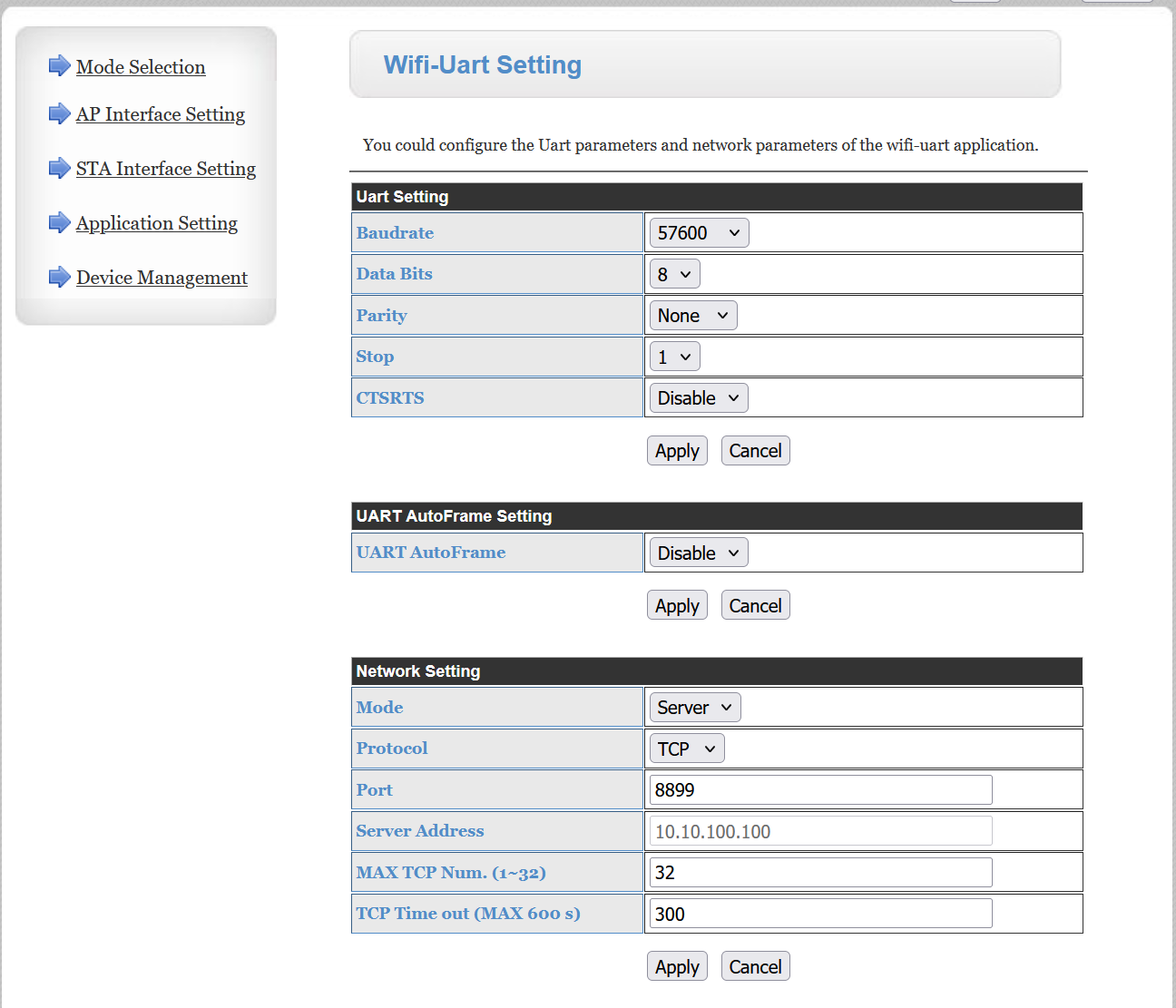
cmek The HF-A21 datasheet suggests that the "Heartbeat Signal" is actually controlled by TCP Timeout on the WIFI-UART settings page on the dongle webpages and the maximum duration is 600s. I wonder what happens if its set to 0 - does that disable the need for a "Heartbeat Signal"?

Also @Rubikcube that seems to be where the strange behaviour of connecting to everything is controlled as well:

1.4.3. Multi-TCP Link Connection
When HF-A21-SMT module configured as TCP Server, it supports Multi-TCP link connection, and
maximum 32 TCP clients permit to connect to HF-A21-SMT module. User can realize multi-TCP
link connection at each work mode.
Multi-TCP link connection will work as following structure:
Upstream: All dates from different TCP connection or client will be transmitted to the serial port as
a sequence.
Downstream: All data from serial port (user) will be duplicate and broadcast to every TCP
connection or client.

D
#47 DD

cmek My automation talks to the inverter every 5 minutes so I hope that works as the heartbeat..

The underlying modbus library you're using does support the heartbeat, but the dongle only sends out the request every few minutes on an active client connection, so if your script only briefly connects, there may never be a heartbeat. I don't think anyone's tested whether a periodic client connection is sufficient. GivTCP v2, which was probably based on an older version of the modbus library, is reportedly not sufficient.

T
#48 TimI

mrand31 I was thinking that myself, wiht a HY3.6, no updated firmware, how will the local control work - is it already fully exposed and just needs the know how on how to poke it? If so, once its in the official app, unofficial apps become easier to make wiht reverse engineering?

V
#49 Vestas

TimI Already pretty well exposed via various modbus libraries. Already apps which are well tested and work so it hasn't been a secret or anything. Some things are deliberately unexposed like changing power rating/export limit but there's been ex-installers doing that for a while now (on more brands than GE).

The "official app" in "local mode" isn't going to expose as much as GivTCP (for example) once GE Software remove the need to auth with their servers. That's all they need to do to make it work locally. Utterly trivial.

T
#50 TimI

Vestas Fair enough, I've not kept up wiht that side of things - there is part of me thats interested in it (I've worked on embedded systems in the past, but also web stuff, and all that side) - but i just don't have time to mess, kinda like the 'set and forget' idea right now.

V
#51 Vestas

Basically @Rubikcube has a G1 (and a testbed) so anyone with a G1 is sorted in terms of reliable app development on android.

GivTCP v3 exposes most of the functions of the inverter - including safe writes for those who want to put that f/w on.

tl;dr G1 is in about the best position of all the products because nothing much has changed in years. There's a few of us with "odd" f/w like the fast response stuff but GivTCP handles the extra options (pause etc) fine. @Rubikcube 's app doesn't as yet.

C
#52 cmek

DD
I see, if that's the case I can just convert the script to a daemon and have it open a long running connection and just send the commands every 5 minutes while handing those heartbeat requests.

Just a guess but from some other information here it sounds like the "heartbeat" is just something to keep those long running TCP connection alive when they go through NAT/firewalls etc.. If there's a limit of 32 TCP clients this probably just protects the stack from having too many stale/hanging connections that would exhaust it. So it shouldn't really matter much for my local use case.

D
#53 DD

cmek I see, if that's the case I can just convert the script to a daemon and have it open a long running connection and just send the commands every 5 minutes while handing those heartbeat requests.

Yes. (Those are the only heartbeats I'm aware of.) One possible reason for the dongle restarting is that it has few ways of detecting if its wifi connection has gone bad. Since it expects to always have a client connected, the absense of a client may suggest the network is misbehaving. I think ESPhome does the same thing.

If you're interested, my own long-running modbus script is
https://github.com/divenal/sensors/blob/main/mon6.py

One trick I use is to use "unused" registers to communicate with it. So eg for unused charging slots, the charge limit isn't used by the inverter, so I repurpose those slightly. The 'sensors' bit is a mechanism I use for sharing state between the various components - I guess to some extent I'm reimplementing HA at a much smaller scale.

C
#54 cmek

DD
This is really cool, thanks for sharing! I've noticed that you have some code that adds idle time between discharging and charging, is it something recommended for the battery? Would love to understand more about it. The comment mentions that it's to allow cells to rebalance and you also have some code to collect cell voltage (which I need to start doing too, you can't have too much graphs 😉. Another thing I've noticed is the code avoids doing unnecessary writes. I haven't thought about this (no idea what storage is used in the inverter for those registers) - is there a recommendation or some known limitation about this?

D
#55 DD

cmek I had read on here that there could be balancing done at the bottom end, but I'm not really sure. One thing I have seen is that if the battery runs out, and you leave it for a while, the SoC can creep up. It can resume discharging if it reaches 8%. Not sure if this is rebalancing, or just re-evaluating the SoC when the cells are idle - it can't be done accurately under load.

There was some concern a while back about having too many register writes - speak to the geek on YouTube raised it iirc. There is a limited number of write cycles you can make to flash. I believe the latest firmware has an option to write only to ram copies of some frequently written registers, at a risk of losing the values if the inverter restarts. I don't have that one (yet).

C
#56 cmek

DD
That flash/eeprom definitely has limited number of writes so I'm glad I read your comments to make me realise that. I'm definitely going to limit the number of writes. Writing to RAM would solve this issue for me completely, didn't even know that was an option. thanks again 😉

I haven't noticed any changes in SoC at the bottom end, will have to have a look at this too.

T
#57 T-M

Vestas For info, my AIO 1 Inverter and Gateway dongles are both set at 300s timeout as shown below:

#59 hoggy

From Mick who developed the EMS:

You can destroy an inverter in about 4 weeks , I know i have done it twice in testing deliberately trashing the flash memory, intensive write and rewrite the same register over a million times - approx 38 days at 1 write every 3 seconds

P
#60 pwdst

Is there a copy of the fast react firmware with the in memory registers available anywhere? I obviously can't email GE and ask for it and it is too late to roll back to the standard one that includes it when you get symptoms.

W
#61 wrighar

hoggy And this is why I always have RTC switched on, even if not intensively writing.

V
#62 Vestas

pwdst No.

V
#63 Vestas

hoggy So he was writing 1440 times my daily rate (roughly) - ie he wrote as much in a minute as I write in a day. That suggests my inverter flash memory will last in excess of 50,000 days, which is a hell of a lot longer than GE itself lasted....

#64 hoggy

Yes I mentioned a similar irony over on another group - my inverter is 5 and a bit years old so only has to do another 4 to outlive Givenergy itself!

V
#65 Vestas

pwdst Being more detailed - the only people who got fast response firmware got their inverters pre-vetted by Paul Landregan.

Support had no visibility of that firmware and indeed denied all knowledge of it twice (including Adam who knew his stuff).

Eventually I got passed on to Paul who said he'd test it in the next couple of hours to see if it could take the f/w and if so he'd put it on. I was out, came back about 3 hours later and it was done.

Edit - perhaps it happened differently in the beta group but I was never in that.

S
#66 SimonClarke

Not sure who put the fast firmware on mine but I was talking to someone called Jacob Smith who was helpful at the time

V
#67 Vestas

SimonClarke Was that via the beta forum?

P
#68 pwdst

I have the earlier version of the fast react firmware without the in memory registers and I am very happy with it.
We are on Cosy so PreBat is changing the charge slots three times a day and also things like pausing charge and tweaking charge rates to be filled just before the cheap period ends.
Despite that it's unlikely to fail from too many writes but it would be nice to upgrade if it was an option so I don't get left with a perfectly functional battery and no inverter.

S
#69 SimonClarke

Vestas sorry I don’t even know what that was! Fast stuff has been behaving with 3020 so I’m not touching it. Just got Rubikcubes app and pretty much all I do is leave it on Eco and sometimes export some extra in the summer - less so with the heat pump.. tried to look back and see why I ended up with the fast stuff but I must have deleted the email. Not much good asking now…

M
#70 mrand31

Paul put the fast firmware on my Gen1, but there were some problems, so he reverted it for me. All this via the bookface thread.

R
#71 Russ

riversdale great. Can you pubish this on github please?

C
#72 cmek

hoggy

at my current rate I would hit 1mln writes in about 10 years.. probably still worth refactoring that part just in case. many thanks for the info.