G
When I open the app on my iPad the graphics do not align properly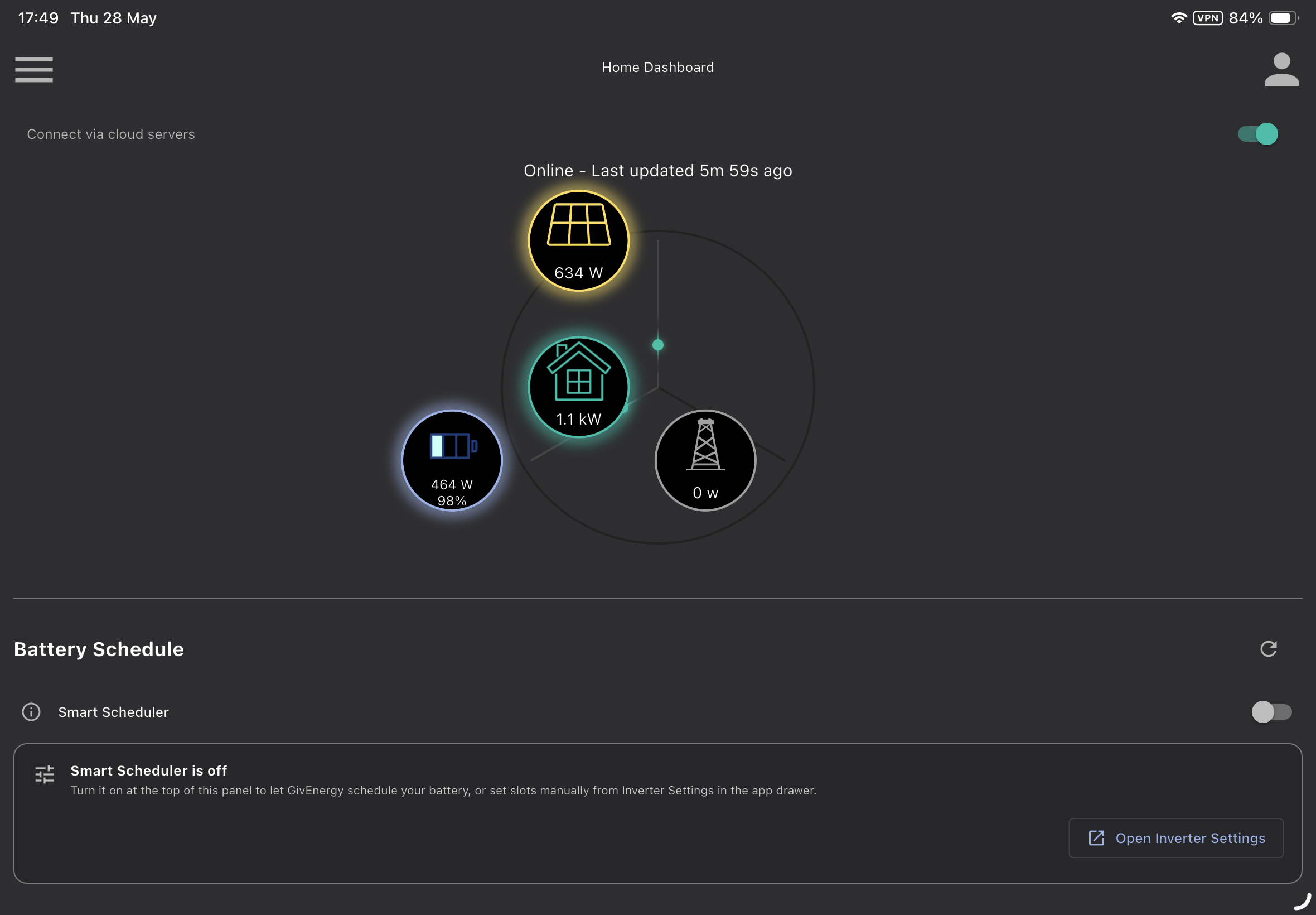
It looks as though the graphics are optimised for phone (portrait orientation and not landscape)

When I open the app on my iPad the graphics do not align properly
It looks as though the graphics are optimised for phone (portrait orientation and not landscape)
geoffmurphy Are you surprised? Tell them about it they don't read these forums
geoffmurphy It does not align on portrait either.
As others have pointed out somewhere, there are probably 3 people and a dog working on the app software and none of them read this forum

geoffmurphy I am asking why my GivEnergy plug isn’t shown on the wheel or the the orange energy source icon doesn’t function, seems to be worse since they asked for a subscription.
All aligns up now. Someone is taking notice.
Yes someone is monitoring this forum (and listening). Power circle is much larger and it has a new battery icon with a clearer SOC.
A small piece of encouragement.
killythebid sorry I have not seen the reply.
Dashboard is lovely and clear and gives me the Cloud option but two features are missing:
Press the grid pylon and nothing happens. I regularly checked to import/export value but its not available.
I also checked the battery state from this page.
As the standard Home display gives what I want, I am not sure Premium adds what I want.
Atkinstagram Pressing the pylon on premium does nothing either on the new app, only v4.0.4 and older.
Thanks all, all done.