Axle event

30 comments started 2026-06-10 last 2026-06-14
APIsHome Automation
C
#1 Chips78

Hi my Axle event doesnt seem to have worked this morning, just interested in what happened with other GivEnergy users. This is the first event since i took advantage of their free premium app offer with givenergy. As an aside i do have smart scheduler activated, im on octopus go and it seems to be doing some charging overnight on the cheap tarriff.

D
#2 duplada

Mine didn't work either Northern Powergrid so I just did a Wonder Watt quick schedule for 50 minutes. You get paid on what your Smart Meter reads.

B
#3 BobB

Can we compare what commands were sent to inverters? This was my first event too, and I was babysitting it and saw what happened.

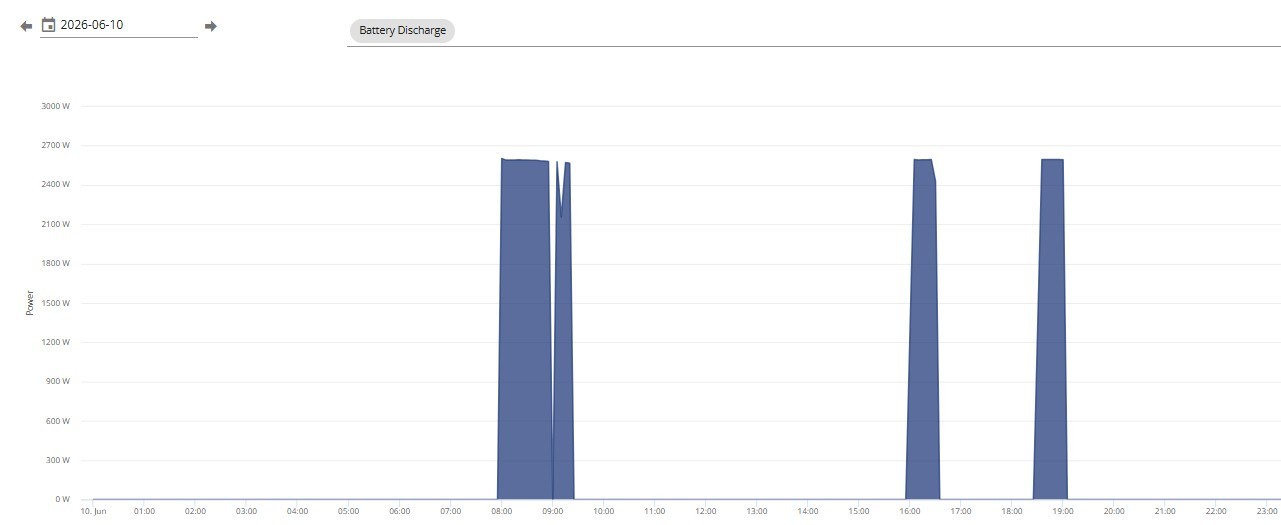
The event was from 08h00 - 09h00.
Axel turned off eco mode and disabled AC charging at event start - 3mins (Why? Export is independent of Eco setting and AC charging, isn't it?)

It looks like my DC discharge time was also changed from 05h30 to 08h00, but this wasn't recorded in the log.

… then nothing happened. At event start + 4 mins I got bored and set Enable DC Discharge On myself. This started the export.

The export continued past the event end. At event end + 6 minutes I manually set DC Discharge to Off and Eco Mode to On. A very short while later, Axel tidied up after itself.

The big miss appears to have been Axel not toggling Enable DC Discharge. Is this a common issue? What registers does Axel touch on your system?

I set the DC Discharge time slots from 00:00 to start 05:30 and end 23:59 myself. This was to correct a BMS SOC calculation issue in version 3018. This issue is not present in 3020 so (I think) I could choose to leave DC Discharge On and just rely on Axel setting times to control the export.

Thoughts, anyone?

Thanks.

B
#4 BobB

Apologies for the spam reply. I've just turned off the filter for errors and I can see multiple attempts by Axel to pause my battery. Again - why? Do other folk have this?

D
#5 DD

BobB Axel turned off eco mode and disabled AC charging at event start - 3mins (Why? Export is independent of Eco setting and AC charging, isn't it?)

On gen-1 systems, it can only export with eco turned off. Axle seem to turn it off for everyone.
If you have a charge slot set for the same time, maybe that takes precedence over discharge ?

BobB The export continued past the event end.

Do you have a second discharge slot that overlaps the first one ? Or maybe the time on your inverter is a few minutes out ? Though if it was more than 5 mins out, your inverter wouldn't have started exporting as soon as you turned on discharge flag.

D
#6 DD

BobB Again - why?

Presumably they knew the API request had failed, and they were trying hard to restore your system settings.

D
#7 duplada

BobB Can we compare what commands were sent to inverters? This was my first event too,

Nothing Whatsoever was sent to my Inverter just checked

B
#8 BobB

DD Thanks DD. Well whaddya know? Every day's a school day. I have a Gen 1 system and wasn't aware of the need to turn off eco to enable DC discharge. I had to check this just now and it is indeed the case. As an added bonus I can confirm the clock is right!

I guess this means that if Axel don't change the DC Discharge register I can just leave it on. When they turn off Eco, I'll start exporting automatically.

Do you happen to know if Axel does try to set the DC Discharge register during events?

Thanks again for your informative reply 🙂

B
#9 BobB

duplada Hmmm. There's your problem! Might be worth talking to Axel to see if they can shed any light on why no commands were sent to you.

D
#10 duplada

BobB yes sent them an email after the event

D
#11 DD

BobB I guess this means that if Axel don't change the DC Discharge register I can just leave it on. When they turn off Eco, I'll start exporting automatically.

Not quite sure if it works like that - there was quite a long thread a long time ago while we were discussing how timed discharge was supposed to work (it didn't match the description for a very long time), and it turned out it couldn't work as advertised for gen-1. I'll see if I can find it.

V
#12 Vestas

DD Timed discharge only works "properly" on G1 hybrid inverters with the "fast response f/w".

The "fix" is unrelated to the "fast response" part so in theory GE could have rolled out firmware to make the inverter work the way it was supposed to from the start. They chose not to.

To save anyone asking, no the "fast response f/w" is not publically available, probably because it'd cause all G1 hybrid inverters to fail if they have a serial number before 2022 week 10.

D
#13 DD

DD Not quite sure if it works like that - there was quite a long thread a long time ago while we were discussing how timed discharge was supposed to work

Okay, if
https://community.givenergy.cloud/d/3654-timed-discharge-behaviour-survey/3
is to be believed, turning on timed discharge on gen-1 actually results in inhibiting solar charging.

(IIRC, "timed discharge" at the time meant both DC discharge and eco flags on. On my gen-3 system, this was the sane version of timed-export, which re-enabled eco after the export. But on gen-1, it didn't actually export. I think the 'timed discharge' setting eventually got hidden for gen-1 systems. And for other systems, it now means something different.)

B
#14 BobB

Vestas Aaaargh! Thanks Vestas. That's the second reason why I should have taken a brave pill and gone to the fast response F/W (first being clipping, you told me about that as well!) But we are where we are and I'm not changing nuffin' now!

B
#15 BobB

DD Oh, this is good stuff. Thanks DD. I've done some experimenting and this is the setting you identified:

And you're right. Setting DC Discharge in the Remote Control detail settings page is not sufficient to enable this switch. You also have to disable Eco mode.
"Slot 1" does marry up to Slot 1 in the Remote Control detail settings page. I'll monitor this more closely next Axel event. Clearly, if Axel don't set both switches correctly then the export will not start, a potential issue for all the Gen1s out there.

Thanks again.

C
#16 CW

BobB I signed up to Axle, then deleted the API key with GE. I now get the event notification and will manually set the discharge times as appropriate if I wish to participate.

As Axle have confirmed that they get the readings from the smart meter (probably via the DCC) I still get paid. This also has the advantage that I am in control of my battery and thus setting/resetting any controls.

EDIT: I use Rubikcube's monitor application to do all this

B
#17 BobB

CW Honestly, I'd prefer this myself. I cannot remember getting an API key option to give Axel access. Instead I had to log in to my system during the onboarding process and that has given them access. I see the following in me Account Security page:

Did I mess up the onboarding?

S
#18 SteveCook

I signed up for Axle Dispatch Modes - Events Only
On Tuesday night my HA/Predbat detected the even , as well as I got an email from Axle.
I did not touch anything and all went OK.

C
#19 CW

BobB No, but if you still have access to the GE cloud, you can go to the relevant page (from memory, somewhere on the Account page but as I don't subscribe I can't look!!) and remove the API key. This will prevent Axle from connecting to your battery and controlling it directly. For my setup (AIO) when I get an email advising of an event,I will locally using Rubikcube's app set the start and end time and enable discharge. Once the event is over I then disable discharge. I deliberately took this approach as I didn't want any organisation having control over my battery and me being unable to revoke it without the subscription

B
#20 BobB

SteveCook That's interesting, thanks Steve. I can't see anywhere in your logs that Axel set the "Enable DC Discharge" register to On.
Is that change just not shown in the 8 lines you shared?
What generation inverter do you have? Given mine is ye olde worlde Gen 1, I think I do need that change to be made.

B
#21 BobB

CW You do subscribe, if you are with Axel. Maybe you're implying that once you removed access from Axel they stopped your subscription.
Thanks for the suggestion. my screen shot was from the relevant page (Account Settings -> Manage Account Security). It does appear that I can remove all access from Axel, but I want to keep them sweet so they keep paying for my remote access. (I realise there are other remote options available!)

At the moment I'm leaning towards checking if my system is exporting when it should using Home Assistant and if it isn't, make it happen.

C
#22 CW

BobB No, I am subscribed with Axle, they just don't have access to my battery - they will credit your Axle account based on your meter export readings

S
#23 SteveCook

BobB
I have gone through the logs, the 5 axle commands is all I have, but I can confirm the battery went full discharge at 08:00 until 09:00, and then HA/Predbat took things back under control for 2 exports later in the day.
I have Gen1 Hy 5.0 and 9.5 battery .

Maybe DC discharge was already enabled by HA/Predbat as I tend to run on battery though the night on these summer months.

D
#24 DD

BobB I can't see anywhere in your logs that Axel set the "Enable DC Discharge" register to On.

Is it just that the log only records changes, so if that flag was already on, it wouldn't record a change.

T
#25 TimHutchings

SteveCook I had the issue with Axle. Ist session since I joined. Waited till 3 mins past 8am and nothing from the battery was being exported, so I manually set the battery to export on Rubikcube's app. Just after 9am, I had to switch on Eco so the battery would charge from solar after I stopped exporting.
Later yesterday, I went through the logs in the portal and everything appeared to be set up right by Axle, but there was one log missing. There was no 'Enable DC Discharge' until I switched it on at 8.03am! That command from Axle was missing.
I always have it off, as I use scheduling in the Inverter Monitor to have it switch on or off at certain times through the day when I want to Discharge.
Mine is the Gen1 5kW inverter running the Fast Firmware 191/193 which actually doesn't need Eco off to export, but it got switched off by Axle but not switched back on again.
I'll see what happens next time!

S
#26 SteveCook

TimHutchings
Tim. Good luck. Sorry I am not able to help more.
Mine has just worked.

T
#27 TimHutchings

SteveCook Thanks! Clicked the wrong reply button, meant to reply to BobB

S
#28 SteveCook

TimHutchings
Tim. I did find with my Gen1, that regularly when playing with charge and discharge settings that things did not always do what they 'suggested' they should. I would set one thing for a set time, but that process would upset something else. eg When on Eco7 and Flux export, I would set a timed overnight import and a peak export, but Eco would regularly get turned off and not come back on.
I then went to HA and set automations for those imports and exports, but also created an automation to reset Eco back on after every event. That fixed things.
I then added Predbat that does all the planning and sessions automatically.

G
#29 GeoffEvans

I run my system “hands off” on ECO.
In the summer, I charge overnight to 50% and 95% in winter, no timed Export.
The inverter is GIV-AC3.0.
I signed up to Axle and two events have been successful with ECO set at the end.d

B
#30 BobB

TimHutchings We're in the same boat, Tim. I too am going to watch the next session. It's no biggy to automate "check if you're exporting and if not make it so" in HA if necessary. Thanks for the confirmation that someone else had a no DC discharge issue. I was starting to think I was going doolally!