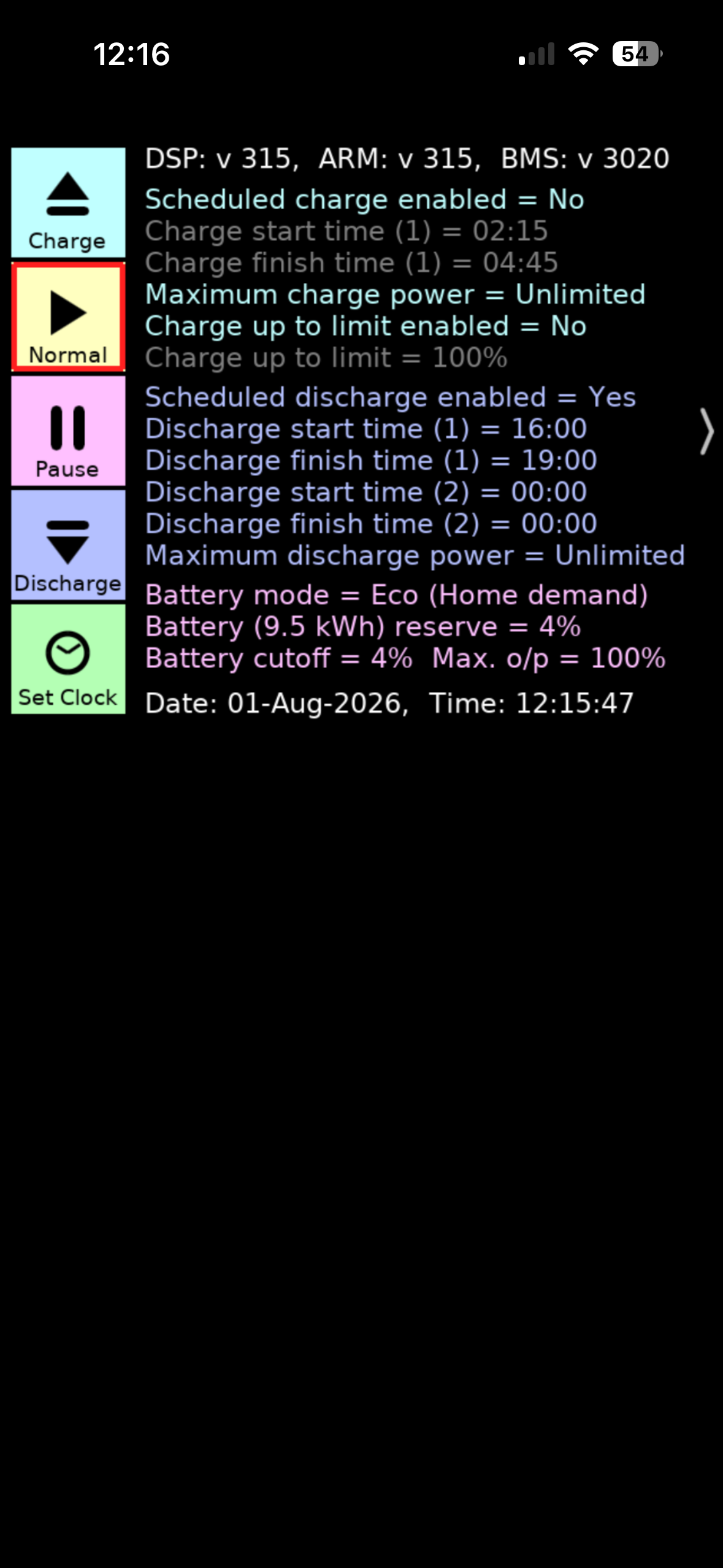
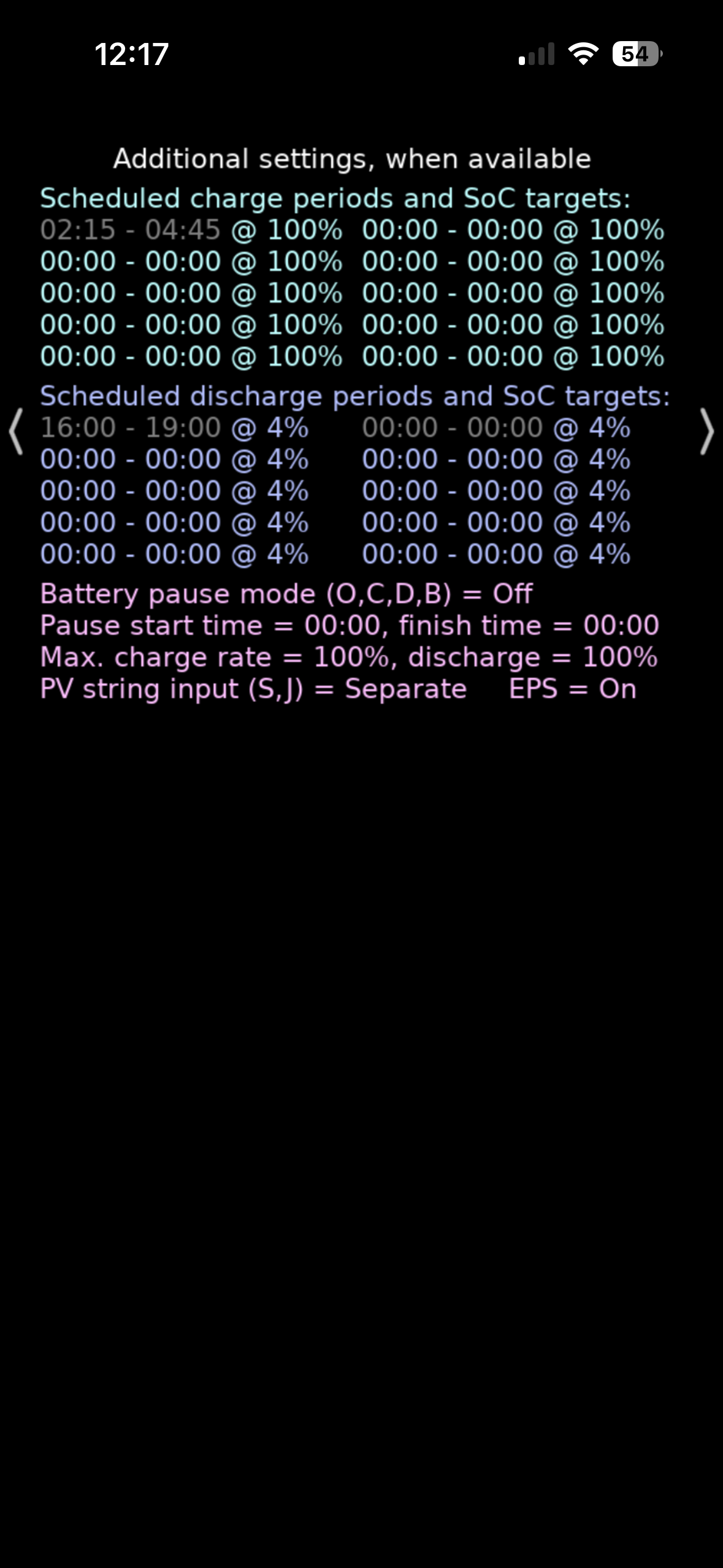
I am trying to use timed export to take advantage of my time of use tariff to export power from my battery between the times of 4pm and 7pm each day. My problem is that when i use the app to set the export schedule with start time as 16:00 and end time as 19:00 the actual export starts whenever i switch on timed export rather than at the start time in the schedule. It's like the start time is ignored. The stop time seems to work OK. Has anyone else noticed this or come up with a solution? I have a gen 3 inverter. The same thing happens if I use Home Assistant to manually (not using an automation) set the export schedule. P.S the timed export has worked OK previously. Thanks

Timed export - start time problem
RobertD Have you checked that all the other timed slots are empty?
Thanks for the quick reply DD. Yes all the other time slots are empty
RobertD hmm... Stopping correctly suggests the time is set correctly, and that it's not a 24-hour thing. If you enable the flag just after 7pm, I assume it doesnt start exporting again.
An experiment would be to turn the flag on briefly during each half hour, to see when it happens. (Could reduce export power to avoid excessive discharge.) Could speed up the process by adjusting the inverter time in 30-min steps, to map it that way instead.
Hi DD, My normal pattern is to turn the flag on at 4pm and export the entire battery capacity (9.5 Kwh) up to 7pm, leaving the flag on so that this also happens on each successive day at the scheduled time, unless I want to prevent the export for some reason. At 2am to 5am I charge the battery (schedule works OK for this). At 5am , if I have left the export flag on the previous day, the export starts again even though this isn't scheduled.
I just turned the flag on at 12:11pm with the start and end times in the schedule both set at "00:00:00" and the export started. I had to turn off the flag to stop it.

RobertD I have a gen 3 hybrid and used timed export in the same way. This is what my settings look like in the Beeb Inverter app. These work as you’d expect.


Maxwell I have not been previously aware of this app. Looks like a nice clear and simple output. I am currently using Home Assistant as well as the Givenergy app to monitor and control my inverter/battery though I am restricting my self to using the app for control at the moment until I can get my current problem resolved in order to prevent any potential conflict between the app and Home Assistant (though there shouldn't be any).

RobertD I am also using the ge app (standard tier) and running givtcp on a pi (not home assistant) . These Beeb app will run on a number of platforms including iOS, windows. macOS and a raspberry pi. I thought if you could run it and compare your settings as the app sees it then it might be easier to troubleshoot as I know there is scope for mixing up the different settings. And not helped by differences between internal register names and what these translate to in the different client side apps.
RobertD with timed export enabled, what does the scheduler at the bottom of the app show?
RobertD It sounds as though you have a rogue setting somewhere. I had a similar problem. The app and the cloud were showing everything was set as I wanted it to be. I did a Reset to Defaults, this clears everything, then set up my charge and discharge slots again. This solved the problem. I think that the app and cloud don't always interrogate the inverter and use cached settings to display.
NormC I assume direct control on the new app has to read inverter directly?
DD The scheduler shows half hourly blocks set to export from the start of the day to the end time for the schedule. Additionally i have found that if I leave the export flag set, although the export stops at the end time, the following day when my solar panels are producing they export rather than feed the house or battery even though the system is in eco mode. I have to switch the flag off so that the system operates normally. I think I'm going to try a "reset to default" using the portal as NormC suggested and see if this fixes the problem.
NormC I'm not sure this is the same problem for me as the same thing happens when I use Home Assistant (GiveTCP) to set the export schedule, but I'll give it a go tomorrow.
RobertD everything seems consistent with one of the timer slots having a rogue end time (but with start time of 00:00).
I'd recheck them all, and if they still look correct, set each end slot away from 0, then back to 0, which will force a write, even if an incorrect value is cached somewhere.
RobertD even though the system is in eco mode
Having an active charge or discharge slot overrides eco mode for that window.
DD I tried the "reset to default" but it didn't resolve the problem. I even switched off home assistant to guarantee no automations were having an effect (i was sure this wasn't the case) and this wasn't the problem. I'll try your suggestion of setting all the time slots to none 0 and back again from the portal.
RobertD reset to defaults ought to have taken care of that, but I've heard some reports that forced writes have resolved issues that reset didn't. (Those would have been cloud-based - no information post updated app.)
I am about to manually set discharge windows in the FE app, in addition to Axle managing sessions. Last time I tried this, setting discharge slots switched EVO mode off so my battery wad full all day. Sounds like this issue is resolved? Also wondering if I should upgrade b the android app?
philipdawsonladds some inverters can only export if the eco flag is turned off. I think the app was trying to be helpful by turning eco off when you set a timed export. I would guess that if you use direct control section, it wouldn't do anything implicitly, but you'd need to be aware of the underlying limitation.
Thanks. I might just try it once the battery is full. The inverter settings tab does suggest that Smart scheduling takes preference.
DD Looks like my forced writes have fixed the problem. Thanks for your help DD. I would still like to know what caused the problem so as to stop it happening again, but maybe I'll never know :-)
philipdawsonladds I also had the experience today during an Axle export, of Eco mode being switched off and not being turned on again after the export, though Axle do say in their email that it can take up to 30 minutes for the settings to be reverted.