Hi, new owner here. I have a 24-panel PV system with a 9.52kWh battery and Gen2 hybrid inverter 4700W.
We have a very heavy daytime power load (averaging 25-30 kWh/day) so I know that my PV system will rarely if ever charge up my battery and I'm not expecting to export much to the grid! But one thing I really want to do, is to keep my battery charged up and in reserve, enough to keep the lights on (so to speak) over these 3-hour rolling power cuts we are threatened with.
How can I do this?
I tried using the Eco mode and charging the battery on Timed Charge, setting the Battery Option to charge up to 95% and reserve 25%. However, although the battery charged up, it then drained steadily right down to 1% supplying my home !!! That's not what I thought it would do!
Why did it do this?
Now I have turned off the Eco Mode. The battery has charged up to 95% and is just holding it there.
This seems OK but also seems rather a waste... and will it start supplying my home if there is a power cut? In fact, will anything work if there is a power cut?
What will my stystem do in a planned 3hr power cut?
The inverter is grid-tied, which means that if the grid goes down then the inverter and battery will also shut down.
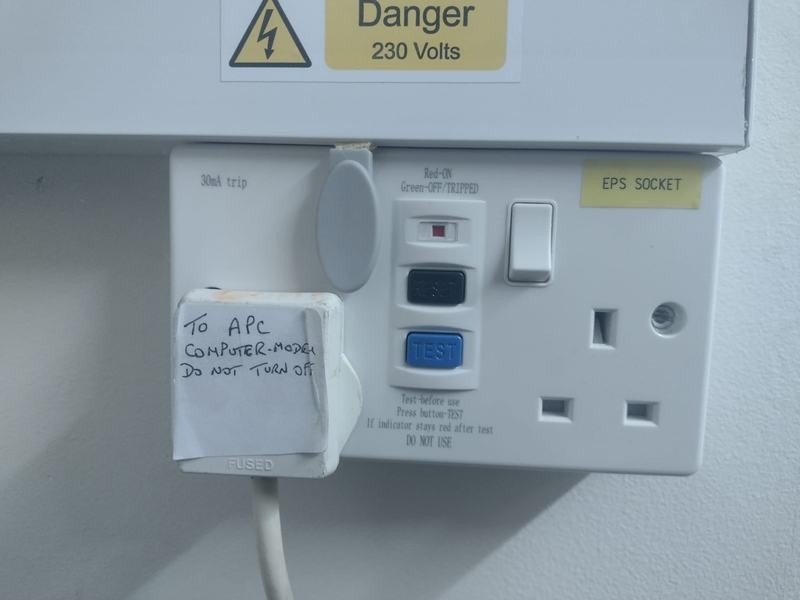
There is the ability to power some devices via the Emergency Power Supply, but this needs to be wired in by an electrician who knows their stuff.
Zakalwe Thank you!
But this is really disappointing news....
What is "The Emergency Power Supply" and where can I find out more about it?
see this discussion:
https://community.givenergy.cloud/d/857-battery-backup-in-powercut

francesbaines Its just a separate output on the inverter itself, but can need different earthing measures to be taken.
As far as I'm aware it might only be the Powerwall and its Gateway that can just keep on trucking in a power cut with no additional things to think about, as it has the relevant hardware and permissions to disconnect itself from the grid if the grid itself goes down.
Sorry if you’ve already done this but here goes:
Battery.
On the portal, select inverter then battery settings. Enable eco and timed charge modes (input off peak start and finish times). Also, reduce your reserve to the 4% minimum giving a usable 96% capacity. I have had these settings on my 8.2kW battery since day one in May and it supplies my home demand for the whole day rate period, only drawing on the grid if the home demand exceeds the max 2.6kW battery discharge rate, which it occasionally does when the oven is on together with an induction hob plate or steamer at lunchtime!
Double-check that the same battery settings appear in the app.
EPS
As advised, get a qualified electrician (preferably a GivEnergy approved installer) to wire up the Inverter EPS output through a dedicated RCD to a three position MANUAL change over switch (Grid/isolated/EPS) -next to the meter box in my case. There are several options for connecting to the desired house circuits during power outages; I chose the EPS output to feed my consumer distribution unit i.e., all the circuits in the house, thereby giving me the choice of which appliances to have switched on during a period of outage, PRIOR to manually throwing the switch to EPS. If you calculate the power demand of each appliance beforehand, you should be able to limit the demand to the max discharge rate of the battery ensuring the inverter does not overload and trip out.
Earthing arrangement for EPS mode.
Grid mode uses a grid derived earth to bond with the house circuits and solar/ battery system. The EPS mode however stipulates a local earth rod (T-T) system to be installed and bonded to all the home and solar system earth cables, thereby isolating the house earth circuits from the grid to prevent potentially dangerous earth loops in the system. There is a good document on the GivEnergy website covering all the EPS options.
From the knowledge base
Drawings included
https://kb.givenergy.cloud/article.php?id=12
francesbaines Accepting that you need to make electrical changes to your home to enable your preferred circuits to be fed from EPS using a changeover switch then ...
If it's a planned/scheduled power cut and you know the start and finish times, on the days when you know there will be a planned power cut, charge the battery by PV or overnight and set a timed discharge on the inverter to the start of the power cut (or soon after). Your battery should hold the charge in your battery (powering the house from grid) until the scheduled discharge and then (after operating the changeover switch), discharge to meet house load until the battery is depleted. Probably best to test this works as expected before the event as you'd be relying on the inverter automatically enabling a scheduled battery discharge whilst disconnected from the grid. This means it would be relying on the battery or PV to keep it powered up.
I've never tried that but if it doesn't hold the battery charge for some reason, you'd have to be able to control the inverter whilst the grid was disconnected. One way to facilitate this would be to put your broadband router and any other household automation essentials permanently on the EPS supply, before any changeover switch. If you do this, you'll be able to see that your router and other essentials draw maybe 10-30W on the EPS connection and you could reduce the battery discharge on the day of the planned power cut to be just above this to keep the wifi/internet live during the changeover. When the power cut starts, connect to the portal and set battery discharge to whatever you need, up to the maximum, and carry out your manual changeover to energise your preferred circuits.
hi
I am waiting for the installer to come back from holiday to make the final EPS connection into the router and setup the TT earth, but I have wired a CU with the following circuits to be fed from the EPS on the inverter (currently fed from main CU and will die on grid failure)
Smoke alarms
Burglar alarm
Gas boiler/pump/controls
Living room power sockets (TV and Sky box)
House lighting and lighting control system- all set that in power cut and back on, all lights are "off"
Two twin sockets - fridge, freezer, router plus spare
I think that lot will be max of about 750w with fridge, freezer and TV on and a couple of lights. If i turn more lights on the load will go up, but all lamps are LED.
Having the router on will allow me to see what is happening with the battery and inverter
Steve
Toogie Can I ask, why did you decide to go with a manual change over switch rather than an automatic one? I chose an automatic one in the end, that way if I'm away on holiday etc, at least the fridge/freezer will still be powered.
SteveandLinda The issue with automatic change over switch when feeding the whole house is that it is easy to unintentionally exceed the EPS output power (as the user hasn't notice the power outage) and the inverter shuts down.
If manual switch then the loads connected can be managed before connecting the EPS.
Having a limited number of circuits dedicated to the EPS output (method 2) allows auto change-over with reduced risk of overloading the EPS output.
athresuk Ah, thanks for that, my system does have a second fuse box with 3 dedicated breakers which the EPS would power if the grid goes down, one is for the kitchen sockets, lights that power that room and the bathroom, the third is to power the boiler/radiator pump.
Having only one battery/not many solar panels, I knew that being able to power the whole house were a no go from the start, I had to go with how the property had been wired in the first place to some degree, hence the choices that I made.
SteveandLinda If all your kitchen sockets are on the EPS make sure you don't mess things up by using too many plug in appliances at the same time. Just air fryer and a kettle on at the same time could take you over your EPS limits even without the boiler and some lights.
When my system was installed a month ago, the electrician wired up a double plug socket next to the inverter/battery in my garage.
He said this would power directly from the storage in case of a power cut.
Not had cause to use it yet, and I've not heard of getting any rolling power cuts in my area.... But I do live in a part of the country with quite a lot of solar, wind & hydro generation.
If you've had something like that fitted, then you'd need to run an extension lead from that to somewhere. It's not going to run a lot... But would power some lights, maybe a tv. Fridges & freezers should be fine for most oft he day providing you avoid opening them. So if you know there's going to be a power cut. Get a coolbox, some ice packs and put a few items in that.
We also have a little camping gas stove and kettle, so we can boil some water for tea as we're going fully electric and getting rid of gas for cooking entirely.
cluelesscris Yes, I am aware of that, we don't even have an air fryer or many othe such kitchen gadgets to be honest, I were just thinking of the fridge freezer and being able to boil the kettle or use the toaster.
Hi,
Thanks for the guidance on how to set up for a PLANNED power cut. Do you have any suggestions for how to preserve battery power when an UNPLANNED power cut is likely? We often get them here when there is a bad storm.
I have an AC3.0 system with automatic EPS to several RCBO/MCB protected circuits. I would normally have discharged my 2x5.2 batteries by the evening (in Winter certainly), so EPS would not kick in. I could halt the discharge early in the day when the battery is full-ish, if a storm is likely, but then how do I start it again if the power goes down, given that there will be no Broadband etc.
Would it be best to switch off the batteries physically then switch them on if needed?, or is there some other foolproof procedure?
Thanks
PeterB
You can set a reserve percentage from the web portal, myInverter page, settings area.
Ignore anything re cutoff - as that's going in the new firmware.
With regards to the internet connection, can you power your router/modem via the EPS? Even if just on an extension lead?
What type of internet do you have?
If it's FTTP or ADSL it might stay up - depending on how the exchange is powered.
If it's FTTC or Virgin Media it might stay up for a while depending on battery backups in the street cab.
If it's mobile broadband, it might stay up depending on how many cell towers are impacted and whether they have battery backup or generators (and for how long!).
You also have the option to locally control the inverter if you investigate GivTCP automation with say Home Assistant.
Or you could change the dongle to use a mobile phone hotspot for a while, if your mobile has signal! use the dongle connection guide for that (see the GivEnergy KB site).
Many thanks TX200.
Sadly my internet connection is via Fibre but I could try and get mobile signal (pretty poor here too). If I could connect via mobile and used the Away mode in the mobile App, would the inverter respond (e.g. if I had set the Reserve to 90%) and allow me to reset the Reserve so that it would start discharging?
Are you aslo saying that I would need to modify the dongle for that to work, so that it uses mobile not my local network?
Many Thanks
Peter
The reserve is something you'd set as a one off for unplanned power cuts.
Say set it to 20% if you think that's enough.
You could always change it if you had a planned power cut announced, but otherwise "set and forget"
As for the dongle, yes, you can change it to use any WiFi*, the details on how to do that are on the GivEnergy KB site - search Google for GivEnergy KB dongle
( * Some older dongles don't like 5Ghz WiFi, some don't like mesh networks, etc )
Re the reserve, as far as I'm aware, the system normally stops discharging when you hit the reserve.
However when there's a power cut, it'll continue to discharge below the reserve.
So you don't actually need to logon and change the reserve level during a power cut.
There have been some bugs in the past re the reserve value not being respected, but hopefully they're sorted. If not, should be in the new firmware being released in the future.
I suspect saving 90% of the battery for power cuts is a bit extreme for most people. Most want to use their battery on a daily basis to get their money's worth. But I guess it depends how often you have power cuts, how long they usually are, and how important it is to have power for your essential circuits during them.
That's very helpful to know that the reserve would be ignored in a power cut. That's my answer.
I would only set the reserve high if I was pretty sure that a bad storm was coming (I normally have it at 4%).
Many thanks for that - I now know what to do, without messing with the dongle.
Cheers
Peter
Hi again, a subsidiary question. As we have strong winds/storm expected, I am charging up my batteries again as we regularly have unplanned outages in bad winds. If the system is in Timed Charge mode when the power goes off, will it still flip into EPS mode (in the same way that it ignores the Reserve limit as mentioned above)?
Many thanks, PeterB
PBQH Hi Peter, yes I think so. I tried isolating the grid when the battery was discharging and it was fine, but I don't anticipate any other result when the battery is charging, it should not matter.
You can verify it today, without waiting for power cut. Set battery to charging schedule, and turn off grid isolator. If all goes well, the battery will start supplying the house immediately and you may or may not see a light flick for a split second.
OK thanks for the quick reply. I'll stop worrying now.
Cheers
I have an AIO plus gateway and my experiences are that the EPS switchover can take a lot longer than the published 20ms i.e. enough to upset some of my more sensitive tech. The lights will flicker as the battery kicks in. I have installed some small UPSs to mitigate this issue, so I hardly notice if we have any power issues other than the lights briefly flickering.
To avoid any possibility of swamping the battery/inverter, my two high-load circuits (cooker and heat pump) are not protected by the AIO, but I can live without them in the event of a grid failure.
My experience is that the battery reserve will be ignored if the grid is lost
Although our grid supply is underground, the village transformers are fed overhead. I float my router and NAS on a small UPS [c 80 minutes] as 'brown-outs' are not uncommon. Poor mobile signal too so need WiFi/internet back-haul for phone signal; and landline which is VoIP. For those who have flaky grid I thoroughly recommend a small UPS (uninterrupted power supply).
I use the GE Android App to force charge the GE battery prior to anticipated bad weather event and then set it to Pause. If event strikes can set to Run [if that is even necessary, or does EPS start whatever the battery setting?] and then use the EPS to power the CH pump [manual change-over] and any other small items - usually lights, and of course the UPS, so we could keep using the internet.
We had two three hour unplanned outages withing first 60 days of EPS commission and it worked well enough for us - despite my early days ignorance of the best method of usage
I understood from installer that there would be a few seconds [mandated by legislation?] delay between grid failure and EPS kick-in, though have never searched for the evidence. Hence EPS would not necessarily maintain the Router connection.
The EPS on my Hybrid Gen 3 inverter is live all the time - it's not just live during a power cut.
Mine feeds a (clearly labelled) double socket in the house, which is probably about right for the 16A max output. One socket feeds an extension lead to the UPS for my PC etc (this small UPS is just in case there is a switch over delay). I have another extension lead ready to run from the second socket to the freezer if required.
Pete.J I have the same sort of setup and I though I was covered, except today we had a one hour power cut and as soon as the mains went off so did the EPS, it would not reset until the mains power was restored.
Home assistant running off my UPS along with the virgin hub and computer were fine and HA showed the system was still generating and the battery charging but I couldn't get to the GE app Home and there is a gap in data today on the GE portal, also the BBC app was unable to collect data during the outage.
I'll have to get my installer to look at the EPS socket. It's irritating that it sits there for months
and then the one time you really need it, the one time you actually want it to do it's job it fails!

My wife said I was like John Cleese in faulty towers and the fire extinguisher sketch.