M
I've just changed our WiFi provider and can't find any instructions on how to update the GivEnergy system. I assumed the system would find the new router but this has not been the case. Can I update it or do I need a specialist?

I've just changed our WiFi provider and can't find any instructions on how to update the GivEnergy system. I assumed the system would find the new router but this has not been the case. Can I update it or do I need a specialist?
Easiest way to do this is to rename the new router SSID to the old router name. Then use the same password.
This will save you from having to reset every item in the house...
Google search for giv energy kB dongle

Murrayjohnc as @Zakalwe says used the same SSID and password on your new router, then all devices, not just your dongle, will connect up without (m)any issues
Thanks guys, really appreciate you taking the time to answer. The problem I now have is I have no idea how to do any of that! I guess that's one of the many downsides of being an "old boy"! Anyway I've organised for the company who installed the system to come and update it.
Again thanks for taking the time.
J

As this is pinned topic now, a few updates to follow
The first one is that you might have to turn off the 5Ghz channel temporarily on your router (if it allows you to!) whilst you pair up the inverter. Then turn it back on again after.
If your router allows you to have different names (aka SSID) for each of the 2.4 and 5Ghz networks, then that can be another way of keeping things simpler with inverter dongles and IoT devices.
If neither of the above is possible, consider buying a WiFi extender that you can either cable back to your main network or join onto your main WiFi (e.g. WiFi extender offers 2.4Ghz but uses 5Ghz to talk back to the main WiFi router).
Other options for those that have ethernet enabled inverters - switch the inverter off (see the installer guides on the givenegy KB site), change the dip switches, wait 5 minutes and turn it on.
Then use ethernet either directly back to your router or consider using powerlines kit, I think TP Link have a good reputation, but other brands exist too.
Nb. KB site is here: https://kb.givenergy.cloud/
There sometimes can be issues with mesh networks. There may be settings you can temporarily turn off to help you get the inverter connected.
See here for an example of a post regarding that.
Murrayjohnc yes I have the same thing I'm 80
The comments I added are generic, aimed to help anyone with inverter issues when changing their broadband.
I can't comment on EV chargers, I don't have one and don't know enough about them.
Someone else is welcome to post in here with any tips for EV chargers when changing their broadband (although I'd imagine a lot of people use ethernet for them).
Dragon. Thanks for making this a sticky, but unfortunately for me, it is not sticking at the top but rapidly falling down the post list
Hi
My inverter has an internal dongle.
I need to rest the inverter to change to a new router/ internet provider.
The instructions say there is a panel to open, but I can't find one.
Serial number WH2249G324
Thanks
Wes
Hi,
I have also recently changed my router but was unaware of the simple fix of changing the new router SSID and password so that all my previously connected devices (including my GivEnergy system).
I have managed to change my inverter to the new router but was unable to connect the EV charger because the QR code on the side of charger is unreadable due to weather damage. Does anyone know of a way round this. I would really like to control the charger remotely via the App again.
Hi i am in the same boat, after many hours I have failed despite you tube instructions and Google instructions. I wish I knew how to change the inverter as that failed too,Solaredge spent an hour on their help system and that failed too. My installer is two hundred miles a away so even if he agrees it will be expensive. I did wonder if a fixed ethernet cable would be an oprtion on both ? anybody know ?regards
Roger
I have had anew router installed and changed the SSID to match previous. However the new router will not accept the old password (more of a phrase really) as it was more than 20 characters. In the app, under settings, there is an 'Update WiFi Details' menu item. This requires the GivInstaller app to be downloaded. However, I have not managed to log into that yet!! Anyone solved this issue yet. There are three button options on the installer app- Login, Update Dongle and Update Wifi Details. It says 'Login with SSO' and requires an email address
[unknown] you can update wifi details in your own GivConsumer app.
tungstentrout you can update wifi details in your own GivConsumer app.
I hate to say this gave up trying to connect my solar and batteries 18 months ago after changing internet providers nothing worked but still see income earned through solar.
Retirement is not to far away so really wish to sort this out. My inverter and batteries are in the attic which does not help and no power sockets in the attic
TheDragon (GivEnergy)
How?
I was on a Quick Setting mode
So every time I try to click the inverter settings button it tells me "you are currently on quick settings ..., change to play .."
which I cannot do as I my inverter is offline
Switching routers. If you were a BT broadband user and have recently renewed the service which has now become EE and have received a new EE router then dont install it. The BT one does the job and as far as I can see there are no extra bells & whistles and the speeds are as expected.
[unknown] If offline you cant change anything.
It needs to be online to make changes
[unknown]
I have now sorted this but app still shows me as away and won’t change to home
Have you tried the hamburger top left - scroll down to settings - scroll down to local monitoring and scan for your inverter.
Is your phone on the same network as the inverter
Maybe the app is holding the old IP address and the new router has given it a new address and you will have to delete it some way. Could uninstall the app and install it again?
In future can you set your router to always give the inverter the same IP address
TX200 If you have TP-Link Deco mesh units then and you're using the DHCP server in the separate modem/router then turn them off completely while you change over the router. These Deco units have an integral DHCP server which, although it can be disabled, will fire-up and create a whole new address table if they see there is no other DHCP server on the network. This has caught me out many a time, including yesterday when I had to change my BT Home Hub due to 'digital voice'. I tried to swap-over without turning off the Deco units because they are difficult to access.
[unknown]
I had this nightmare. If the app is hanging then something with your new network is incompatible. I had installed an eero mesh network and no amount of turning off 5ghz or switching to legacy mode helped. I was previously on a Starlink router which worked fine.
You can test if it is your new network by setting up the charger using a WiFi hotspot and seeing if it works. Make sure the hotspot is on a different device to your app. If it gets through the point it normally hangs at then make sure the charger is fully visible and complete on the app before you turn the hotspot off.
In the end I I have had to use both systems. My Starlink router is on solely for the ev charger!
Really irritating, the WiFi tech in the ev charger is shockingly poor! I spent nearly 2 days on this to come to this poor solution!
A side issue seems to be that my inverter no longer prevents the battery from charging the car as it is on a different network. That is today’s problem to fix!
[unknown]
I had this nightmare. If the app is hanging then something with your new network is incompatible. I had installed an eero mesh network and no amount of turning off 5ghz or switching to legacy mode helped. I was previously on a Starlink router which worked fine.
You can test if it is your new network by setting up the charger using a WiFi hotspot and seeing if it works. Make sure the hotspot is on a different device to your app. If it gets through the point it normally hangs at then make sure the charger is fully visible and complete on the app before you turn the hotspot off.
In the end I I have had to use both systems. My Starlink router is on solely for the ev charger!
Really irritating, the WiFi tech in the ev charger is shockingly poor! I spent nearly 2 days on this to come to this poor solution!
A side issue seems to be that my inverter no longer prevents the battery from charging the car as it is on a different network. That is today’s problem to fix!
Idly question, not sure where my Inverter sits within the WiFi. The Givenergy dashboard is always available on my computer. The Givenergy App never connects with the 'local inverter' on the Home tab.
Curious why it is on the Computer via home network and not on the App. Its been like this from 2023 AFAIK. Does it matter?
I may be a fool, but this week we are moving from BT full fibre to Yodafone full fibre (£36pm to £21.75...)
New Powerhub 6 has arrived and I tried to do some pre config on it for switch over day.
I've been given the Vodafone fibre login credentials to configure a 3rd party hub/router, but BT's ones are locked down now, so I can;t just change the login on that :-(
I think my plan will be to disable everything on the Vodafone router and use it as a fibre wan to lan, and then connect the BT Smarthub directly to the Vodafone one.
Should work... except they said Voip phones will onky work on the Vodafone router, so I may be off to buy a cabled cordless voip phone.....
At least I should be able to retain all my devices...
[unknown] I can't set my SSID password our approx 80 devices use even in expert and compatibility mode as it doesn't meed there minimum security criteria :-(
I have an idea. Try changing the existing router password to the new one. Not sure about the SSID. It might then simply pick up the old network.
[unknown]
I have a load of legacy devices which still work but the companies have folded and there is no web services left for me to set a new password on these devices...
[unknown] that's why I suggested changing the Router password on the old router using the new password. If they all remain connected, job done. If not you can then revert to the original password.
If the old router was very old and using a short password then that password might just not be secure enough. Especially if you had something ancient that used WEP.
Mind you, swapping routers is a bit easier now that you can use WPS. Press the WPS button on the router (or in the router app) and then select the new SSID on the device. No need to key in a long password. Note: please set a secure, lengthy password both in the router login and in the WiFi settings!
@Zakalwe not so much passwords but all the devices on the network. 80 was the number mentioned.
In my case a have 8 twin smart sockets, 5 smart plugs, cameras, alarm, TVs, readers, phones, car, heat pump, battery inverter and I am sure some I have forgotten.
I take the point about old security standards but my router is only a couple of years old. The question is could it accept a more complex password rather than the present 7. I think it could.
[unknown]
Yes, I recognise that. At least with WPS you don't have to enter the password in every device. Just press the WPS button tell the device to connect.
[unknown]
Assuming you have the ability to tell the devices to connect. I have several now with no web front ends to engage with, and no WPS for them.
Those devices HAVE to use the old 8 character password that the router is set too and 2.4G.
Changing the password on the old router just disconnects everything until it's set back again. It doesn't magically update all the devices to the new password.
[unknown]
Assuming you have the ability to tell the devices to connect. I have several now with no web front ends to engage with, and no WPS for them.
Those devices HAVE to use the old 8 character password that the router is set too and 2.4G.
Changing the password on the old router just disconnects everything until it's set back again. It doesn't magically update all the devices to the new password.
Assuming you have the ability to tell the devices to connect. I have several now with no web front ends to engage with, and no WPS for them.
Those devices HAVE to use the old 8 character password that the router is set too and 2.4G.
Changing the password on the old router just disconnects everything until it's set back again. It doesn't magically update all the devices to the new password.
IT Support in Norwich Union / Aviva for 32 years, the last 15+ looking at networks/connectivity/resilience.
Yeah, I'm not sure that I'd want devices like that even NEAR my WiFi let alone connected to it....
[unknown] Thanks for the tip. I forgot the 2.4 G bit. Turned 5G off and all came back to life. Funny enough my Home Assistant had no issue talking and interacting with the Inverter at all. It was just the native GivEnergy app and Cloud data flow that seems to be affected after wifi router swap. Turned 5G back and it seems to be holding so far (few hours).
TX200 Thanks for the tip. I forgot the 2.4 G bit. Turned 5G off and all came back to life. Funny enough my Home Assistant had no issue talking and interacting with the Inverter at all. It was just the native GivEnergy app and Cloud data flow that seems to be affected after wifi router swap. Turned 5G back and it seems to be holding so far (few hours). BTW I am using TP-link mesh and had been for almost a year now with no issues - so far the 5G was the only snag.
All the is help is great and appreciated BUT my router works on dual band and the dongle only connects to 2.4. So turn off 5 and it connects! So far so good. But as soon as the router drops out for any reason then the dongle loses connection and it can take 2-3 weeks to connect itself. Surely I don’t have to keep disabling 5 just to allow the dongle to connect. Why doesn’t GIV energy fix this annoying problem
[unknown]
Can you set your router to always give the same IP address to the inverter dongle. It may speed things up. (not tecchie, so i may be talking rubbish)

HALST It isn't a GE problem. Your router is faulty if you have to turn off the 5GHz. I use a Google Nest system which has 5GHz and 2.4GHz with the same SSID and it just works. Some routers try to force 2.4GHz devices onto 5GHz and that does no work on 2.4GHz only devices. They never see the 5GHz signal so it can't have any effect on them. Turning off the 5GHz stops your router dropping the 2.GHz signal.
One other option to investigate is to turn off WPA3 on your router. I too have Google Nest and it wasn't the most stable connection. Turning off WPA3 on the router settings helped considerably.

[unknown] I've also found that turning off the 5GHz signal increases the range of the 2.4GHz slightly (having to share the available power?). In general, the 5GHZ connection has a greater bandwidth (and can thus carry more data) but a shorter range. Most (all?) equipment in my house, including the laptop, functions perfectly well on 2.4GHz no matter where. Using 5GHz the laptop will often lose the connection in areas furthest from the router..
[unknown] I've also found that turning off the 5GHz signal increases the range of the 2.4GHz slightly (having to share the available power?). In general, the 5GHZ connection has a greater bandwidth (and can thus carry more data) but a shorter range. Most (all?) equipment in my house, including the laptop, functions perfectly well on 2.4GHz no matter where. Using 5GHz the laptop will often lose the connection in areas furthest from the router..
Even changing my new router SSID & PW to match that of the old router didn't work for me & I experienced major problems getting my Gen2 Hybrid inverter back online after a router & broadband supplier change. Nearly a day on the phone to GE Tech.
That painful experience convinced me to get my Inverter & Zappi car charger hard wired to our router which I'm currently in the process of doing.
To make the install easier I'm planning to use TP Link Powerline adapters to get a connection from my router into my attached garage & then hard wire to the Inverter & car charger from there. I've tested the power sockets in the garage for connectivity by plugging in our Sure Cat Flap hub which connects via the mains wiring & my existing TP Link PL adapter & it works fine. Just hope my RJ45 connecter wiring is up to scratch! I will test my handmade connections before shutting down the Inverter & making the DIP switch changes.
If I do run into any problems the the powerline adapters then I will have to wire directly from the router to the garage. It's doable but not that easy & may require the cable going outside for an easier run into the garage. I'm hoping that's not going to be necessary.
Quick update on the above. TPLink Powerline adaptors didn't work that well. The GE Gen 2 Inverter was fine but my Eddi & Zappi would not connect. So I reverted to plan B which was an ethernet cable from router in lounge to our attached garage with a TP-Link Gigabit switch on the end of it. I wired the Inverter, Eddi & Zappi to the switch & powered everything up & fingers crossed everything is OK. Well no. The Gen 2 Inverter is fine & connected but I still can't get Zappi & Eddi to connect so some more research needed or more discussion with ME Tech. I'll get there eventually it's just that this sort of stuff is not my forte.
So I have a new router with my existing provider given the change to voip. I have read the threads here but my app says to download givinstaller and follow the instructions to restart the dongle and update the wifi. Has anyone done that and I wonder why this is not simply stated as the solution here? Btw my installer has gone out of business so I can not contact them.
[unknown] I had the same issue with VOIP but followed people's advice to change the SSID and PW on the new router to that of the old. Everything fired up as normal with no issues. Can remember exactly how I did it, though. It's worth exploring your old router first and carefully plan all the steps you need to take, before starting.
[unknown] I had the same issue with VOIP but followed people's advice to change the SSID and PW on the new router to that of the old. Everything fired up as normal with no issues. Can remember exactly how I did it, though. It's worth exploring your old router first and carefully plan all the steps you need to take, before starting.
[unknown] I had the same issue with VOIP but followed people's advice to change the SSID and PW on the new router to that of the old. Everything fired up as normal with no issues. Can remember exactly how I did it, though. It's worth exploring your old router first and carefully plan all the steps you need to take, before starting.
[unknown] I had the same issue with VOIP but followed people's advice to change the SSID and PW on the new router to that of the old. Everything fired up as normal with no issues. Can remember exactly how I did it, though. It's worth exploring your old router first and carefully plan all the steps you need to take, before starting.
Steve56 I had the same issue with VOIP but followed people's advice to change the SSID and PW on the new router to that of the old. Everything fired up as normal with no issues. Can't remember exactly how I did it, though. It's worth exploring your old router first and carefully plan all the steps you need to take, before starting.
My current router (Nokia - 7 months old)) has 4 SSIDs for 2,4GHz and another 4 for 5GHz. I just changed one of the 2.4 SSIDs to the previous router's SSID and PW, set it not to broadcast its SSID (to avoid anyone else in range from picking it up) and the dongle connected just fine. There's not been any connection issues since.
My other wifi connections (phone, laptop, Alexa etc) all use one of the other SSIDs.
HTH
And interestingly - to avoid double-posting - I've just discovered that when it says 'failed to post' and gives you the option of trying again or discarding, choosing 'discard' makes it look like your post has disappeared, but if you refresh the webpage it comes back!

At the risk of hijacking the thread…got a new router, set it up & working ok BUT it is working on ‘Away’ and when I do what I suggested above I get an immediate ‘Scan Complete’ and nothing else, no ‘Home’ at all - anyone help?
Edit : this…
In the app, 3 line ‘hamburger’ top left - settings - local monitoring - scan for inverter - add. Then delete dead one/s.
Might work?
Edit/Edit 2
Logged out/back in and now all good.
Left here in case anyone else has the same issue.
Well, after 3 months of wifi and broadband drops/outages in the house, which completely messes my daughters use of Adobe premier Pro, I've ditched the provided VF Powerhub and bought a TP-Link AX55 which will mesh with my existing TP-Link extenders.
15 mins setup, all working really well and no drops in 48 hrs.
Children and wife now happy.
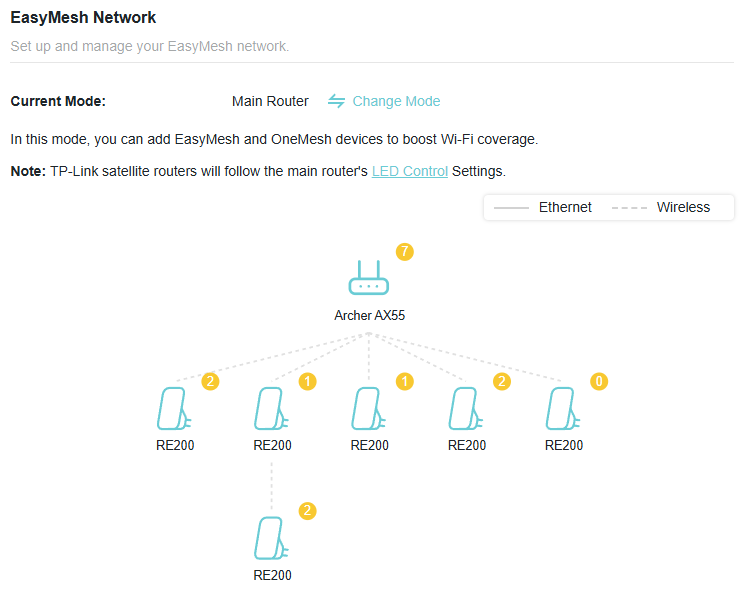
Well, after 3 months of wifi and broadband drops/outages in the house, which completely messes my daughters use of Adobe premier Pro, I've ditched the provided VF Powerhub and bought a TP-Link AX55 which will mesh with my existing TP-Link extenders.
15 mins setup, all working really well and no drops in 48 hrs.
Children and wife now happy.
[unknown] Many thanks ChrisLav! Just testing that now...
SteveCook I was hoping to do this but the new router said my old password was not adequate (too short, no lower case letters) so I am in the position of working out how to change the setting when I don't know the WiFi password for the inverter.
The You Tube video by Andy (of EVM fame) was useful, but doesn't help if you can't access your interter WiFi.
Scanning this thread to seek out solutions.
DBamford
I think there have been posts that the security of your router may be too strong for GivEnergy kit and you should use WPA2 - sorry if this is BS, I am not an IT person, it is just something at the back of my mind.
https://community.givenergy.cloud/d/4897-connect-to-sky-broadband-security-level-wpa3-t/54
As per the above, I can't use the easy solution (switch to the old username and password) on our new Vodafone network because the password wasn't deemed long enough and didn't contain any lowercase letters. Urgh.
I can't access the inverter's own WiFi network to update the settings as it won't accept any password I have tried.
We are on Octopus Intelligent Flux so Octopus are controlling the inverter and need access via our internet connection.
Temporary solution: Two routers
I've got a temporary bodge. I've plugged in our old router to the new one so we now have both networks and the inverter can access the internet via that.
But I don't want to leave this old router plugged in forever.
Accessing the WiFi information to change it
I downloaded the Givinstaller app as instructed on the app and it says I have to 'remove the cover' on the inverter to reset the password.
Which cover is this exactly? The inverter has warnings all over it 'do not remove' etc. but if I power it all down then presumably it won't be able to connect to WiFi any more?
Anyone know exactly what cover I am supposed to remove? Is it the big white plate with the lights on it?
I also saw there is a usb port which I can access - is there any way to change the WiFi settings via that?
Any help appreciated!
[unknown] As per the above, I can't use the easy solution (switch to the old username and password) on our new Vodafone network because the password wasn't deemed long enough and didn't contain any lowercase letters. Urgh.
This is just one of the reasons why I stopped using supplied routers by Broadband suppliers five or so years ago. Their routers are built to a price and they will insist on applying their own tweaks and defining their own stupid very limiting standards. Supplied routers are usually under powered too, limiting your ability to fully monitor all traffic (seriously useful of you are worried about what your kids are up to).
Everyone - take some advice and get your own router or better, especially if you are on fibre, a gateway such as those available from Ubiquiti. The advantage is that you will be able to change network provider at will and not have to mess about getting everything working that the new provider screwed up. You will have way better network management tools - reliable, scalable wifi networks, etc, etc. The only thing you will need to change is the username and password for the PPPOE access which will be given to you by each new provider. One change and everything will be up and running just as before without any more faffing about.
[unknown]
Thanks. Is there any router you would recommend please.
Openreach are installing fibre in my village and I guess at some point a new router may arrive.
I would like to be prepared.
SteveCook I use Linksys WRT1900AC routers (3 of them) running DD-WRT firmware. This gives me excellent house coverage but setting them up isn't for the faint-hearted. First hurdle is getting DD-WRT onto them without bricking them!
The master one is next to the Virgin-Media router (in Modem mode). The other 2 are wirelessly connected to the master over 5G then provide their own 2.4G wireless networks giving me three independent 2.4G networks and excellent signal strength everywhere. I have over 75 devices on the network (10 bulbs, 15 smart switches, 10 thermostats, 10 monitoring devices, 10 Google smart devices, 20 other devices including the 2 inverters in the garage).
When my Virgin-Media contract comes to an end I will go for Fibre which they have just put in our street.
I use a ubiquiti unifi gateway and nework infrastructure (including wifi that covers a whole 5 acres and all my outbuildings). I even have a point to point link for cctv on a field almost a mile away to keep an eye on our horses when theey are down there. Thier gatways are pretty much state of the art and VERY powerful. Loads of you tube videos showing how to do things with their stuff. If you run a smart home with lots of devices you can stuff them on their own virtual lan and stop them accessing the internet or recieving probes and getting hacked. Firewall rules are a doddle. However, the best thing about it all is that it's been rock solid through power cuts several network changes. They aren't cheap but when you are paying £400 plus a year for your service they are incredible value over a couple of years.
I’ve got a Sky router and the cheapest TP Link mesh system I could get off Amazon about 5 years ago. Works fine in my 3 bed bungalow and garden. Changed the router this year no issues.
I’ve got a Sky router and the cheapest TP Link mesh system I could get off Amazon about 5 years ago. Works fine in my 3 bed bungalow and garden. Changed the router this year no issues.
I’ve got a Sky router and the cheapest TP Link mesh system I could get off Amazon about 5 years ago. Works fine in my 3 bed bungalow and garden. Changed the router this year no issues.
Very dodgy posting though….
[unknown] I feel your pain. I am very nervous doing anything on this system. Last time I tried I blew up the inverter and it had to be replaced. But to be fair I have all this kit hanging on wall and absolutely no instructions
I have done this. The app is not working. Batteries all full and if the house needs any power it is pulling it from grid. So do I need to switch inverter on and off again to get it to recognise the correct router

I swapped out my netgear Orbi mesh system for a Ubiquity Dream Router 7 and Express 7 combo.
Worked perfectly just reusing the ssid. Modern routers are making it more difficult to split the bands or enforcing wpa3.
I have put in 4 BT discs in various rooms and the garage (about 30m away) connected to my router with LAN cables.
Dongle connects with wifi and static IP address that i have set.
BT discs support WPA2
So no one has any experience of force-resetting the password on a Gen 2 hybrid inverter?
I emailed Givenergy several weeks ago to ask for more detailed instruction but have not had an answer.
Hi, I've also just changed broadband provider and having same problem. I've already changed all my other devices (24 in total) to the new SSID so don't want to change to old name. My installer has tried to reconnect but with no luck. I've found instructions on the Internet but all say to reset the dongle. I've tried to contact Givenergy by phone and their super new WhatsApp but no one available to help. I just want to know how to reset the dongles. I have an All in One battery and a GIV-A10-GW1 inverter but can't find a dongle reset for either. Can anyone help?
Hi, I've also just changed broadband provider and having same problem. I've already changed all my other devices (24 in total) to the new SSID so don't want to change to old name. My installer has tried to reconnect but with no luck. I've found instructions on the Internet but all say to reset the dongle. I've tried to contact Givenergy by phone and their super new WhatsApp but no one available to help. I just want to know how to reset the dongles. I have an All in One battery and a GIV-A10-GW1 inverter but can't find a dongle reset for either. Can anyone help?
Iceman https://givenergy.co.uk/wp-content/uploads/UK-Installation-Manual-All-in-One.pdf
This is the installation manual hopefuly it will help you get connected.
This is good. But what if I HAVE to change my SSID and password because of a suspected hack?
This is good. But what if I HAVE to change my SSID and password because of a suspected hack?
This is good. But what if I HAVE to change my SSID and password because of a suspected hack?
If you have been hacked, then I suggest you change SSID and PW on new router and connect all devices again. Turn off 5ghz and you will have to login and/or reset GivEnergy dongle
That's what I have done. But I cannot find how to re-connect my dongle without it being online!
Catch 22.
This message will appear many times because .....
"Oops! Something went wrong. Please reload the page and try again."
That's what I have done. But I cannot find how to re-connect my dongle without it being online!
Catch 22.
This message will appear many times because .....
"Oops! Something went wrong. Please reload the page and try again."
TheDragon (GivEnergy)
28 Feb
[unknown] If offline you cant change anything.
It needs to be online to make changes
THIS IS NOT HELPFUL!
Brassy That's what I have done. But I cannot find how to re-connect my dongle without it being online
Connect to the Dongle access point which is usually named after the Serial Number of the Dongle. You can then update the details using the management pages. If you switched off the separate Access Point then reset the Dongle.
The GivEnergy Wifi Setup Guide is your frend.
I still haven't managed to change my password!
@"Brassy" I feel your pain.
I saw there is an update to the app today and I noticed there is a section in the setting about updating WiFi. Result!
Clicking on this led me to a link to the Givenergy Installer app. I installed the updated version of this and that looks more promising as well with an option to 'update WiFi password.' Positive.
That gives you the instructions, which seem very straightforward before you start the process.
HOWEVER, the process was not as simple as indicated.
I was told to remove the cover of the inverter, which I finally did today after heeding the warnings previously.
The installer app says to 'remove the cover and press the button.' WHAT BUTTON?!?!
I'm now looking inside the beast at loads of circuit boards. There was nothing about this in the initial instructions - it said that you just scanned a barcode.
Looking inside I can't even see a button but I don't think I should be poking about in there while it is on and especially when the sun is out.
So I've put the cover back on now and I am none the wiser.
If anyone has any experience of the inside of a gen 2 inverter and knows where this mysterious magic button is I'd love a pointer.
It should not be this difficult to update WiFi settings. As @[deleted] notes it might be necessary to do this for security reasons (my old password apparently wasn't deemed safe enough so I can't continue to use it).
Perhaps it is easier for @[deleted] with an All in One, so the installer app might do the job for them.
Any ideas for what to do with a Gen 2? I'd love to retire my old WiFi and cease running two networks simultaneously for such a stupid reason.

Isn't Gen 2 something to do with either the dip switches under the cover underneath where the comms cables go in or some sort of button under there? I'll be honest the manuals are not clear at all on how to reset it.
[unknown] Cheers, yes not clear at all.
There was indeed another thing about dipswitches. Haven't found them and I'm not sure they achieve a reset.
A while back I found a cover with screws underneath and took it off expecting to find something there. It was just a USB slot. Was wondering if I could plug a device into the USB and if that would do something. But no instructions say to do that.
I think that USB slot is probably for firmware updates.
If I got a dongle from somewhere would it have a WIFI reset button on it that I could press?
In other news, I'm hoping to go to the Everything Electric Show in Farnborough tomorrow (if I feel well enough to travel).
I see that Givenergy have a stall there so I might ask if anyone knows about gen 2 inverters, since I don't get replies to emails about this issue.
DBamford
https://kb.givenergy.cloud/article.php?id=76&oid=1
see pictures in section 11 showing where dip switches and usb ports are
[unknown] There is a button on the end of the WiFi dongle (other end to USB plug), perhaps this is what they were referencing. Highly likely (but no guranatee0 to be a reset button - otherwise why would it exist.
[unknown] There is a button on the end of the WiFi dongle (other end to USB plug), perhaps this is what they were referencing. Highly likely (but no guranatee0 to be a reset button - otherwise why would it exist.
Sorry about the repetition something going apesh!t with the website
Thanks for all the help on this.
I found someone at the Givenergy stall at Everything Electric who explained where the comms part is on the Gen 2.
It makes sense now, because it is where the cables go in. There is a black block underneath with screws. Undo those and carefully remove the block with the wires and there are ports and a tiny resent button there.
I got it all working by splitting our WiFi connection into two bands (compatibility mode I think it is called), resetting the unit and using the Givinstaller App.
Sadly our EVSE then seems to have lost connection so I need to work out how to put that on the new band, possibly using a factory reset as it hasn't worked any other way thus far.
Just FYI - this popped up yesterday on FB but beware of the text in the app if your resetting wifi on a Gen 2.
The text in the app:
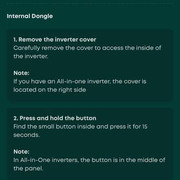
Leads you to do this (don't do this):
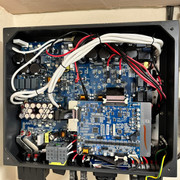
When it means to actually do this this (from underneath):
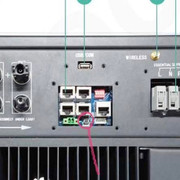
Please don't go poking around stuff in the inverter guts, it'll not end well.
Hi, there are several videos on Youtube i found helpfull for this & many other Givenergy problems. cheers
Hi all
New user to GivEnergy and recently been setting this up on my Eero system. I have managed to get the Inverter to show as connected in my Eero App when I have the 5GHz channel temporarily disabled however as soon as the 5 comes back the inverter looses connection. Which doesn’t really make any sense?
It also still shows as offline in the Portal as well as the app. Any help would be appreciated as a total newcomer really after a house purchase.
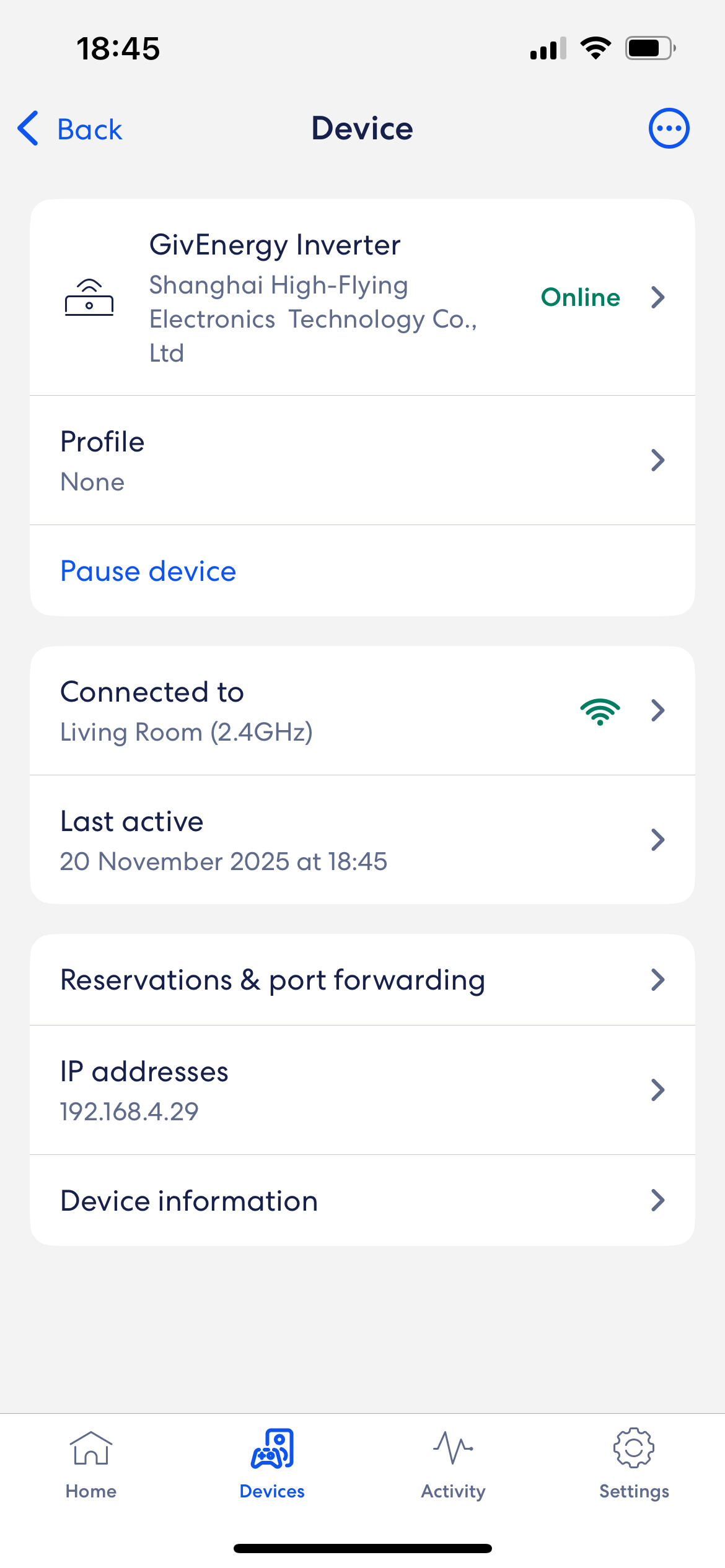
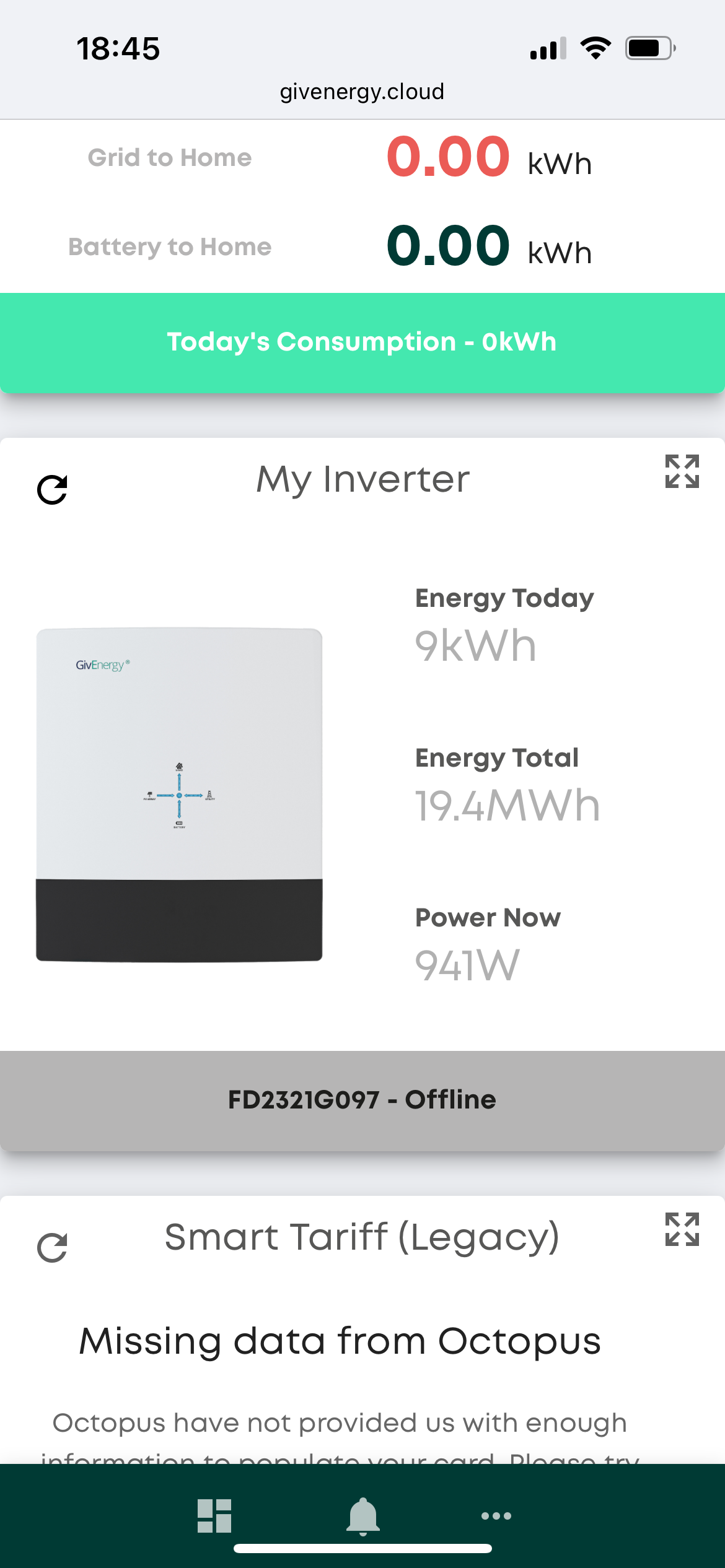
I setup my WiFi using the Inverters login page and set the STA mode and settings to my WiFi and restart the device. It connects but then this page seems to revert back to normal if I reload the page as if the settings have not saved. Is this correct?
Similar position here to last poster. Router changed. Despite changing SSID details back to original, I have had problems with devices reconnecting and I have twice reset the WIFI details in the Inverter dongle (internal) via the Installer app and both times it said it worked OK. Have deleted and reinstalled phone app. The phone app and the cloud dashboard still show zero data (Inverter offline on the cloud). Seems to suggest the issue is the inverter.
Vodafone supplied range extender installed upstairs for signal strength between inverter dongle WiFi resets but that’s not helped.
Any other suggestions about what to try? I’ve sent a support e-mail in.
Cheers
Ally
Turn of 5Ghz until dongle connected and then assign a fixed IP to dongle.
What security settings are being used. I think the dongle is limited (WPA2) and your new routers and extenders may not support what dongle has
I don't want to sound like a broken record but I would also consider updating the dongle firmware if you are having issues connecting to a newer router. Our WiFi 7 mesh and the WiFi 6 mesh before it were both problematic until we updated the firmware, we did still have to temporarily switch off the 5GHz to get it to connect.
Go to https://givenergy.co.uk/installer-resources/ and look for HF21 Dongle Chipset Update or just download https://givenergy.co.uk/wp-content/uploads/Chipset-v27-Boot-1.14.zip
pwdst appreciate the suggestion and you may be right. However, as a total novice with the GivEnergy hardware (I got the installation this year), how would I do that? The dongle is internal to the inverter (I believe). Is it via the installer app, and via the inverter dongle WiFi network?
Do you work for GivEnergy? Your post reads like it
Cheers
I don't work for GivEnergy and nothing I say should be taken as anything more than advice from a random person on the internet.
I document our own experience updating this firmware in https://community.givenergy.cloud/d/2924-is-there-a-way-to-stop-the-wifi-dongle-making-its-own-wifi-network/50 - the TLDR is that you download the Zip, extract it and then log onto the dongle management page and update the firmware there following the instructions on the document in the Zip file. Do you know if you have Gen 1, 2 or 3 equipment? If your "dongle" is internal to your inverter then this might not be the appropriate firmware for your equipment. AFAIK Gen 2 and Gen 3 both have built in WiFi and don't have a "dongle" per-say. What are the first two letters of the WiFi network name the inverter creates?
With respect to staff on the forum, I haven't seen any staff here since @TheDragon (GivEnergy) left in July. Most people's experience of trying to get hold of support in the last six months has been of multiple weeks delay before someone gets back to you, although we keep being told this is changing and new support staff are being brought online.
I very much doubt any staff would be lurking on a Sunday even if any do use the forum. @Rubikcube and @geoffreycoan are fantastically knowledgeable resources with more knowledge than me, but are likewise users who do not work for nor get paid by GivEnergy.
TheDragon (GivEnergy) Left the forum then - you disappeared rather abruptly. I am pleased that you are alive and (hopefully) well.
I imagine that manning the forum was a rather thankless task on top of undoubtedly onerous other duties.
pwdst thank you for your insight. Genuinely. My experience in the few months of owning the system agrees with your description of customer support. No judgement levelled at individual employees and the workload as I cannot comment. However the cost of hardware like this requires resource to support users and not rely on the knowledge and experience of folks on here.
That said, the suggestion about 5 GHz is quite possibly the silver bullet here. I switched it off (and on again) but it has connected in the interim. Beginnings of a fix so much appreciated.
TheDragon (GivEnergy) It's reassuring to know that you are still with GivEnergy! There must have been some chaotic management changes probably due to a very fast expansion of the business?
Can anyone help me - we've just moved to a house wiht solar panels and gve energy inverter and battery. I followed the you tube videos to change the wifi details for both the inverter and the dongle which all seems to go to plan but i have nothing showing on my dashboard - i dont even have an inverter registered to me on the dashboard. I've emailed give energy and no one has responded, i tried caling but got Rachel the AI bot!!!. Any help would be greatly recieved. I've also sent an enquiry about an EV charger but no one has got back to me about that either - so far not overly impressed with the customer support!!
In your situation I would start a new thread!
Do you know who installed the system? If so approach them to do the update. The kit is good , the support not so. But.. you will get help here.
I refer you to my first point.;-)
JT26
You need to get the account login details either from the installer and/or the previous owner.
Your dongle may be connected to the web and then to GivEnergy, but you need the login.
In the short term, try the Android Inverter Monitor app to see what is going on.
.For a one off fee of £10 i think you can actually control your inverter with the app
Murrayjohnc Just change the SSID to the same and the password from the router interface, usually 192.168.1.1 or 192.168.0.1.
Don't enable WPA3 if you have the option. A few other non-standard stuff (modern) like this will prevent the inverter connecting.
Easiest way to do it.
Hi all, I was wondering if anyone can help. My G3 inverter is connected through a LAN cable, which seems to have stopped working, so I'm now trying to move to WiFi.
I am not able to connect to the WiFi dongle. I have watched the two videos by GiveEnergy on how to reset the WiFi dongle:
https://www.youtube.com/watch?v=e2mq56f9UjI
https://www.youtube.com/watch?v=IUZkuMg_hgM
They are helpful, but I have a question. The guy in the videos turns off the isolators. But then, when he presses the WiFi button to reset, the inverter seems on (and so one of the isolators switches behind him).
My questions are:
Do I need to turn off the isolators before removing the cover?
If yes, do I need to turn them on again before pressing the wifi reset the button for 15 seconds?
Any help would be appreciated!
Costaz why has the ethernet cable stopped working? I would imagine that if that is having problems then trying to swap to wifi would make things harder not easier. Ethernet cables generally don't stop working, so what else has changed? In terms of connecting to the wifi, did you connect to the hidden SSID network?
For some reason my dongle (internal to a G3) has gone offline and I can't get it back. Ive tried scanning for the Inverter, Ive followed the instruction video and even reached out to GivEnergy (No responses) and nothing is working. Any suggestions so that I can get data back into the app dashboard and potentially ensure that the system stays updated.
Connecting to the dongle is extremely annoying.
It often disconnects you after a few moments so changing the settings can be extremely troublesome.
I find it best to just change the router to be the SSID and password of your old router, and it will connect to the new router as if nothing has changed.
As for lan issues @Costaz, I would check if the IP has changed if you have changed router... some routers use 192.168.0.x while others use 192.168.1.x... possible the inverter is set up to use a static address hence why it isn't connecting.
Other than that, try testing the lan wire with a laptop...
There is also a DIP switch on the inverter to change between wifi and lan, so you likely need to change that over, you can't just connect to WiFi / reset it without telling the inverter to use WiFi.
AndyRowlands you changed the dip switches and powered the inverter fully off and on again, right?
AndyRowlands Turned off everything I could see.
Do the ethernet sockets the ethernet cable is plugged into on the Inverter and Router have green lights flashing irregularly?

AndyRowlands You mentioned the inverter was not seen on your “repeater”. Have you tried re-booting the repeater ?
This might already have been suggested... try pressing the WPS button on the router to get them connected over wifi. With the LAN cables, there is no password needed and no SSID but they shouldn't just stop working.
On the router software look for the system log and look for your devices in there (connect to the router's default IP from computer, tablet or minor). System log should show every device it finds each time the router restarts. Givenergy AllinOne is HF2010 or similar.
If you briefly swap back to old router you can check old settings and see MAC addresses and any fist IP addresses, which you can record to add to new router. Restarting Givenergy kit will force it to search for router again.
Andrew Miller's Givenergy Inverter App uses fixed IP address and oddly did not find AIO doing a network scan - on the router I just set it back to the same fixed IP address we used before..
Hi,
I am new to the community and need help. We have had our system since Oct 2023 and never had an issue.
I have read most of the comments on here regarding the router change, as yes, I did it too in Feb 2026. First, I couldn't connect it to the new router. Then I changed the router details to the old one, and we connected. Brilliant. However, I have now been experiencing my Inverter dropping out and losing connection multiple times throughout the day. Please, can someone help?
Thanks
I am no IT expert, but these are the tips I have picked up on this forum, and they work for me.
Login to your router settings.
Turn off 5gHz wifi until dongle connects. You can turn it back on later
Find the inverter, should be called something like HF-21. Set your router to always assign it the same IP address.
Make sure your security is WPA2, as the dongle cannot deal with anything else
Updating the dongle firmware now whilst you still can is probably a good idea. Download the new firmware and instructions today as the help pages and files may disappear at any moment. It is extremely likely that the company hosting them are not being paid anymore.
NRG You don't say which 'new' router you have but in general if it is one you have recieved included in a ISP deal it's not going to be the best at anything. Do yourself a favour and buy your own and get the best you can afford. There are a number of advantages of this approach and the biggest by a country mile is that you don't have to worry about anything falling over whenever you decide to switch ISP's. You simply request the PPPOE username and password and maybe the VLAN setting from the new provider put it into your router and your are straight up and running and all your devices will not notice the difference. For what it's worth I use Ubiquiti stuff. It's incredibly powerful, secure and reliable as well as there being tons of configuration videos available to help you really get the best out of your network. I'm a smart home nerd and currently have 92 devices on multiple vlans, several isolated wifi ssid's, a mesh network covering all my farm grounds, barns, stables, etc. I've changed isp's 3 times in three years, including the lastest to full fibre and everything took the changes without skipping a beat. One of the best things about this approach for me is that I'm also not limited at all by some twit at the ISP head office thinking this setting or that setting shoudn't be allowed to be used by any customer because they think we are all idiots. Seriously, you may not need anything like my overall network but everyone should get their own router and properly own it in every sense of the word.
cluelesscris
Hi, it is the WIFI 7 router from EE
I am in full fibre too
WiFi 7 likely defaults to WPA3, see if there is a hybrid WPA2/WPA3 mode available. If that doesn't work try WPA2.
I get frustrated when people say "just change the settings on your new routerto match the old one" Sometimes that just isn't possible when you change ISP abd get a new router.
For example, my home network is all on the 192.168.1.xxx IP addresses. I was given a free introductiory Virgin Installation, but the Router was locked to 192.168.0.xxx.
Similarly, I have some old devices that were on an EE network, using a password whose format is not supported by my current Vodafone router, and whose set-up instructions are no longer available to me. My solution was to keep my old EE router, and connect it as an Access Point, retaining the old wifi SSID and password. Such a solution is beyond many less technical folk.

Jerrytaff My solution was to keep my old EE router, and connect it as an Access Point, retaining the old wifi SSID and password. Such a solution is beyond many less technical folk.
That's exactly what I have done with my Fritzbox when we had FTTP installed by Toob. The supplied Linksys router has the option to switch off the 5G network hidden away in small typeface " CA " at the very bottom of the page.🤔
I have completed all the steps, and still no luck.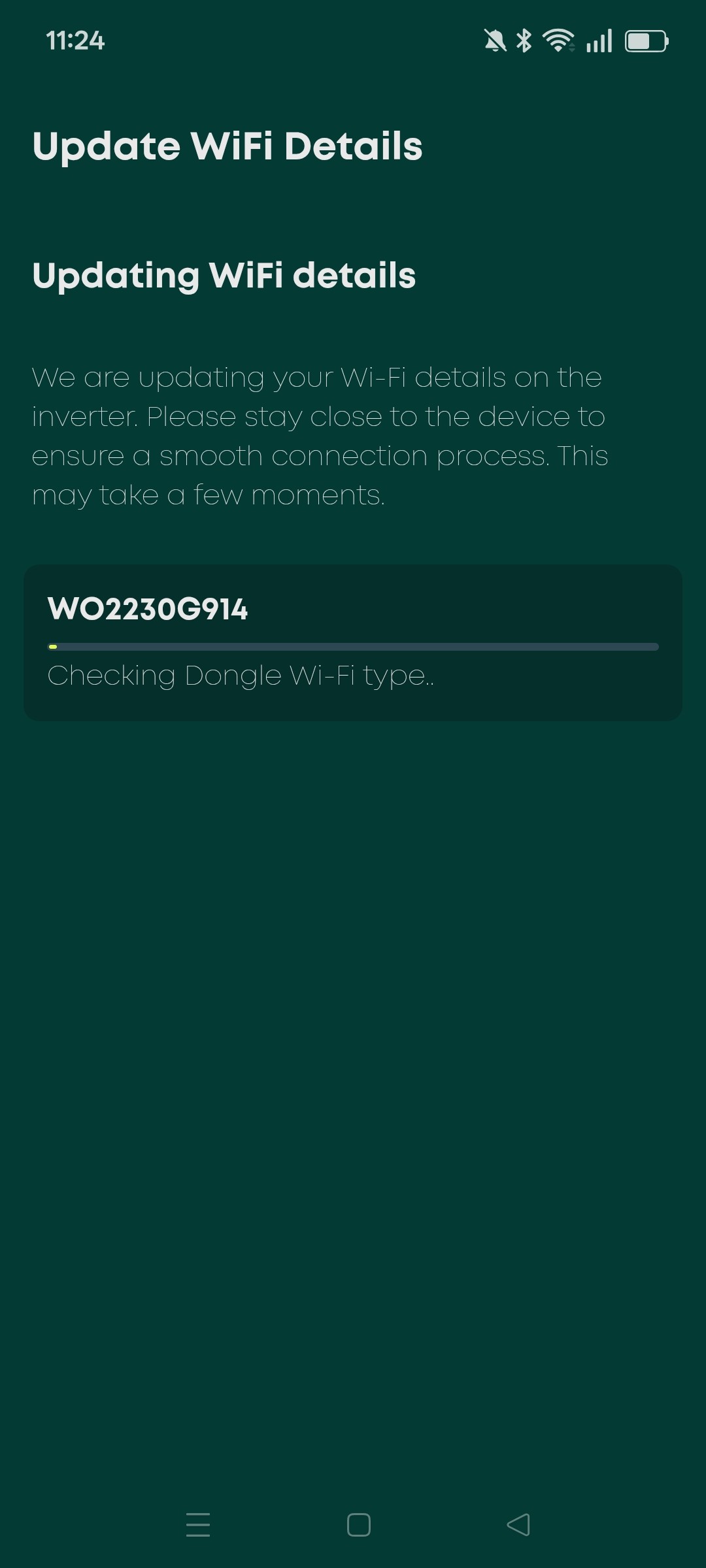
This is where it gets stuck for 5 minutes
Then this
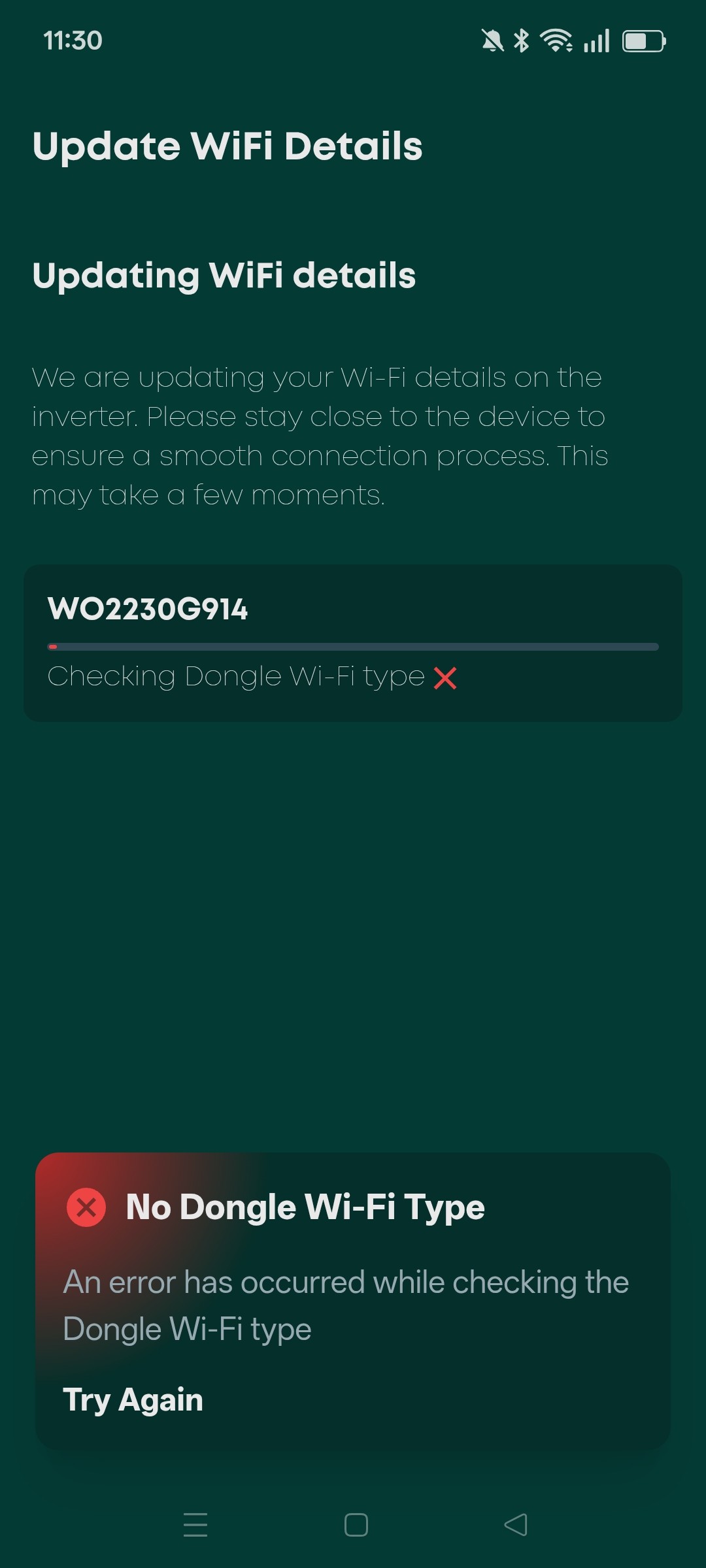
Giv energy inverter and battery app support started again?
What is this stuff you are posting about.
Does it have anything to do with GivEnergy systems?
YAWN
@xtameemfl This isn't really the forum for you, you'll get no click through.
Probably better to spam somewhere else.