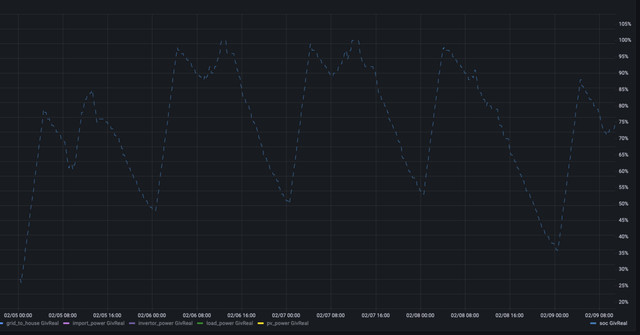
Hi. PV +battery system on Go, 1 month ago. I want to limit the overnight cheap rate charge, as the PVs are charging the battery back to 100 and we're exporting to the grid with no payment.
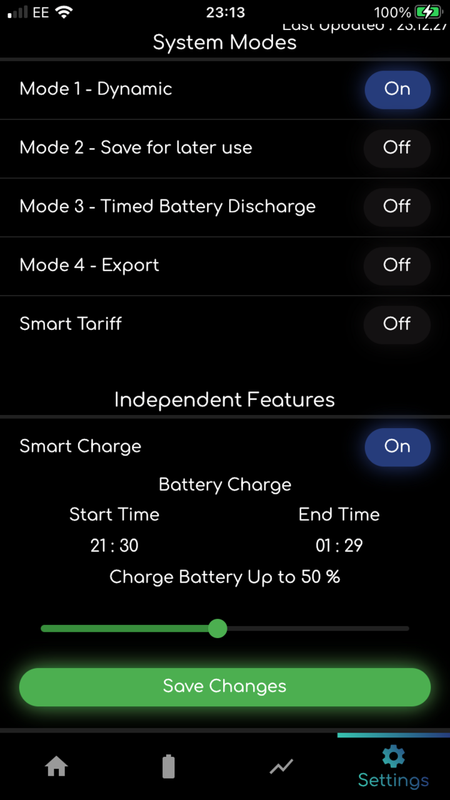
From the App (v2.7.8)>settings>Independent Features>Charge Battery Up to % (then save changes) appears to let you limit the battery charge to, say, 80% before going to bed, but I wake to see the battery has charged to 100% and the App shows the 80% I set has changed itself back to 100%.
For me, it looks like a bug in the App, but I wonder which parameter I could set from the betaCloud Inverter card>Settings? There's a 'Percentage Limits'/Battery Reserve % Limit setting - could this be what the App isn't setting?
Thanks if you have ideas....

Limit battery overnight charge?
pjb904 morning.
The app isn't properly supported anymore so the best bet is to set those options in the beta portal under the inverter tab instead.
I think the intention is that as the beta portal supports mobile devices the app will be removed at some point.
yandards thanks - so is the Battery Reserve % where I can limit the overnight charge? I'd need to change it back to 100% each morning to allow the PVs to top up during the day. A bit of a pain.....?

pjb904 Adjust the times on the overnight charge to stop sooner, or start later. That will limit how much charge goes into the battery and allow you to keep the 100% limit set.
However I charge my battery overnight until 2:30am between then and the sun coming up I have already used a good chunk of power. For me as days get longer and the sun gets higher I start setting the charge % down in 10% chunks. Not there just yet, charged up to 80%+ from PV recently but got a bit to go!

Unless I'm oversimplifying it don't you just want to change the 'Charge to' value on your overnight charge.
You can leave this alone once it's set as charging on solar during the day isn't limited by this timed charge percentage.
At the moment I still have this on 100% but as the year progresses I'll be hopefully dropping it down and eventually turning it off.
My example: https://ibb.co/N7Sg7PH

judgepd Yeah this, spot on!
judgepd thanks. Interestingly, if I change the charge limit (as shown in the link grab you kindly sent) - then go to the settings cog (top right on that page) I can see the change made is reflected in the 'Winter Mode Battery Charge and Limit' AND turns the mysterious Winter Mode to 'ON' π€·π»ββοΈ
I noticed when setting from the App that any change is reflected there too BUT does not enable Winter mode, nor sends the value to the system (needed to Force read registers again).
I did report the non functioning setting from the App to the Devs as a bug, which they said they'd fix.
Thanks all for your ideas and comments. I'll know tomorrow morning if I have limited the charge % from your ideas.
Limiting charge time would work too, I'm sure, but maybe some maths needed first π

pjb904 The winter mode thing comes up a fair bit - such as here Basically if it's not set right then the Inverter ignores the % and goes to full.
In all honesty the app seems to cause more issues/confusion than it solves now, they might as well just make the app a shortcut to the Beta portal, given it scales fine.
hoggy thanks!

judgepd
That's what I am doing, now that we are getting a bit of solar PV generation during the day to top up the batteries.
Currently I have it set to 90% charge during the Go Faster 01:30-06:30 period.
However, it only appears to charge to 88 or 89% and then if a load changes during that Go Faster period, it takes some power from the battery & then tops it up again to 88 or 89% before the 6:30 finish.
When I had it set to 100% and it was full before 6:30 it stayed at 100% and did not take any power from the batteries until after 6:30.
Not sure why it discharges from the battery during the Go Faster Charging period when the % is set below 100%, as the grid can supply all the needed power at the cheap rate. Also, there are the losses between charging & discharging during that period that make it less efficient.

My understanding is that the battery won't discharge during a timed charge period, even if the current SOC is above the percentage charge limit that you've set. e.g. charge limit set to 40% but battery is at 90% then the battery will not discharge at all until the timed charge period ends.

judgepd My understanding is that the battery won't discharge during a timed charge period, even if the current SOC is above the percentage charge limit that you've set. e.g. charge limit set to 40% but battery is at 90% then the battery will not discharge at all until the timed charge period ends.
That was my understanding, but it is not what is happening. The battery is discharging during the Go Faster charging period I have set, but only if the % set to charge to is below 100%.

Woodlands You will need to email support for further help. The battery should not discharge during the timed charge period.

Woodlands Sounds like one for GivEnergy to have a look at or comment on.

Given nobody really knew the purpose of Winter Mode setting (in a "why does it need this register at all" kind of way) it may well be that it actually disables the charger output entirely once 100% until the charge window has finished.
Perhaps it was needed as otherwise the charger or battery stays "connected" allowing it to bounce around constantly aiming for target?
My system has never topped up at 100% once it's got there - so it's doing something differently and that's the only register that appears to get changed.
Still no joy for me - I'll try the 'reduce charge time' work around tonight, but I must have a fault in my settings. Shame there isn't a good guide as to exactly what the Inverter settings do. ( GivEnergy guys please note :-)
I have to get this sorted before it gets any sunnier, as me filling the Grid for free when it's sunny isn't what I had planned. ποΈ
pjb904
Hi I use the same version iOS app (Mode 1 - Dynamic, Independent feature). I frequently change the % of charge, even during the charge cycle, and it works most of the time (only few times the change was not accepted). Have you tried to scroll further down to expose a "Save Changes" button? This is not displayed on a 4.7" iPhone screen without scrolling. You have to confirm the % change setting and the command is confirmed by at the top of the screen. I keep the charge window open for the entire price plunge so the house baseload comes from the grid during this period rather than battery kicking in, except some back and forth between the battery and grid. Apologies, if I'm stating the obvious.

Sparta thank you, I appreciate you trying to help me! I'm on Go, so my plunge times are 0030-0430.
I have set the 'Smart Tariff to Go. Thanks again but I am 'Save Changes' pressing. I've followed advice from others suggestions, and have tried Cloud Inverter controls without success, and I fear I've really confused my system. Last night I did limit my battery charge, but it charged 0430-0600 OUTSIDE my cheap rate π
Does anyone know if/how to get Giv to look at my system settings, and sort me out?
Heeeelp! π
pjb904 I would stop using the mobile app and just use the beta portal. There have been some reported issues with the app and portal not getting along.
With the beta portal post any settings change you need to wait until you get a green confirmation box pop up after changing the settings or it won't have gone in.
Don't know of you have a Zappi but if you do set the charge period to end at 0435 instead of 0430 or you might find the car has pinched your overnight battery charge.
pjb904 I'm on Go Faster 4hr (21:30-01:30) and I do not have EV charging at present. I ignore Smart tariff setup, keep on Mode 1 (Dynamic) and Independent battery charge. I suggest that you call GivEnergy Support and get them to reset and start again. They helped me to sort out/confirm when the app was not accepting changes. Also, may be worth checking whether the battery is on latest firmware. Update would require battery recalibration which involves energy dump. When GE did mine recently, I asked them to schedule it so the calibration charge happens during the price plunge window, which is obviously outside of their office hours, and they were able to schedule it and it went through without a glitch. Good luck.
PS. You should not need to be exporting for free. Octopus still pays for export though this is limited to SEG rate when on Go/Go Faster. Actually, I had an email from Octopus on Monday informing me that the Export tariff has gone up from 3p to 4.1p which reduced the delta to price plunge (5p for me at present).
Sparta thanks again. Very interesting.
I did get this reply from Giv, which has interesting 'nuggets' of info:
At the moment, the octopus go smart tariff feature will only charge the batteries up to 100%. That should be changing soon, although i don't have a confirmed date in hand. Luckily, there's no real difference in performance if you were to put the system into Mode 1 and have the battery smart charge feature turned on to between 00:30 -04:30. That way, you can select the amount it charges up to. The smart tariff is handy if you're on something like agile where the rates change all the time, but as Go is always the same, you can just control that feature to charge independently.
All the best,
George Rawding
Givenergy Customer Support
-01377 252874
www.givenergy.cloud
www.givenergy.co.uk

pjb904 I am on Go and must admit I do not use the smart tariff card. I use the timed charge function.
Dynamic yes
timed charge 2130 - 0230
charge to 100%
I will reduce from 100% when there is more sun!

Same here, I'm on go and didn't see the point of using the specific tariff integration when it does the same (seemingly worse) than just setting a timed charge.
It seems like that tariff integration needs some text adding to confirm that it will always do a 100% charge.

Woodlands Hi. Now that I've lowered my overnight charge percentage to less than 100% I've noticed the same behaviour. If the charge is set to 100% the battery does not discharge at all during the charge period (even if it's already full), however if the charge is set to any other value, such as 80% then the battery will charge up to 80% and then discharge to meet demand and then charge and then discharge until the charging window ends.
I wonder if @Adam-Reynolds could comment on whether this is the expected behaviour.

judgepd I will test this too. Currently on a different firmware for another issue so might have other stealth fixes in it. I will drop mine to 90% now.
judgepd
I'm seeing similar behaviour too. See here:
https://community.givenergy.cloud/d/209-battery-output-flatlining/5
My system has been acting strangely as well.
If winter mode set, the remote control returns "true - false - false" and the battery charges 100% whatever the % setting.
If winter mode off, the return is "false - true - true" and the battery charges to the set point, say 70%, but then discharges and cycles on /off around the 70% figure rather than shutting off until the end of the set charge time.
I have been told this is incorrect and have had the latest battery software downloaded.
Currently doing the battery charge and calibration.
Hopefully back to normal tomorrow.

Ok so my battery charged to 89% (close enough) and did not discharge until after the end of the Go Faster period. Though my graph data has changed today, the left hand wattage is higher than what I normal see though demand is the same.
My system is a an AC3 fed by 2 PV systems.

You can see an example of the behaviour here. I think it was set to 95% but after it's full the battery level isn't just a straight line, it's jumping up and down until the charge period ends.

Yeah mine flicks between 89 and 90% sometimes seeing 49w draw but it is nearly straight.

Yes, that is what ours is doing.
Also found that if I set it to 70% charge, it only charges to 69% and then flickers between 68% & 69% until the end of the set charging period.
If I set it to 71% it charges to 70%, but then flickers between 69% & 70%.
Probably just a display issue, but still not sure why it should discharge during the charging period if set to lower than 100%

@Woodlands Yes, exactly this. If I set to 90% it will flick between 88% and 89% until the charge period ends. It not being bang on the set percentage seems less of an issue, but I would expect it to just 'turn off' discharge completely while in a charging period but it only seems to do this if the set percentage is 100%.
Since we had our second 8.2kWh battery installed in late Jan, coupled with some pretty decent sun, we're rarely going under 50% SoC now:
I was thinking about sometimes pausing the nightly charging schedule to intentionally discharge the batteries - does this make sense? It's my understanding the Lithium Ion batteries in the cars like to have regular half-cycles (80% -> 20% -> 80%), but does this apply with Lithium Phosphate as well?
judgepd It's probably to do with the SoC varying slightly as the battery cools post charging period.
I guess writing the code for charge to 100% is a touch simpler as its charge until full and do not discharge to support any demand.
The odd % variation with charge to any other % will be down to that measurement not being an exact science due to temperature variations and then subsequent charge/discharge chasing that extract % SoC as set. You could potentially code this out but it's a true reflection of what is actually going on with the system.
The old portal and mobile app use a different set of registers (back end inverter settings) than the new beta portal.
Our older method of doing it was essentially to base the charge on the percentage value as first priority, then the charge time. With that in mind it would charge to 100%, then discharge to 99% then charge to 100% and so on whilst in the timed charge period.
The new method on the beta portal however takes both into account at the same time, so if you set a charge to a certain percentage it should stay at that value regardless of the timed charge that was set.
To get around this happening, switch the charge OFF in the old portal/mobile app and turn the charge back on again in the new portal to readjust all of the back end settings, this should turn off the necessary functions that causes this to happen.
Just in relation to what you said also @hoggy the app is due to be redesigned with the new end points of the new portal, our app developer is just working on our engineers app currently and I believe this is then next in line to bring some of the functionality and features across from the new portal.

Thanks for the response @Adam-Reynolds

Thanks @Adam-Reynolds
I have turned the timed charge off in the App, Old Portal & New Portal and then enabled it again in the New Portal.
Hopefully, that will cure the issue of the battery discharging during the timed charge period.
Many Thanks
Adam-Reynolds Thanks for the reply Adam - Am I right in thinking that the current battery API interacts with the old portal/mobile app? The reason this has become clear to me now is because I did as you suggested and switched the charge OFF in the old portal/mobile app, then ran my API call using the battery API and it turned the charge back on in the old portal/mobile app. Is the new API that's being mentioned in another thread effectively the backend for the beta dashboard?
When my battery was discharging/ charging during the charging window support told me it was the winter mode setting.when I turned this off it stopped doing it. Itβs not a display issue as on the myenergi app I could see the actual power flows happening.

@Adam-Reynolds I'm pretty sure I followed the instructions to turn off the timed charge in the old portal and then turn it back in the new one and I still had the same behaviour last night. Charge set to 80% but the battery level bounced between 78% and 79% during the charge window.

Same here. Followed the instructions to turn Timed Charge OFF in the New Portal, App & Old Portal and then Enabled it again in the New Portal, but it still discharged & recharged until the end of the time period, once it had reached 1% below the target set.
hmm, maybe there is some back end registers that don't turn off when the AC charge is turned off on the old portal, I usually strip the inverters settings in the back end and add things manually. I'd be happy to take a look at both of your systems though if you could pop me an email perhaps with your serial numbers so as to not expose any information here.

Adam-Reynolds Thanks again. Dropped the number in an email to support@.
My system also has this problem, I would be interested if you get it sorted.
Thanks

@Adam-Reynolds Thanks for the offer. I have sent an email to support.
As suggested by @rwbarrett above, I have also now turned winter mode off (using the remote control page), so will see if that changes things tonight during the timed charge period.
I would like to write a 'thing' probably in NodeRed that looks at my current battery % at 23:30 when I switch to cheap rate, calculates the KWH I need to get to be 100% full at 05:30, then sets the charge rate of the battery so I hit 100% exactly at 05:30.
This will lower the temperature on the inverter.
Tonight for example I was at 40%. I only needed 1560w charge rate to hit 100% battery at 05:30. If this calculation can be done evey day I can avoid the heat.
In standard format I would have charged at 3400 w and completed the charge at 02:45 ish - and have a hot inverter...

Woodlands @Adam-Reynolds Thanks for the offer. I have sent an email to support.
As suggested by @rwbarrett above, I have also now turned winter mode off (using the remote control page), so will see if that changes things tonight during the timed charge period.
Well, turning off "Winter Mode" had a different result! It charged to 100% last night, even though the setting was 71%.
So I have Disabled all the settings & re-enabled them to what I want. Checking on the "Remote Control" page, that has also turned "Winter Mode" back on.
I will live with it discharging & recharging during the "Timed Charge" period, once it reaches 1% below the setting, as I don't want it to do an update & re-calibration during the peak rate of our Go Faster tariff.

I had mine set to 100% last night and it just moved between 98% and 99%, which is worse than what it was doing before.
Interestingly so did mine; Charged to 100% - which it held for nearly 30 mins, and then dropped to 98% and stayed there until the charge window ended at 4.30. Can't tell if this is a software issues with how the % is calculated and displayed or the battery really is not holding at 100%,

Search "winter mode" on here - depending which way it's toggled it will ignore whatever charge % you tell it and go for 100%.
(Yes I know it's SUPPOSED to not matter anymore owing to a Hotfix but obviously it's not "fixed")

Thanks. It seems on mine, regardless of what percentage I set, the winter mode stays set to 'true' or '1'. I wonder if that is what has been changed in the last 'fix'. Does mean that I don't seem to get a proper 100% charge though.