Optimal flux settings

100 comments started 2023-06-02 last 2023-07-27
Home AutomationGivEnergy ProductsHybridBattery
M
#1 michaelhoskins

I have a 5.1kwp west facing panels and a 5wh Hybrid gen 2 inverter and 9.5kwh battery. I am wondering what peoples' experiences with flux are. No EV and gas heating and hot water (for now)

At the moment, i am not charging overnight at all. At about 6am I am at sound 50% and then getting to be 100% (actually it levels out at 98%) between midday and 2pm. So I am then exporting on a good day from them until around 6pm. I don't really do forced export.

Very happy to see negative costs most days now and I like the fact that I'm not importing, but I do wonder whether it makes sense to charge overnight so I would start exporting earlier (and possibly add a forced charge in during the flux period).

Interested in others experiences and whether someone has done the maths!?
S
#2 stevelewis

Spreadsheets not required... Look at the tariff and buy low, sell high.

R
#3 Rogerbu

I buy as much as possible 02:00 to 05:00 at 21p
I have a PHEV & EDDI (Gas only for cooking now)
Once upto 100% I export at 24p - only 2.1p profit per kWh but better than paying.
During 16:00 to 19:00 I force export as much as possible to leave enough to get round to 02:00

Most sunny days I make a profit of £9 to £10 after home, PHEV & EDDI usage.

(7.8 kW panels, 2 x 9.5 GE batteries, AC3.0 Battery Inverter)

D
#4 Dai

michaelhoskins with a southwest facing roof on flux, like yourself not importing anything (except the noise kw from inverter response time), I leave the inverter on eco unless when I remember switch forced export between 4&7 and then manually move it back to eco at the end of the 3 hours. Overall at this time of the year gives a fair more favourable credit on the acct vs fixed outgoing and agile outgoing. Just need to hear of any changes to the £kWh rates from 1st July which may move the equation more in Octopus’s favour wrt export rates going forward but hopefully the price difference between lowest incoming rate to highest export rate will remain. In truth winter usage will be the true test of the tariff, but you have the safety net that you can revert to another tariff if the £ don’t seem favourable.

N
#5 Newman

Just a thought on buying and exporting power. With an AC3 , if you import 100 kWh at 21p that costs £21 however only 95kWh will get into your batteries and when you export only 90 kWh of AC will be generated worth 90 x 24p or £21.60.
Most of your profit is from your PV, the electric company is paying you 0.6p per kWh for shifting their load / using your capital investment.

S
#6 stevelewis

Newman Maybe the Octopus Flux rates vary widely across the regions. Here (West Mids), the flux import rate is 19.7p/kWh and the peak export rate is 34.9p/kWh. After conversion losses, that's roughly a 10p/kWh gain, 80p/day, £300/year.

A
#7 Arg0t

If solcast forecasts more than 20kw of generation tomorrow I force a discharge between 4 and 7 down to 40%., System then runs down to between 15 and 20% overnight and starts charging up. Has hit 100% around 2pm for the last couple of weeks. System then exports anything over house usage and until it starts dumping again at 4pm.
If forecast is less than 20kw no forced discharge and I potentially hit full batteries earlier tomorrow. If forecast is less than 7W then there is an overnight charge up to 65%.
This way I sell at the highest price, I cycle the batteries below 50% frequently to allow the BMS to calibrate but can still live 100% of solar from end of April.

Gen2 5kw, 6.4Kw in a East West config and 2 9.5Kw batteries. If not for the battery firmware upgrade causing a 25kw forced grid use I would have been at 3kw purchased for the month, 2kw of that because my home assistant code sh*t the bed and set a wrong overnight battery ac charge limit.

N
#8 naltsta

I only have a 5.2kW battery so I fully charge every day at 2am and discharge between 4-7pm.

Set the dishwasher off at 2am as it’s cheaper to import from the grid than use my own “free” electricity if I can sell it at a decent price!

S
#9 SJB

stevelewis I think in most cases Newman is correct, though it does depend on how much your system generates from solar and at what rate you can export.
If your solar generation will exceed your battery capacity and daily consumption then there is no reason to charge at the cheap rate as you will have swapped charging your battery from 'free' solar for paying to charge your battery, the 'free' solar will be exported at the middle export rate thus making your profit around a penny a kWh.
If your solar generation will be much less than your battery capacity then you could conceivably import at the cheap rate and benefit from exporting at the higher rate.

Myself I discharge the battery in the morning so as to reduce the clipping on a sunny day (a gain of up to 5kWh) and then try to discharge the battery to around 50% between 1600 and 1900.

S
#10 stevelewis

SJB good point on the peak shaving, that could make quite a difference with the hybrid inverter and a biggish array.

M
#11 mpartington

stevelewis I'd agree with around the 10p/kW benefit. This was the (DC discharge) data from some testing performed by Giv that was shared in the beta firmware thread on a 5.2kWh battery. It shows around 14% loss during discharge, so add some losses for the charge process, would be around 20%. So maybe 12p benefit if glass half full. If I discharge half my 2x5.2 capacity, then additional 43p a day. I'm on the fence if it's worth the extra cycles.

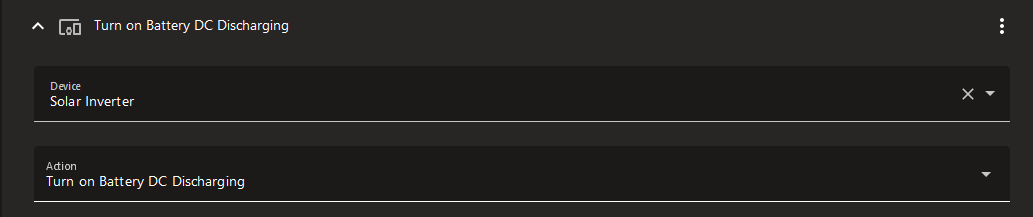
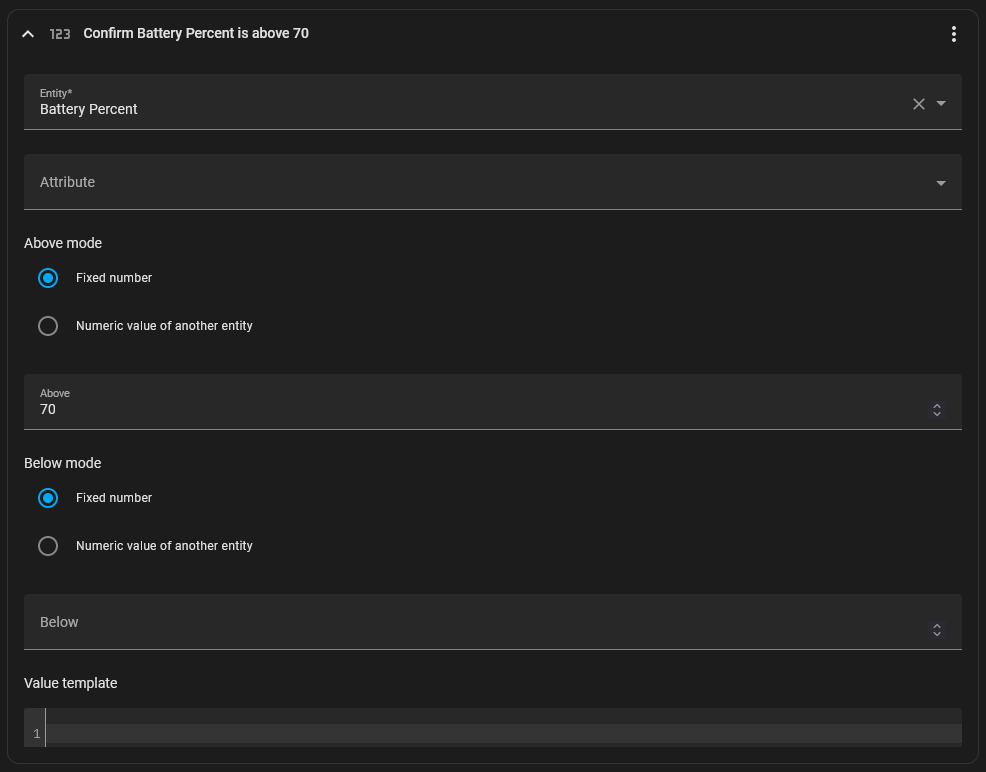
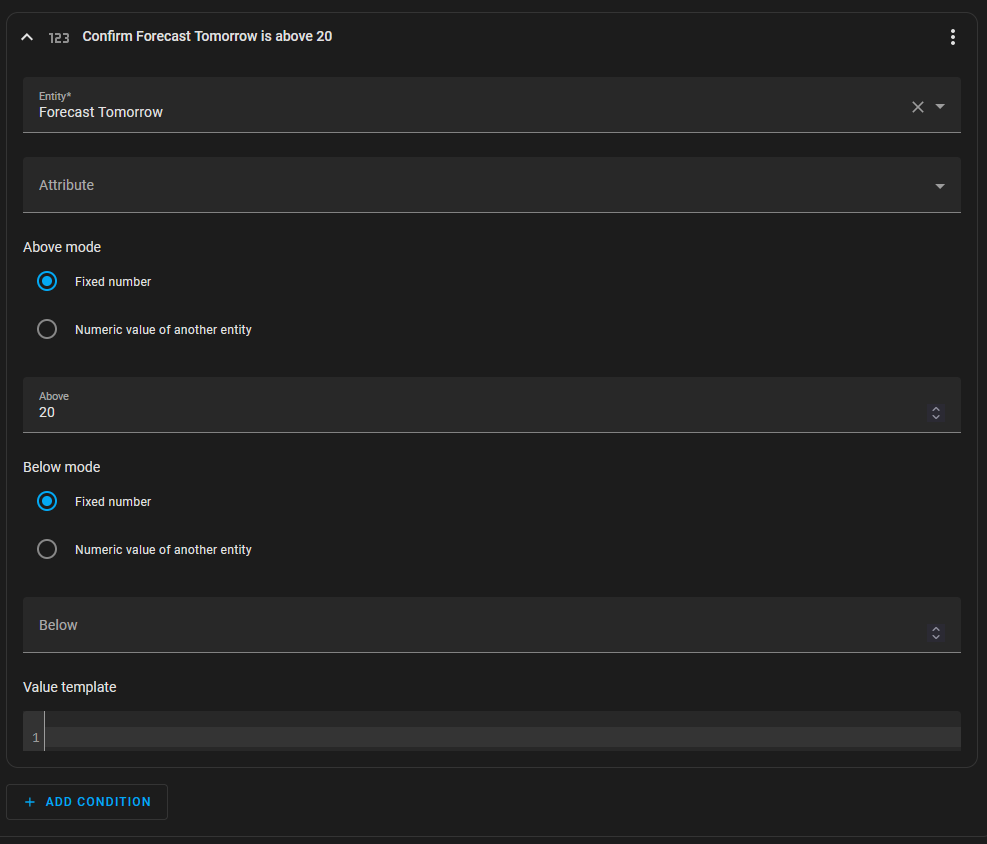
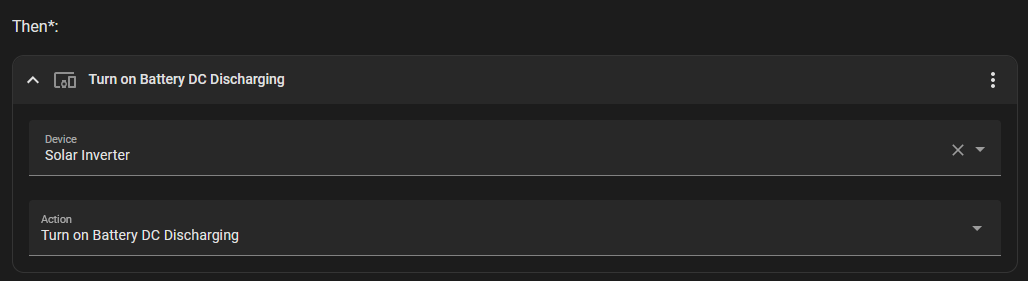
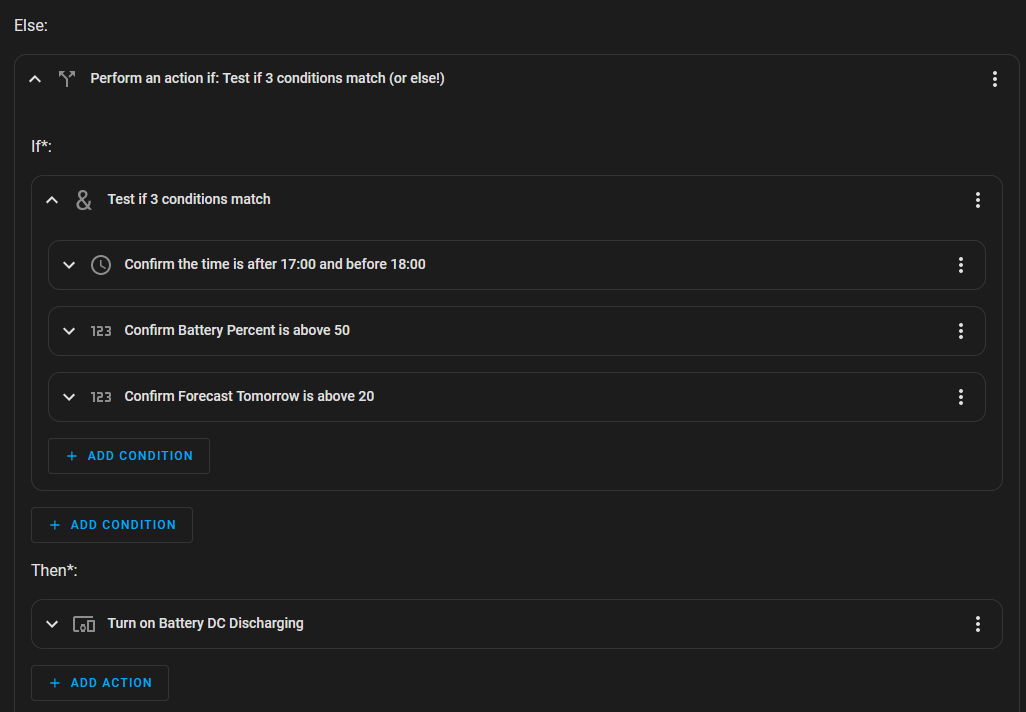
J
#12 Jonesy

Hi all,

This is exactly what I want to setup with mine and my father settings.
I'm looking to export from my battery between 16-19:00 leaving 50%.... But I can't quite understand the settings?

@Arg0t Are you manually discharging this?
How are you controlling when how to maintain it?

I'm a bit of a Noob to this, so I'm trying to set this up on my inverter but I'm not sure how to configure it to Export down to 50% at a set time.... but still allow me to consume the battery in the house.

The remote settings don't seem to make sense to me. Anyone got a picture of the setups they've done on the inverter/battery?

S
#13 SteveCook

I tried to do the same, and I want it all automated, not have to do anything manually.
So far

To simplify things with battery %s, I have worked on the basis of 9.5kWhr battery and Gen1 with discharge rate of 2.6kW. Set for 2 hours discharge at 2.6= 5.2kWhrs gone, leaving 4.3kWhr, which is 45% (or higher if sun is still out) .
Discharge 17:00-19:00

With GE portal.
I can get my 02:00-05:00 charge to work, but there is no way to set a 2nd afternoon charge just to make sure battery is full before peak export -though this time of year, it is not really needed.
The GE portal timed export works, but I could never get Eco to kick back in after the 19:00 peak export time ended. The export would stop but the battery would site idle and then start importing to meet the load.

With Octo R&D
I then tried Octo R&D scheduler as that allows more slots to set import and export times.
I could get 2 import slot times to work and export to work, but same problem as GE portal that after export I could not get what was left of the battery to feed the house until 02:00 charge. The battery would sit idle and import would take place from 19:00 - 02:00.

Home assistant
I have then gone to Home assistant.
I can get 2 timed import slots to work.
Same problem as above that after export, HA sends ECO signal and export stops, but battery would still sit idle and import would then start.
I have now put an inverter reboot in at 19:05 that seems to kick the Eco mode into action.

S
#14 SteveCook

Tonight I turned off the automated inverter reboot with HA, but after timed export stopped I had set HA to sent an Enable Eco mode command. It seems to have worked.

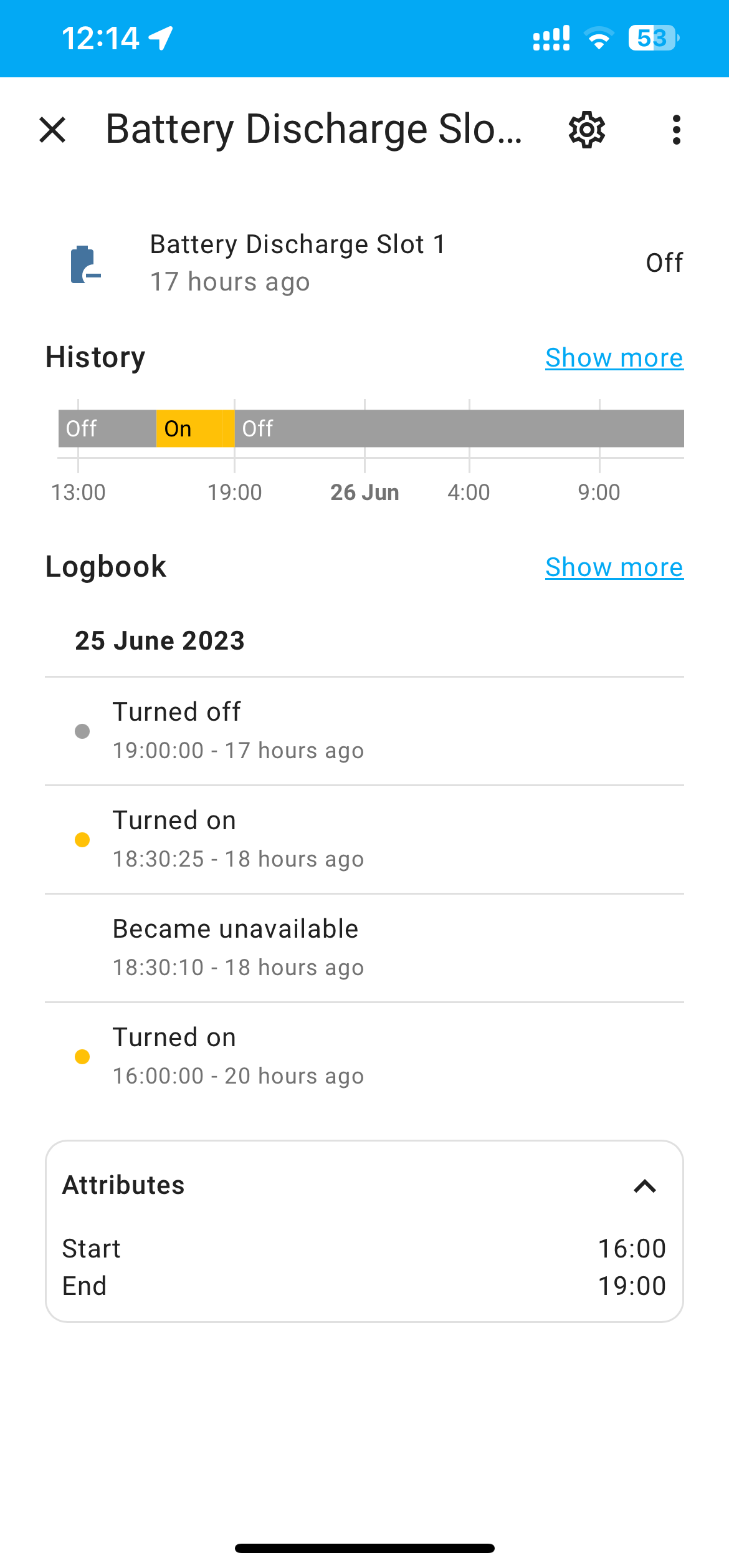
J
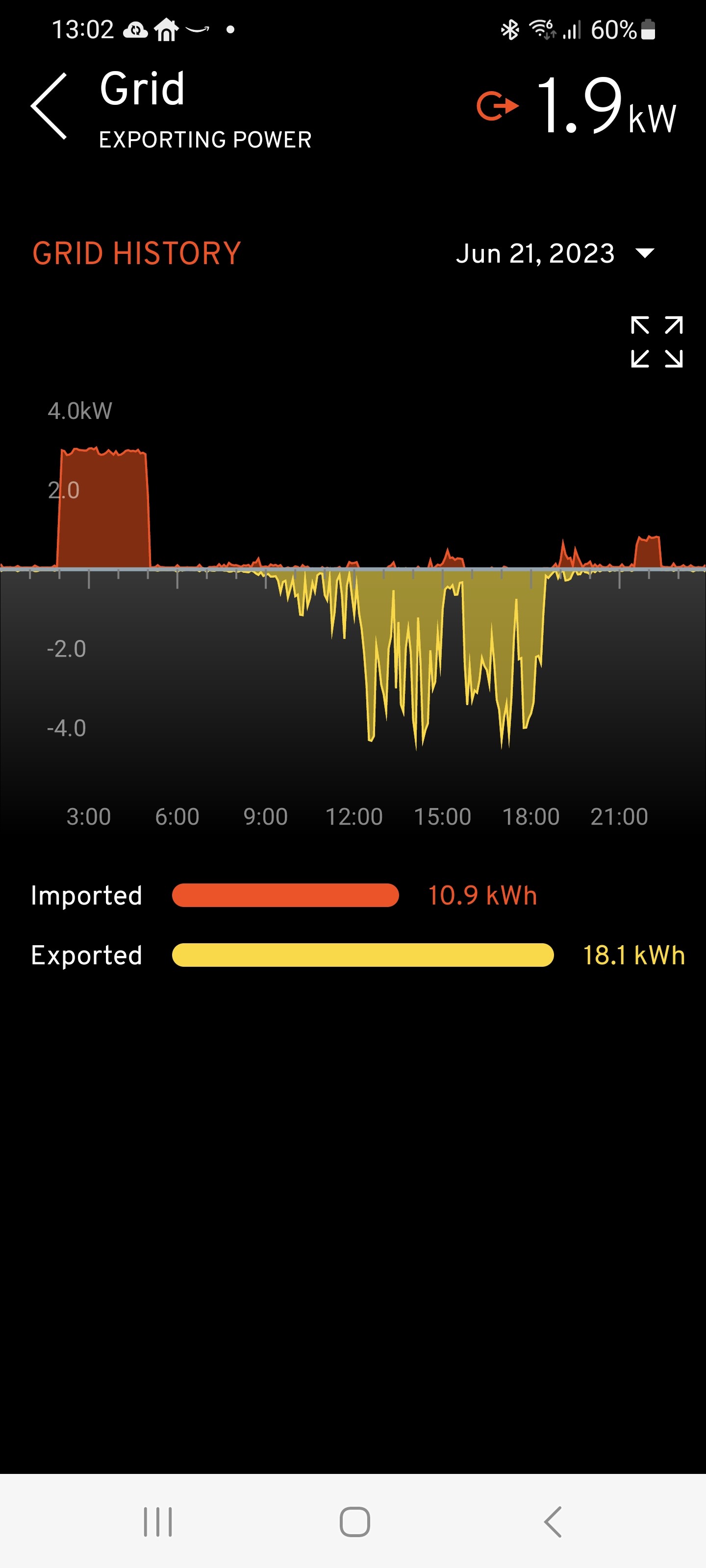
#15 J1m

SteveCook

I'm interested in trying this method Steve - I've not come across 'Home Assistant', could you please let me know more about it? Cheers!

S
#16 SteveCook

Hi
If I get any of the statements below please excuse me, as this is a new world to a 62 year old.
Home assistant is a program(s) that run on a home server (I am using as Raspberry Pi I nicked from my son).
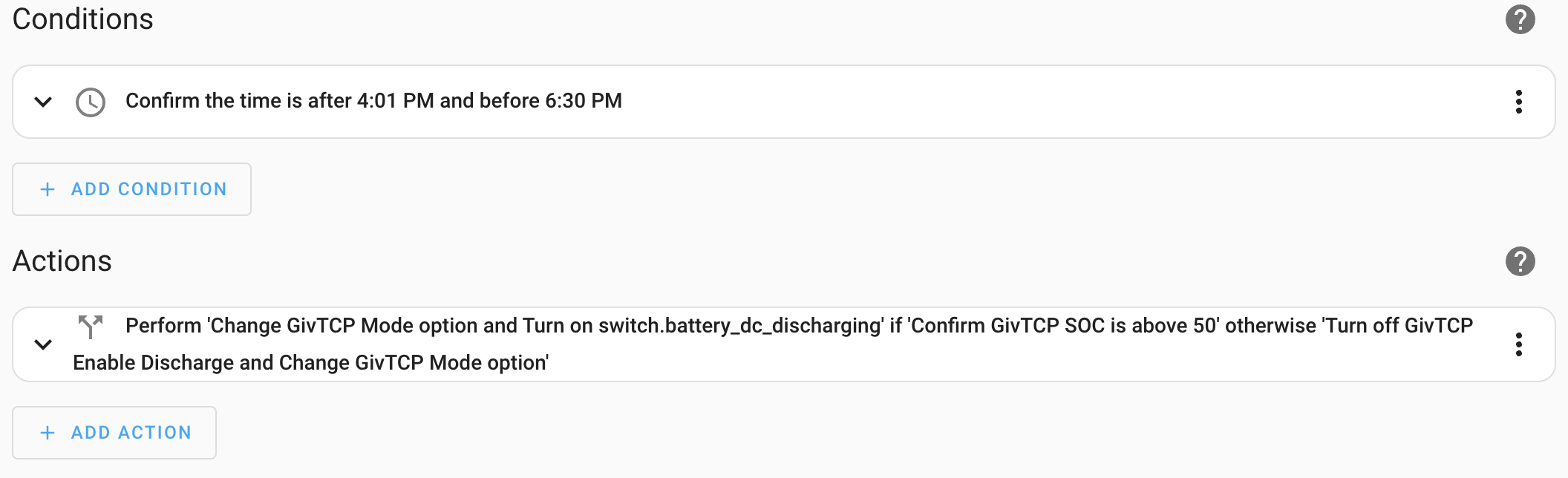
By downloading various bits of code it can "talk" to other things that are on your home network.
It took me about 1 day to get up and running and then I have been mucking about for a couple of weeks.
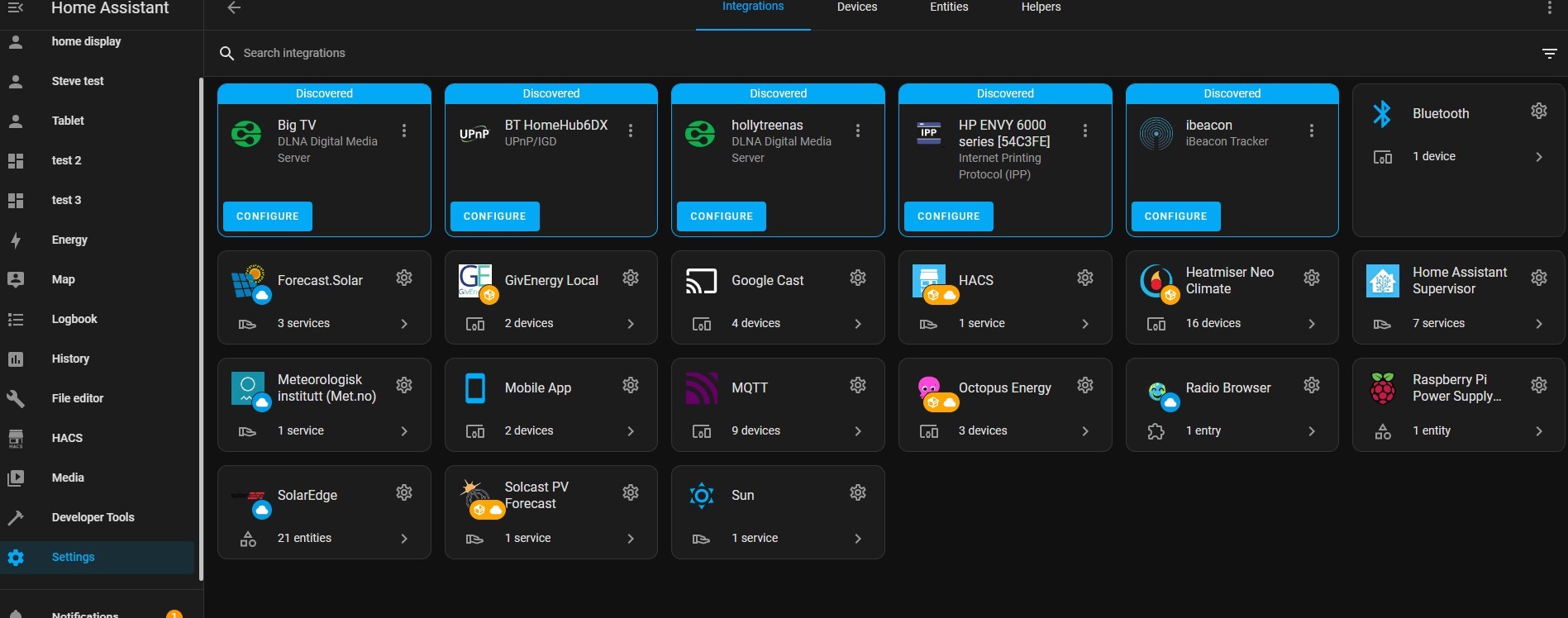
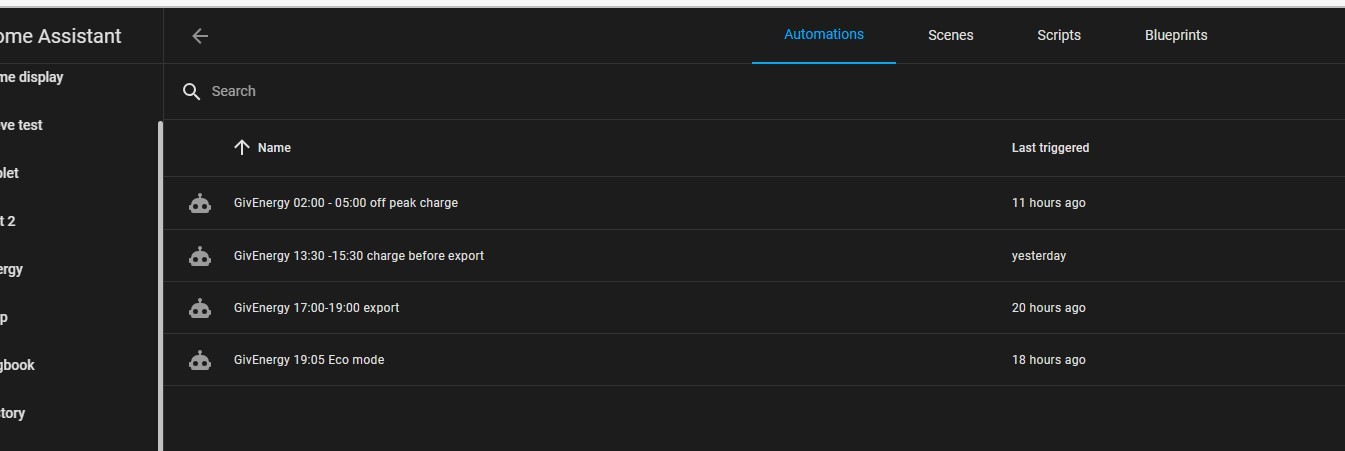
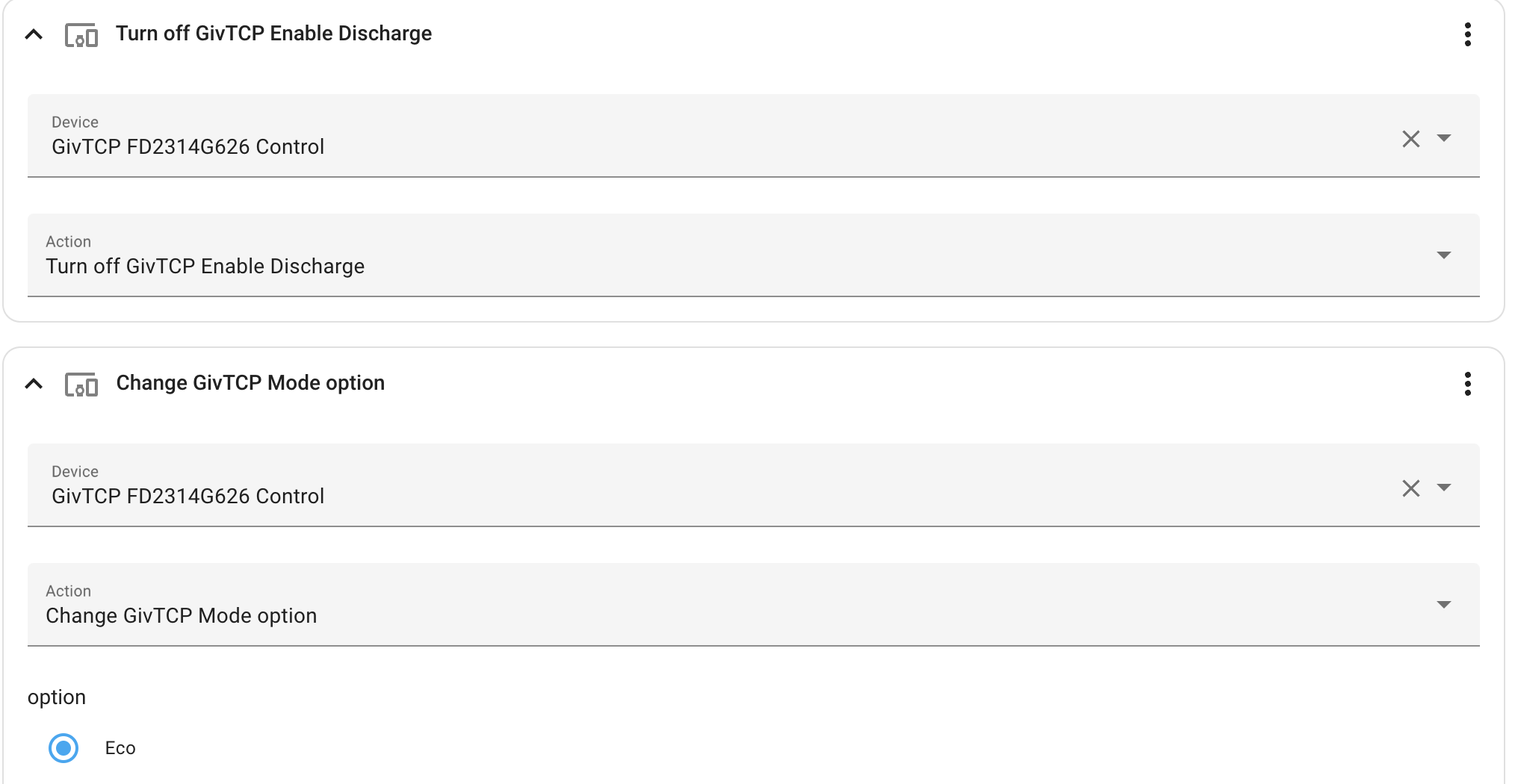
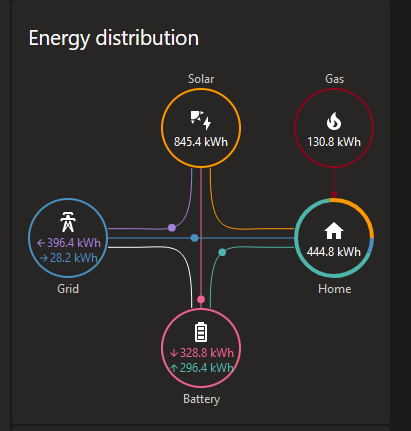
I have put a photo below of all the things at my house I could interface with. Currently do GivEnergy, SolarEdge, Heatmiser thermostats and the Google mini and TV.
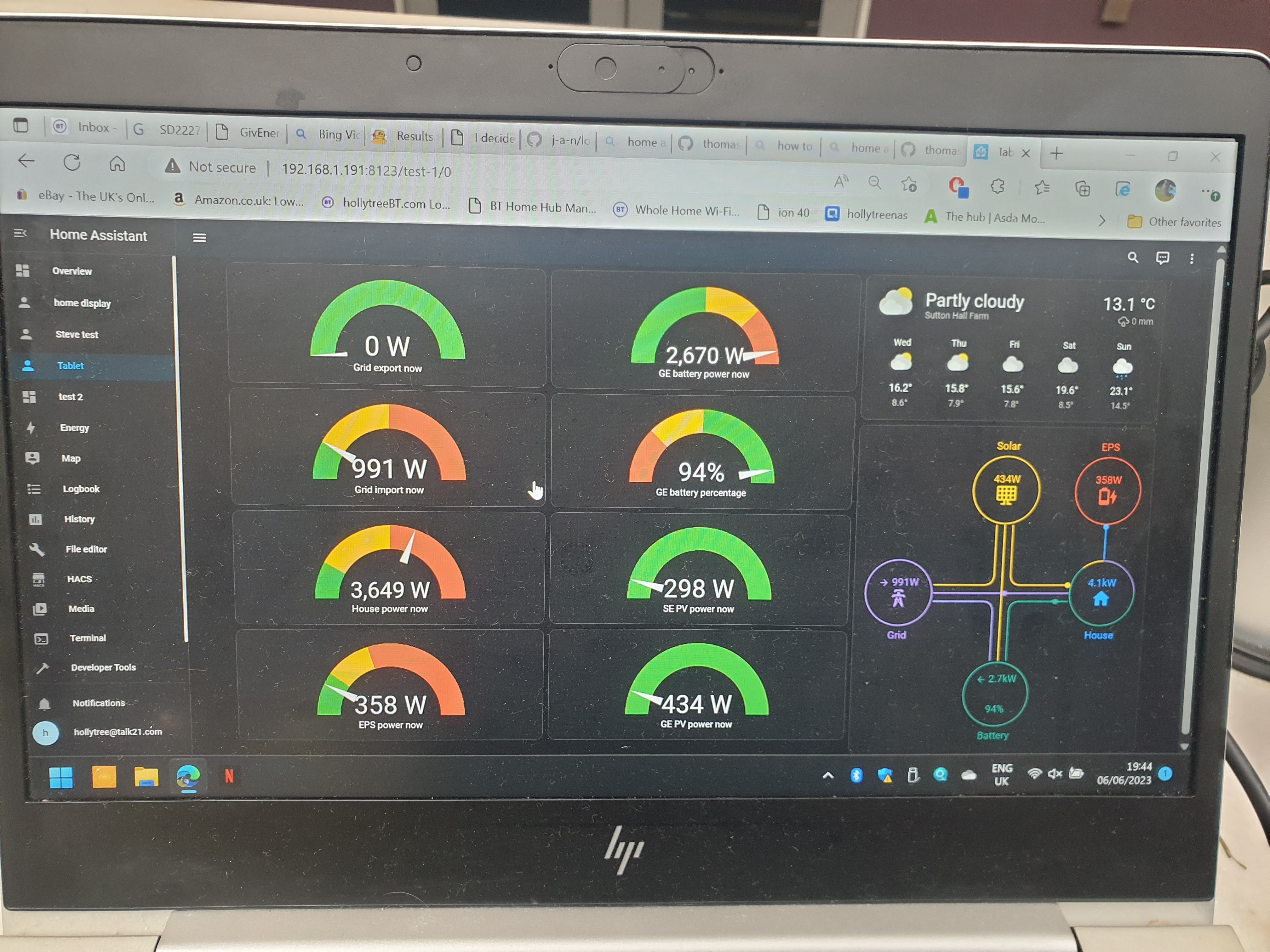
I have also attached a photo of the dashboard I setup for my solar.

T
#17 Tim

J1m Just Google "Home Assistant". It's a very well supported and feature rich home automation tool. If you want to commit to it, search on eBay for a Dell Wyse thin client or similar. You should be able to get a perfectly suitable device for £30-£40. There's lots written about putting HA on a Raspberry Pi or NAS, which is fine if you already have such a device to hand, otherwise the second hand thin client will have plenty of processor power.

T
#18 Tim

SteveCook Nice! If you're accessing it headless from a windows PC, the Shift-Windows Button-S combination allows you to screen grab (rather than photographing your screen. Just saying ...

S
#19 SteveCook

Tim
Thanks.
Shows my age/lack of knowledge. In a post somewhere else I described that when I went to uni we had to share a Commodore Pet and load basic programmes from an audio tape. Took about 2 mins to get the tennis game to load!

J
#20 J1m

Many thanks all! I can get my hands on my son's 4gb Raspberry Pi (which he no longer uses!) which hopefully will work. Once I get HA on it are there any guides around on how to connect to the GivEnergy Inverter - and to control it please?

W
#22 wrefordj

Tim Thanks for the tip! - I was used to ctrl-alt-prt sc which is not so useful....

J
#23 J1m

Cdent
Many thanks for this - really helpful!

A
#24 Arg0t

Jonesy as mentioned in the last few threads the answer is HomeAssistant with the integration https://github.com/cdpuk/givenergy-local. Which for me handles all the nuances of eco mode, timed discharge etc and just gives simple buttons that turn on/off charge or discharge.
I have some simple IF logic that enables the discharge mode between 4pm and 7pm if tomorrows solar forecast is above 20 kwh and the batteries are above a certain charge at certain times between 4 and 7. Code runs every minute and turns of discharge once a threshold is reached. Aim is to not discharge below 70% before 5pm, 50% before 6pm and 40% before 7pm, be that discharge being the forced grid export or the missus/kids doing something to ramp up the house usage.
Turning off the discharge setting reenables Eco mode.
During this window the inverter will handle 5KW total, if the panels are generating 2.5kw, the house is using 1kw then 4kw will be exported, 2.5kw from battery, 1.5kw from solar.

This approach with flux generates around 5 quid a day in flux income and as yet i've not seen a point where the grid was used, of course your mileage may vary as your home usage in an evening is unique and you many need higher or lower percentages.

Code is below. device_id: 8c2452fa0b8f143bb19599bd56c3c461 would change to a unique reference for your inverter

`alias: "Automation: Flux Weekday Discharge"
description: ""
trigger:

  • platform: time_pattern
    minutes: /1
    condition:
  • condition: and
    conditions:
    • condition: time
      after: "16:00:00"
      before: "19:05:00"
      weekday:
      • mon
        • tue
        • wed
        • thu
        • sun
      • condition: numeric_state
        entity_id: sensor.solcast_forecast_tomorrow
        above: 20
        action:
  • if:
    • condition: and
      conditions:
      • condition: time
        after: "16:00:00"
        before: "17:00:00"
        • condition: numeric_state
          entity_id: sensor.battery_percent
          above: 70
          then:
      • type: turn_on
        device_id: 8c2452fa0b8f143bb19599bd56c3c461
        entity_id: switch.battery_dc_discharging
        domain: switch
        else:
      • if:
        • condition: and
          conditions:
          • condition: time
            after: "17:00:00"
            before: "18:00:00"
          • condition: numeric_state
            entity_id: sensor.battery_percent
            above: 50
            then:
        • type: turn_on
          device_id: 8c2452fa0b8f143bb19599bd56c3c461
          entity_id: switch.battery_dc_discharging
          domain: switch
          else:
        • if:
          • condition: and
            conditions:
            • condition: time
              after: "18:00:00"
              before: "19:00:00"
            • condition: numeric_state
              entity_id: sensor.battery_percent
              above: 40
              then:
          • type: turn_on
            device_id: 8c2452fa0b8f143bb19599bd56c3c461
            entity_id: switch.battery_dc_discharging
            domain: switch
            else:
          • type: turn_off
            device_id: 8c2452fa0b8f143bb19599bd56c3c461
            entity_id: switch.battery_dc_discharging
            domain: switch
            mode: single
            `
J
#25 J1m

Arg0t
Wow, that looks really cool! Thanks for sharing, your settings are pretty much the way I want my system to work in Flux.
Will look to try this once I get HA up and running...cheers, jim

A
#26 Arg0t

J1m probably worth it's own thread once you have it going, can share with you the automations I have setup that handle both the charge and discharge dynamically based on solar forecast. Not rocket science but works fairly well so far.

Three recommended HACS integrations once you have HA setup.
https://github.com/BottlecapDave/HomeAssistant-OctopusEnergy/ - Pulls in the rate and spend information from the octopus API. Exposes some nice functionality that allows you to find the cheapest periods to charge, really shines with Agile but still useful with flux
https://github.com/cdpuk/givenergy-local - Exposes the inverter and battery data, switches and parameters to HA, not as complete as givtcp but straightforward to use and is easy to turn on grid charge or discharge without needing to change multiple switches.
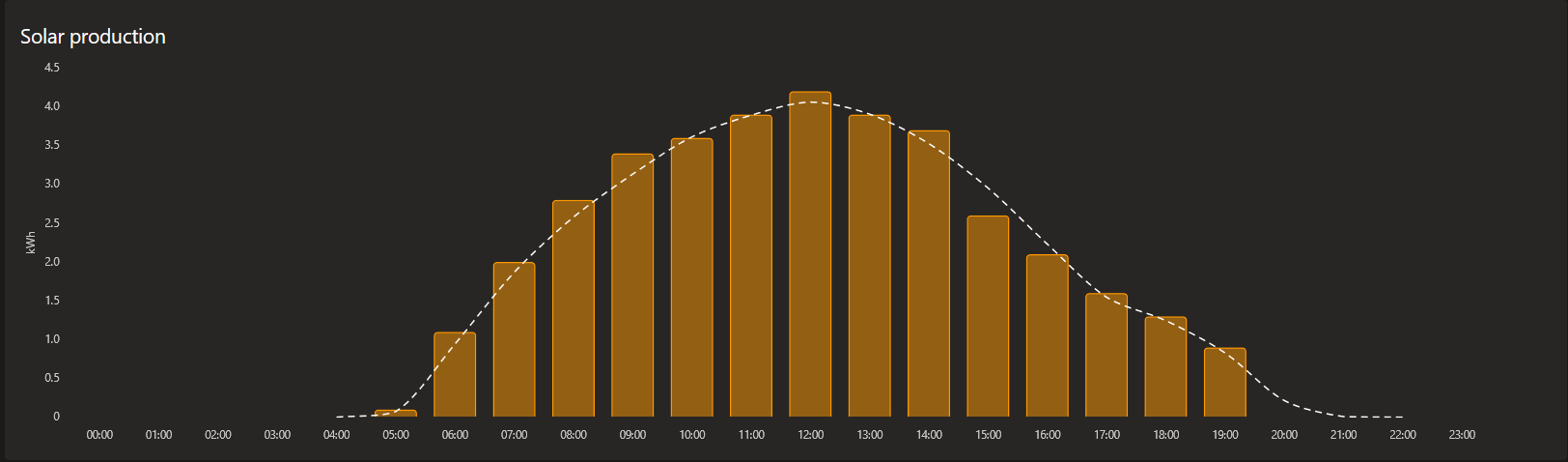
https://github.com/oziee/ha-solcast-solar - Solcast data is core to my approach, using tomorrows forecasted PV generation to determine if I discharge or charge and if I charge to what battery %. Find Solcast to be the most accurate, below is todays HA graph for generation, bars are actual, dotted line the solcast forecast.
.

J
#27 J1m

Arg0t
That's absolutely great! I really appreciate your help with this and will certainly take what you advise on board.

I may need to get back to you as I go along - hope you don't mind?! Cheers, Jim

J
#28 J1m

Arg0t
Hi again @Argot, many thanks for your advice to date! I wonder if you could advise a bit more please?
I apologise in advance if I appear 'thick, but I am the wrong side of 70 years old, and a late-comer to all this technology!
I have made some progress, in that I have got Home Assistant and HACS up and running on a Raspberry Pi, which is now in a cupboard hard wired to my router, and I'm now using the Home Assistant app to connect to it.
Firstly I think I have set up the Octopus Integration in HACS (it appears in 'Integrations' within HACS), and ive linkedto the Octopus API, but I'm not sure what to do next? On the Home Assistant home page I've now got data from the three meters (electricity, export and gas) but I don't know what to do now!

I got the GivEnergy Integration to appear okay but the instructions go on to say...Go to Configuration > Devices & Services > Add Integration, then find GivEnergy Local in the list.... I can't find 'Configuration' !!

I've registered with Solcast and got an API key, but when I click on the link to install in HACS I get this message: Repository oziee/ha-solcast-solar not found. I then tried to follow the manual instructions but I don't know where to find the 'config/custom_components' directory! I'm sorry, I'm being a bit useless at this but would really be grateful for some guidance! Thanks, Jim

D
#29 deepanshus

Arg0t this is amazing and seems like a lot of thought process has gone into it. Cant wait to experiment once i have the HA setup. On a side note, just to understand, you mention you generated about 5 quids from flux... do you have a number you would have generated if the system is on default Eco mode?

T
#30 Toogie

stevelewis
Exactly. Also, if you have an EV and Octopus approved charger, maximise your income by pairing Intelligent Octopus and Flux export.

A
#31 Arg0t

J1m try clicking this https://my.home-assistant.io/redirect/hacs_repository/?owner=oziee&repository=ha-solcast-solar&category=plugin is should prompt to install the solcast integration in hacs.

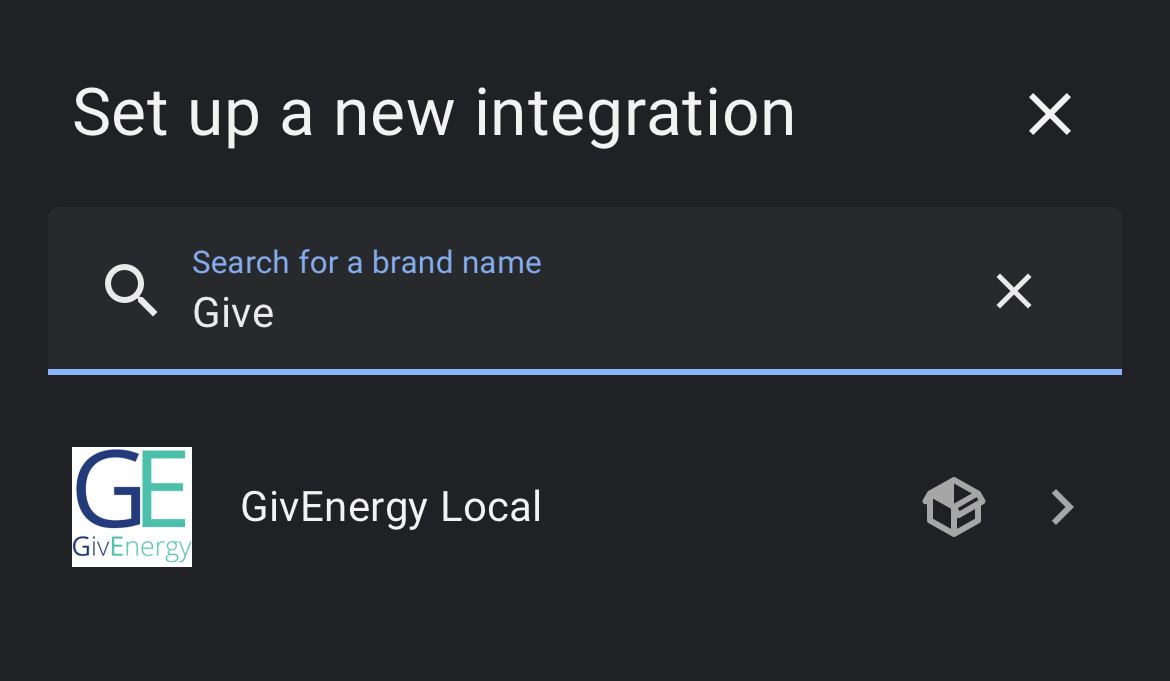
After adding givenergy local in hacs, go back to the homeassistant settings menu and add integration. You should get a prompt to add the inverter IP and number of batteries.

Once you have the core components installed you are ready to start building your automations. Your automations will mainly be if statements, if this happens then do this type logic.
Paste my flux discharge code, in previous post, into the editor to get a hint how it works.

The values from solcast and the inverter appear as entities. Activating functions, such as grid charging or discharge, use devices.

Good luck!

A
#32 Arg0t

deepanshus

Yes everyone's number will be different. So a £5 export income won’t mean much for comparison.

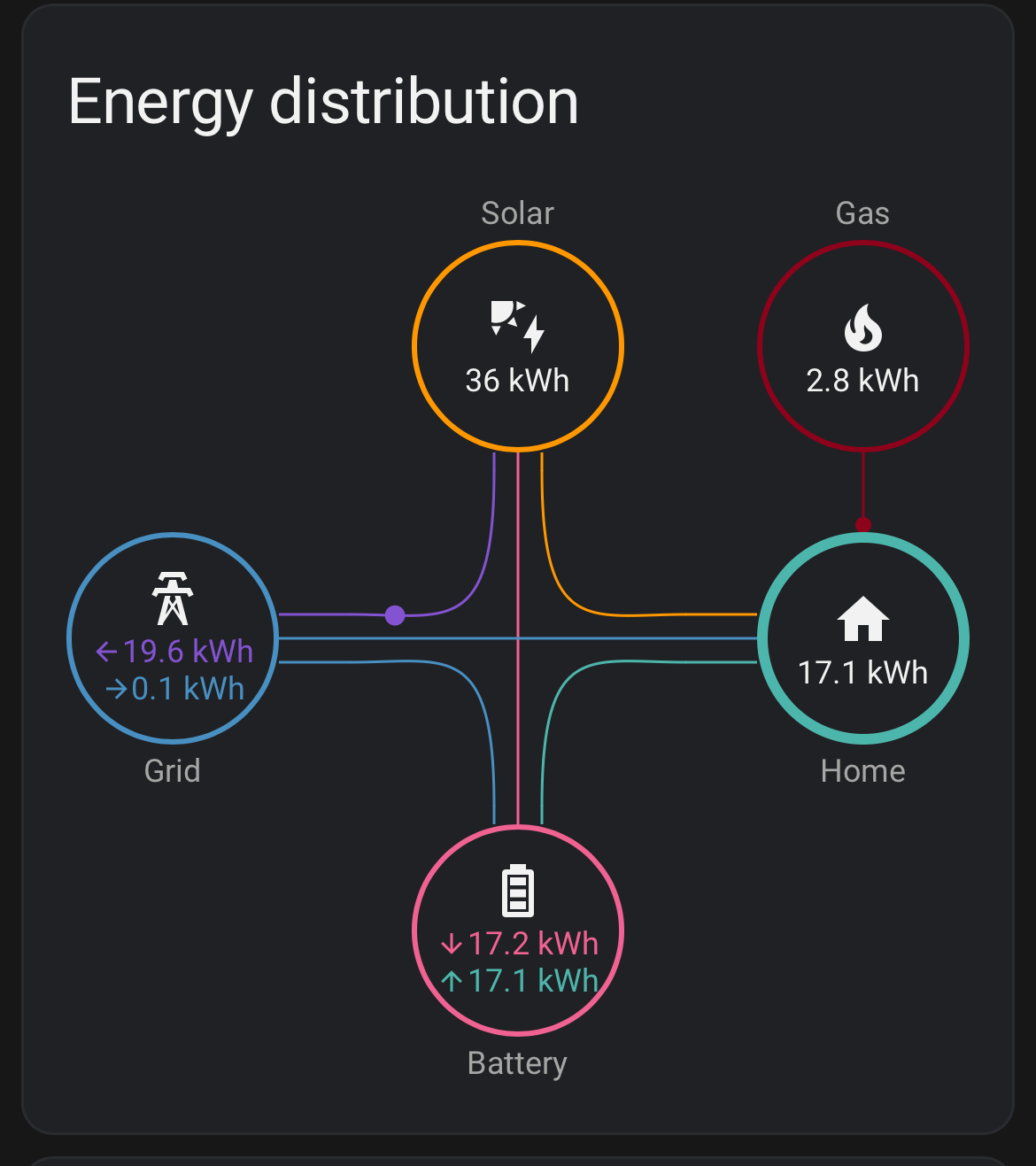
Here is yesterday.
36kWh generated
17kWh used by the house £5.95 avoided cost
19.6kWh exported for a £5.98 income
So yesterday the solar setup paid back £11.93 against the initial invest.

J
#33 J1m

Arg0t
Thank you, Really appreciate your help!
I've just tried once again to do the solcast part, clicking on the link you've posted I once again get this message...Repository oziee/ha-solcast-solar not found. I'm obviously missing something!!

S
#34 SteveCook

I have used the HA automations functions to set up my flux as I am not comfortable coding yet.

D
#35 deepanshus

waiting to get my hands on a Raspberry Pi to get started, its very hard to come by and ebay is so costly, almost a hundred pound. My installation is this week and i guess it takes about 3-4 weeks to get MPAN and another week or so to start the export tariff, so i have no rush, hopefully will get some device by then

J
#37 J1m

Arg0t

Thanks once again, that worked!

I now have Octopus Energy, Solcast PV Solar and GivEnergy Local appearing in the HACS Integrations section.

My apologies, a couple of more questions?! Firstly when I applied for the Solcast account it asked for the orientation of the solar panels, along with the angle of my roof. I just guessed at these but wonder if I should have been more accurate - and if so is it possible to change these settings?

Secondly, when I added the Octopus Integration, it then asked me add a target rate period, and whether continuous or intermittent, then to select which meter to apply it to (is this the import or export meter?) plus time to start/stop and what offset to apply etc? Or are some of these set via the automations?

Regarding the automations editor, where would I find the unique device ID please for my inverter?

Regards (and thanks!) Jim

G
#38 geoffreycoan

J1m Firstly when I applied for the Solcast account it asked for the orientation of the solar panels, along with the angle of my roof. I just guessed at these but wonder if I should have been more accurate - and if so is it possible to change these settings?

Yes you can change these in solcast. You can also add up to two arrays in the free solcast account, so if you have panels on both sides of the roof you can define the different arrays, size and orientation. You have to then delete the solcast API from the GE cloud portal and re-setup the solcast ‘tile’ in the portal.
Deleting the API key is somewhere under settings, API keys. Its not immediately obvious to find!

J
#39 J1m

geoffreycoan
Thanks for the info! Do you know if its important to get these settings as accurately as possible as I'm not sure?

A
#40 Arg0t

J1m

Try and make solcast as accurate as possible as the values it provides influences the quality of your automations. You will use Solcast as a condition in your if statements, if tomorrows solar forecast is good then sell your battery charge today, if solar forecast is bad then charge your batteries overnight using the cheap flux rate.

For the target rate period just set it to 3 hours, intermittent midnight to midnight with no offset. This function helps find the cheapest rates from octopus, which isn’t really needed for Flux as it’s 2am until 5am. When you change from flux to agile for the winter this is massively powerful and you can create automations that dynamically change the settings based on the solar forecast.

Too much detail for now, but here is how i use this function in my setup.
I have an automation that triggers when target rate period is set to on. The automation switches on ac charging. Have a second automation that triggers off.
I have an automation that sets the AC battery charge limit based on the solar forecast. The automation sets different percentage limits based on the range of the forecast, below 7kWh 75%, below 15kWh 55%, below 20kWh 25% above 30kWh 10%. These numbers would need to be tuned to your needs.
The third automation, isnt required with flux and only really required with agile if you want to be very optimal on cost, is updating the target rate period dynamically. The automation looks at current battery level and tomorrows forecast and then changes the hours value in target rate period. Low forecast we need to get batteries up to 75% so set to 4 hours, great day batteries only need 10% so find just 0.5 hours.
The target rate function then finds the X cheapest slots across the day to meet your target hours and turns on.

All three automations combined I have AC charging switching on dynamically based on the forecast but only charging the batteries if the batteries are below desired charge. With the desired charge dynamically set on forecast.

Have fun setting up your automations and playing with the different values and approaches. Mine works for me but may not work for others but hopefully gives you some food for thought on building your approach.

J
#41 J1m

Arg0t
Thanks once again for the detailed reply!

I am no doubt overstaying my welcome now (!) but would be grateful for a bit more help?

Regarding the Octopus Energy target rate setup, what do I set for the minimum start/maximum stop times? Is this 00:00 to 23:59 (you mentioned midnight to midnight but I can't see a setting for that)?
There are actually two meter MPAN numbers available to select which I don't recognise! (I will no doubt have to delve deeper to resolve that one!)

As per my last reply, where do I find the GivEnergy inverter ID please (to replace the one in your earlier automation post)?

In the GivEnergy cloud portal, under the solar forecast (Solcast) it asks for the solar API (which I have), but also the 'resource id' (which I don't have!) Could you please advise where I find that?
Thanks! Jim

A
#42 Arg0t

J1m

Regarding the Octopus Energy target rate setup, what do I set for the minimum start/maximum stop times? Is this 00:00 to 23:59 (you mentioned midnight to midnight but I can't see a setting for that)?

  • Correct, go with 00:00 to 23:59

There are actually two meter MPAN numbers available to select which I don't recognise! (I will no doubt have to delve deeper to resolve that one!)

  • One will be import, one export. You should be able to work out which is which in the octopus app. You want the import one.

As per my last reply, where do I find the GivEnergy inverter ID please (to replace the one in your earlier automation post)?

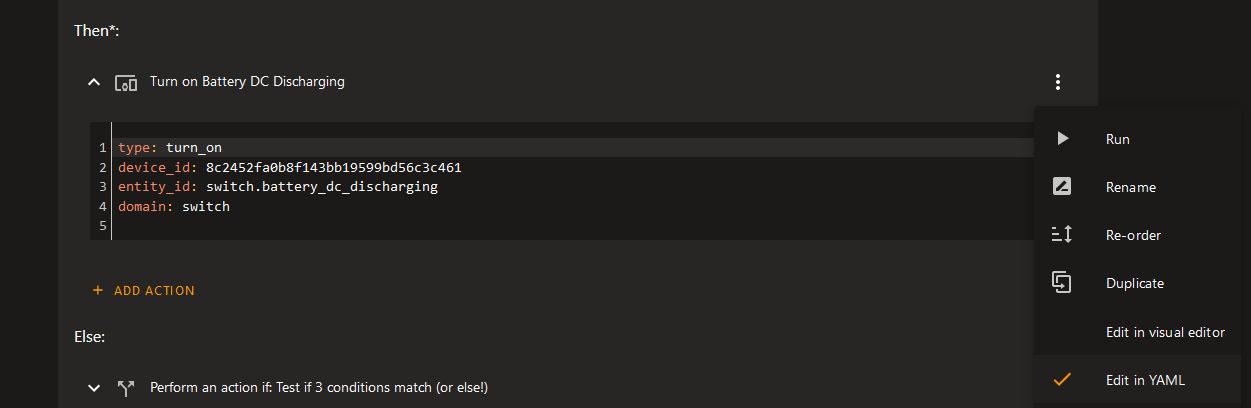
  • Create an automation in the gui editor, add a device, chose your solar inverter.

If you then change to edit in YAML mode you get to see your ID for the inverter

In the GivEnergy cloud portal, under the solar forecast (Solcast) it asks for the solar API (which I have), but also the 'resource id' (which I don't have!) Could you please advise where I find that?

  • Suggest not adding to the giv portal, just have it run in Home Assistant and have home assistant query the Solcast API every few hours (or you run out of API calls)

`alias: "Automation: Solcast Data Update"
description: New API call Solcast
trigger:

  • platform: time_pattern
    hours: /6
    seconds: "0"
    action:
  • service: solcast_solar.update_forecasts
    data: {}
    mode: single
    `

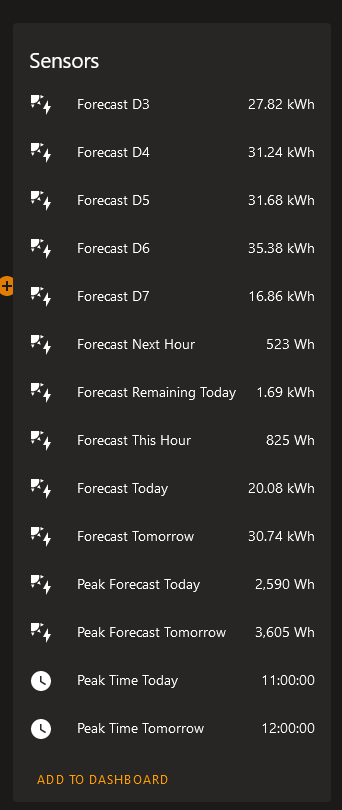
Solcast exposes these sensors in HomeAssistant that you can use to build some nice dashboards or include in automations.

J
#43 J1m

Arg0t
That's great, thank you once again, and for your patience!!
Just one last query, hopefully for a good while?(!!) I've got an API that was generated via the GivEnergy cloud portal - should I be using that somewhere in the Integrations please?

A
#44 Arg0t

J1m

You should have:
The Octopus API in the OctopusEnergy integration, pulls the rates and actual usage from your Octopus account into HA.
The Solcast API in the Solcast integration, pulls the solar forecast for the sites you have setup on the account.
The inverter is controlled directly from HA to the inverter over your local network.

There is no API on the givenergy cloud that I can think you would use, for me personally I log and control locally and only use the giv cloud site when communicating with support

J
#45 J1m

Arg0t
Great, thanks once again 😊

J
#46 J1m

Arg0t
Sorry, its me again 😔!
I was hoping I could just paste your Automation into HA so I could have a play with it but can't find a way of doing it?

A
#47 Arg0t

J1m

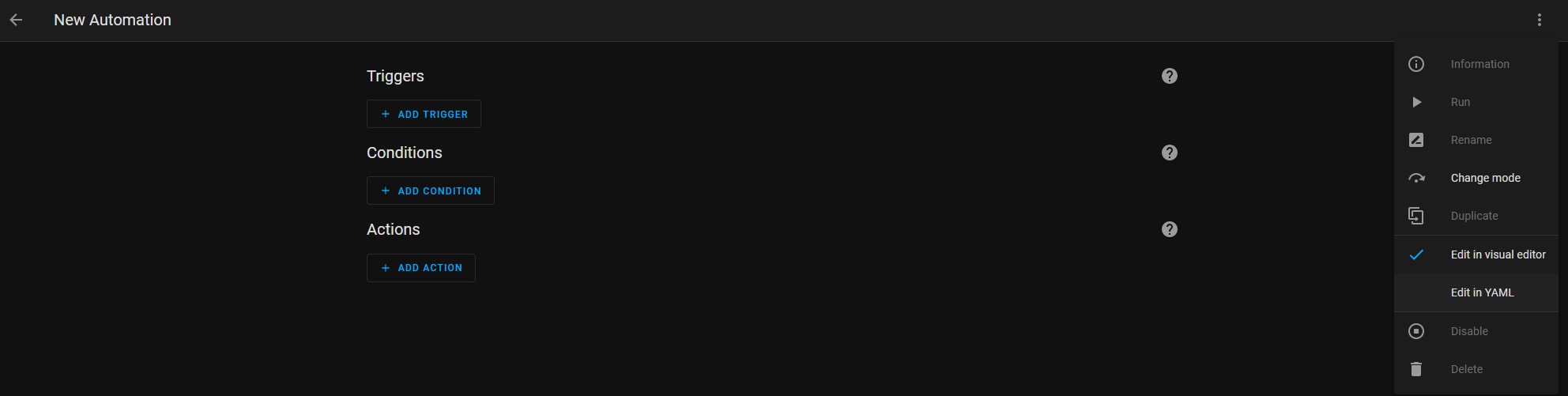
Create a new automation, change to YAML mode. Paste in my example and then change back to visual editor.

J
#48 J1m

Arg0t
I do appreciate your help. At the moment I can paste it in in YAML and save without problems but when I switch back to the visual editor it all disappears, even when I switch back to YAML. I'm sure I've taken up more than enough of your time so will keep trying. Hopefully I will get there in the end!

A
#49 Arg0t

J1m

Did you change the device ID before saving?

J
#50 J1m

Arg0t
Sorry about this! Yes, there are 4 or 5 instances of the device id, which I changed to mine. Then it all looks good and I save it , then if I switch to the visual editor it all disappears, and also is the same if I switch back again to YAML editor. The automation shows as saved with the name I gave it but appears empty. I am mindful of how much time you are wasting on me!

#51 Cdent

Toogie is that even possible? I was told I had to be on Flux import to get Flux export

A
#52 Arg0t

J1m

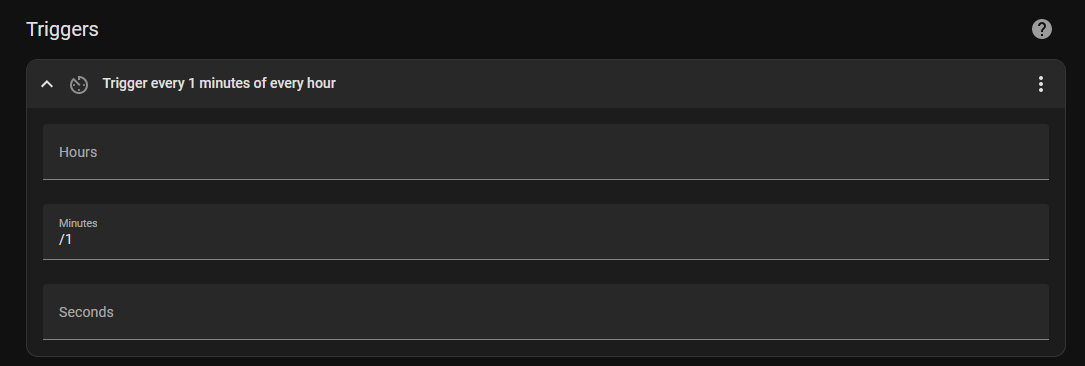
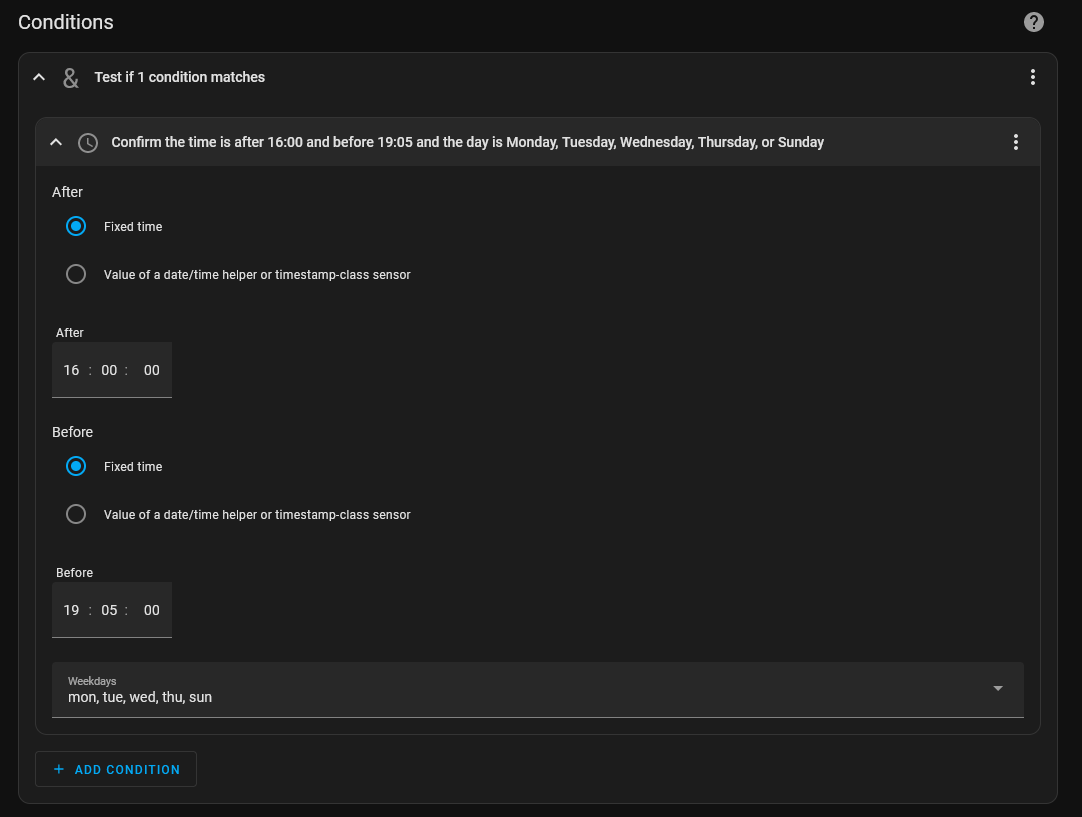
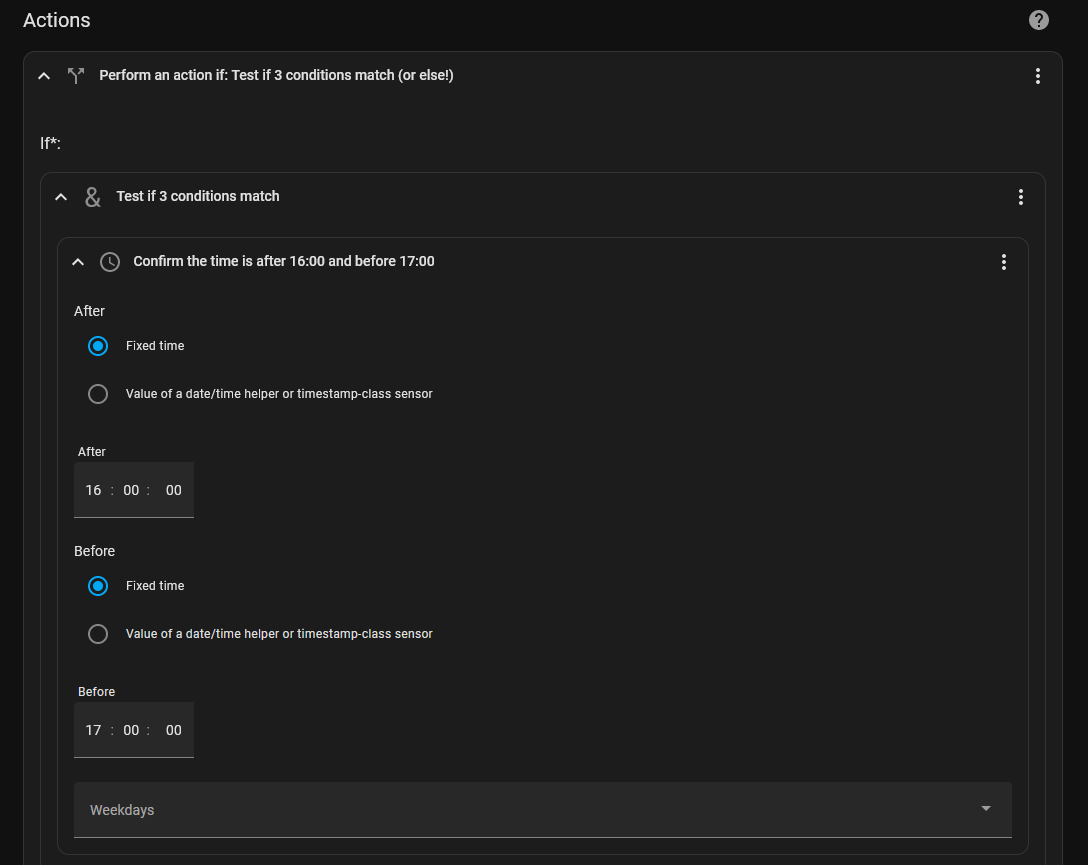
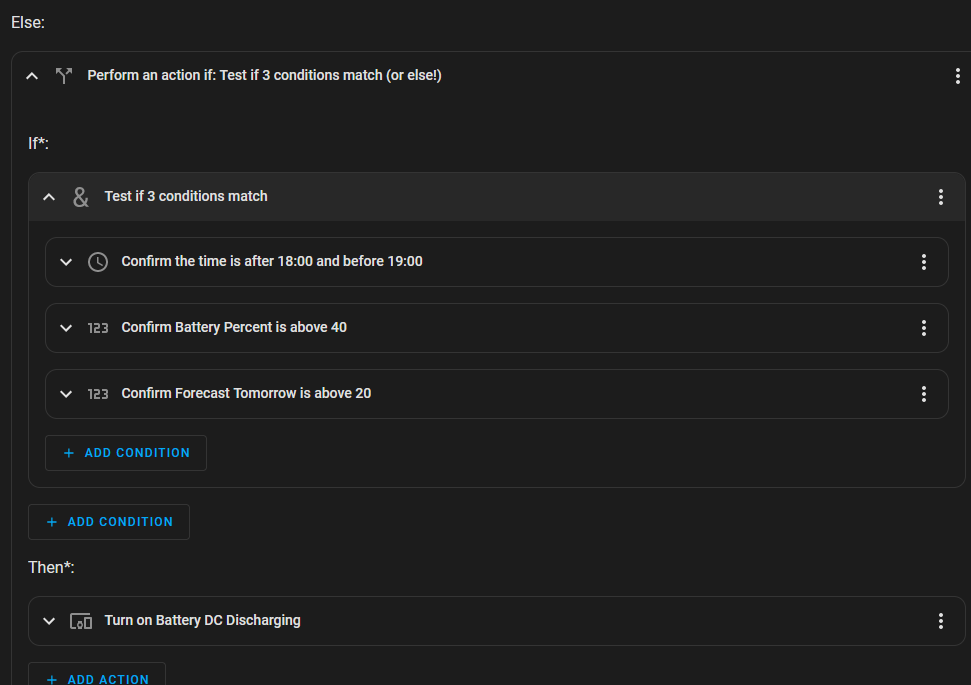
Lets try another way. Here are the screenshots of my weekday discharge automation for refrerence to create your own. As mentioned these are my personal preferences so your mileage may vary and I take no responsibility if you end up with empty batteries 😃

Triggers: I want the code to run every minute.

Conditions: But I only want it to run between 4pm and 7:05pm Sunday to Thursday (I have a second automation for the weekend with different IF conditions)

Actions: Using nested If Else.

Condition 1: Time is between 4pm and 5pm

Condition 2: Battery is above 70%

Condition 3: Solcast forecast tomorrow is above 20kWh

Then: If all three conditions are met, and it's between 4pm and 7pm on a Sunday to Thursday then turn on the discharge of batteries via the solar inverter.

Else: the settings above are then repeated through the else statements with different values. My aim is to hit 7pm with 40% battery on weekday evenings.


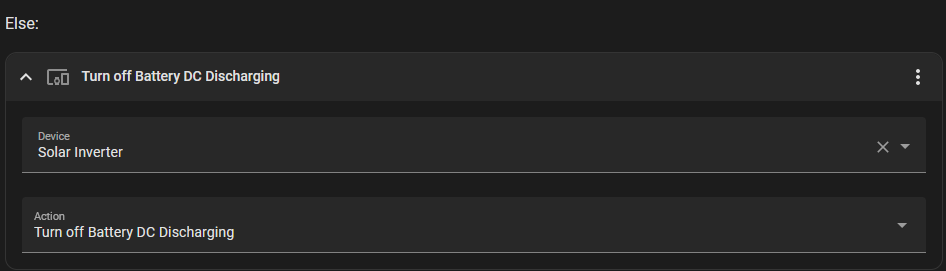
Closing Else: If non of the proceeding IF statements are true. Then turn off DC Discharging.

J
#53 J1m

Arg0t
I really am so grateful to you for taking the time to explain this so well! It is really appreciated 👍

B
#54 BarleyRiser

There seems to be so much work going into HA etc. I don't need anything more than the GE settings to work! Surely it would be easier to get the system set back to ECO for everyone rather than everybody trying to sort it out for themselves.

A
#55 Arg0t

BarleyRiser

Yes all achievable through GE portal, but it's not optomised for my specific variables, it's optomised for general consumption. So there are opportunities for improvement that some of us chose to make through HA.
Personally I do not want to have to monitor the system and manually make the decision to charge or discharge and find the built in automations not suitable for my desired profile.

HA allows you to combine multiple disperate sources of information to allow a calculated decision. In my instance, my understanding of my home power usage, solcasts forecasting algorythm, octopus pricing data, giv battery charge information. Based on the values from all those systems, and some very basic logic, the decision to charge or discharge is fully automated.
Plus for some of us, it's fun.

K
#56 keith-smith

BarleyRiser
I agree. All I want is to set a timed charge between 2 and 5 to some SOC percentage, and then a timed export between 1600 and 1900 either for a fixed time which will control the amount exported or to a SOC value., with the system going back to eco in between.
Is there anyway we can beat up givenergy to do this?

#57 Cdent

keith-smith afaik they're sorting out the BMS and inverter firmware before they look into more customisation options in the portal. Might just need to wait it out until they've fixed these big issues

B
#58 BarleyRiser

Just updated the firmware and was told this might sort it. Perhaps I'm lucky. All I can see that Doesn't work is the resetting of ECO. Perhaps this is too difficult to sort out. I thought it would be easy as it's there to be chosen.

U
#59 Ubarrow

I did a few nights of charging to 100% on the basis that I was selling for more than I was buying at. Then I realised that the pence difference was probably being lost in the inefficiency costs. i.e. putting 1kw in doesn't get you a full kw out. Now I just leave it alone.
When it comes to Winter I'll probably charge to 100% every night.

J
#60 J1m

Arg0t
Right! I think I've set it up! For now I've mimicked your settings, but will adjust times/percentages later.

I'm pasting what I've done below - does it look okay please?
I've set it to 'run'. Is there an easy way of checking it is working, or is it a matter of monitoring at appropriate times when battery export may be taking place?

As a matter of interest what changes do you make for your weekend automation?

Many thanks again...

alias: Flux tariff discharge automation
description: ""
trigger:

  • platform: time_pattern
    minutes: /1
    condition:
  • condition: and
    conditions:
    • condition: time
      after: "16:00:00"
      before: "19:05:00"
      weekday:
      • mon
        • tue
        • wed
        • thu
        • sun
          action:
  • if:
    • condition: and
      conditions:
      • condition: time
        after: "16:00:00"
        before: "17:00:00"
      • condition: numeric_state
        entity_id: sensor.battery_percent
        above: 70
      • condition: numeric_state
        entity_id: sensor.forecast_tomorrow
        above: 20
        then:
      • type: turn_on
        device_id: 7084bc7d41921f7c4b93c974c5514ae2
        entity_id: switch.battery_dc_discharging
        domain: switch
        else:
      • if:
        • condition: time
          after: "17:00:00"
          before: "18:00:00"
        • condition: numeric_state
          entity_id: sensor.battery_percent
          above: 50
        • condition: numeric_state
          entity_id: sensor.forecast_tomorrow
          above: 20
          then:
        • type: turn_on
          device_id: 7084bc7d41921f7c4b93c974c5514ae2
          entity_id: switch.battery_dc_discharging
          domain: switch
          else:
        • if:
          • condition: and
            conditions:
            • condition: time
              after: "18:00:00"
              before: "19:00:00"
            • condition: numeric_state
              entity_id: sensor.battery_percent
              above: 40
          • condition: numeric_state
            entity_id: sensor.forecast_tomorrow
            above: 20
            then:
          • type: turn_on
            device_id: 7084bc7d41921f7c4b93c974c5514ae2
            entity_id: switch.battery_dc_discharging
            domain: switch
            else:
          • type: turn_off
            device_id: 7084bc7d41921f7c4b93c974c5514ae2
            entity_id: switch.battery_dc_discharging
            domain: switch
            mode: single
T
#61 Toogie

simon_swinburne

Cdent
Well so did I. Something has changed at Octopus. They would not let you earn more from export than you were paying for import but i think national grid must be paying exporters the market rate for home solar so Octopus are not out of pocket.
In my case, I recently moved from Flux to Intelligent Octopus and discovered Flux Export was still in place, hey ho!

A
#62 Arg0t

J1m

Great to hear. You can look at traces, on the automation, to see the last 5 runs and the outcomes of the decision.

I would just monitor at 4pm this evening and see if discharge switches on, if the conditions would expect it to switch on, and then monitor that it switches off at 7pm or when the battery drops to the desired minimum.

J
#63 J1m

Arg0t
Looks like I've done something wrong!

I've just looked at the trace and it failed at 11.51 this morning...
The timeline says..

Triggered by the time pattern at 20 June 2023 at 11:51:00
Test if 1 condition matches
Stopped because a condition failed at 20 June 2023 at 11:51:00 (runtime: 0.00 seconds)

The step details say..

**_Executed: 20 June 2023 at 11:44:00
Result:
result: false
conditions/0
Executed: 20 June 2023 at 11:44:00
Result:
after:
__type: <class 'datetime.time'>
isoformat: '16:00:00'
now_time:
__type: <class 'datetime.time'>
isoformat: '11:44:00.082378'
before:
__type: <class 'datetime.time'>
isoformat: '19:05:00'
result: false
1
2
3
4
5
6
7
8
9
10
11
condition: and
conditions:

  • condition: time
    after: '16:00:00'
    before: '19:05:00'
    weekday:
    • mon
      • tue
      • wed
      • thu
      • sun_**

I can't see why it would fail at this time?

A
#64 Arg0t

@Jim

entity_id: sensor.forecast_tomorrow
above: 20

You might want to check this number and base it on your PV generation and house usage. The 20 is very much based on what my scenario. 20kWh is 30% uplift on my average usage knowing I have 19kWh of batteries.

The other thing to consider is the 40% lower limit on your batteries, is your intention to have enough battery to get you through until 2am when you can grid charge or through until morning when the solar starts to recharge the batteries. Adjust this number to suit your home usage and your desired approach.

condition: numeric_state
entity_id: sensor.battery_percent
above: 40

A
#65 Arg0t

J1m

Fails because the conditions are not me, it's not between 4pm and 7:05 pm, check at 4:01 😃

J
#66 J1m

Arg0t
🤦‍♂️ sorry!!🤦‍♂️

Thanks for the advice in adjustments!

A
#67 Arg0t

J1m Did it work?

J
#68 J1m

Arg0t
Yes, sort of! It started discharging the battery just after 4p.m (viewing on the GivEnergy app)
The battery had just reached 71%. Its been discharging since but only 5 - 10 Watts, and the battery has stayed at 70% all the time! Just checked again and its a steady 4W going to the grid...

A
#69 Arg0t

J1m What is your solcast forecast for tomorrow?

J
#70 J1m

Arg0t

it's 82.79 KWH for tomorrow. I just tried switching to 'discharge' in the GivEnergy app and it shot up to 2.6'ish kW battery to grid. Switched it back to 'resume' and the battery had a brief spell of charging from solar, then resumed sending 4W to grid!

J
#71 J1m

J1m
Interestingly, I switched the app back to discharge to try and earn some export (!) and left it going. At 7p.m whilst the app was still set to discharge it stopped, and the battery resumed charging from solar. So it IS sort of working!

A
#72 Arg0t

J1m jesus Jim how big is your roof! 82.79kWh is impressive.

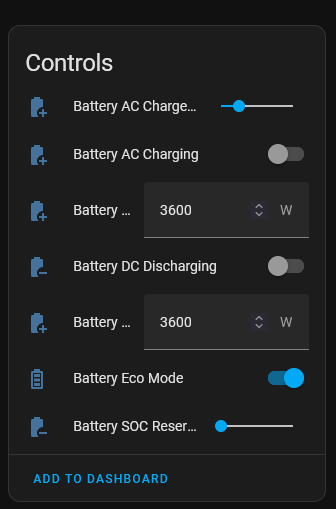
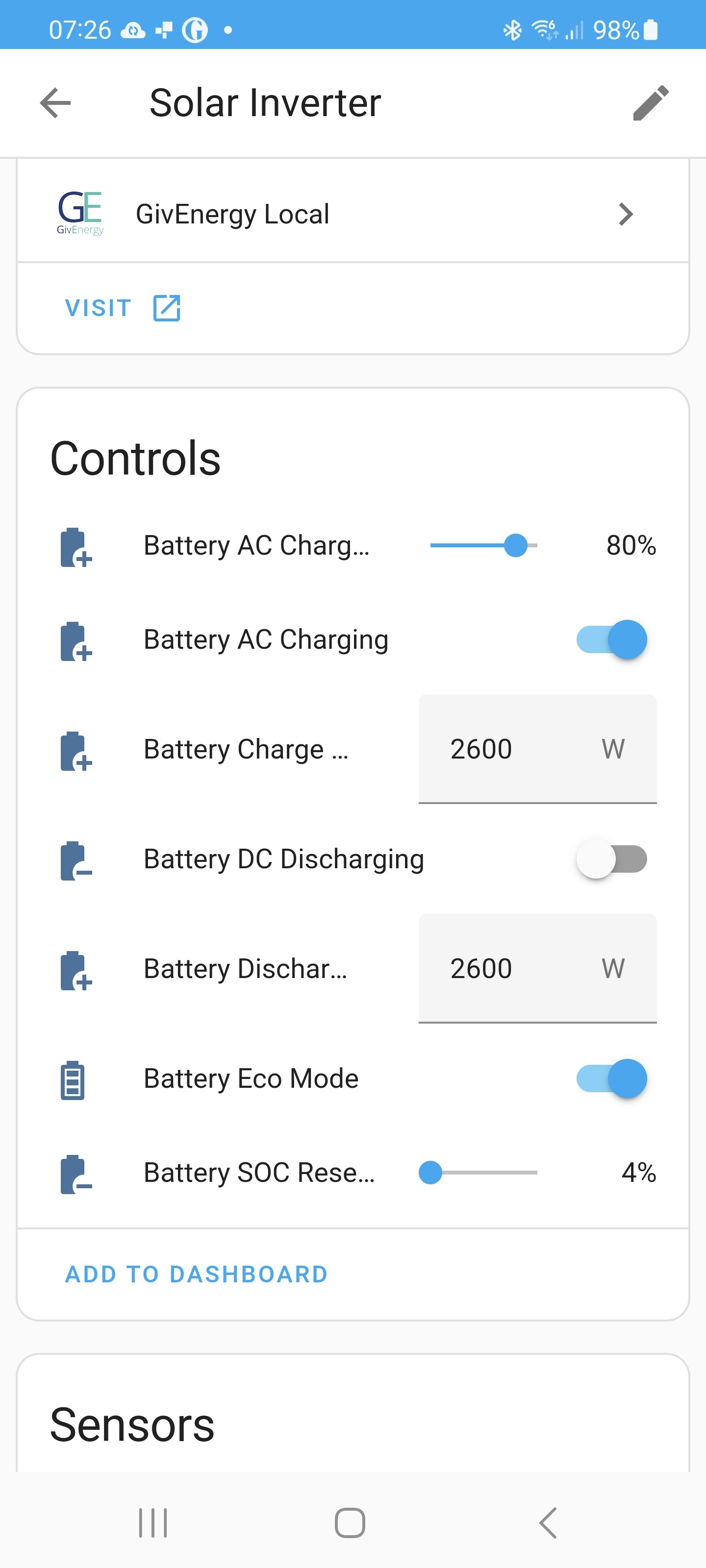
How do your controls compare to mine? find this in solar inverter in devices

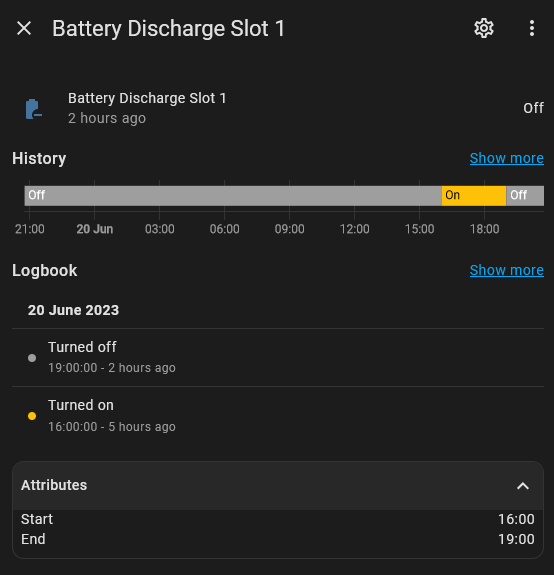
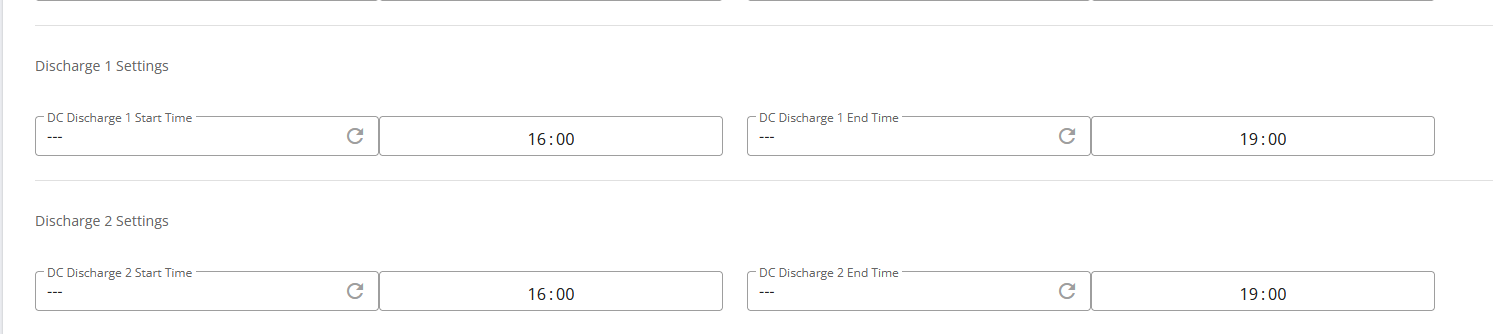
Also what discharge slot is maintained on the inverter? you can check this via attributes and easiest to change it via the portal

J
#73 J1m

Arg0t
I have wondered about the solar forecasts! I did originally guess at the azimuth and roof angle but have since entered the accurate information in Solcast and changed the regenerated API. I have 18 x 400watt panels on a more or less south facing roof.

I'm sorry, I can't find the location of the controls and discharge slot - could you please guide me to where I can find these? Sorry once again!

A
#74 Arg0t

J1m

Settings > Devices and Services > Devices Tab > Scroll down and select the Solar Inverter.

Alternatively you can check on the remote control page on the Givenergy portal.

J
#75 J1m

Arg0t
Okay thanks I've found that now. I can't find out how to paste an image on this forum but my control settings are the same as yours except that the battery charge/discharge power is 2600W on mine, and the reserve is set at 4%. My apologies once again, I still can't locate the battery discharge slot! 🙄

S
#76 SteveCook

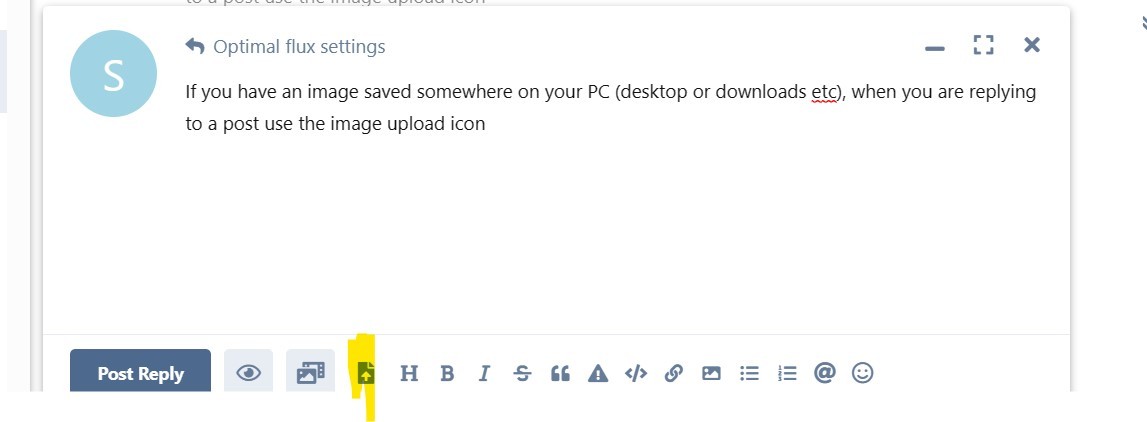
If you have an image saved somewhere on your PC (desktop or downloads etc), when you are replying to a post use the image upload icon at the bottom of the post.
I use snipping tool to grab any images i want.

J
#78 J1m

Arg0t

No, it's a 5kw hybrid inverter and a 9.5 kwh dc battery

J
#79 J1m

SteveCook
Many thanks Steve 😊

J
#80 J1m

Arg0t
Same thing happened yesterday, discharging switched on/off okay between 4pm and 7pm but was throttled back to around 7W!

A
#81 Arg0t

J1m

Suggest checking the attributes for Battery Discharge Slot 1. If you only intend to force discharge between 4pm and 7pm set accordingly.

Hybrid Gen 1 is limited to 2.6kW battery output.

Also in your screenshot you are charging from grid to 80% at 7.26 am. Is that intentional? Personal I would not charge outside 2am to 5am, no saving over just using the grid.

J
#82 J1m

Arg0t

Thanks for that, will take a look. 7.26 was when I took the screenshot by the way. I'm charging from grid only between 2 and 5 am..
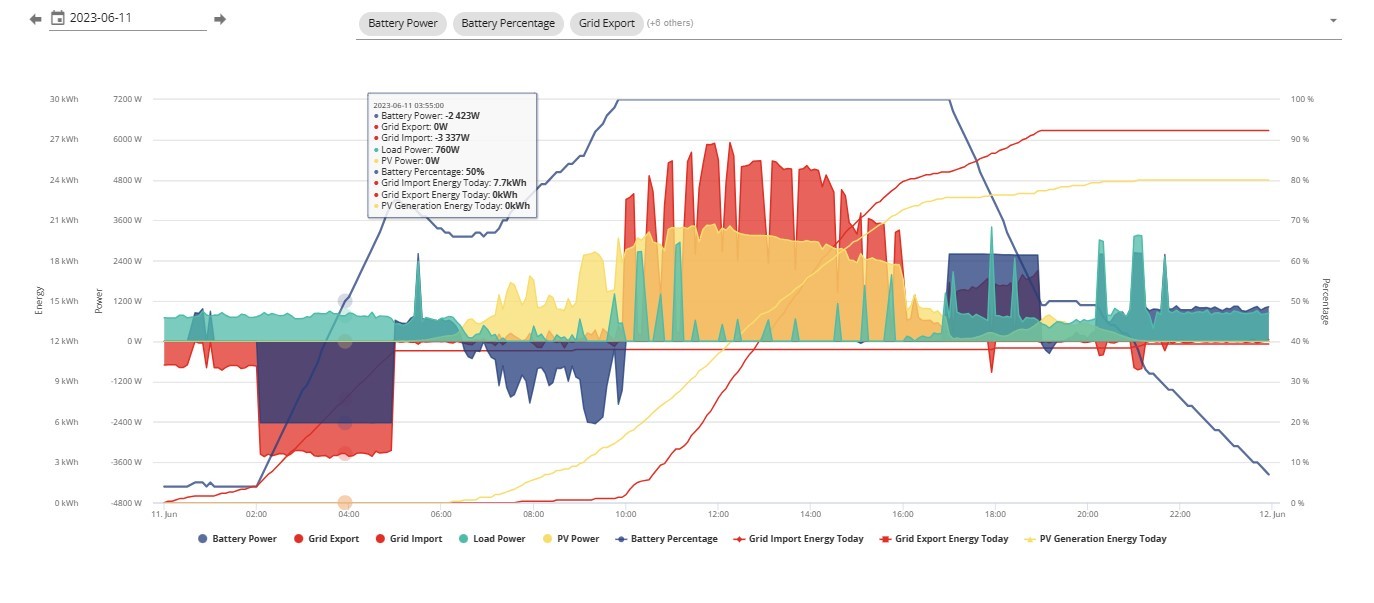
This is the screenshot of my import/export for that day..

T
#83 Toogie

Cdent
News flash
Octopus have noticed I’m on IO for import and Flux for export and have dumped me back onto SEG for export so you were right after all. So I’ve switched to Flux again!

#84 Cdent

Toogie ah, shame that! Hopefully you got some use out of IO though!

T
#85 Terrylawless2023

Rogerbu
What settings do you use?
Can this be done automatically or do you have to manually intervene ?
The "Export to grid " option says that it holds charge in order to do this. I want the battery to supply energy when required,

Any thoughts please

S
#86 SteveCook

Terrylawless2023
Using GE, after timed export/discharge Eco does not kick back in!
Known issue and plenty of posts

J
#87 Jerrytaff

SteveCook I've had the same issues with the GivEnergy portal and App, and wanted to give Octo R&D a go. However, I can't find out how to get the GivEnergy Integration. On the Web version of Octo R&D I have the help system which shows me the dashboard, but beyond that I have my consumption and export graphs, and my account info - nothing more. On the App it tells me I have no integrations but does not seem to have a means of adding them.

G
#88 geoffreycoan

Jerrytaff There is a button somewhere, I think it was in the app but I may be mistaken to ‘upgrade to beta service’ or something like that. I can’t remember precisely what it said, but it was definitely something about upgrading.
You click on that to get the full R&D service which allows external integrations.
Again from memory there was a delay of a few days, presumably for the account to be upgraded, and then in the devices tab of the website and the app I could add new devices https://smart-energy.octopushome.net/brands?view=cards
There’s a list of device types that Octo R&D knows about. You choose GivEnergy API, enter your login details and a GE API that you have to generate on the GE portal.
Then Octo can ‘see’ your inverters, you choose the inverters and batteries you want to integrate and you get a power flow diagram pulling in live data much the same as the GE app. Can then schedule the start/stop times of your battery.

S
#89 SteveCook

Jerrytaff
In Octo R&D go to My Account then Octopus Account and import Octo API.
Go into Devices and bottom RHS of screen import APIs for whatever equipment you are using.
Go into Scheduler and create an automation using the device and settings you want.

D
#90 deepanshus

Arg0t

Hello, hope its not too much to ask, i was writing the same script but i don't understand why you have multiple if-then-else for hourly slots to check the SOC? Any special reason for that?

i just have one logic to switch on if SOC is above 50 and switch off otherwise.

alias: Flux Weekday Discharge
description: "Automation: Flux Weekday Discharge"
trigger:

  • platform: time_pattern
    minutes: /5
    condition:
  • condition: time
    after: "16:01:00"
    before: "18:30:00"
    action:
  • if:
    • condition: numeric_state
      entity_id: sensor.givtcp_fd2314g626_soc
      above: 50
      then:
      • type: turn_on
        device_id: ce15811667fdf1b68f2152bb2b8e15f0
        entity_id: switch.battery_dc_discharging
        domain: switch
        else:
      • type: turn_off
        device_id: ce15811667fdf1b68f2152bb2b8e15f0
        entity_id: switch.battery_dc_discharging
        domain: switch
        mode: single

an update, after 4PM today, the script ran successfully and the traces showed that the switch_on command was executed but still the battery did not start discharging.

Triggered by the time pattern at July 16, 2023 at 4:40:00 PM
Test Confirm the time is after 4:01 PM and before 6:30 PM
If: then action executed
Turn on switch.battery_dc_discharging
Finished at July 16, 2023 at 4:40:00 PM (runtime: 0.02 seconds)
T
#91 TX200

deepanshus do you also have to disable eco mode at the same time as enabling DC discharge? Or does GivTCP take care of that?

D
#92 deepanshus

TX200

yes, it doesnt disable the eco mode and thats what was missing.. once i added the logic to disable and re-enable the eco mode, it worked fine

this is how it looks now !

J
#93 jakubkozak

Hey!
Some nice reading here. I am not the best in writing scripts so I hope there will be someone who can help me to put together some solution what would work for people in future. Maybe GivE can get some inspiration too.

I run HA with GivTCP addon and I can see the entities through MQTT. I have solar forecast and Octopus meters linked in too.

My desire is to have a robust automation or even entire addon which would be hopefully universal solution for all HA users.

requirements from the script/addon:

  • calculate an average usage from last "X" days and calculate "idle" or average consumption of the house between evening time "Y" and start of the cheaper Flux rate time.
    This would determine how much % I need to keep in the battery to run overnight off grid.

-The battery to charge fully whilst the cheaper rate is available (this to be also editable in a case flux times will change)

  • based on what % is needed to run on battery overnight, the discharge (to grid) to kick in every evening timed to finish at 7pm when high export rate goes back to normal rate. so the discharge will start on different times but will finish at 7pm if that's the time when flux high export rate stops.

  • the length of discharge to kick in in different times calculated based on the discharge rate, battery capacity and what is aimed to keep in the battery for the night. the buffer needs to be added to compensate for the house usage in these times. also the cut off for the charge in a case battery will go beyond desired percentage.

-also to consider the solar forecast and predicted generation once the export finishes. so in a case there is still few kWh to be produced, then the discharge can last longer as sun will compensate and charge the battery so it'll cover overnight usage.

-Eco mode to kick in between charge and discharge in normal periods

I know I am asking for leads here but I wish I was able to do it myself. I keep trying and learning every day. I'll be trying to put this together with friend who is better in HA scripting than me.
Any help and advice would be appreciated

thanks in advance

after some help from oliver - speaktothegeek he recommended this [https://github.com/springfall2008/batpred#appdaemon-install]

J
#94 jakubkozak

deepanshus
hey can you share your yaml ? thanks

A
#95 Arg0t

deepanshus

It’s a combination of discharge switch plus discharge time slots and battery reserve. Make sure you allow discharge between 4pm and 7pm and your reserve isn’t too high.
Also I understand Givtcp doesn’t automate modes, the integration i use switches modes on activating the charge or discharge switches, you might need a second action to switch eco on or off.

The multiple ifs are to avoid over discharge. the target is 40% battery reserve at 7pm and a mix of starting %, discharge to grid and discharge to house influence when 40% is reached. So the ifs stagger the lower reserve limit per hour to avoid going too low in the first two hours of the discharge window and ultimately house load taking me under 40% at 7pm.
40% is my sweet spot to allow the family to do what they do, cover the house base load and be at around 15% reserve when the pv starts taking over house load and recharging in the morning.

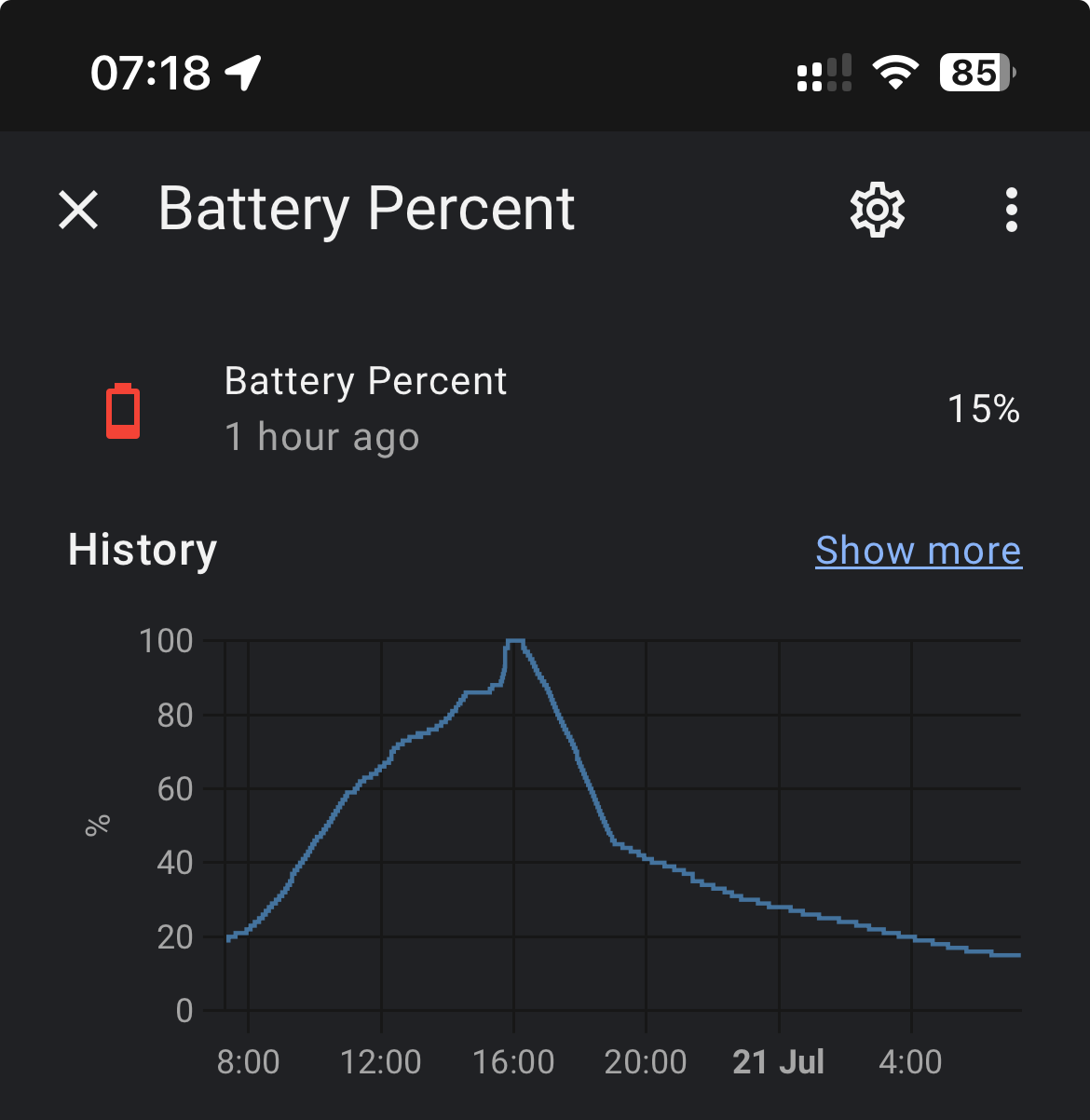
Last 24 hour battery chart nicely shows the summer cycle.

D
#96 deepanshus

jakubkozak

automation-1.txt
1kB

here is the yaml file but it will not make much sense as the device id and entity id are unique to each,

DeepS

G
#97 greysquirrel

This can also be achieved by using the Givenergy API using Apple shortcuts or the android equivalent.

Using the following

https://api.givenergy.cloud/v1/inverter/{Inverter SN}/settings/{setting}/write

Method Is “post”

Headers
Content-Type application/json
Authorization Bearer {API Key}
Accept application/json

Request body JSON

I use the following settings

24 Enable Eco mode (true / false)
56 Enable DC charge (true / false)
53 set DC discharge start (HH:mm)
54 set DC discharge end (HH:mm)

I set up three shortcuts

Force discharge battery
Sets DC discharge to true
Set DC discharge start to 16:00
Set DC discharge end to 19:00
Sets Eco mode to False

Return to eco mode
Scheduled at 18:58
Set DC discharge to false
Sets eco mode to True

flux control
I run this at 30min intervals from 16:00

I check the battery % using

https://api.givenergy.cloud/v1/inverter/{Inverter SN}/system-data/latest

A dictionary list can extract the current battery %

If the battery is greater than 40% run the “Force discharge battery“ shortcut

Else

I run the “return to ECO mode” shortcut

Edit: it would be straightforward to check the battery before the peek and force charge if required.

A
#98 AlastairCooper

@Arg0t
I've been following this thread for a while and I am wondering if you could share the automations for setting the SoC for the next day. I am struggling to get any time to play with this and the GivTCP one seems to produce completely unbelievable decisions some days.
I would really like to somehow base all this on usage outside the go/flux reduced rate periods because the EV charging I do there is irrelevant to the battery. I think that is the downfall of the PalmSoc

But still it does crazy stuff I can't explain: like leaving battery on 25% when the next day has rainy forecast. I guess it might be that the command to set the SOC gets lost, but then it only tries once and never checks its work. Mad.

T
#99 TX200

AlastairCooper it’s also based on usage, so maybe you didn’t use much the day before?

You can change the settings to get average usage for the last three days, or the same day last week, or other such options. It’s all on the GivTCP add on configuration tab.

A
#100 AlastairCooper

I thought maybe that the write was failing, but if I change the minimum charge amount it reliably becomes the new setting. I see there is a new setting for number of write retries so I just incremented that and we'll see.

TX200 Unless it's ignoring the night time usage, the amount we use day to day varies by less than the battery capacity, which given that it keeps pegging the charge at minimum on days with less than battery capacity forecast generation (yay july!) it seems weird.

I suspect that it might be seeing the huge variance in car charging days and assuming a minimum charge is going to be ok, but that isn't true because the base load will erode the minimum by mid morning if the irradiation is not playing ball. Some days it changes, the target SoC, but it never outputs why, which seems like another area I could improve with some actual time to spend.

I have experimented with a weighted average over the whole week biasing the same day, but this hasn't changed anything.

As a stopgap this thread had @Arg0t suggesting a different approach to changing the target soc and I would very much like to try that out, but rolling my own is not feasible given current time available.