New Battery Firmware

155 comments started 2023-07-25 last 2024-04-11
GivEnergy ProductsBattery
A
#1 alfwro

Does anyone here knows what's this new battery firmware that suddenly appeared in the portal?
I'm on BMS 3012. There is nothing on https://kb.givenergy.cloud/article.php?id=22 page. Everything with GE seems to be so disorganised and ad-hoc. Are they really expect people to apply firmware without knowing what it changes?

A
#2 ashenshugar37

It’s the BMS version 3013. Agreed the message could contain more information or a link to release notes.

I applied the update and my inverter (AC3) got stuck in a reboot loop (rebooting every 5 mins), a quick call to GivEnergy’s tech support resolved the issue (manual cancelling of portal launched updated and manually applying the new BMS) in about 10 minutes, with no need to perform a recalibration 😀.
System now working on 3013.

S
#3 stevelewis

michaelhoskins Similar issue here with firmware upgrade on AC3. Now offline.

@TheDragon (GivEnergy) - seems like the upgrade button on the portal doesn't work for AC3s!

A
#4 alfwro

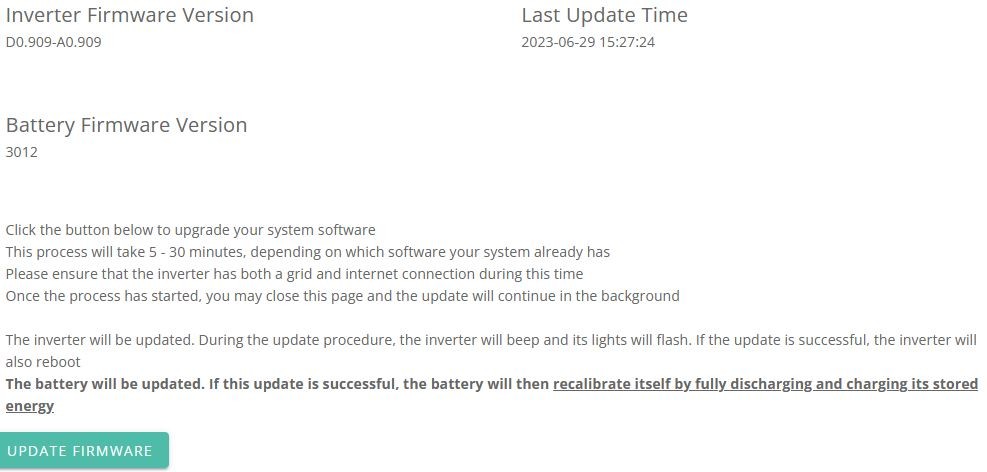
ashenshugar37 the message on my portal states that " If this update is successful, the battery will then recalibrate itself by fully discharging and charging its stored energy".

A
#5 ashenshugar37

alfwro I believe that is the case if the firmware is updated through the portal, it appears GivEnergy support can override the need to recalibrate, my battery is now definitely on 3013 and hasn’t performed a recalibration and the rep mentioned it wouldn’t be needed.

S
#6 Smk82

stevelewis in that case I’m
Not touching it for the moment!

D
#7 deepanshus

if i don't see anything wrong with my battery, i am not upgrading the software. pumping out 9.5KWh to grid and then importing 9.5KW back just doesn't make any sense, my system is only a month old and i have already done the calibration twice !

A
#8 alfwro

yep - mine was commissioned in January and I already had 3 calibrations - that is 30kwh wasted for no good reason - well the only positive outcome from all that is that my last calibration got screwed up somehow and I'm getting 10.5 kwh (9.6kwh battery) from my battery right now

T
#9 Tim

alfwro my last calibration got screwed up somehow and I'm getting 10.5 kwh (9.6kwh battery) from my battery right now

That sounds like the calibration never finished; it's being flexed from actual 0% to 100%? Maybe speak to support?

A
#10 alfwro

Tim Calibration finished OK, using GE terminology the battery found additional capacity to compensate for all those months with almost daily 50% SoC drops

A
#11 Adrian

Mine fails the battery update after 2 hours. I start the install which appears to work - it then goes on to checking the install and progresses immediately to 90% and sticks there. It then fails after 2 hours.
Any ideas anyone?

V
#12 Vestas

Server (portal) is basically rebooting the inverter every 5 minutes after trying the update. Gen1 inverter, Gen 2 9.5kWh battery.

Broken. Very broken.

A
#13 Adrian

Vestas
Yes, same here. V Poorly.
I powered the whole lot off and on again. Seems to have stopped the server rebooting it - its been 20 mins now with no reboot.

V
#14 Vestas

Adrian

I did the same. It just starts rebooting again after about half an hour.

Better not do any damage.....

M
#15 MarkyG82

Seems a regular occurrence that the new firmwares break something before being tweaked to be a good fit for everyone. I'll be leaving well alone for now with my ac3.

T
#16 tah

ashenshugar37 How do you cancel the update? I've got the same reboot loop just now.

A
#17 ashenshugar37

tah I rang GivEnergg support. Perhaps @TheDragon (GivEnergy) could help you out if he’s still online.

T
#18 tah

I switched off the battery and let the inverter continually restart and then it suddenly updated. Battery is now switched on for callibration

L
#19 L174559

My experience is slightly different. I got into this when my system started throwing wobbles. Battery not recharging between 02:00 & 05:00
to 90%. Ended up being told that needed a firmware update, which was tried remotely by Givenergy but it failed, asked to get a service engineer to do it via visit. My installers Gas Tech Wales also tried remotely but it also failed. Yesterday I carried out a successful update and battery recalibration successfully as per notifications. But this morning no recharge!
A clue I've found is that when I use the Givenergy eeb portal it reports that my battery is " lead acid" this is a pointer to a problem. I checked this after my firmware was updated yesterday and it reported "Lithium Ion" but this morning on checking its reverted back to "lead acid".
Back to square 1 without my 8.5 kWh recharge!

M
#20 mrand31

I tried the update (3.6kW hybrid D0.450-A0.451 with 8.2kWh battery 3012) in the early hours of this morning. It failed. It seems to have failed again this morning. Oh well.

V
#21 Vestas

Blocked the inverter from communicating with the portal overnight and the restart commands issued by the server have now stopped. Battery still on 3012.

Lesson learned - don't go anywhere near givEnergy firmware updates until you have no choice.

L
#22 L174559

MarkyG82
I think its called debugging on the fly!

T
#23 tah

I left my battery to calibrate overnight and even that failed. It discharged fully and then started to charge but ended at the same time my overnight charge was scheduled to end, so it only got up to 13%. I would have expected as part of the firmware update process that these scheduled settings would be temporarily ignored.

My battery was then sitting at 6% at 6am this morning and suddenly jumped to 15% with minimal PV power - looks like I need to recalibrate again.

Oh, and after all that I'm still on 3012. Calling support later today!

This is day 3 of battery ownership for me and not a great start.

C
#24 Chicaned

Same here. I've tried to update the battery firmware to 3013 and the inverter is going on and off line. Nice update....

T
#25 TonyAbse

I've tried to apply the update, the system tries then fails after 2 hours, tried about 3 times now and i get the same result. i'm on firmware 3012.

J
#26 justpassing

alfwro I had the same when my battery calibrated for 3012. It may be a coincidence but I really restricted my charge rate during the calibration due to it being a grey day. So it was trickle charging when it decided enough was enough. I was then seeing 10.2 at full, which seemed like a good thing 🙂. However when I started looking at cell voltages, 1 cell in particular was hitting 3.6 at full charge, whereas the rest were much lower, and this seemed worse after 3013. Again, too many variables to be sure. I requested a recalibration, xnd let it recharge at a higher , but not full, rate. The remaining capacity has dropped about 200 wH, but the cell peaks have dropped as well. So might be worth checking cell voltages if you can. As an aside, I see that GivTCP, givenergy-local, and possibly other apps all are deriving the soc in kWh, so might not be comparing like for like.

#27 TheDragon (GivEnergy)

There was a small portal glitch this am, causing slow response times, which may be affecting the send/ack of the firmware packets.

T
#28 TonyAbse

the update gets as far as "Verifying update - 90%" and thats it

D
#29 DeeJayArr

TheDragon (GivEnergy)
I started my firmware upgrade this morning, but I can't seem to see how far into the process it is.
How can we tell?

D
#30 DeeJayArr

TonyAbse How can you tell?

C
#31 Chicaned

Chicaned ...and now it's failed. I'll leave it for now until a fix is found.

#32 TheDragon (GivEnergy)

There is no fix, there isnt something wrong. many 100s are being done.

What is the serial of the inverter, I can take a look why

D
#33 DeeJayArr

TheDragon (GivEnergy)
Can you have a look and see what mine's doing please? SA2142G220

N
#35 NSR2

Has anyone found the release notes for this version?
I'll happily upgrade if I know what it does (and other people are successfully upgrading)

S
#36 steverice1

TheDragon (GivEnergy)

Can you take a look at mine please appears to have got to 90% and failed, update but gone so not able to try again.

SD2204G049

V
#39 Vestas

SA2244G487 if you have time to check why it failed.....

T
#40 Tim Adams

@TheDragon (GivEnergy) you might have a quick look:
SA2053G084
3 x 8.2kw batteries

Firmware upgrade seems ok and shows as 3013

batteries were (sort of) near empty at start of calibration with wide divergence
now charging with
SOC: 61%
Batt1: 59%
Batt2: 13%
Batt3: 8%

in the past calibration would have been with all 3 batteries in closer proximity

is it ok?

#41 TheDragon (GivEnergy)

Vestas

S
#42 steverice1

TheDragon (GivEnergy)

Thanks for that, no calibration has started, is this not needed?

R
#43 rjp

Update seems to have worked fine on mine. Stuck at "verifying update 90%" for about 5 mins which was disconcerting. Now discharging to grid as expected. Will turn on dishwasher!

M
#45 mrand31

Mine, SA2142G227, failed twice, once starting at 02:15-ish and once starting at 06:30-ish. I tried again at about 10:15-ish and the dashboard shows the battery not accepting charge from 10:15 to 11:20, reset the inverter at that point and it's charging again, but no apparent calibration and dashboard still indicates 3012 version.

To be fair, 3012 seems to have been behaving very well with the current charge/discharge regime and has been a vast improvement on 3008.

N
#46 NSR2

I've pushed the update button.
Seems stuck at verifying 90%...? Maybe it's just taking it's time?

B
#47 BenG

TheDragon (GivEnergy) could you take a look at SD2246G583 please? Failed firmware update twice this morning. Thanks

T
#48 TonyAbse

DeeJayArr it says!

T
#50 TonyAbse

TonyAbse

Inverter Firmware Version
D0.450-A0.451

Last Update Time

Battery Firmware Version
3012

failed last 4 attempts

T
#51 Tim Adams

Tim Adams
currently now charging with
SOC: 85%
Batt1: 81%
Batt2: 13%
Batt3: 8%

only Batt1 charging during calibration

Batt2 + 3 have green status lights and just one green light for SOC

S
#52 sunnyjoe

TheDragon (GivEnergy)

Could you also please help me update battery s/n DY2216G058?

Two failed attempts at upgrade yesterday (both failed at 90% complete). Remote Control History shows 50 successful writes to the Inverter Restart register, which I assume was part of the failed update process.

Thanks in advance.

T
#53 TonyAbse

TheDragon (GivEnergy)
can you have a look at mine too SD1950G008, took 2 hours and 90% before it failed 4 times now.
Also the last update couldn't be done online by me either and was sorted out by GivEnergy in the end. Do you think there's something wrong at my end?

T
#54 Tim Adams

Tim Adams
i got a message that calibration had "finished"
it appears that Batt1 reached 100% but the other 2 remain as
Batt2: 13%
Batt3: 8%

clearly a problem!
will it need a further calibration? if so perhaps trigger it tomorrow morning first thing?

should i try and "reboot" switching off/on batteries or inverter?

I
#55 IanW

Can we have the release notes please?

A
#56 alfwro

justpassing Yeah I raised that with GE support but apparently my cells are well balanced (they are not - when battery goes below 10% a couple of battery cells hit voltages as low as 2.45V and the rest is on 2.8-2.9V).
According to them everything is rosy.

S
#57 sunnyjoe

alfwro a BMS should ideally take better care of outlying imbalanced cells, but I don't know what cell balance protect is in the GE BMS. I have seen cases (different manufacturer) when battery modules have been opened up and individual cells charged to bring them back into better balance with the remainder of the cells.

M
#58 Marande

TheDragon (GivEnergy)

Mine is also stuck in an inverter restarting loop after trying to update to 3013 and appearing to get stuck at 90% 'verifying update' before failing. My inverter is SD2204G299.

Many thanks for any help!

M
#59 mrand31

After four attempts, my success rate is very consistent. Zero. 🙁

A
#60 Adrian

TheDragon (GivEnergy)
please would you have a poke at mine too SA2236g166
Muchas Gracias!

T
#61 TimHutchings

mrand31 Send an email like I did earlier with a screenshot of your inverter page on the portal with the inverter number and wifi number. Ten minutes late I got a response saying it was all done, and the battery doesn't need to recalibrate. Great service from support, though obviously I would have preferred the firmware update to have worked first time!

G
#62 GP3_Bunny

Hi @TheDragon (GivEnergy) hopefully as you always do - guide and help, I got the message The firmware update running on SA2244G331 has failed. You can start it again on the inverter card.

Please guide me to ensure it is successful ...

Regards

#63 TheDragon (GivEnergy)

GP3_Bunny done.

No trace of the firmware even beginning.
But done now no issue

#64 EmmetBrown

I'd like to try and time mine off so it calibrates and fully charges overnight. If I have say 17kW left in my batteries, how long should that take to export to the grid?

T
#65 TimHutchings

EmmetBrown It depends on your inverters export rate. If you have one inverter exporting at 3.6kw per hour, then then 17kw will take 4.72 hours to export. In fact it's likely to take a little longer as the conversion from dc to ac means you'll export at less than 3.6kw ph.

S
#66 SamA

Release notes: https://kb.givenergy.cloud/article.php?id=22

BMS 3013 03/07/2023

  1. During the BMS upgrade, the backup upgrade file is deleted
  2. Fix BMS can hang on reboot issue
  3. Remove the condition that the parallel SOC should be less than 20%, voltage of 0.5v tolerance remains (Max 1v)
  4. Widen the calibration range of SOC from 50% to 80%
G
#67 garypower

@TheDragon (GivEnergy) Hi, tried over last 2 evenings to update from 3012 > 3013 never had an issue before. AC3 inverter 2 x 8.2 batteries. This update the constantly seeing a bounce between importing and battery running as usual for ~ 2 hours before I get an update failed via app.

Anything you can suggest or poke please? Inverter number : CE2105G176

Thanks!

T
#68 Tim Adams

SA2053G084
3 x 8.2kw batteries
Yesterday I installed firmware upgrade = which seemed to install ok and show as 3013
Calibration started.

batteries were (sort of) near empty at start of calibration albeit with a wide divergence.and swiftly discharged.
During charging it showed
SOC: 61%
Batt1: 59%
Batt2: 13%
Batt3: 8%
I believe in the past calibration would have been with all 3 batteries in close proximity

a bit later
SOC: 85%
Batt1: 81%
Batt2: 13%
Batt3: 8%
clearly only Batt1 charging during calibration
Batt2 + 3 have green status lights and just one green light for SOC

Later i got a message that calibration had "finished"
it appears that Batt1 reached 100% but the other 2 remained as
Batt2: 13%
Batt3: 8%

clearly a problem!

I tried a "reboot" switching off/on batteries or inverter. but batteries 2+3 will not switch off by pushing and holding the button.

Overnight Batt1 has discharged (normally I think) but 2 + 3 are unchanged

Please advise as a matter of urgency

A
#69 Anne

Adrian I've got the same issue. I have been told it's because the WiFi signal dropped

#70 TheDragon (GivEnergy)

garypower No trace of it even beginning.

Suspect portal back end issues. Raised a high priority ticket.

laded the FW for you 1st time, no problems.

#71 TheDragon (GivEnergy)

Tim Adams Please call support, battery 2 & 3 are unresponsive.

Can they be turned off from the black button on the right side?

T
#72 Tim Adams

TheDragon (GivEnergy) thanks. I will contact support.

No, Batt 2+3 will not switch off by holding finger on button even

#74 hoggy

Think mines stuck in a boot loop if you have the time.
Restart every 5 mins since attempt (does this timeout eventually?)
Rusty old SD2039G078 inverter.

#75 hoggy

Think mines stuck in a boot loop if you have the time.
Restart every 5 mins since attempt (does this timeout eventually?)
Rusty old SD2039G078 inverter.

T
#76 Tim Adams

Tim Adams Support have kicked off another calibration. I have to say i'm not very hopeful as it would only charge Batt1 on forced charge and is now only discharging Batt1 on calibration. But we can let it go through. as batteries are not very full I expect discharge will take under one hour. Then charging will take around 3 hours if only one battery filling (up to 9 or 10 hours if 3 batteries filling).

sadly I expect to see calibration complete by 1pm - with Batt1 & 2 still showing unchanged 13% & 8%. i.e. not working

I hope i'm wrong!

#77 TheDragon (GivEnergy)

hoggy I see you are also stuck at 90% verifying, yet no FW has even started to load.

Devs are going to try and debug whats going on here, as this is new fault

#78 hoggy

TheDragon (GivEnergy) no worries. I'm out all week so no need for the system should you need to use it as a guinea pig

C
#80 Cozzer

ED2253G046
I tried to run the firmware update, cant get past 90%.

What was strange was the battery was around 20% at midnight, I started to run the update, then battery went to 0%. At 1:48am, the battery went to 100%. Now this morning the battery thinks its got 80% charge. Somehow it thinks its got power inside it.....

Any change you could push the update please.

Thanks

A
#81 ajcrewe

@TheDragon (GivEnergy) Can you take a look at CE2208G172 when you get a chance. AC3 and 9.5 battery. I hit the update to 3013 button on the portal which started OK but seemed to hang at 90%. Battery has now reverted back to normal operation, is still on 3012 and update button has not reappeared.

#82 TheDragon (GivEnergy)

ajcrewe the devs are actually using yours to debug, so will get done.

checked back, its on 3013

S
#83 simont

ajcrewe I hit the update to 3013 button on the portal which started OK but seemed to hang at 90%. Battery has now reverted back to normal operation, is still on 3012 and update button has not reappeared.

Exact same for me, CE2235G432, TheDragon (GivEnergy) could you have a look please ?

A
#84 ajcrewe

TheDragon (GivEnergy) Many thanks. It looks like it has started the calibration cycle now.

G
#85 GP3_Bunny

TheDragon (GivEnergy)

You are the BEST ... Mega thanks it is showing on the dashboard as Battery Firmware Version
3013.
Thank you

#86 Stevef1964

Hi Paul, mine failed this morning. Not sure why.

You happy to take a look and kick it off if needed?

SA2208G029

W
#87 Wavy Davy

I will probably leave it for now, as my system is only a couple of months old and has already done 2 calibrations. One when installed and one after a second battery was installed. If TheDragon (GivEnergy) would initiate it without a re-callibrate that would be great. SA2244G426. otherwise will run the batteries down before starting it.

A
#88 alfwro

@TheDragon (GivEnergy) What is the deal with the calibration - is it optional? I have seen few posts where people stated that they asked support to update their FW without calibration.
Thanks

T
#89 Tim Adams

Tim Adams calibration has been cancelled by support. It looks like the bms has froze on the slave batteries, Apparently this will need a site visit from Givenergy engineers.

Just hoping its not going to be a long wait. It seems we have a failure each time with battery and inverter firmware upgrades. Makes me nervous about future upgrades and whether I should go for AIO in my new build......

S
#90 simont

simont ajcrewe I hit the update to 3013 button on the portal which started OK but seemed to hang at 90%. Battery has now reverted back to normal operation, is still on 3012 and update button has not reappeared.

Exact same for me, CE2235G432, TheDragon (GivEnergy) could you have a look please ?

2 Failed updates, think I'll leave it.

S
#91 SimonHadley

Firmware update has failed 4 times. Support suggest physically dismantlement the battery and loading a file direct to an internal USB. Not a solution for someone with an ICD in their chest! Will try the update again over the coming days.

S
#92 SimonHadley

GiveEnergy Support Team have resolved my update failure and managed to load externally for me. Great help and support. Thank you.

M
#93 mrand31

Contacted GE with the chat feature of the web site. The chap there did the upgrade and it went through simply and quickly. No calibration needed going from 3012 to 3013. He said that there had been a few issues with the automated upgrades.

D
#94 deepanshus

SamA
Widen the calibration range of SOC from 50% to 80%

Any idea what this means?

T
#95 TX200

deepanshus soc is state of charge (percentage full).

The system will check the percentage charge via various factors, to make sure it's as accurate as possible (some bugs, so experience may vary!)

Instead of just doing one type of soc correction in the lower 50% of the battery they are now doing it as high as at 80% charge.

This is particularly useful during the summer for those people whose batteries don't get fully depleted each day, e.g. spend the time in the upper half.

After a while the actual charge may drift, leading to sudden crashes in the soc - e.g. suddenly empty. Or sudden jumps say from 90% full to 100% full - as the battery was fuller than expected and hit an upper voltage limit which meant the battery knew it was full despite thinking it was at 90%.

N
#96 NotoriousPyro

alfwro lmao I thought the same myself, I decided to take a look at the "what's new" page and it was last updated 28/09/2022...

Seems like crickets going off in their offices 🤣

#97 Stevef1964

Mine seems to have failed again.

I've sent a message to Support.

Lets see what happens.

A
#98 alfwro

I am just wondering is there anyone out there who managed to update the FW without getting the support involved or bricking their device?

#99 Stevef1964

alfwro

My system is still working fine. It looks like as the verification failed the update didn't happen.

S
#100 simont

Got a reply from Support:

We have a known issue with this at the moment, but it should be fixed Monday if you try again, thanks.

#101 Stevef1964

Ok thanks for the heads up Simon.

A
#102 alfwro

If there is a known issue why is the update still available? or why is the no warning on the KB site or next to the update?

#103 Stevef1964

alfwro

Probably because some systems are being upgraded without issue, and probably it's just part of the verification process is not quite right, which is stopping certain systems from progressing.

The ones that are causing system problems could be because of something completely seperate from the upgrade issue.

K
#104 killythebid

I after looking up the details of the update on the knowledge base database started the update this morning. Although you have got to admit that a new version of anything is more tempting than a bowl of ice cream on a hot day! The urge to push the update button is powerful!

Anyway joking aside the update has been installed the first time and the batteries are now draining to the grid as the calibration is started.

One has to remember that for every post about the update not working there will be many that happen just fine and there are several factors in why an update may fail some at least of which are nothing to do with Givenergy.

#105 Woodstock

deepanshus As TX200 said but I have a word of caution. Under 3013 when performing the SOC correction in the newly added >50% and <80% range my system is consistently over correcting by a large margin. This results in a "sudden jump" of the displayed SOC when the battery next approaches full. I have posted details of this behaviour several times but there has been no interest/response/correction forthcoming.

V
#106 Vestas

I think there's been some network rearrangement happening where the servers are hosted.

givenergy.co.uk was 502/503'ing pretty much all day Wednesday/Thursday. Seems to be back now, I haven't looked at the zonefile to see if that changed but it seems a likely cause.

P
#107 P3tro

Vestas I did chuckle at the thought of non-techies not knowing what is meant by "502/503'ing" 😃

I've tried to catch up on a few posts and decided I'm going to resist the urge to update the battery to 3013 from 3012, certainly for a few days at which point I'm going to come back and read up some more.

I guess more people will post with issues than those who've had a successful update, but it's just too big of a risk for me given what I've read and I don't have time to 'mop up' after any possible mess (which may or may not occur) as a result of updating 🙁

I'm not clear, though, whether the update is solely for the BMS or whether there's updates to the inverter based on a reply to someone asking similar somewhere from TheDragon. I'm on an AC3 and I know it's still in BETA but I'm eagerly anticipating it.

Woodstock Can I also say I read your posts with great interest, thank you for the detail and length you go to in communicating feedback or issues. While I may not understand ALL of it, it's still appreciated. I hope there's work going on behind the scenes with your posts.


V
#108 Vestas

P3tro I think there's a few techies with different backgrounds on here 😉

I'm pretty sure 3013 is solely for batteries - f/w notes don't suggest anything else & there's at least one person on here who has had to take the panel off the battery to manually update via the USB stick in there.

My speculation is that for whatever reason the portal had "issues" and couldn't send/find the f/w file but for some reason thought it had been sent. Cue portal restarting inverters 12 times an hour for several hours/until some people lost patience and blocked the portal 😉 while the batteries didn't actually restart at all because they had no reason to. Given some people obviously have had their systems updated OK and manual intervention works it suggests someone has misconfigured a route/rule server-side, or some hardware has been changed and doesn't quite work the same way.

Anyway, probably best to leave it until Monday regardless of reasons. NEVER upgrade anything on a Friday afternoon. Just don't....

A
#109 AtrixMan

Adrian I also had exactly the same result and have tried to install this firmware update 3 times.

Although, I recently upgraded my system, replacing a 5kW hybrid gen1 Inverter for a gen2 and adding a 4th battery.
Thinking it may help, I've decided to let the batteries fully charge and discharge down to 4% normally, and then try the update again.

D
#110 danerf

wish I never did the update and stayed away from this forum. Should have used my IT head and waited a few weeks until it seemed stable with no radio noise.
Been contacting support and after 3 calibrations it gets stuck idle at 20-21%

K
#111 killythebid

Vestas The updates for 3013 are described in the Givenergy Knowledge base for anyone to access.

It is firmware for batteries, not the inverter.

Unsurprisingly it can be found under Firmware revisions

BMS 3013 03/07/2023

  1. During the BMS upgrade, the backup upgrade file is deleted
  2. Fix BMS can hang on reboot issue
  3. Remove the condition that the parallel SOC should be less than 20%, voltage of 0.5v tolerance remains (Max 1v)
  4. Widen the calibration range of SOC from 50% to 80%
D
#112 danerf

danerf I think they've given up trying to get it to complete a full calibration and bypassed the calibration.

K
#114 killythebid

danerf The calibration started and completed OK for my system update today.

Oddly, I have now got another invite button to update the firmware. I don't fancy another calibration today. Actually ay 2nd look it is inviting an inverter update this time and no battery calibration.

S
#115 Simkna

Looks like their SSL Certificate has expired now, too...

#116 dbt85

I have to add, to me it seems odd to not have seperate buttons to upgrade inverter and battery on the portal. Upgrading both at the same time feels like it's asking for trouble.

S
#117 SteveCook

Gen1 5.0 and 9.5 battery.
I clicked update at 19:30 after my peak export last night.
All went smoothly and calibration and full charge all completed smoothly.
Just so people know that it does work!

K
#118 killythebid

dbt85 The battery and Inverter updates were done serially on my system. The update was available for 3013 first and after that had been completed there was an update that could be selected for updating the inverter to 911. The updates did not happen at the click of a single button or simultaneously.

K
#119 killythebid

SteveCook On my 5.0 Gen2 and 2x 5.2 battery system both battery and inverter updates went smoothly yesterday too.

R
#120 Roberto

Dont faff around trying to update via portal. Just email support and them to do it. Simple. Mine all done 20 mins after i emailed them.

#121 gwynnej3

Acording to the release note in https://kb.givenergy.cloud/article.php?id=22 there isn't a lot in this release, even less that I can understand, so I wouldn't rush to install it esp. if you have to do a diascharge/recharge cycle. imho.

S
#122 sponev

Unfortunately the manual procedure GE support provided to remove the memory stick(s) on my batteries has proved impossible as they are glued in. Even after scraping the glue off and gently pulling with sharp nosed pliers, no joy. At the point the circuit board started to flex I gave up as damage could easily have resulted. I've emailed the service desk to request an engineer visit - not really acceptable to be fair. We shouldn't really need to be taking the covers off kit like this to update them surely?

V
#123 Vestas

sponev Someone said they needed to use a stanley knife to run the blade between the socket and plug as the glue/loctite was in there.

S
#124 sponev

Vestas We tried a scalpel on the face and front edge and then pliers. No joy and not prepared to risk damage, GE will need to resolve it. Hopefully they can bring this kit to a good level of reliability soon. I see the big improvements happening with the likes of Paul on board, but still seems to be a lot if issues to resolve. It will be interesting to see how long a service visit takes 🙁

V
#125 Vestas

sponev I can understand why the USB stick is glued in - I'm sure the DoA stats would have been fairly horrific had it not been - but there are other methods of latching USB sticks in place which should be used if there's any requirement to remove the stick other than to replace it.

Even using one of the loctite variants would be better than blobs of glue - plenty of options in that range to secure the stick from vibration/shock while still remaining easy to remove.

I'll be interested to see how long it takes for an "engineer" visit.....

S
#126 sponev

Vestas Your comments echo those of my other half - although she was less diplomatic! Rightly she was concerned at seeing me switching it all off, removing the covers and approaching with a pair of pliers. It needs a re-think so that the USB is easily accessible and not glued in. Poor design to be fair.

K
#127 killythebid

Vestas I had to cut the USB free with a Stanley knife a month or so ago when there were issues with my batteries and they were not able to update remotely. It all worked OK and the battery updated from the USB without issues.

I have not had an issue with OTA updates since.

A
#128 anglefire

sponev One of the issues this was designed to solve was that they were loose in the box and installers forgot to fit them and they got thrown away - mine is no where to be found so fitted a small one off amazon (Just not Sandisk!)

S
#129 sponev

killythebid I hear you and we tried as hard as we dare. If it's going to break anything on removal, it needs to be on GE and not the end-user. I'm sure it'll be fine ongoing but they need to resolve the issue the flaky update routine caused. Scalpel and pliers was as far as we were prepared to go, it's in there solid as a rock!

#130 dbt85

killythebid Interseting, that is not what the text on the portal suggests will happen.

I'll do it shortly so it can discharge at the peak flux rates and I#ll tie its hands behind its back so that it charges again at 2am.

EDIt: update failed 32% lol. And I have no idea which it was doing
EDIT2: It seems to be the inverter. But because of the portal design I can't just get it to try the battery.

K
#131 killythebid

dbt85 That is just going to update the battery firmware. I expect like me after it completes you will get another invite and button to update the Inverter firmware.

The wording of the update could be more clear but it is only going to update to 3013 battery firmware and recalibrate the battery the first time around.

#132 dbt85

killythebid No, it was the inverter. Its gotten further on the second try, still waiting for the reboot sequence to end.

EDIT: It has now ended and the portal and givtcp indicate it is now on 911, but no sign of the battery update and the button isn't even visible any more on the portal. I'll leave it a bit and see if it reappears.
EDIT2: it has reappeared and is now doing the battery and discharging.

W
#133 Wavy Davy

Like someone said earlier, I was hesitant about the 3013 update and the need to recalibrate, so I emailed support and about 15 mins later had a email saying they had done it, no probs and no recalibration required.

K
#134 killythebid

dbt85 OK it did it in the reverse to mine then but two bites at it in any case. It sounds like it will work OK.

K
#135 killythebid

Wavy Davy That's good, but a recalibration is good for the BMS from time to time to keep things running at optimum.

W
#136 Wavy Davy

killythebid I agree, but system is only 2.5 months old and had 2 recal's already. Was told by support it didn't need it.

A
#137 anglefire

killythebid I don’t agree that a calibration is good for the batteries - as it takes them to the extremes both ways.
But taking them to 100% and 0% is not a bad thing (as that takes the charge to normal limits)

K
#138 killythebid

Wavy Davy Sure, it does not need to be done every 5 mins.

K
#139 killythebid

anglefire Actually, I said the recalibration is good for the BMS which is different.

An occasional drain and refill won't really do harm to an LFP battery.

For instance, the BMS was always reporting my secondary battery as 10% below the primary when it was near 100% in recent days but now the recalibration has been completed they are now reporting in step with each other.

S
#140 Simkna

@TheDragon (GivEnergy)
Can you take a look at CE2048G033 please?
AC3 and 2 x 8.2 batteries. I hit the update to 3013 button on the portal and it paused at 90% verification as expected.
Waited an hour, refreshed window, is still on 3012 and update button has not reappeared.

M
#141 Mike-H

Wish I had seen this thread before I updated inverter and batt. firmware. Updates seem to have gone fine but if I'd known I could have avoided a costly batt. calibration by contacting support...
Doesn't help that this part of the country has been under a solid blanket of cloud for the last 6 weeks whilst the rest of the world has been scorched. Agh!

S
#142 simont

simont simontether ajcrewe I hit the update to 3013 button on the portal which started OK but seemed to hang at 90%. Battery has now reverted back to normal operation, is still on 3012 and update button has not reappeared.

Exact same for me, CE2235G432, TheDragon (GivEnergy) could you have a look please ?

Updated today, all went fine, it did a battery calibration

J
#143 jocky

every time I get a software update the settings for the battery capacity in the invertor general section goes back to reading the lead acid settings, 125 Ah | 6.40 kWh | (2 Packs) not the 2 x 9.5Kw installed. This is the third time I have had to call the installer to reset this and the systems only been in under four months. No idea why this keeps happening.

C
#144 Cozzer

I have been trying still to update my firmware on the battery but it just keeps hanging and then fails 2 hours later.

ED2253G046

P
#145 pjb904

Vestas
I agree completely. Got burned last time, and wished I hadn't pressed the button!

T
#146 Tim Adams

Tim Adams following firmware update on 26th July and reported failures immediately .....that left 2 out of 3 batteries not working .....had engineer visit 1st Sept. (just over 5 weeks later).
Promptly got one of the non-working batteries operating but the 3rd battery will need replacing. Hoping that i'll see an engineer reasonably soon!

Hopefully @Givenergy will be doing a full analysis of failures with firmware updates to understand and learn for future... as well as increasing engineer numbers so turnaround can be improved.

B
#147 BenHB

@Givenergy can you take a look at system FD2314G402... The battery in our system is not responding. Battery firmware is showing as '0' on the portal with SOC=0.0% and no response when I try to force charge from grid. Any surplus from solar PV is bypassing the battery and exporting to grid.
Thanks

K
#148 KevinB

BenHB That sounds like a genuine request for the support team, I don't think they generally watch this forum - you should probably call/email them directly.

G
#149 geoffreycoan

I would check the thin black data cable from the battery to the inverter. If its a gen 1 inverter there's no securing lug and the cable can come loose. Mine did this

J
#150 Jellybaby

Tim Adams That is just stupid to me, surely if they were coming to investigate a battery fault they would be carrying spare batteries incase they couldn't get them working, like why make it two trips?

T
#151 Tim Adams

Jellybaby Hopefully systems will improve with more engineers and better support all round. Perhaps making use of local installers to help as well?

i'm sure the pace of growth in the business has caused a lot of growing pains!

G
#152 Grahamthomas

I’m on GE9.6 with AC3, firmware is 3008.

When I tried to update last year it failed and I’ve not tried again. Should I?

Can it be done without a battery calibration?

V
#153 Vestas

Grahamthomas Can it be done without a battery calibration?

No.

G
#154 geoffreycoan

Vestas Grahamthomas Can it be done without a battery calibration?

No.

Not strictly 100% true. GivEnergy support can I believe initiate the upgrade and stop/prevent the battery calibration.

But if you’ve not calibrated for a year it would probably be worth doing a fresh calibration anyway to get more accurate SOC recording.

S
#155 SimonClarke

geoffreycoan last few days I’ve been on 3012, then 3015, then 3068, now back to 3012 all with no calibration. Will post the results later…..

M
#156 M_J

SimonClarke Will post the results later

Very interested in your journey... I await with anticipation..

S
#157 SimonClarke

M_J I will be quite surprised if I am not back exactly where I started! We’ll see