Set two charging periods in one day?

46 comments started 2023-09-10 last 2023-12-21
GivEnergy ProductsBattery
T
#1 Timbrettward

Our system is new and I don't yet know whether I'll need/want to do this over the winter, but in case I do, how do I configure two charging periods per day? One during the Octopus Flux cheap overnight period, and one to top up if necessary just before the expensive afternoon period. The dashboard only appears to allow configuration of one charging period per day.

I assume I could use the API with some software I write and dump on a server somewhere to reprogram the one charging period twice a day ... but I can't be the first person with this question so there must be a better answer?

T
#2 TimHutchings

I have a gen1 and on the portal I can only charge once. A gen2 or 3 may be different. I would use the portal to set a charge at night on Flux since you'll be asleep, then use the app quick set buttons to charge manually in the day if you need to. You could always set an alarm on your phone if you want to make it regular.
Alternatively, get involved in Home Assistant to set your times when you want.

T
#3 Timbrettward

Yeah. Home Assistant seems waaaay OTT just for this function. (Though I do have a spare Pi 4 lying around, so the hardest bit, getting hold of the hardware, won't be an issue.)

Trouble is my co-lo web server is a LAMP stack and although it's probably only a few dozen lines of PHP I haven't written any for quite some time and don't really feel attracted by the idea of picking it up again. So it looks like a toss-up between that and trying to remember to do it manually.

"use the app quick set buttons"

I might look into the Givenergy app though - it looks like I've never bothered to install it. (I don't normally use a phone app if there's a way of doing the same job on a real computer with a big screen and a real keyboard and a real mouse.)

But really! If I'd been that programmer and someone had told me to code only one daily period into the control system I'd have pushed back on the grounds that sooner or later people would want more than one. And if my boss had said to shut up and do what I was told, then I'd have coded the multiple periods anyway, and just hidden them until the boss discovered the "new requirement" for multiple periods.

Thanks for your suggestions.

B
#4 Barns

This is something I really want to get going as well with our new AIO. Currently I'm heading down the Home Assistant route and, whilst it's fun digging into all kinds of technical nerdery, I can't help feeling there must be a simpler way. Currently I've not actually even found a simple HA setup to just charge to x between various time periods; every guide I find seems to be about much more complicated solar forecasting and whatnot. Surely there should be a way to automate this easily without digging code out?

T
#5 Timbrettward

@TimHutchings I've got the app and found the button, ta.

I
#7 IanMc

I have the givenergy app but I cant see any quick set buttons.
Could someone point the way for me please?
Thanks

#8 Cdent

IanMc go to the hamburger menu at the top left > settings > preferences and toggle on quick settings button

I
#9 IanMc

got it, thanks

D
#10 dragon2905

What you want to do cannot currently be configured in the App or Cloud Portal.

Your only option is to go the home automation route.

S
#12 stevelewis

dragon2905 the standalone version of PALM offers a simpler approach than Home Assistant for two charges each day, forecast-dependent overnight charge, etc. Runs on any platform that works with Python and/or Windows.

Www.github.com/salewis38/palm

T
#13 Timbrettward

Ta. Still needs a server that's on 24/7, and the only one of those I've got is a LAMP co-lo which I'm sure won't let me run Python ...

... or ... at least ... it didn't when I signed up to it many years ago. I've just checked and it does now! So this is a possibility.

B
#14 Barns

stevelewis Any pointers getting PALM running from inside Home Assistant? Or using HA itself to charge on/off twice a day? Everything I keep coming across is linked to solar forecasts but currently I just want to charge to 100% overnight and again to 100% in the early afternoon (assuming I was on Cosy tariff with its two cheap rate times and wasn't getting much sun to worry about over the winter).

B
#16 Barns

SteveCook thanks! I'll take a look. I actually cobbled together an automation with a script hacked from one of SpeakToTheGeek's which seemed to work force charging last night for an hour, so maybe I'm on the right track finally. Not what I'd call end user easy though and that's speaking as a developer and tech geek of 30+ years šŸ™‚

S
#17 SteveCook

Barns I really dont know if I trust myself writing scripts but I can edit these automation pages

B
#18 Barns

SteveCook Yours does look somewhat simpler! Maybe I'll streamline my baroque scripts down a tad šŸ™‚

B
#19 Barns

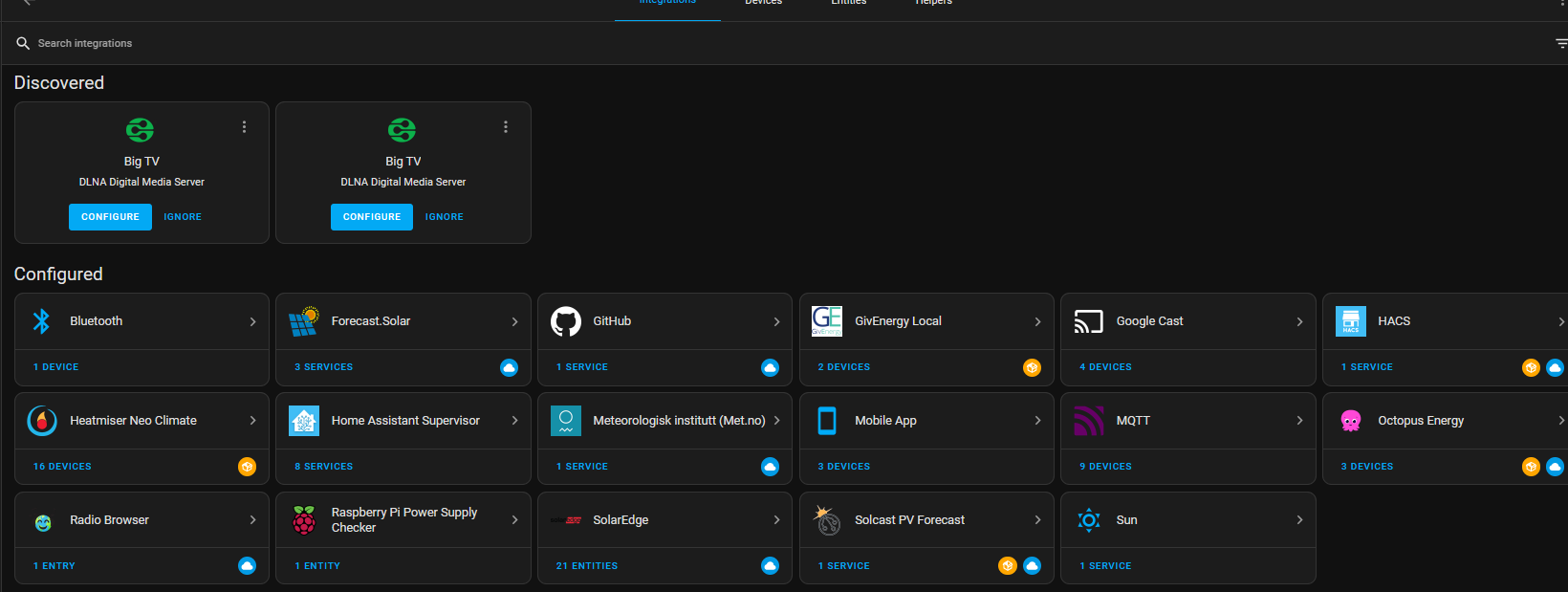
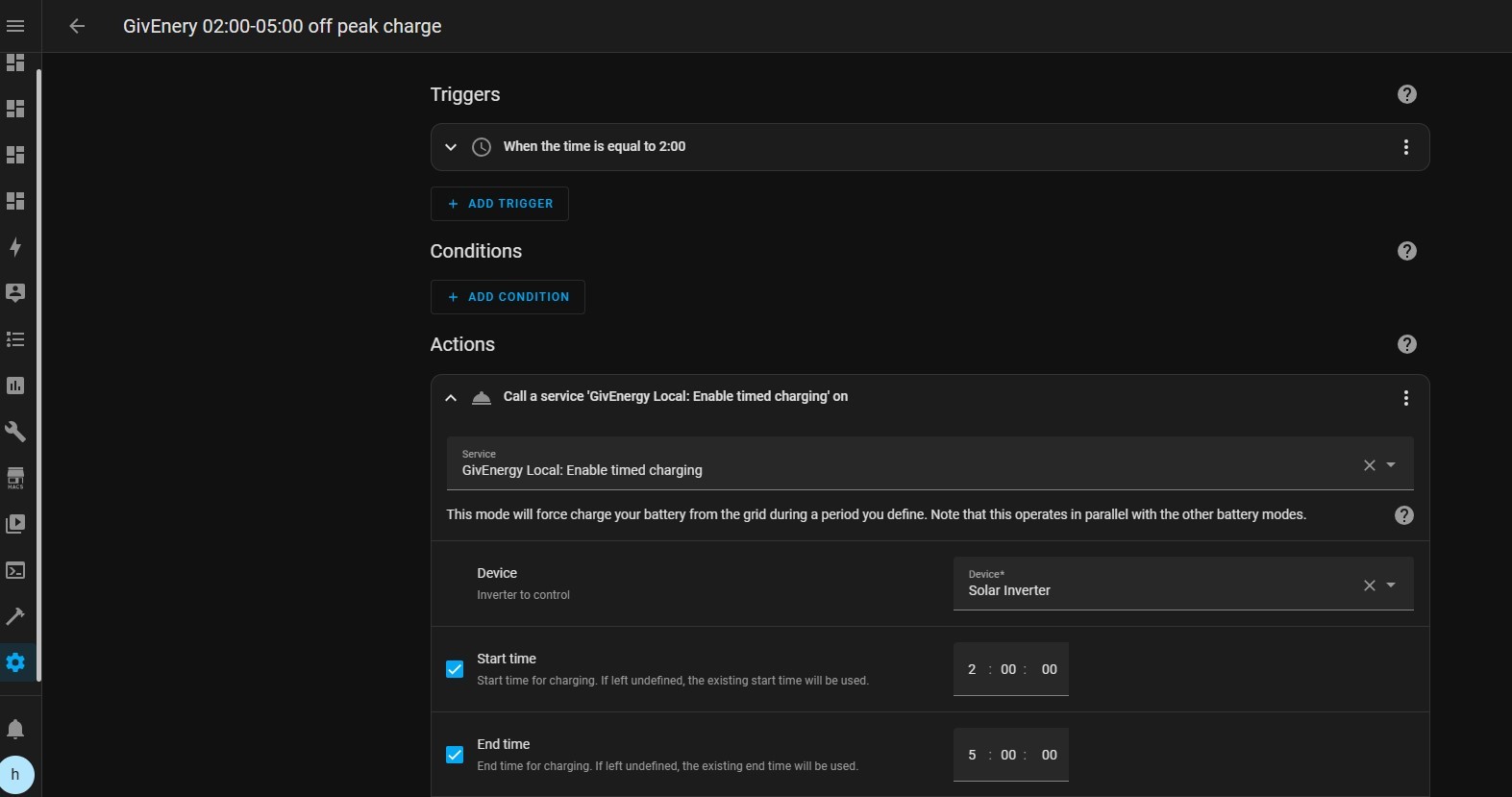
SteveCook On the automation you've linked the image to, it calls the Service "GivEnergy Local: Enable timed charging" - but this doesn't exist on my setup in that dropdown - is this a script you've created or downloaded yourself? It's where I needed to create a script of my own (based on SpeakToTheGeek's examples). "GivEnergy Local" sounds like a different service from GivTCP, have you installed that as well?

S
#20 SteveCook

Barns I have GivEnergy local and MQTT as well as GivTCP.
TBH I am not sure what "does" what regarding preset automations. I just installed them and then found the automations

B
#21 Barns

SteveCook Thanks! I think that Service you're using comes from GivEnergy Local now I've poked about into that a bit more. I'll look into implications of installing both since it's not mentioned on the various guides I've read (I'm sure it's fine, just want to double check). Ta for your help.

G
#22 geoffreycoan

Barns There’s two main ways of talking to the Givenergy inverters, Givenergy Local and GivTCP. I think Givenergy local uses direct direct calls whereas GivTCP uses MQTT publish/subscribe messaging so is more robust, but that may be wrong!

I followed the GivTCP route as that was what I found described on the givenergy wiki site, a link to Speak to the Geek’s video on how to setup GivTCP

On this post https://community.givenergy.cloud/d/3022-inverter-settings/5 I’ve shared a brief run through of how I got my inverters setup and managed in Home Assistant, the basic dashboard and the flux evening discharge script.
I have a suspicion that the exact commands you need to fire through to the inverter vary by what inverter generation you have. I have gen1 inverters. I got the sequence of commands by manually triggering charge and discharge in the iOS app and seeing what changed in the GivTCP controls. Then a bit of trial and error.
Its quite reliable now I’ve worked it out

B
#23 Barns

geoffreycoan thanks, I'm learning a lot tinkering today! I seem to have a basic set of force charge for x minutes at y time automations working, one remaining question is what happens when it gets to 100% charged with some of the force charge time left?

For example, set it force charging at 4am for 2hrs. If it reaches 100% before the 2hrs is up, does it stop charging and resume discharging automatically? Or will it sit there topping up to 100% continually until 2hrs is up?

G
#24 geoffreycoan

Barns When the battery gets to 100% the inverter will stop charging, it can’t charge to above 100% so there won’t be any further grid import.

To answer the second part of the question, ā€œwhat happens nextā€, on my inverter (gen 1) there is a Control Mode entity (values of Eco, Eco (Paused), Timed Demand, Timed Export and Unknown) and there is a Force Charge entity (values Normal, Running, 15, 30, 120, etc) . When you do a force charge (I change Force Charge entity to 120, and it responds by changing to Running) the mode changes to Eco (Paused). I would imagine (need to prove by testing) that if there is then house demand the battery will supply that, the SoC will drop slightly and it will resume force charging again.

Certainly I know that it doesn’t change back to Eco mode automatically until the end of the Timed Charge period.

In my scripts when I want to stop charging I change Force Charge to Normal, and set the Control Mode to Eco to be sure it is doing what I want.

Its all good fun tinkering!

T
#25 Tim

geoffreycoan whereas GivTCP uses MQTT publish/subscribe messaging

If you disable MQTT output in the GivTCP config, I'd expect it to carry on working with the inverter; controlling and receiving data as before. My understanding of the MQTT is that it's just another route to make visible and manage the data being transferred. GivTCP will be using Modbus over TCP/IP for the actual inverter comms.

B
#26 Barns

geoffreycoan Thanks this is all very interesting, I'll need to dig into it further to see what works best. Currently my scripts set Force Charge to a time in minutes and it seems to set everything back to sensible values once that's over. I've got another script that sets Force Charge to "Cancel" (as that appeared to be one of the valid values for the entity) which I can run manually and that seems to correctly stop any running force charge and set back to sensible values.

I guess what I want now is some way of detecting when the battery hits 100% charge during a force charge and send the Cancel at that point to return to normal running. I'll need to ponder!

S
#27 stevelewis

Timbrettward nice! Someone else is already running PALM on a NAS. Running it on an OpenWRT router is another option.

D
#28 dragon2905

stevelewis sorry I was editing the post but then couldn't at the time so instead opted to delete it and change to "home automation" rather than Home Assistant (as I know there are others methods). Think we got crossed in postings

D
#29 dragon2905

SteveCook does the Octo R&D allow you to set your own and multiple charge/discharge periods or does it simply automate the system based on your tariff?

Everyone's use case will be different but I don't want to hand over control of my system to Octopus I want to tell it when to do the things that I want it to do.

With over a years worth of data I have run the numbers for Flux and any other tariff available to me and, for me, Flux is a non-starter. It would cost us money and deprive us of the available battery at the exact times (in autumn/winter) when most needed. In summer it's generally not an issue but exporting the energy in the battery and then purchasing back for general use just doesn't work financially (again for us specifically)

The cheapest tariff for me would be Intelligent but that's not an option due to car (or lack of).

Octopus Go is currently the best option with a "EV on order"

G
#30 geoffreycoan

Barns I guess what I want now is some way of detecting when the battery hits 100% charge during a force charge and send the Cancel at that point to return to normal running. I'll need to ponder!

You can just do an automation with a numeric state trigger on the inverter SoC. When SoC is above a value, stop the charging. I find the charging can slow down when it reaches 100% so maybe have the trigger on SoC > 96% for example.

Or have a time pattern trigger to run say every 10 minutes that checks SoC and takes action accordingly.
I’ve taken this approach in my scripts when I am discharging down to a level or stopping charge when it reaches a min SoC level, but now am wondering why I did it this way as I could have used a numeric state trigger !

G
#31 geoffreycoan

geoffreycoan Just been looking at my own flux peak period discharge script and realised that maybe there are advantages to the way I do the triggering every 10 minutes between 5 and 7pm. Doing it this way I know that the script is only running when I am in the period that I want to consider starting (and later stopping) a peak period export.

If I had a trigger on SoC > 96% for example and then cancelling the forced export in the script actions, well that script would be triggered every time SoC went naturally above 96% regardless of whether its in the peak charging period or not. So would need to add extra logic in the script to decide whether it was already force charging, or its in the peak period, before deciding what (if any) action to take on the SoC level.

Many way to do these things of course

B
#32 Barns

geoffreycoan Had a tinker last night and discovered the numeric trigger function and also added condition of "Force Charging=Running" which should mean it'll only trigger at 100% when force charging. Seemed to work overnight! As any good developer knows, one test with one success means it's now perfect and ready to ship šŸ™‚

S
#33 SteveCook

dragon2905 The OctoR&D scheduler allows you to set periods OR rules based on tariff.
I was using Octo for a couple of months but I could never get Eco reset after a forced export so I went to HA.
I also had times when Octo server did not send signals to GE, or GE server did not get the signals, or GE signals did not get to me via internet.
So I went to HA with my server on my network

T
#34 Timbrettward

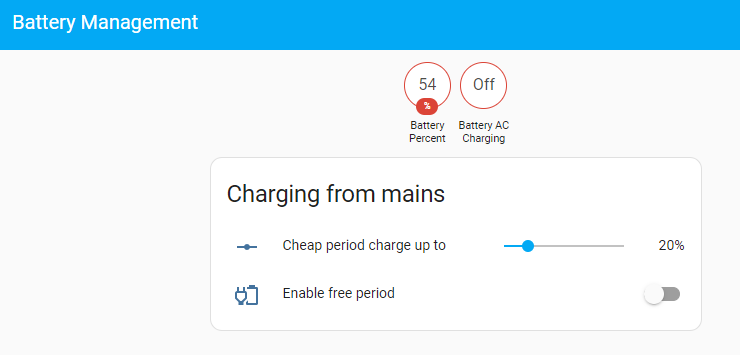
Been away from this thread ... been busy setting up my spare Raspberry Pi running HA. So far I've got a dashboard that looks like this

It charges up to the slider value during the cheap overnight period, and as I seem to get free electricity between 2pm and 4pm some days (never yet at any other time of day) I can toggle on an automation which will charge up to 100% during that period.

Of course the slider position shouldn't be manual, it should be calculated based on tomorrow's solar forecast ...

G
#35 geoffreycoan

Timbrettward it should be calculated based on tomorrow's solar forecast ...

have a look at this speak to the geek video on 3 different solar battery predictors in HA https://www.youtube.com/watch?v=hfg62N_5kX4
I’ve just setup predbat and am learning how it works

On the octopus power ups, we’ve had 3 this week as its been very windy so presumably lots of excess solar. All ours between 2-4pm as well. Ive got scripts that automate my battery use on power up days, they let the 9.5 battery charge to about 50% in the morning off solar then stop the charging so everything else gets exported. Then they do a free force charge from 2-4 to fill the batteries up.

T
#36 Timbrettward

Well, that didn't work last night. Previously I'd been setting the charge limit by something like

action:
  - device_id: bbbf2f8e2ce3eb3b3785570fe629359e
    domain: number
    entity_id: 4cbbbbc233afde18521ec0701308a22b
    type: set_value
    value: 30

but when I tried to read the limit from a helper slider last night instead of hard coding it

  action:
  - service: number.set_value
    data:
      value: '{{ states( ''input_number.max_wanted_cheap_charge'' ) | float(0) }}'
    target:
      device_id: bbbf2f8e2ce3eb3b3785570fe629359e
      entity_id: number.battery_ac_charge_limit

it did indeed set the charge limit to the percentage shown on the slider but it also

  • set the batter SOC reserve to the same number from the slider
  • set the charge power limit to zero
  • set the discharge power limit to zero
  • (and maybe ******ed up some other things I haven't discovered yet)

leaving the battery stuck at its then-current charge level until I fixed things.

WTF?

  1. Why did it do that?
  2. Can I fix it by replacing number.battery_ac_charge_limit by 4cbbbbc233afde18521ec0701308a22b?
G
#37 geoffreycoan

Timbrettward In my automations I’ve not needed to set an inverter value to an input field, I’ve only read from such fields in my scripts so I can’t advise directly, my scripts look like this:

- service: number.set_value
data:
value: "0"
target:
entity_id: number.g_sd1234g555_battery_charge_rate

the only thing that doesnt quite look right is the double quotes inside the states command, should it be states(ā€˜input_number.max_wanted_cheap_charge’) ?

I dont have any device id’s in my scripts either, I only refer to the entity id’s (which are unique).

I’ve found it requires quite a bit of trial and error working out how the different inverter controls work together and what you need to set to get the desired outcome. I’ve not tried any ā€˜charge to %’ scripts, where I have needed similar I have had a 5 or 10 minute time based trigger to check the SoC and cancel the charge if its at the desired level. More belt and braces

T
#38 Timbrettward

Hmm. (Re the quotes, it's Python behind the scenes which doesn't care [much] whether you use single or double quotes, it's mostly a matter of convenience if you have to escape embedded quotes.)

T
#39 Timbrettward

So this does what I want.

service: givenergy_local.enable_timed_charge
data:
  charge_target: "{{ states( 'input_number.max_wanted_cheap_charge' ) | float(0) }}"
  start_time: "02:00:00"
  end_time: "05:00:00"
  device_id: bbbf2f8e2ce3eb3b3785570fe629359e
#40 PianSom

@Timbrettward @geoffreycoan Although I've been a HA user and tinkerer for the last 6 or 7y, I only had my PV/AIO installed last Friday. So I am now keen to get tinkering!

I've already got docker images up and ready with GivTCP, an inverter poller (as well, of course, as my pre-existing MQTT broker etc), and have added in the necessary HA integrations (solcast, octopus, predbat, myenergi, ...).

It would be very helpful if you could continue to post the full yaml of your dashboard/automations, as it would certainly save me some time and pain. Thanks!

G
#41 geoffreycoan

Timbrettward Great to hear you got it working with givenergy local. It certainly looks more straight forward than GivTCP as it looks like you can issue the charge in a single command. With GivTCP I’d be having to separately set the start time, end time and charge to %’s.

I’m sticking with GivTCP just because thats what I started with from the speak to the geek videos and its used in the scripts I have.

PianSom happy to share any scripts and automations I have. At the moment I have manual scripts to discharge the battery, an automation for the octopus power up events to preserve the battery at a low SoC then force charge in the power up 2 hour free electricity period, and I’ve a daily automation to force discharge down to a % value the batteries in the flux peak period, leaving enough for the overnight period.
I am currently tweaking and learning to use predbat/batpred in predict-only mode. As the daily solar drops I’ll need to start overnight charging and plan to use predbat to do it for me once I understand and get it working as I want. I’ll then discontinue my Octopus flux peak exports and hand it over to predbat.
predbat uses GivTCP so another reason for me to stick with it.

If you are just starting with predbat do look at the linked videos Trefor made on installing and setting it up.

S
#42 SimonB

I found and used the quick set Charge Now button which worked. However this is not useful longer term because it is crude - why not have a "charge for 2 hours" or - much better "charge till 16.00" options?
It would be much better if I could just set a second repeating charge from say 14.00 to 16.00 as well as the 02.00-05.00 slot. This is what I can do in any central heating controller. The afternoon charge probably would not pull juice from grid on sunny days but would need to on most grey days.
It is interesting to see the coding discussion between those who are competent to do that but I would never risk inserting scripts etc as I am not a coder. Why can't GivEnergy just buy the script from one of you who has spent time on it and then roll it out to all users who don't have coding skills?

#43 nophead

I have a Gen3 inverter and that has 10 charging and 10 discharging slots. Only the first one is available from the app but in the web portal I have set up a second charge slot which has just charged for two hours before 4PM.

K
#44 KevinH

SimonB I share your frustration.
Bare with me here, I am an absolute novice at this game.
I have been using the Octo R&D App for a few weeks (following some very helpful hand holding on here) and have been playing with it since, getting reliable single slot automation results. I had thought I had reached the limit of what the App could do.
However...I just now (@20:28) attempted to add a second slot, for 20:30-21:00, just to see what happens, and so far so good. I am going to check in at 21:00 and see what happens, eg it should end the import and turn ECO on again.
Then overnight my original automation should kick in again.
I'll share what happens.

S
#45 SteveCook

I used Octo R&D scheduler with 2 charging slots for a couple of months and it was fine, returning to Eco every time.
The reason I went to HA was I could not use an export slot and then get Eco to kick back in.
This may be fixed now though.
Gen1 Hy5.0

K
#46 KevinH

SteveCook That's interesting to hear. I didn't test for export, just import, yesterday. I added a 2nd import schedule and flicked the eco switch to on. Once the scheduled import had ended the inverter returned to eco mode, and the main overnight scheduled import worked as input, again eco was on afterwards.

I'll try an export schedule next time there is a saving session (I don't have excess units to throw away for little in return) and will report back. Could well be a different outcome depending upon model of inverter, as you suggest. I think I have a 3rd generation, not sure where to find this (d'oh).