I feel this topic has been discussed a lot but I can't seem to find a simple solution. How do I set timed export for 16:00-19:00 but stop exporting when my battery gets down to say 30%? Can I do this using an HA automation? Any advice or pointers to where to look would be welcome. Thanks.
Octopus Flux timed export using Home Assistant/GivTCP
Stop exporting and do what? Starting to import at peak rate is a bad idea. My flux automation works like this:
At 16:00 if battery > 90% start export
At 17:00 if battery > 70% start export
At 18:00 if battery > 50% start export
At 19:00 stop export.
I run three HA Automations per below. The general idea is start when SoC > High Water, stop when SoC drops below Low Water. I also put battery into pause charge mode so any excess is exported rather charged.
In your case, you'd set Low Water to 30 and High Water to anything >= 30. Lets say at 16:00 the SoC is at 50. The dump would start and when the battery gets down to 30, it would stop. The pause charge would keep the battery at 30 and export any excess PV above you background load you have until 7pm.
Threshold Start.
Runs every minute between 16:00 and 19:00.
IF Inverter_Mode = "Eco" AND SOC > High_Water_Mark THEN
Set Inverter_Mode = "Timed Export"
Set Battery_Pause_Mode = "PauseCharge"Threshold Stop.
Runs every minute between 16:00 and 19:00.
IF Inverter Mode = "Timed Export" AND SoC < Low_Water_Mark THEN
Set Inverter_Mode = "Eco"Stop
Run at 19:00
IF Inverter_Mode = "Timed Export" mode THEN
Set Set Inverter_Mode = "Eco"
If Battery_Pause_Mode = "PauseCharge" Mode THEN
Set Battery_Pause_Mode = "Disabled"
Thanks folks thats great!
Rubikcube Stop exporting and run my house of the battery until 2am when I start importing.
4monks I have my automation up and running but I can't get PauseCharge to work properly. It seems to pause charge and discharge (i.e. acts like PauseBoth). Any advice welcome.
John A I had a problem where if pause charge was set beyond the timed window, it seemed to cause an issue - The system would appear to be in timed demand, not timed export. I'm still investigating how this happened, but for the moment, I have commented out the paused charge element until I have sorted it. Without it, my setup works roughly the same; if it is sunny between 4 and 7, once it hits low water mark, it waits until it goes above high and then dumps again briefly. I have low and high both set to 25 ATM. As I have two batteries, I have also extended the dump period to 8 until I find tune the algo for setting the low / high.
OK thanks not just me then. I have done the same as you so it dumps again briefly it if goes back above threshold
For info, it looks like sooner or later this functionality will be easier to configure, possibly in the givenergy portal. You've probably noticed that there are 10 charge/discharge time slots in GivTCP with target SOC but they're currently work in progress. See discussion below.
https://community.givenergy.cloud/d/2836-inverter-settings-and-combinations-what-works
John A Thx - I've been monitoring the mystery multiple slots. The interactions / dependencies between the various modes is far from crystal.. I guess it's an evolution of multiple concurrently developed control systems where the state needs to be wholly correct without the rules. For example, if you actively put the system into paused charge outside the paused charge window in GivTCP, I have seen some strange behaviour. Case 1: Mode went to Eco (Paused). Case 2: inverter went offline (seen this twice). I'm trying to reverse engineer the rules with limited success š
Yes I've had this happen while trying to get my automation working. Good luck trying to reverse engineer it!
4monks Been on the same journey as others in trying to work out how to configure home assistant to control the flux export during peak period.
Found a post by @LordHippos https://community.givenergy.cloud/d/2268-scheduled-discharging/18 but I think this was with giv local, not givtcp as I'm using.
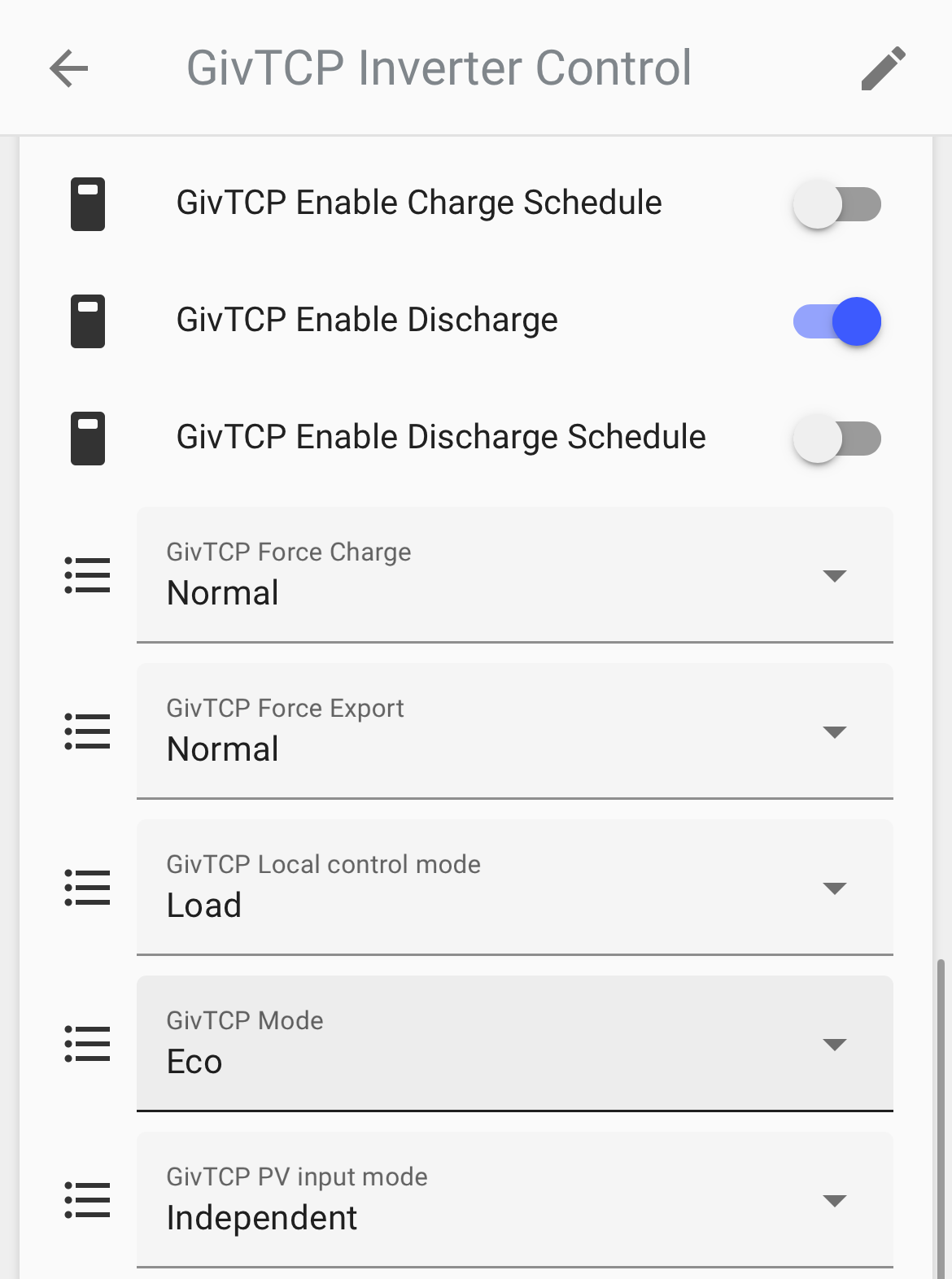
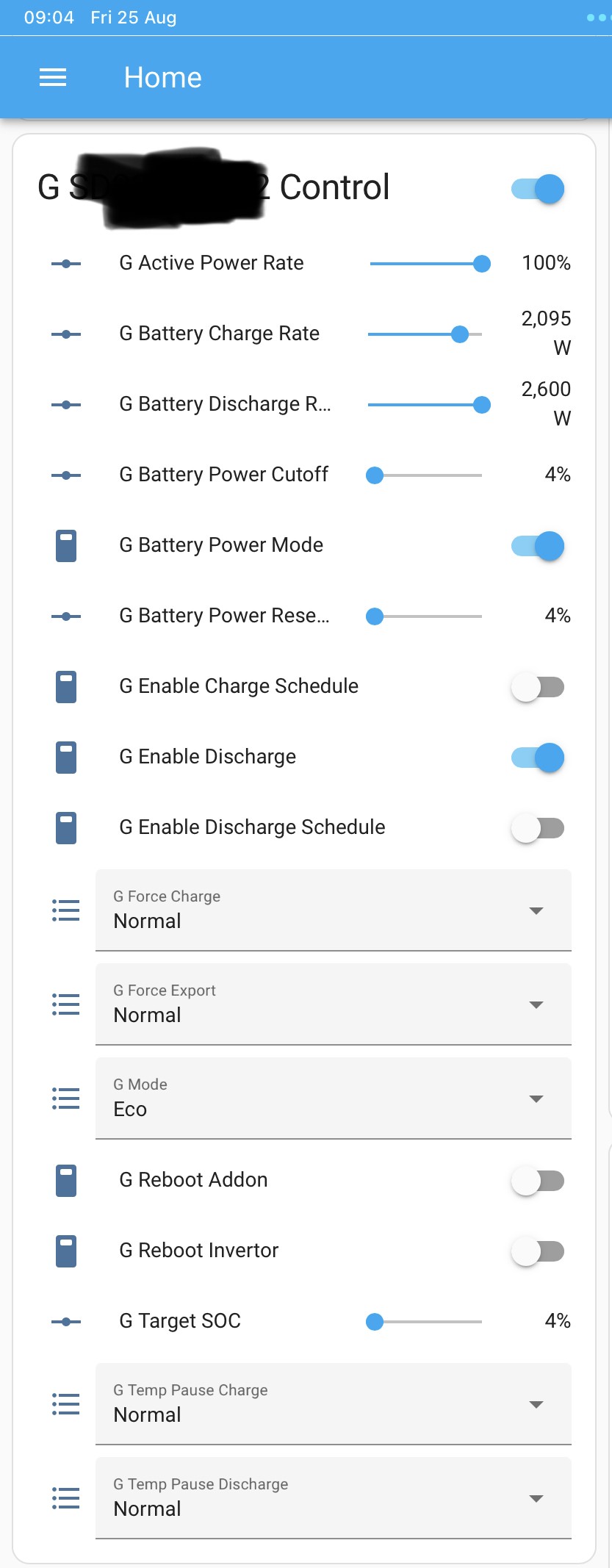
And I have gen 1 hybrid inverters which don't have the different pause modes. I've got mode = Eco, Eco (Paused), Timed Demand, Timed Export and Unknown.
There are Temp Pause Charge and Discharge settings (both set to Normal) which appear to be a time duration 2/15/30 minutes etc.
Not sure Eco (Paused) is very useful, it seems to change Enable Discharge from On to Off, it still charges the battery from solar, but any house demand above the solar generation is supplied from the grid not the battery.
When I use the app to start discharging the battery by pressing quick mode Battery minus I see:
- Mode changes from Eco to Timed Export
- Discharge end time slot changes from 00:00:00 to 23:59:00
- Battery Power Mode changes from On to Off
- Enable Discharge Schedule changes from Off to On
And when I press the Play button in the app the reverse happens
If I try to control the export in home assistant and just change the Mode from Eco to Timed Export, I see Battery Power Mode turns off, Enable Discharge Schedule turns on but discharging and exporting doesn't happen.
So to enable flux export during the peak period with givtcp I need to
- First set Discharge end time slot to 19:00:00
- Then change Mode from Eco to Timed Export
- Battery Power Mode automatically changes from On to Off and Enable Discharge Schedule also changes from Off to On
And this does appear to work. At the end of the flux peak export period or when SoC reaches my low water mark I just change Mode back to Eco and the Battery Power Mode changes automatically from Off to On and Enable Discharge Schedule changes from On to Off.
I have two inverters with a battery on each. Curiously if I set just one of my two inverters to Timed Export and leave the other on Eco then in the BBC basic Inverter app it shows both batteries apparently discharging to grid but looking at the SoCās in HA, one falls and one continues to rise as I would expect. The GivEnergy iOS app looks as if its doing the right thing, the home display shows energy flowing from solar to grid, solar to battery and battery to grid and the battery statii show as one battery is discharging and one is charging. As the batteries are different sizes I want to control them independently to retain sufficient kW in each. Using the app to change the export manually I often end up with the smaller battery running out at night.

This works for me, all be it with a Hybrid Gen2. YMMV.
`alias: "Automation: Flux Discharge Weekdays"
description: ""
trigger: #between 4pm and 7:01pm.
- platform: time_pattern
minutes: /1
hours: "16" - platform: time_pattern
hours: "17"
minutes: /1 - platform: time_pattern
hours: "18"
minutes: /1 - platform: time
at: "19:01:00"
condition: - condition: and
conditions:- condition: time
after: "15:59:00"
before: "19:02:00"
weekday: #only run on weekdays, weekend had different thresholds- sun
- thu
- wed
- tue
- mon
- condition: template #confirm I'm still on flux, do not want this running when I switch to Agile or Tracker.
value_template: >
{{ 'FLUX' in
state_attr('sensor.octopus_energy_electricity**************_current_rate',
'tariff') }}
action:
- sun
- condition: time
- if:
- condition: and
conditions: #discharge to 70% SOC between 4 and 5pm if the solar forecast tomorrow is above 20kWh- condition: time
after: "16:00:00"
before: "17:00:00"- condition: numeric_state
entity_id: sensor.givtcp**********soc
above: 70 - condition: numeric_state
entity_id: sensor.solcast_forecast_tomorrow
above: 20
then:
- condition: numeric_state
- service: switch.turn_on
data: {}
target:
entity_id: switch.givtcp**********enable_discharge_schedule
else: - if:
- condition: and
conditions: #55% SOC threshold at 6pm.- condition: time
after: "17:00:00"
before: "18:00:00" - condition: numeric_state
entity_id: sensor.givtcp**********soc
above: 55 - condition: numeric_state
entity_id: sensor.solcast_forecast_tomorrow
above: 20
then:
- condition: time
- service: switch.turn_on
data: {}
target:
entity_id: switch.givtcp**********enable_discharge_schedule
else: - if:
- condition: and
conditions: #40% soc threshold at 7pm.- condition: time
after: "18:00:00"
before: "19:00:00" - condition: numeric_state
entity_id: sensor.givtcp**********soc
above: 40 - condition: numeric_state
entity_id: sensor.solcast_forecast_tomorrow
above: 20
then:
- condition: time
- service: switch.turn_on
data: {}
target:
entity_id: switch.givtcp**********enable_discharge_schedule
else: - if:
- condition: not
conditions: #if above isnt true then check if the inverter isn't in eco, switch off discharge schedule and set back to eco.- condition: state
entity_id: select.givtcp**********mode
state: Eco
then:
- condition: state
- service: switch.turn_off
data: {}
target:
entity_id: switch.givtcp**********enable_discharge_schedule - device_id: 58aea2749b18c9e79de484f5e61b64f5 # GivTCP Inverter Control
domain: select
entity_id: e20cc6e839ea043092412310a95766d5 # GivTCP Mode Option
type: select_option
option: Eco
mode: single
`
- condition: not
- condition: and
- condition: and
- condition: time
- condition: and
Arg0t Thanks for sharing your yaml. There's some neat bits to it that I didn't have in my scripts, solcast integration to check forecast solar (future planned upgrade to my scripts), checking the octopus tariff and the way you have it all in one script.
After I don't know how many how many hours and getting quite frustrated, I finally got my scripts working just after 7pm. Whilst I could get the inverter to discharge by changing the controls in home assistant, I just couldn't get the automation yaml code right to update the same controls. All the other examples I found on the forum used giv local not giv TCP and I just couldnāt get the code right for changing an option selector. I've worked my entire career in IT and still found it hard!
At the moment I have 5 scripts, one for each inverter to turn the discharging on, another two to turn discharging off at target SoC and one to change back to Eco at 7pm. Will look to combine them.
Script wise weāve got a different approach to the automation. Yours just appears to toggle Enable Discharge Schedule on and off whereas I have followed what the app āquick modeā buttons do, setting a Discharge-to time and changing the inverter Mode from Eco to Timed Export. Iāll do a further check that my scripts are working correctly and will share them tomorrow, Iāll also have a play with just turning Enable Discharge Schedule on and off has the same effect and so I can simplify.
Update: done some further testing this evening, and if I just turn on Enable Discharge Schedule (mirroring your script), I see that Mode changes to Timed Demand but the inverter doesnāt start exporting on my Gen 1 hybrid inverters :-(
Here are my scripts which Iāve confirmed DO work on my gen 1ā¦
It uses a percentage helper āflux_peak_export_minimum_socā. If the SoC is greater than this it will start discharging.
NB: My GivTCP is installed with a prefix of G_ for the first inverter and H_ for the second inverter (I changed from the defaults of GivTCP and GivTCP2).
Start flux peak export (thereās currently two scripts like this, one for each inverter):
alias: Flux Inv1 Start peak export
description: ""
trigger:
- platform: time_pattern
hours: "16"
minutes: "*" - platform: time_pattern
hours: "17"
minutes: "*" - platform: time_pattern
hours: "18"
minutes: "*"
condition: - condition: and
conditions:- condition: state
entity_id: select.g_XXXXXXX_mode
state: Eco- condition: numeric_state
entity_id: sensor.g_XXXXXXX_soc
above: input_number.flux_peak_export_minimum_soc
action:
- condition: numeric_state
- condition: state
- service: select.select_option
target:
entity_id: select.g_XXXXXXX_discharge_end_time_slot_1
data:
option: "23:59:00" - service: select.select_option
target:
entity_id: select.g_XXXXXXX_mode
data:
option: Timed Export
mode: single
End flux export script (again two of these, one for each inverter). The script uses the same min flux % helper, when the SoC reaches this it will change the inverter back to Eco mode. The Gen 1 inverters currently donāt have the pause modes that the Gen 2ās have, so when the min SoC is reached the battery will start charging again, and will trigger a further discharge once the SoC has increased. Could be a bit more sophisticated, but this should work.
alias: Flux Inv1 Stop peak export at min SoC
description: ""
trigger:
- platform: time_pattern
hours: "16"
minutes: "*" - platform: time_pattern
hours: "17"
minutes: "*" - platform: time_pattern
hours: "18"
minutes: "*"
condition: - condition: and
conditions:- condition: state
entity_id: select.g_XXXXXXX_mode
state: Timed Export- condition: numeric_state
entity_id: sensor.g_XXXXXXX_soc
below: input_number.flux_peak_export_minimum_soc
action:
- condition: numeric_state
- condition: state
- service: select.select_option
target:
entity_id: select.g_XXXXXXX_mode
data:
option: Eco
mode: single
And finally a script that will turn both inverters to Eco mode at 19:00 with fall-backās at 19:15 and 19:30:
alias: Flux Stop peak exports at 19:00
description: ""
trigger:
- platform: time
at: "19:00:00" - platform: time
at: "19:15:00" - platform: time
at: "19:30:00"
action: - service: select.select_option
target:
entity_id: select.g_XXXXXXX_mode
data:
option: Eco - service: select.select_option
target:
entity_id: select.h_YYYYYYY_mode
data:
option: Eco
mode: single
The other thing I found that seemed to mess things up occasionally was when the window of the timed export was too close to my on/off points; the automatic action of the window ending could mess with my actions. So I set the timed export window permanently to 00:00 to 23:59.
I have discharge 1 slot set up 4pm to 7pm, here are the other inverter switch settings for comparison. Enable discharge schedule is enough with a Gen2 and these settings.

Alternate approach could be to use force export, have the logic of the script set force export to 2 or 15 minutes. Then the else cancel force export and enable Eco. As the script runs every minute the 2 minute timer would be reset every minute and cancelled if your conditions are not met.
In my testing force export changes the discharge schedule 2 start and end times.
Further update:
Thanks for showing the use of -if: /then/else, it has enabled me to simplify my 5 scripts down to just two scripts, one script for each inverter that turns the Timed Export on if SoC is above minimum SoC, and turns it off once SoC either goes below minimum SoC or the end of the Flux period is reached.
Iāve taken out the checking of current state in the on/off logic, no need to do that, if its appropriate to discharge then it will now set the inverter to discharge even if it is already in discharge mode. I also changed the triggering frequency to every 5 minutes to reduce bouncing things on and off and took out the triggers from 4-5pm as it only takes about an hour and a half to discharge to the minimum SoC of 65% I need to see me through the night.
Also had changed the timed export window to 23:59 and change it back to 00:00 after discharge.
@Arg0t how do you get comments in the yaml script? When I add them in the yaml editor, as soon as I save the script and reopen it, they disappear. According to this article thatās expected behaviour https://community.home-assistant.io/t/why-does-ui-of-automations-delete-all-yaml-comments/470135/7 so I couldnāt work out how youād managed to retain them?
I feel like I am getting the hang of HA YAML nowā¦
alias: Inv1 Start & stop flux peak discharge
description: ""
trigger:
- platform: time_pattern
hours: "17"
minutes: /5 - platform: time_pattern
hours: "18"
minutes: /5 - platform: time
at:- "19:00"
- "19:15"
- "19:30"
action:
- "19:00"
- if:
- condition: or
conditions:- condition: time
after: "18:59"- condition: numeric_state
entity_id: sensor.g_XXXXXXX_soc
below: input_number.flux_peak_export_minimum_soc
then:
- condition: numeric_state
- service: select.select_option
target:
entity_id: select.g_XXXXXXX_discharge_end_time_slot_1
data:
option: "00:00:00" - service: select.select_option
target:
entity_id: select.g_XXXXXXX_mode
data:
option: Eco
else: - if:
- condition: numeric_state
entity_id: sensor.g_XXXXXXX_soc
above: input_number.flux_peak_export_minimum_soc
then: - service: select.select_option
target:
entity_id: select.g_XXXXXXX_discharge_end_time_slot_1
data:
option: "23:59:00" - service: select.select_option
target:
entity_id: select.g_XXXXXXX_mode
data:
option: Timed Export
mode: single
- condition: numeric_state
- condition: time
- condition: or
geoffreycoan Very similar to mine now except I set the time start / end outside the script manually and just leave it at 00:00 & 23:59 then just flick between "Eco" and "Timed Export".
As belt an braces for the odd behaviour I saw when I coincided with the end times, I also switch the logic to only switch to Eco if it was not in Eco and likewise, only switch to Time Export when not in Timed Export. I left the test in the condition and the if in the action.. overkill, I know. Of course it's fairly easy to roll them all into one script with suitable logic.
Dynamic start script:
alias: My GivTCP Dump Limit Start
description: ""
trigger:
- platform: time_pattern
hours: "16"
seconds: "0"
minutes: /1 - platform: time_pattern
hours: "17"
minutes: /1
seconds: "0"
enabled: true - platform: time_pattern
hours: "18"
minutes: /1
seconds: "0"
condition: - condition: and
conditions:- condition: numeric_state
entity_id: sensor.givtcp_XXXXXXXXXX_soc
above: input_number.my_givenergy_battery_dump_high_limit- condition: not
conditions:- condition: state
entity_id: select.givtcp_XXXXXXXXXX_mode
state: Timed Export
action:
- condition: state
- condition: not
- condition: numeric_state
- if:
- condition: not
conditions:- condition: state
entity_id: select.givtcp_XXXXXXXXXX_mode
state: Timed Export
then: - service: select.select_option
data:
option: Timed Export
target:
entity_id: select.givtcp_XXXXXXXXXX_mode
mode: single
trace:
stored_traces: 360
- condition: state
- condition: not
Dynamic end script:
alias: My GivTCP Dump Limit Stop
description: ""
trigger:
- platform: time_pattern
hours: "16"
seconds: "30"
minutes: /1 - platform: time_pattern
hours: "17"
minutes: /1
seconds: "30"
enabled: true - platform: time_pattern
hours: "18"
minutes: /1
seconds: "30"
condition: - condition: and
conditions:- condition: numeric_state
entity_id: sensor.givtcp_XXXXXXXXXX_soc
below: input_number.my_givenergy_battery_dump_low_limit- condition: not
conditions:- condition: state
entity_id: select.givtcp_XXXXXXXXXX_mode
state: Eco
action:
- condition: state
- condition: not
- condition: numeric_state
- if:
- condition: not
conditions:- condition: state
entity_id: select.givtcp_XXXXXXXXXX_mode
state: Eco
then: - service: select.select_option
data:
option: Eco
target:
entity_id: select.givtcp_XXXXXXXXXX_mode
mode: single
trace:
stored_traces: 360
- condition: state
- condition: not
Backstop script:
alias: My GivTCP Dump Stop
description: ""
trigger:
- platform: time
at: "19:01:00" - platform: time
at: "19:06:00"
condition: []
action: - if:
- condition: not
conditions:- condition: state
entity_id: select.givtcp_XXXXXXXXXX_mode
state: Eco
then: - service: select.select_option
data:
option: Eco
target:
entity_id: select.givtcp_XXXXXXXXXX_mode
mode: single
- condition: state
- condition: not
Arg0t
Iāve done some more testing with my gen 1 hybrid inverter and it definitely behaves differently to your gen 2.
I set discharge start and end times in slot 1 then toggle the Enable Schedule Discharge on. The inverter automatically changes to Mode Timed Demand but absolutely no discharging of the battery happened. Turn the Enable Schedule Discharge off, Mode changes back to Eco, but no change to export levels or any discharge activity.
Leaving the discharge start and end time in slot 1 as 4monks has and initiated a battery discharge using the battery minus quick mode on the GivEnergy app. The inverter slot 1 discharge start and end times were over-written with 00:00:00 and 23:59:00, Mode was changed to Timed Export, and discharging to export started.
Pressing the play button in the app to put the system back into normal mode caused slot 1 discharge start and end to be over-written with 00:00:00 and the Mode changed back to Eco.
I want to have the option to still be able to manually initiate battery discharges (e.g. when Octopus have a Power Up event in my area) so having observed this behaviour that the discharge start and end time are over-written I canāt leave them set and will need to keep changing them in the automation script.
Multiple charge/discharge schedules is said to be āwork in progressā by GivEnergy, so maybe this is an area that the Gen 2 with newer firmware is more advanced than the Gen 1.
Arg0t looking at my Gen 1 hybrid inverter control settings in HA, there are quite a few differences to your Gen 2. Maybe this will change when they next update the Gen 1 firmware?

geoffreycoan @4monks FYI if you put three backticks followed by a carriage return, paste your script in, then three more backticks after a carriage return, the text will be shrunk to a window. eg
alias: Inv1 Start & stop flux peak discharge
description: ""
trigger:
platform: time_pattern
hours: "17"
minutes: /5
platform: time_pattern
hours: "18"
minutes: /5
platform: time
at:
"19:00"
"19:15"
"19:30"
action:
if:
condition: or
conditions:
condition: time
after: "18:59"
condition: numeric_state
entity_id: sensor.g_XXXXXXX_soc
below: input_number.flux_peak_export_minimum_soc
then:
service: select.select_option
target:
entity_id: select.g_XXXXXXX_discharge_end_time_slot_1
data:
option: "00:00:00"
service: select.select_option
target:
entity_id: select.g_XXXXXXX_mode
data:
option: Eco
else:
if:
condition: numeric_state
entity_id: sensor.g_XXXXXXX_soc
above: input_number.flux_peak_export_minimum_soc
then:
service: select.select_option
target:
entity_id: select.g_XXXXXXX_discharge_end_time_slot_1
data:
option: "23:59:00"
service: select.select_option
target:
entity_id: select.g_XXXXXXX_mode
data:
option: Timed Export
mode: single
Can make things a bit more readable. This code was copied from above and has lost the formatting but it should maintain the formatting when you copy from HA.

John A Hi John, Iām exactly same newbie position. Max my flux opportunities. Is there an automation as per the thread youāre engaged with that I can just select? The Twitter feed for GivEnergy suggests so but damned if Iām able to get my head around it all.
I have GivTCP and MQTT all setup and then go to Settings, Automations & Scenes and create an automation.
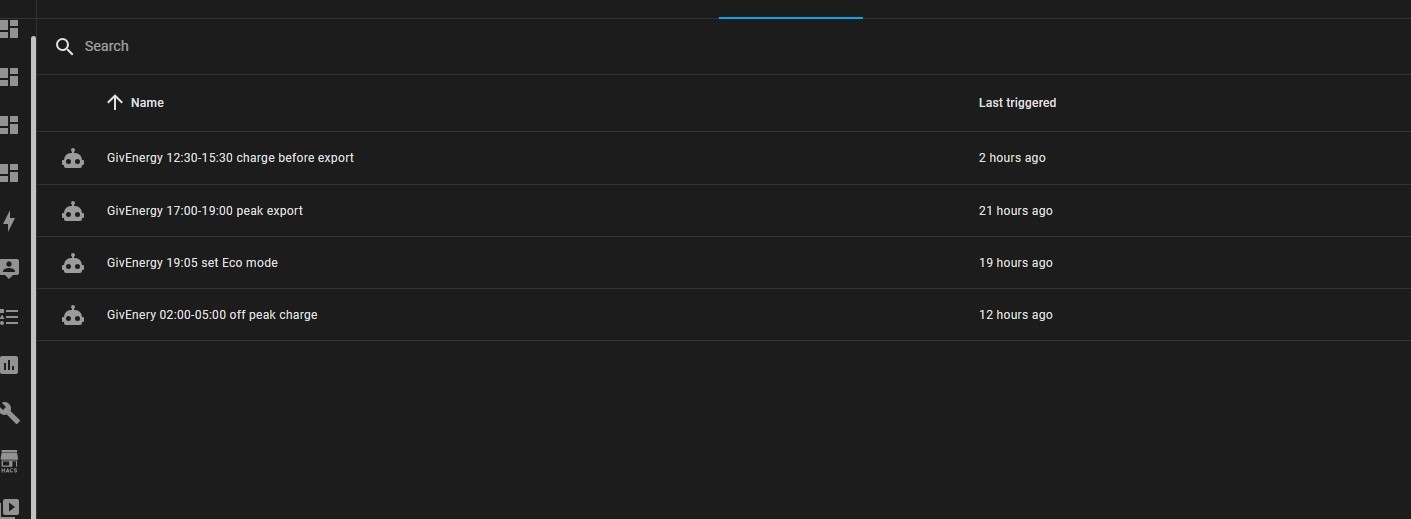
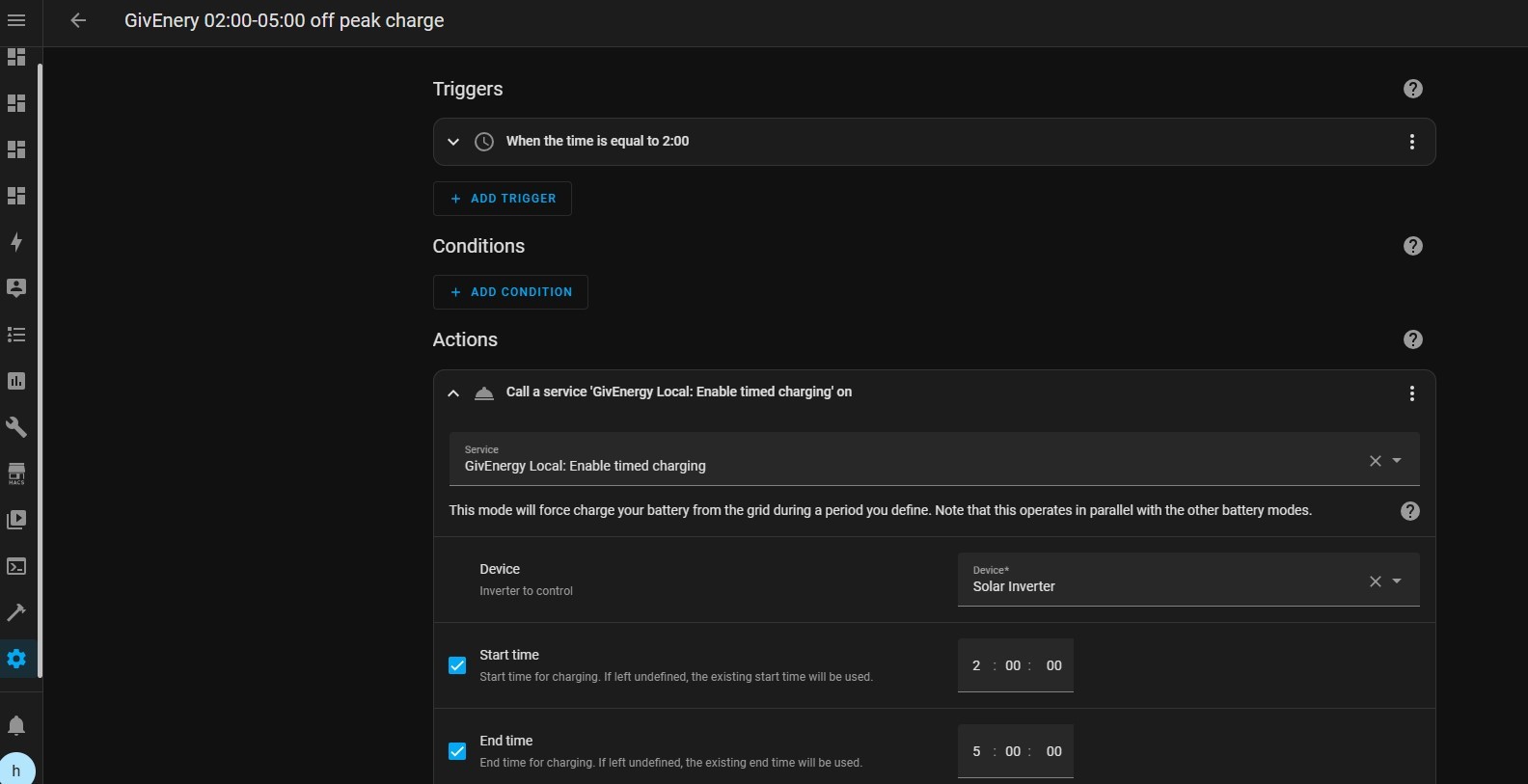
Snips of the four I use with their descriptions plus the off peak charge setup.
My setup is pretty basis, but I am sure there are more complex things that can easily be built in regarding level of charge etc, but TBH I am a relative newby.
NB the ECO reset might not be needed after a timed export, but I have it as a failsafe


Greggles Have a look at this other thread https://community.givenergy.cloud/d/3022-inverter-settings/4
I posted my āhow toā setup GivTCP, include Flux time of day utilisation into the Home Assistant Energy dashboard and how I have automated my flux peak period discharge. Thereās an explanation of my thinking of whether to charge from flux offpeak (currently I donāt) and thereās links to the appropriate Speak to the Geek youtube videos I used in getting to the setup, dashboards and automation I have now.
The exact commands to control your inverters looks as if it differs slightly by Inverter Generation, I have 2x 5kW Gen 1 hybrids. If you have different inverters you may need to adapt the scripts. I basically observed what happened to the inverter settings I could see in GivTCP when I put the battery into Eco, discharge and charge modes, and then mirrored that (with a bit of trial and error) in my scripts.
Thereās also two different ways of integrating to the GivEnergy inverters, GivEnergy Local and GivTCP. Iām using the latter as thatās what Mr Geek recommended !
Greggles Its probably worth also saying that you have to think about how you want to automate your battery, what your solar panel system size is, what size your batteries are and how much electricity you consume each day and when.
As I explained in the linked article, we have a 10.4kW solar system which is currently generating 20-45kW a day, far in excess of our 13-18kW a day draw. So our solar is sufficient to fully charge the batteries every day, export the excess, and the batteries are larger than we needed to get through the night so we export a bit out of the battery every day.
Your figures and approach will differ.
Iād also say to look at the flux import and export rates and recognise that there will always be some energy loss on charge and discharge. No point in exporting energy that you then have to import later on and vice-versa.
Enjoy !
Greggles Sorry for the delayed response I have been away. I had a simple automation working on my Gen 3 Hybrid Inverter using Timed Export mode, but this stopped working about a month ago so I switched if off while I was away. It turns out now that I now need to use Timed Demand mode (confusingly called Timed Discharge in the GE cloud portal). Has something changed with the firmware upgrade? Anyway, basically my automation logic is now as follows (all I have done is change 'Timed Export' to 'Timed Demand'). The goal is to start exporting during the Flux peak period 16:00-19:00 then stop when the battery gets down to 40% SOC.
Trigger at 16:00
Notify start of automation (I send notifications to the HA console and to my mobile phone)
Repeat until 19:00
If SOC > 40 (or whatever state of charge you want to stop at)
If mode is not Timed Demand
Set mode to Timed Demand
Notify Timed Demand start
End if
Else if mode is not Eco
Set mode to Eco
Notify Eco mode start
End if
Wait 1 min (and repeat the above until 19:00)
Then at 19:00
Set mode to Eco if not already
Notify Eco mode
Notify end of automation
This works well. If the SOC falls below 40% it stops exporting, then keeps looping round every minute so if the sun is still shining and the battery charges up above 40% it will trigger another brief export. If anyone wants me to post the actual script let me know.
John A I forgot to mention: I'm not sure this is necessary but I have also set a Timed Discharge period from 16:00-19:00. I did this via the cloud portal by going into settings, enabling Timed Discharge (aka Timed Demand) then entering the time period. Having saved this, I then disabled it and saved it again (but retaining the time period setting). The automation then re-enables Timed Demand when it starts exporting within the time period. Otherwise, in normal operations Eco mode is enabled as standard. (FYI, I also have a Timed Charge period enabled from 02:00-05:00 to charge my battery at Flux off-peak rate).
John A Iāve got Gen 1 hybrid inverters and Timed Export works fine for me. Never used TImed Demand.
In my GivTCP config there are start and end time slots for Charge and two sets of slots for Discharge. I know its been mentioned that the Gen 2 and Gen3 have more slots (up to 10 I think), and these are part of the firmware development that GE are doing. So it may be that the latest firmware is using different slots for Timed Demand and Timed Export?
I suggest it would be worth you setting the discharge start and end times in your script, I know you said you set them up in the portal but your script needs them to be set correctly to work, and its more āscript safeā if you set the all the settings that the script needs in the script.
My script for Flux export is pretty much the same as yours, except that 7pm I always set the mode back to Eco regardless of SoC to prevent discharging outside the peak period. I also donāt trigger my script to start running until 5pm not 4pm. The thinking is that from 4-5pm if there is excess solar its going to be exported anyway, and depending on my target SoC the export is done in around an hour anyway so I donāt need to start exporting until 5pm.
geoffreycoan Yes there are 10 slots available in GivTCP but they are 'work in progress'. Setting Timed Discharge and Timed Charge in the portal populates Charge and Discharge slots 1 so while this is working I'm happy. Re. starting export at 5pm - it appears that in Timed Demand mode any excess solar is exported anyway, so the net result would be the same.