AIO firmware upgrade from .607

68 comments started 2023-09-25 last 2023-10-02
GivEnergy ProductsAC CoupledHybridBattery
#1 PianSom

I've just noticed that I have a button to upgrade my firmware from D0.607-A0.607/Battery 6. It says it will take 5-30 mins to do the upgrade then the battery will be upgraded and a calibration done.

Seeing as I am a newbie (only installed on Friday) I wanted to check my logic on timing.

It's been a nice sunny day here, so my battery is currently full. (All those wasted kWh given to free to Octopus today - grr!). I'm guessing that by 10pm tonight I'll be at around 50% after supper's been cooked and tv been watched. Am I right in thinking that that will mean there will be approx 8kWh left in the battery (it says that the capacity is 15.96 kWh), and so will take about 1h15 or so to dump (ie at 6kW per hour)?

I'm on Octopus Go, so the cheap stuff comes online at 12.30am. So a 10pm start will mean a charge starting at around 11.30pm if I am correct. And it will take around 2h to charge up to full. That sound correct?


#2 Jase1703

PianSom would be nice to know what is in the upgrade, I also noticed the option today to update. I guess there is a good time to do it depending on tariff. And what if you have PredBat running with GivTcp, will they allow the firmware update without interference?

J
#3 Jellybaby

PianSom I have had 4% > 100% show 14.7 and 15.7 before (System is new to me so not fully charged often from flat to full).

Your state of charge may not even be accurate, do you know when the last empty > full charge was, I have to do the math myself as my SOC gets up to the 60's before nosediving to flat if I leave it nearly a week.

Edit
Just checked my info, when 15.7 got put into battery it was period between 02:10-04:50 and 02:10>04:10 was 11.9kwh put into battery at max charge.

#4 PianSom

Jellybaby
As I said, it was only installed on Friday, so the last empty to full charge was then. It was charged to full on Sat and ran to empty on Sun. I put too much charge in last night (60%) so it’s spent most of today full.

All looks consistent and reasonable so far …

J
#5 Jellybaby

PianSom ah, if that is the case then easy enough to do the math from when it first started charging and then subtract and add if you want to confirm the SOC reading and how much you got left in the tank, if I had know there was an update coming tonight I wouldn't have intentionally tanked SOC last night and just done it tonight.

I charged from flat to 80% last night and when it reached 100% from solar apparently 100% = 10.9kwh for me today, I am probably a special case though because ive not seen others having such troubles I have, I did have a lot of trouble with initial commission taking over a day.

T
#6 tomorrowman

My upgrade from battery SW v4 to v6 was done as part of install. Installers attempt to update failed a few times and so did my attempts, think GivEnergy may have pushed it in response to installer request for assistance.

Apparently from v6 future upgrades will be less problematic.

Calibration involved full discharge to the grid (in my case my battery was at 18% and fine if you have 15p export tariff). Based on graphs seemed to take about 3 hours.

Would seem to be sensible to kickoff in your off peak period

K
#7 kram

Jellybaby
Surely your installer/GE would want to swap your unit out for a good one and take yours back to understand what (if anything) is causing problems and why.

Be it a fault, weird initial calibration or something else, I would have though with a new product they would want to know.

J
#8 Jellybaby

kram Whether I do it direct or via installer all that happens is they click "activate battery" and thats it and any time I email or phone GE they say "firmware issue" so I am going to wait til battery nearly dead around 2am then do a firmware update and let it discharge/charge to full and calibrate and pray to god that sorts it, if nothing changes at all then imma demand a replacement unit.

Until then I can see how others fair with the update 😃 mwuahahahahahaha

#9 PianSom

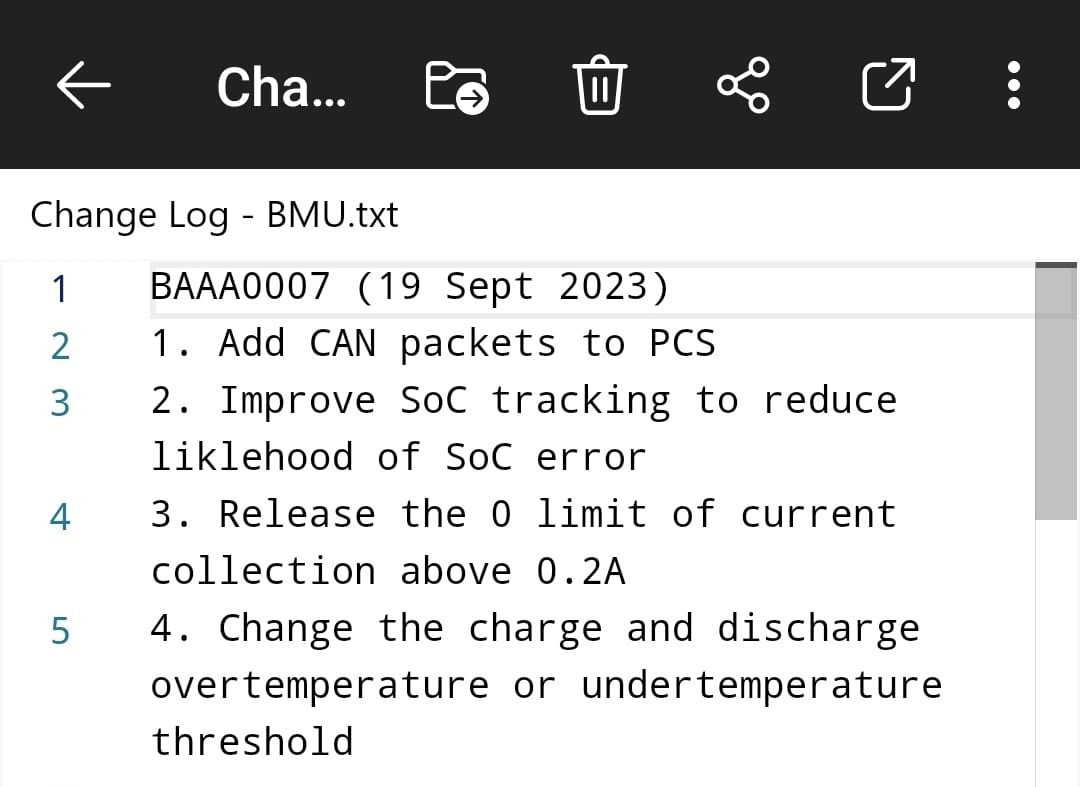
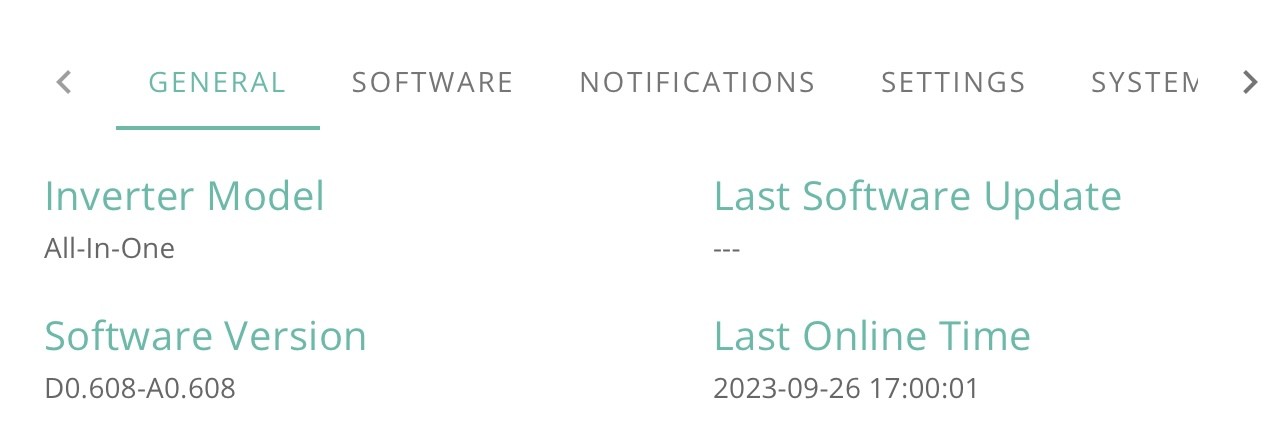
Well, it went to .608. No sign of any change log.

Let’s see if it recalibrates …

Edit - and yet I get a notification that the update has failed. Hmm

Edit2 - second attempt appears to be updating battery, as opposed to inverter the first time

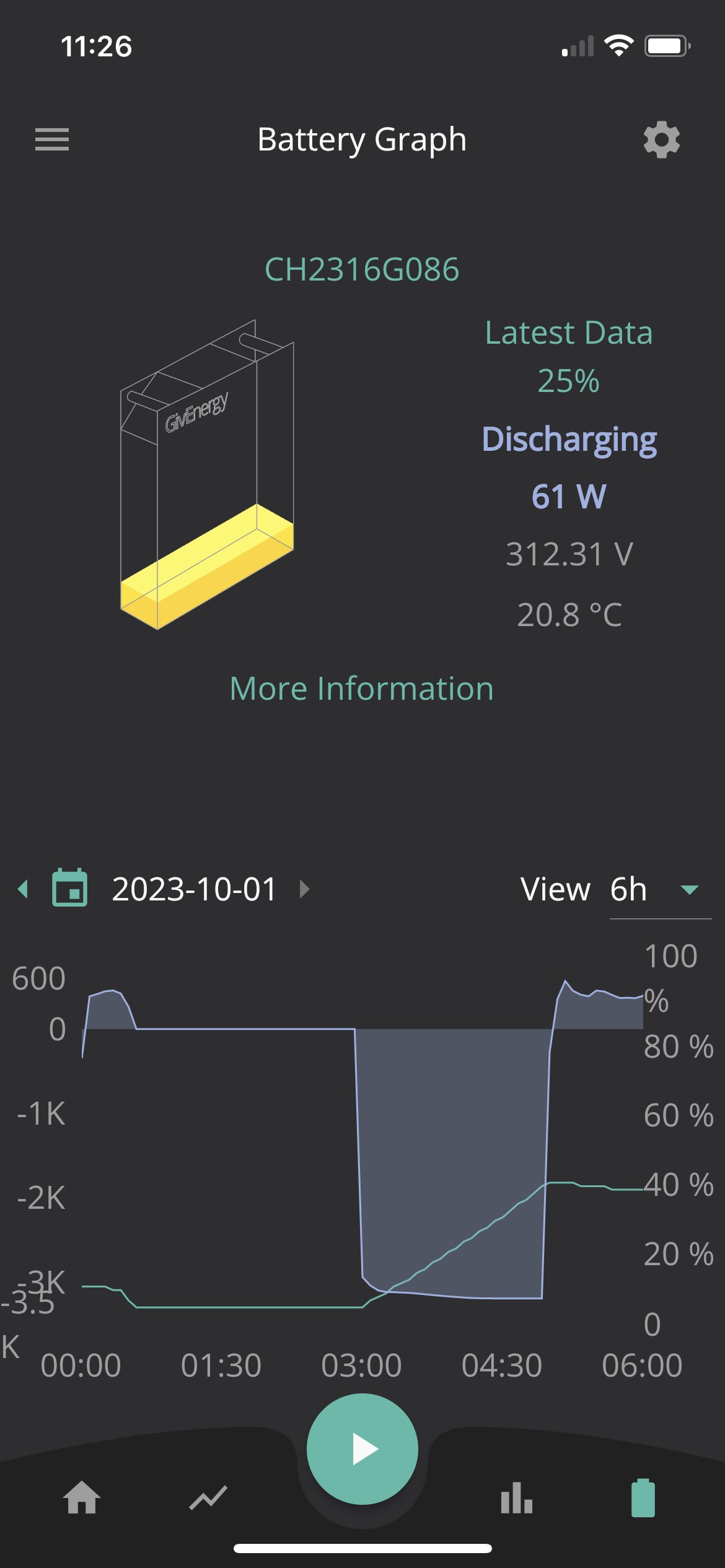
B
#10 Barns

PianSom I'm interested to know if it forces a full discharge and charge calibration, as that'll determine whether I give it a go tomorrow myself or not.

#11 Jase1703

PianSom have you seen any documentation on what the new firmware changes for AIO, I am expecting some major improvements and functionality. Very brave to just dive in.

#12 PianSom

Jase1703
None at all, even though I searched.

Tbf I’ve only had it for 3 days, and my last firmware update was … 3 days ago. So I’m not very vested at this point.

Also, I am a rider at the gates of dawn, me.

#13 PianSom

“Firmware update finished. “

“Battery calibration started. “

Looks like the gods are smiling on me. Showing battery revision 7.

Let’s see if I wake up to a working system. Exciting!

#14 PianSom

OK, so all is good.

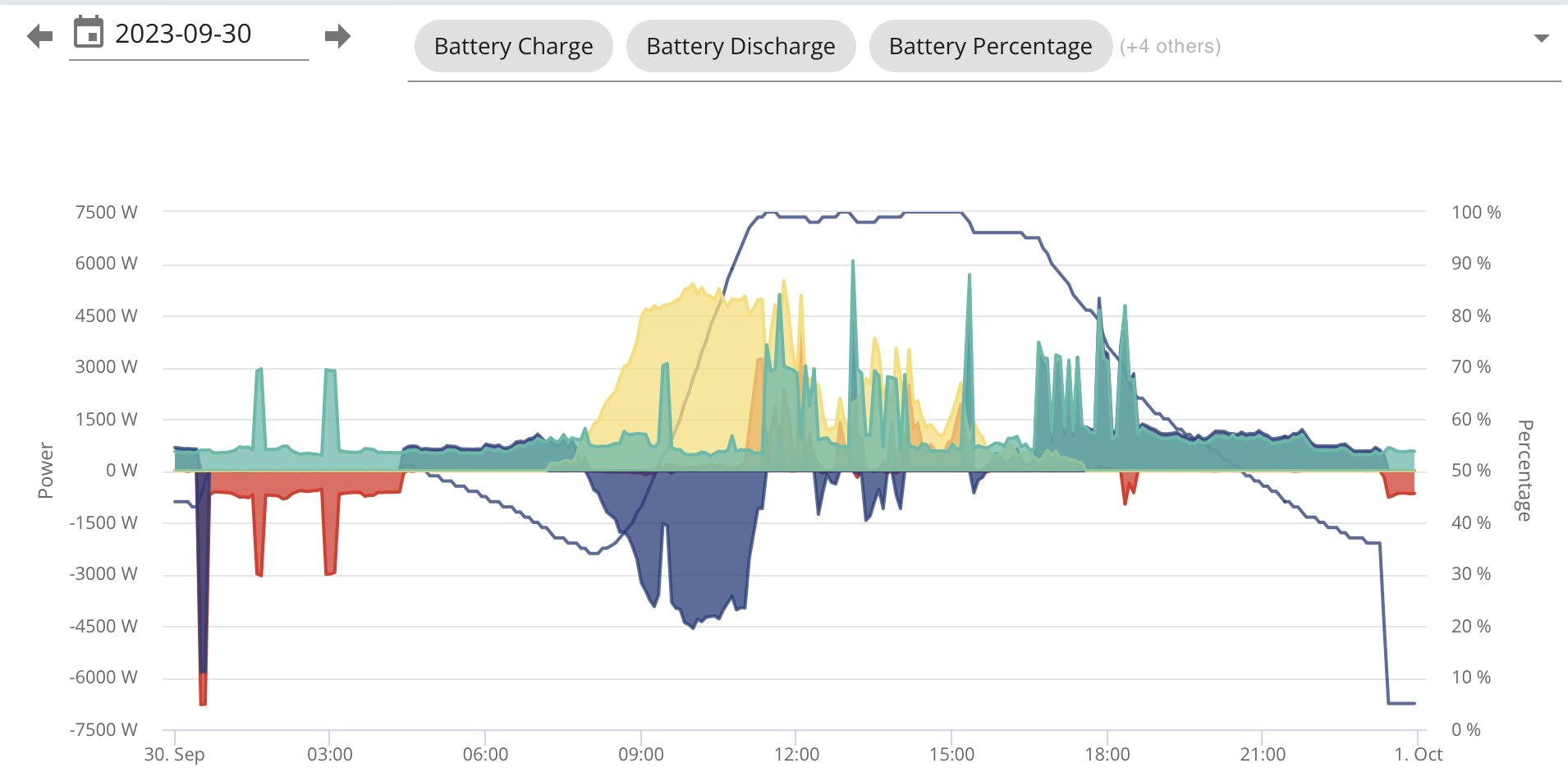
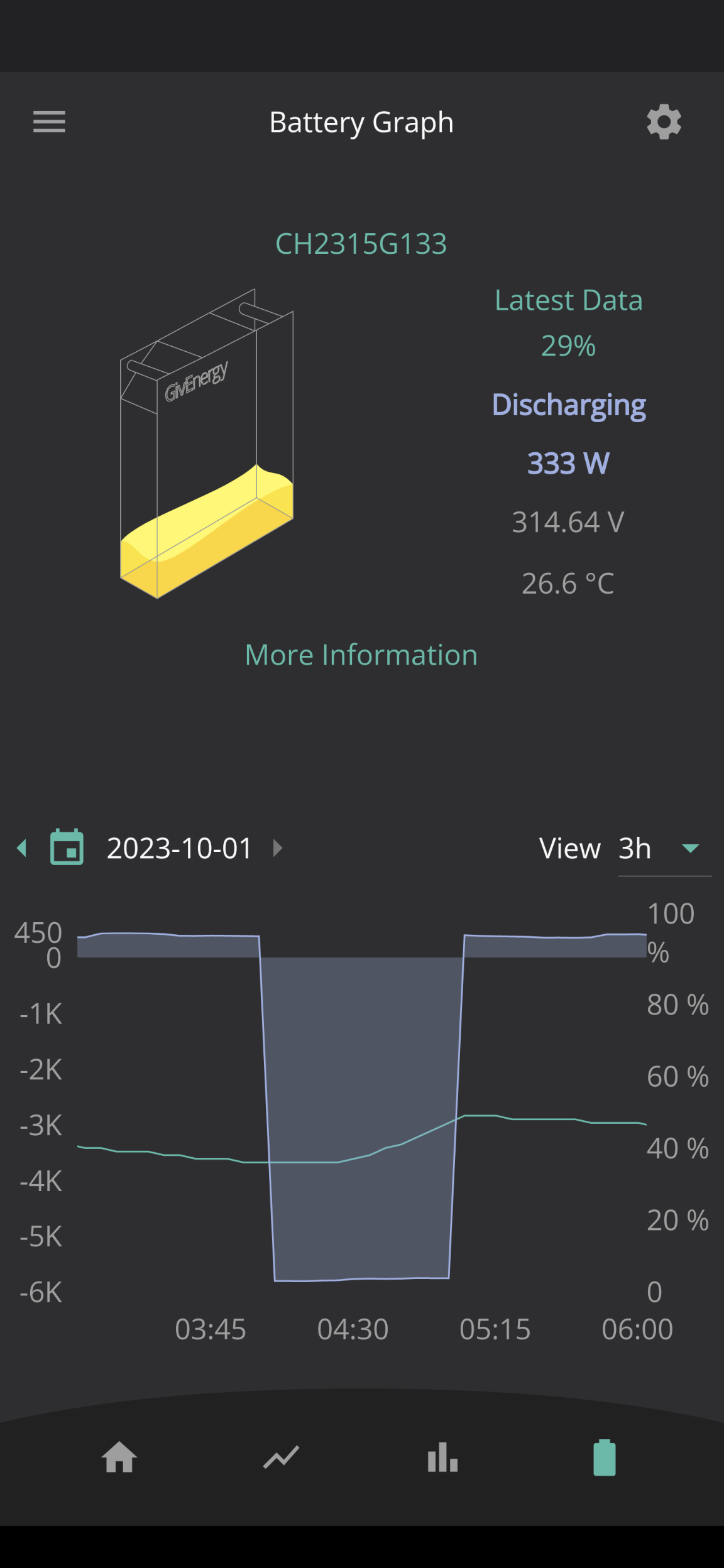
Things proceeded pretty much exactly on the timings I envisaged on my original post. Starting from 100% charge, by 22.17 I was down to about 47%. I kicked off the firmware upgrade, it moved from .607 to .608 and then reported at 22.31 that the upgrade had failed. A small squeaky bottom moment later at 22.35 I kicked it off again, and at 22.50 (44%) it reported successful upgrade (the battery firmware version had moved to 7) and it started battery calibration, which it reported completing at 04.39 (though it reached 100% charge at around 03.00; it continued to draw ~ 1.1kW until the calibration finished). Looks like discharge finished and charging started at around 00.15.

(I do have a "BMS Over Voltage" notification on the Notifications tab of the Inverter dashboard at 04.37, which I assume is just an artefact.)

Since I am Octopus Go, it looks like I managed to hit the 00.30-04.30 target cheap rate pretty well - maybe just 15 mins of peak power cost.

It terms of changes from the upgrade - well, none at all that I can see atm. Maybe just a maintenance release? On the iOS app the "More information" link on the Battery tab still doesn't work. Inverter still reports as being offline, when it clearly isn't. Just like before.

#15 NC

Largely similar experience here.

Started the update last night about 21:30. The download and install was seamless and had no issues.

The battery recalibration was a bit of a pain. It discharged at the rate I had set for my forced discharge but I'd have thought the request from the update would have overruled my settings. The battery was discharged during the off-peak rate on intelligent but the charge only started at 05:45 which couldn't\t have been worse. The battery charged and hit 100% but still continued to draw about 1.1kW as you note. Hopefully that'll give me a bit more useable storage as this is the first time my AIO has had a calibration. It didn't perform one on commission a few weeks ago.

My Power graph is offline in the portal and the historical data in the energy graph is still all over the place. Negative numbers and additions which don't sum correctly etc.

I'll have to wait until tomorrow to check how my setting perform over night during the charge and discharge cycles. Hopefully there was some improvement.

G
#16 GaryS

NC My power graph is also gone and the energy graph useless. Half the numbers negative, makes no sense at all.

M
#17 MLB

Can anyone that’s updated tell me whether it’s fixed the battery charge target bug in the app? If so I’ll update this evening

#18 PianSom

No issues with graphs here.

One slightly odd thing I did notice - my battery stayed at 100% after the calibration until about 06.30, even though the house load was around 600W.

#19 hoggy

Don't think the KB has been updated with the AIO firmware changelog at all BUT Paul did reply on facebook to someone with the below as to what it addresses:

B
#20 Barns

PianSom I seem to have gained a bottomless battery, it's sitting at 0% in calibration and still discharging over 1kW to the grid. Magic! I expect it's just finding the "real" 0% though. Hopefully it'll gain a bit of usable capacity after this.

T
#21 TX200

Barns yes, that's a good sign. It's searching for the true 0% based on voltage etc.

B
#22 Barns

TX200 It spent about an hour and a half or more sat at 0% and discharging, then stopped to only 500W ish discharge for 10 mins and now it's started charging. Cunningly (by pure luck) to coincide both with a nice sunny spell and also the 1-4pm cheap Cosy afternoon rate. So hopefully it'll not even have cost too much import.

D
#23 Daveb01

My AIO was upgraded by GE 😀

#24 Jase1703

Daveb01 how did they time the full discharge and charge back to 100%, are you saying you did not have control of when they did the update?

J
#25 Jellybaby

Jase1703 They can prevent the calibration from happening and push through the update, could possibly be why ive been having such trouble with mine as despite it never discharging/charging and never getting calibration message GE kept insisting it had gone through the calibration.

J
#26 Jellybaby

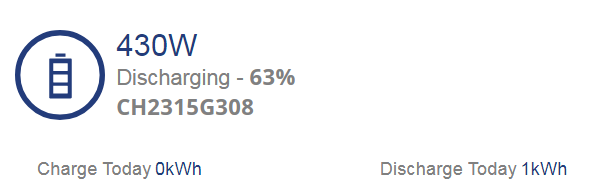
I think I should have started this sooner lol, I was trying to time it to start charging around cheap flux rate but its been on this for 5 minutes now

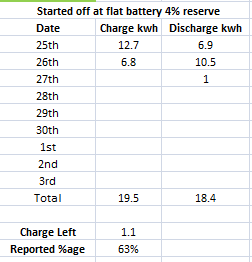
Looks like im going to be starting to dump the 1kwh I had left after 2am


Yup you read that right 1kwh left and its at 63% lol

Inverter just came back on line, hopefully it will finish updating soon.

Edit
Doing battery now, be interesting to see if I was right about the numbers on kwh left.

J
#27 Jellybaby

odd, it was discharging on the IHD and it has just stopped after exporting 0.9kwh which is pretty much what I had left according to the math and its not charging and it says 54% and im currently running off battery?

Got a bad feeling im not charging up via flux cheap rate

Edit
nvm looks like its tanking hard, gone down 15% in 20 seconds, got local mode on app running with screen timeout off so it stays on so I can monitor it.

Looks like I was spot on with my math though, it tanked right around where I thought it would, tanked at 54% just after two days of being empty lol

I really hope this update and calibration sorts it, I really do.

Battery got all the way down to 0.0 😮

But yeah, should have started the update a lot sooner lol, 40 minutes into flux cheap period and not started charging yet. Hopefully it starts BEFORE 3am so I can get 2 full hours of cheap rate.

Time to reset spreadsheet to start from today.

J
#28 Jellybaby

For those that done the update and let the battery calibrate, what was your min/max battery voltages?

Voltage range on datasheet is 260-346
For me it was 268.78 - 327.26 during battery calibration

Just curious to see what others got to to compare to my own.

#29 PianSom

Jellybaby
I'm not sure why you care, but ...

Looks like mine was -

  • Pre-callibration - 312.7V
  • Low point when charge was zero (00.10) - 298.6V
  • Highest voltage when charging (04.30) - 330.0V (at the end of the 1.1kWh drawing period)
  • Voltage when charging finished after 1.1kWh drawing period (04.45) - 318.2V
B
#30 Barns

Something I've noticed now it's upgraded is that my scheduled overnight force charge (scheduled via Home Assistant, not using the built in app timings) didn't work. The HA automation fired ok but the battery just didn't charge. Manually running the script is the same, no charge. But setting a charge going via the GE app timings controls works. So I'm guessing something internal to the AIO must've changed with the firmware update that means GivTCP might need an update?

T
#31 TX200

Barns if you go into the settings of HA, add-ons, GivTCP you should be able to see if an update is waiting

Also there is a configuration tab there too, two toggles in particular, is it an AIO, yep! Is it old/new firmware! It'll be new I assume for the AIO - although I would have thought both of those would be the same since install!

Any firmware updates waiting to apply on the AIO itself?

Any Comms issues?

Can you see, in homeassistant, data coming through regularly - grid voltage is a good one as it is always changing a bit. If the graph for that isn't very choppy and changey, then you may have intermittent Comms issues.

Also was it on a Pi? Is the Pi on an ethernet connection to your router (that is strongly recommended) as is using an external SSD for the Pi as it will eat memory cards quite quickly!

Is the AIO on wireless or is it on ethernet? Ethernet recommended wherever possible (there's some dip switches that need to be changed if changing the Comms method - has to be done whilst the AIO is off too, assume it only notices on boot up)

B
#32 Barns

TX200 All other Comms look fine, am getting sensible regular data updates just like prior to the AIO firmware update yesterday. Yes running on Pi4 with SSD. Network looks solid. I'm suspecting it'll be something in my "force charge" scripts that worked on the previous AIO firmware but now needs to do something different to actually trigger the charge on the new firmware. I'll have a tinker when I get home.

J
#33 Jellybaby

PianSom It was just to see what kind of difference there was tbh as if there was a consistent range between other users and I was way off it could indicate a problem with one or more of the batteries which I am starting to suspect there is based on history and last nights calibration.

D
#34 Daveb01

Jase1703

Hi Jase, I was given the option to decide when to do both upgrade and recalibrate. As it was nearly 4pm I choose now, so they did the upgrade and the recalibrating started so at least I exported during the Flux high period, I took the hit on it recharging but it did not start till way after 7 so I was happy with that.

#35 TheDragon (GivEnergy)

the voltage ranges will differ, depending on cells, temperature cycles.

the spec is the absolute range. If i see 340v i would be worried|! really worried
345 is the safety cutoff

298 to 330 is typical

J
#36 Jellybaby

Looks like I might have the opposite problem to what I had before after this update, instead of SOC not going down fast enough now its going down too fast, max usage in a 1h period is 0.8kw and that is when I am gaming so this battery rated at 13.5 should last at least 15 hours but in 5 hours (30m of that was split between solar + battery) I am down to pretty much 50% after only 5.4kwh being used.

Calibration put 16.5kwh into battery.

How are others getting on with the update?

J
#37 Jellybaby

TheDragon (GivEnergy)
Just had another check as I stopped when it got to 100% and was only drawing 1.1 to the battery but these were the highest, I found it odd to be that high with such low charge going in around midday.

Also just as the battery calibration was ending this flagged up

#38 TheDragon (GivEnergy)

Jellybaby Ive replied to your ticket

last nights charge fro you was a nice smooth rise in SOC.
As expected

B
#39 Barns

TheDragon (GivEnergy) Interestingly, last night's charge for me, the first on the new firmware after a calibration, looked very weird. It charged for an hour at 4am at 5.8kW but the SOC stayed flat at 51% for most of that hour and only started to slowly creep up a few % for the last 10 minutes or so. I restarted the charge when I woke at 6am just to see what was going on and in half an hour the SOC climbed to 80% plus. Seems very peculiar to me and nothing like how it behaved before the firmware update. Any thoughts?

M
#40 morgs

I plan to perform the update this weekend when i am home.

Can anyone confirm if the following is fixed or changed in this update:

Loss of coms when scheduling a high power charge ?
Daytime solar charging automatically resets to 100% after schedule charge percentage change?
Quick settings functionality in the App. ?

Also any noticeable improvements or new bugs.

D
#41 Daveb01

How about this puzzle?

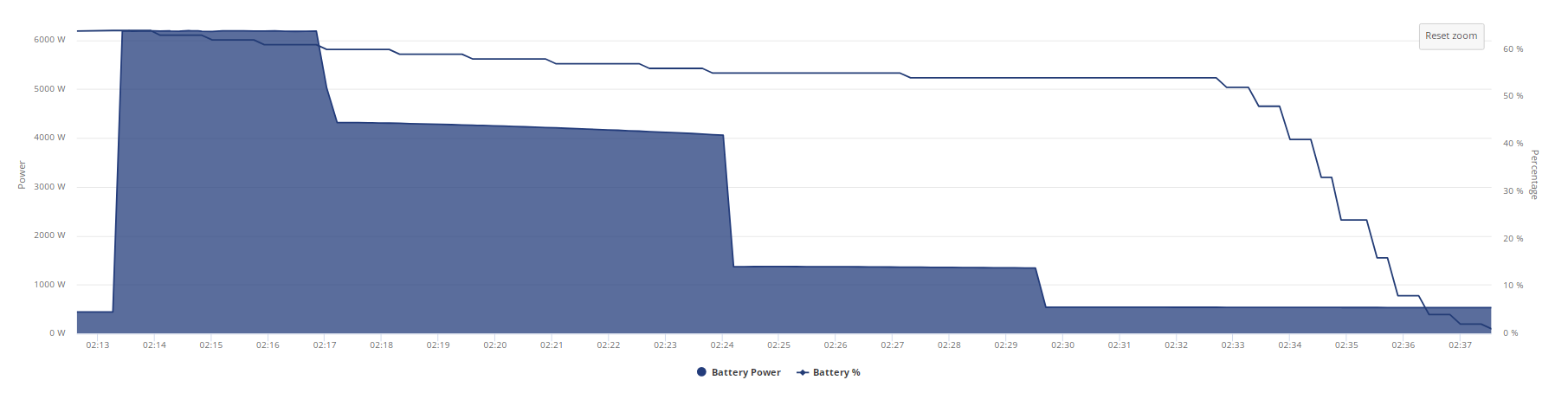
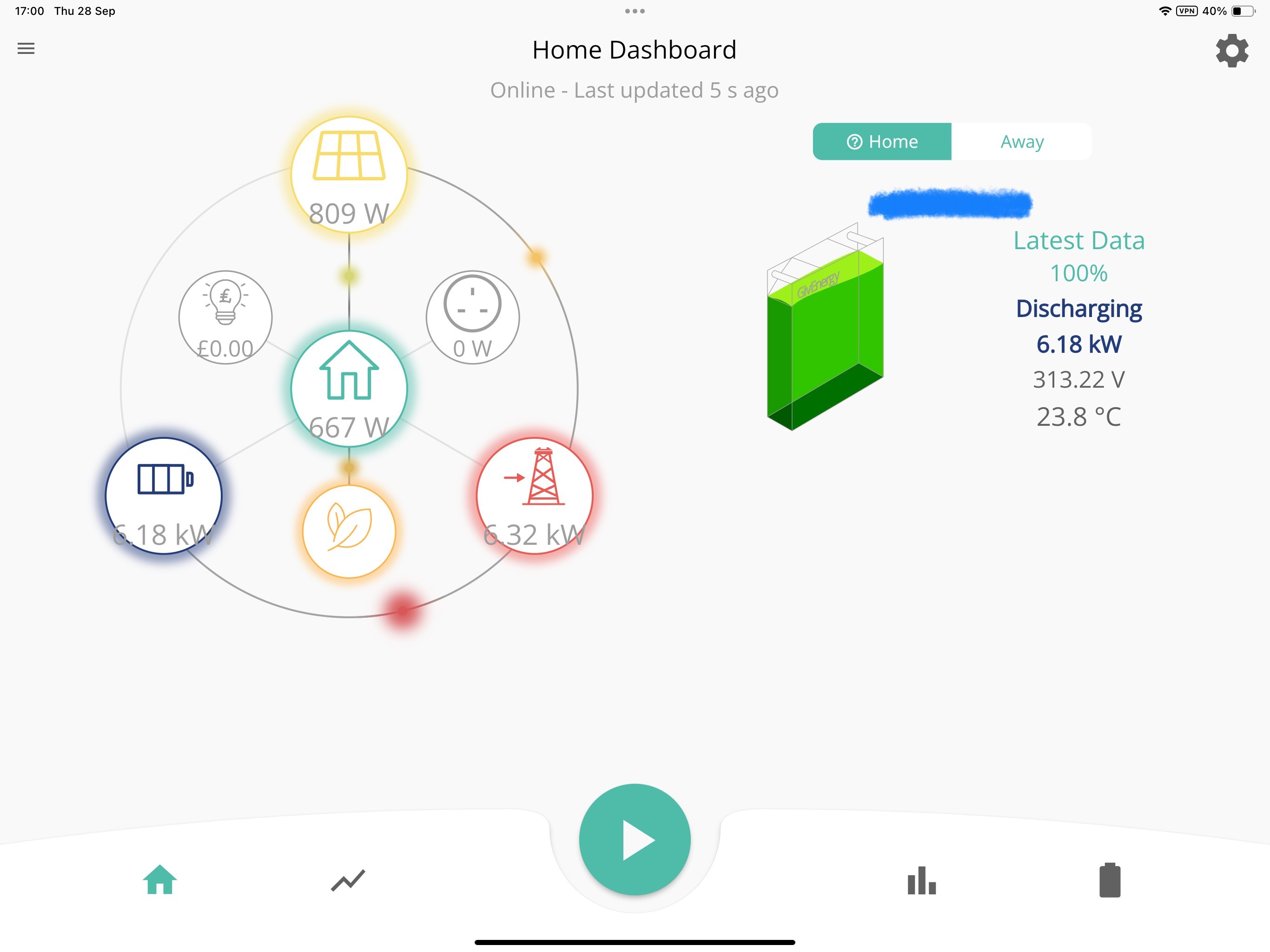
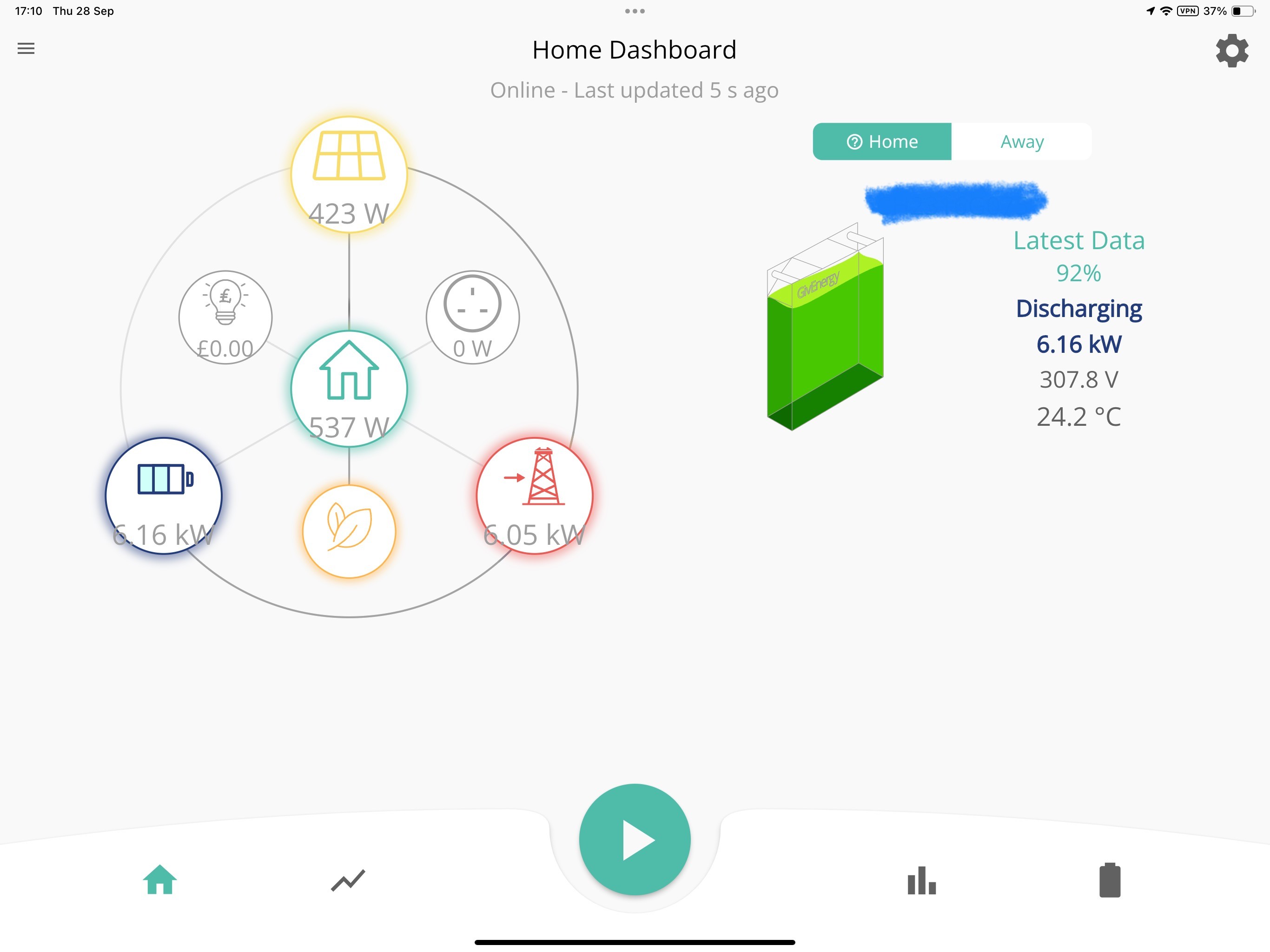
Started a test discharge from 100% at 17:00 today.
I am limited to 3680 discharge to grid.

16:59

17:00

17:10 - my AIO has lost 8% in 10 mins, can this be right at 3680w, or is it correct at 6000w? If it is 6000w and there is a restriction where is the extra 3000w ish going?

#42 Jase1703

It’s discharging at 6000w, if you have a discharge restriction from the network then that is probably down to you to adhere to. AFAIK.

J
#43 Jellybaby

oh I keep meaning to ask, for those that leave scheduled charge for flux if they are with octopus do you still get the draw triggering at midnight for around a minute bug if you have updated? Out of habit I got used to turning it off in the morning and I keep forgetting to turn it back before before midnight but I only remember when the lights dim at midnight and I know its midnight lol.

#44 PianSom

Jellybaby
I am on Octopus Go, and have a scheduled charge at 00.30. I see a short, unexpected draw spike at midnight.

That said, it didn't seem to have happened last night. That's the first time it has not happened since my install (apart from when the post-update calibration was on-going).

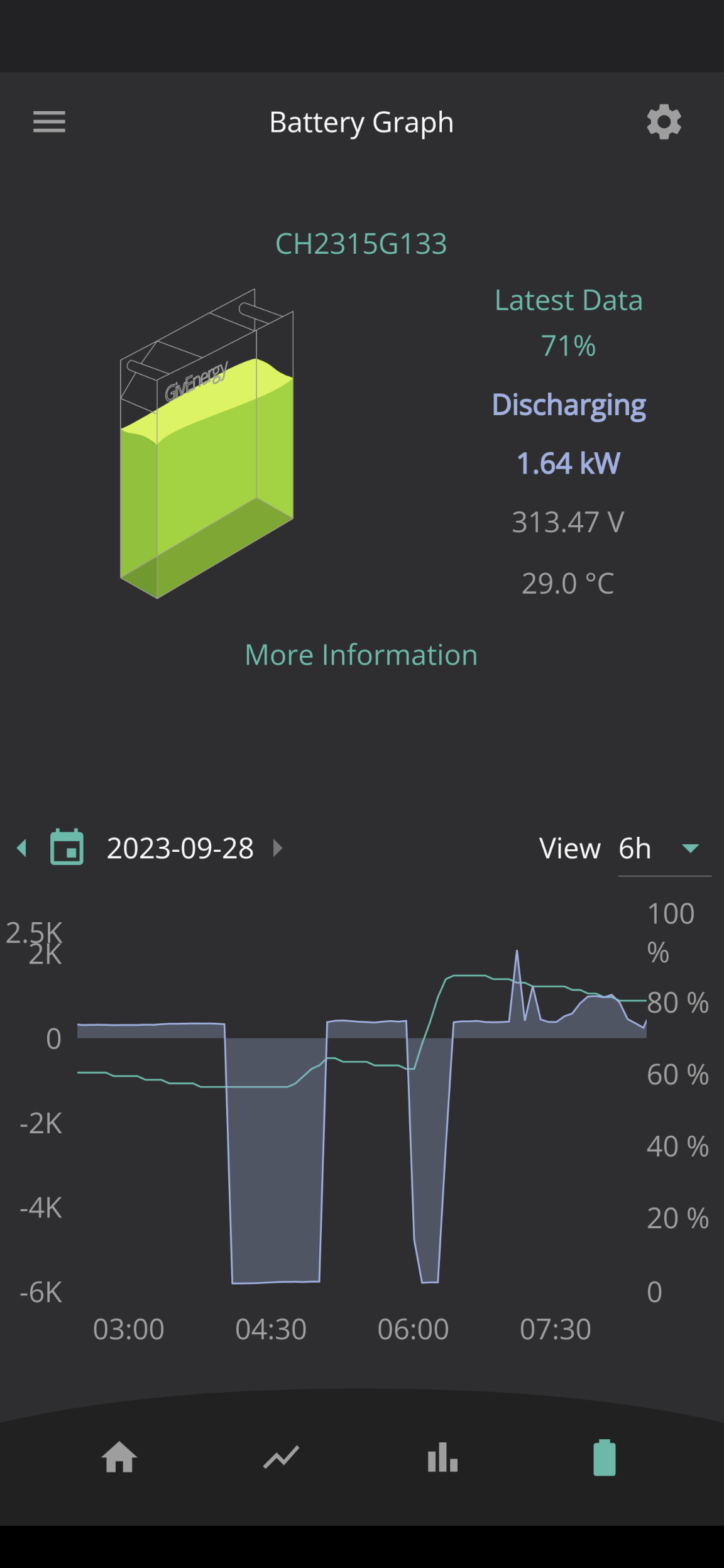
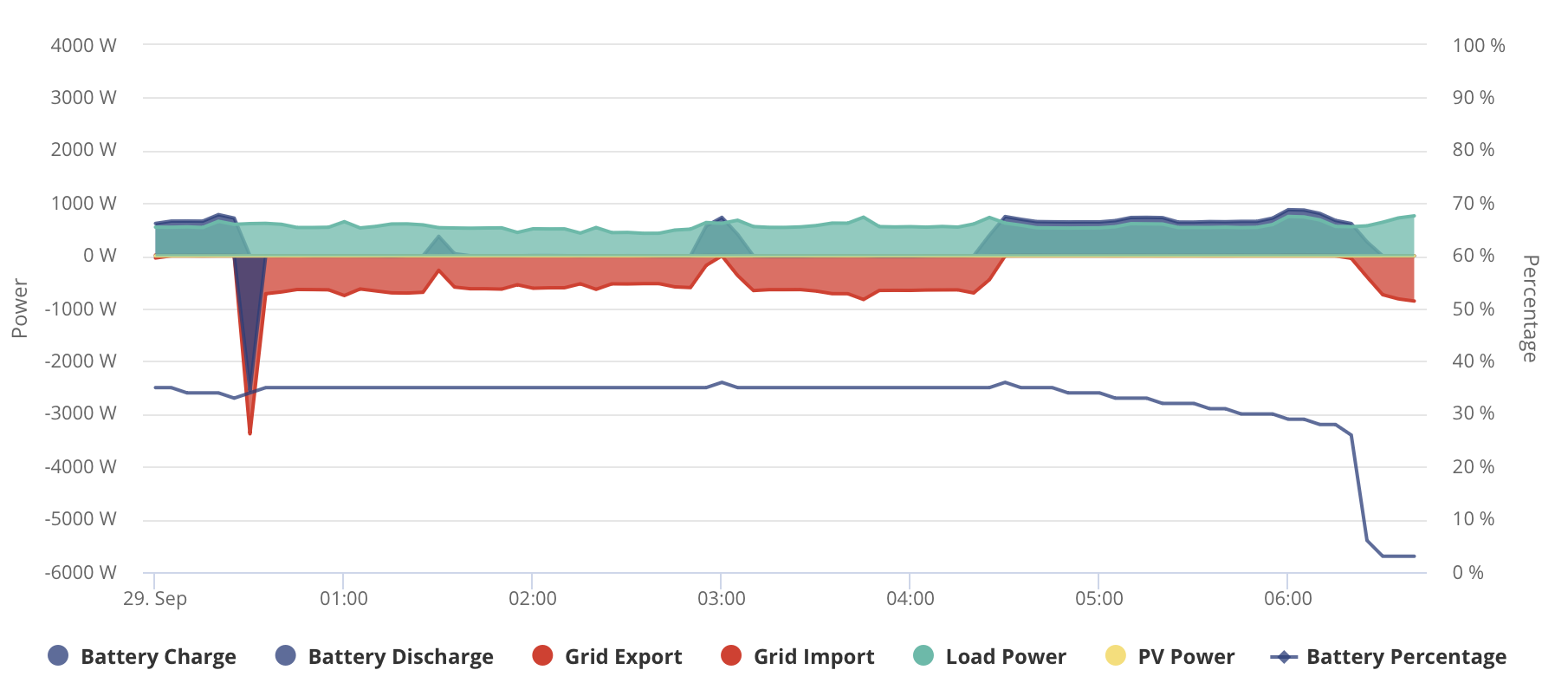
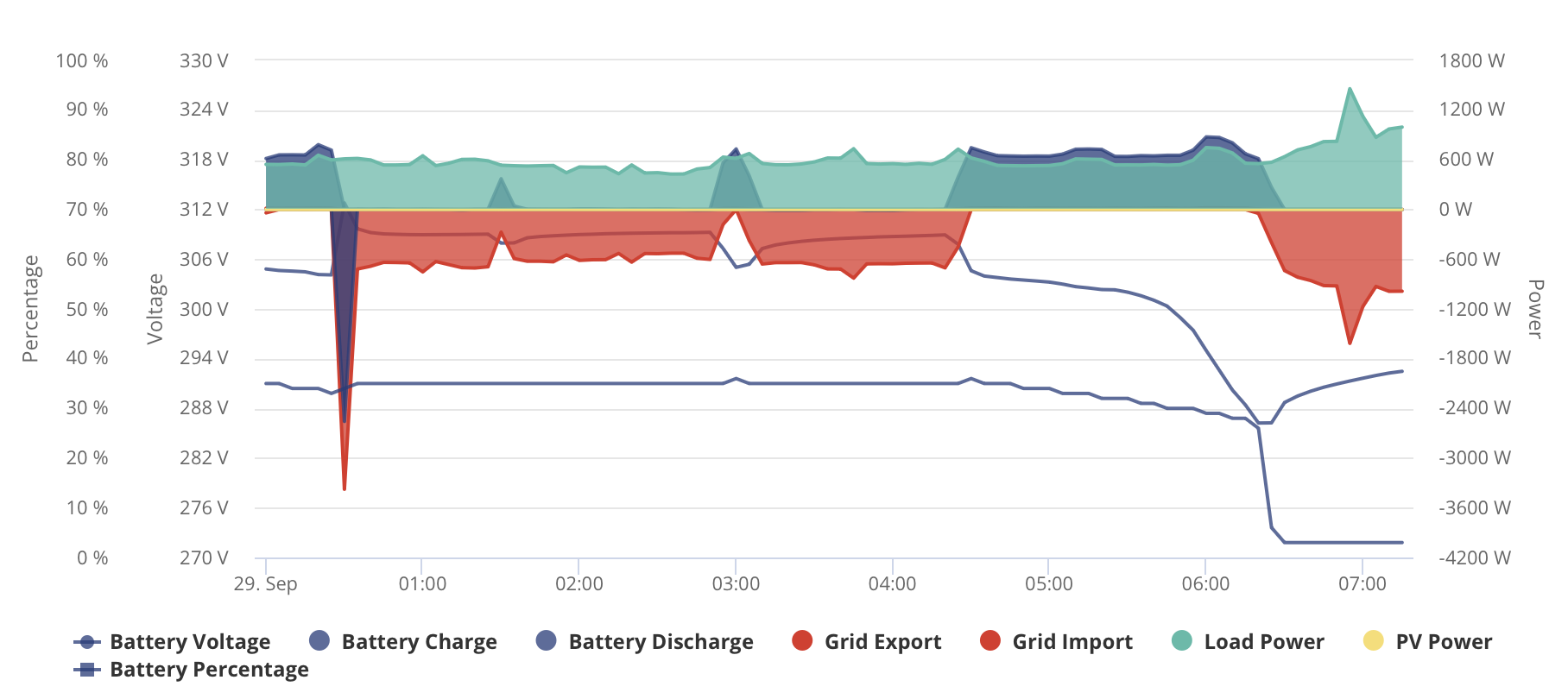
EDIT - Oh, another new thing today - my first random charge drop. Between 06.20 and 06.25 by battery percentage went from 26% to 6% with no change of load. The voltage showed a steep linear drop from 05.45 until 06.20 from 300V to 286V, then a small bounce to 290V lasting until now (while drawing grid). All very odd

#45 PianSom

The voltage (upper blue line) has continued its slow recovery, though the battery charge (lower blue line) is still flat-lining at 3% (below the 4% minimum cutoff).

PV generation will kick in any mo. Thank goodness it's supposed to be a full sun day.

#46 Jase1703

PianSom with all this strange AIO battery behaviour I am staying well away from this firmware upgrade.

B
#47 Barns

Jase1703 Probably a sensible move for a week or two until it's bedded in and any issues are understood. I'm regretting being an inveterate tinkerer and upgrading quickly, my battery isn't being as weird as some of those above but it's certainly developed some annoying new quirks. Like for example it'll now charge for an hour at max charge rate overnight but only gain about 10% SOC in that time, flatlining for most of it. But then if I restart the charge a bit later it'll shoot up 30% in 30 mins. Makes it very tricky trying to judge how much to charge and when.

M
#48 morgs

Jase1703
I agree. I have not seen any posts of improvements from this fw.

D
#49 Daveb01

Jase1703

Hi Jase,

The restriction of 3680w was from the DNO application and set in the AIO/Gatway during commissioning, this was checked by GE.

If I change the export wattage to 3680w in the schedule from 4-5pm this is what the AIO does all day, so not working how I thought.

I have asked GE to look at the app be able to set up a default e.g Dynamic, 6000w, 4% reserve. Then set up a schedule 4-5pm, 3680w, 4% reserve. The changes only happen from 4-5 then revert to default. Don’t think they want to listen.

V
#50 Vestas

Daveb01 I think you're probably not phrasing it right....

Tell them its possible to inadvertantly bypass the DNO export restrictions simply by using GE software. If that doesn't concentrate their minds then I'd escalate the issue rapidly.

Remember its YOUR responsibility not to exceed the export limit, not theirs.

J
#51 Jellybaby

Jase1703 oh the spike thign just after midnight has been going on a while, was just curious if it was still there, not sure what triggers it at midnight for around a minute its really odd.

I had no choice but to update firmware since battery was playing up all kinds of weird on state of charge but I believe its because the battery never ran a calibration cycle when it was commissioned, it took over a day for it to be commissioned and power kept going off for like 40 seconds before coming back up which was due to them tinkering to try getting it working and when it got commissioned I think it was done GE side for the update and calibration was halted their end.

What would be nice is a nice calibrate battery button in remote section of dashboard where run off-grid is.

Whilst the battery state of charge goes down a lot quicker now it seems to be more inline with usage BUT for some reason it seems to think 75% charge is around 7kwh, last night for exmaple 25%>100% was 7.5kwh but that would be more accurate for a 10kwh battery.

Battery calibration stuck 16.5kwh in it from 0.0% and that is the baseline I have so far as it has not gone flat yet since I updated.

#52 hoggy

The overnight 5min spike thing has been around on other inverters, not just the AIO for some considerable time.
https://community.givenergy.cloud/d/1786-battery-charging-for-5-minutes-every-night-from-the-grid-when-it-shouldnt-be
Never did recall what was ultimately causing it, if everyone gets it or not (and I don't fancy trailing through all that lot again) or if later FW fixed it. Can't recall seeing many people mentioning it lately.

I thought it was something to do with the unused charge slots on the older kit but the same bug being present in the AIO which is new design I'm not so sure. Maybe it's the portal doing something weird, or maybe it's ultimately all the same inverter inside turned up to 11 anyway so it's brought that weirdness along with it.

#53 Jase1703

Some people are having awful AIO installations lasting days, I consider myself extremely lucky, my install took 10 hours 8am to 6pm, all commissioned job done. Some issues with cloud controls and integrations not ready for AIO, couple of shortcomings in PredBat which may or may not be down to AIO. Support lately from GE has been very poor, seem to have disappeared from this forum!

T
#54 tomorrowman

Jase1703 My installer was fairly impressed with the ease of physical installation, specifically liked the gateway (apparently you need to build the PW Gateway internals up from near scratch). Commissioning however meant the install carried over to the next day. Thankfully he is very local.

He seemed to think a lot of the stock out there had battery firmware v4, which is a bugger to upgrade as part of the commissioning process.

Installers don't like the variability of it. Like to be able to schedule it as a day job and not get unexpected suprises which have knock on effects to following jobs and customers peeved as it's not working.

As it was I had 3 installers who despite being 'authorised' GivEnergy installers telling me they would not touch GivEnergy due to previous challenges and told me to go powerwall. Even the Installer who did install my AIO was doing it to see if things had improved - he was in two minds as to whether it had.

If GivEnergy don't sort this out rapidly nobody will touch it

Apart from sporadic connectivity loss needing a reboot my 1st 10 days have been OK with it, but I'm not ready to play with updates just yet.

T
#55 treborUK

Completely painless upgrade for me yesterday.
Upgrade started, upgrade finished, battery calibration started, calibration finished.

Much smoother than the first upgrade during system install and commissioning that kept failing then reported fail even though the firmware number had updated and it no longer offered an update.

#56 PianSom

Another unexplained and inexplicable drop in reported battery charge yesterday. That's twice in 2 days.

According to GivTCP/Home Assistant, the charge went from 35% to 5% in under three minutes at around 11.10 last night.

Is there somewhere where this bug-like behaviour can be reported, other than on this forum?

Looking at today's data it seems I have used 6.2kWh to charge up to my target level of 70%. If the reported battery capacity of 15.96kWh is correct, then that implies a 38% increase in charge, which in turn implies that the staring charge level was about 32% and NOT the 5% that the AIO was reporting. So there is some evidence suggesting it's an internal mis-reporting issue by the AIO, rather than magically disappearing electrons.

D
#57 DCostura

I had those sudden drops previously, not recently although can't be sure as the system has been offline a majority of the time, it seemed to recover miraculously a few hours later (and not from charging) and jump back up so I'm expecting it's a calibration / BMS confusion issue, was alarming me at first as I thought that was alot of energy to just disappear and given discharge rates it actually wasn't physically possible for it to be a controlled discharge which was worse....

P
#58 Pandorian

I updated my AIO last night to the current software. I waited until 10pm so that the battery calibration would be on my intelligent tariff. Software updated fine, and it didn't do a calibration - perhaps because the last calibration was only a week ago. Anyway, a painless update for me.

T
#59 tomorrowman

Pandorian interesting mine did calibration and my system was only installed and initial installs done just over a week ago (included calibration). Did you get the firmware update finished notification ?

B
#60 Barns

Once again the overnight hour charge didn't really put much juice in as far as the SOC was concerned (I'm sure the actual electrons were stored though!?). An hour of 6kW full power charging only raised the SOC from 36% to 49% and for half of that hour the SOC is just flat despite being charged.

Prior to this new firmware it was raising it by 40% or so. This new behaviour of flatlining for 30m before starting to slowly raise SOC is making it very difficult to predict what charge duration is required overnight.

I'd like to know from GE whether this is expected behaviour - for example, do they expect the SOC to stay flat, then slowly increase, then accelerate, and not just have a linear increase with charge in?

Image below of the overnight charge showing the flat SOC during charging.

P
#61 Pandorian

tomorrowman Yes, notification received and it has the correct version in the software pane of the portal.

P
#62 Pandorian

Barns

I updated the software yesterday evening, and charged for a couple of hours at 3kW.

B
#63 Barns

Pandorian ok interesting, thanks, yours seems to climb immediately, from 0% at least. What's the reasoning for limiting charging to 3kW rather than full whack at 6kW?

T
#64 TX200

Barns if you have a long enough time period overnight, charge at a slower rate stops the battery getting too warm and maybe helps it last longer? Although not sure it is as energy efficient at slower rates. Probably okay at that rate anyway.

Also some people are having Comms issues which apparently don't happen if the charge rate is 3kW or less.

P
#65 Pandorian

Barns Had it go offline last week, and I am playing with various settings at the moment. I have charged at 6kW without issue.

#66 PianSom

Third day in a row that I’ve had the step down in charge phenomena.

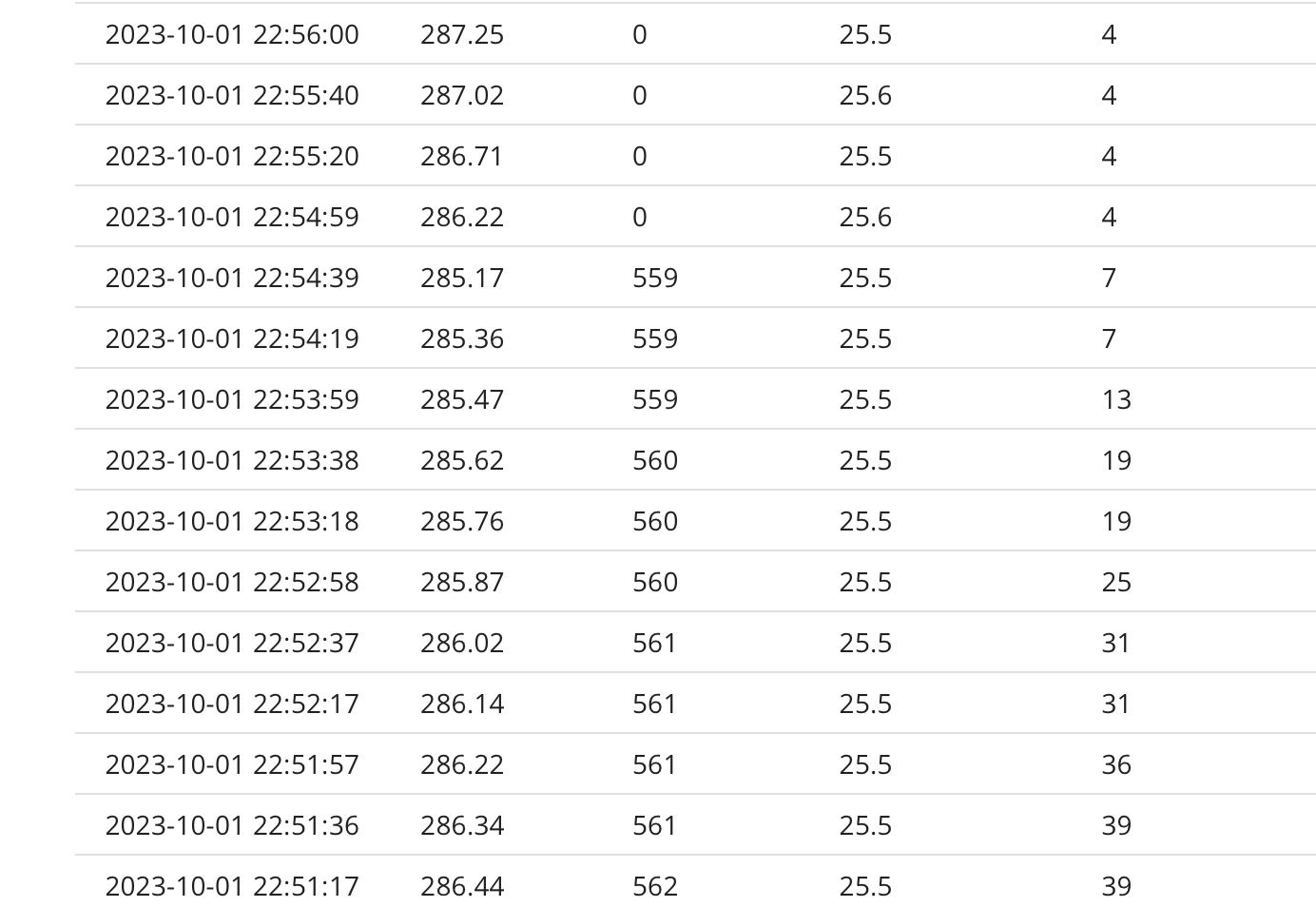
Last night (similar to the previous night) it went from 40% at 22.45 to 4% at 22.55.

#67 PianSom

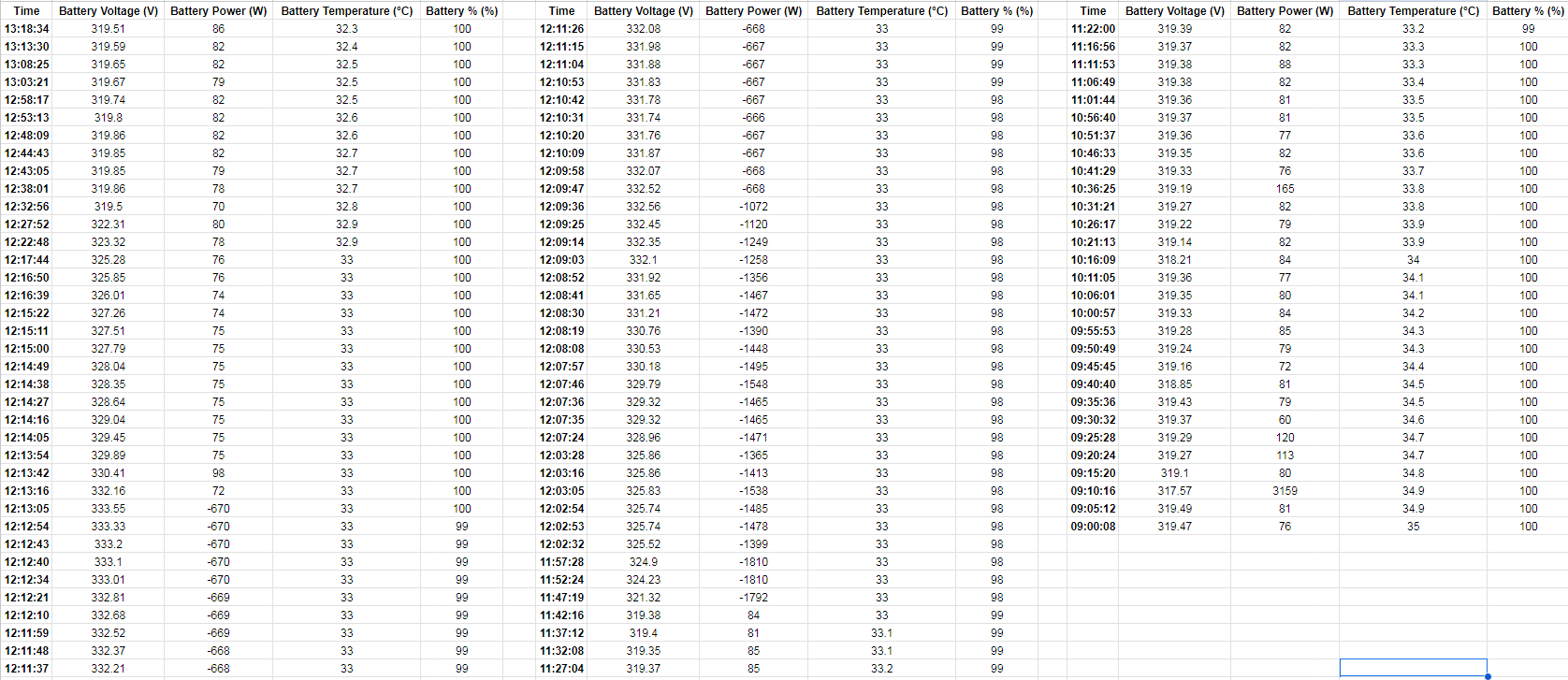
Here is the Voltage, Battery draw, Temp, and Battery % from a 5 min period last night. This makes no sense to me at all.

D
#68 Daveb01

Daveb01

Hi All, I have sorted my puzzle above 🙂. Export limit from DNO.

GE have replied with this, something for all with AIO to consider.

I believe I have found the issue, the export was limited to 3680w but the G100 was disabled and therefore not enacting the limitation