No Grid to home after smart meter install

23 comments started 2023-10-23 last 2023-10-26
GivEnergy ProductsHybrid
G
#1 givname

Finally getting to trawl through my stats after a few months, I was confused as not seeing any Grid to home numbers and I can see that starts basically same day after my smart meter install which is too much of a coincidence. Is there something that needs to be done for GivEnergy to get the data?
S
#2 SteveCook

was the system correctly commissioned.
please post a snip of your power graph.
is your EM115 showing any data and lit up

G
#3 givname

Thanks for reply ...
Professionally commissioned (panels, inventor, battery) and from what I can tell seems like they did a good job.
EM115?

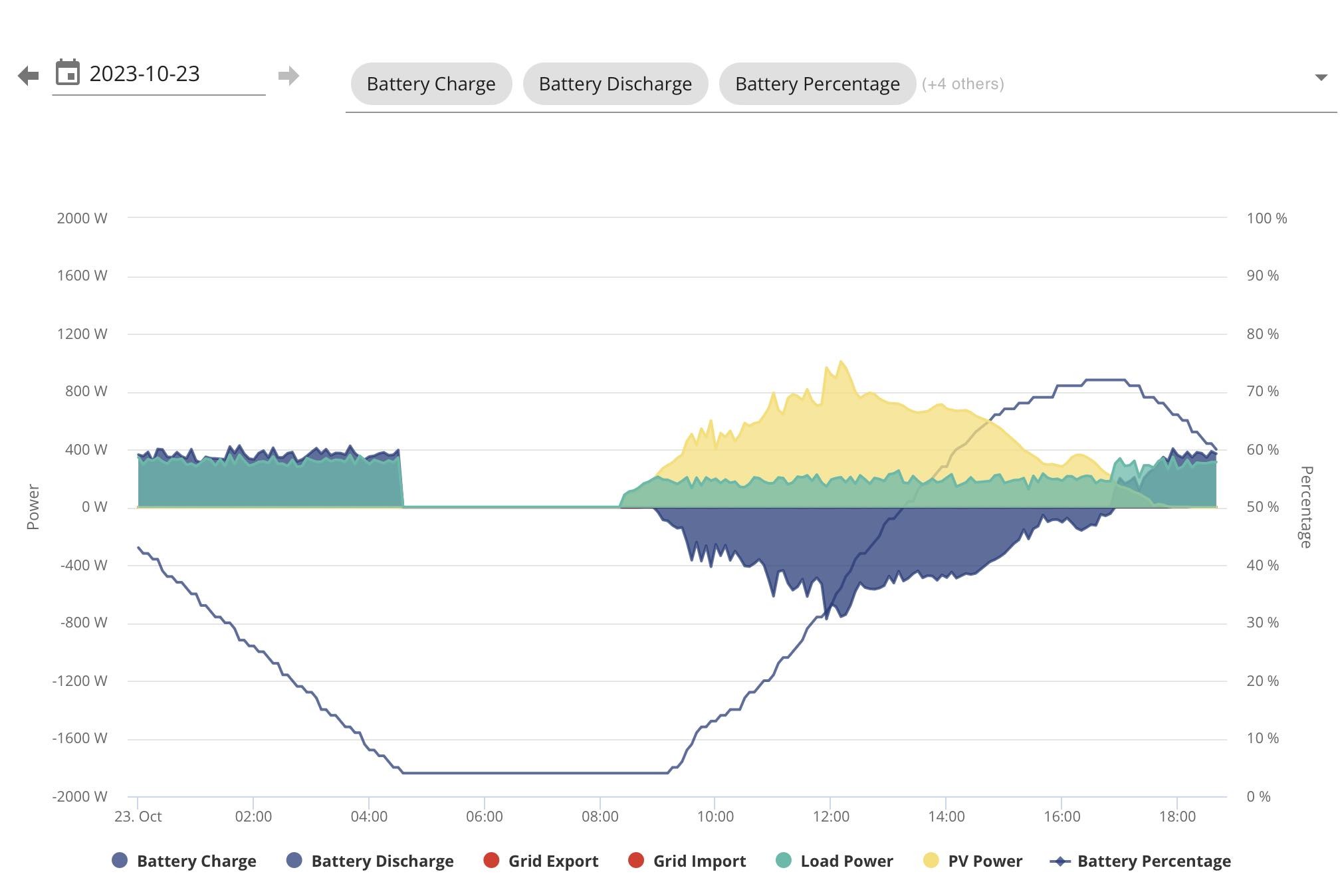
Not sure if this is what you meant but todays graph is ..

S
#4 SteveCook

That is the graph. Have you selected all the fields you want to see by moving the cursor along the line where it says (+4 others).
EM115 is small meter next to your incoming power cable with a clamp round the live cable.
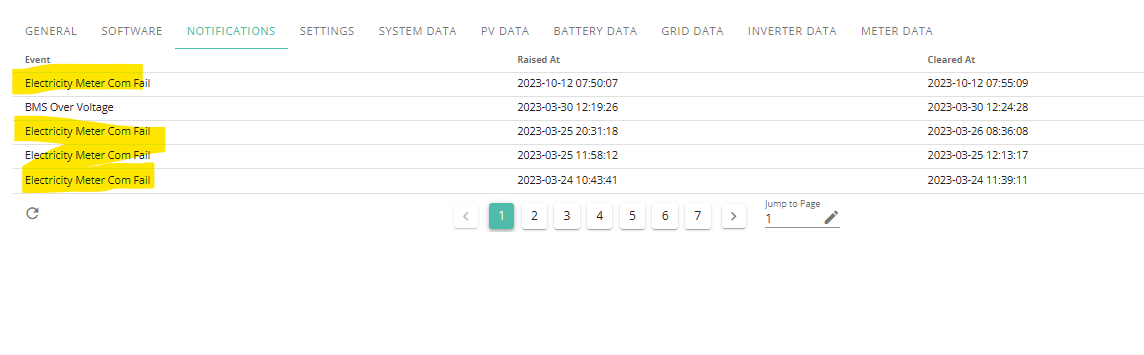
Are you getting any errors in the notifications.. LHS - my inverter - along top - notifications
Take a look at 1st picture
https://community.givenergy.cloud/d/1858-incorrect-em115-wiring

G
#5 givname

I'll check all this and report back.

G
#6 givname

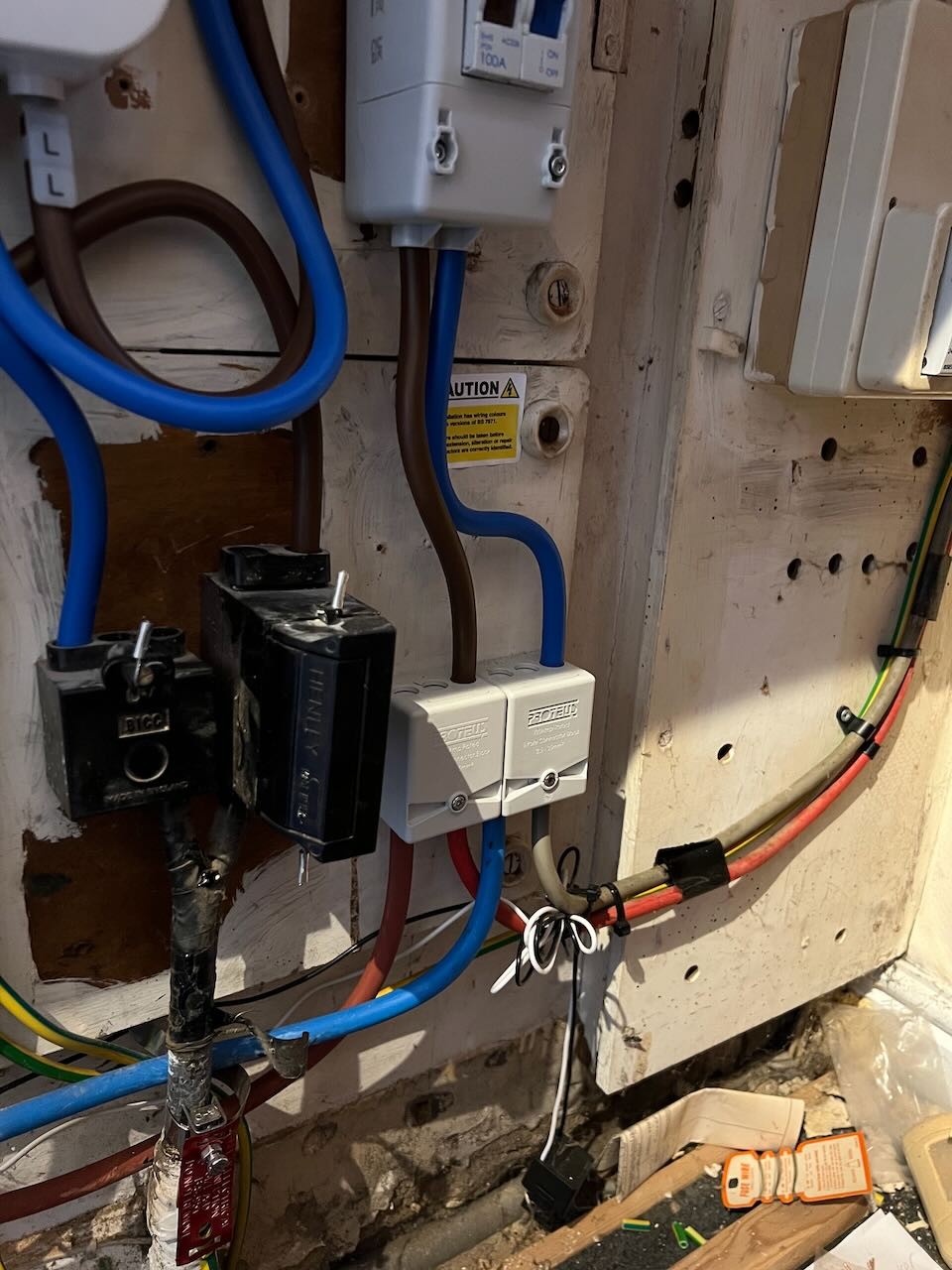
I have a OB155 in my solar FuseBox, there are 2 wires (white and black) coming from Fusebox to a clamp but it's not attached to the Live cable. Maybe the smart meter installers detached and didn't put back the clamp after removing the old meter?? Would this effect my meter readings ?

G
#8 geoffreycoan

givname if the clamp is not connected to the live feed from your smart meter to the home then the inverter has no way to tell whether it is importing or exporting. Surprised that there’s no errors on the inverter log.

You simply clip it onto the meter tail. There’s an arrow on it pointing k -> l, it should point in the direction of the flow into the house. If your inverter starts force discharging the battery to the grid then the clamp is on the wrong way round.

Simple for you to put it back, no electricity risk !

G
#9 givname

Hi Steve and Geoff, Thanks for all your comments. I went to look at where to attach the clamp but am I being daft or does it look like my inverter feed is not connected to the house (photo below). Looks like mains enters consumer unit (far right) as blue and brown coming down via meter and fuse but the inverter wires are going into the same proteus connector block that looks like a separte unconnected straight through connection (the install photo pre-smart meter install shows an unbranded single black box). Is that normal or am I just panicking now? You can see the clamp left hanging.

S
#10 SteveCook

Bit difficult to see what I am looking at and what goes where. Can you take a pic a bit further back plz.
Yes looks like the clamp (on end of black wire and white wire) is lying on floor.
Surprised you are not getting comms error notifications .
Mine when the wires were messed up

G
#11 givname

Nope, no errors in the inverter notifications.

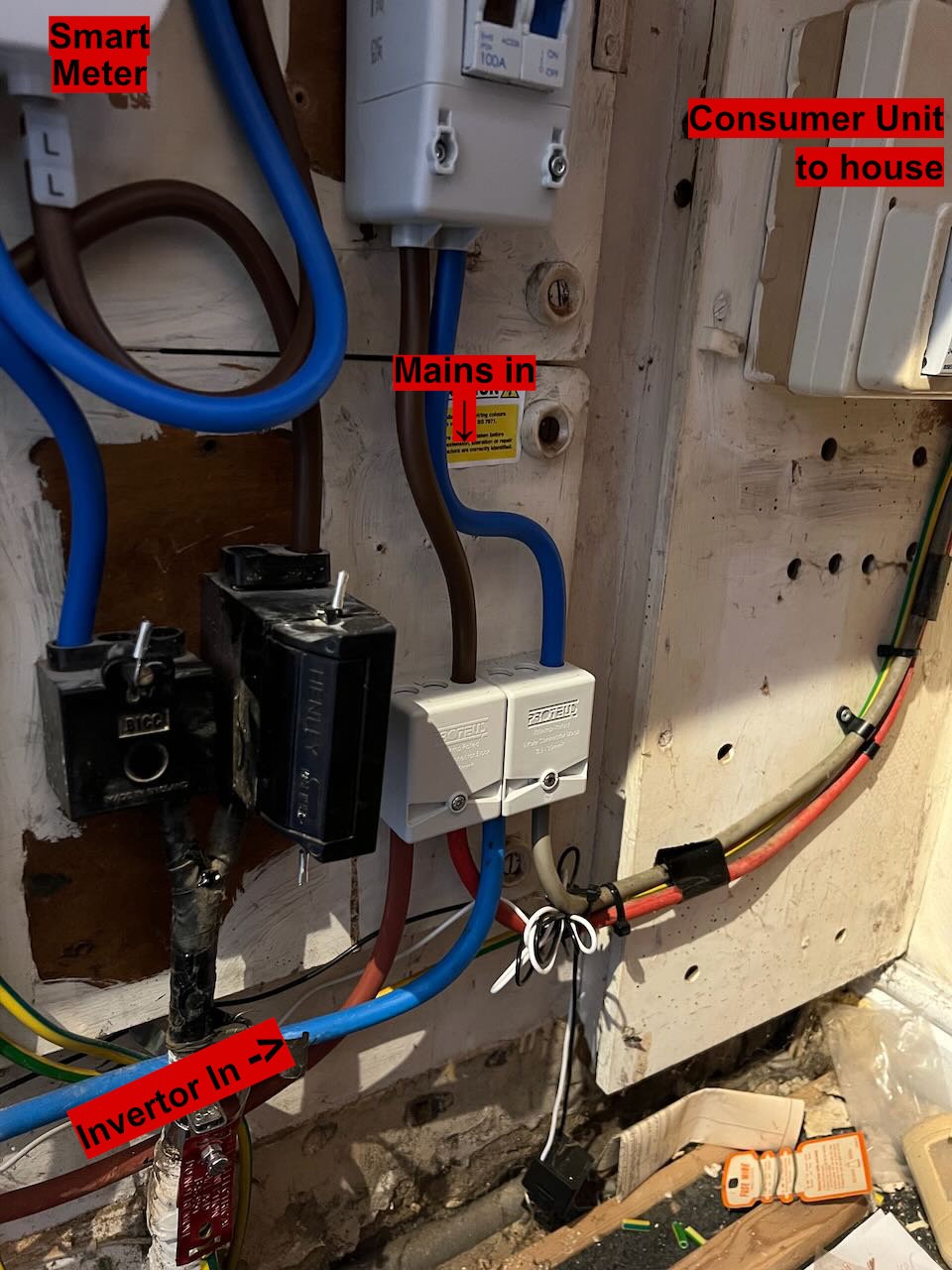
Annotations below. Im trying to match up my bills, usage, generation stats etc. within suitable margin but now after finding why my invertor import stats don't match the elec supplier/meter (the missing clamp); I'm now worried the inverter wasn't reconnected to house supply (the blocks at the junction of the two ins). Am I just being daft and this looks normal or do I need to get electrician to check inside the blocks. This probably sounds stupid but I don't have an intuition for the pre vs post solar grid usage yet so I can't say there is definitely a change.

S
#12 simont

givname Those blocks are just connectors so all cables in each one are connected to each other so your inverter is connected to mains/consumer unit
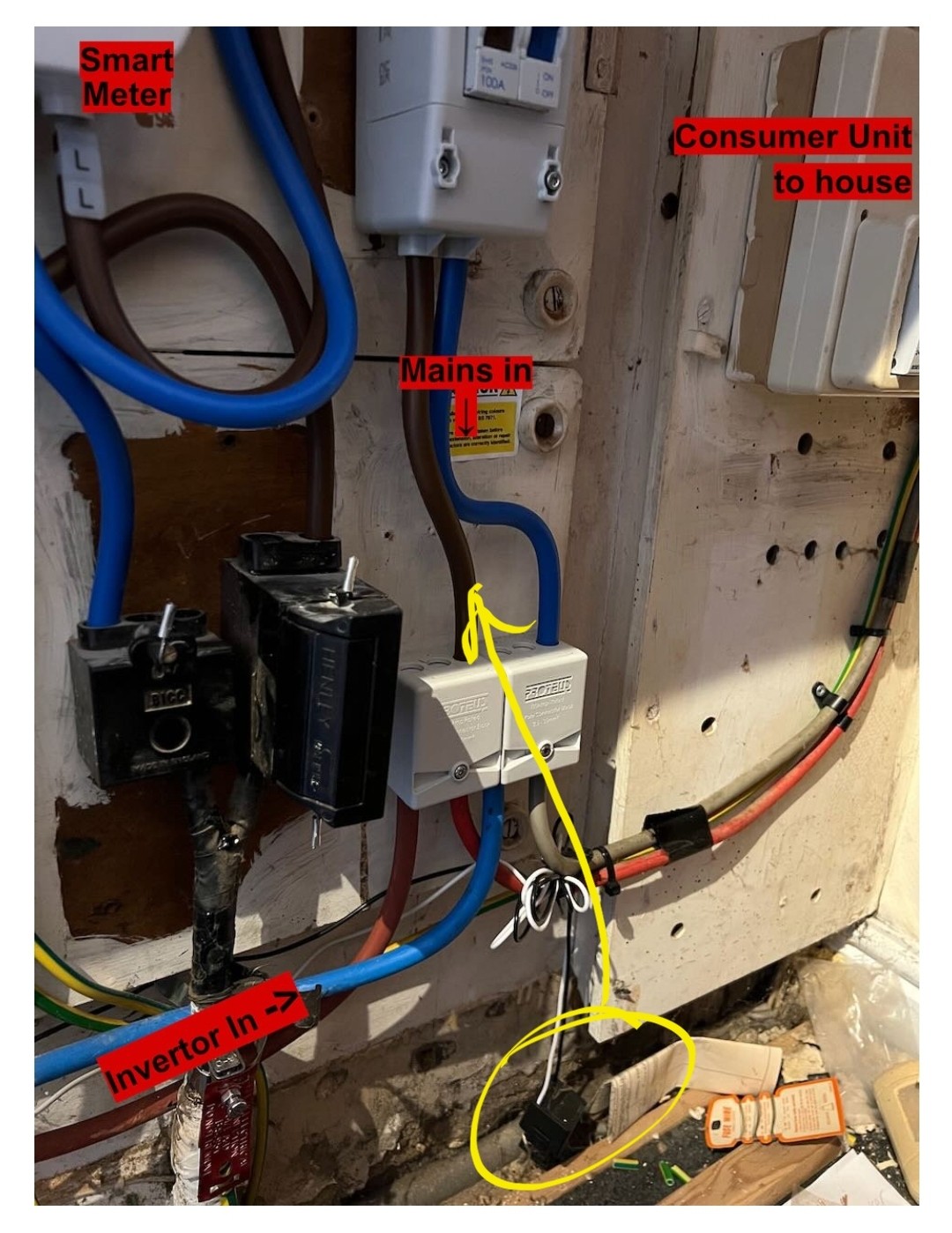
You need to put the CT clamp back on the Live cable, in the right direction

#13 hoggy

Your meter person has forgot to clip the ct clamp back.
Clip that > around that.

S
#14 simont

givname Those blocks are just connectors so all cables in each one are connected to each other so your inverter is connected to mains/consumer unit. Although not sure why you have a brown from consumer unit to neutral and red to line, maybe just wrong colours
You need to put the CT clamp back on the line cable, in the right direction

#15 hoggy

If you get funny readings it's the wrong way around. They have a direction arrow on them but because you can both wire them back to front and also reverse them in the software on commissioning its impossible to tell

J
#16 Jellybaby

hoggy At least its not too much hassle to figure out, just have the app open whilst you connect it, if things dont look right switch it around hehe

Bit of a shoddy job whoever fitted the smart meter though, id file a complaint about that, coulda put things back the way they were.

S
#17 SteveCook

Jellybaby
Its not the smart meter(energy company) installer, it is the inverter installer

G
#18 givname

Thanks everyone for all the help and advice! New here and still everything to learn about this stuff. Clamp reattached and the Grid Import data is now showing. Clamp is actually a bit big for cable but it's up against it and I'll see where it's at vs supplier stats. Might also explain what looked like some strange battery discharge decisions if it didn't know what being imported.

Anyway thanks again!
Dave

J
#19 Jellybaby

SteveCook oh, assumed it was smart meter people as they said it happened same day.

S
#20 SteveCook

Jellybaby
no problem, they may have pulled it off.
surprised no errors showing

G
#21 geoffreycoan

The Eon engineer that replaced my meter took photos beforehand.

Then installed the ct clamps the wrong way round so the inverters thought that I was continuing to import when I was exporting and drained the batteries to try to match the phantom load.

Once I figured out what the issue was it was easy to fix. At least the engineer tried I suppose.

J
#22 Jellybaby

geoffreycoan It happens but it wouldn't hurt them to ask to double check everything is working as it did beforehand though before they left.