D
How can I test island mode on my AIO?

How can I test island mode on my AIO?
It’s very quick to switch over, the AIO makes a clicking noise. Sometimes the lights flick in the lounge but only certain ones. Otherwise no interruption.
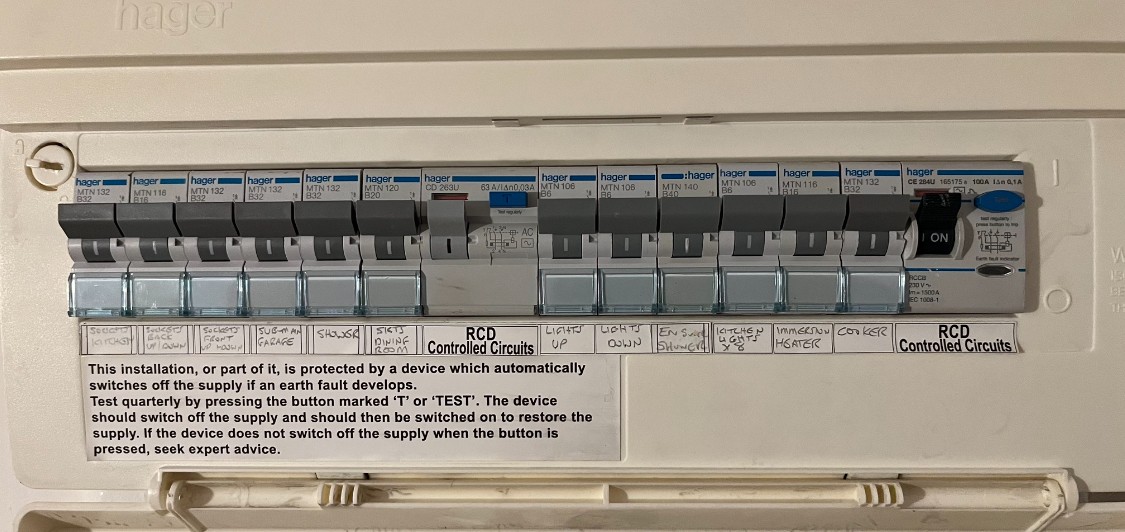
Daveb01 I had a bit of a panic. I set Force Off Grid to true and one of my RCDs on my main consumer kit tripped, and when I went to push it back up, it kept tripping. I went into the Gateway and pulled the Grid breaker down and pushed the RCD on the main consumer unit and it stayed on. I then managed to get the internet back on and set Force Off Grid, but had to push the Grid breaker back on after that, and the RCD tripped again! I pushed it back up on the main consumer unit and now we’re back on. I guess that means in a power cut the main RCD will trip? I wonder why?
see some of my experience that may help. In the end I had to put inverter on own RCD with no other "shared" RCD
https://community.givenergy.cloud/d/3478-type-a-and-type-ac-rccbrcd-experience

What brand of RCD?
The AIO goes into split phase mode (120V on the Live, 120V on the Neutral so 240V between the two) when running off grid. Basically like North America.
Some RCDs (or things in the house) seem to not like that and cause it tor trip.
Dont know if type A might help, but my problems in order were
1 a stray neutral between my essential CU and house CU - cured after disconnecting testing and reconnecting all circuits until found it.
2 what appeared to be cumulative earth leakage in wet conditions across all circuits - cured by installing small CU just for inverter with its own dedicated type A RCD and no "shared" RCDs for inverter
So to narrow it down, you can switch the downstream MCBs of that tripping RCD off and see if it holds up just on its own.
Then working through each MCB switch them on 1 by 1 until it trips again.
Then (if its a ring/sockets) start unplugging stuff on that to see if you can get it to stay on.
If you have a UPS anywhere I'd start with that unplugged personally.
Bit of pain but if you've paid for islanding you kind of want it to work. The split phase thing is not well known .
hoggy this is the interesting thing: if I “Force Off Grid” on the remote control settings, the RCD trips and the Grid breaker is still up on the Gateway. If I pull the Grid breaker down, I can push the RCD up and it stays on. So I’m in island mode with split phase but it works. So shouldn’t it trip? It seems to only trip if there is a cut to the grid/if I force Off grid using the remote settings and the Grid breaker is on. Shouldn’t the Grid breaker go down?
deanjesper so if I'm reading your description right, if your switching the grid breaker (in the gateway) off then the RCD in your main board will reset because it has no power from he AIO. The grid breaker in the gateway blocks the output of the AIO so all you are really powering is the gateway.
Edit: I'm tired, by grid breaker I assume you mean the incoming one from your meter tails? Sorry, thought you meant the load one to your CU. No it shouldn't trip your grid breaker, as its supposed to resync once the grid comes back up.
hoggy not quite, so if I set “Force Off Grid” to true on the remote settings on the GivEnergy portal, the RCD trips and the Grid breaker remains up on the Gateway. I try and pull the RCD up and it trips after a second. The Grid Meter in the Gateway is still powered and on. If I then pull the Grid breaker down, the Grid Meter goes off. I then flip up the RCD on the CU and the RCD stays on. But I’m off grid? So shouldn’t the RCD trip again?
Here is my setup, as per GE conversations with my installer.
Pic 1 - is supply to house, going to Smart Meter, then to new fuse box, then to Gateway.
Pic 2 - fuse box inside
Pic 3 - is cable coming back from Gateway to new consumer unit.
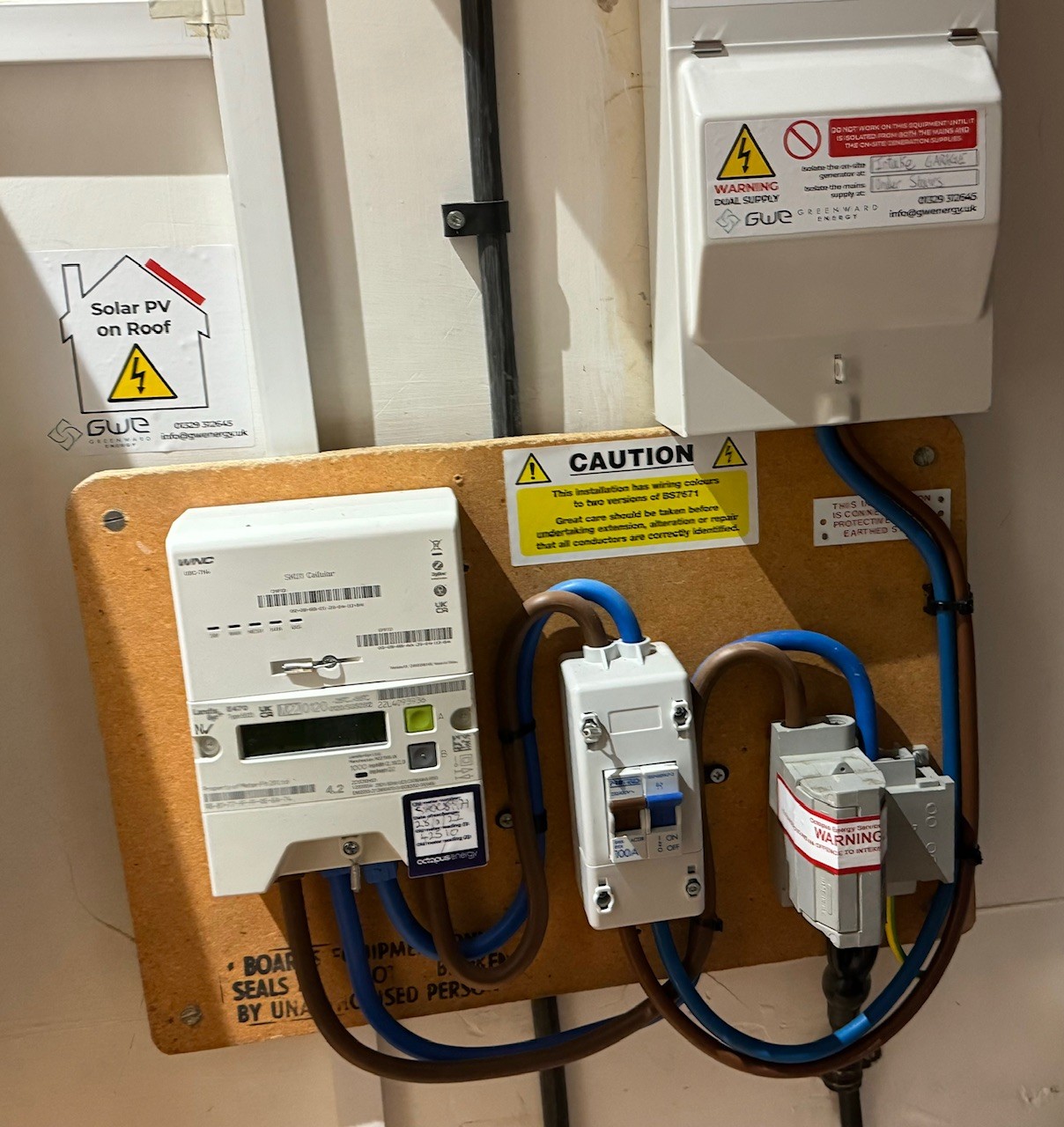
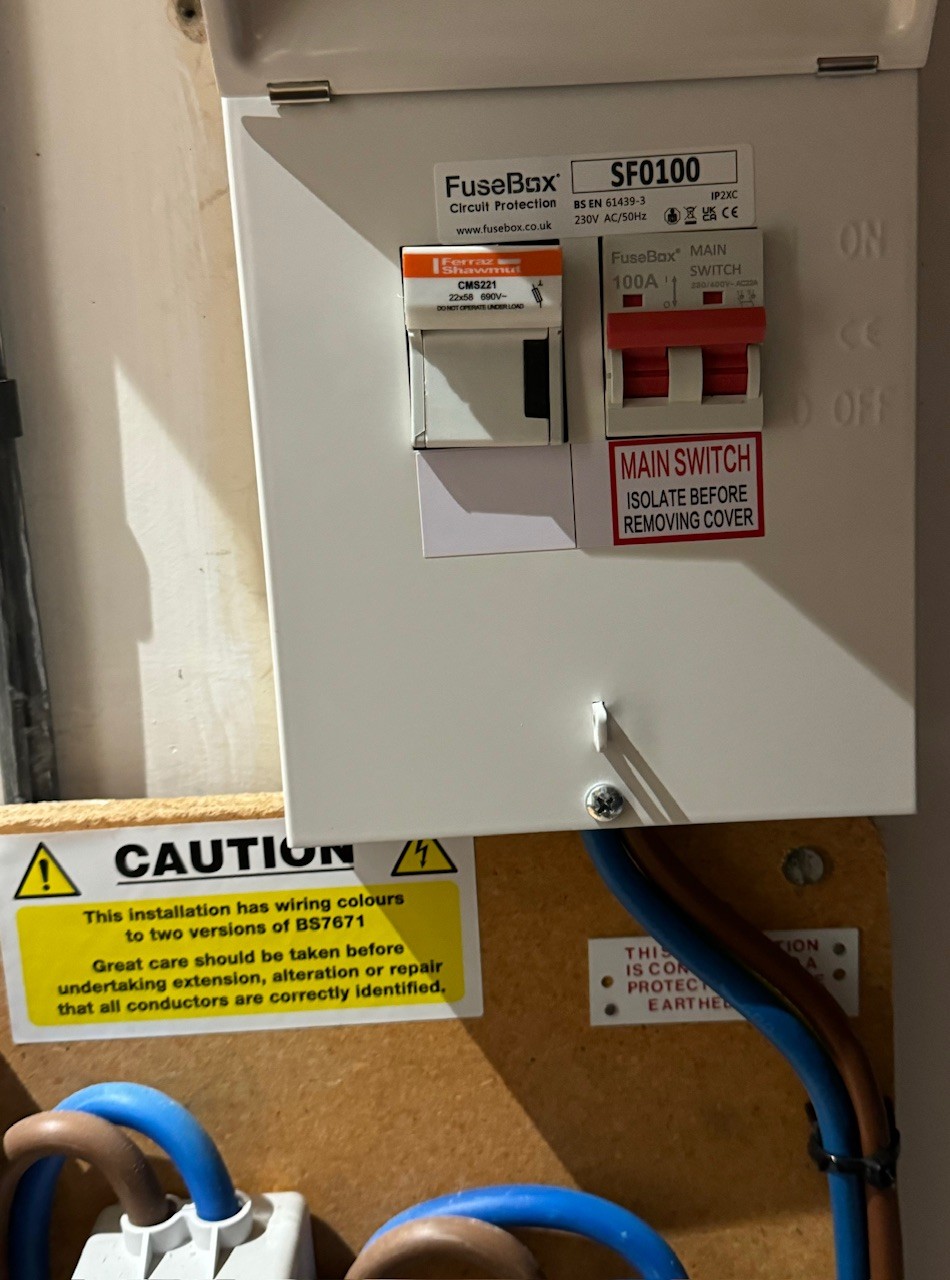
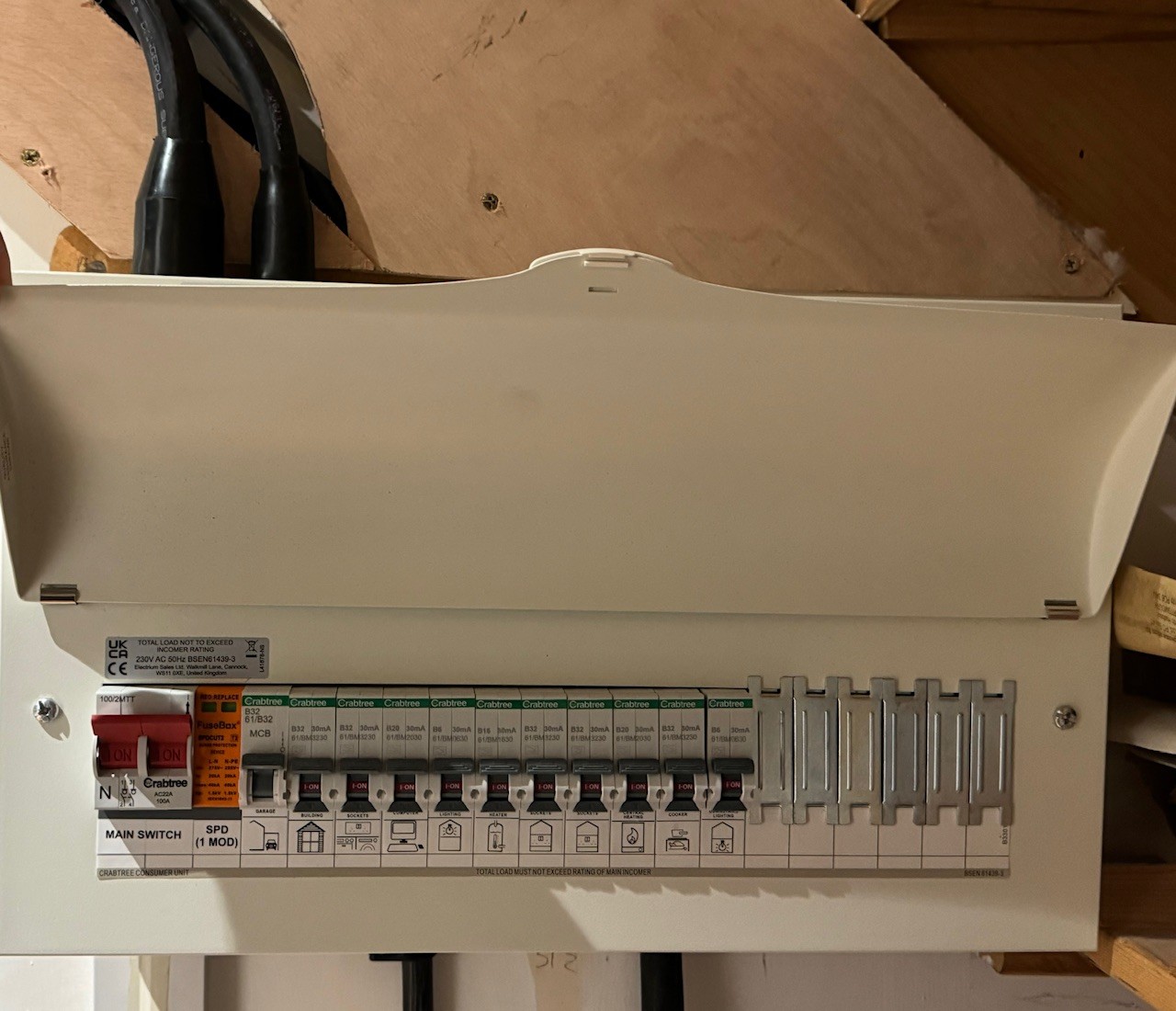
Daveb01 yeah so mine is similar, the 100a grid comes into the Gateway and then the Gateway into the main CU, but what I don’t understand is why it doesn’t trip again if I pull the Grid breaker when I’m in Island Mode? Surely it should trip regardless?
Edit: just to put the steps in to make it clear:
So which RCD trips in the main CU?
Is it the 100a Main Switch?
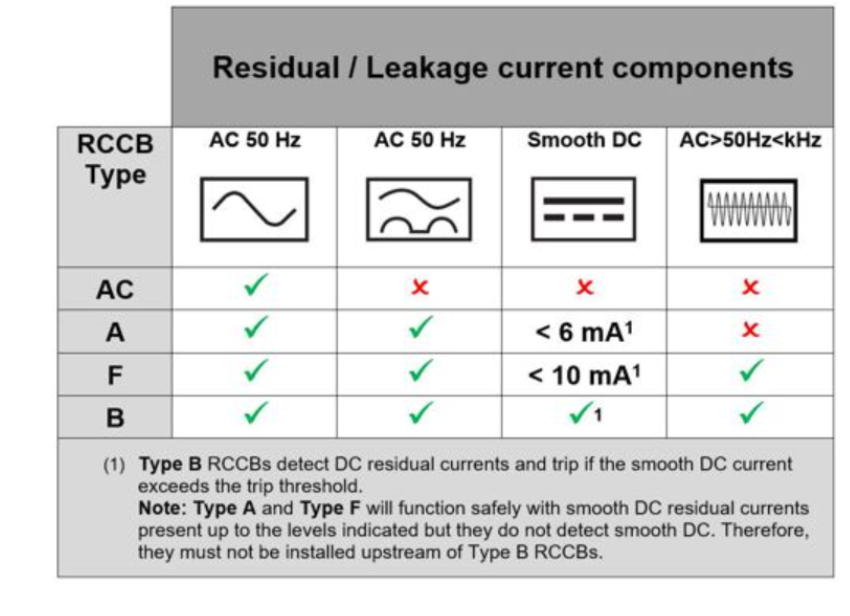
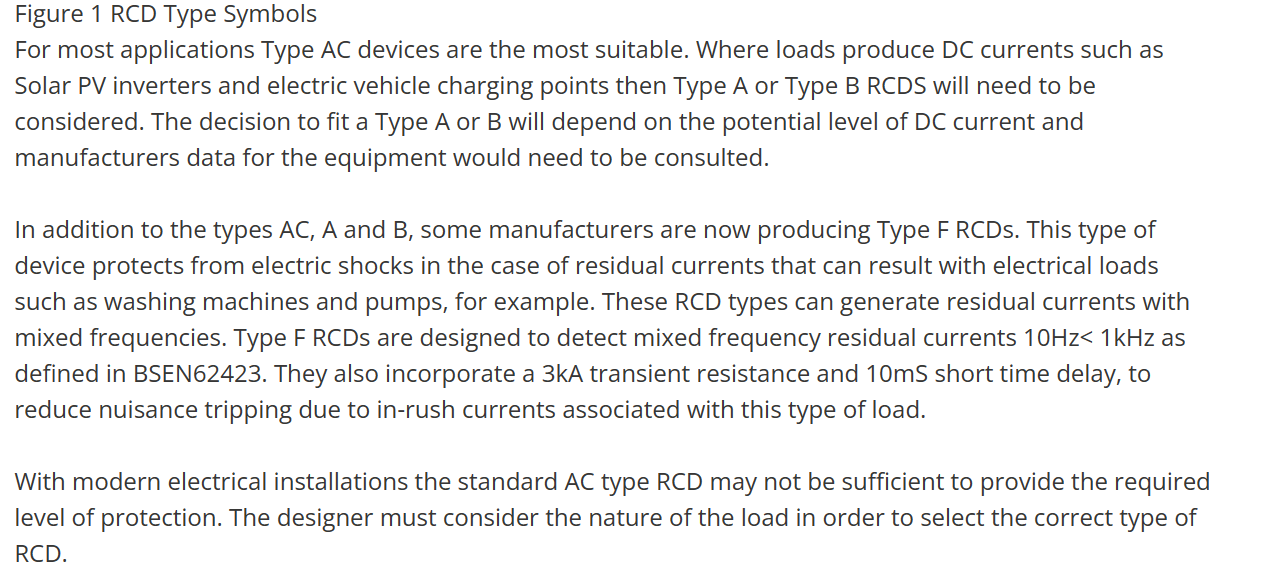
As you can see my mains switch is AC (see Steve Cooks Table above)
What do you have?
I am trying to work out where your issue is?
Given the Gateway essentially does the same thing (disconnect L & N from the Grid same as the Grid Breaker) then realistically the only thing that can impact/interact with the grid side still is Earth, which isn't switched. Given your presumably on TNCS, which means you neutral & earth are bonded Grid side, and the fact the AIO still uses earth (inc a new rod that should have been fitted - did this happen?) And the fact the gateway has to monitor Grid side L&N still for when the grid comes back (via the grid breaker) there is obviously some parallel path interaction here between N-E.
We can spend all day going back and forth with vague ideas but in all honesty it probably needs a few hours of your installer/spark testing things in person to work out exactly where the issue lies.
Note: you can still try sequentially turning MCBs on while toggling off grid mode, you may get lucky in narrowing it down. My bet is "garage" personally as a wild stab.
deanjesper no problem. (FYI the reason your other RCD doesn't trip is likely because its the Hager CE range so 100mA allowed before tripping.
The CD range is 30mA so much more picky)
Both are type AC but seeing as the ones GE fit themselves in the gateway are also type AC then it shouldn't (in theory) matter, as the AIO itself monitors for DC leakage and kills itself.
I agree ask your installer to pop round to check everything is correct and upgrade any if needed. If you have a power cut you don’t want the main CU tripping all the time.
My installer (whilst having a coffee) needed to test all the cut off switches and simulate a power cut. Your installer should also supply a diagram with instructions to put on the wall near your equipment on how to isolate each part of your system and how to restart it.
I can isolate:
Hope you got all the info you needed and can get this fixed soon. Happy New Year.
I raised the RCD tripping issue with GivEnergy as I wanted to see what they said and the support engineer said that the AIO doesn’t work well with Hager RCDs. I’m intrigued why it’s not been documented as it was never picked up as part of the install. Surely future customers with Hager RCDs should be informed?