D
As release 8 is now available for public release I thought I would get the new one going.
Hope I have not stepped on anyone’s toes

As release 8 is now available for public release I thought I would get the new one going.
Hope I have not stepped on anyone’s toes
After rushing in to upgrade to 7 my plan for 9 is 🍿 🕶️
But I did check its there tempting me...

Nine? - Nein! 😉
( well, I'm sorely tempted but will see how long I can hold out 'til curiosity gets the better of me )
pressed the upgrade yesterday, all parts updated to correct version but the inverter kept rebooting endlessly... called GE after the 6th time and they stopped it rebooting.
No calibration was triggered.
Might have to call them again to ask if it's ok as I have no idea what state it's in...

A wise man said never be the first nor the last to adopt new technology.
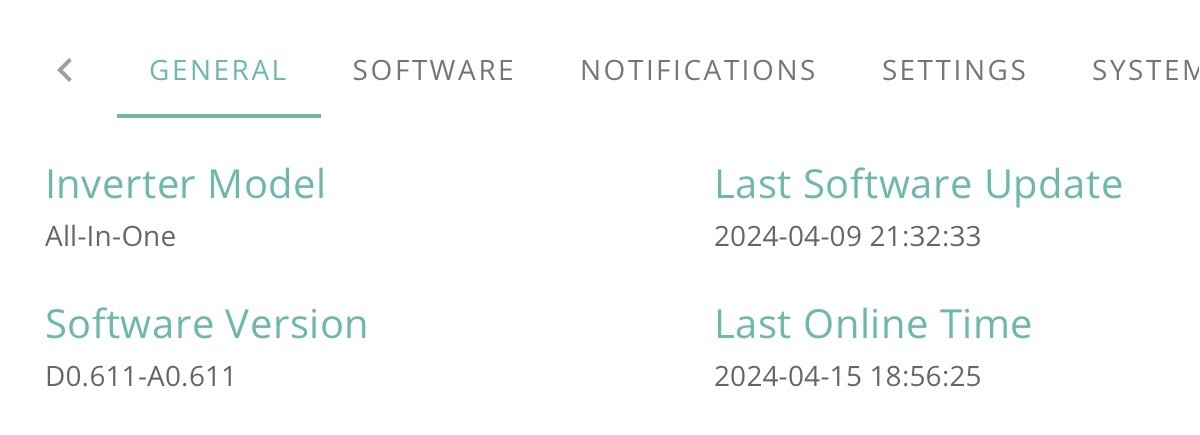
Been on 9 for a while (testing) but just updated WiFi dongle and inverter to 611 through portal. Took about half an hour, no drama, all good.
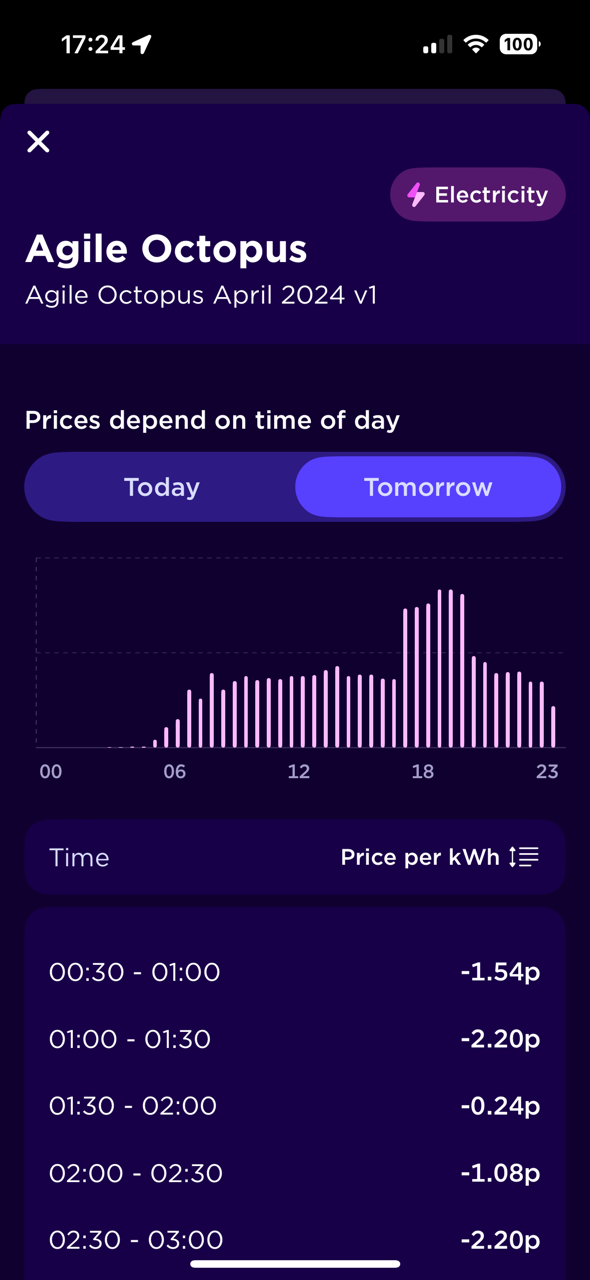
Whelp, if anybody on agile was considering it tonight is the night to do it lol
I see there is a new column on the portal My Inverter 👍
Shame GE did not update the Gateway again, FW or dongle

Well took about 30 goes but finally taken and now starting calibration
I had quite a full battery last night and saw that the overnight rates were very good.
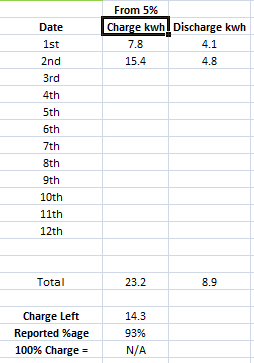
I set up a discharge at 21:00 to empty the battery down to 4% and used Wonder Watt to schedule the optimal slots to top back up to 100% in the early hours of this morning. About 10:00pm when the battery was down to 45% I thought " let's do this " and pressed the update button. I got the confirmation message back about a full discharge / charge calibration and off it went. The battery reported 0% at 22:45, had a little think for 5 minutes then jumped back to 23% at 22:50 and continued discharging before reaching 0% ( again ) at 23:55. It then started to charge back up and reached a reported 100% at 02:45 with a reported charge of 14.5kWh.
As Jellybaby said, last night was the optimum time to do it and I was able to do do a full charge at negative rates 😎
First day and the first day ever that my usage was 13.5 kWh happy days if it remains like, though of course it could just be it was under reporting on 8, or over reporting in 9.
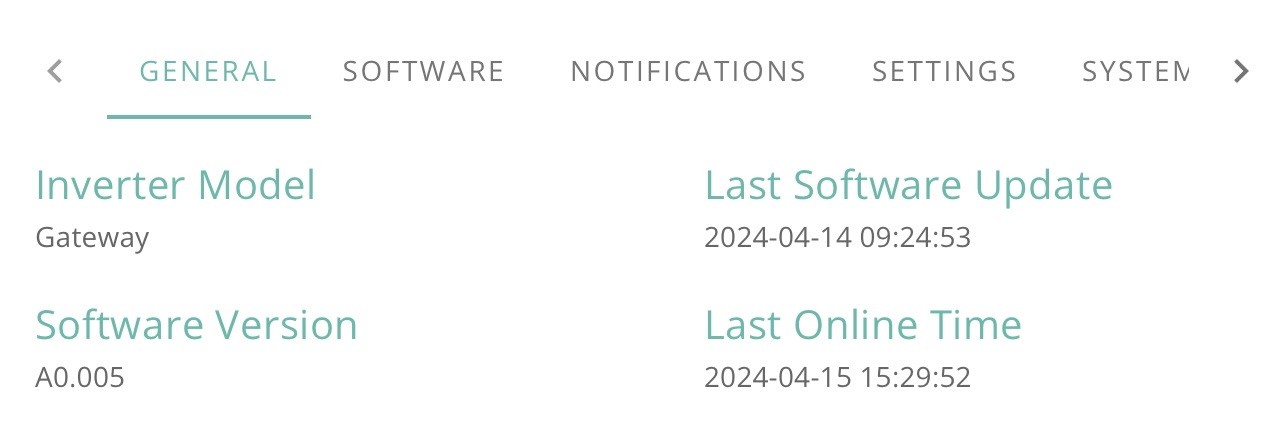
Just had notification that a firmware update has been applied to my gateway. Presumably triggered by GE. Now version A0. 005. Not sure what it was before. Wonder if anyone else has had this happen?
Same, but my Gateway was on A0.005 before. Looking at the logs it was Dongle firmware update, to same 205 revision as my AIO did the other day with its firmware update
Just had an update. The "Revision History log" Shows
Format Dongle, Written successfully
Restart inverter, Written successfully
Dongle Firmware Version, Read sucsessfully


Mine updated too, a couple of hours ago:

So one interesting thing from the upgrade is since I have had the AIO Ive never had the wifi working on the app so I couldn't see locally as such - Wifi was correctly configured to work it just didn't.
It now does.
Last software update in "My Inverter" is empty

Same with "Last Update" time in Software
Strange
Thats odd, now my data updated is 1h ahead, wth
But it seems the reports are not

Something new in release 9 is Im seeing upticks in remaining percentage - never saw that in 7 and 8.
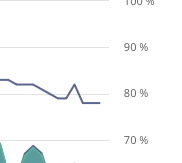
Well, that's weird:
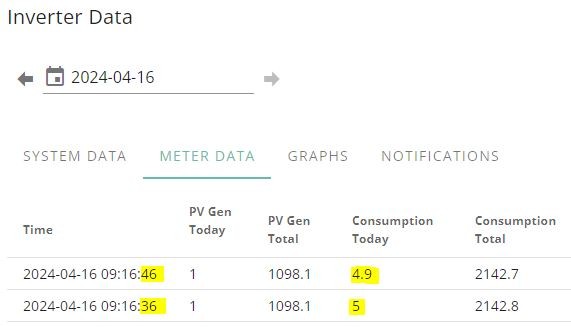
My accumulated consumption seems to go up and down.
This is odd, %age didn't seem to go up despite nearly a couple of hours of solar
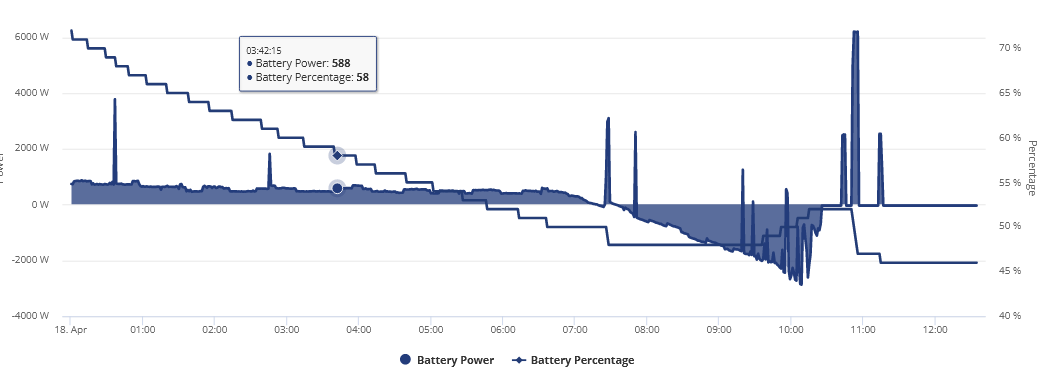
This seems a little odd as well, it was tracking pretty yesterday after 3 days without a full discharge but seems quite out of whack now
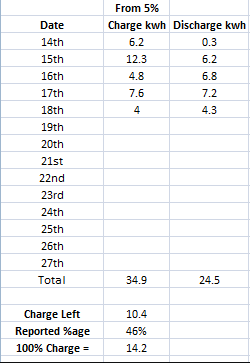
Will see what happens when it fully discharges.
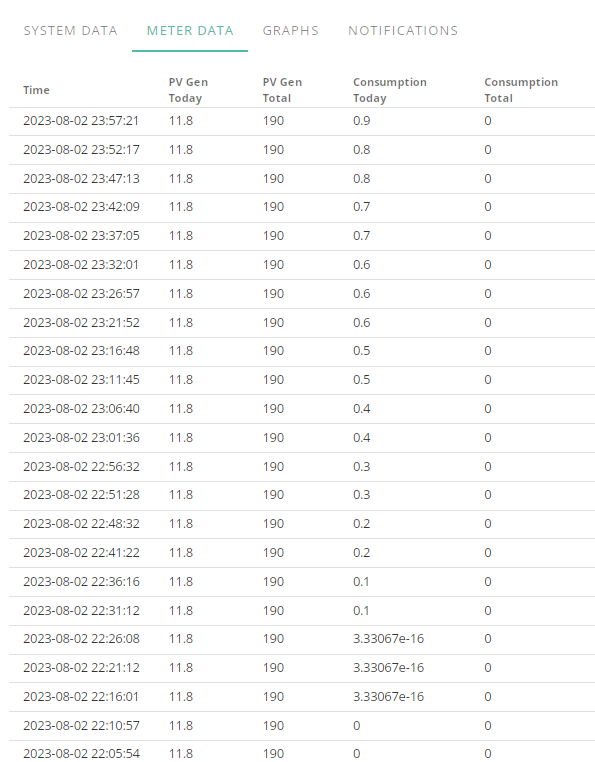
The PV Gen today is just the generation so far. It was early morning so it had only accumulated around 1 unit by 09:16.
However I'm increasingly suspicious of the readings since the BMS 9.
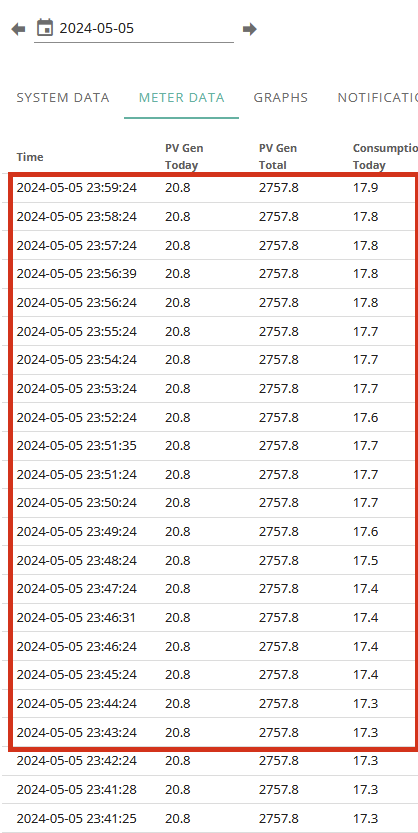
I just had a look again today and (since this data is in chronological order) I wouldn't expect my 'Consumption Today' to do anything but stay the same or increase:
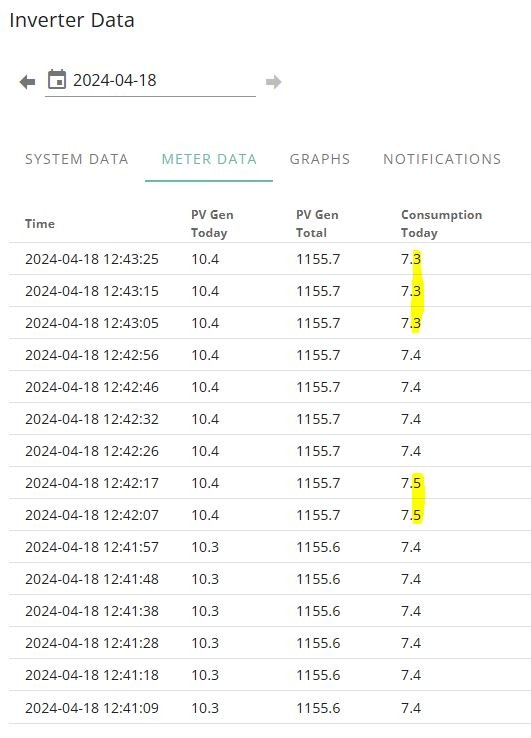
I must be missing something. Probably staring all you good folks in the face.
Icarus Take a look at this, I will be sending this to GE
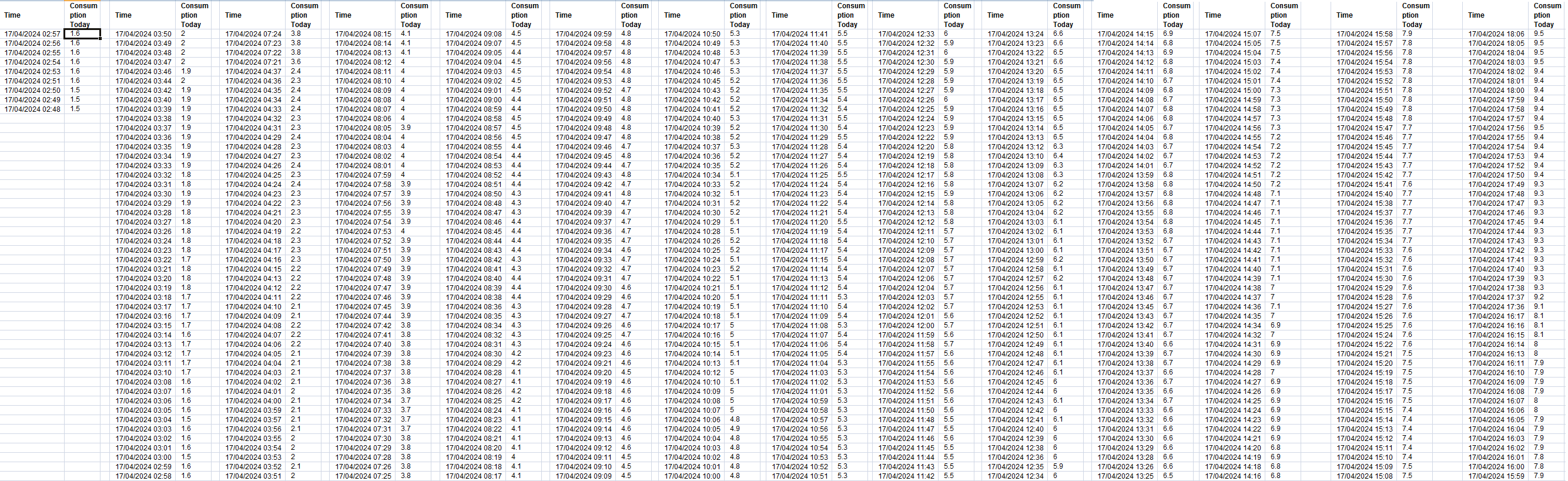
EDIT
I have been going back through my portal and its been doing this for at least two weeks so far.
4th of April I was less than 13kwh, wtf.
EDIT 2
Its been doing this since before march so can't even trust the meter data now
My daily consumption should be very, VERY close to each other since the washing machine doesn't get used often and routines are pretty much the same, there should not be much more than maybe 1kwh difference throughout the day let alone 3+.
I even went back to February 1st
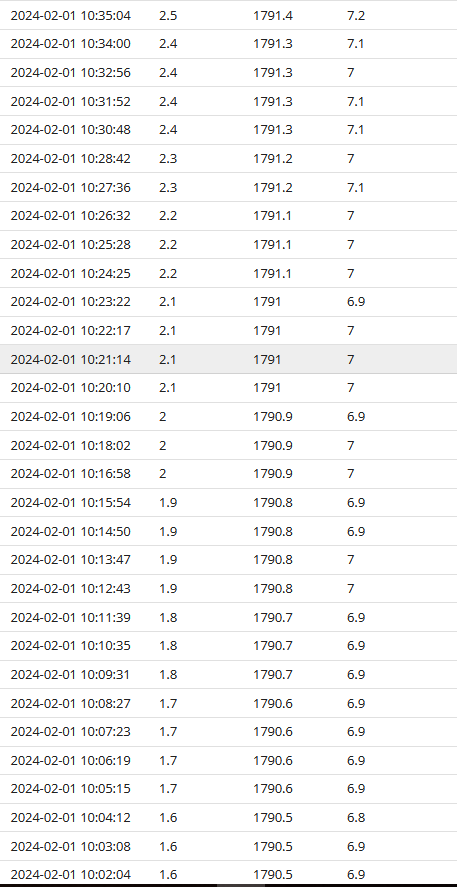
Don't suppose anybody knows what this is do they?

Something went wrong here
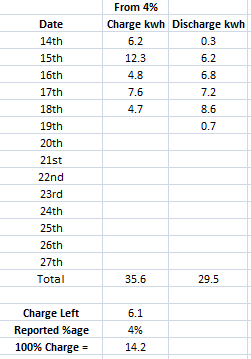
This BMS is so much worse for me than the previous and I don’t know which numbers to trust.
They haven’t fixed the low solar charging problem and I think it’s worse than before.
Gradually over the past few days I’ve been getting less and less reported discharge. Discharge in home assistant hasn’t been close to 13.5kwh since the upgrade and on BMS 8 is was pretty much always there. The highest reported value I’ve had from HA is 12.8.
BMS9 for me is worse for tracking than 8 was, first 4 days without discharge doing the in and out math I should have had 6.4kwh left, I shoulda just stuck with 8 forever like I said I was going to.
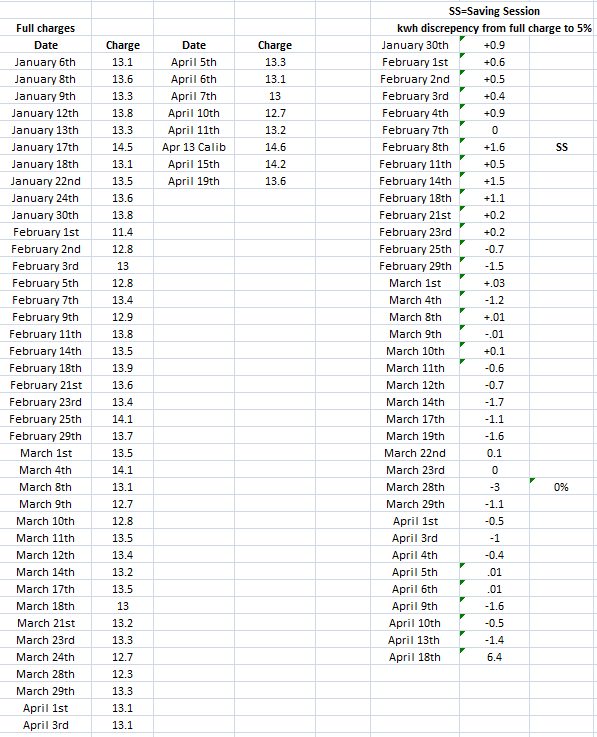
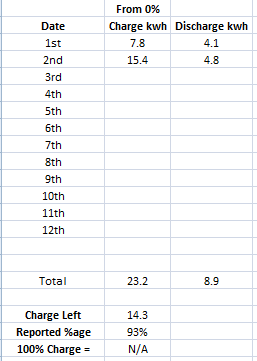
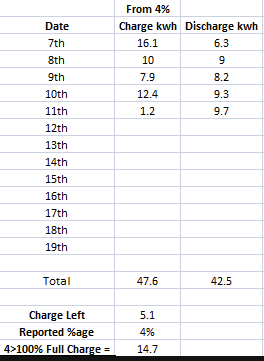
I didn't include the discharge after the calibration as it would have been more skewed as usual and I marked the calibration was a calibration day for the charge.
Looking at the comments on V9, I'm not impressed. Wondering if you guys are reporting the issue to GE. V8 is fairly stable from the soc drops point of view but certainly doesn't cope with solar charging.
I’m tempted to go back to 8. Yes it has the solar issue, but it’s worse in 9.
At the moment not getting 13.5 isn’t a problem because of some solar. If it starts the be an issue I’m downgrading.
But I do like the sub 200w solar reporting.
Well if this is anything to go by im losing 1kwh of battery every day I don't fully discharge, last time I was into 6th day and should have had 6kwh left and this time I am into 3rd and am 2 down.
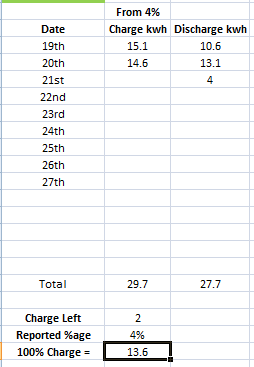
Really wish I had stuck to my guns and stuck on 8 but was hearing good things and better solar tracking.
Worried 9 is going the way of 7 even for me with no solar.
Ive maxed capacity 4 times since upgrading 13.5, 13.1, 12.6 , 11.2 going down each time...
Im going to see how much gets loaded tonight and will call to go back to 8 if this carries on
nvm I think I messed up
Not very happy either 🙁😡🤬
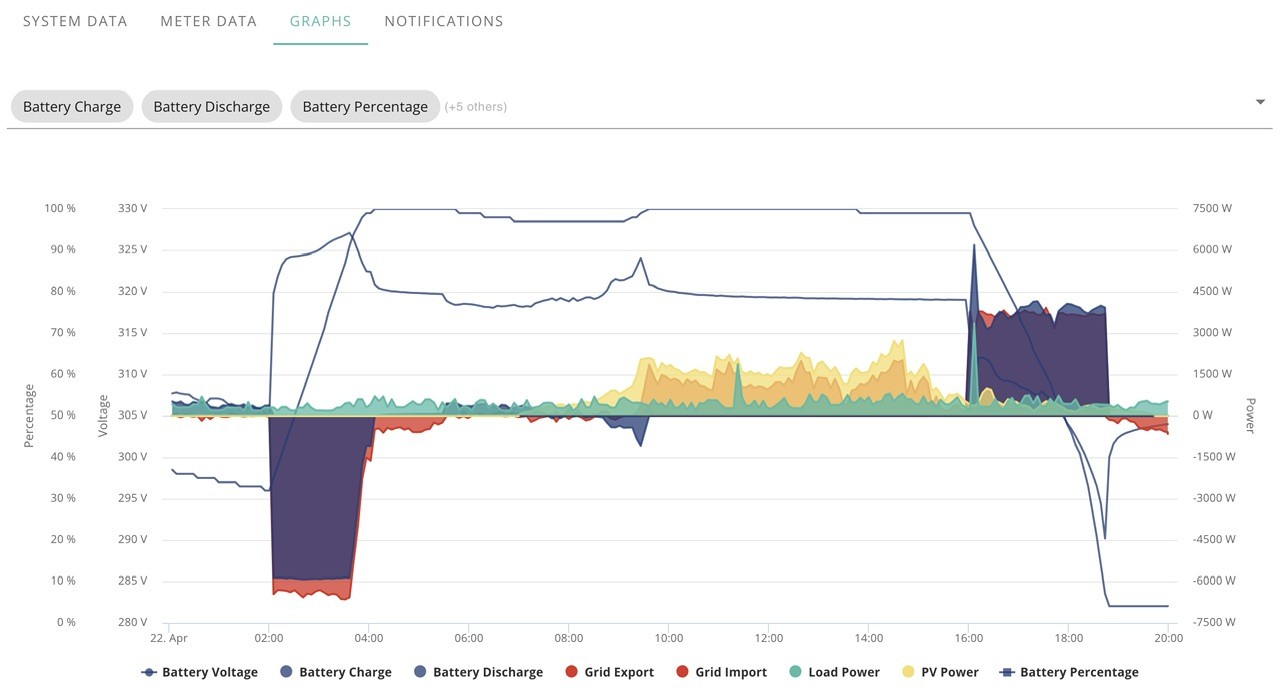
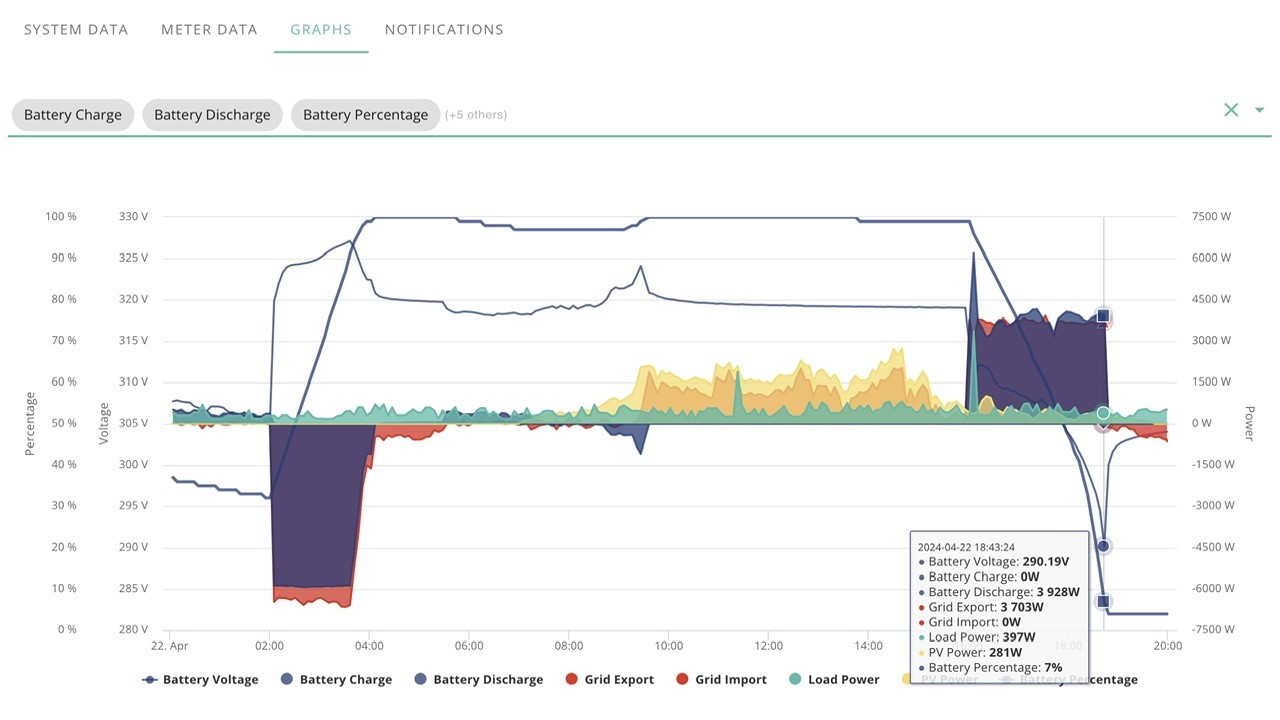
Battery at 100% most of day, discharging at 16:00 and flat before 19:00.
Vestas OpenJDK
I think you'll find Java is far from dead these days.
https://pypl.github.io/PYPL.html
Icarus Commercially dead is what I meant - everyone is bailing out as fast as they can due to Oracle imposing huge increases in licensing fees last year.
You now have to pay an "employee metric" fee, so in short if you have 100 employees and JDK installed on just one machine then you have to pay a fee for ALL 100 employees, regardless of whether they ever use JDK or not and regardless of how many processors are in use*. This effectively increases the cost of a licence to £10 per employee per year from something like a quid or so.
Oracle sales are pursuing companies VERY aggressively and basically if you have Oracle Java anywhere in your company then you are screwed.
*up to 50,000 cpu cores then you need a REALLY expensive license.
Daveb01 It looks like you were discharging at 4kw ish, so 3 hrs =12kwhr? Or am I misreading the graphs? What I found is that if you are pulling out at that level near the end of the charge, the system will react to the battery voltage being low and you don't get the full capacity. Mine when doing this, then floats back up voltage wise to maybe 7 to 8 volts above the cutoff point. Still on V8 though.
When it does a calibration discharge, I noticed it tapered off the discharge load at the end to (hopefully) obtain a more accurate end point.
Vestas Agreed.
I used to work for a company that went though considerable grief switching to OpenJDK and becoming database agnostic, thus removing dependance on Oracle products and improving the bottom line. They were also very careful about 3rd party code usage, disallowing anything that might be LGPL based, since it is far too easy to accidentally infringe license conditions in a commercial environment.
Just a quick update on my status - not sure if me grumping has embarrassed it but last two days Ive gotten 12.6 and tonight 13.1 - the only change was I put the recharge down to 4k so lower like I had initially (3.1) when I went onto 9 (Id changed it to 6k last week)
Midnight
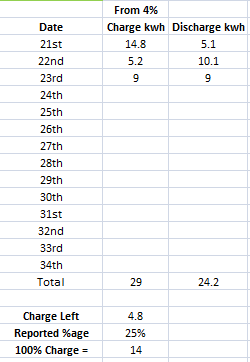
Little off on SOC compared to whats being reported left.
Edit
WHAT THE HELL
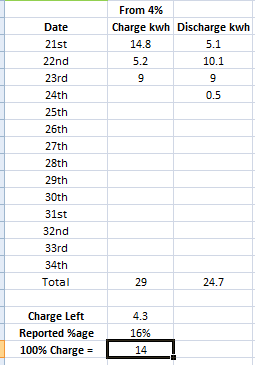
Its like im back on BMS 6
EDIT
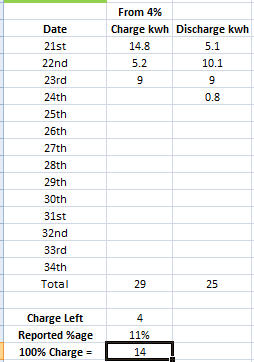
Its gone down another 2% SOC but still on 0.8 for todays discharge
This is 1kwh worth of discharge, nearly 20% for 1kwh
EDIT
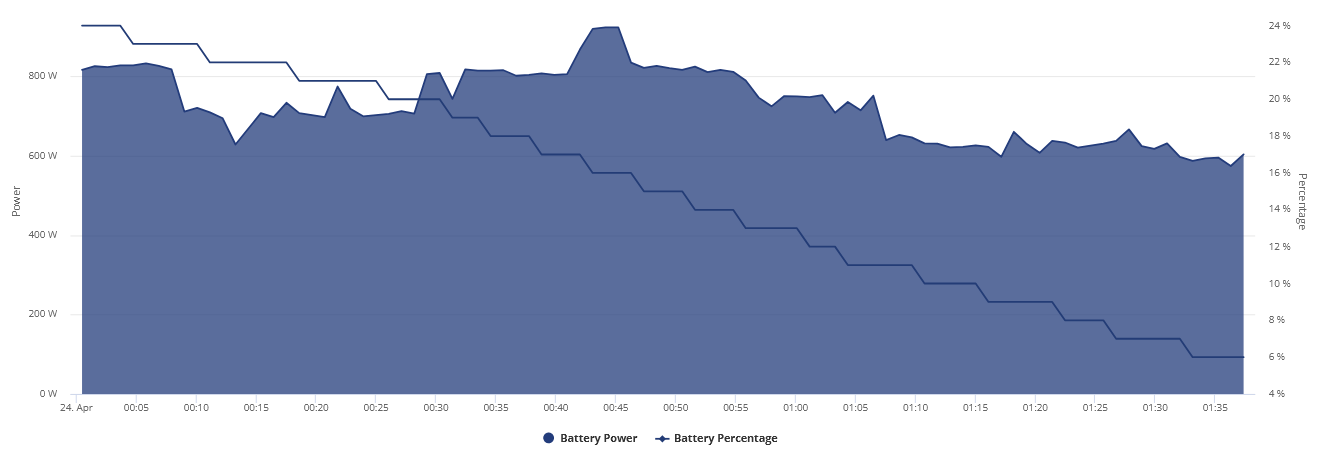
Finally result and results of previous empty discharge readings.
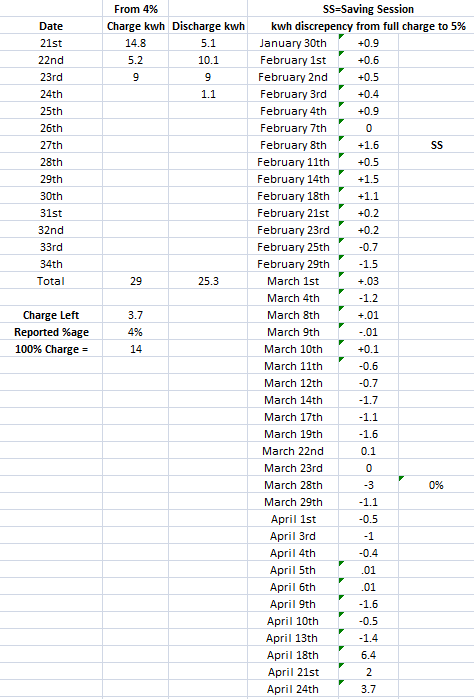
Kinda tracks with my losing 1kwh capacity per day I don't fully discharge
I wonder if Dragon knows exactly what version of BMS8 I got before as it wasn't released for a week or two after I had it to everyone else.
Jellybaby I think that the loss of capacity is from it losing the upper charge limit as mine tops out at 100% at gradually lower voltage. So your battery is not full, hence less capacity to empty. Still on the released V8. Seems to correct if emptied and then recharged at around 4.6kw. Fluctuating solar top up causes it. Conclusion is that the firmware can't track non linear charging accurately.
Ultima357 Charging has not changed one bit since last year, this has been charge/discharge numbers on top of what what the empty results are.
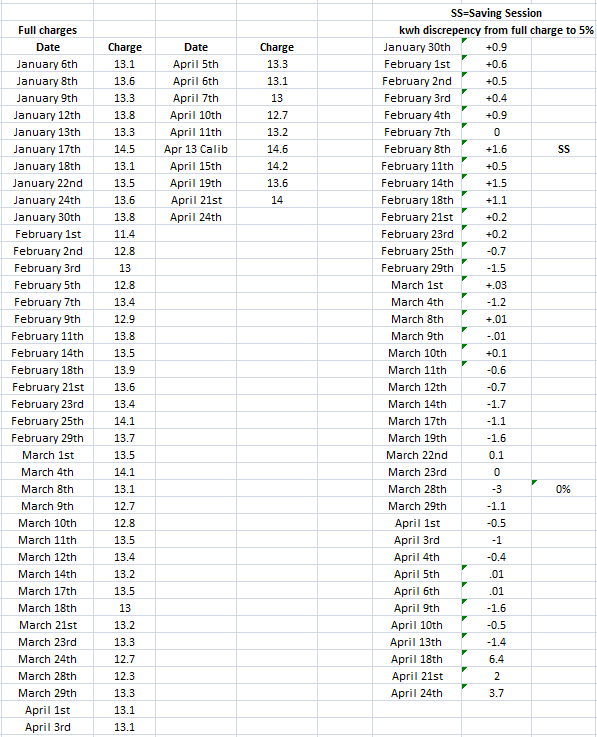
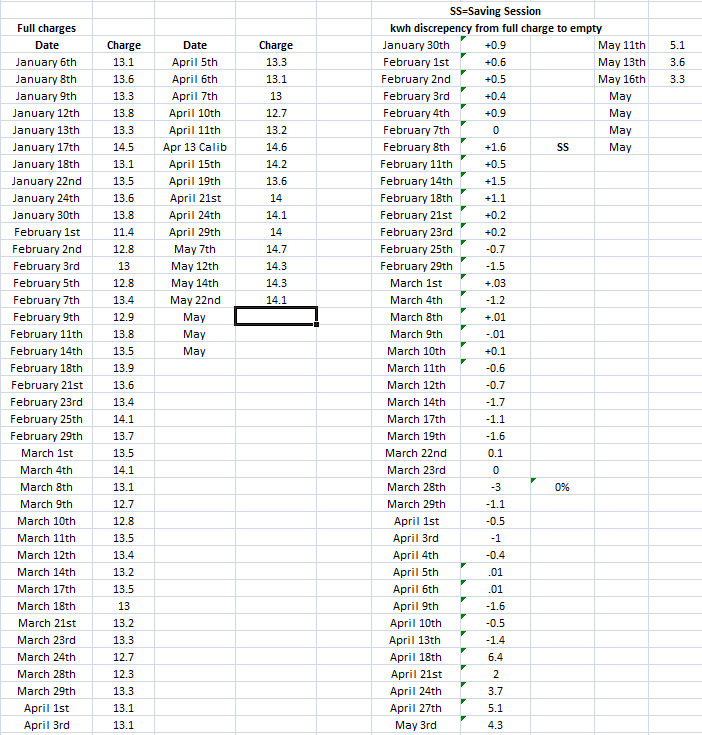
For the most part its pretty consistent, until BMS9 ive had +6, +2 and now +3.7kwh.
+/- 0-2 is the typical norm, +6 and nearly +4 is a joke which indicates its just like BMS6 where it keeps forgetting where the floor is til its discharged.
hahaha I went back to the month after my system was installed to check the consumption data to see if I could pinpoint when it started going backwards
JasonF so I got 13.7kwh total discharge, 12.7 usable. This is with putting 14.1kwh in. With BMS 8 it was always 13-13.5 usable and I charged and discharged at a higher rate than I do now.
The only real difference is intermittent low solar charging.
I just don’t understand how it can be so difficult. I have a Tesla, and when I put in a route and it tells me how much battery I will have left when I reach my destination, when I get there I have that much battery left.
I really wish I’d waited and got a power wall.
We’ve all been complaining about this for so long now, in reality what can we actually do about it? They can’t just get away with this shit.
JasonF Don't forget you will have loss to build into that - mine took in 14.2 last night and I got 12.9 back.
Not sure Id go that far with the powerwall argument - If id of gone that route even with an average of 12.5 out the AIO battery the cost per stored w would still be cheaper than the power wall at the time, and its on old chemistry
DreadorUK those numbers include that. Total discharge was 13.7 but I used 12.7. I put 14.6 into it in total but 14.1 made it in as usable. (home assistant gives the numbers separately so you can see what’s going on)
My point is on BMS8 I was putting 14.2 usable in and consistently seeing 13.5kwh discharge with total discharge showing 14.2. It was working so well, I only ever saw it fluctuate max by 0.5kwh.
Odd, I don't ever recall it ending up on initial charge amount before after the same day let alone on the second day
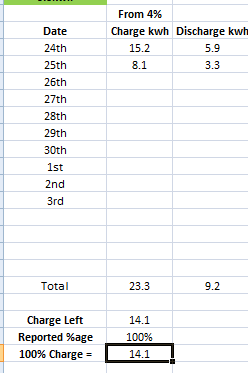
I might request to go back onto 8.
Just wondering if anyone has actually measured the accuracy of the built in monitoring? EG, How accurate are the figures it reports. Not sure, other than putting in some fancy piece of measuring kit how exactly you'd do it. I guess the normal mains meters are pretty accurate or maybe the din rail type, but you'd need a pair to get ins and outs if they can be put in circuit and don't mind reverse flow?. Old style spinning wheel type used to reverse, I had one for a couple of years on my first PV system which was great :-).
Ill be honest I trust them as far as I can throw them as we all seem to have a random number generator thrown in the mix every upgrade I never had over 13 in anything but 9, Jason is getting less now.
The only figure as such that I do trust is the import to battery data, Ive fixed it speed of recharge and I know when it stops stops charging so I can use that stop point in hours x rate of charge to see if its ball park okay.
My two penny worth 😀
I think GE have sorted the charge and discharge fully, e.g if you charge at night, hold the charge and discharge at 16:00 - 19:00 plus the rest of the night it work fine.
It also works if you charge at night and discharge to home during the day and evening back to 5%
What I am seeing is any charge before it gets to 5% e.g Solar or (if your on Agile) and a bit of discharge in between, then it is a Who Knows (not even the battery) what the SOC is. So that part still need fixing. So don’t think the version will make much difference v8 or v9 seems to do the same thing, but v8 seemed to be a bit better.
oh there is no chance in hell more has gone in than what went in during full charge, if the charge left is more than +3 when this battery discharges I am going back on 8.
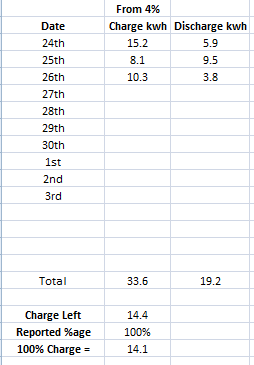
Daveb01 yeah I don’t know of they change how something is measured but the discharge amount in home assistant on v8 was always 13.2-13.7 on v9 it’s now 12.5-12.8 and the charge amount in has remained the same.
I guess if it’s reporting I’m putting the same amount in, but getting less out, then I can’t actually be getting less out or it would be putting less in.
I do pretty much agree with your summary though. If you fully charge and fully empty it’s seems to behave better. I only have a small solar array so the minute a tiny bit of charge touches the battery from solar that I’m not using (max like 100w) it goes wild.
I’m super happy with the change to solar tracking, but v8 was definitely better.
Main thing its not V7 I ended up getting only 5 kWh out of it near the end and yeah charge times mirrored that so I know I was getting less.
DreadorUK oof dont remind me, I got two flat to full charges in a few hours of 1-2kw production, total kwh into battery for 2xflat to full charges was 3.6kwh, after it got to 100% after 1.6kwh I force discharged then let it charge again lol
EDIT
Found it lol
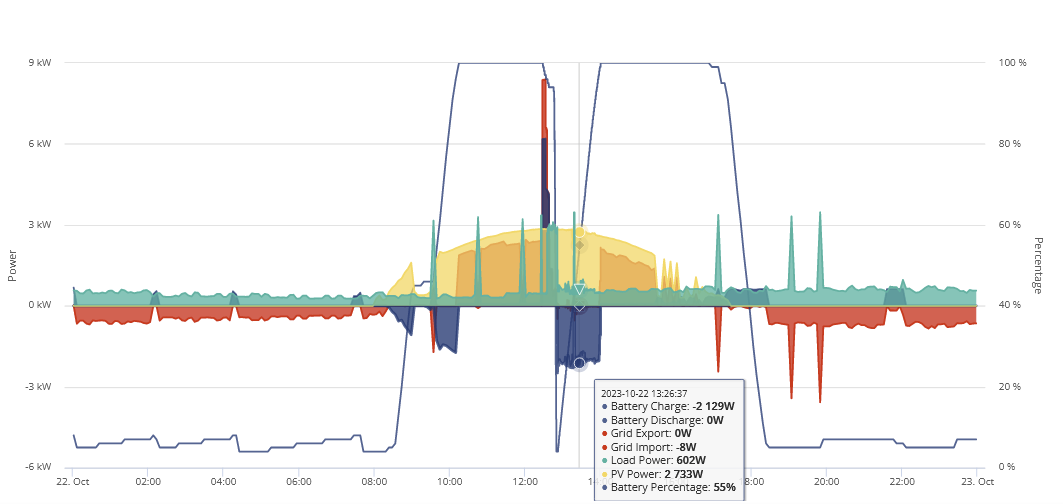
This was the first charge
This was the second
I just let the whole system idle until I got onto the BMS8 tests lol
Yup, definitely going to request going back on previous BMS I had
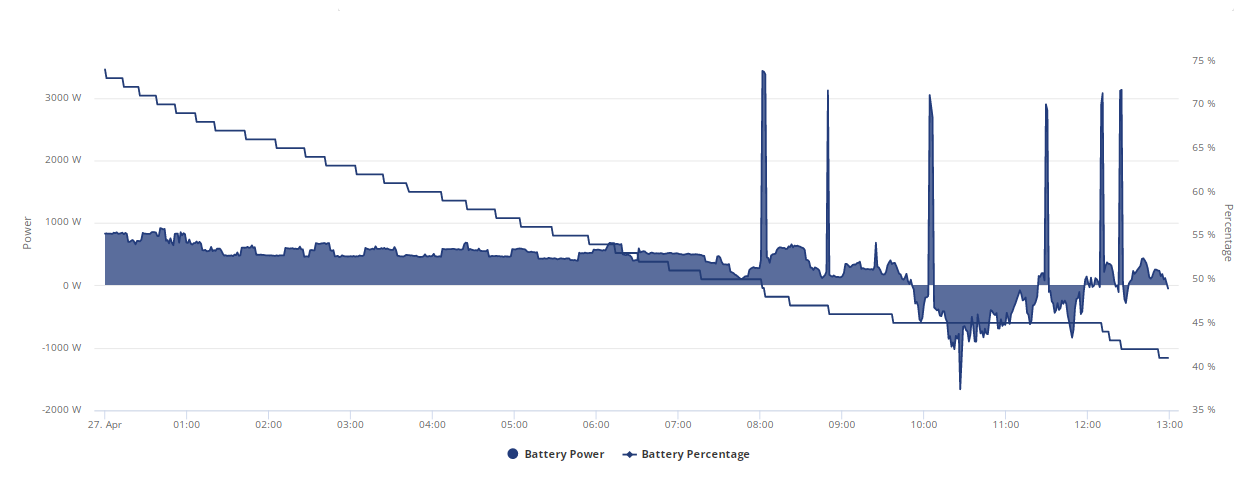
Twice kettle was boiled and solar charging battery for ~ 2 hours and it stayed at a flat %age.
I am as paranoid about the unpredictability of this BMS version as I was 7, whilst BMS8 was still out on the SOC side at least the in/out was a lot more predictable and stable at +/- .5-1.5
This is the worst I've seen it so far, 10% to 100%
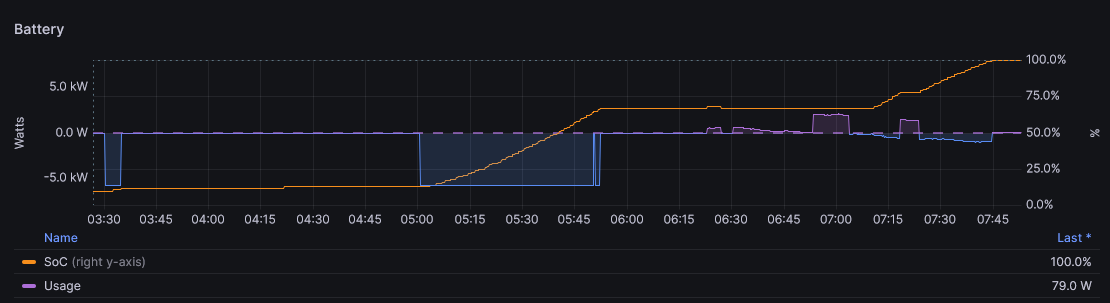
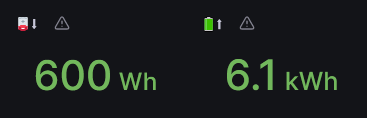
discharged 600 Wh and charged 6.1kWh in this period
so 90% = 5.5kWh according to this
at least around 2kwh off currently
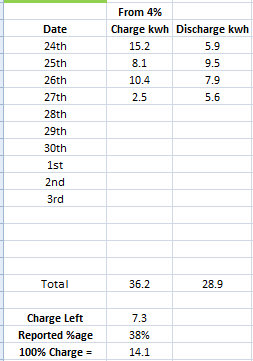
These releases seem rather like Windows, one good followed by one bad. V10 will be along soon?
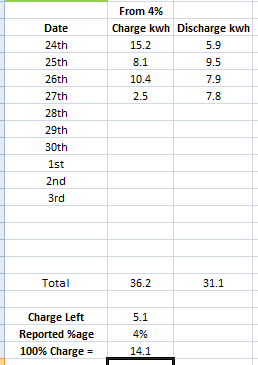
Here is track record, see if you can tell when first entry of BMS9 came into play lol
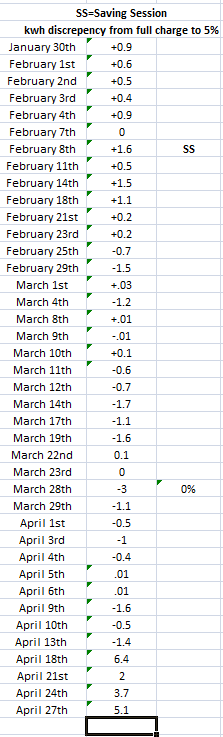
I am really hoping going back onto BMS8 I go back to how it was before, I could at least rely on the math +/- 1kwh
Daveb01 Could very well be, will find out tomorrow, going to give them a ring to go back. Should have some solid info by end of week as it looks like a crap week lol
It seems like it was replicating the BMS6 issues where it kept forgetting where the floor was til it fully discharged and god knows how I got more kwh into the battery AFTER a flat to full charge than what the flat to full charge was.
If it still happens I will request to go back to inverter, what was it, 609?
I knew I shouldn't have tempted fate.
Are we able to keep the inverter update for the solar and just roll back the battery?
The thing that’s really been bothering me is how my battery can keep telling me I’m putting in 14.1kwh but the discharge value is like 12.6 when previously they would be similar.
It seems that somewhere in the update they changed or broke something. The portal agrees with the 12.6 number…but the app does not it shows a higher number.
I created my own sensor in home assistant to take the the “battery to home” and “battery to grid” power values, that’s what’s the battery is physically discharging. And that sensor shows a number that is much closer to what the app shows for total discharge.
Yesterday I put 14.2kwh into the battery and this sensor shows I got 14kwh out. While the “discharge” number in the portal and reported to home assistant showed 12.7kwh.
It’s a 16kwh battery, yes they reserve some at the top and bottom for battery life but that should leave about 14.8 kWh total left which should give us 13.5kwh usable. But they’re miles off.
Ahh okay so no overlap if your forcing discharge

Batteries lose energy as heat when charged and discharged due to internal resistance and perhaps other loses due to chemical processes, so you will never get back the energy used to charge them back out again.
@DreadorUK Called up, second line the chap on phone spoke to wouldn't let them downgrade, they reckon it could cause more problems that are worse than losing 1-2kwh of capacity a day til it fully discharges.
If I go back to BMS8 at some point and it goes back to how it was before I will never ever EVER bloody update again.
I can't believe I broke my number one rule of technology, if its working LEAVE IT THE **** ALONE.
Jellybaby Crazy world of GE's inconsistent firmware.
Apart from a small issue where I panicked and thought 9 had turned into 7, 9's been consistently the better upgrade.
I just need to retest to see if my wobble was due to charging at 6 kWh over what I am now which is 4, but as Octopus still havent sorted my export Im not in a rush to change it.
DreadorUK with longer days and sun the AIO doesn't get low anymore but it didn't on BMS8 either and it was absolutely fine but you can see the drastic changes after BMS9 was applied, they said they had not had any reports of this either, I sent along my spreadsheet with all the info on dates/amounts and managed to undo changes in spreadsheet enough to show that more went into the battery on the third day than what the flat to full charge put in.
Thank god I keep excel sheet open 24/7, I did save before I went all the way back though so had to close and reopen but they got all the info.
I am tempted to have both inverter and bms downgraded at same time and pray its like I never updated.
JasonF Jason
I do still sometimes get the lower figure in mid to high 12's its just on 8 that lower figure was 1 kWh lower so 11.5-12.5
And I still need to see if its running at 6kWh that caused my downturn on 9 as for you peeps with solar thats not going to be unusual an occurance, unless you're export rate makes it so you don't charge with it.
I've got to the point where I'm no longer sure what is the best way to monitor the capacity of my system as I don't often run the battery below 10%. It would be useful (for me, if no one else), if we can identify how we are measuring our battery capacity so we can make sure we are reporting consistent information and allow easier comparisons between our systems.
The Black Cat Charge in/out after a full charge is what I do.
Like so, this was last night and again it seemed to put more in that a flat the full charge
Well still on V8. Overnight it dropped from 100% solar charge to 61% this morning on a circa 3.5kwh discharge, down to 313v. Today, it has been charging since around 6am, now standing at 322 to 323v after 3.24kwh input and still says 61%. Go figure.
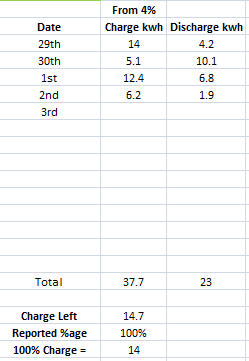
Funny how the kwh left math keeps going up day by day -_-
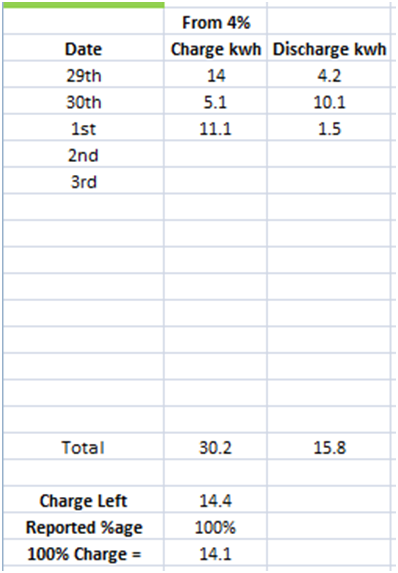
Jellybaby Well if I'm reading your figures correctly, from full on 29th you discharged 4.2 and then topped up with 5.1. So difference is 0.9 and as a percentage of charge is 17.6%. Next day 10.1 vs 12.4 gives 18.5%. The last one is negative as you put in less than out. That's if I'm interpreting your figures correctly.
whelp, Home Assistant data is completely useless for any type of info because the piece of crap hardware keeps going BACKWARDS ON THE DAMN CONSUMPTION DATA.
I know of a couple of people that have this issue and honestly I never paid much attention, wonder how widespread it is and if its just the AIO's atm
I am letting the battery run down overnight see how low it gets and how far the kwh/soc drifts, got things set up and will go from 7pm last night.
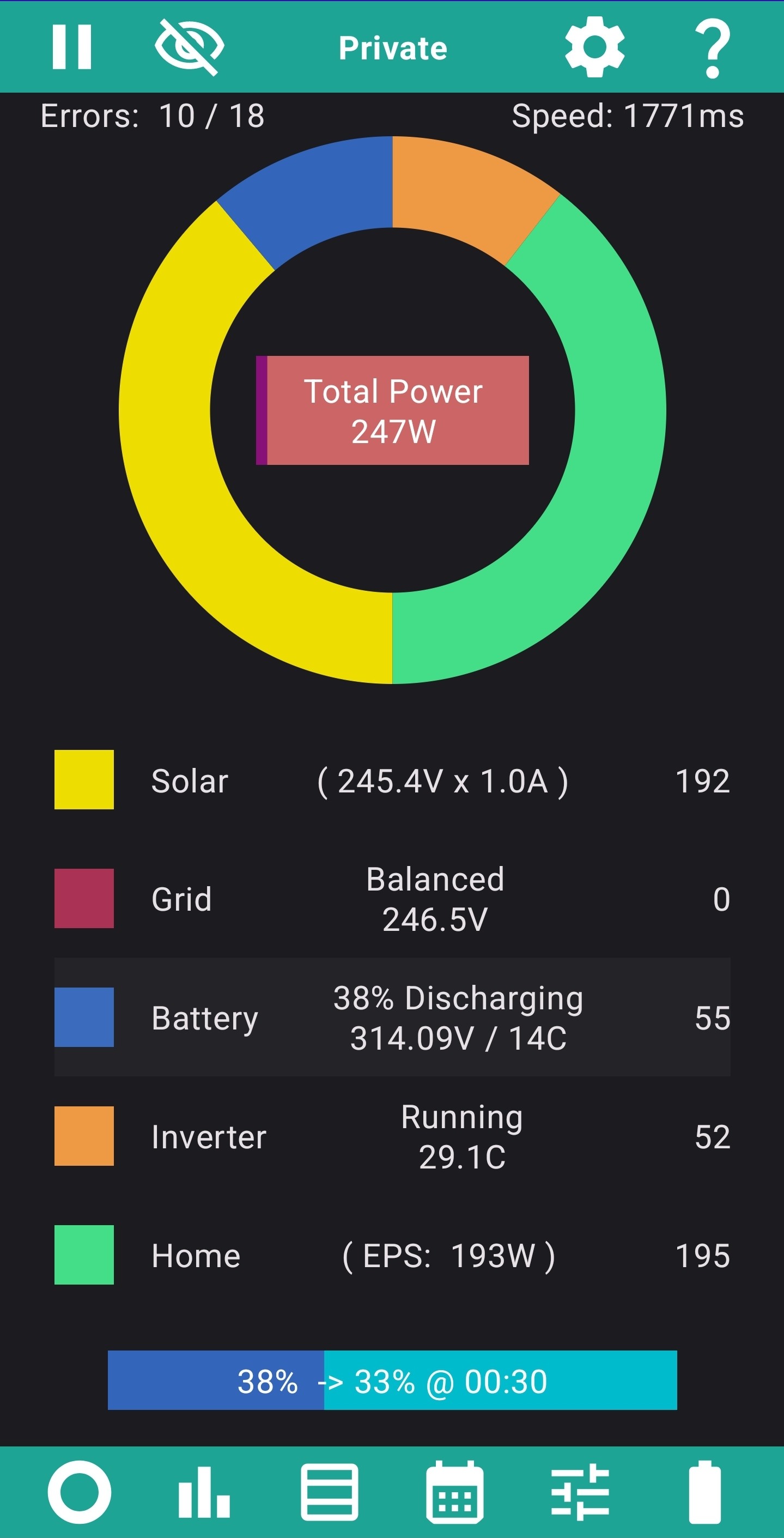
The solar panels are producing 3 watts less than the house demands. So the Battery is discharging at 55 watts to provide this shortfall. This means when discharging the System can be as low as 5% efficient
Whelp, it got to 0% and supposed to have around 4kwh left, something is seriously wrong with this bms for me
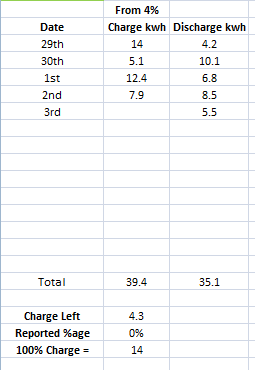
It went from 10% to 0%
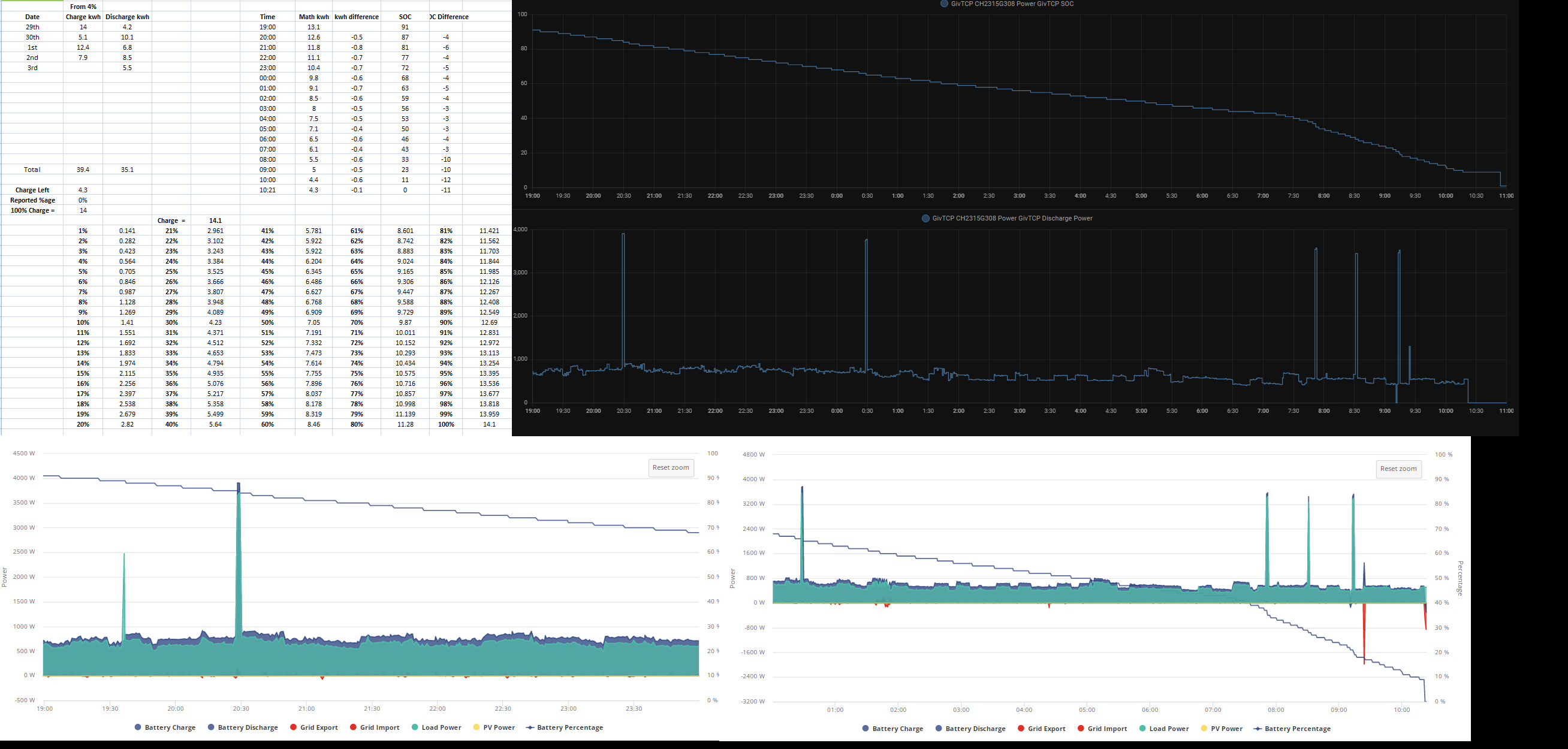
I know BMS8 wasn't perfect but it was sure as hell a lot better than this and with +/- 1kwh the math was pretty solid
Right, put 9.3kwh into battery from 0%, went up to 60% but old 13.5 readings I was going by says 60% is 8.1 and the 14kwh that has been going in since the dumpster fire that is BMS9 60% is 8.4.
Anybody got a time machine I can use to slap myself silly for thinking about updating and prevent me from doing it.
Jellybaby this is what I mean by they did something that changed the numbers.
I don’t know how to know if there is an issue since mine is reporting 14.1kwh in every night but only 12.x out. So the charge minus discharge just keeps increasing all the time.
It’s all a sodding mess, and I too wish I’d stayed with BMS8, it was working so well.
JasonF If I get to a BMS that behaves like 8 did I am not leaving it ever.
I am also hoping they look into at least the AIO units consumption numbers keep going backwards, despite every single day being the same I cannot get anything close to consistent readings this was a snip I took yesterday.
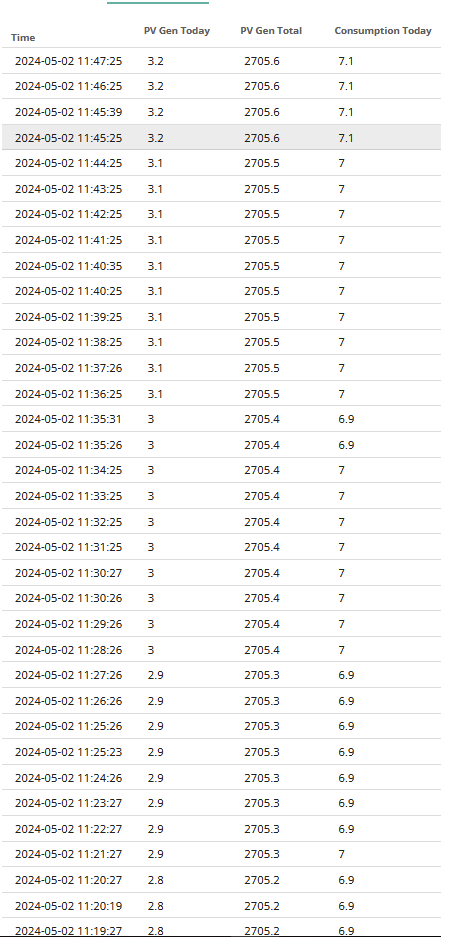
Right this very second home assistant for 23:00 says 14.7, portal at 23:01 says 14.5
This is the first time ive been unhappy with the system since BMS8 went on, was absolutely horrific up until that point but BMS8 made it worth it, math was reliableish, was having no comms dropouts thanks to dongle software fix (unless netgear network switch needed power cycling) but the better solar tracking below 200w was what got me.
Edited
Jellybaby
Just out of interest, I had a look at my own data around 11:45 on 2nd May - to compare with yours.
Mine also shows the up/down/up consumption around the same time.
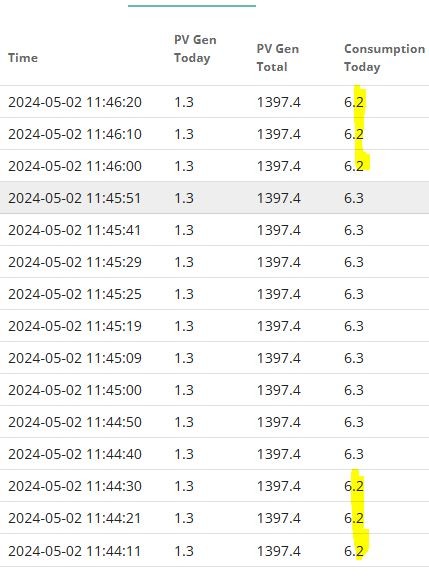
I wonder if this is some kind of rounding anomaly on the web portal?
I've managed to download all the data for April into a spreadsheet.
I'm going to try and spot a pattern of when the anomalies occur - but I won't hold my breath trying to find what will probably be a needle in the haystack.

Is it when your battery has idled for a little while and recalculated SOC? Therefore readjusts totals around (assuming battery 'today' values also change?)
@Jellybaby I've already discovered a gap in my data. On days were there happen to be a large number of samples (in my case 2024-04-26) the API invoked when I click "Download Data" fails:
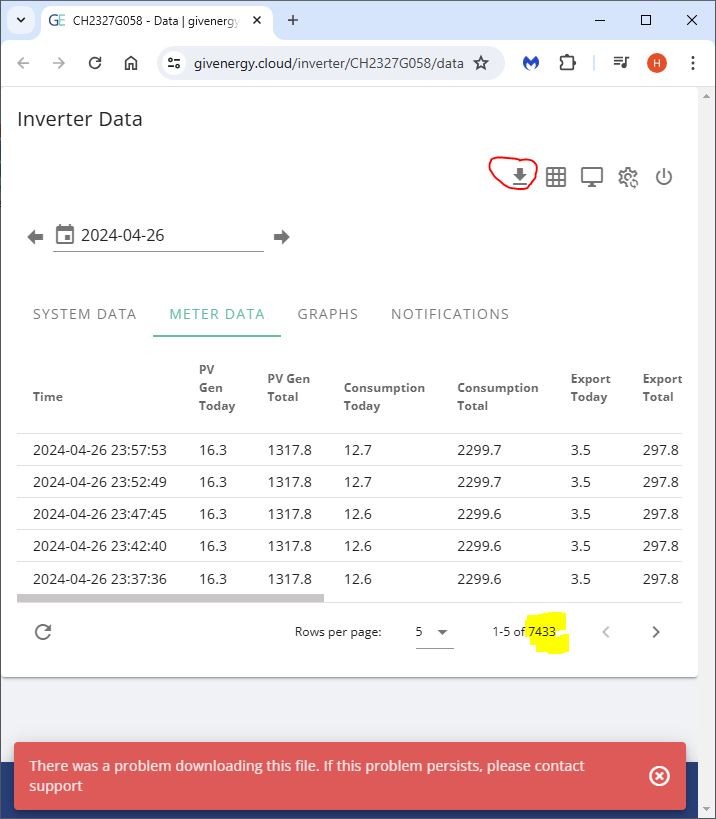
The plot thickens!
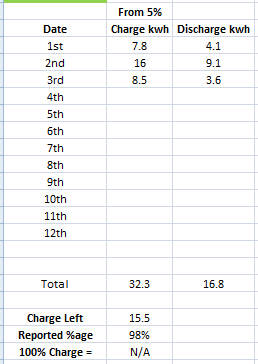
LOL, looks like my All-In-One got an upgrade last night.
EDIT
Finally finished,
Have a look at this as quite a lot of new things for v9 compared to v8, some of this may need tweaking for v10 to sort out the Solar charge during the day.
BAAA0009 (15 mar 2024)
firmware changes:
BAAA0008 (07 Dec 2023)
1.CCS battery module compatability
2.Change the SOC estimation logic (Correct SOC issues)
3.Solve AIO can't force discharge
4.Solve AIO can't switch off (Cell balancing function)
5.Change the duty cycle of balance to 50% (Cell balancing function)
This was whilst the tumble dryer was on lol, still went backwards. 0.2kwh discrepancy between portal and home assistant
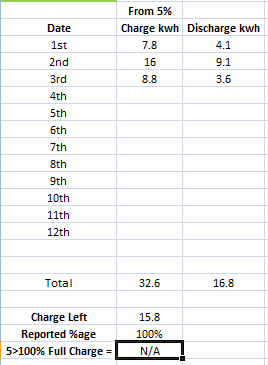
So far its been exactly 1.2kwh behind where it should be kwh wise when comparing SOC, going to be interesting to see if it tanks really hard from this point onwards like it usually does.
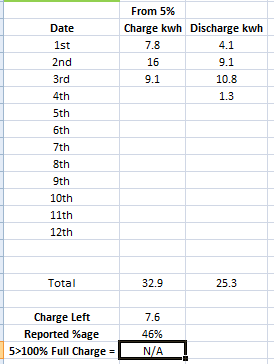
EDIT 06/0524 11:33
Left it to run out again, never charged from grid after initial days around 8kwh charge.
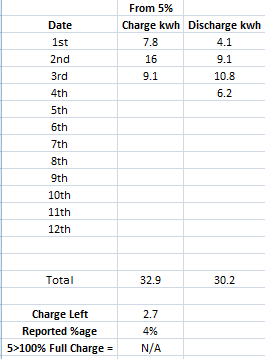
Not a flat to full charge, still not happy with the reported kwh left considering it was discharged straight away with no second charge.
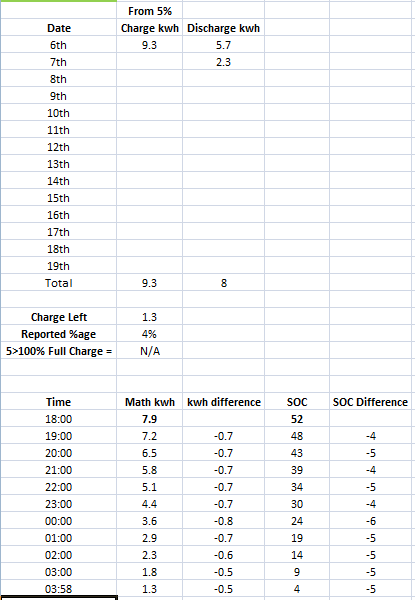
Its doing something hinky that it didn't on the previous firmware, including putting more charge in the battery than should be possible.
Charged for 30m 2.9kwh at 04:30-04:59 (end time always seems to run 1m late) to get past the 20ppkwh 2h period.
After that battery discharged 1.2kwh before sun came up
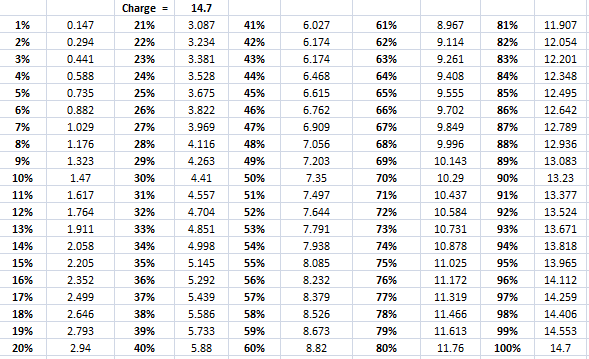
Here is reported charge overall into battery with the 1.2kwh discharge in mind and im basing this off the consistent 14kwh charges that had been going in from 4%>100%
11:53 9.4kwh into battery, reported %age 61%, 61% should be ~ 8.54kwh
12:31 11kwh into battery, reported %age 70%, 70% should be around ~ 9.8kwh
13:06 12.3kwh into battery, reported %age 80%, 80% should be ~ 11.2
14:10 14.7kwh into battery, reported %age 100%
had not long woken up and tried to keep 30 or 60m intervals but kept forgetting but so far the full charges and whats supposed to be left after is wildly inconsistent.
If I adjust the 4>100% (it goes from 1-100% based off that 96%) this is what I get
Another flat line soc today. Been at 75% for a few hours now despite 5.3kwh input from solar. 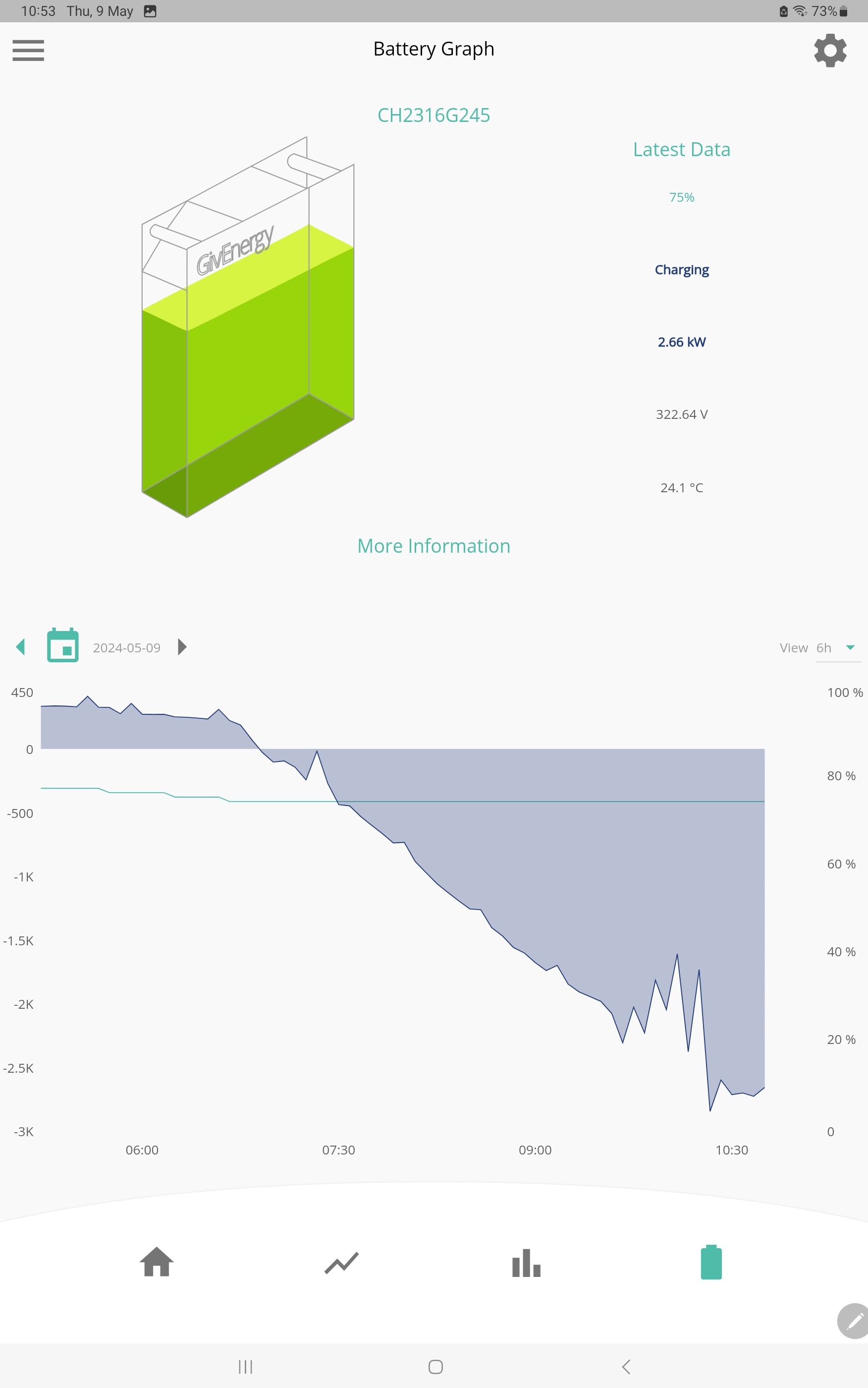
Well it just finished charging following my grid input in a free power window. 11.8kwh charge from 75% to full. Or in other words there was just a couple of kWh left even though it thought it was 75% charged.
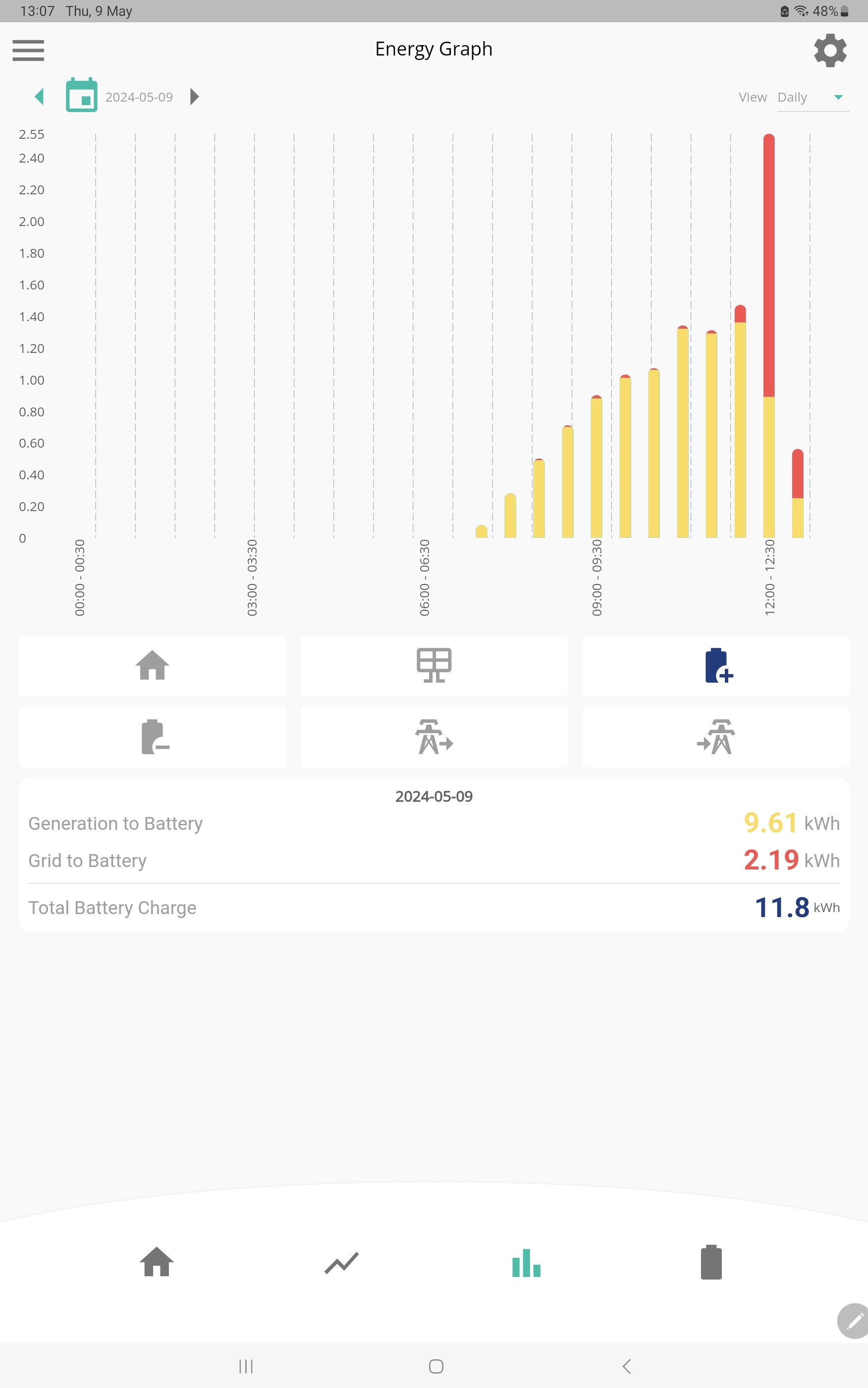
Same experience repeatedly here, Usually follows a larger overnight charge. Im using 2kwh out of the battery during the day yet last night over 8kwh was used to "top up".
I have been told I need to recalibrate, but as others are having the same experience, I think not.
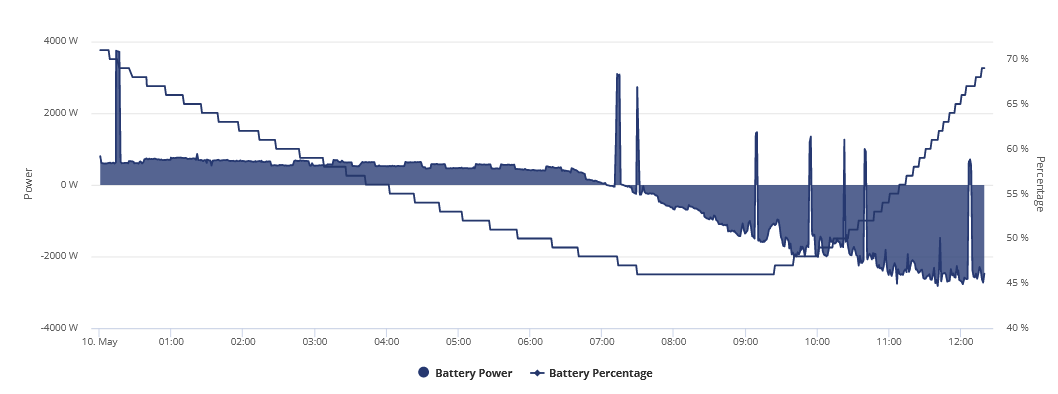
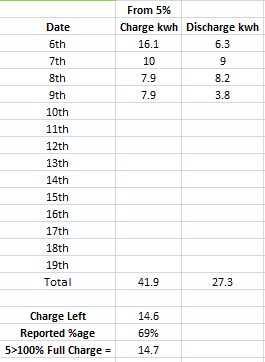
Whelp, this isn't right, 14.6/14.7 and 69%, this was from just before solar came online
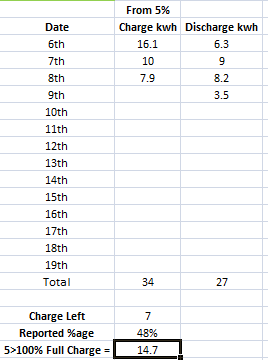
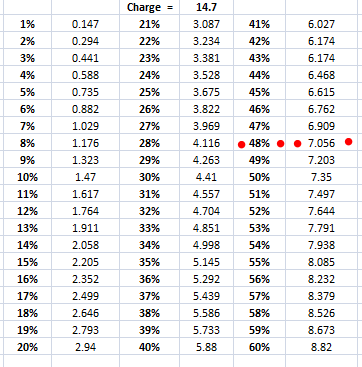
Around 40% is when the SOC typically tanked hard and id be left with a lot of charge that was supposed to be left.
EDIT
Just noticed the 6th shouldn't be there, I forgot to delete that date and move the rest up.
Current battery voltage status
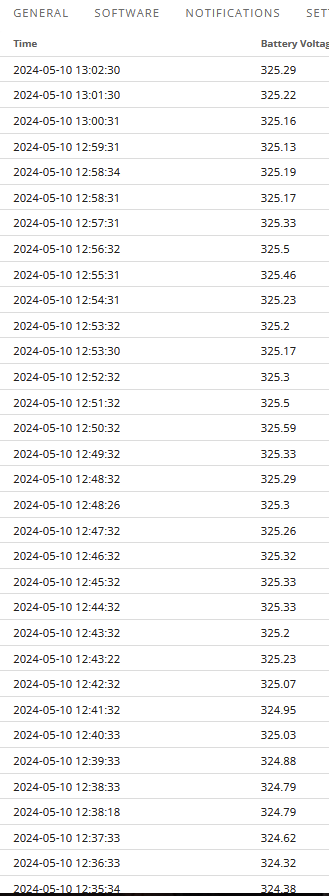
Basically not moving but soaking up all the solar, im torn between pausing charge and discharge and just running the battery down later tonight and seeing just how far over 14.7kwh it can go.
EDIT 18:55 10/05/24
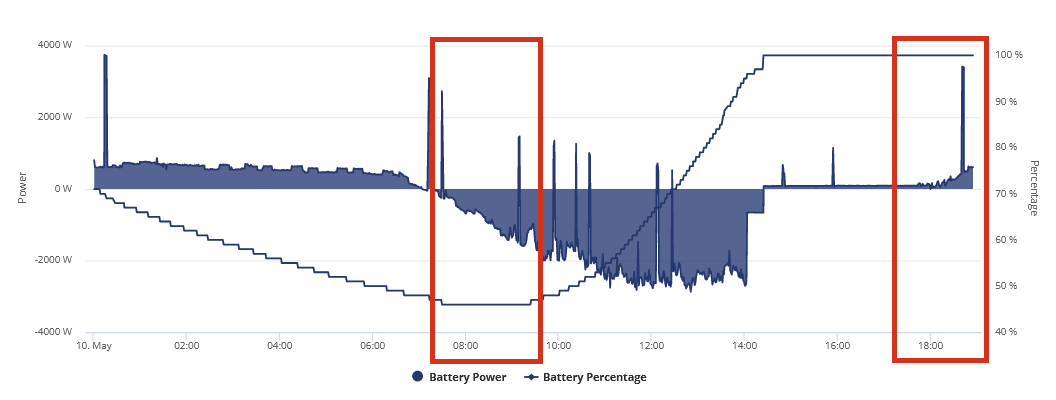
Can't say this is inspiring any hope in the system behaving, no SOC increase in first marked area and SOC isn't going down at all, usually it drops down 1% after a couple of hours due to slow discharge when reaching full.
Also first time ive seen it doorstep skip %ages like that since BMS6+7 from 97% to 100%
Currently letting the battery run dry, after it put in nearly 5kwh over capacity yesterday based on the math it discharged 3.8kwh up to midnight and I paused charging during the day (but still managed somehow to charge 1.3kwh) and up til now discharge has been 7.1 so overall 10.9kwh has been used and reported SOC is currently at 39% but at 10.9kwh based on 14.7kwh flat>full charge 39% is around 5.7kwh remaining battery so that would put the total so far overall at 16.6kwh.
Absolutely no consistency in anything atm and I just got to pray im not going to run out at any time.
EDIT
This BMS is even worse than 8 for discharging as well
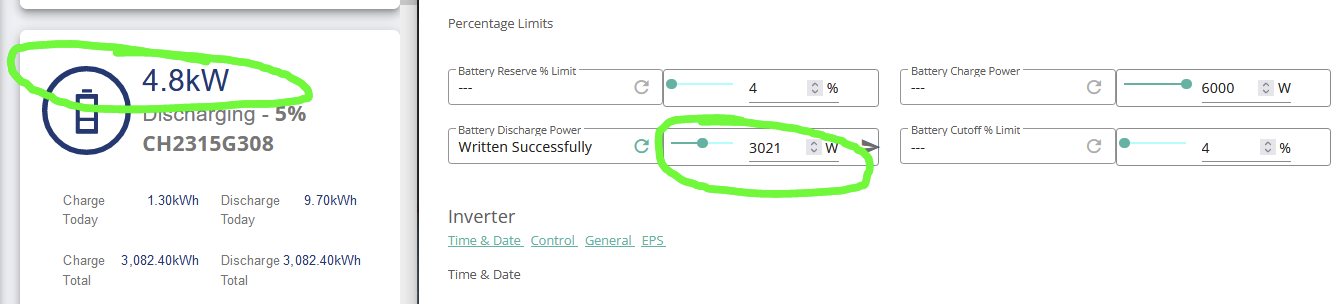
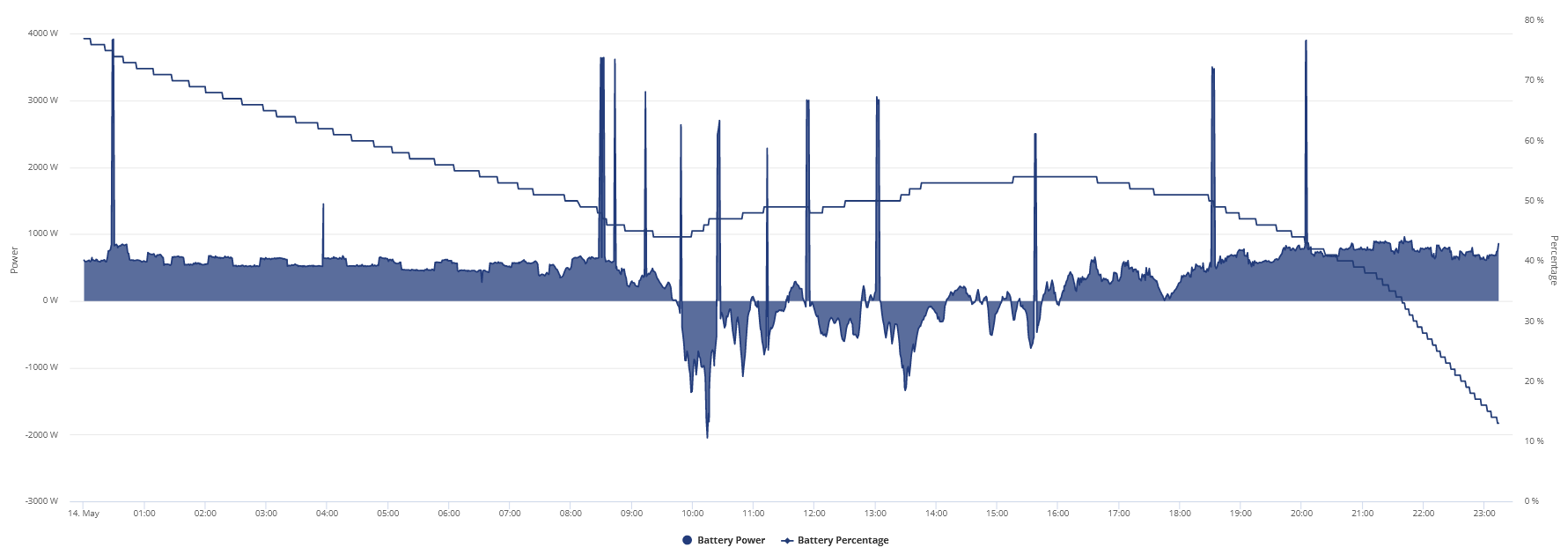
It seems it decided to reset itself at some point.
Gone down 7% for 0.3kwh, as soon as 40% SOC hits teh gap between what I should have left compared to the SOC grows very very quick.
This shouldn't be flatlining at any point given how much charge 1% SOC represents
See what I mean
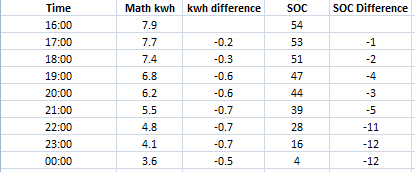
15/5/24 01:14
Its idle, what charge
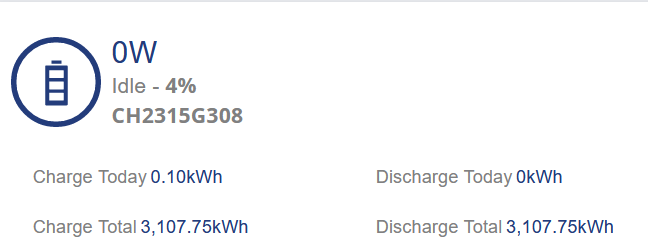
Fresh charge yesterday from flat and its flatlining already
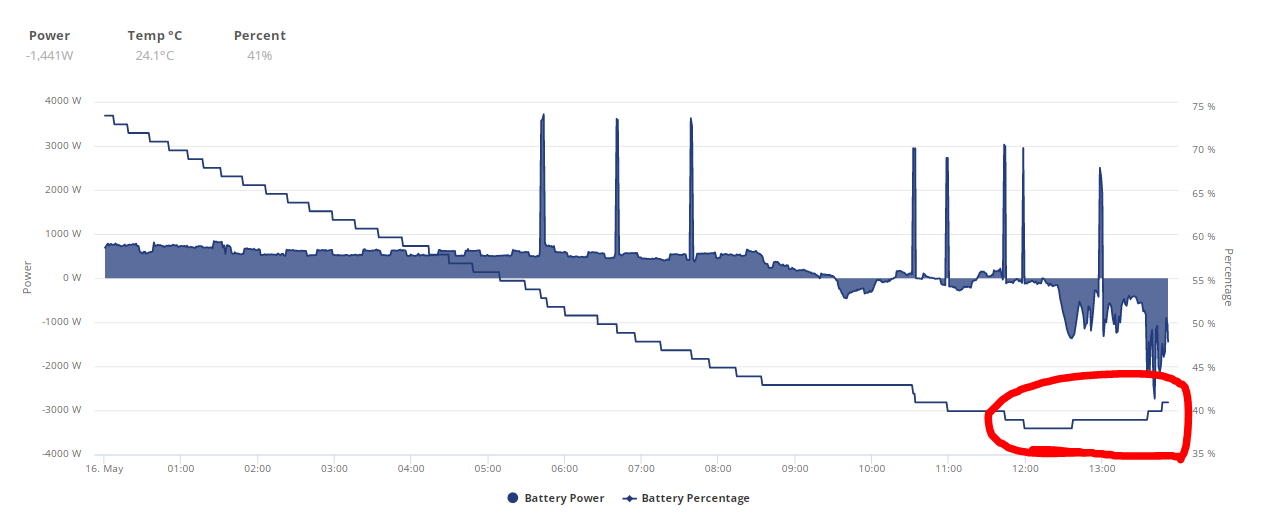
39% at 12:00 with only 0.5kwh going into the battery
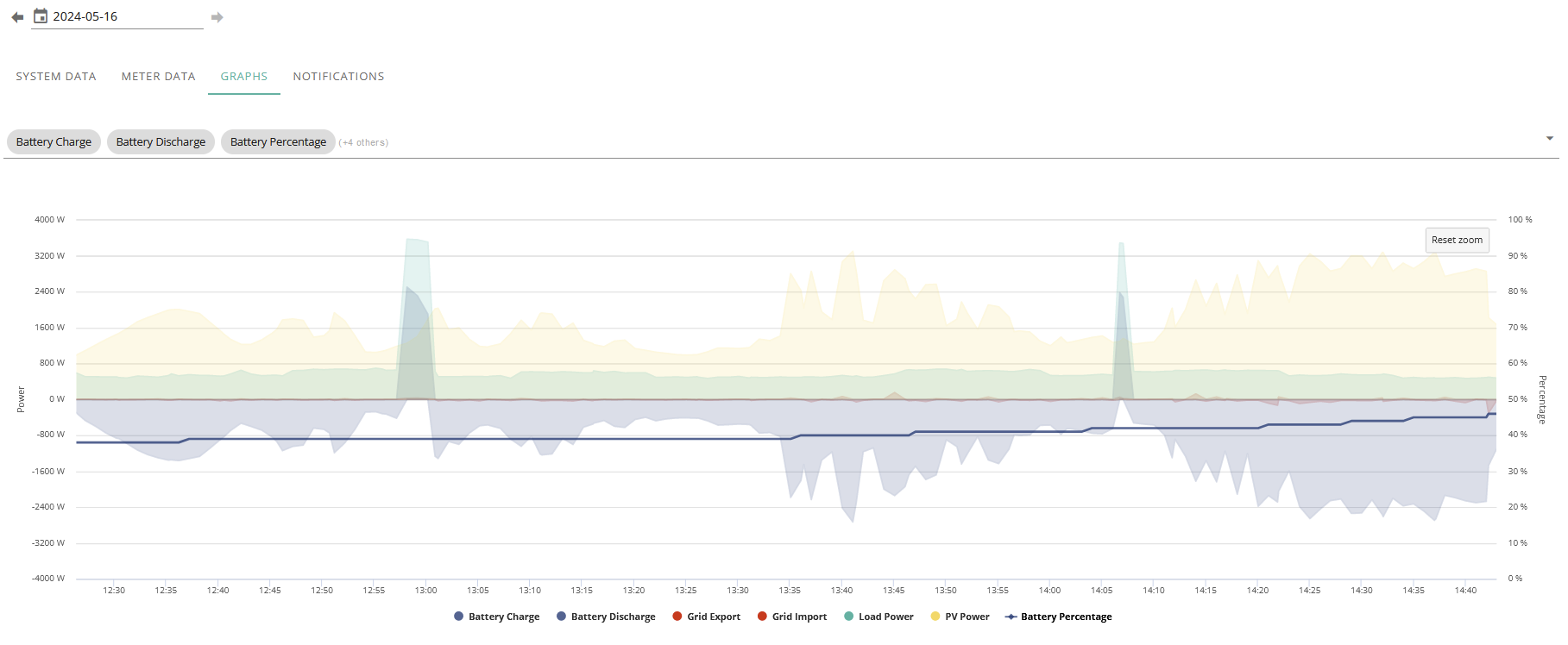
41% at 13:55 with 2kwh going into the battery
45% at 14:40 with 3.1kwh going into battery
1kwh is at least 7% based on supposed 14.3kwh charges going into the battery but going by the above 3.1kwh went in and its only gone up 6%, if my previous math calculation of it going 6kwh over what a 4>100% charge took im not going to export anything during the summer with BMS9.
They better hurry up with the next firmware.
Charging for an hour +/- 1kw and it doesn't budge even when kettle is used, can't rely on SOC, cant rely on the math anymore.
EDIT
It should be going up a lot faster in SOC than this
really, charged on the 15th, pretty much all but discharged on the 16th AND IM STILL LOSING OVER 3KWH, this is unreal.
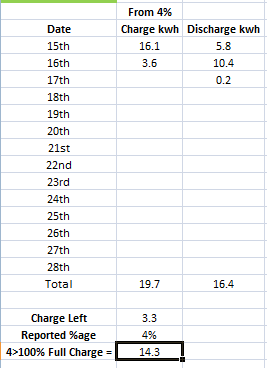
Think im just going to let battery idle til next firmware like I did with BMS7, solar should get me through 4-7pm fine, sick and tired of this unpredictability, at least with BMS8 I was about 30-60m off on when battery was going to die but 3.3kwh is like 4-5 hours.
14.6 put into battery via solar but 94%
Presently at 92% SOC after 1.1kwh from 100% discharge despite 2.5kwh going in......
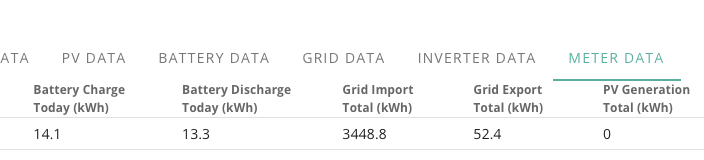
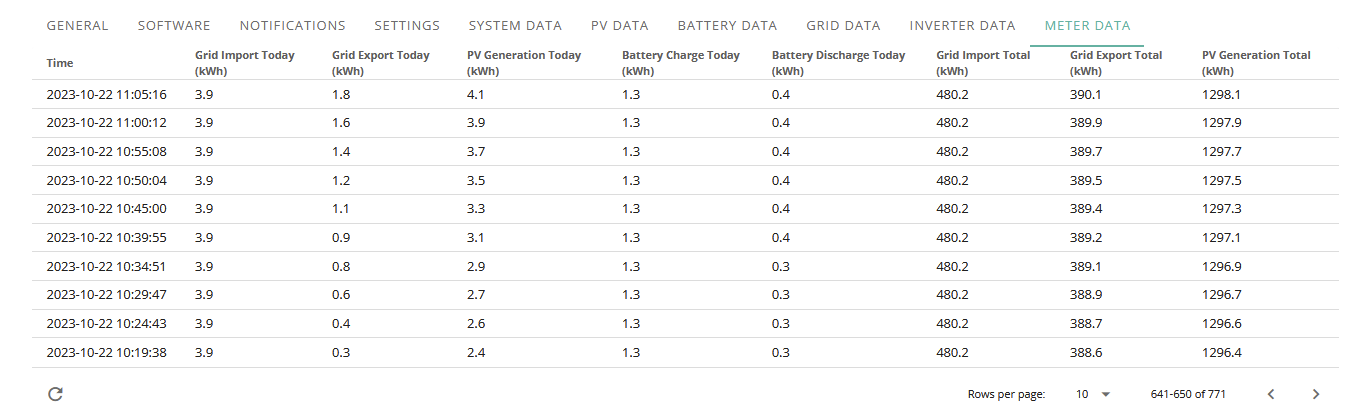
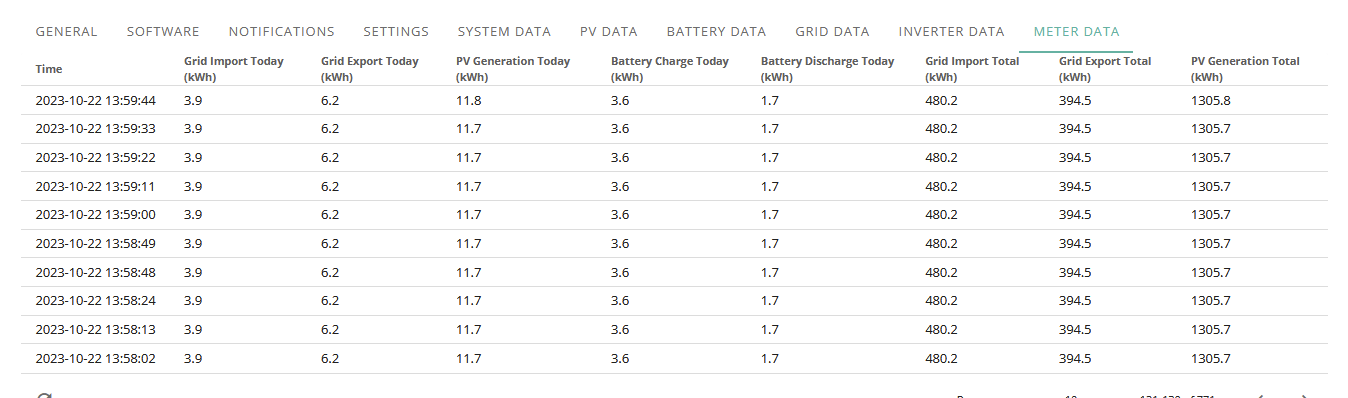
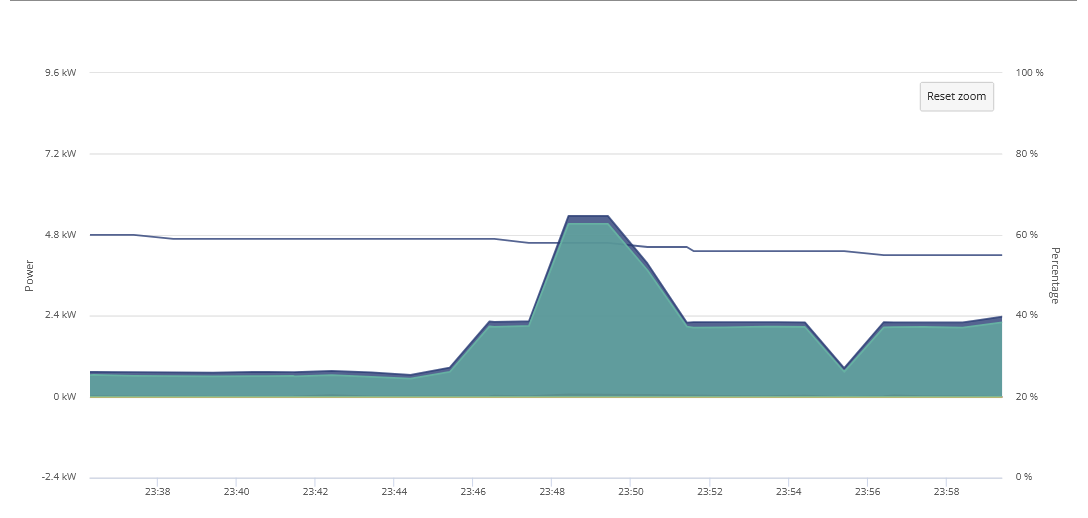
Here is my data from the Meters not the graphs for the last couple of days.
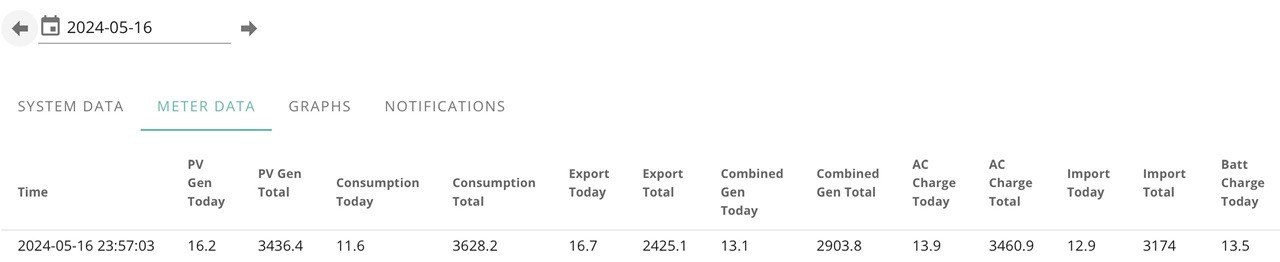
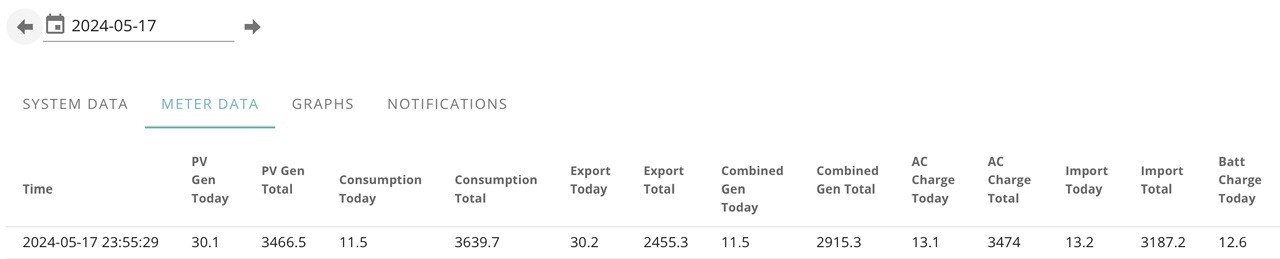
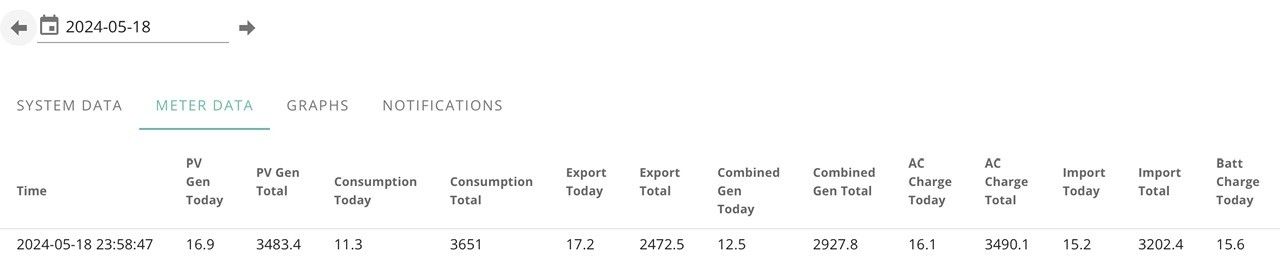
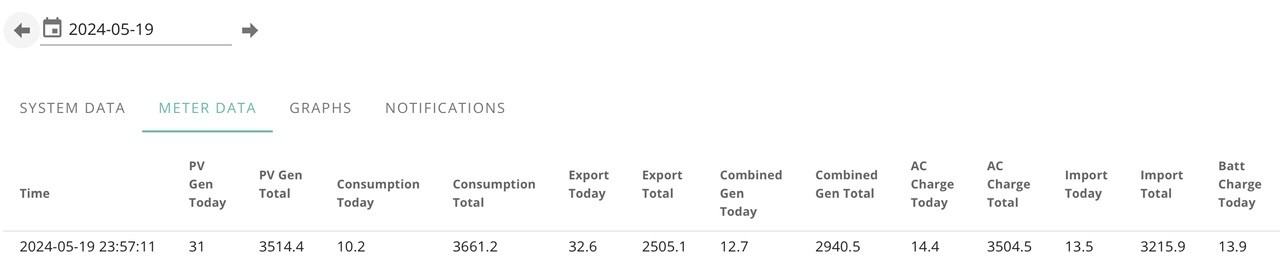
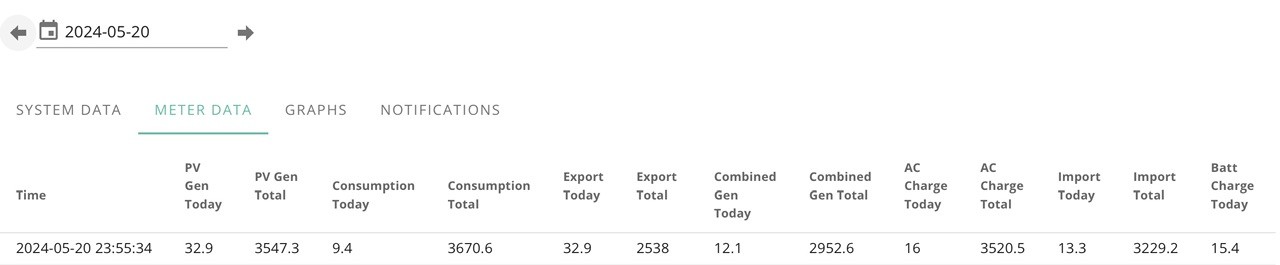
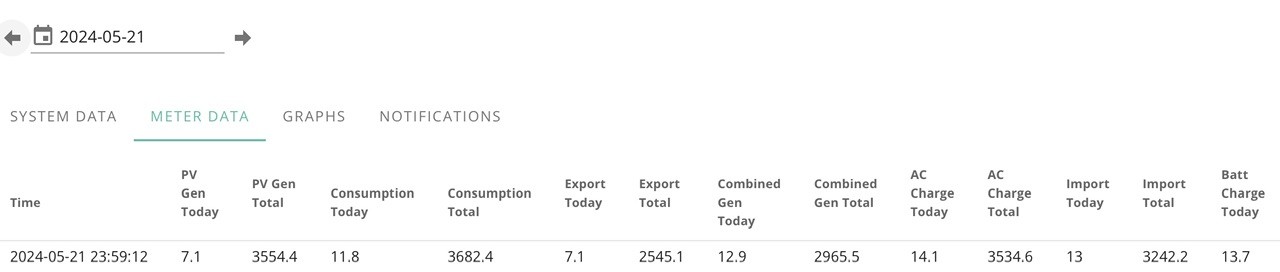
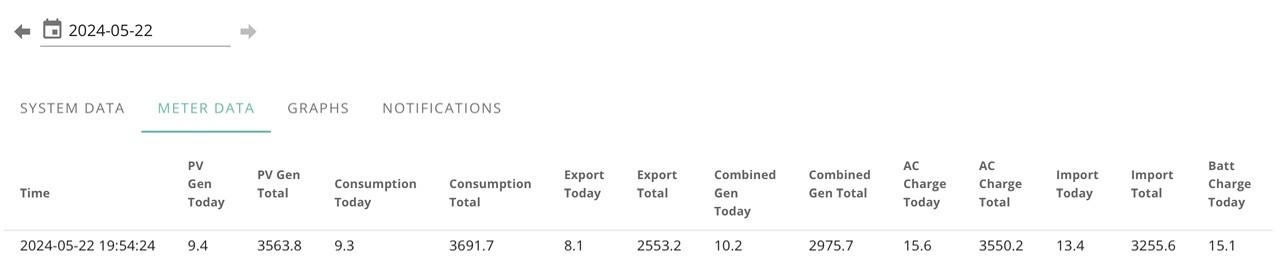
For the love of god STOP RESETTING DAMNIT

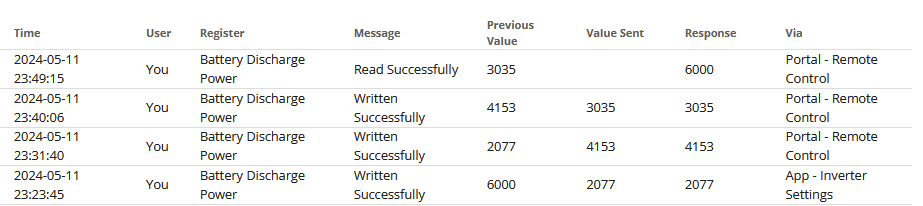
It keeps going back to 6,000 and it really starting to make me rage
For 4 minutes it kept the discharge rate I set and then it went back to 6kw
Edit
and again

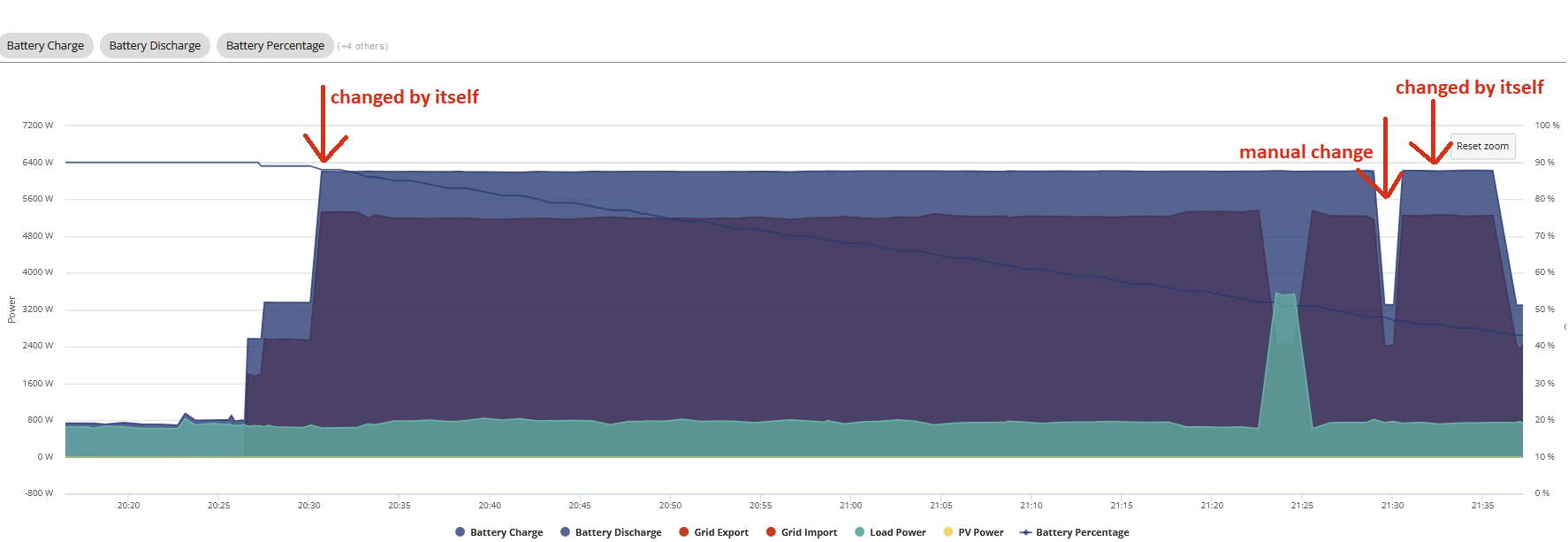
Got app running to see if it does it a third time.
I NEVER have trouble with the charge resetting, just the discharge.
EDIT
Apparently its home assistant that keeps resetting discharge only and I don't know why.
EDIT
Despite being in monitor only mode it looks like predbat was causing my problems, I loaded my HA with ONLY givtcp on it for 10-20 and all was fine so 5 minutes ago went back to normal HA but didnt start predbat and so far its kept the discharge rate.
EDIT
Yep, 100% Predbat problem, as soon as I turned it back on despite being monitor only its back to max discharge rate.
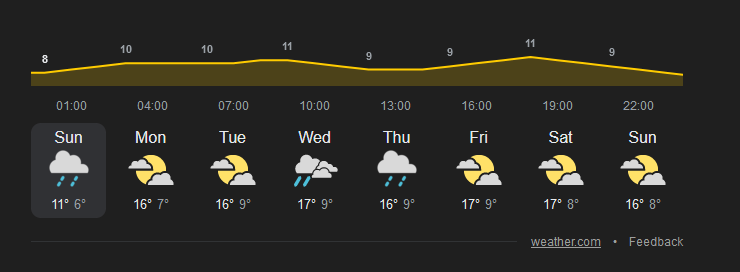
Loving this summer weather.... Not! Waking up to yet another grey wet day here in Suffolk, only to find the battery empty after an overnight dive from 45% so. Roughly speaking, from 100% yesterday it gave less than 6kwhr. Obviously the same issue with only solar charge losing the full state. Still on V8 and wondering if V9 is better at this? Or those who are using HA , is it possible to control the system with an automated schedule if it dives during a cheap grid tariff period? Eg, I get 7.5p rate from 11:30pm to 05:30am, so run a scheme where if it gets to say less than 40% during this period it switches to grid charge.
Ultima357 My AIO is on BMS8 and to be fair its never had a SOC drop although the battery does get plenty of exercise with 4-7pm dumping. I use a bunch of HA automations and I have found using a 1 minute timed event to then run conditional logic actions is pretty effective. You could trigger on the entity "GivTCP CHxxxxxxxxx Control GivTCP Target SOC" below 45 and then check if charge is on using GivTCP control and "GivTCP CHxxxxxxxxx Control GivTCP Enable Charge Schedule is off", if it is then "Toggle GivTCP CHxxxxxxxxx Control GivTCP Enable Charge Schedule". If you have a second charge slot pre set to the window you want then turning it on is enough.
If you have other automations from smart tariffs the 1 minute timed check is a good way to monitor. You can also include other logic to turn charge off again and adjust limits and levels. Lots of things are accessible direct from the entity name if they dont appear in the GivTCP control list
Hopeful Thanks for the info. Sounds like it's worthwhile having a play with it. I guess as you regularly dump and presumably recharge from grid at cheap rates, then you are avoiding the issue I get with variable solar charging. I've found that if I subsequently hit it with a full grid charge, it recovers.
Ultima357 I am on IOF tariff now so charging has typically been a mixture of solar and grid during the day with a discharge to 20% 4-7pm but I have had a range of use cases since install as my tariffs came on line and it seems to have avoided any SOC issues.....touch wood. I do find 1-2kw appears to be consumed every day, but not counted, when I do the maths. Thats probably losses, self consumption, and GivMaths induced but I try not to stress too much about that now and accept its clearly not an exact science.
BAAA0009 (15 mar 2024)
firmware changes:
BAAA0008 (07 Dec 2023)
1.CCS battery module compatability
2.Change the SOC estimation logic (Correct SOC issues)
3.Solve AIO can't force discharge
4.Solve AIO can't switch off (Cell balancing function)
5.Change the duty cycle of balance to 50% (Cell balancing function)
Gateway
Gateway Software version GAAA0008 (7 never issued)
Auto CT direction fix (Required AIO Firmware 609 or greater)
Data storage issue optimisation
Gateway Software version GAAA0006
Add the function of automatically identifying the CT direction of AC power grid
DRM function
Adjust the long-term overvoltage function
Increase the load apparent power display when off-grid
Modify the display faults of the mains led and battery led lights
Add packets with major version numbers GA1.0 and SC1.0
Change the recovery time of undervoltage/overvoltage and undervoltage/overfrequency protection
AIO A611-D611 (08 Apr 2024)
AIO Software A610 15 Mar 2024
AIO Software A609-D609 (16 Oct 2023)
Apparently the other night a full charge put in over 15kwh lul
Wish they would hurry up with the next BMS release, another drop to 0% and from 100% Thursday afternoon to to empty = 8.9kwh and math wise from the 4>100% charge on the 9th I should have had 5.5kwh left, I miss when it was +/- 1kwh.
I am hoping so very very much next bms is like BMS8 so I can be happy again.
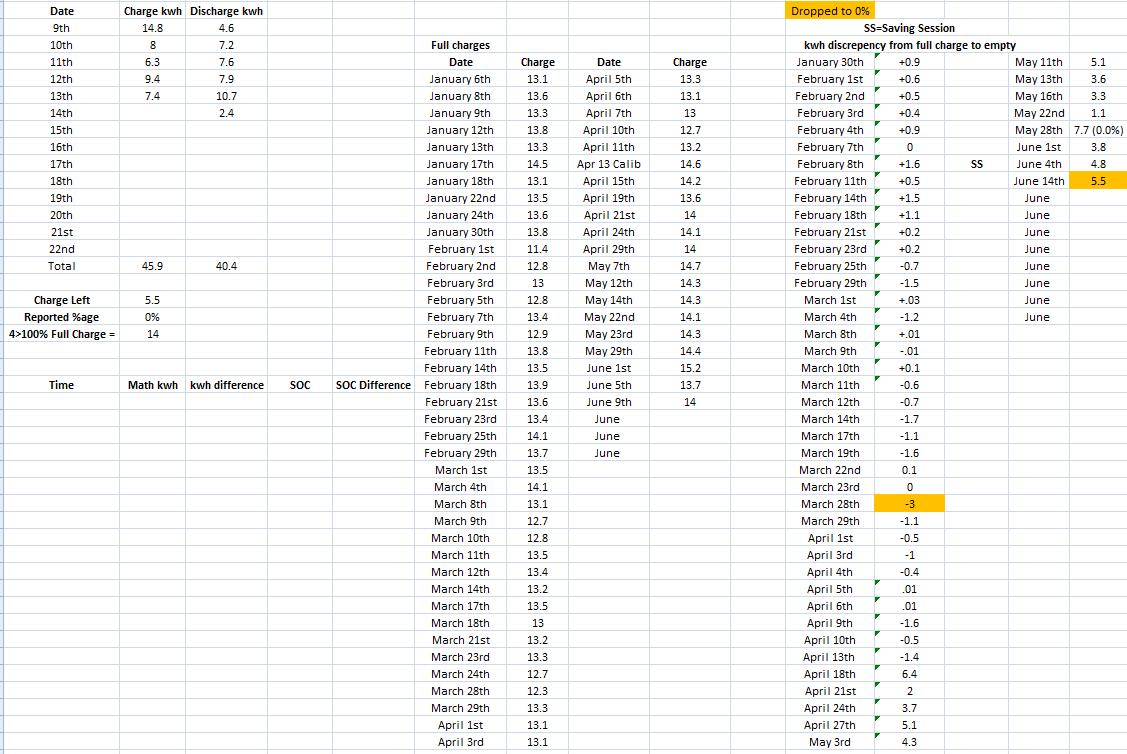
EDIT
Just noticed I forgot to add May 28 to the color marking for 0.0%
Jellybaby Well I'm still on 8 and a few days ago it dived from over 50% to 0 in the few minutes between the two readings. # Total out from 100% was less than 5kwhr, so in my case V8 is not working well either. Clearly it's the small charging via solar that doesn't work as I remember that the dragon said charging from 4.6kw gave the best results. From your comments, I've not been tempted to do V9 but it is supposed to be much better at tracking solar charge.
Don't know why this is posting in big bold letters either! It should just have the # in front of bizarrely.
Anyone contacted GE and got a reply on how to update the Gateway to the latest firmware/software version 8? They have not replied to my emails.
Gateway
Gateway Software version GAAA0008 (7 never issued)
Auto CT direction fix (Required AIO Firmware 609 or greater)
Data storage issue optimisation
Gateway Software version GAAA0006
Add the function of automatically identifying the CT direction of AC power grid
DRM function
Adjust the long-term overvoltage function
Increase the load apparent power display when off-grid
Modify the display faults of the mains led and battery led lights
Add packets with major version numbers GA1.0 and SC1.0
Change the recovery time of undervoltage/overvoltage and undervoltage/overfrequency protection

Hi all, sent an email to GE about the Gateway firmware version.
Hi,
My gateway is on v5, however on your website it says you have v8 dated 6th November 2023. How do I get this version please as it looks like it fixes a few issues in v6 and v8.
I got this reply today.
You can get this update done on the portal. givenergy.cloud and then go to the "my inverter" page then software tab click update firmware.
Anyone see the update on there Gateway? I don’t see an option to upgrade??
GE uploaded it for me as not available online

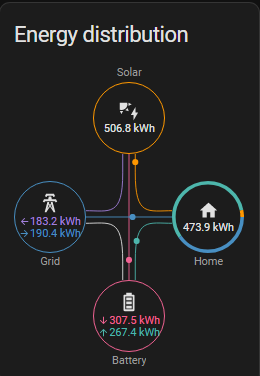
Couple months full data from HA
May
June
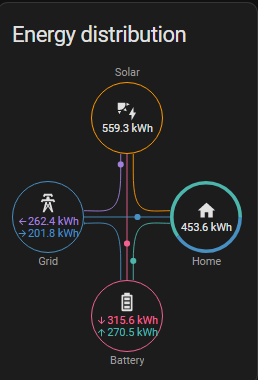
Does it being out by 40-45kwh for the month seem ok despite the lack of full charge/discharge cycles which is apparent based off solar production and home consumption?
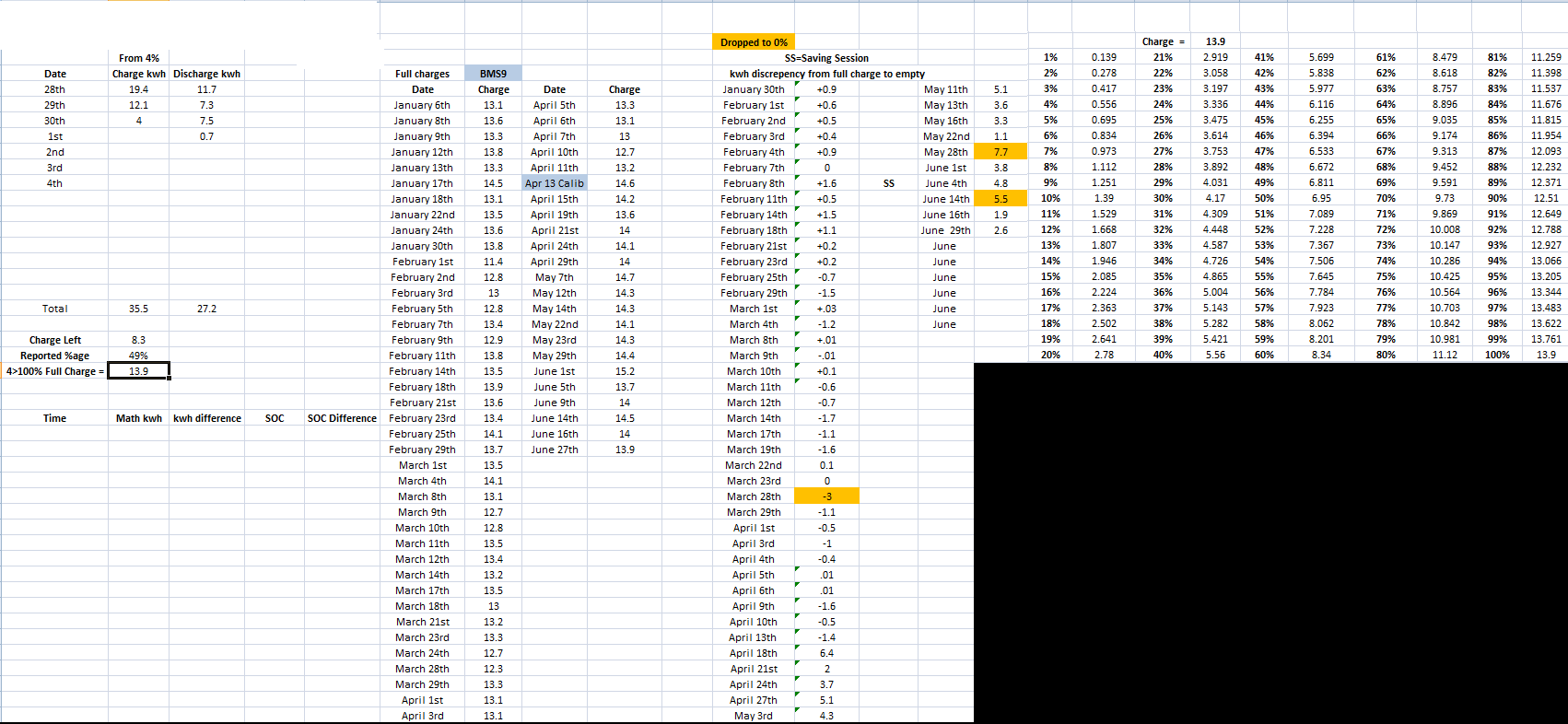
SOC Still tanks pretty hard after hitting 40% and im always out by around 5kwh if it isn't fully discharged in say 4 days
The battery difference is expected given charging / discharging losses and would seem within sensible limits. Disappointing that the soc still crashes though . Noticed mine crashed from 50 to 0 once last month and then climbed back to 7% with no input, and in the last week of sunshine the fully charged voltage slipping down around 1v per day, now saying fully charged at steady state 316v which it clearly isn't. I may consider doing the V9 upgrade soon which is supposed to handle solar charging better.
Update. Obviously today is a correction day. Over 4.5kwh input but flatlined so at 70%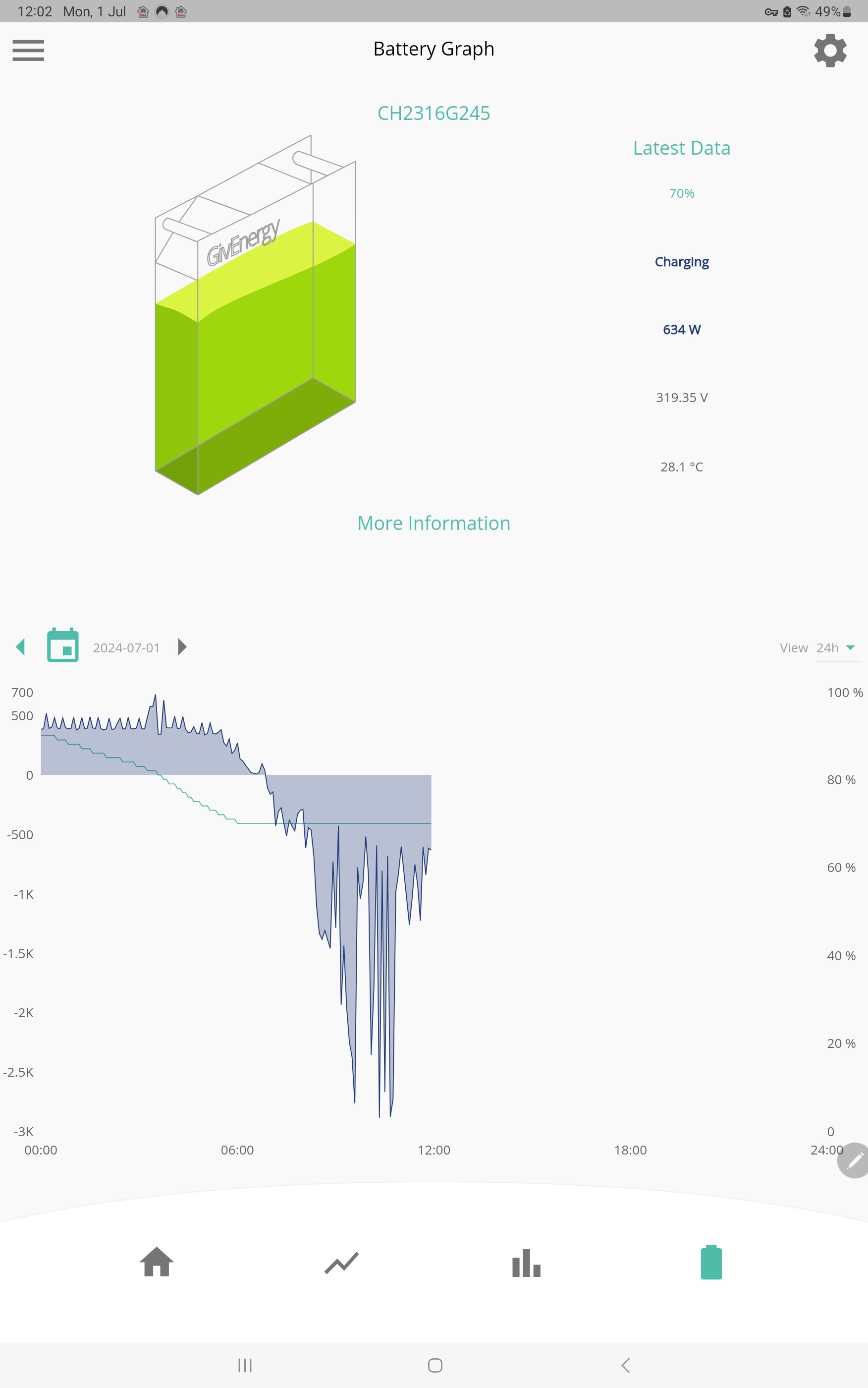
Edit. Now at 81% after 8.5kwhr input, no output. So looking like the reported 70% at the beginning was just about empty
I went to BMS 9 / inverter 0.611 last night on my AIO. Wish me luck...
It feels to me like its not compensating for losses when calculating SOC which BMS8 did better but the SOC was similar to BMS9 going down faster the closer you got to empty but the kwh in/out was +/- 1 typically even after a few days which made it pretty darn reliable for when it was going to go off.
Shame it doesn't readjust upon reboot like phones do when you restart them or turn them on/off when the battery left goes a little wonky after playing games and whatnot or with age.
Ultima357 For me 100% NOT
V8 I could time when I wanted the battery to run dry, with V9 the kwh distance from 0 gets bigger every day.
Full charge 4th of July 14kwh went in, when it ran dry on the 6th I was supposed to have 2.7kwh left.
BMS8 was predictable via the kwh in/out despite the SOC not being accurate, BMS9 its like BMS6 was where it wouldn't remember the capacity until it went flat.
As seen in one of my images above BMS8 was pretty darned consistent +/-1kwh but as soon as BMS9 went on it was for kwh in/out saying I should have had this left in the battery.
6.4
2
3.7
5.1
4.3
5.1
3.6
3.3
1.1
7.7 when it went to 0 (seriously, how was it off BY HALF THE BATTERY CAPACITY)
3.8
4.8
5.5
You get the idea.
Jellybaby Ah, so it's like V8 in reverse as mine drifts down from fully charged saying its full when it clearly is not as evidenced by battery voltage. Presumably you can see the battery voltage at so called empty drifting upwards? My full charge steady state runs from 320v down to 315v when it seems to do a reset. So I think I'll leave V8 on it and wait until V10 appears.
I know I am discharging but not sure on what planet nearly 20% is 0.9kwh, last flat to full charge was on the 7th.
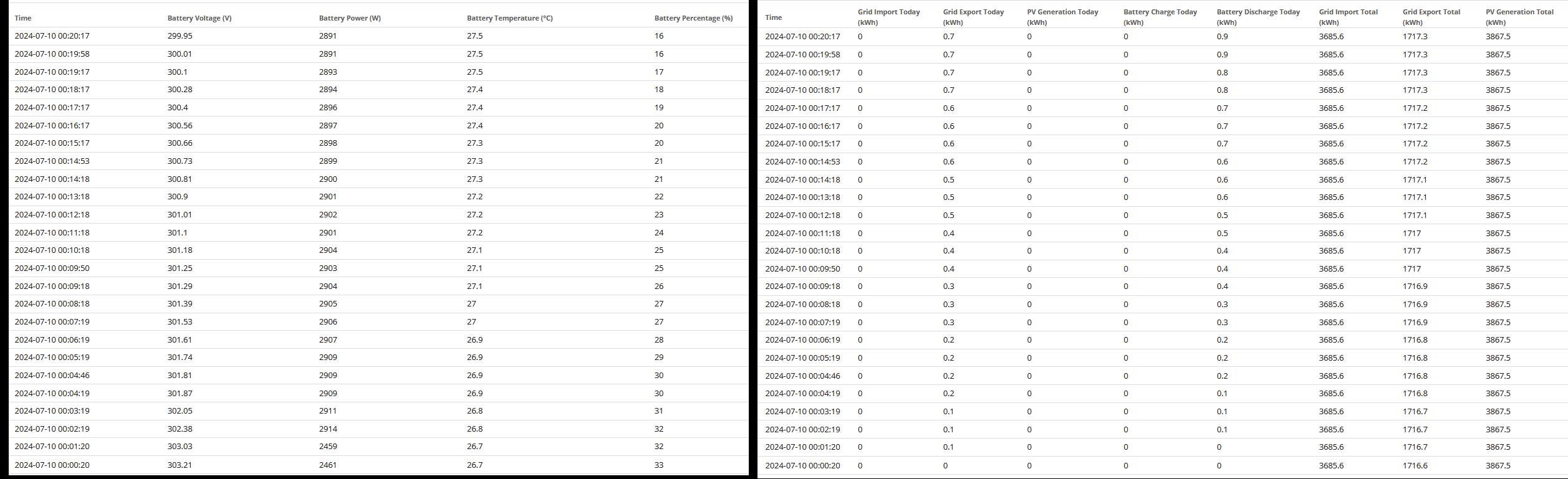
Last full charge was 14.8 so 31% shoulda been 4.5kwh and 14% should be 2kwh.
Edit 02:51
Apparently this time around I should have had 4.5kwh remaining.
Yet another 'correction' day. 7.68 kwhr input from supposedly 74% to 100%. Didn't know I had a 30kwh battery... :-)
Apparently 0.2kwh = 6% lul
From 4% I put in 8kwh into battery overnight and had battery paused from 7am to 7pm and yet somehow it went up by 1.5 for a total of 9.5kwh put into battery.
In less than a day I used 7.5kwh from the battery and if the 9.5 is right then that is 2kwh vanished IN THE SAME DAY.
So I fully empty mine every day, and I haven’t had any soc drops and consistently get 13kwh out of it, with 0.5 being the 4% reserve I assume.
JasonF Well I guess you must charge overnight on cheap rate at a constant charge too? I'm sure the problem is that it can't cope with varying charge from solar and not hitting empty and full each time. V8 drifts down from full charge and V9 seems to drift up from empty. All a bit of a problem for a battery marketed as a solar store. I think it's really not fit for purpose at present.
Hi all,
As some of you know I have been experimenting with a new regime. I have stopped charging the battery from the grid + don’t discharge to the grid. (I am on Agile + fixed export).
The battery has been very good for over a month going down to about 60% then getting topped up by Solar. The SOC obviously is drifting as I am not fully charging/discharging etc.
It crashed last night from 45% to 0% (so 45 days).
This has made me think, it must be very difficult for GE to get the software right for all uses of the battery. (Fully charge/discharge or just house load etc). Most people don’t even look at the battery, so don’t even know if it has crashed etc.
It’s not difficult, I drive an EV, if the battery in my car behaved like some of these batteries people would be breaking down all over the place.
7pm 38% which should be around 5kwh
10pm and ive used 2kwh (Battery discharge not actual home usage) which should be around 15% which should leave me with around 20-23%
I am currently down to 13%
EDIT
Decided to charge at 15.26p (I had exported 9kwh earlier as I thought it would be another sub 15p night but I was wrong) and from 7pm>10:30 I had used 2.3kwh and went from 38% to 6%.
30m charge slot put 3.4? into battery (went from 0.8 which it was at from 7-10:30 to 4.2) and pushed %age up from 6% to 22% so 16% for 3.4kwh.
EDIT 2 01:07
Starting to go down 2% every 0.1kwh from that 3kwh charge since it got to around 15%, its looking like im only gonna get around 2.5kwh out of that 3.4 that got put in.
EDIT 02:50
Started at 6%, 3.4 charge, 2.2 discharge and back at 6%, wth did 1.2 go? No way in hell that is losses as that would be what 35% loss?
Jellybaby Looks more likely to be duff metering or iffy soc figures. Probably the latter given the track record of the software. Yesterday mine had put in around 2kwh from low charge solar and the soc had not budged from 74% before dropping to 73% with no output. Then topped up to 100% during a free leccy slot from Octopus.
Anyone know what the new AIO firmware has in it?
BMS 10 - see https://community.givenergy.cloud/d/4706-aio-secondthird-battery-install/36
And I believe D0.612-A0.612, which has been beta-ing since May, though I haven't seen that confirmed
I can see the update available on my AIO, so it is live.
I have started the BMS 10 post
https://community.givenergy.cloud/d/4748-all-in-one-bms-release-10
Hi All,
I became the owner of a 13.5 kWh all-in-one late May this year. At first sight it appeared to be doing a good job. However, I became confused / concerned when I looked at the numbers in detail.
Spurious single point data
Data taken from 5 minute “Data Download” via “My Inverter”
There have been multiple abnormal data entries where inputs do not match outputs
14 instances > 2kW
Some samples
Date Time Solar Generation Grid Power Battery Power Load Power Power In-Out
01/07/2024 17:18 766 75 2686 229 3148
09/07/2024 18:04 610 3122 1539 1849 -2822
17/07/2024 07:29 167 -3164 -15 339 2977
There has also been, mostly in the early hours of the morning, significant grid import/export for no apparent reason
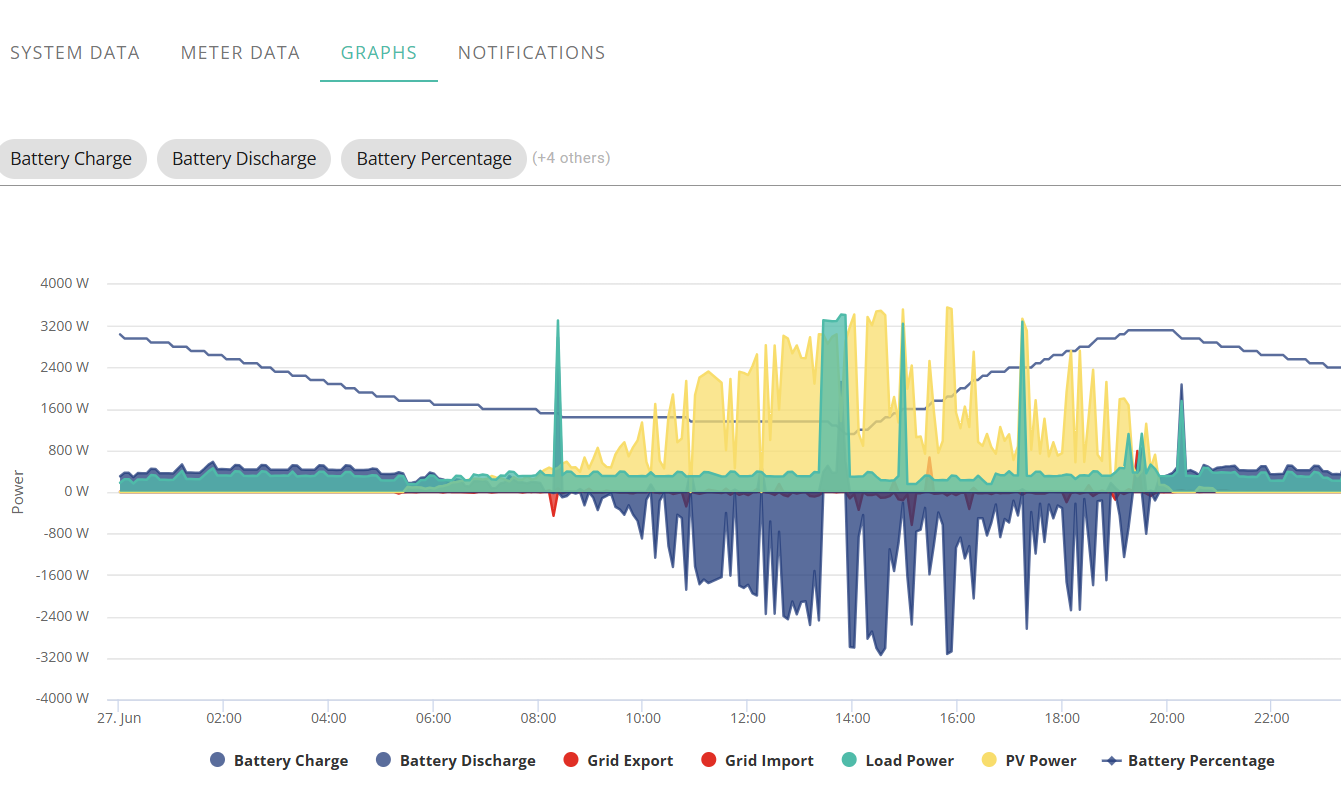
Missing MJoulesMore alarming is when there is considerable mismatch between the stated charge / discharge power to / from the battery and the apparent power level retained in the battery.
I have listed the difference between the nett “TODAY” charge / discharge levels and the battery charge level change from first reading of the day.
Over the 50 days since installation there has been 18 days where the error has exceeded 1.35 kWh (10%), battery level lower than expected, and 1 case being higher.
Of particular concern was 27/06/24 when 9.5 kWh 70% (34 MJ) went missing, mostly between 10:00 & 15:00 when there was solar power going to battery but little gain in the battery. There has been 3 other occurrences greater than 4kWh loss
Are these readings normal for All-in-One installations, or are they an indication of faulty hardware / installation. Should I be regarding this as a safety issue?
It was 30 minutes to leave it idle to adjust for any SOC issues right, apparently 1.9kwh discharge is 20%, went from 57 to 37 and I turned eco off 40 minutes ago and SOC has remained the same (which I know is complete bull given history and 20% equalling 1.9kwh), going to turn eco back on before going to bed though,
Whelp that was interesting, 57>0% = 3.1kwh LOL, hope we get a close to zero agile period soon overnight, even better if it goes into negative so I can update firmware.
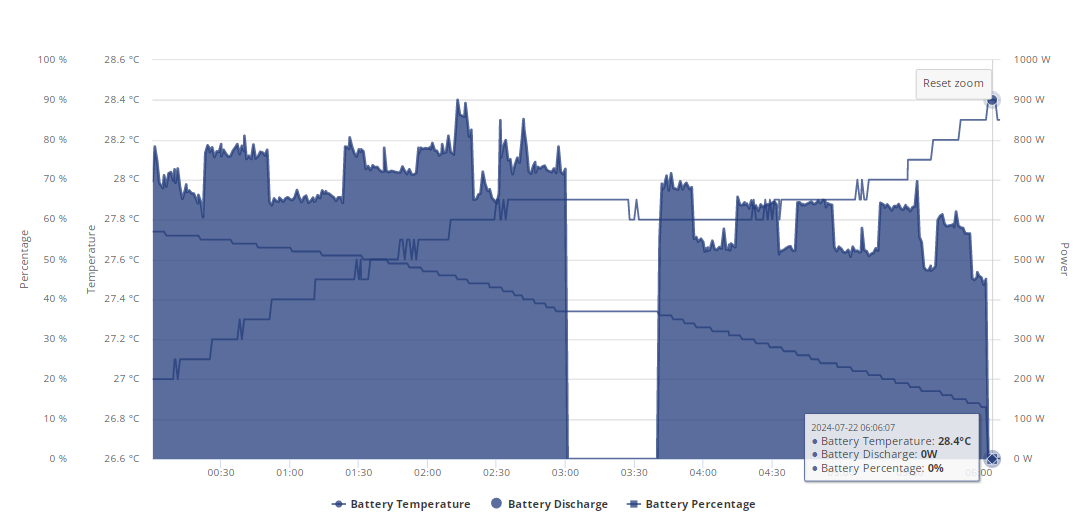
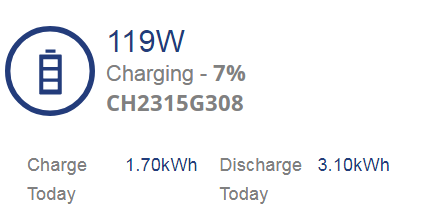
lol in that 4 days 38.8 has been put into the battery, 34.1 has been discharged from battery and it hit 0% AGAIN this morning, it went from 50% at midnight to 0% at 06:23 after 3.4kwh discharged.
I am debating whether I should wait for a cheap overnight period on Agile to update the firmware.